The prompt box has emerged as the defining interface of the AI era. Many AI systems, such as ChatGPT and Claude, as well as Gemini and Perplexity, adopt a simple interaction model: users describe their needs in natural language, and the system responds. For product teams, this approach is attractive because a single prompt field can support a wide range of tasks without requiring separate workflows for each use case.
Because of this flexibility, several companies have used prompting as the default method for exposing AI capabilities. Unlike traditional software, which relies on well-designed interfaces for specific tasks, AI systems can handle a considerably broader range of requests. Because of this, the prompt box has become a universal interface that seems to be able to handle nearly anything that users ask of it.
However, extensive use of prompting has led to an important assumption: because AI understands language, language should be the primary interface for dealing with it. While prompting is clearly powerful, it doesn’t always provide the best user experience.
In many cases, prompt-first designs are used not because they’re the best option, but because they’re the easiest to build. The more important question for product teams isn’t whether prompting works, but when it should be used as an interface, and when other interaction models may be more effective.
Because prompting reduces the number of UI elements, it feels easy. However, reducing interface complexity doesn’t always translate into less effort on the part of the user.
Prompt-first UX frequently transfers accountability from the product to the user. Users must learn how to properly communicate with the system, rather than the system directing them toward desired results. This leads to a number of usability issues.
Cognitive load is one of the biggest problems with prompt-first interfaces. According to educational psychologist John Sweller’s cognitive load theory, people’s ability to process information is limited. Good design reduces unnecessary mental effort so users can concentrate on their goals.
Prompting often does the opposite. When faced with a blank text field, users must determine:
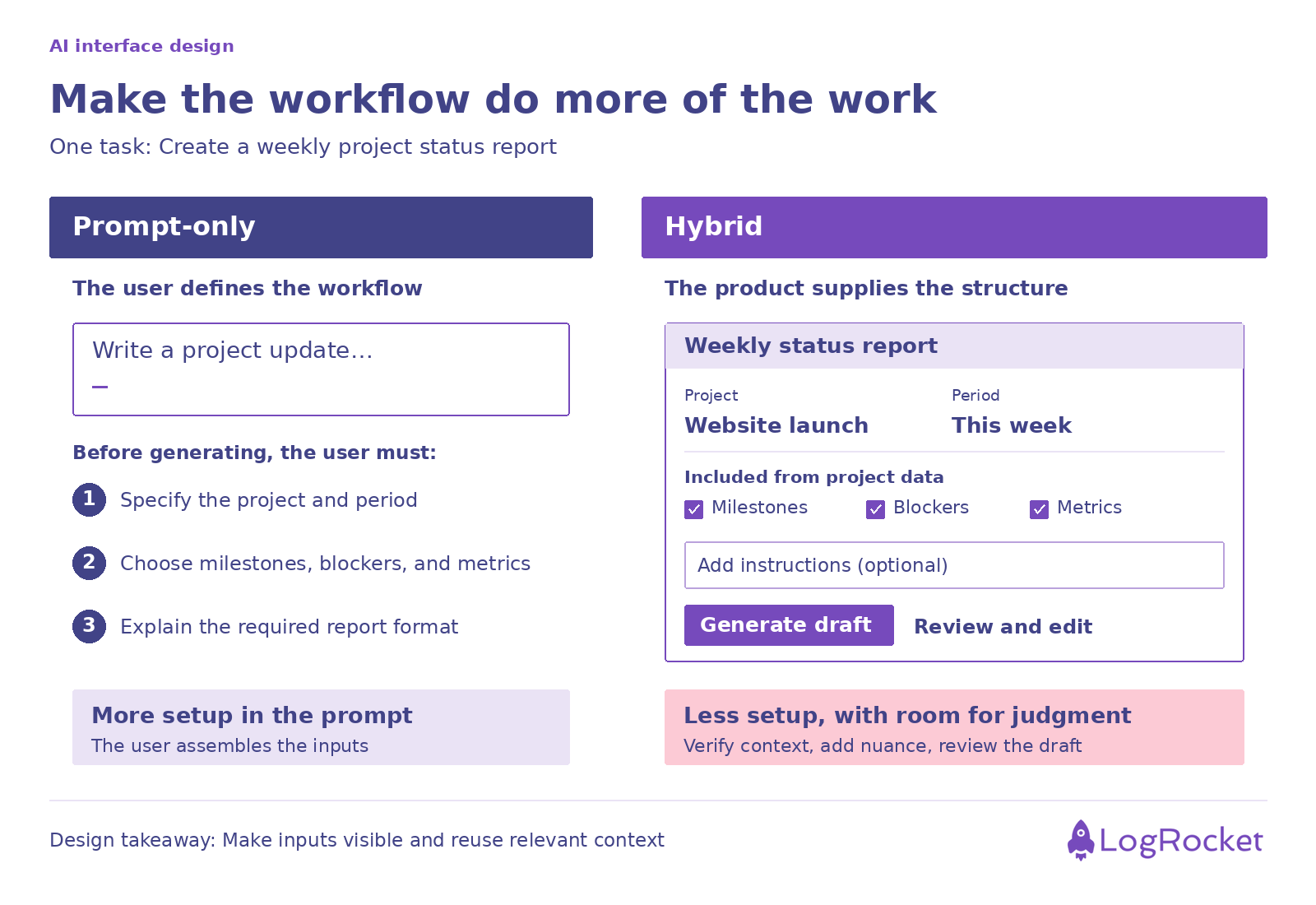
On the surface, a task may seem easy, but it may actually demand a significant amount of mental work. Assume, for instance, that a user wishes to provide a report on the status of a project.
Using a structured form, a typical workflow could request project milestones, blockers, timeline updates, and key metrics. Before they can start using a prompt-first system, users must determine what information is relevant. In this case, the burden of interaction design shifts from the product team to the user.
Prompting also presents discoverability issues. Users should be able to recognize available actions rather than recall them. Prompt interfaces rely largely on recall.
Users find it difficult to discover features that they are unaware of. A new user opening an AI-powered productivity tool may not realize it can:
Unless users explicitly request them, certain features stay hidden. Traditional interfaces offer functionality through menus, buttons, tooltips, and navigation structures. Prompt-first interfaces frequently hide functionality behind words. As a result, users may never realize the full potential of the product.
Another issue is predictability. Traditional software typically generates consistent results for the same activity. Clicking “Export PDF” normally produces a PDF.
Prompting introduces uncertainty. Small phrasing adjustments can generate huge differences in results. The same prompt can produce multiple results depending on the context, conversation history, model updates, or system behavior.
This difference causes friction for users who prefer reliability over exploration. While variety is useful for brainstorming or creative work, it becomes problematic when users are attempting to execute routine tasks efficiently.
Despite these limitations, prompting remains a highly effective interaction model in many situations. As a product manager, your goal is to determine where it provides value.
Prompting works best when there’s no single right answer. Conversational interfaces are useful for brainstorming, ideation, research, and exploration because users don’t always know what they are looking for.
A PM investigating feature ideas, for example, may begin with a broad request and subsequently refine their thinking through discussion. The conversation itself influences the outcome. In these cases, flexibility is more important than predictability.
Experimentation is often required when working on creative projects. Writers, designers, marketers, and content creators frequently prefer several choices rather than a single deterministic answer.
Before settling on one graphic concept, a designer may experiment with others. Prompting facilitates this exploratory process by allowing for the quick production and refinement of ideas.
Prompting can also be extremely helpful for experienced users. Consider software developers using Cursor or experienced analysts using AI-powered research tools. These users often have adequate domain knowledge to communicate effectively with the system. They comprehend the task and the AI’s limits.
For them, prompting becomes a great shortcut rather than a roadblock. Experts are often ready to exchange simplicity for flexibility.
The same qualities that make prompting useful in some situations make it ineffective in others.
Repeated tasks benefit from efficiency. If a user does the same action every day, asking them to describe it repeatedly causes unnecessary friction.
Consider an expense management application that requires users to prompt: “Categorize these transactions and generate a spending report.”
A simple button labeled “Generate Monthly Report” would be faster, more consistent, and simpler to use. For repeated operations, automation usually outperforms prompting.
Certain tasks adhere to well-defined guidelines and protocols. One well-known example is tax preparation. The majority of users choose not to use a conversational interface to explain their tax situation. They prefer guided questions that gradually collect the required data.
Products like TurboTax have become popular because they convert complex requirements into systematic workflows. Forms often outperform prompts in these scenarios because they remove ambiguity and ensure that all necessary information is gathered.
Prompting isn’t always the most effective interface for visual manipulation. Consider editing an image. Typing “Move the object slightly left and increase brightness by 10 percent” is typically slower and less natural than dragging the object and adjusting a slider.
This is why many successful AI-powered design tools mix AI generation with visual controls rather than depending just on text instructions.
As risk increases, prompt-first interfaces become more difficult to justify. Healthcare, legal services, financial planning, compliance, and safety-critical applications often need transparency, consistency, and verification.
Users must be confident in the decision-making process and be able to review information in a systematic manner. Prompting can help these workflows, but it rarely provides adequate protection on its own. The higher the stakes, the more structure users often require.
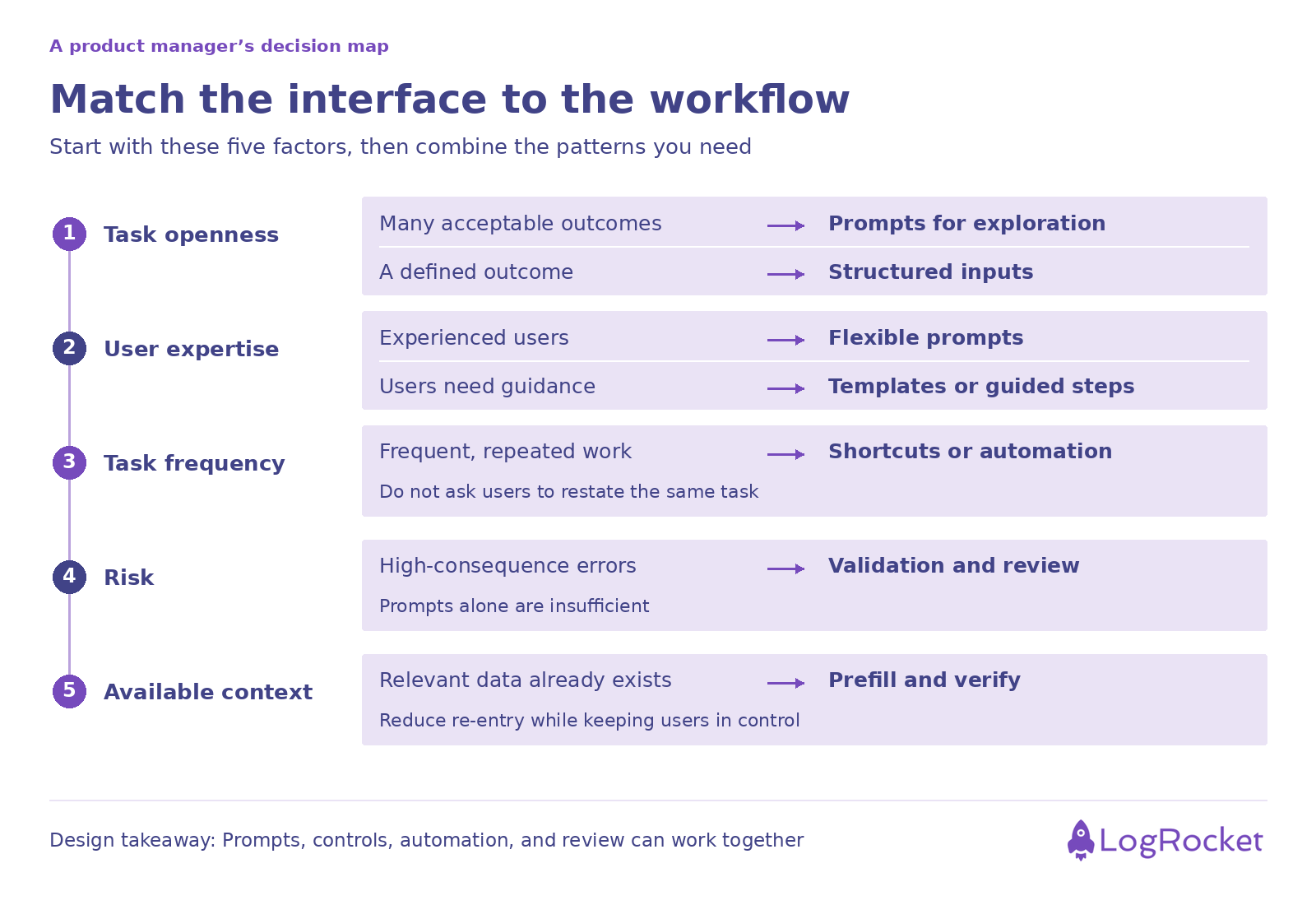
Rather than asking whether prompting is good or bad, you should evaluate whether prompting is appropriate for a certain workflow. One useful approach is to assess five dimensions.
Prompting helps with highly open-ended tasks like brainstorming or storytelling since flexibility is important.
Structured interfaces are often useful for highly limited tasks such as filing expenses or organizing travel. As openness decreases, so does the need for prompting.
Experts tend to value flexible interfaces because they know how to properly steer the system. Beginners usually benefit from instruction, templates, and established workflows.
The less skill people have, the more support the interface should offer.
Frequent tasks should take little effort. A daily workflow should not need users to repeat what they want.
As frequency rises, automation and shortcuts become more useful.
Low-risk activities can handle uncertainty and experimentation. High-risk tasks demand increased predictability, validation, and oversight.
As the level of risk rises, structured interactions become more necessary.
Many prompts appear simply because systems lack context. Users frequently share information about projects, papers, preferences, and goals.
When products can access relevant context automatically, the requirement for prompting is considerably reduced. The more context the system has, the less effort users will have to make.
In cases where prompting isn’t the best fit, product teams have several alternatives to keep in mind.
Guided workflows assist users in completing tasks step by step. Rather than asking users to explain everything all at once, the system gradually gathers information and guides them to a successful conclusion. This method decreases cognitive burden and increases consistency.
Forms, dropdowns, checkboxes, and predefined options remain useful. Using AI doesn’t eliminate the need for structure. Structured inputs often increase output quality by ensuring that key information is reliably recorded.
Users generally prefer to interact directly with content. Dragging items, editing documents, selecting elements, and customizing controls can be more efficient and straightforward than explaining desired changes in text. Direct manipulation is one of the most fundamental concepts in interface design.
Templates are good starting points. Instead of starting with a blank prompt box, users can select from established workflows dedicated to common goals. This eliminates uncertainty while remaining flexible.
Perhaps the most viable way is to combine prompts with traditional UX patterns. Hybrid interfaces enable users to use natural language when necessary while still benefiting from structure, context, and assistance. Many successful AI products are already headed in this direction.
The following scenarios help you better understand when to use prompting on its own and when to consider hybrid approaches instead.
A prompt-only coding environment requires developers to describe difficulties and manually provide context. Hybrid tools like Cursor integrate prompts with code awareness, project context, file navigation, and direct code actions.
Developers can still communicate naturally, but the machine already understands much of its environment. The end result is a lower prompt burden and more productivity.
Text-to-image systems highlight the effectiveness of prompting in visual production. However, design platforms are increasingly combining prompting and visual editing tools.
Tools that allow users to produce designs using prompts and then refine them directly often offer a better experience than prompt-only tools. Users can explain their thoughts first, and then manipulate the results visually.
A prompt-only approach needs users to describe datasets, metrics, and desired analysis. Spreadsheet-integrated AI systems can already access the underlying data structure. Users can ask more straightforward questions because the product knows the context.
A mix of structured data and conversational interaction decreases effort while increasing accuracy. The most effective products reduce the amount of prompting users must do.
Prompting has been one of the most prominent interface developments of the AI era, providing users with a flexible way to interact with systems capable of executing a wide range of activities. It’s especially useful in exploratory, creative, and expert-driven workflows where flexibility and open-ended engagement are valued over predictability. However, its effectiveness in these cases doesn’t mean it’s the best interface for every use case.
As tasks become more repetitive, structured, visual, or high-stakes, prompt-first interactions might add additional cognitive load, reduce discoverability, and result in inconsistent outcomes. Rather than just replacing every interface with a chat box, product teams should select interaction models depending on user intent, context, expertise, and risk.
The most successful AI solutions will most likely blend natural language with traditional UX structure and guidance, treating prompting as one interaction pattern among several rather than the default solution to every problem.
Featured image source: IconScout
LogRocket identifies friction points in the user experience so you can make informed decisions about product and design changes that must happen to hit your goals.
With LogRocket, you can understand the scope of the issues affecting your product and prioritize the changes that need to be made. LogRocket simplifies workflows by allowing Engineering, Product, UX, and Design teams to work from the same data as you, eliminating any confusion about what needs to be done.
Get your teams on the same page — try LogRocket today.
Is the foldable iPhone true product innovation? See how PMs can assess user needs, weigh costs, and separate real value from technical hype.
Explore agentic AI security trade-offs product managers must own before launch, from permissions and human oversight to memory and recovery.
See how to define AI features that deliver user value. Validate needs, assess costs, and set reliability requirements before the team builds.

Learn how to read a P&L statement, assess product costs, build stronger business cases and align product roadmaps with financial priorities.


 Learn more →