AI products can be extremely effective at improving short-term performance. From coding assistants and writing copilots to AI-powered research and decision-support tools, they enable users to complete tasks faster. You can measure these benefits using metrics like task completion, time saved, engagement, and user satisfaction.
But there’s another side to this equation: What happens when AI repeatedly performs cognitive tasks that people used to do themselves? A user may become faster at completing a task while becoming less capable of performing it independently.
In this article, cognitive debt in AI products refers to the risk that repeated AI assistance leaves users with fewer opportunities to develop or maintain skills they still need. This matters when your product takes over part of a task but the user remains responsible for the outcome.
The concept draws on research into cognitive offloading and automation bias. For product managers, it raises a practical design question: Which parts of the work can users hand off to AI, and what must they still understand to judge the result?
Cognitive offloading means using a tool to do some of the mental work that a task requires. Think about the last time you followed GPS directions somewhere new. You may have arrived on time and still had little idea how to get there the next day. When you know the directions will be available again, you have less reason to remember the route.
AI extends that trade-off beyond memory and navigation. A coding assistant can suggest a fix for a bug. The developer who accepts it still needs to judge whether the fix addresses the underlying problem and whether it could break something else. If the assistant routinely handles the diagnosis, where does the developer get to practice that judgment?
Users can appear productive and satisfied while getting less practice working independently. The following behaviors can help you decide where to look more closely. To find out whether a skill has changed, you’ll need to observe people doing comparable work over time.
One common indicator emerges when users successfully perform tasks but are unable to explain how they attained the results. A developer using an AI coding assistant may produce functional code without a thorough understanding of the implementation specifics. A marketing professional may post AI-assisted material without knowing the strategic rationale for the campaign.
In both cases, output quality may remain excellent, but user comprehension doesn’t improve with performance. When performance repeatedly outpaces understanding, cognitive debt can start to accumulate.
Now, let’s consider an AI tool that attributes a drop in sign-ups to a recent onboarding change. The conversion chart beside the recommendation shows that sign-ups started falling a week before the change shipped.
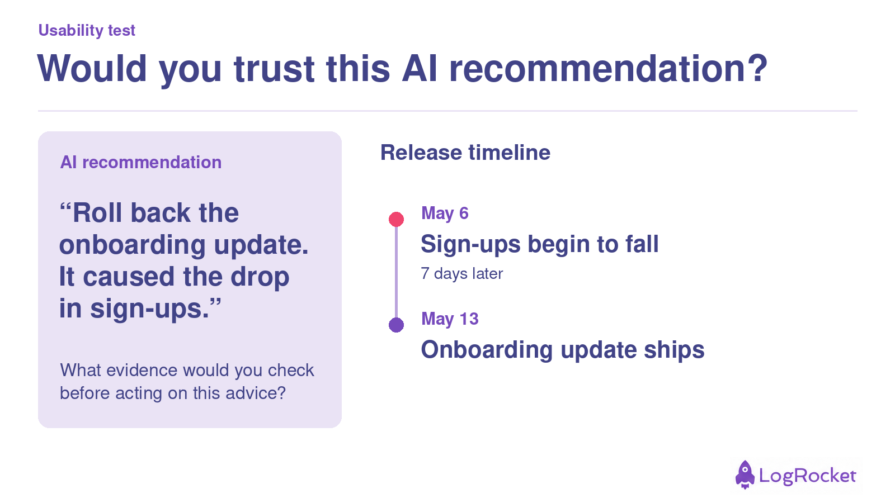
During a usability test, watch what users do with that discrepancy. Do they check the dates, ask what else changed, or go ahead and recommend rolling back the release?
If users accept the explanation, ask them to walk you through their decision. Someone who overlooked the chart may need the evidence closer to the recommendation. Someone who spotted the timing problem and still deferred to the AI gives you a different question to investigate: what made the recommendation more convincing than the evidence in front of them?
Another important subject for product teams to consider is what happens when the AI is unavailable, provides a wrong answer, or faces an issue outside its capabilities. Users with good mental models can frequently detect errors and recover efficiently. Users who have gotten dependent on the system often struggle to figure out what went wrong or how to proceed without support.
The amount of disruption produced by AI failure can reflect how much capability the user retains compared to the product.
As a product manager, you need practical ways to assess the impact of AI features. A cognitive debt audit helps you spot risks during product development, design reviews, and experimentation.
The first question you should ask is what type of thinking the product automates. Not all cognitive work has the same implications.
Automating routine calculations has different risks than automating diagnosis, writing, strategic planning, or judgment. The closer an activity is linked to expertise development, the more carefully you should analyze its long-term effects.
Some products only provide answers, while others offer logic, evidence, assumptions, or alternate approaches. When users can observe how decisions are made, they have more opportunity to learn from the system rather than simply consume its outputs.
The distinction between assistance and substitution frequently hinges on how much of the thinking process is observable.
Certain skills grow with repetition and practice. If AI eliminates opportunities for practice, you should examine if key capabilities will deteriorate over time. However, not every skill demands preservation. The essential question is whether the talent is still useful for users’ long-term success.
Recovery is an effective measure of dependency. Can users continue working even if the AI is unavailable? Can they discover and remedy AI errors? If the answer is no, the product may be fostering a fragile sort of productivity that relies only on ongoing AI support.
When developing products, you want to bring in useful AI features while keeping humans at the center of decision-making. Take a tool that summarizes customer interviews. It can save a PM hours of sorting through transcripts, but the PM still has to decide whether a finding deserves a place on the roadmap. Here are a few design choices that can help them make that call.
If the summary says customers struggle with onboarding, let the PM inspect the interview excerpts behind that claim. Show how many participants raised the issue.
Three comments from one frustrated customer carry a different weight than three customers independently describing the same problem.
An “accept summary” button leaves the PM little room to exercise judgment. Let them split a theme, move a quote, or flag a finding that needs more evidence.
For example, two customers might both mention setup delays, but one got stuck waiting for admin approval and the other couldn’t find the import tool. Grouping them together could send the team looking for a single fix.
If the product also helps new PMs learn research synthesis, give them the option to group a few excerpts themselves before revealing the suggested themes.
They can then compare interpretations while the interviews are fresh. An experienced researcher preparing a routine readout can go straight to the summary.
To improve and pressure-test the quality of your product, pair time saved with a measure of a skill your users still need. For an interview synthesis tool, you might track how quickly PMs produce a summary alongside how accurately they distinguish a recurring theme from an isolated complaint. You can test your users in the following ways.
Before rolling out an AI feature, ask users to complete a representative task without assistance. After a period of regular use, give them a comparable task to complete on their own and score it using the same criteria.
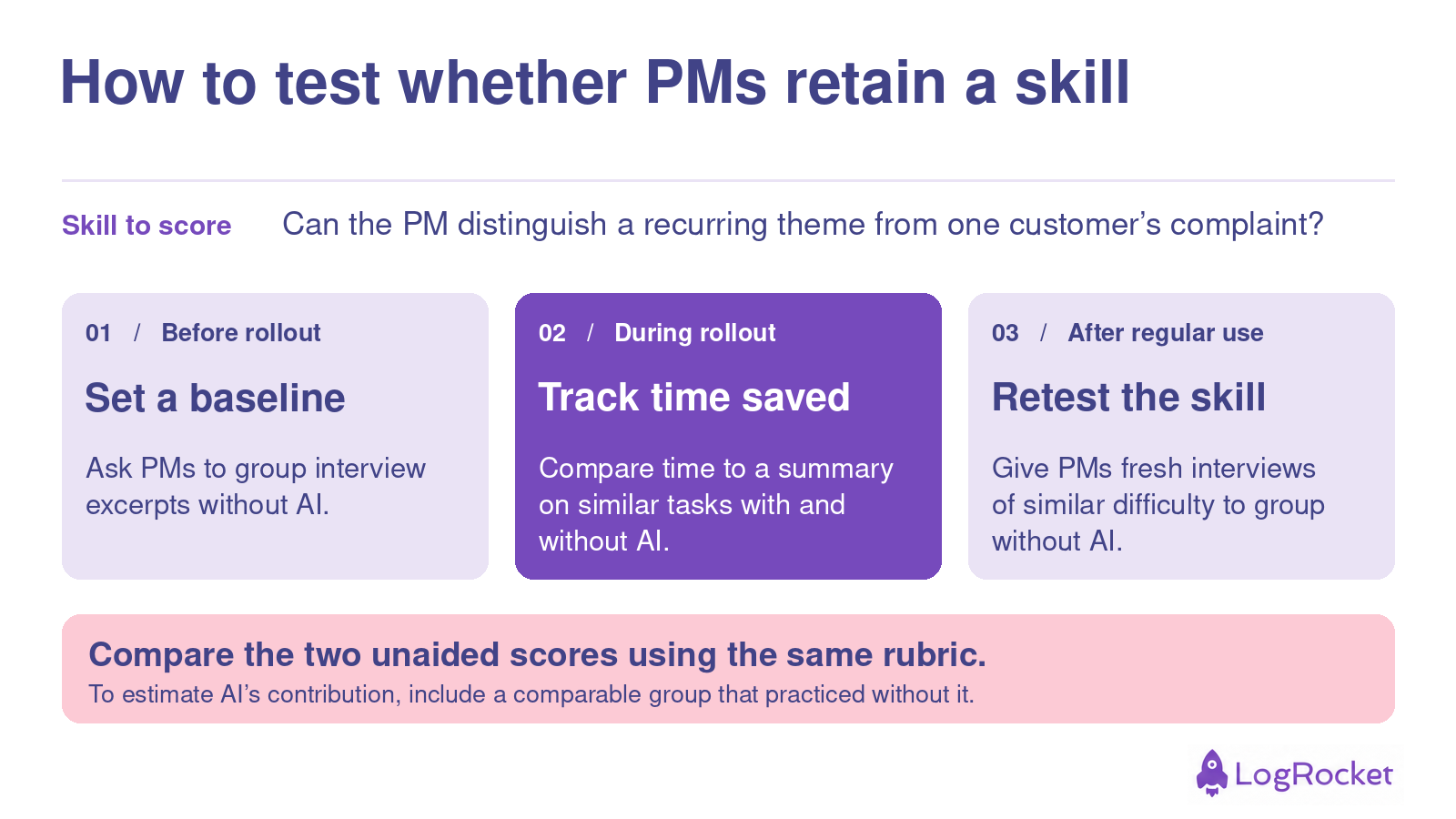
An AI-on versus AI-off test tells you how much assistance helps today. Comparing unaided performance over time tells you whether users have retained the skill. If you want to understand how much the feature contributed to a change, include a comparison group that practiced without it.
Calibration determines whether users’ trust in an AI system matches its actual reliability. The goal is for people to trust AI responsibly, which includes accepting reliable results while identifying instances that require verification or human judgment.
This is especially relevant for products where AI recommendations influence critical decisions, since excessive trust can lead to automation bias, while extreme skepticism can prevent users from benefiting from the system.
Decision quality examines whether AI assistance enhances the quality of users’ decisions rather than merely speeding up decisions. You can compare AI-assisted results to unassisted results, expert judgments, or independently verified results to assess whether the system is assisting users in reasoning more effectively.
This distinction is necessary because a product that boosts decision speed while reducing users’ ability to detect poor recommendations may improve a surface-level metric at the expense of a more important outcome.
A product can support genuine learning when users can apply what they learned from one AI-assisted task to a new but related context. Instead of providing isolated solutions, a coding assistant should ideally assist developers in understanding patterns that they may recognize and apply in future projects.
Measuring whether users can transfer knowledge between tasks is a more reliable indicator of capability development than measuring how quickly they successfully complete the original task.
When an AI feature helps people finish a task faster, the benefit is easy to see. What’s harder to tell is whether they can still recognize a poor result. As long as the AI keeps giving them good answers, users who understand the work and users who have learned to accept the answer can look equally successful.
At your next design review, pick one decision the user will still be responsible for. What would they need to know to spot a mistake? Give them a chance to exercise that judgment in the product, and check how well they can do it on their own after a period of regular use. That’s how you can tell whether the time your feature saves today comes at the expense of a skill your users will need tomorrow.
Featured image source: IconScout
LogRocket identifies friction points in the user experience so you can make informed decisions about product and design changes that must happen to hit your goals.
With LogRocket, you can understand the scope of the issues affecting your product and prioritize the changes that need to be made. LogRocket simplifies workflows by allowing Engineering, Product, UX, and Design teams to work from the same data as you, eliminating any confusion about what needs to be done.
Get your teams on the same page — try LogRocket today.

Learn how to turn regulatory requirements into clear product requirements, define acceptance criteria, and keep your compliance work current.

Spot misleading KPIs, balance targets with counter-metrics, and keep your team focused on better product outcomes instead of dashboard wins.
Keep the reasoning behind product decisions within reach. Build a clear system to track customer feedback, priorities, and project progress.
Discover how Meilisearch uses LogRocket’s MCP and Galileo to improve free trial conversion and adoption of newly shipped features across its Cloud product.

 Learn more →