The world of frontend development is constantly evolving and people create progressively more complex and powerful apps and software every day. Naturally, this has led to massive bundles of code, which can drastically increase the time an app takes to load and negatively impact the user experience. That’s where lazy loading comes in.

In this tutorial, we’ll show you how lazy loading works in React.js, demonstrate how to apply code-splitting and lazy loading using react.lazy and React.Suspense, and build a demo React app to see these concepts in action.
Lazy loading is a design pattern for optimizing web and mobile apps. The concept of lazy loading is simple: initialize objects that are critical to the user interface first and quietly render noncritical items later.
When you visit a website or use an app, it’s very likely you’re not seeing all the available content. Depending on how you navigate and use the app, you may never encounter the need for certain components, and loading unneeded items costs time and computing resources. Lazy loading enables you to render elements on demand, making your app more efficient and improving the user experience.
React has two features that make it very easy to apply code-splitting and lazy loading to React components: React.lazy() and React.Suspense.
React.lazy() is a function that enables you to render a dynamic import as a regular component. Dynamic imports are a way of code-splitting, which is central to lazy loading. A core feature as of React 16.6, React.lazy() eliminates the need to use a third-party library such as react-loadable.
React.Suspense enables you to specify the loading indicator in the event that the components in the tree below it are not yet ready to render.
Before we see React.lazy and React.Suspense in action, let’s quickly review the concepts of code-splitting and dynamic imports, explain how they work, and break down how they facilitate lazy loading in React.
With the advent of ES modules, transpilers such as Babel, and bundlers such as webpack and Browserify, you can now write JavaScript applications in a completely modular pattern for easy maintainability. Usually, each module is imported and merged into a single file called a bundle, then the bundle is included on a webpage to load the entire app. As the app grows, the bundle size increases and eventually impacts page load times.
Code-splitting is the process of dividing a large bundle of code into multiple bundles that can be loaded dynamically. This helps you avoid performance issues associated with oversized bundles without actually reducing the amount of code in your app.
One way to split code is to use dynamic imports, which leverage the import() syntax. Calling import() to load a module relies on JavaScript Promises. Hence, it returns a promise that is fulfilled with the loaded module or rejected if the module can’t be loaded.
Here is what it looks like to dynamically import a module for an app bundled with webpack:
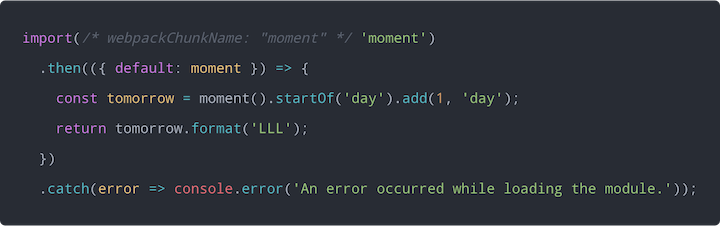
When webpack sees this syntax, it knows to dynamically create a separate bundle file for the moment library.
For React apps, code-splitting using dynamic import() happens on the fly if you’re using a boilerplate such as create-react-app or Next.js. However, if you’re using a custom webpack setup, you should check the webpack guide for setting up code-splitting. For Babel transpiling, you need the babel-plugin-syntax-dynamic-import plugin to parse dynamic import() correctly.
Without further ado, let’s explore how to use React.lazy() and React.Suspense
React.lazy()React.lazy() makes it easy to create components that are loaded using dynamic import() but rendered like regular components. This automatically causes the bundle containing the component to load when the component is rendered.
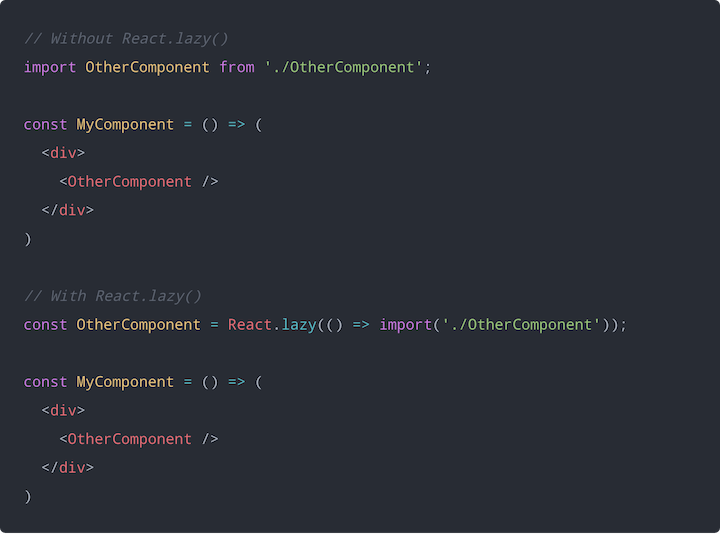
React.lazy() takes as its argument a function that must return a promise by calling import() to load the component. The returned promise resolves to a module with a default export containing the React component.
Using React.lazy() looks like this:
React.SuspenseA component created using React.lazy() is loaded only when it needs to be rendered. Therefore, you should display some kind of placeholder content while the lazy component is being loaded , such as a loading indicator. This is exactly what React.Suspense is designed for.
React.Suspense is a component for wrapping lazy components. You can wrap multiple lazy components at different hierarchy levels with a single Suspense component.
The Suspense component takes a fallback prop that accepts the React elements you want rendered as placeholder content while all the lazy components get loaded.
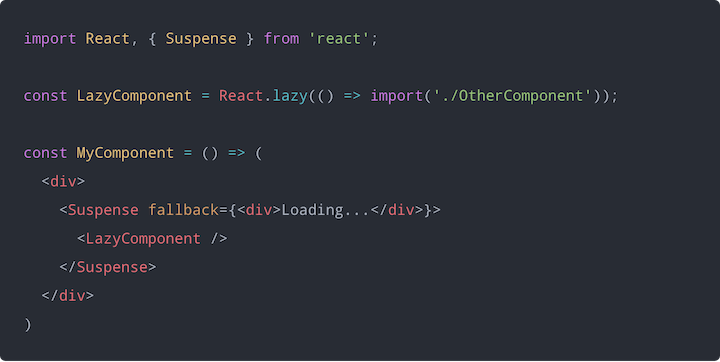
You can place an error boundary anywhere above a lazy component to enhance the user experience in the event that a lazy component fails to load.
I created a very simple demo on CodeSandbox to demonstrate using React.lazy() and Suspense for lazy loading components.
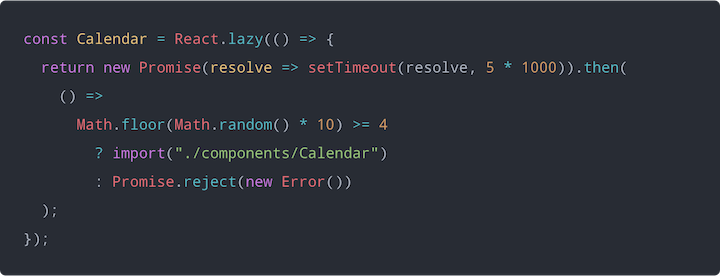
Here’s what the code looks like for our miniature app:
import React, { Suspense } from "react";
import Loader from "./components/Loader";
import Header from "./components/Header";
import ErrorBoundary from "./components/ErrorBoundary";

const Calendar = React.lazy(() => {
  return new Promise(resolve => setTimeout(resolve, 5 * 1000)).then(
    () =>
      Math.floor(Math.random() * 10) >= 4
        ? import("./components/Calendar")
        : Promise.reject(new Error())
  );
});

export default function CalendarComponent() {
  return (
    <div>
      <ErrorBoundary>
        <Header>Calendar</Header>

        <Suspense fallback={<Loader />}>
          <Calendar />
        </Suspense>
      </ErrorBoundary>
    </div>
  );
}
Here, we created a simple Loader component to use as fallback content for the lazy Calendar component. We also created an error boundary to display a message when the lazy Calendar component fails to load.
I have wrapped the lazy Calendar import with another promise to simulate a delay of five seconds. To increase the chances of the Calendar component failing to load, I also used a condition to either import the Calendar component or return a promise that rejects.
The following animation shows a demo of what the component will look like when rendered using React.lazy() and React.Suspense.

At the moment, React.lazy() does not support using named exports for React components. If you wish to use named exports containing React components, you need to reexport them as default exports in separate intermediate modules.
For example, let’s say you have OtherComponent as a named export in a module and you wish to load OtherComponent using React.lazy(). You would create an intermediate module for reexporting OtherComponent as a default export.
Components.js:
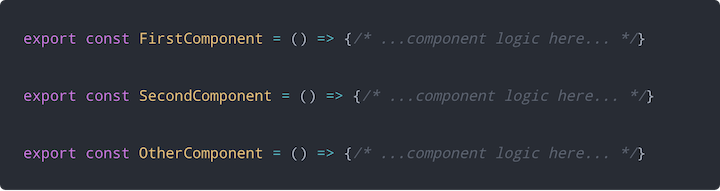
OtherComponent.js:

You can now use React.lazy() to load OtherComponent from the intermediate module.
React.lazy() and React.Suspense enable you to perform route-based code-splitting without using an external package. You can simply convert the route components of your app to lazy components and wrap all the routes with a Suspense component.
The following code snippet shows route-based code-splitting using the Reach Router library.
import React, { Suspense } from 'react';
import { Router } from '@reach/router';
import Loading from './Loading';

const Home = React.lazy(() => import('./Home'));
const Dashboard = React.lazy(() => import('./Dashboard'));
const Overview = React.lazy(() => import('./Overview'));
const History = React.lazy(() => import('./History'));
const NotFound = React.lazy(() => import('./NotFound'));

function App() {
  return (
    <div>
      <Suspense fallback={<Loading />}>
        <Router>
          <Home path="/" />
          <Dashboard path="dashboard">
            <Overview path="/" />
            <History path="/history" />
          </Dashboard>
          <NotFound default />
        </Router>
      </Suspense>
    </div>
  )
}
It’s important to validate that everything works in your production React app as expected. If you’re interested in monitoring and tracking issues related to components AND seeing how users interact with specific components, try LogRocket. 
 https://logrocket.com/signup/
LogRocket is like a DVR for web apps, recording literally everything that happens on your site. The LogRocket React plugin allows you to search for user sessions where the user clicks a specific component in your app. With LogRocket you can understand how users interact with components, and surface any errors related to components not rendering.
In addition, LogRocket logs all actions and state from your Redux stores. LogRocket instruments your app to record requests/responses with headers + bodies. It also records the HTML and CSS on the page, recreating pixel-perfect videos of even the most complex single-page apps. Modernize how you debug your React apps – Start monitoring for free.
React.lazy() and Suspense are not yet available for server-side rendering. For server-side code-splitting, you should still use react-loadable.
One approach to code-splitting React components is called route-based code-splitting, which entails applying dynamic import() to lazy load route components. react-loadable provides a higher-order component (HOC) for loading React components with promises, leveraging the dynamic import() syntax.
Consider the following React component called MyComponent:
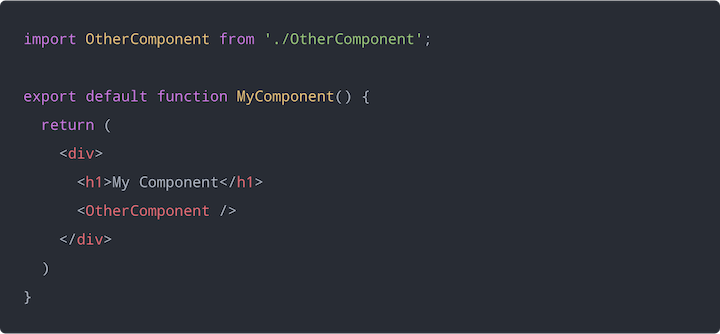
Here, the OtherComponent is not required until MyComponent is rendered. However, because we are importing OtherComponent statically, it’s bundled together with MyComponent.
We can use react-loadable to defer loading OtherComponent until we render MyComponent, thereby splitting the code into separate bundles.
Here is the OtherComponent lazy loaded using react-loadable:
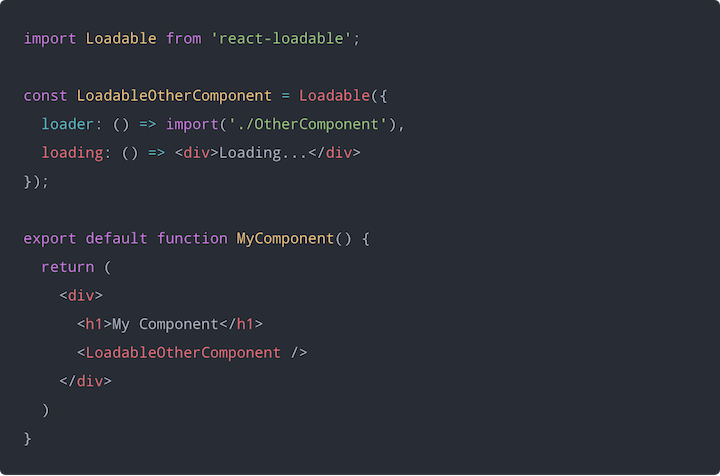
The component is imported using the dynamic import() syntax and assigned to the loader property in the options object.
react-loadable also uses a loading property to specify a fallback component that is rendered while waiting for the actual component to load.
With React.lazy() and React.Suspense, code-splitting and lazy loading React components has never been simpler. These functions make it easier than ever to speed up the performance of your React app and improve the overall user experience.

We tested five AI code review tools for speed, setup, security, and code quality to compare their strengths and help you choose the right tool.

Compare five React toast libraries for features, bundle size, accessibility, performance, and React 19 compatibility.

See how Tecovas built a patching agent that turns LogRocket’s Galileo AI issue analysis into GitHub PRs, with a developer reviewing every fix before it ships.

Explore OctaneJS, a compiler-first alternative to React. Build a task dashboard and learn about rendering, hooks, asynchronous UI, and React compatibility.
Would you be interested in joining LogRocket's developer community?
Join LogRocket’s Content Advisory Board. You’ll help inform the type of content we create and get access to exclusive meetups, social accreditation, and swag.
Sign up now

 Learn more →