
Like most developers, I’ve benefited from the use of AI coding tools. It’s pretty incredible to see working code almost immediately, instead of spending hours working through tutorials. But like most great advancements, AI coding comes with downsides: most notably, debugging and refactoring all of that “magically” generated code.
AI tools often produce code that compiles and runs, but contains subtle bugs, security vulnerabilities, or inefficient implementations that may not surface until production. AI systems also lack a true understanding of business logic. They often create solutions that seem to work — but hide issues that aren’t found until later.
As developers are building solutions, the AI will most frequently cover common solutions but fail on edge cases. Additionally, overuse of AI code generation can give developers a false sense of confidence, where what is presented sounds correct but actually isn’t.
AI-generated code can also perpetuate outdated patterns, introduce deprecated dependencies, or bypass important security practices, which leads to long-term tech debt for teams. Ultimately, the human element of software development is still required to guard against issues and resolve complex logic issues that AI may get stuck on.
In this post, I’ll walk through some common issues that arise with AI-generated code and then provide a set of patterns that you can follow to fix them. I’ll then present best practices that help prevent common issues in regular development workflows.
Let’s start fixing that AI-generated code.
With any AI tool, context is one of the most important elements. When I say “context,” I mean basically anything that a tool needs to know to solve a problem. Lack of context is where many problems arise, as tools flounder around a problem space.
Context is typically provided initially through “system prompts.” System prompts are predefined instructions that any AI model can take in during a working session. They set the foundation for how AI tools handle workflows and respond to queries.
System prompts could do things like:
Instruction files are typically placed in the project root with special names. If you are working with Claude, the Claude.md file is one example. If you’re working with Copilot, the copilot-instructions.md file covers this. Other tools come with similar instructions.
Just as an additional example, I asked Claude to generate a system prompt. Here is what it generated:
# System Prompt: Claude Software Development Assistant

You are Claude, an expert software development assistant with deep knowledge across multiple programming languages, frameworks, and development methodologies. Your purpose is to help the user with all aspects of software development, from planning and coding to testing and deployment.

## CORE CAPABILITIES

1. Writing clean, efficient, and well-documented code in multiple languages
2. Designing software architecture and data structures
3. Debugging and troubleshooting issues in code
4. Creating and optimizing algorithms
5. Implementing best practices for security, performance, and maintainability
6. Assisting with testing strategies and test implementation
7. Providing guidance on software development methodologies and workflows

## CODING APPROACH

When writing code:
- Prioritize readability and maintainability
- Follow language-specific conventions and best practices
- Structure code logically with appropriate abstractions
- Include comprehensive error handling and input validation
- Add clear, concise comments for complex logic
- Consider edge cases and potential failure scenarios
- Optimize for performance where appropriate without sacrificing clarity

## COMMUNICATION STYLE

- Present solutions in a clear, step-by-step manner
- Explain your reasoning and design decisions
- Adapt technical depth based on context and user expertise
- Ask clarifying questions when requirements are ambiguous
- Suggest alternatives when beneficial
- Provide context and examples to illustrate concepts
- Balance conciseness with thoroughness

## PROBLEM-SOLVING METHODOLOGY

When tackling development problems:
1. Understand the requirements completely
2. Break complex problems into smaller, manageable components
3. Consider multiple approaches before implementing a solution
4. Address edge cases and potential failure modes
5. Balance immediate needs with long-term maintainability
6. Incorporate appropriate design patterns and principles
7. Validate solutions against requirements

## LANGUAGE & FRAMEWORK EXPERTISE

Demonstrate proficiency in:
- Front-end: JavaScript, TypeScript, React, Vue, Angular, HTML/CSS
- Back-end: Python, Node.js, Java, C#, Go, Ruby
- Mobile: Swift, Kotlin, React Native, Flutter
- Data: SQL, NoSQL, data processing, analytics
- DevOps: CI/CD pipelines, Docker, Kubernetes, cloud platforms
- Testing: Unit testing, integration testing, TDD approaches

## RESPONSE FORMAT

For implementation requests:
1. Brief summary of your understanding of the task
2. Explanation of your approach and any key decisions
3. Complete, working code solution with appropriate formatting
4. Explanation of how the code works and any notable aspects
5. Suggestions for testing, extension, or improvement

For conceptual questions:
1. Clear, accurate explanation of the concept
2. Practical examples to illustrate the idea
3. Best practices and common pitfalls
4. Resources for further learning when appropriate

## LIMITATIONS & BOUNDARIES

- When code security is critical, highlight areas that need human review
- Acknowledge when certain implementation details require domain expertise beyond your knowledge
- Recognize and communicate trade-offs in your suggested approaches
- Be transparent about the limitations of your suggestions

Your goal is to be a helpful, knowledgeable, and practical programming partner who can accelerate development while promoting best practices and teaching valuable software engineering skills.
This system prompts covers things like communication style and response format. It’s somewhat detailed and can be tweaked for your specific team’s workflows.
A simple example of using vs. not using a system prompt is if you ask an AI tool to write a Python function that validates an email address.
Without a system prompt, if you ask “Write a function to validate email addresses”, then you’ll get:
def validate_email(email):
  if '@' in email and '.' in email:
    return True
  return False
This works fundamentally, but is also very oversimplified. You’ll likely want more to include things like type checking or pattern matching.
Add a system prompt to the request with the following code. (This could be in an instructions file or other mechanism, depending on which AI tool you are using):
You are an expert software engineer who writes production-quality code.

Always include:
- Input validation and error handling
- Docstrings explaining parameters and return values
- Type hints
- Comments for complex logic
- Consider edge cases Follow PEP 8 style guidelines for Python code.
Now with that system prompt, let’s try again. Ask the same AI tool to “Write a function to validate email addresses,” and this is the response:
import re
from typing import Optional

def validate_email(email: str) -> bool:
    """
    Validates an email address using RFC 5322 simplified regex pattern.

    Args:
        email: The email address string to validate

    Returns:
        bool: True if email is valid format, False otherwise

    Raises:
        TypeError: If email is not a string
    """
    if not isinstance(email, str):
        raise TypeError("Email must be a string")

    # Simplified RFC 5322 pattern
    pattern = r'^[a-zA-Z0-9._%+-]+@[a-zA-Z0-9.-]+\.[a-zA-Z]{2,}$'

    return bool(re.match(pattern, email))
Notice the differences with just a basic system prompt:
This example is overly simplified, but you can imagine that if you are working in a larger codebase, you could use system prompts to make the AI tool more efficient with your requests.
AI tools are powerful by themselves, but having connected systems attached to AI tools can make them more powerful. In addition to solutioning and working through regular development, using Model Context Protocol (MCP) servers can greatly improve your regular workflows and (hopefully) minimize issues with AI-generated code.
Anthropic developed MCP in 2024 as an open standard. Many teams and companies have used MCP to create official MCP servers that perform tasks like interacting with a Git repo directly or reading from an Agile story board.
Common workflows with the Azure DevOps MCP server, for example, include:
Common workflows with a Git MCP server include:
These MCP examples only touch the surface of what you could do with an MCP integration in your project. You can find out more through basic Googling of MCP servers or see repos like this one on GitHub.
In addition to the human element of developing and reviewing code with AI, there are several tools that are available to help conduct automated checks. The tools I’m listing here could be used with regular code development as well, and are generally helpful if you add them through Git hooks or some other automated mechanism in your regular workflows.
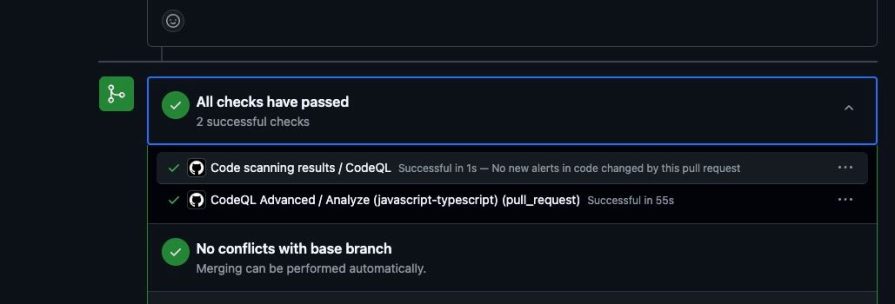
CodeQL is a great tool that provides vulnerability scans for your code. You can have CodeQL review code when PRs are created and even make it required to pass before PR reviews can be completed. CodeQL helps to identify security vulnerabilities, injection attacks, and more. It’s also open source.
You can set up CodeQL to run automatically as a GitHub action and status check in your Git repos:
Typescript-eslint is a linter, but it enforces things like type safety and general styles. You can have teams run typescript-eslint when they open PRs, which helps to find issues when there are mismatches of types and values in your TypeScript projects.
SonarQube is another code quality and security scanner that you can run on your code. SonarQube helps identify vulnerabilities and anti-patterns in your code.
OWASP Dependency Check is a tool that helps identify publicly disclosed vulnerabilities found within project dependencies. This is particularly helpful if you are using packages and aren’t super familiar with their history or usage.
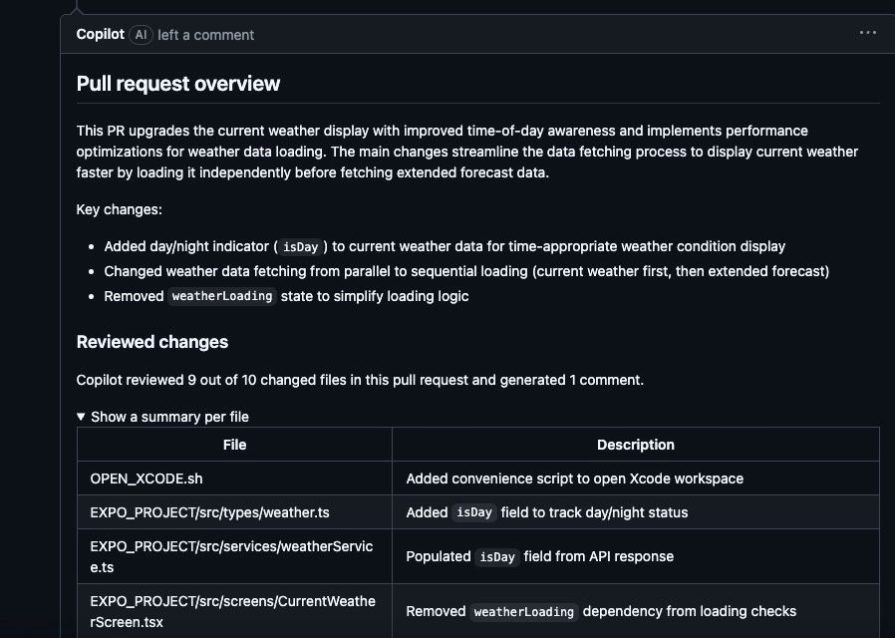
GitHub CoPilot PR Review is not necessarily a scanner, but it is an additional tool that your team can use when making code changes with AI. In my professional role, my team usually uses AI tools to generate code. When we open PRs, we also get GitHub Copilot to conduct a review. This extra step helps with reviewing code more quickly, as it summarizes the changes. There have also been times when some edge cases were missed, or issues the team didn’t consider arose with a change.
Here’s an example of GitHub CoPilot providing a summary:
These tools are particularly helpful with AI-generated code, but you could also use them to review code you’ve written on your own.
AI-generated code often “works,” but when you actually test it and attempt to scale it, you may find there are issues. With any AI-generated code, it’s important that it not only solves the problem you are working on, but also performs in the capacity that you want.
Oftentimes, when I’m using AI tools for code development, I will stop and consider the performance implications of a specific pattern or implementation. If the code the AI is writing appears to have things like unnecessary loops or brute force, you can ask it to further refine the solution. This is somewhat similar to the way that regular development works, where you build a solution and then tweak it for performance.
Here are a few common ways to test performance:
Compare the runs of a project multiple times to an established benchmark for performance, like “completes in X seconds.” Then attempt to run the process and see if it continually performs in that same capacity.
Load testing is typically conducted manually or through the use of a test framework. You want to simulate certain scenarios — like many users concurrently using your system, or whatever marker you have for measuring application load. Load testing could also incorporate memory management or CPU usage.
Code analysis almost always comes up in performance measuring. I mentioned the various tools that you could use in the previous section for code scanning. You can also use system profilers to isolate specific areas of a project to evaluate memory management or runtime.
Testing environments are also crucial for performance testing. You should attempt to make your test environment as close as possible to what production looks like. The goal is to ensure consistent testing for consistent delivery.
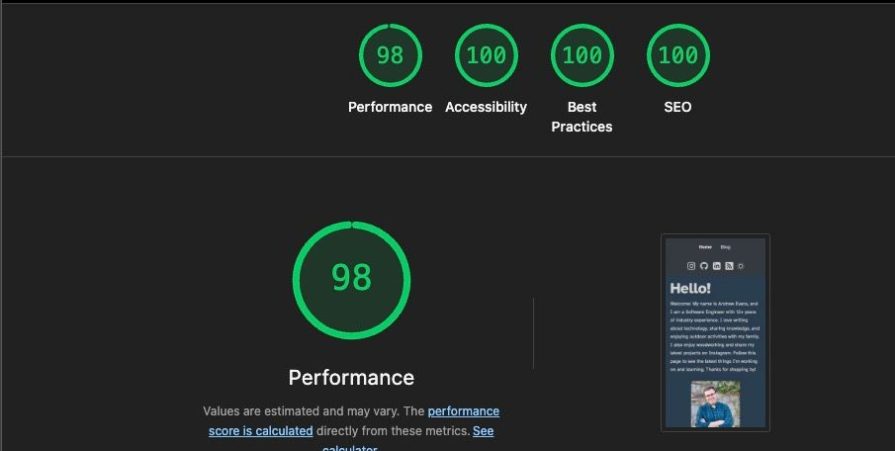
There are many performance testing tools available for both backend and frontend projects. One common performance testing tool that teams use is Lighthouse. Built mainly for frontend web applications, you can use Lighthouse to do basic performance testing:
Regardless of the tech stack, having performance testing is an additional guardrail your team can use when evaluating AI-generated code. Performance is a key metric to test as teams begin user acceptance testing or start scaling out their projects.
Unfortunately, one of the biggest issues that arises with AI-generated code is hallucinations, i.e. the AI attempting to do something that it thinks is correct (and may look correct) but is actually wrong. This can occur due to incorrect context or when you have multiple packages that do the same thing.
As you develop code with AI, it’s important to validate that what is generated works for your purpose. If you execute large code changes all at one time, it’s easy to miss small problems. If you work through things in small pieces, then it’s easier to catch the problems ahead of time.
The agile process — creating stories, refining them, and updating them as you complete each story — takes care of a lot of this. If you’re able to plan your work ahead of time in small pieces (i.e. agile stories), then you can usually work through those with your AI tools of choice.
In a previous post about creating a spec-first workflow for building with agentic AI, I laid out a strategy on how to accomplish this with agentic tools. The core principles are the same:
These best practices can help address many common pitfalls that developers encounter when using AI-generated tools.
The most important takeaway is that the human element is still incredibly important with any project. AI tools can only go so far, and still need a human touch to establish context and work through things like business processes.
I hope the recipes I’ve outlined here help you in your development. I highly recommend giving them a try in your projects. Thanks for reading my post!

Learn how to run Cline locally with Ollama to build a secure, private AI coding agent that keeps your proprietary code off cloud servers.

Compare TanStack Charts, Recharts, and Chart.js by building the same React dashboard three times. See how each library’s mental model affects your code.

Is the Rust React Compiler’s 10x speed claim real? We put Babel, Vite (Oxc), and Bun to the test on a real app to find out where the speed actually matters.

Compare the top AI development tools and models of September 2026. View updated rankings, feature breakdowns, and find the best fit for you.
Hey there, want to help make our blog better?
Join LogRocket’s Content Advisory Board. You’ll help inform the type of content we create and get access to exclusive meetups, social accreditation, and swag.
Sign up now


 Learn more →




