A React chatbot that streams Markdown has to render a document while it is still being written. Each incoming chunk can extend a paragraph, finish a code block, or turn a line of text into a table.

react-markdown handles the conversion to React elements. In a straightforward implementation, the app appends each chunk to a string and passes the accumulated text back to the component. That causes repeated parsing and plugin work as the reply grows.
I wanted to know when that work becomes expensive enough to justify a different renderer. I compared react-markdown with Streamdown, Markstream’s React package, and Comark, using recorded model responses in a shared replay app.
The shorter replies gave me little reason to switch. The long reply, which included six code blocks, exposed a substantial cost when react-markdown used syntax highlighting under CPU throttling. The results also showed why a streaming renderer needs testing with your own configuration.
If you need an introduction to the baseline, see our guide to using react-markdown.
When react-markdown receives updated text, it parses that input and runs the configured plugins again. React then reconciles the resulting elements and commits the necessary DOM changes. Repeated parsing can become expensive even when much of the existing DOM stays in place.
The long fixture contained 1,993 recorded chunks. That means 1,993 calls to the replay’s state setter; React’s scheduling determines how those updates become renders and commits.
Incomplete syntax adds another complication. For example, the accumulated response might end with an open code fence:
```javascript
const total = items.reduce((sum, item) =>
Or a table might arrive in pieces:
| Renderer | Size |
| ---
Streaming renderers can apply rules for incomplete Markdown while the response arrives. I tested the cost of updating the document and used an automated check to look for a few visible syntax artifacts.
I saved four responses from deepseek/deepseek-chat through OpenRouter, including each chunk and its arrival timestamp:
| Fixture | Characters | Content |
|---|---|---|
| Short | 1,963 | Plain text |
| Medium | 4,703 | A code block and a table |
| Long | 22,229 | Six code blocks and two tables |
| Diagram | 4,599 | A Mermaid diagram |
The React 19 replay app gives each renderer its own page with shared controls, a chat bubble, and base styles. Replays use local fixtures, so model response times and live network conditions are outside this comparison.
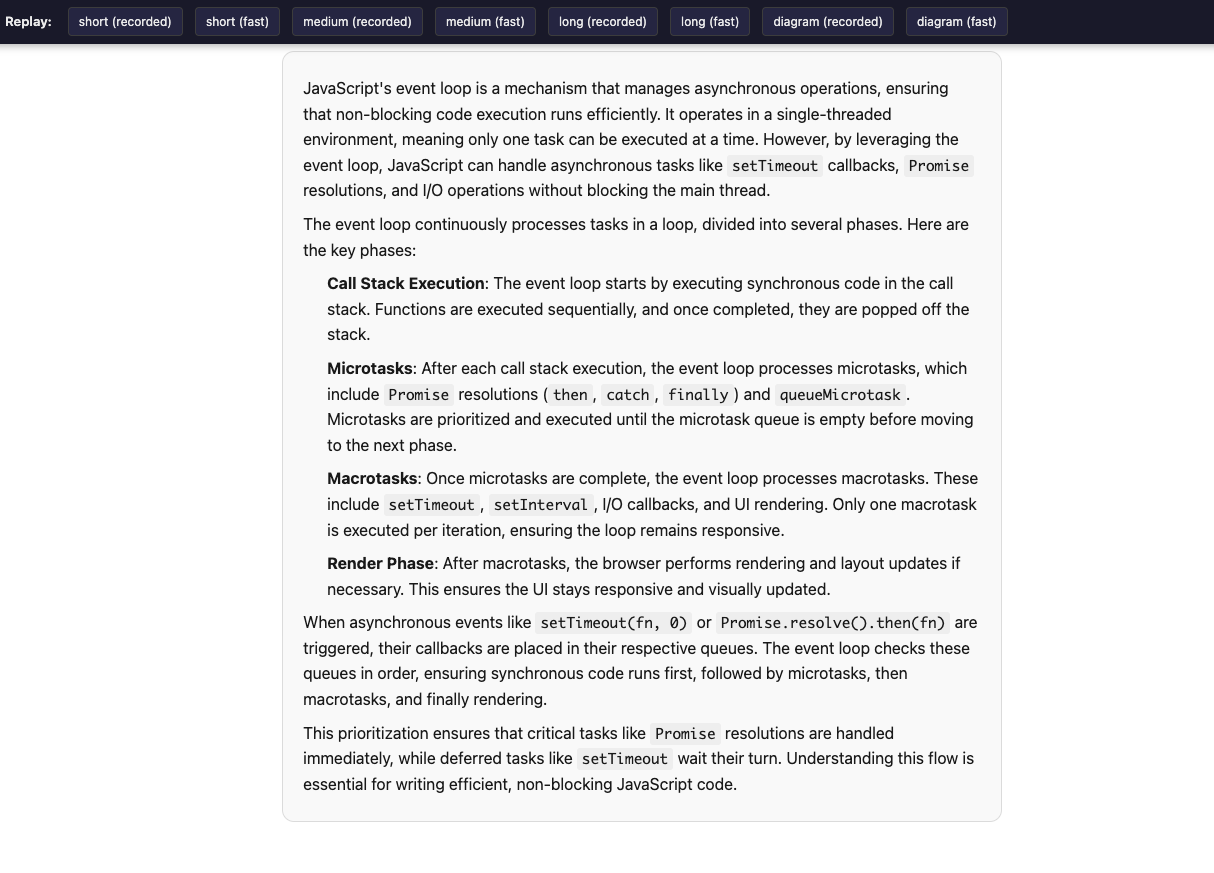
A shared hook appends each chunk to React state:
onChunk: (accumulated, isDone) => {
  performance.mark("chunk-append");
  settersRef.current.setContent(accumulated);
  if (isDone) {
    settersRef.current.setDone(true);
  }
},
I tested react-markdown with remark-gfm for tables, then added rehype-highlight for a second configuration:
<ReactMarkdown remarkPlugins={[remarkGfm]} rehypePlugins={[rehypeHighlight]}>
  {content}
</ReactMarkdown>
The streaming renderers received the same accumulated string and completion state. These are the configurations used in the benchmark:
// Streamdown
<Streamdown mode={done ? "static" : "streaming"} plugins={{ code, mermaid: mermaidPlugin }}>
  {content}
</Streamdown>

// Markstream, using markstream-react
<NodeRenderer content={content} final={done} />

// Comark
<MarkdownClient value={content} streaming={!done} plugins={[shiki(), mermaidPlugin()]} />
The repository’s environment log lists react-markdown 10.1.0, Streamdown 2.7.0, markstream-react 2.0.19, and Comark 0.7.0. Highlighting and diagram implementations differ between configurations, so the results compare these setups as a whole.
The following recordings show the short and medium replays:
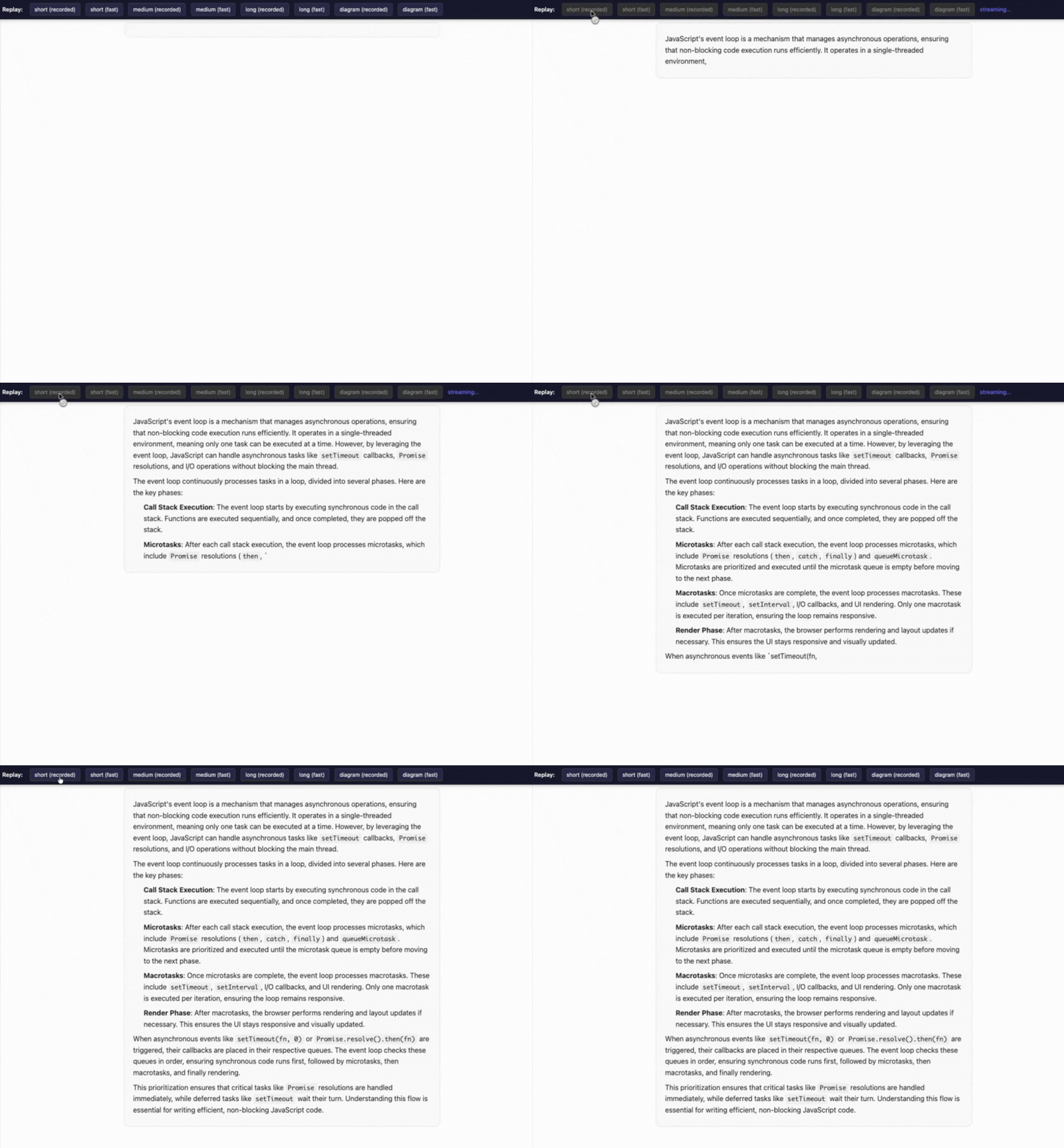
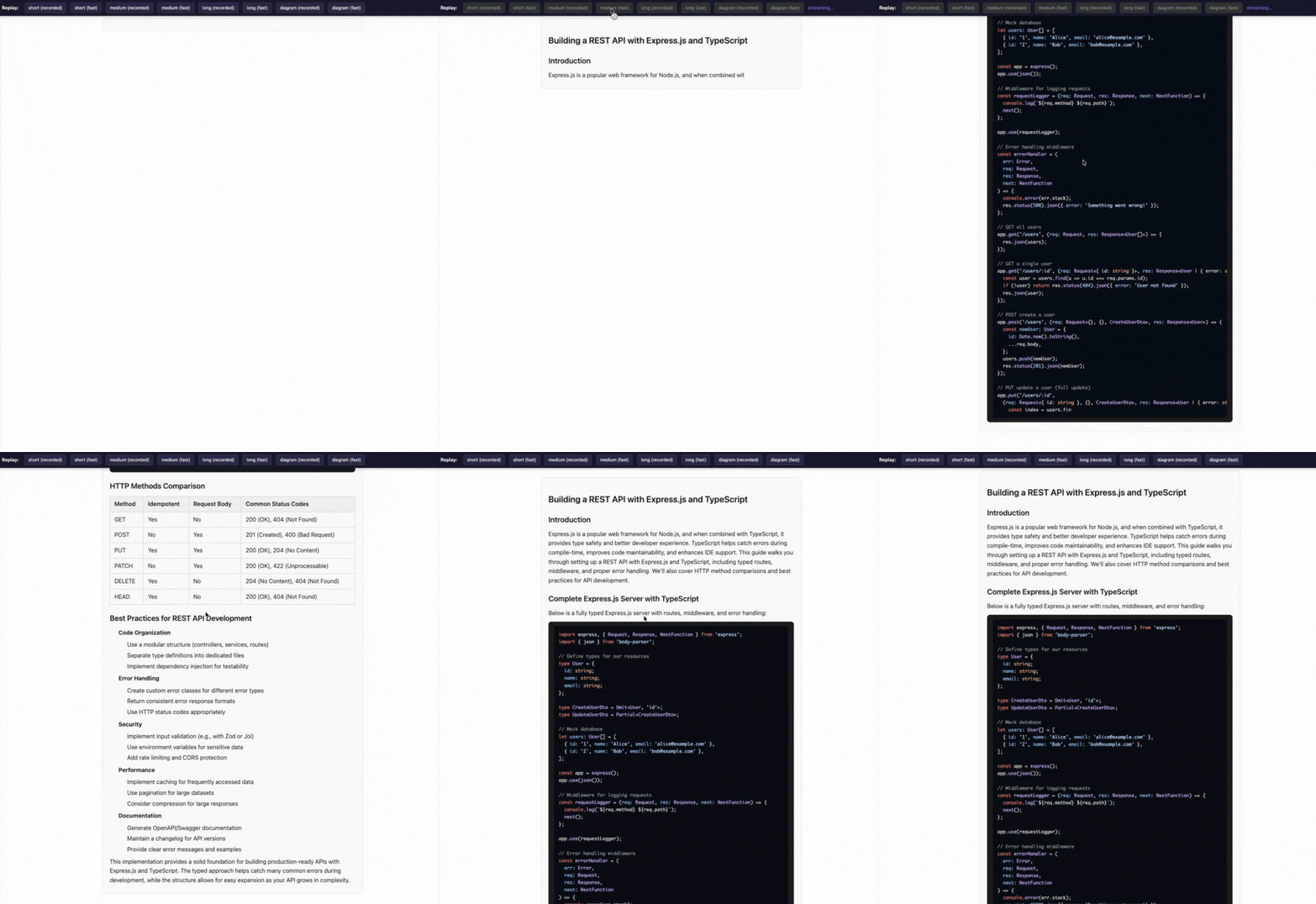
Playwright automated production-build replays in headless Chromium on an Apple M4 MacBook Air. The two playback modes were:
requestAnimationFrame callback. The repository calls this mode “fast.” Its delivery rate slows when the browser falls behind.Each mode ran at native CPU speed and with 4× CPU throttling. That slowdown applies to the test machine; it does not establish performance on a particular phone. Chrome’s CPU calibration guidance explains why mobile approximations depend on the host hardware.
The script requests one warmup and three measured runs per combination. The committed raw data contains three runs for 79 combinations and two for Streamdown’s medium, recorded-timing, throttled condition. Figures below use medians recalculated from those raw files at commit af7bfce4d542134b0e6ad4ebfe5d5e9eac74d465.
The harness records several different signals:
| Measurement | What it captures |
|---|---|
| Time to first text | Time from measurement start until a frame callback detects text in the bubble, including the local fixture fetch |
| Main-thread task time | The change in Chromium’s TaskDuration counter during the measurement window, including harness overhead |
| Chunk-to-mutation latency | Time from a chunk mark to the next observed DOM mutation, which can include scheduling delay |
| Long frame gaps | Intervals over 33.4 ms between frame callbacks |
| Long tasks | Tasks lasting at least 50 ms, recorded through the Long Tasks API |
The chunk-to-mutation measurement stops before a confirmed paint and can miss intermediate updates when chunks arrive before a mutation. Its length buckets use the bubble’s existing textContent, so they approximate rendered-text length.
To try the replay locally:
git clone https://github.com/marvelken/Open-source-markdown-streaming.git
cd Open-source-markdown-streaming
pnpm install --frozen-lockfile
pnpm dev
Open /src/pages/react-markdown-base/ at the address Vite prints. Manual recorded-timing replays run at the original timing; the automated benchmark applies the 10× acceleration.
This surprised me. Both react-markdown configurations had a median of zero frame gaps over 33.4 ms across the short and medium conditions. The largest median worst-frame interval was 28.0 ms, and every renderer’s median time to first text stayed below 61 ms across those fixtures.
The streaming configurations still had occasional delays. For example, Streamdown’s medium, recorded-timing, throttled condition had a median of five long frame gaps and a worst-frame interval of 154.2 ms. Only two measured runs are committed for that condition, so it needs another run before drawing a firm comparison.
These fixtures gave me little performance reason to replace react-markdown. They also show why a renderer’s streaming features alone cannot predict its speed.
At 60 Hz, frames are about 16.7 ms apart. Work that occupies much of that interval leaves less room for the browser to handle input and paint. The harness counts intervals over 33.4 ms as long frame gaps; each count represents one observed gap, regardless of how many refresh opportunities it spans.
The chart below tracks chunk-to-mutation latency during the long, accelerated recorded-timing replay with CPU throttling.
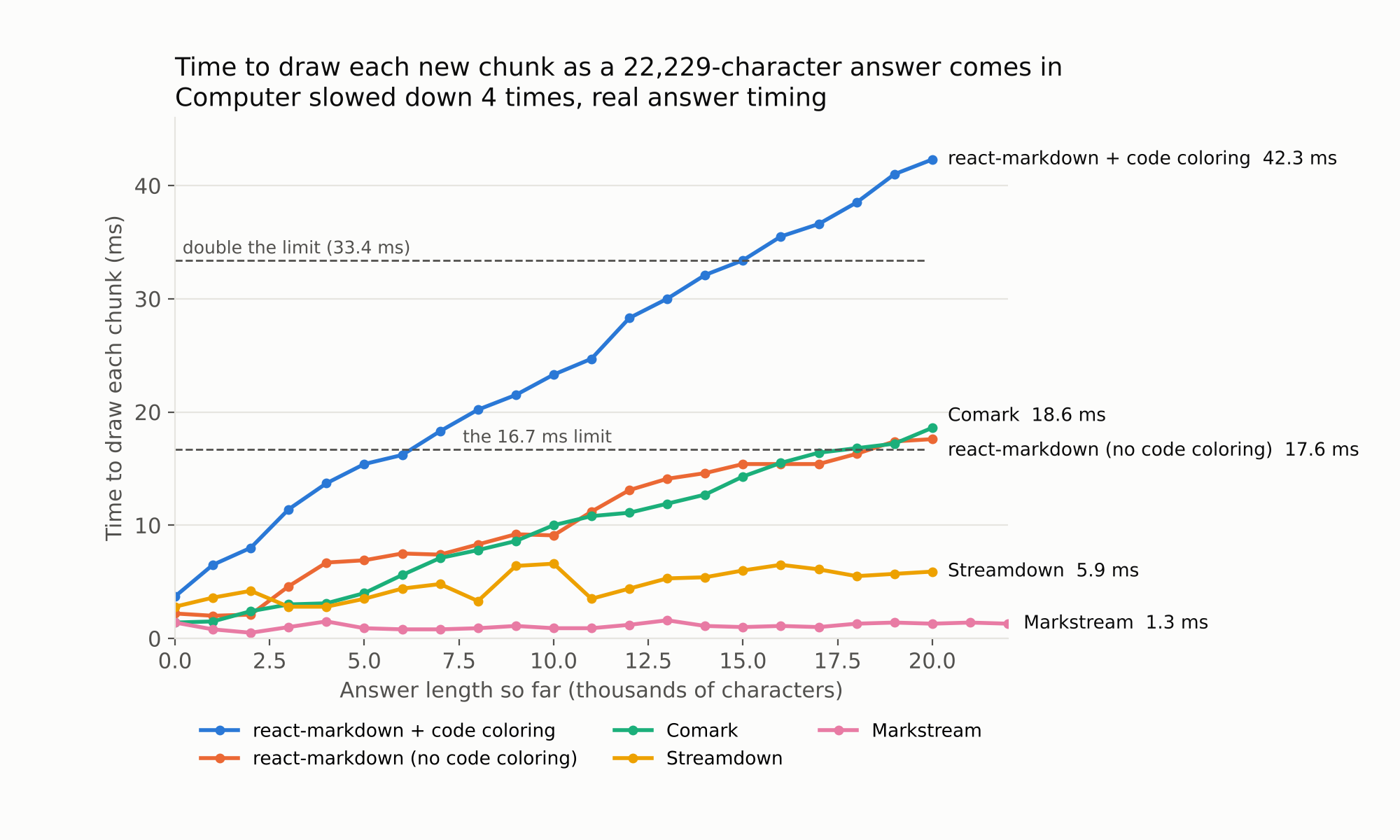
react-markdown with highlighting rose from 3.7 ms in the first length bucket to 42.3 ms in the final bucket. It exceeded 16.7 ms in the bucket beginning at roughly 7,000 rendered-text characters. The base configuration ended at 17.6 ms, while Markstream stayed around 1 ms and Streamdown ranged from 2.8 to 6.6 ms.
The frame measurements also showed a difference. With highlighting, react-markdown recorded a median of 159 long frame gaps in this condition and 269 in frame-paced mode. The base setup recorded one and zero, respectively. Both react-markdown configurations recorded a median of zero long frame gaps for the long fixture at native CPU speed.
The result points to highlighting as a substantial contributor in this setup. The 7,000-character crossing belongs to this fixture and measurement method; a different response, plugin configuration, or device can behave differently.
The long, frame-paced, throttled condition produced these results:
| Setup | Main-thread task time | Long frame gaps | Worst-frame interval |
|---|---|---|---|
| react-markdown | 11.6 s | 0 | 33.1 ms |
| react-markdown + rehype-highlight | 23.1 s | 269 | 54.1 ms |
| Markstream | 3.7 s | 1 | 41.1 ms |
| Streamdown | 6.2 s | 12 | 1,053.5 ms |
| Comark | 154.5 s | 850 | 344.5 ms |
Each entry is a median across three runs. Main-thread task time accumulates across the replay and includes measurement overhead.
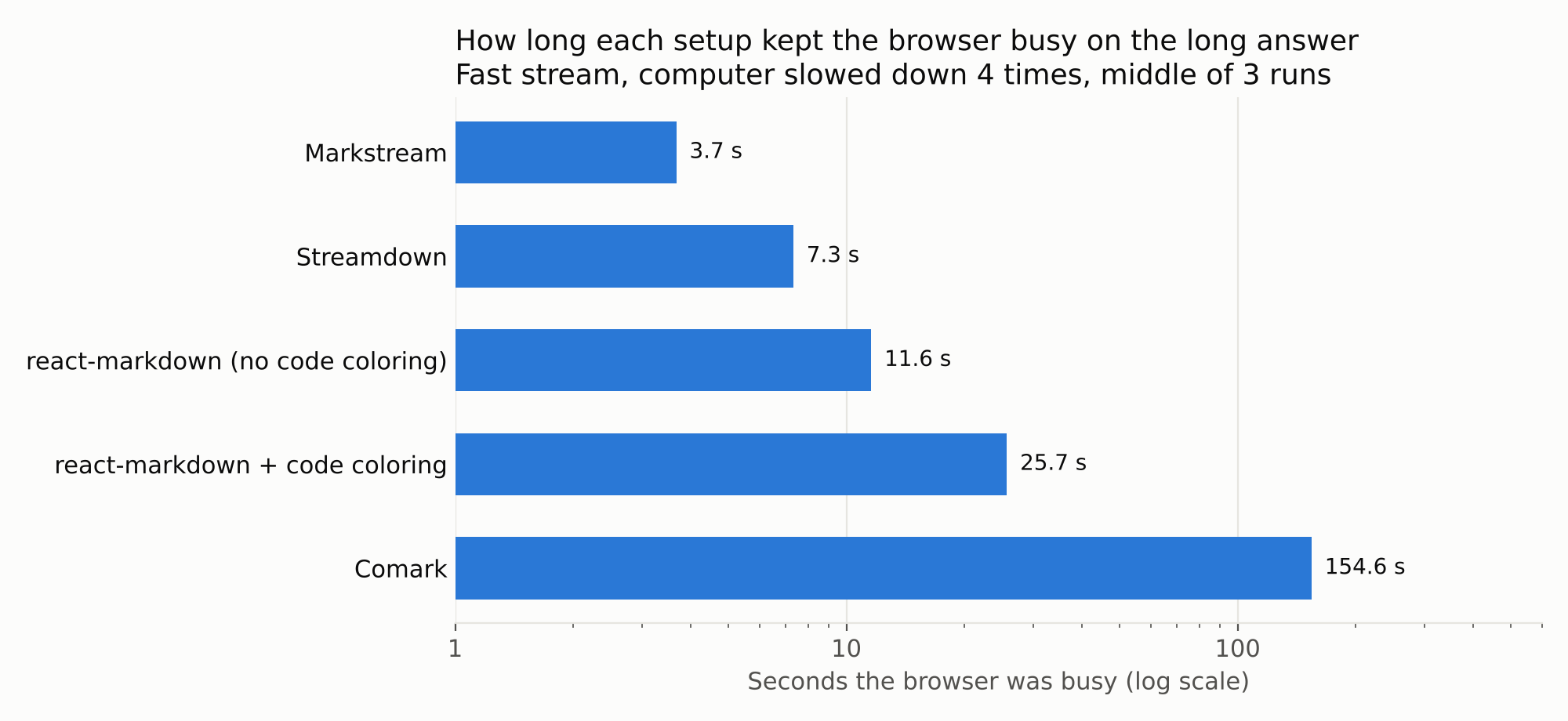
Markstream used the least main-thread time in this condition. Streamdown also reduced that work compared with the highlighted baseline, although its median worst-frame interval exceeded one second. That delay warrants investigation even when the total looks favorable.
Comark’s tested setup performed poorly on this fixture. Its adapter creates shiki() and mermaidPlugin() instances inside the component on every render. Before attributing the result to Comark itself, I would rerun it with stable plugin instances and profile the work. The existing measurements cannot isolate the cost of parsing, highlighting, plugin setup, or React scheduling.
In the long, accelerated recorded-timing test with throttling, the raw data gives median long-task counts of two for react-markdown with highlighting, zero for the base setup, seven for Streamdown, and one for Markstream.
A long task occupies the main thread for at least 50 ms. Shorter tasks can still delay frames, so a zero long-task count does not establish smooth animation. The highlighted react-markdown setup illustrates that distinction in frame-paced mode: it recorded zero median long tasks alongside 269 long frame gaps.
Mermaid adds another workload. In the diagram fixture’s accelerated recorded-timing, throttled condition, Streamdown and Markstream each recorded five median long frame gaps; Comark recorded three. Their median worst-frame intervals were 198.0 ms, 146.8 ms, and 193.9 ms, respectively.
Both react-markdown configurations recorded zero median long frame gaps, but they displayed the Mermaid source as code. They did not perform equivalent diagram rendering, so this result cannot rank them against the diagram-enabled setups.
The harness samples the bubble’s text on animation frames and looks for triple backticks, table-separator syntax, and a limited pattern involving emphasis markers. It does not inspect screenshots or comprehensively validate tables, diagrams, or layout stability.
Across the committed runs, the highest condition-level median share of flagged samples was about 0.62 percent for both react-markdown configurations and Streamdown. Markstream and Comark recorded zero under these checks.
Those results suggest that the specific artifacts checked here were uncommon. A broader correctness test would need deliberately split links, nested structures, unfinished fences, and visual inspection during the stream.
The repository reports the following gzip size estimates for each test page:
| Setup | Reported gzip estimate (KiB) |
|---|---|
| react-markdown | 112.8 |
| react-markdown + rehype-highlight | 164.5 |
| Comark | 165.6 |
| Streamdown | 218.9 |
| Markstream | 266.1 |
These are page-level estimates, including shared app code. The script divides bytes by 1,024, so the unit is KiB.
The calculation follows entry scripts and one level of static imports. It does not recursively traverse the dependency graph or capture every import form, and it excludes CSS and assets loaded later. Verify actual page requests or use a complete build-manifest traversal before treating these figures as initial download totals.
On the current estimate, Markstream is roughly 102 KiB larger than the highlighted baseline. That difference needs validation alongside the total assets loaded when code blocks and diagrams first appear.
The long fixture is relevant to coding assistants that return several code blocks in one answer. In this test, repeatedly processing the growing response with highlighting used enough main-thread time to produce frequent long frame gaps under throttling.
That makes input responsiveness worth measuring directly. A long main-thread task can delay a Stop button’s handler, but this harness did not measure interaction latency. Its results cover a single bubble with local fixtures; real devices, multiple messages, memory pressure, and network conditions need separate testing.
The replay modes also affect the comparison. Accelerating recorded timings changes the input pressure, while frame-paced delivery slows down with the renderer. Test the arrival pattern your application expects, including any batching between incoming tokens and React state updates.
Keep react-markdown as a candidate when your responses resemble the short and medium fixtures. The results support its use for those tested workloads, without establishing a universal character limit.
For long replies with highlighted code, Markstream is worth evaluating: its tested React configuration used the least main-thread time in the long, frame-paced, throttled condition. Check its download cost and behavior with the Markdown features your app uses.
Streamdown is another candidate, particularly if its react-markdown-style API fits your app. Investigate the large frame gap and test the code and Mermaid plugins you intend to ship.
Comark 0.7.0 needs a configuration-controlled rerun before I would make a recommendation from these results. Its current adapter is a useful starting point for profiling.
If you keep react-markdown, compare update batching and deferred highlighting against the baseline. Those changes were outside this benchmark, but they give you specific ways to test whether repeated processing is the bottleneck in your application.
My benchmark found a substantial cost in streaming a long, code-heavy reply through react-markdown with rehype-highlight under CPU throttling. Markstream and Streamdown reduced overall main-thread work in the tested configurations, with different tradeoffs in frame timing and estimated download size.
Use these fixtures as a starting point for measuring your own responses and device targets. For the stream-handling side of the implementation, see my earlier article on why useEffect breaks AI streaming responses in React.
Install LogRocket via npm or script tag. LogRocket.init() must be called client-side, not
server-side
$ npm i --save logrocket

// Code:

import LogRocket from 'logrocket';
LogRocket.init('app/id');
// Add to your HTML:

<script src="https://cdn.lr-ingest.com/LogRocket.min.js"></script>
<script>window.LogRocket && window.LogRocket.init('app/id');</script>

Learn how coding agents streamline TDD with automated tests, quality guardrails, and mutation testing to catch bugs and build reliable software.
We tested five AI code review tools for speed, setup, security, and code quality to compare their strengths and help you choose the right tool.
Learn how to generate a versioned component contract from Primer React, point Claude Code at it, and enforce it in CI. Includes benchmark results.

Compare five React toast libraries for features, bundle size, accessibility, performance, and React 19 compatibility.
Would you be interested in joining LogRocket's developer community?
Join LogRocket’s Content Advisory Board. You’ll help inform the type of content we create and get access to exclusive meetups, social accreditation, and swag.
Sign up now
 Learn more →