So, you shipped an AI feature that your team spent weeks testing. Internal outputs looked fine. Ready, set, launch.

A few weeks later, users start saying the outputs feel “off.” The feedback explains that it’s too generic, occasionally wrong, and not quite natural.
You dig in and the problem is… somewhere. The prompt? The context? The model? A data quality issue upstream?
You genuinely don’t know. So you tweak a bit of everything hoping that it’ll improve the quality. Sound familiar?
That loop of ship, notice issue, guess, and fix is how most AI product teams operate. It’s also one of the primary reasons why there’s so much “AI slop” out there: AI products that “work on paper,” but fail to make people stick.
The good news is that the fix has a name: evals, short for evaluations or evaluators.
When you build a traditional feature, such as a filter, checkout flow, or search experience, quality is mostly deterministic. Either the button works or it doesn’t. Same input, same broken output, catchable with a test.
AI products are probabilistic. Take an AI chat: quality depends on the exact input, conversation history, the model’s context, and token randomness.
Good luck writing a test for that.
What differentiates AI products from standard products is the need for evaluations, or evals for short. Many people confuse “evals” and “testing,” which is an expensive mistake, so let’s clear that up.
Testing is largely an infrastructure question: Does the system work as built? Does the API return a response? Does the UI render? Does the integration hold under load? These questions have deterministic answers, and your existing tooling handles them fine.
Evals ask a different kind of question: Is the system producing good outputs? Are those outputs accurate, relevant, and useful? That requires human judgment, or eventually a well-calibrated proxy for it.
An eval is a systematic process. You define what good looks like, rate a sample of outputs against it, and track performance over time. A gut check every now and then is not enough.
Let me illustrate the process based on a recent side project of mine.
BITS is an AI-powered audio news aggregator. Every night a pipeline runs: it pulls articles from RSS feeds and Hacker News, distills them into structured facts, plans episode outlines, writes 40 to 100 second audio scripts, checks quality, and converts them to audio. Users browse a library of short clips and build their own daily podcast.
The pipeline has six stages. We evaluate only one: the script. Not because the others don’t matter, but because the script is the last human-readable step before audio. Everything that goes wrong upstream shows up there. It’s where the whole pipeline’s quality collapses into one thing you can read and judge.
We built a small tool to export scripts as a CSV and collect verdicts, but a Google Sheet does the same job. The important part is the habit.
We had no idea what made a good script. That sounds strange in retrospect, but it’s true. We could feel when a script was off. What we couldn’t do was name it, and you can’t systematically fix what you can’t name.
So, we started marking scripts pass or fail with a one-line comment explaining why. No formal criteria, no taxonomy, just: Does this clear the bar, and if not, what specifically bothers you? The comments ranged from “too generic” to “outdated information.”
We collected two weeks of these, then fed them into an LLM and asked it to extract patterns. What came back was a taxonomy: 14 failure modes with names like generic_filler, unclear_framing, confusing_analogy, missing_quantification. Now we could flag scripts automatically, at scale, with specific labels instead of gut feel.
With actual data across more than 50 scripts, something clicked: Not all failure modes are equally fixable or equally damaging. Unclear framing appeared in passes and fails alike. Missing quantification was almost always in fails. That’s your ROI map. You don’t fix everything. You fix the thing blocking the most passes first:
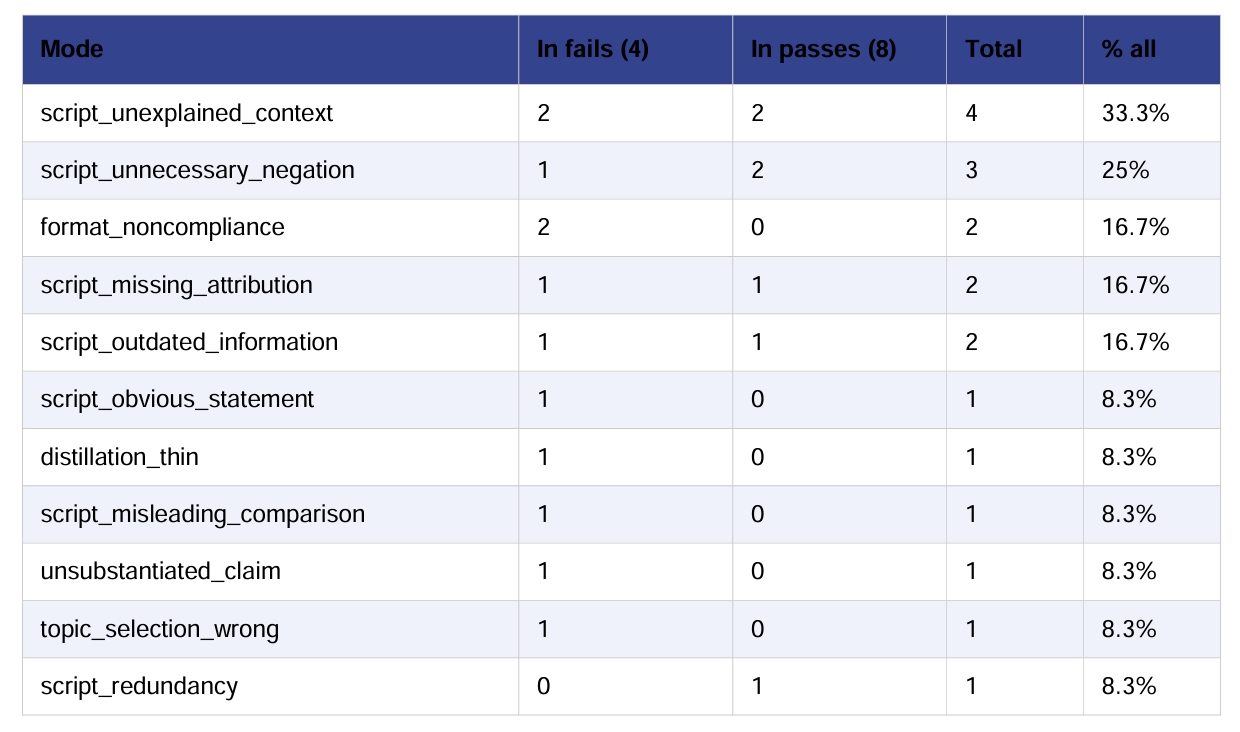
Sometimes the fix is a prompt change: a single instruction, done in an afternoon, and the failure mode drops 30 points in the next round. Missing_quantification nearly disappeared after we changed how the script was instructed to handle numbers and sources.
Sometimes you have to dig deeper. We had a persistent* generic_filler* problem – scripts padding content with vague, consequence-free sentences. We tried fixing the script writer prompt. It helped a bit, but the problem came back.
We traced it backward through the pipeline and found the root cause two stages earlier: the distillation stage was being asked to extract ” four to eight facts” from source articles that only had a headline and two sentences. It was inventing fillers to comply.
The script writer was padding because the input was thin. After, we tripled the amount of content we passed down the pipeline. The generic_filler failure mode dropped from 65 percent to 10 percent in the next round.
With multi-stage pipelines, where the failure shows up and where it originates are often different places. Evals make the failure visible by tracing backwards to tell you where to actually look.
We ran four to five rounds of evals every week. New failure modes appeared. Some because we’d changed the pipeline and introduced new patterns, some because an old fix destabilized something we thought we’d resolved.
The pass rate didn’t improve in a straight line. But the direction was always clear, because we were always looking at data:
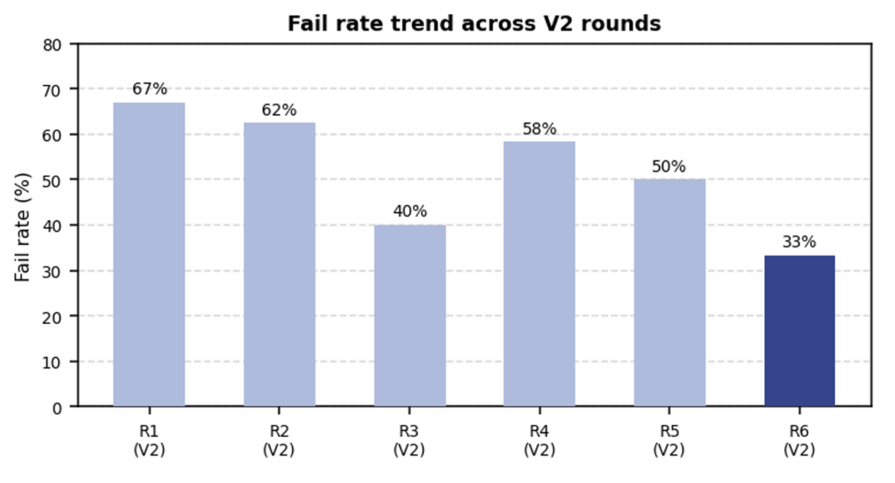
Twenty prompt iterations later, the outline planner, distiller, and script writer had each been rebuilt at least once based on what the evals surfaced. We overhauled our source selection criteria because evals kept flagging outdated information. We added a full editorial planning stage to the pipeline because the data showed we had a structural problem, not a writing problem.
None of that came from user feedback or gut feel. It came from looking at outputs systematically and asking: What specifically is failing, and why?
Good evals don’t require a platform or automation to start. Here’s the minimum viable process.
Export 20 to 30 recent outputs from your AI feature. Read them the way a user would. Write a note for anything that bothers you: what specifically feels off, or what you’d be embarrassed to show a real user. Don’t categorize yet. Just capture what you see.
Cluster your notes so common patterns become criteria. If five notes flag an output as vague or off-target, ask yourself: Does the output address what the user actually needed? AI can help a lot at this step.
A one-to-five scale sounds rigorous, but you’ll spend half the time arguing whether something is a three or a four and make a binary call anyway. Write the conditions explicitly:
| Criterion | Pass | Fail |
| Accuracy | No false or misleading claims | Contains factual errors or significant omissions |
| Relevance | Addresses what the user needed | Buries the point or answers the wrong question |
| Usability | User can act on it without re-reading | Requires effort to extract the useful part |
Pick whoever genuinely understands what good looks like for your users: the PM, a power user, or someone else close to the workflow. If you can’t point to a single person who understands the product and users well enough to set criteria, then you have a bigger problem to solve in your product org than evals.
“Fails because it opens with a company bio instead of the actual news.” “Fails because it references a term the user hasn’t heard before without explaining it.” These notes surface patterns across failures and become the raw material for your LLM judge later.
Set a ship threshold explicitly, such as “we don’t launch below an 80 percent pass rate on blocking criteria,” and treat that as a product decision. One counterintuitive signal: if 95 percent of your outputs are passing, your criteria probably aren’t strict enough.
A bar with real teeth should surface real failures. Around a 70 percent pass rate on a well-designed criterion means it’s doing its job.
Start with a spreadsheet, 30 samples, and a weekly hour. In the future, you can automate the process and include it as part of your CI/CD pipeline.
When outputs start failing, the question isn’t just what went wrong. It’s where the problem started. Triage from cheapest to most expensive:
Start with prompts. Then check what’s landing in your model and whether your RAG system is handling it. Look across the whole pipeline. Usually, the failure mode itself will hint at where the issue lies.
A model swap or fine-tuning is usually the last resort.
Manual evals work at the early stages, but at scale, with hundreds of outputs per day, multiple pipeline stages, human review becomes a bottleneck. That’s where LLM-as-a-judge comes in.
The concept is simple: You configure an LLM judge to replicate your human judgments by showing it accumulated pass/fail verdicts with written explanations. It evaluates new outputs at volume without you reviewing every single one.
The first time we tried this, the judge agreed with itself more than it agreed with us. We assumed a handful of examples would be enough. It wasn’t. We hadn’t calibrated. Here’s how to do it properly.
Each few-shot example should follow this structure: the input received, the output generated, a sentence explaining why it passes or fails, and the verdict. Those one-line critiques you’ve been writing when things fail? That’s your training data. A handful of real examples is enough for the model to start replicating the pattern at scale.
Binary prompts calibrate better than scaled ones. An LLM judge asked to score something from one to five will disagree with humans constantly because the difference between a three and a four is murky for both parties.
Pass or fail, with a one-sentence explanation, aligns much more reliably. If you’ve already built pass/fail criteria, this falls out naturally.
Label 50 to 100 examples yourself and run the judge on the same set. Track true positive rate, meaning failures the judge catches that you would catch, and true negative rate, meaning passes the judge approves that you would approve. Target at least 80 percent on both.
Three or four rounds of reviewing disagreements and updating examples typically gets you above 90 percent. If one failure type consistently misaligns, split it into a separate judge for that criterion. There’s no point in having an automated judge if you don’t agree with it.
LLM judges catch systematic patterns at volume. They miss outputs that technically score fine but would destroy user trust, such as the subtly wrong framing or the edge case that falls through the rubric.
Keep a human in the loop for spot checks. For example, the automated judge runs on every batch, flags failures, a human reviews a sample weekly, and the team recalibrates the judge when it drifts.
An eval that influences one product decision is worth more than a sophisticated automated pipeline that runs in the background. Start manually, build product culture around evals, and once they start working, automate parts of the process.
The bigger shift is treating eval results as product signals. If accuracy consistently fails for a specific query type, that’s a roadmap input. Maybe you need better-structured data, a richer retrieval layer, or a narrower scope for that use case.
If usability is passing but relevance keeps failing, that’s likely a prompt problem you can fix in a sprint. If pass rates are uniformly low across criteria, the feature probably isn’t ready to scale.
Before any significant launch, define your pass threshold explicitly. A 75 percent pass rate on blocking criteria might be acceptable for an internal v1. However, it probably isn’t acceptable for a consumer-facing feature that forms users’ first impression of your product. Making that call explicitly, rather than shipping and hoping, is a PM decision, not an engineering one.
The eval-driven iteration loop is simple: run evals, identify the failing criterion, trace it to the right bucket, make one targeted fix, rerun evals, and compare.
It might not sound sexy, but let’s face it, anyone can ship a feature quickly with AI-assisted development. Building AI products is about improving how well your AI handles the job it’s supposed to handle.
Here’s the thing that took me a while to internalize: The point of evals isn’t the score. It’s that they force you to regularly look at what your AI is actually producing, not what the demo showed or what internal testing suggested. The rubric, judge, and pass rate dashboard are all just mechanisms to make that happen consistently.
Most AI quality problems aren’t hard to diagnose once someone is actually looking. The bottleneck is almost always that nobody has been looking systematically. You end up making calls on what to build, ship, and fix based on user complaints and gut feel, which works fine until the quiet failures start to compound.
Remember that loop from the opening? Ship, notice issue, guess, fix. Evals don’t eliminate the loop. They replace the guessing with a signal. You still iterate, but now you know whether the iteration actually moved the needle.
Start with a rubric, a spreadsheet, one reviewer, and one hour a week. You don’t need a platform. Build the infrastructure after you’ve proven the habit is worth having.
At the end of the day, you can ship an AI feature without evals. Plenty of teams do. You just won’t know whether the thing you shipped is actually working.
Featured image source: IconScout
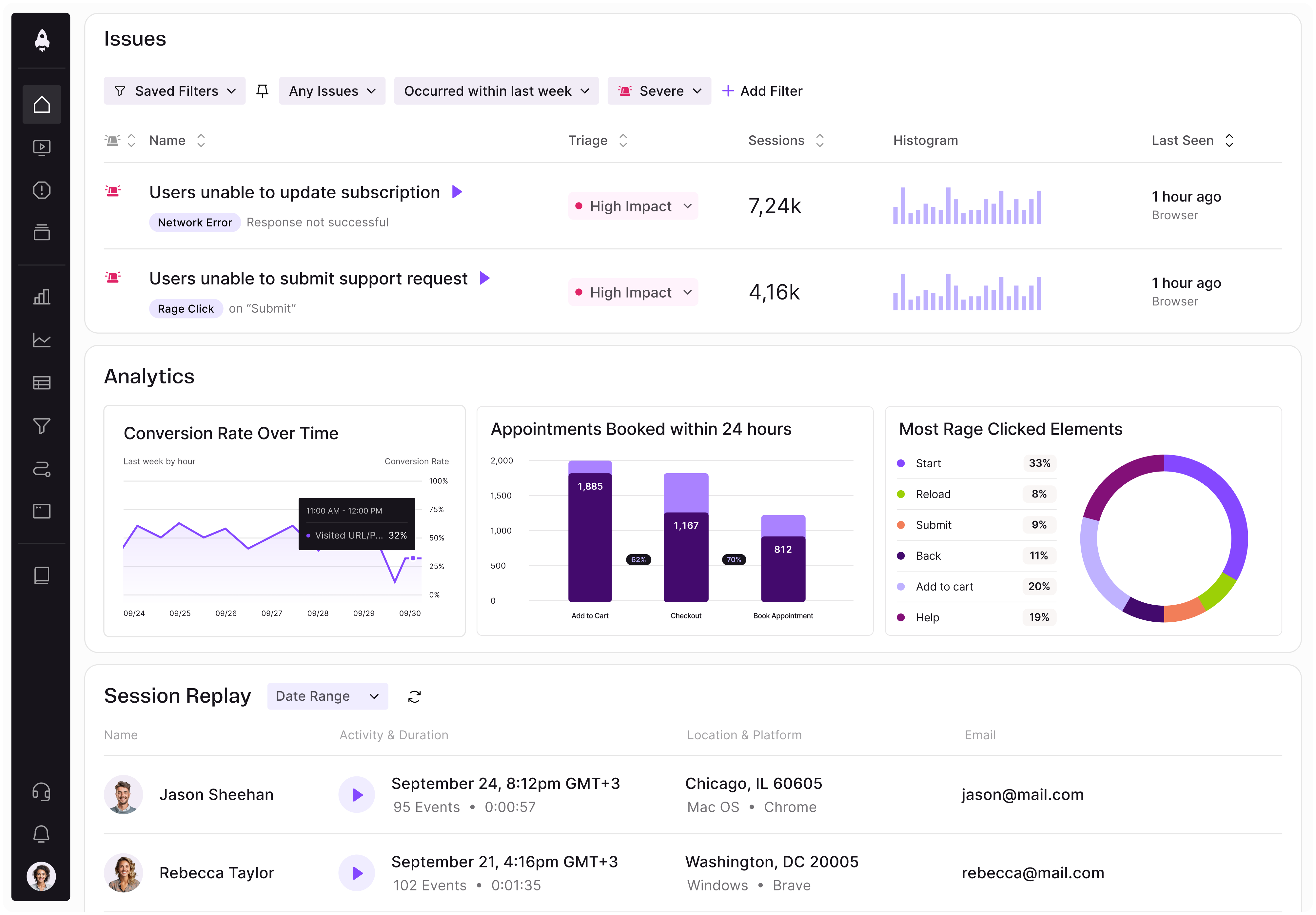
LogRocket identifies friction points in the user experience so you can make informed decisions about product and design changes that must happen to hit your goals.
With LogRocket, you can understand the scope of the issues affecting your product and prioritize the changes that need to be made. LogRocket simplifies workflows by allowing Engineering, Product, UX, and Design teams to work from the same data as you, eliminating any confusion about what needs to be done.
Get your teams on the same page — try LogRocket today.

Learn how product managers can design products for both humans and AI agents with reliable APIs, permissions, errors, and workflows.
See how a cloud storage PM uses LogRocket’s MCP to power Otto, an internal tool that flags bugs and tracks feature adoption automatically.

Learn how much AI fluency product managers need, which skills matter most, and why human judgment remains their competitive advantage.

Add a harm score to product prioritization to catch severe user consequences that RICE and other frameworks can miss.


 Learn more →