
There is an inside joke in frontend development, and pretty much every senior engineer who has ever shipped a chat UI knows it: CSS has no idea how tall your text is going to be until it renders it. Think about that.

Let’s assume you are building a messaging app. A user types “lol,” and the bubble wraps perfectly. Another user pastes a paragraph with emoji, Arabic mixed with English, and a code snippet. The bubble either overflows, clips, or does an awful thing where it renders one width, measures, recalculates, and jumps, all in front of the user’s eyes. You didn’t write bad code. CSS just wasn’t built for this.
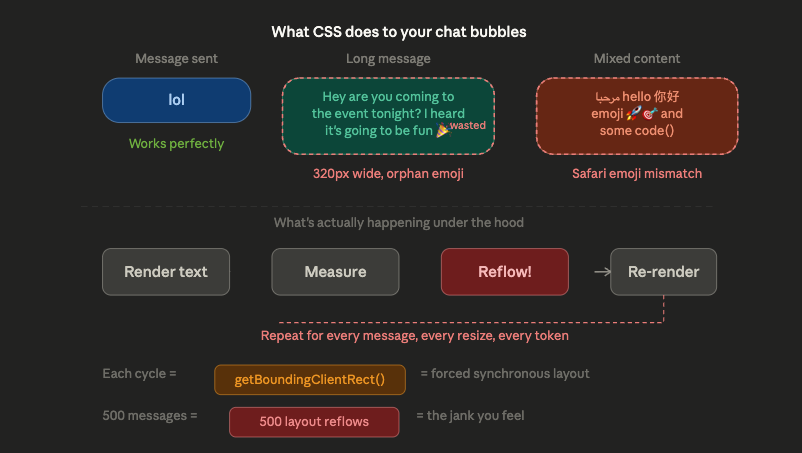
Cheng Lou, a core member of the original React team, just open-sourced a library called Pretext that changes things entirely. It measures text dimensions in pure TypeScript, before the DOM even knows the text exists.
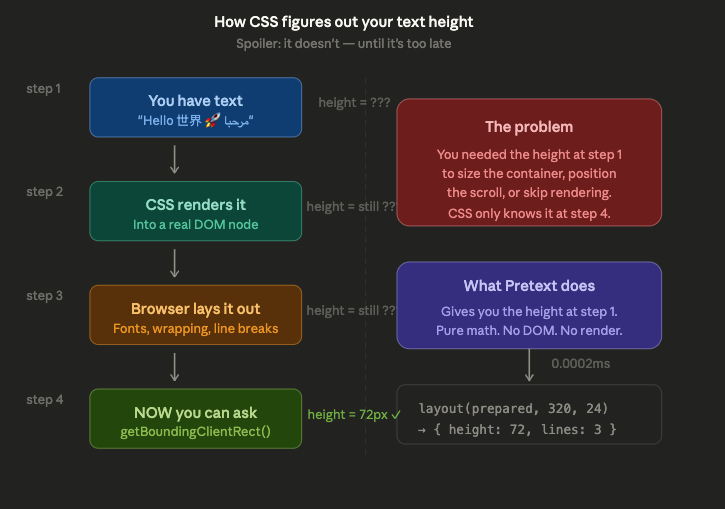
In this article, we’ll discuss why this problem exists in the first place, why it has been so annoyingly hard to solve, and then we’ll build the thing that CSS never could: perfectly shrinkwrapped chat bubbles in React, with a before-and-after that you can run yourself.
This is not a criticism. It is just history catching up with us. When CSS was designed in the mid-1990s, the web was a document delivery system. The layout model was built to solve a very specific problem: take a stream of text and flow it into a rectangular container, top to bottom, left to right. Headers, paragraphs, lists, and static content with predictable structure.
The box model reflects this perfectly. Every element is a rectangle. The browser figures out the dimensions after it processes the content. This is called the render-then-measure paradigm, and for documents, it works beautifully. Now the issue is that modern UIs are not documents.
A chat bubble needs to fit its content before the content is rendered. A virtualized feed needs to know the height of 10,000 messages without rendering any of them. A streaming AI response needs to reflow every time a new token arrives. These are all cases where you need measurements first and rendering second, and oh well, CSS gives you the opposite.
The CSS specification itself acknowledges the tension. Properties like intrinsic-size, contain-intrinsic-size, and content-visibility all exist because the working group recognizes that the render-then-measure model breaks down at scale. But they’re patches on top of a foundation that was never designed for pre-render measurement, and we’ve been working around this for a while now.
Let me show you the problem in code. Let’s say you’re building a chat component and you want each bubble to shrink-wrap its text, and it shouldn’t be wider than it needs to be, but not narrower than what breaks the text onto an extra line.
The natural instinct is to use CSS this way:
.bubble {
  max-width: 320px;
  width: fit-content;
  padding: 8px 12px;
  border-radius: 12px;
  background: #e3f2fd;
}
This gets you to 70%, but try these edge cases:
The typical JavaScript fix should look like this:
function useMeasuredHeight(ref) {
  const [height, setHeight] = useState(0);

  useEffect(() => {
    if (!ref.current) return;
    const observer = new ResizeObserver(entries => {
      setHeight(entries[0].contentRect.height);
    });
    observer.observe(ref.current);
    return () => observer.disconnect();
  }, [ref]);

  return height;
}
Looking at the code above, we render the text into a hidden element, measure it with getBoundingClientRect or ResizeObserver, then use that measurement to set the real element’s dimensions. Every single call to getBoundingClientRect or offsetHeight forces the browser to pause JavaScript execution and recalculate the entire page’s geometry. For a page with 500 chat messages, that’s 500 layout reflows. On a mid-range Android phone, you may feel it.
Let me walk you through the thinking the way I see fit. Assuming you are building a chat app. Could be for developers, or your church group doesn’t matter. The point is, your main view is a scrollable list of messages. And one day, a user opens a Bible study group chat with about 10,000 messages from the last six months.
You can’t render all 10,000 to the DOM. Your phone will blow up. So you do what every senior frontend engineer does: you reach for virtualization. Only render the messages currently in the viewport. Recycle the rest. Standard procedure.
To virtualize properly, you need to know the height of every single message before you render it. Why? Because the scrollbar has to be the right size. The scroll position has to land on the right message when someone jumps to “last week.” The viewport has to know which messages to mount and which to skip. All of that math depends on heights you don’t have yet.
So you start picking through your options, and they all have something wrong with them.
Option 1: Render every message off-screen, measure them, then throw them away – You’ve just done the work you were trying to avoid. Each measurement triggers a forced layout reflow. 10,000 messages, which is 10,000 reflows. Your initial render takes four seconds. The user closes the app
Option 2: Estimate – Set every message to “probably 80 pixels” and pray. The scrollbar is now lying to the user. They drag it halfway down expecting to land in June, and they end up in February😂. Every time a new message scrolls into view and turns out to be taller than your guess, the entire list jumps. Let’s go to option three, as this isn’t the best
Option 3: Measure on first render and cache – This is what most virtualization libraries do today. The first time a message appears, you measure it, save the height, and reuse that next time. You still pay the reflow cost, but it works
Option 4: Quit frontend and become a goat farmer – Honestly, the most appealing option some days
Here’s the thing nobody realized for fifteen years: you don’t actually need the DOM to know how tall a piece of text is. You just need the font, the text, and some math. The browser already knows how wide every character is in every font; that information lives in the font engine, completely separate from the layout engine. The DOM is just the messenger we’ve all been waiting for an answer.
Cheng Lou’s insight was to skip the messenger entirely. The width problem turned out to be the easy part. There’s an old browser API called Canvas, yes, the same one people use for HTML5 games, and inside it lives a function called measureText().
It’s been there forever. You give it a string and a font, and it gives you back the exact pixel width. It just asks the font engine directly. For some reason, almost nobody had thought to use it for layout.
But with the width, we are only half there. To know how tall a paragraph will be, you need to know where the lines break. And line breaking is genuinely hard; no wonder I didn’t think of it. Different browsers handle it differently. CJK languages break per character.
Thai has no spaces. Arabic flows right-to-left and merges punctuation into clusters. Emoji sequences with skin-tone modifiers count as one grapheme even though they’re technically five code points. Every one of these is a special case, and getting any of them wrong means your heights are wrong, which means your virtual scroll is wrong, which means you’ve shipped the same broken thing as everyone else.
Cheng didn’t write the line-breaking algorithm by hand. Or rather, he didn’t write all of it by hand. He set up a feedback loop: he had AI agents write candidate implementations, then ran them against actual browser output across hundreds of test cases, different fonts, different languages, different widths, different edge cases. When the algorithm disagreed with the browser, the AI would iterate. Fix the bug, rerun the tests, repeat. For weeks.
If you look at the Pretext repo today, you’ll see a CLAUDE.md file in the root and a corpora folder full of public domain texts in Thai, Chinese, Korean, Japanese, and Arabic. Those aren’t decorative. They’re how he proved the library actually works on text that breaks every assumption Western developers make about how language is supposed to behave.
What came out at the end was a 5KB library with two functions and 100% accuracy against browser ground truth. The kind of thing that looks obvious in hindsight and impossible in foresight.
With Pretext instead of rendering text and then asking the browser how big it is, Pretext figures out the dimensions using pure math, before the text ever touches the DOM.
Here’s the core idea in five lines:
import { prepare, layout } from '@chenglou/pretext';

const prepared = prepare('Your message text here 🚀', '16px Inter');
const { height, lineCount } = layout(prepared, 320, 24);
// height and lineCount are exact. No DOM. No reflow.
Two functions, and two phases:
prepare() does the expensive work once. It takes your text and font, normalizes whitespace according to the CSS spec, and segments the text using Intl.Segmenter (which handles CJK per-character breaks, spaceless Thai, Arabic RTL, and emoji sequences correctly), measures each segment using Canvas measureText, and caches everything by (segment, font) key. This runs in about 1–5ms.
layout() does the cheap work every time after that. It walks the cached segment widths, accumulates them until maxWidth is reached, and breaks to a new line, pure arithmetic. Each call takes roughly 0.0002ms. That is not a typo! You can call it on every animation frame, and it will not even register on a performance profile.
The separation is the insight. prepare() is the one-time font analysis. layout() is the hot path. When the user resizes the window, you don’t re-prepare; you just re-layout. When a new token streams in from an AI response, you prepare the new token once and lay it out as many times as you need.
And for the shrinkwrap problem specifically, Pretext gives you something CSS has never offered — walkLineRanges:
import { prepareWithSegments, walkLineRanges } from '@chenglou/pretext';

const prepared = prepareWithSegments(message, '16px Inter');

let maxLineWidth = 0;
walkLineRanges(prepared, 320, line => {
  if (line.width > maxLineWidth) maxLineWidth = line.width;
});
// maxLineWidth is now the tightest container width
// that fits the text without adding extra lines
This is the multiline shrinkwrap that has been missing from the web. You can binary search a “nice” width value by repeatedly calling walkLineRanges and checking whether the line count stays the same.
The demos I’m about to walk you through are all runnable. Clone this repo, run npm run dev, and you’ll see four examples side by side. Each one uses Pretext to solve a problem you’ve probably already noticed together at least once.
You need heights before you render, but the DOM won’t give you heights until you do; that’s just the problem, so typically the workaround is to render into a hidden node, measure, then render for real, two renders per item, each one forcing a layout reflow.

With Pretext, you compute every height in a single pass before mounting anything:
const heights = messages.map(msg => {
  const prepared = prepare(msg.text, '16px Inter');
  const { height } = layout(prepared, BUBBLE_MAX_WIDTH, LINE_HEIGHT);
  return height + PADDING + LABEL_HEIGHT;
});
That’s it. One prepare() per message, and one layout() call, then you have 10,000 messages computed in under 2ms. The scrollbar is exact on load, jump-to-message lands perfectly, and none of it required rendering a single DOM node to figure out the math.
Same principle, different shape. A masonry layout needs column heights to pack cards efficiently. If your card heights are wrong, the cards overlap or leave gaps.
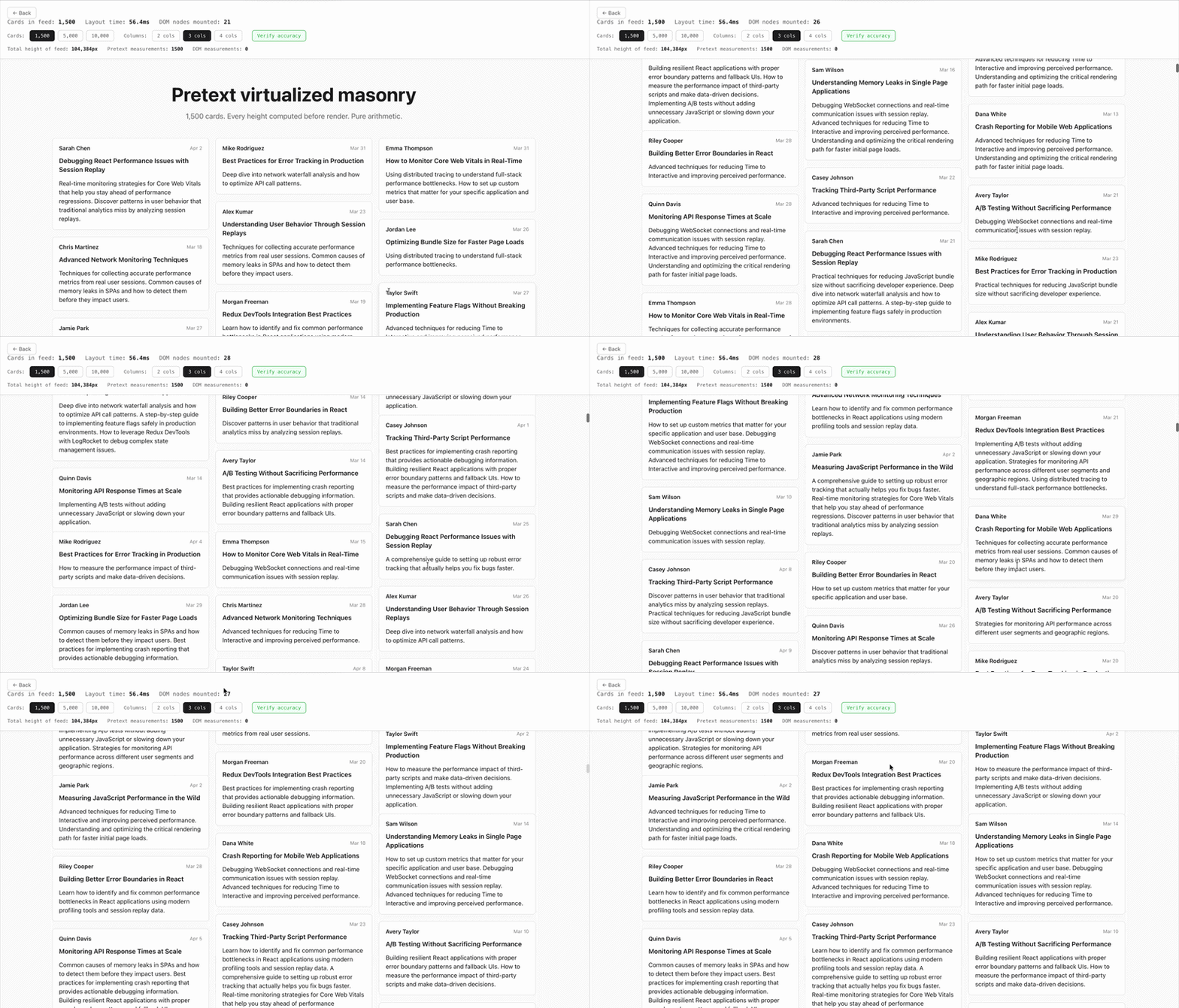
const prepared = prepareWithSegments(textContent, FONT);
const { lineCount } = layout(prepared, contentWidth, LINE_HEIGHT);
const cardHeight = lineCount * LINE_HEIGHT + CARD_CHROME;
prepareWithSegments instead of prepare here because the masonry demo also uses walkLineRanges for visual inspection. The important thing is layout() costs 0.0002ms. You call it 10,000 times, and it barely registers on a performance profile.
This is the one that made me understand what Pretext actually unlocks. CSS has width: fit-content, but it has no concept of “find the narrowest width that keeps the same number of lines.” That’s a thing you’ve never been able to do in CSS, full stop.
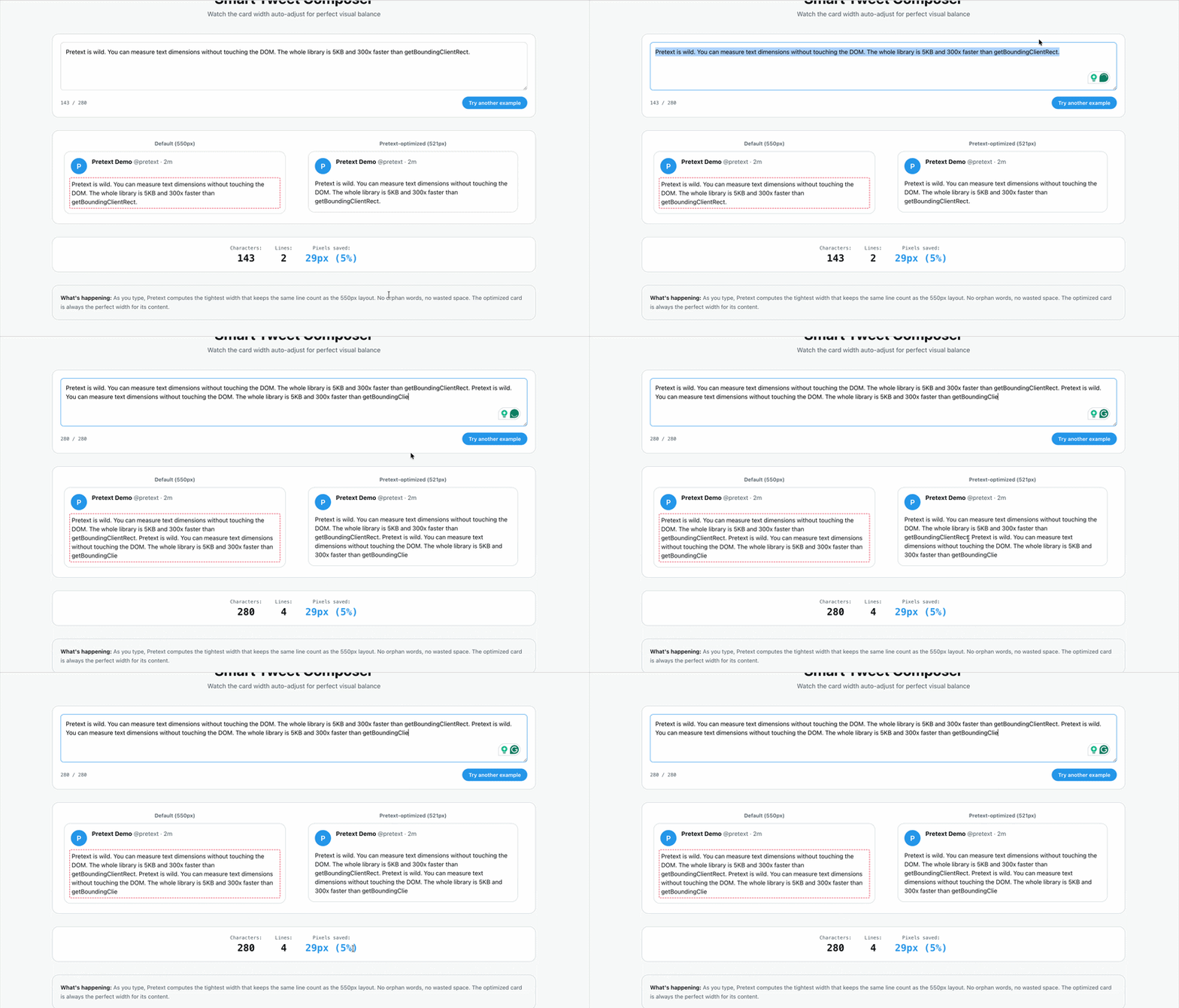
Pretext gives you walkLineRanges, which tells you the actual rendered width of each line. Combine that with layout() in a binary search, and you get the tightest container that doesn’t orphan a single word:
const prepared = prepareWithSegments(text, FONT);
const { lineCount: targetLines } = layout(prepared, MAX_WIDTH, LINE_HEIGHT);

// measure wasted space at max width
let longestLine = 0;
walkLineRanges(prepared, MAX_WIDTH, (line) => {
  if (line.width > longestLine) longestLine = line.width;
});

// binary search for the tightest width that keeps the same line count
let lo = MIN_WIDTH, hi = MAX_WIDTH;
while (hi - lo > 1) {
  const mid = (lo + hi) / 2;
  const { lineCount } = layout(prepared, mid, LINE_HEIGHT);
  if (lineCount <= targetLines) hi = mid; else lo = mid;
}
// hi is now the optimal width
Every call to layout() in that loop is pure arithmetic. The whole binary search is cheaper than a single getBoundingClientRect. In the demo, you can type anything and watch the card snap to exactly the right width in real time.
This one is the demo that CSS literally cannot do. Not “can do but awkwardly”, cannot do. CSS gives you one font size per element. Canvas gives you whatever you want per draw call. The Pinch-Type Reader renders each line of an article at a different font size based on how close it is to the center of the screen. Lines at your focal point are large. Lines at the edges shrink and fade. 60fps, momentum scrolling, no jank.
Pretext is what makes this practical. Without it, you’d have to implement line-breaking yourself, for every font, every language, every viewport width. Instead:

const prepared = prepareWithSegments(ARTICLE, `${baseFontSize}px Inter`);
const { lines } = layoutWithLines(prepared, canvasWidth - PADDING * 2, lineHeight);
That gives you an array of line objects with their text and widths, broken correctly for Inter at whatever size and width you’re working with. Then in the rAF loop, you render each line at whatever font size the fisheye math produces, without touching Pretext again, because the layout is already done:
for (let i = 0; i < lines.length; i++) {
  const dist = Math.abs(lineCenter - focusY);
  const t = Math.exp(-(dist * dist) / (2 * SIGMA * SIGMA));
  const renderedSize = baseFontSize * (1 + (MAX_SCALE - 1) * t);

  ctx.font = `${renderedSize}px Inter, system-ui, sans-serif`;
  ctx.fillText(lines[i].text, PADDING_X, baseline);
}
The layout only re-runs when the base font size changes (Cmd+scroll) or the window resizes. The render loop is just math and canvas draw calls. This is what the separation of prepare() and layout() is actually for: you pay the layout cost once and then draw as many times as you want, at any scale you want.
The through-line across all four demos is the same thing: Pretext separates the question “how does this text break?” from the question “what do I do with it once I know?” prepare() answers the first question once. Everything else, virtualization, masonry, shrinkwrap, fisheye, is just arithmetic after that.
The four demos above aren’t edge cases. They’re the things you’re probably building right now. A chat app, a feed, a compose box, or a reader. Every one of them has been quietly held back by the same issue, and most of us didn’t even know it was there until Cheng Lou pulled it out.
Go play with it. Clone the demos. Type into the tweet composer and watch the card snap. Scroll through 10,000 chat messages and realize your scrollbar isn’t lying to you for the first time. Maybe after that, you can install the 5KB library and use it at work or in your next project.
As web frontends get increasingly complex, resource-greedy features demand more and more from the browser. If you’re interested in monitoring and tracking client-side CPU usage, memory usage, and more for all of your users in production, try LogRocket.

LogRocket lets you replay user sessions, eliminating guesswork around why bugs happen by showing exactly what users experienced. It captures console logs, errors, network requests, and pixel-perfect DOM recordings — compatible with all frameworks.
LogRocket's Galileo AI watches sessions for you, instantly identifying and explaining user struggles with automated monitoring of your entire product experience.
Modernize how you debug web and mobile apps — start monitoring for free.

React 19.3 and modern CSS make several common patterns unnecessary. Here are 10 features that let you delete old React code and simplify your apps.

Explore the top AI agent frameworks in 2026 and compare how they handle tools, memory, structured output, streaming, and step limits.

Tailwind CSS component libraries provide pre-built components to streamline the process of developing aesthetic, user-friendly interfaces.

Jev is a TypeSafe AI decision model that classifies messages using typed questions. Learn how to use it for routing to reduce unnecessary LLM calls.
Hey there, want to help make our blog better?
Join LogRocket’s Content Advisory Board. You’ll help inform the type of content we create and get access to exclusive meetups, social accreditation, and swag.
Sign up now


 Learn more →




