

Testing a Nuxt application is not the same as testing plain Vue components. Vue is a frontend framework for building reactive UI components; Nuxt is a full-stack framework built on top of Vue that adds server-side rendering, file-based routing, auto-imports, layouts, middleware, Nitro server routes, and deployment conventions.

That extra framework layer is exactly why Nuxt testing needs its own strategy. A standard Vue unit test can verify a component’s props and rendered output, but it will not automatically reproduce Nuxt behavior like useFetch, NuxtLink, route middleware, or auto-imported composables. For that, you need the right combination of Vitest environments and Nuxt-specific testing utilities.
In this guide, we’ll test a Nuxt application across three tiers:
We’ll use @nuxt/test-utils, @vue/test-utils, @testing-library/vue, Vitest, and Playwright-powered browser utilities. If you are new to mocks, spies, and Vitest’s core APIs, my previous LogRocket guide on advanced Vitest testing and mocking covers those fundamentals in more depth.
Plain Vue testing libraries like @vue/test-utils and @testing-library/vue work well when you are testing ordinary Vue components. They fall short when the component depends on Nuxt-specific behavior.
Here are a few common examples:
useFetch and useAsyncData: These composables are tied to Nuxt’s data-fetching lifecycle and SSR contextuseRoute, navigateTo, and route middleware: Routing behavior is difficult to reproduce accurately outside a Nuxt runtimeThe following diagram shows how Vitest concepts, Vue testing utilities, and Nuxt-specific testing APIs fit together:
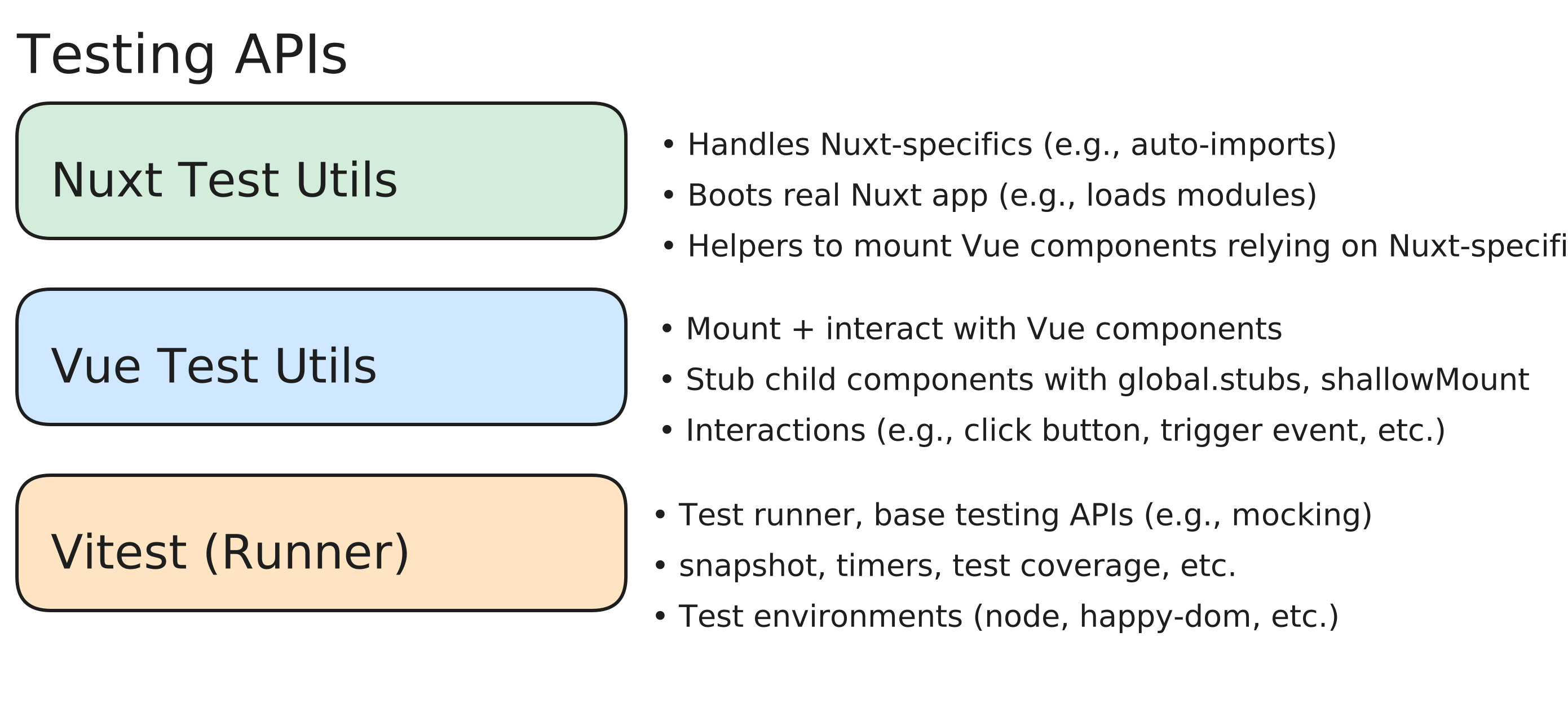
The practical takeaway is simple: use the lightest test environment that still reproduces the behavior you need. Pure Vue behavior can stay in a fast unit test. Nuxt behavior usually needs the nuxt Vitest environment. Full user journeys need e2e coverage.
This article comes with a companion GitHub project that you can follow along with. It is a Nuxt 4 implementation of the popular TodoMVC app, and its tests live in the test folder.
Although the examples use Nuxt 4, most of the testing ideas also apply to current Nuxt 3 projects that use @nuxt/test-utils. Before copying code into an existing app, check your installed Nuxt and @nuxt/test-utils versions against the official docs because imports and setup details can change between major versions.
The companion project uses three testing tiers. Each tier has a different balance of speed, setup complexity, and confidence:
| Test tier | Vitest environment | Main tools | Best for | Tradeoff |
|---|---|---|---|---|
| Unit | happy-dom, jsdom, or node |
Vitest, @testing-library/vue, @vue/test-utils |
Pure functions, simple components, isolated composables, isolated store logic | Fastest, but may miss Nuxt integration bugs |
| Nuxt runtime / integration | nuxt |
@nuxt/test-utils/runtime, mountSuspended, renderSuspended, registerEndpoint, mockNuxtImport |
Components or pages that depend on Nuxt routing, auto-imports, modules, useFetch, or middleware |
More realistic, but more setup |
| E2E | node with @nuxt/test-utils/e2e |
setup, $fetch, fetch, createPage, Playwright |
Full flows involving SSR, routing, API handlers, hydration, and browser interaction | Highest confidence, but slowest and most brittle |
You usually need all three kinds of tests. The goal is not to optimize for one tier, but to choose the lowest tier that gives you enough confidence.
Every test runs in a specific Vitest environment. In a Nuxt app, the environment determines how much of the Nuxt runtime is available:
happy-dom or jsdom: Lightweight browser-like environments for unit tests. There is no Nuxt runtime, so you must stub Nuxt-specific APIs like NuxtLink, useRouter, or auto-imported composables yourself.nuxt: Boots a Nuxt runtime inside Vitest. Auto-imports work, Nuxt modules initialize, and @nuxt/test-utils/runtime APIs like registerEndpoint become available. This is useful for integration-style tests that need Nuxt context but not a real browser.node with @nuxt/test-utils/e2e: Starts a real Nuxt server for e2e tests. You can call real server API routes, fetch SSR-rendered HTML, or create a Playwright page for browser interaction.One important constraint: @nuxt/test-utils/runtime and @nuxt/test-utils/e2e run in different environments, so keep runtime tests and e2e tests in separate files.
According to Nuxt’s testing documentation, @nuxt/test-utils ships with optional peer dependencies so you can choose the DOM environment and e2e runner that fit your project. For the examples in this article, install the following packages:
npm i --save-dev @nuxt/test-utils vitest @vue/test-utils @testing-library/vue happy-dom playwright-core
Nuxt’s official setup command includes @nuxt/test-utils, vitest, @vue/test-utils, happy-dom, and playwright-core. We also install @testing-library/vue because several examples below use Testing Library’s render and screen APIs.
Use playwright-core when you want Nuxt test-utils to drive Playwright through its own e2e utilities. If your project uses Playwright’s standalone test runner instead, Nuxt also supports @playwright/test, but that is a separate setup path.
Next, create a Vitest config. The following example organizes tests into unit, nuxt, and e2e projects:
// vitest.config.mts
import vue from '@vitejs/plugin-vue'
import { defineVitestProject } from '@nuxt/test-utils/config'
import { defineConfig } from 'vitest/config'

export default defineConfig({
  test: {
    projects: [
      {
        plugins: [vue()],
        test: {
          name: 'unit',
          include: ['test/unit/**/*.test.ts'],
          environment: 'happy-dom',
        },
      },
      {
        test: {
          name: 'e2e',
          include: ['test/e2e/**/*.test.ts'],
          environment: 'node',
        },
      },
      await defineVitestProject({
        test: {
          name: 'nuxt',
          include: ['app/**/*.test.ts', 'test/nuxt/**/*.test.ts'],
          environment: 'nuxt',
        },
      }),
    ],
  },
})
This is not the only valid structure. You can also colocate test files next to the components they test and route them into the correct Vitest project through file globs. What matters is that tests using Nuxt runtime utilities run in the nuxt environment, while e2e tests using @nuxt/test-utils/e2e run in node.
happy-domMost projects should have many unit tests because they are fast, isolated, and easy to run on every code change. Use them for logic that does not require Nuxt context:
In the companion project, unit tests live in test/unit/ and run in the happy-dom environment. The following Headline.test.ts file renders a simple Vue component without any Nuxt runtime:
import { render, screen } from '@testing-library/vue'
import Headline from '../../app/components/Headline.vue'

describe('Headline', () => {
  it('renders the provided text', () => {
    render(Headline, {
      props: { text: 'todos' },
    })

    expect(screen.getByText('todos')).toBeDefined()
  })
})
This test does not need the nuxt environment because it only verifies that a Vue component renders a prop. There is no NuxtLink, useFetch, auto-imported Nuxt composable, route middleware, or plugin dependency involved.
For more unit testing examples, see my previous guide to Vitest testing and mocking.
nuxt environmentUse the nuxt Vitest environment when the component or page depends on Nuxt-specific behavior. This gives your test access to a Nuxt runtime, including auto-imports, Nuxt modules, routing, and runtime test utilities.
mountSuspended for components that need Nuxt contextmountSuspended, provided by @nuxt/test-utils/runtime, wraps mount from @vue/test-utils and mounts a component inside the Nuxt environment. Use it when a component depends on async setup, Nuxt plugins, Nuxt injections, or routing behavior.
The following TodoItem.test.ts example verifies that a todo item renders a NuxtLink to the correct detail route:
import { mountSuspended } from '@nuxt/test-utils/runtime'
import TodoItem from '~/components/TodoItem.vue'

const mockTodo = {
  id: 42,
  label: 'Buy groceries',
  date: '2026-02-13',
  checked: false,
}

describe('TodoItem', () => {
  it('renders a NuxtLink pointing to /todos/:id', async () => {
    const wrapper = await mountSuspended(TodoItem, {
      props: { todo: mockTodo },
    })

    const link = wrapper.findComponent({ name: 'NuxtLink' })
    expect(link.exists()).toBe(true)
    expect(link.props('to')).toBe('/todos/42')
  })
})
You could test this with plain mount, but you would need to wire up the router manually:
it('using mount() requires much more manual setup', () => {
  const router = createRouter({
    history: createMemoryHistory(),
    routes: [
      { path: '/todos/:id', component: { template: '<div />' } },
      { path: '/:pathMatch(.*)*', component: { template: '<div />' } },
    ],
  })

  const wrapper = mount(TodoItem, {
    props: { todo: mockTodo },
    global: { plugins: [router] },
  })

  const link = wrapper.findComponent({ name: 'NuxtLink' })
  expect(link.exists()).toBe(true)
  expect(link.props('to')).toBe('/todos/42')
  expect(link.attributes('href')).toBe('/todos/42')
})
The second test is not wrong, but it obscures the intent. The test is about the component’s route output, not about manually creating a router. mountSuspended keeps the setup closer to how the component actually runs in Nuxt.
registerEndpointNuxt’s data-fetching APIs require a different mocking strategy than ordinary browser fetch calls.
The root page in the demo app fetches todos with useFetch:
const { data } = await useFetch<Todo[]>('/api/todos')
In Nuxt, useFetch and $fetch do not always call the global browser fetch API directly. During SSR, Nuxt can resolve routes like /api/todos through Nitro server handlers, bypassing HTTP. That means mocking global fetch may not affect a useFetch call.
Use registerEndpoint to mock Nuxt server API routes inside the Nuxt runtime:
import { registerEndpoint, renderSuspended } from '@nuxt/test-utils/runtime'
import { screen } from '@testing-library/vue'
import IndexPage from '~/pages/index.vue'

const mockTodos = [
  { id: 1, label: 'Buy groceries', date: '2026-02-11', checked: false },
  { id: 2, label: 'Walk the dog', date: '2026-02-10', checked: true },
  { id: 3, label: 'Write tests', date: '2026-02-09', checked: false },
]

registerEndpoint('/api/todos', () => mockTodos)

describe('Index Page', () => {
  it('renders todos from the mocked /api/todos endpoint', async () => {
    await renderSuspended(IndexPage)

    expect(screen.getByText('Buy groceries')).toBeDefined()
    expect(screen.getByText('Walk the dog')).toBeDefined()
    expect(screen.getByText('Write tests')).toBeDefined()
  })
})
registerEndpoint is an API function, not a macro. The first argument is the route, and the second argument returns the response that the Nuxt data-fetching call should receive.
Because this example uses @testing-library/vue, it uses renderSuspended, which plays the same role as mountSuspended but follows Testing Library’s rendering model.
mockComponentSometimes you want to test a component that renders another nontrivial child component. In the demo app, TodoList renders multiple TodoItem components. To focus the test on the list behavior, we can replace TodoItem with a small stub.
@nuxt/test-utils provides mockComponent for this:
// TodoList.test.ts
import { mockComponent, renderSuspended } from '@nuxt/test-utils/runtime'
import { screen } from '@testing-library/vue'
import { defineComponent, h } from 'vue'
import TodoList from '~/components/TodoList.vue'
import { useTodosStore } from '~/stores/todos'

const mockTodos = [
  { id: 1, label: 'Buy groceries', date: '2026-02-11', checked: false },
  { id: 2, label: 'Walk the dog', date: '2026-02-10', checked: true },
  { id: 3, label: 'Write tests', date: '2026-02-09', checked: false },
]

mockComponent('~/components/TodoItem.vue', () =>
  defineComponent({
    props: { todo: Object },
    setup(props) {
      return () =>
        h('div', {
          'data-testid': 'todo-item-stub',
          'todo-label': props.todo?.label,
        })
    },
  })
)

describe('TodoList', () => {
  it('renders one stub per todo seeded into the store', async () => {
    const store = useTodosStore()
    store.setTodos(mockTodos)

    await renderSuspended(TodoList)

    const stubs = screen.getAllByTestId('todo-item-stub')
    expect(stubs).toMatchSnapshot()
  })
})
The TodoList component reads from the Pinia store, so the test seeds the store before rendering the component.
The render-function version above is explicit, but it can be hard to read. Because the Nuxt test environment includes Vue’s runtime template compiler, you can write the stub more simply with a template:
mockComponent('~/components/TodoItem.vue', {
  props: ['todo'],
  template: '<div data-testid="todo-item-stub" :todo-label="todo?.label" />',
})
One caveat: mockComponent is a macro that is hoisted to the top of the file. In practice, that means it is best for file-level stubs. If you need a different stub per test, use a global stub through @vue/test-utils instead:
// TodoList.globalstub.test.ts
test('renders one stub per todo seeded into the store', async () => {
  const store = useTodosStore()
  store.setTodos(mockTodos)

  await renderSuspended(TodoList, {
    global: {
      stubs: {
        TodoItem: {
          props: ['todo'],
          template: '<div data-testid="todo-item-stub" :todo-label="todo?.label" />',
        },
      },
    },
  })

  const stubs = screen.getAllByTestId('todo-item-stub')
  expect(stubs).toMatchSnapshot()
})
A good rule of thumb: use mockComponent when one file-level stub is enough, and use global stubs when each test needs more flexibility.
mockNuxtImportNuxt auto-imports composables like useRuntimeConfig, useState, and useHead. When you need to replace one of those imports in a test, use mockNuxtImport.
For example, the default layout reads the app title from runtime config:
// layouts/default.vue
const { appTitle } = useRuntimeConfig().public
To test this layout, mock useRuntimeConfig and return a custom value:
// DefaultLayout.test.ts
import { mockNuxtImport, renderSuspended } from '@nuxt/test-utils/runtime'
import { screen } from '@testing-library/vue'
import DefaultLayout from '~/layouts/default.vue'

mockNuxtImport('useRuntimeConfig', () => {
  return () => ({
    app: { baseURL: '/' },
    public: {
      appTitle: 'My Custom Title',
    },
  })
})

describe('Default Layout', () => {
  test('renders the appTitle from useRuntimeConfig in the headline', async () => {
    await renderSuspended(DefaultLayout)

    expect(screen.getByText('My Custom Title')).toBeDefined()
  })
})
mockNuxtImport can only be used once per imported symbol per test file because it is transformed into a hoisted vi.mock. When you need to reuse the same mock with different values, pair it with vi.hoisted.
Consider this useDarkMode composable, which relies on Nuxt’s auto-imported useState:
// app/composables/useDarkMode.ts
import themeConfig from '@/utils/theme'

export const useDarkMode = () => {
  const isDark = useState('darkMode', () => true)
  const theme = computed(() =>
    isDark.value ? themeConfig.DARK : themeConfig.LIGHT,
  )

  function toggleDarkMode() {
    isDark.value = !isDark.value
  }

  return { isDark, theme, toggleDarkMode }
}
In the test, create one hoisted mock function and set its return value inside each test:
// useDarkMode.test.ts
import { mockNuxtImport } from '@nuxt/test-utils/runtime'
import { ref } from 'vue'
import themeConfig from '~/utils/theme'
import { useDarkMode } from '~/composables/useDarkMode'

const { useStateMock } = vi.hoisted(() => ({ useStateMock: vi.fn() }))

mockNuxtImport('useState', () => useStateMock)

describe('useDarkMode', () => {
  test('starts in dark mode and toggles to light', () => {
    useStateMock.mockReturnValue(ref(true))

    const { isDark, theme, toggleDarkMode } = useDarkMode()

    expect(isDark.value).toBe(true)
    expect(theme.value).toEqual(themeConfig.DARK)

    toggleDarkMode()

    expect(isDark.value).toBe(false)
    expect(theme.value).toEqual(themeConfig.LIGHT)
  })

  test('starts in light mode and toggles to dark', () => {
    useStateMock.mockReturnValue(ref(false))

    const { isDark, theme, toggleDarkMode } = useDarkMode()

    expect(isDark.value).toBe(false)
    expect(theme.value).toEqual(themeConfig.LIGHT)

    toggleDarkMode()

    expect(isDark.value).toBe(true)
    expect(theme.value).toEqual(themeConfig.DARK)
  })
})
The important pattern is this pair:
const { useStateMock } = vi.hoisted(() => ({ useStateMock: vi.fn() }))

mockNuxtImport('useState', () => useStateMock)
That gives you one hoisted mock that each test can configure independently.
Dynamic routes are a common source of integration bugs in Nuxt because they combine several framework features: route params, middleware, server fetching, error handling, and head management.
The demo project has a todo detail page at pages/todos/[id].vue:
// pages/todos/[id].vue
import type { Todo } from '@/stores/todos'

definePageMeta({
  middleware: ['validate-todo-id'] as const,
})

const route = useRoute()
const todoId = Number(route.params.id)

const { data: todo, error: fetchError } = await useFetch<Todo>(`/api/todos/${todoId}`)

if (fetchError.value) {
  throw fetchError.value
}

useHead({
  title: `Todo: ${todo.value?.label}`,
})
This page uses multiple Nuxt features:
definePageMeta to attach route middlewareuseRoute to read the dynamic id parameteruseFetch to load a todo from a Nitro server routeuseHead to set the page titleStart with the happy path. The test registers a mock server endpoint, renders the page at /todos/42, and verifies both the visible content and useHead call:
// DetailPageHappyPath.test.ts
import { mockNuxtImport, registerEndpoint, renderSuspended } from '@nuxt/test-utils/runtime'
import { screen } from '@testing-library/vue'
import { describe, expect, test, vi } from 'vitest'
import type { Todo } from '~/stores/todos'
import DetailPage from '~/pages/todos/[id].vue'

const mockTodo: Todo = {
  id: 42,
  label: 'Buy groceries',
  date: '2026-03-26',
  checked: false,
}

registerEndpoint('/api/todos/42', () => mockTodo)

const { useHeadMock } = vi.hoisted(() => ({ useHeadMock: vi.fn() }))

mockNuxtImport('useHead', () => useHeadMock)

describe('Detail Page - happy path', () => {
  test('renders the todo title and date and sets the title correctly', async () => {
    await renderSuspended(DetailPage, { route: '/todos/42' })

    expect(screen.getByText('Buy groceries')).toBeDefined()
    expect(screen.getByText(/2026-03-26/)).toBeDefined()
    expect(useHeadMock).toHaveBeenCalledWith({ title: 'Todo: Buy groceries' })
  })
})
For good coverage, also test the error paths. If the route contains a valid integer but the server route has no matching todo, the page should throw a 404:
// DetailPageErrorCase.test.ts
import { registerEndpoint, renderSuspended } from '@nuxt/test-utils/runtime'
import { screen } from '@testing-library/vue'
import type { NuxtError } from '#app'
import DetailPage from '~/pages/todos/[id].vue'
import ErrorPage from '~/error.vue'

registerEndpoint('/api/todos/999', () => {
  throw createError({
    statusCode: 404,
    statusMessage: 'Todo with id 999 not found',
  })
})

test('throws a 404 when the todo does not exist', async () => {
  await expect(
    renderSuspended(DetailPage, {
      route: '/todos/999',
    }),
  ).rejects.toMatchObject({
    statusCode: 404,
    statusMessage: 'Todo with id 999 not found',
  })
})
If the route parameter is not a valid integer, the middleware should throw a 400:
test('throws a 400 when the todo id is not a valid integer', async () => {
  await expect(
    renderSuspended(DetailPage, { route: '/todos/abc' }),
  ).rejects.toMatchObject({
    statusCode: 400,
    statusMessage: 'Invalid todo id: "abc"',
  })
})
You can also test the error page itself:
test('renders status code, message, and back to home button', async () => {
  await renderSuspended(ErrorPage, {
    props: {
      error: { status: 500, message: 'Something went wrong' } as NuxtError,
    },
  })

  expect(screen.getByText('500')).toBeDefined()
  expect(screen.getByText('Something went wrong')).toBeDefined()
  expect(screen.getByText('← Back to home')).toBeDefined()
})
The previous examples test middleware through a real page render. That gives you confidence that the middleware is wired into the route correctly. Sometimes, though, you only want to test the middleware logic quickly.
For that, import the middleware directly and call it with minimal fake route objects.
Here is the middleware implementation:
// app/middleware/validate-todo-id.ts
export default defineNuxtRouteMiddleware((to) => {
  const id = to.params.id as string

  if (!/^\d+$/.test(id)) {
    abortNavigation(
      createError({
        statusCode: 400,
        statusMessage: `Invalid todo id: "${id}"`,
      }),
    )
  }
})
The test mocks abortNavigation and createError, creates fake route objects, and verifies both the allowed and rejected cases:
// ValidateTodoIdMiddleware.test.ts
import { mockNuxtImport } from '@nuxt/test-utils/runtime'
import type { RouteLocationNormalized } from 'vue-router'
import validateTodoId from '~/middleware/validate-todo-id'

const { abortNavigationMock, createErrorMock } = vi.hoisted(() => {
  return {
    abortNavigationMock: vi.fn(),
    createErrorMock: vi.fn((err) => err),
  }
})

mockNuxtImport('abortNavigation', () => abortNavigationMock)
mockNuxtImport('createError', () => createErrorMock)

function fakeRoute(id: string): RouteLocationNormalized {
  return { params: { id } } as unknown as RouteLocationNormalized
}

const homeRoute = {
  name: 'index',
  path: '/',
  fullPath: '/',
} as RouteLocationNormalized

describe('validate-todo-id middleware', () => {
  beforeEach(() => {
    vi.clearAllMocks()
  })

  test('allows navigation for a valid numeric id', () => {
    validateTodoId(fakeRoute('42'), homeRoute)

    expect(abortNavigationMock).not.toHaveBeenCalled()
  })

  test('aborts navigation for a non-numeric id', () => {
    validateTodoId(fakeRoute('abc'), homeRoute)

    expect(createErrorMock).toHaveBeenCalledWith(
      expect.objectContaining({
        statusCode: 400,
        statusMessage: 'Invalid todo id: "abc"',
      }),
    )
    expect(abortNavigationMock).toHaveBeenCalled()
  })

  test('aborts navigation for an empty id', () => {
    validateTodoId(fakeRoute(''), homeRoute)

    expect(createErrorMock).toHaveBeenCalledWith(
      expect.objectContaining({
        statusCode: 400,
        statusMessage: 'Invalid todo id: ""',
      }),
    )
    expect(abortNavigationMock).toHaveBeenCalled()
  })
})
Use isolated middleware tests for fast validation of route rules. Keep at least one page-level runtime test to confirm the middleware is actually connected to the route.
node environmentE2E tests exercise the full Nuxt stack. Unlike happy-dom tests, they do not assert against a fake DOM. Unlike nuxt environment tests, they can run against a real Nuxt server and, if needed, a real browser.
Use e2e tests for critical flows where SSR, routing, middleware, API handlers, hydration, and browser interaction all need to work together.
setup and $fetchBy the time you reach this tier, you usually leave most mocking behind. You do not use registerEndpoint or mockNuxtImport because a real Nuxt server starts before the suite runs and tears down afterward.
The simplest e2e smoke test starts the Nuxt server and fetches the SSR-rendered HTML:
// e2e/app.test.ts
import { $fetch, setup } from '@nuxt/test-utils/e2e'

describe('app', async () => {
  await setup()

  test('checks availability of input', async () => {
    const html = await $fetch('/')
    expect(html).toContain('What needs to be done?')
  })
})
When using setup, await it at the top of the describe block before any tests run. The server stays up for the duration of the suite and is torn down automatically.
$fetch and fetch@nuxt/test-utils/e2e provides two similar APIs for server requests:
| API | Use it when | Return behavior |
|---|---|---|
$fetch |
You care about parsed HTML or JSON payloads | Uses ofetch, parses responses, and throws on non-2xx status codes |
fetch |
You need the raw response object or status code | Returns a response so you can assert status, headers, and body |
createPage |
You need real browser interaction | Creates a Playwright page connected to the running Nuxt server |
For example, use $fetch when you only need the payload:
test('fetches the homepage', async () => {
  const html = await $fetch<string>('/')

  expect(html).toContain('<!DOCTYPE html>')
})

test('fetches JSON API endpoint', async () => {
  const data = await $fetch('/api/health')

  expect(data).toEqual({ status: 'ok' })
})
Use fetch when you need to assert on response status codes:
// e2e/api.test.ts
import { $fetch, fetch, setup } from '@nuxt/test-utils/e2e'
import type { FetchError } from 'ofetch'

interface Todo {
  id: number
  label: string
  date: string
  checked: boolean
}

describe('server API routes', async () => {
  await setup()

  test('POST /api/todos creates a todo and returns status 201', async () => {
    const response = await fetch('/api/todos', {
      method: 'POST',
      headers: { 'Content-Type': 'application/json' },
      body: JSON.stringify({ label: 'test todo' }),
    })

    const todo: Todo = await response.json()

    expect(response.status).toBe(201)
    expect(todo.label).toBe('test todo')
    expect(todo.checked).toBe(false)

    const todos = await $fetch<Todo[]>('/api/todos')
    expect(todos.length).toBe(1)
  })

  test('GET /api/todos/:id returns the todo by id', async () => {
    const created = await $fetch<Todo>('/api/todos', {
      method: 'POST',
      body: { label: 'Fetch by id' },
    })

    const todo = await $fetch<Todo>(`/api/todos/${created.id}`)

    expect(todo.id).toBe(created.id)
    expect(todo.label).toBe('Fetch by id')
  })

  test('GET /api/todos/:id returns 404 for an unknown id', async () => {
    const error = await $fetch<never>('/api/todos/0').catch((e: FetchError) => e)

    expect(error.status).toBe(404)
  })
})
createPageFor real browser interaction, use createPage from @nuxt/test-utils/e2e. This gives you a configured Playwright page connected to the Nuxt test server.
The following test creates a todo item, navigates to its detail page, and returns home:
import { createPage, fetch, setup, url } from '@nuxt/test-utils/e2e'
import { beforeEach, describe, expect, test } from 'vitest'

describe('navigation flow', async () => {
  await setup({ browser: true })

  beforeEach(async () => {
    await fetch('/api/todos', {
      method: 'PATCH',
      body: JSON.stringify({ checked: true }),
      headers: { 'Content-Type': 'application/json' },
    })

    await fetch('/api/todos', { method: 'DELETE' })
  })

  test('adds a todo, navigates to detail page, then back home via headline', async () => {
    const page = await createPage()
    await page.goto(url('/'), { waitUntil: 'domcontentloaded' })

    const todoLabel = 'nav test'
    await page.fill('.todo-input input', todoLabel)
    await page.keyboard.press('Enter')

    const itemLink = page.locator('.item-label', { hasText: todoLabel })
    await itemLink.click()

    await page.waitForSelector('.todo-detail__title')
    const titleText = await page.locator('.todo-detail__title').textContent()
    expect(titleText?.trim()).toBe(todoLabel)

    await page.locator('.layout-headline-link').click()
    await page.waitForSelector('.todo-input input', { state: 'visible' })
  })
})
This test writes data, so it must clean up between runs. The example checks existing todos and deletes them before each test to keep the test isolated.
If you want to debug in a visible browser, set headless to false:
await setup({
  browser: true,
  browserOptions: {
    type: 'chromium',
    launch: { headless: false, slowMo: 600 },
  },
})
Nuxt’s Playwright integration also supports hydration-aware navigation. For example:
await page.goto(url('/'), { waitUntil: 'commit' })
await page.goto(url('/'), { waitUntil: 'hydration' })
This is useful when debugging hydration mismatches. A common example is locale-sensitive formatting: the server renders a date or currency value using the Node.js locale, while the browser formats it using the user’s system locale. The SSR HTML and client output differ, causing Vue to patch the DOM and report a hydration mismatch.
Here are the most common mistakes to watch for when building a Nuxt test suite:
| Mistake | Why it causes problems | Better approach |
|---|---|---|
Mocking global fetch for a useFetch page |
Nuxt may resolve server routes through Nitro rather than browser fetch |
Use registerEndpoint in the nuxt environment |
Using mount for Nuxt-dependent components |
Routing, plugins, and async setup may not be initialized | Use mountSuspended or renderSuspended |
Treating mockNuxtImport like a normal per-test mock |
It is hoisted, so multiple implementations in one file can be tricky | Use vi.hoisted or split tests into separate files |
| Forgetting to clear mocks | Call history leaks between tests | Run vi.clearAllMocks() in beforeEach |
| Overusing e2e tests | They are slower and harder to maintain | Use unit or Nuxt runtime tests when they provide enough confidence |
| Mixing runtime and e2e utilities in one file | They require different Vitest environments | Keep runtime and e2e tests in separate files |
Nuxt ships with @nuxt/test-utils, which builds on Vue Test Utils and provides APIs for testing Nuxt-specific behavior like auto-imports, routing, SSR, and server routes.
This guide covered three testing tiers:
As a rule of thumb, start with the lowest tier that gives you sufficient confidence. Use unit tests for pure logic, Nuxt runtime tests when framework behavior matters, and e2e tests for critical flows where the whole stack needs to work together.
That balance gives you a Nuxt test suite that is fast enough to run often, realistic enough to catch integration bugs, and focused enough to maintain as your application grows.

Explore how looping Transformers reuse layers and compare with traditional GPT models in reasoning tasks.

Learn how one solo developer used multiple Grok Bot AI agents to test, report bugs, fix code, and monitor deployments — hands-free, on a $30/month plan.

Compare the top AI development tools and models of October 2026. View updated rankings, feature breakdowns, and find the best fit for you.

Can AI agents debug React bugs across browsers? I tested Chrome, Safari, and Firefox debugging MCPs on four bugs to compare their findings, workflows, and effectiveness.
Hey there, want to help make our blog better?
Join LogRocket’s Content Advisory Board. You’ll help inform the type of content we create and get access to exclusive meetups, social accreditation, and swag.
Sign up now

 Learn more →




