

When a user signs up for a large platform, one of the first operations is checking whether their desired username is already taken. At a small scale, this is simple: query the database and return a yes or no answer. At scale, that same check can become expensive, especially if your signup form validates availability as users type.

A Bloom filter can reduce that pressure by acting as a fast, in-memory pre-check before the database. It does not replace the database or your unique constraint. Instead, it answers one useful question very quickly: “Is this username definitely not in the existing set?” If the Bloom filter says no, you can skip the database lookup for the availability check. If it says the username might exist, you fall back to the database for confirmation.
This approach works well for username availability because Bloom filters can produce false positives, but not false negatives for items that have actually been inserted into the filter. In practice, that means a new username may occasionally trigger an unnecessary database lookup, but the system will not incorrectly accept a duplicate username as long as the final write still goes through the database.
The repository associated with this article contains the code for the examples below.
The simplest way to check username availability is to query the users table:
SELECT 1 FROM users WHERE username = 'alice' LIMIT 1;
For a small app, this is perfectly reasonable. But for a large platform, username checks can generate a surprising amount of read traffic. A signup form may validate availability repeatedly as users type, and most of those checks will be for usernames that do not exist.
Even with proper indexing, every lookup still needs to travel through the database path. Caching helps when the same usernames are checked repeatedly, but it is less useful for random or newly typed usernames that have never been requested before.
The question is not whether the database can answer this query. It can. The question is whether the database should be the first system asked every time.
A Bloom filter is a probabilistic data structure used to test whether an item may belong to a set. It stores membership information in a compact bit array instead of storing the full values themselves.
When you add a value, such as a username, the Bloom filter runs that value through multiple hash functions. Each hash function maps the username to a position in the bit array, and the filter sets those positions to 1.
When you check a username later, the filter runs the same hash functions again:
| Bloom filter result | Meaning | What to do next |
|---|---|---|
One or more bits are 0 |
The username is definitely not in the filter | Treat it as available for the read-time availability check |
All required bits are 1 |
The username is probably in the filter | Confirm with the database |
| False positive | The filter says “probably present,” but the username is not in the database | Perform one unnecessary database lookup |
| False negative | Standard Bloom filters do not produce this for values that were inserted | If this happens in production, the filter is stale or incorrectly maintained |
This tradeoff is the main reason Bloom filters are useful: they can rule out non-membership with certainty, while membership is only approximate.
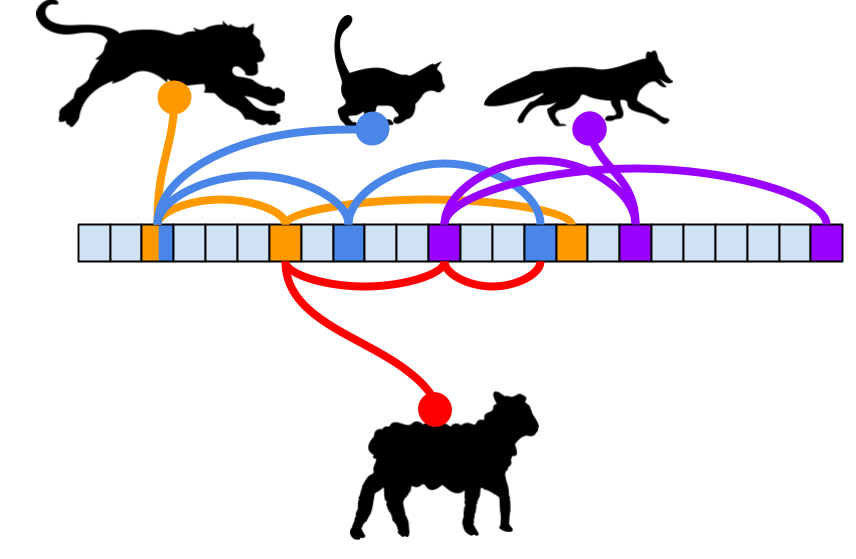
You can think of each inserted username as leaving a small trail of footprints across a bit array. Each hash function marks one position, so inserting a username like "alice" stamps a specific pattern of bits.
When you check "alice" later, the filter follows the same trail. If any footprint is missing, the username was never inserted into the filter.
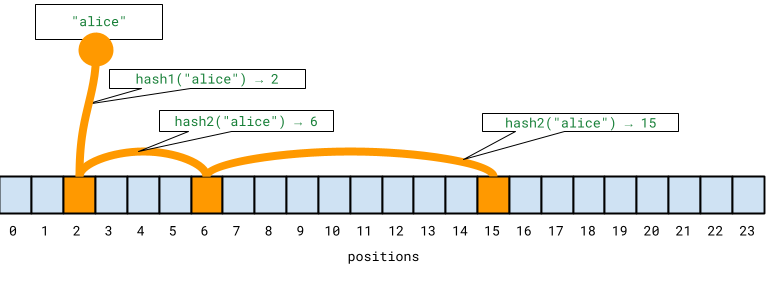
As more usernames are added, these trails start to overlap. Different usernames may set some of the same bits. Eventually, the filter may find that all required bits are already set for a username that was never inserted. That is a false positive.
In a username availability system, this is acceptable. A false positive only means the application performs a database lookup to confirm whether the username is actually taken. It does not mean the system accepts duplicate usernames.
To make the idea concrete, we can build a small prototype using the rbloom library. rbloom is a Python Bloom filter library implemented in Rust, and it exposes an API that feels similar to Python’s built-in set.
Install it first:
pip install rbloom
Then create a Bloom filter configured for 1 million expected usernames with a 1 percent false-positive rate:
from rbloom import Bloom

EXPECTED_USERS = 1_000_000
FALSE_POSITIVE_RATE = 0.01

bf = Bloom(EXPECTED_USERS, FALSE_POSITIVE_RATE)
The first argument is the expected number of items. The second controls the target false-positive rate. Lowering the false-positive rate requires more memory, but it reduces the number of unnecessary database lookups.
Next, generate a mock user base and insert each username into the filter:
existing_users = [f"user_{i}" for i in range(EXPECTED_USERS)]

for username in existing_users:
    bf.add(username)
For this prototype, we can represent the database with a Python set. In a real application, this would be your users table, identity service, or another persistent data store:
user_db = set(existing_users)

def check_database(username: str) -> bool:
    return username in user_db
Now we can define the availability check:
def is_username_available(username: str) -> bool:
    if username not in bf:
        return True

    return not check_database(username)
This function uses the Bloom filter as the first gate:
True without querying the database.Try it with a new username and an existing username:
print(is_username_available("new_user"))  # True
print(is_username_available("user_42"))   # False
For most new usernames, the Bloom filter can answer the availability check without touching the database.
Bloom filters are probabilistic, so it is worth observing false positives directly. We can generate random usernames that are not part of the original dataset and count how often the Bloom filter reports that they may already exist:
import random
import string

def random_username(length: int = 10) -> str:
    return "".join(random.choices(string.ascii_lowercase, k=length))

false_positives = 0
tests = 10_000

for _ in range(tests):
    username = random_username()

    if username in bf and username not in user_db:
        false_positives += 1

print(f"False positives: {false_positives}/{tests}")
With a configured false-positive rate of 1 percent, the number of false positives should stay relatively small and predictable across a large enough sample.
The important point is that false positives do not compromise correctness in this design. They only send the request to the database, which is the same path the system would have used without the Bloom filter.
The performance benefit comes from moving most negative checks out of the database path. In a username availability flow, most requested usernames are not already taken. A Bloom filter can reject those non-members quickly and in memory.
That gives you two advantages:
| Benefit | Why it matters |
|---|---|
| Fewer database reads | Most unavailable-check requests for new usernames never hit the database |
| Lower latency | In-memory checks are faster than round trips to a persistent data store |
| Predictable memory usage | Bloom filters store bit patterns, not full usernames |
| Safe fallback path | Ambiguous cases still go to the database |
This pattern is especially useful when the cost of a false positive is low. In this case, the cost is only an extra database lookup. The cost of accepting a duplicate username, however, would be much higher, so the database must remain the final source of truth.
The Python example shows the core idea, but a production username availability system needs additional safeguards.
A Bloom filter should not be the final authority for creating usernames. It should speed up availability checks, but the database should still enforce a unique constraint on the username column.
That final constraint protects you from race conditions. For example, two users could check the same available username at nearly the same time. Even if both read-time checks return “available,” only one final insert should succeed.
A standard Bloom filter does not produce false negatives for items that were inserted into it. However, a production system can still return incorrect results if the filter is stale.
For example, if a username is written to the database but not added to the Bloom filter, a later availability check may incorrectly skip the database. To avoid this, update the filter when usernames are created, and consider rebuilding it periodically from the source of truth.
Standard Bloom filters do not support deleting individual items. If your product lets users delete accounts or change usernames, the filter may continue to report old usernames as “probably present.”
That does not create a correctness problem, because the database fallback will confirm availability. But it can reduce the filter’s usefulness over time by increasing unnecessary database checks. If deletions matter for your use case, consider a counting Bloom filter, a Cuckoo filter, or a scheduled rebuild.
A local in-memory Bloom filter may work for a single service instance, but many production systems run across multiple instances or regions. In that case, each instance needs a consistent view of the filter.
Tools such as Redis probabilistic data structures can help here. Redis supports scalable Bloom and Cuckoo filters for membership checks, which makes it a practical option when you need a shared filter layer across services.
Bloom filters are a good fit when:
They are not a good fit when:
For username availability, the fit is strong because a false positive only causes an extra database check, while a negative result can safely avoid one.
Bloom filters are a practical way to reduce database load when checking username availability at scale. By accepting a controlled probability of false positives, you can bypass many unnecessary lookups while preserving correctness through a database fallback.
The key is to use the Bloom filter for what it does best: ruling out usernames that definitely do not exist in the filter. It should not replace the database, the unique index, or the final insert-time check. Instead, it acts as a fast pre-check that keeps the common path lightweight and leaves the database for the cases that actually need confirmation.
That tradeoff appears across many large-scale systems. Bloom filters are useful whenever a compact, approximate membership test can prevent more expensive work downstream, from database lookups to duplicate event filtering to blockchain log searches.

Learn how one solo developer used multiple Grok Bot AI agents to test, report bugs, fix code, and monitor deployments — hands-free, on a $30/month plan.

Compare the top AI development tools and models of October 2026. View updated rankings, feature breakdowns, and find the best fit for you.

Can AI agents debug React bugs across browsers? I tested Chrome, Safari, and Firefox debugging MCPs on four bugs to compare their findings, workflows, and effectiveness.

React 19.3 and modern CSS make several common patterns unnecessary. Here are 10 features that let you delete old React code and simplify your apps.
Would you be interested in joining LogRocket's developer community?
Join LogRocket’s Content Advisory Board. You’ll help inform the type of content we create and get access to exclusive meetups, social accreditation, and swag.
Sign up now

 Learn more →



