
The future is here, and you’re loving every single second of writing your React code with Hooks. You’re all like “useThis” and “useThat” and are having the time of your life implementing cross-cutting concerns with this new React feature.

Then, out of nowhere, your manager tells you to fix a bug in some existing code. You know, that legacy crap you wrote in December of 2018? You realize you have to touch class components with lifecycles and this. That hook you wrote yesterday would fix the bug in a second, but since class components don’t support hooks, you’re stuck doing it “the old way”. What should you do?
This article is going to show you two techniques to deal with these situations — creating HOCs from your hooks, and creating hooks from your HOCs.
Wait, what’s a HOC?
A HOC — or a higher order component — is a function that accepts a component, and returns a component that renders the passed component with a few extra props or capabilities. The React docs does a great job explaining them in more detail.
Why would you ever want to make your fancy, sleek Hooks into clunky, ol’ HOCs? Sounds like we’re going backwards, right? Well, not really. We’re providing a migration path that lets us use our hook logic in class components. This way, we can start using new code in old components without rewriting potentially complex logic.
Implementing a HOC that provide your Hook API is pretty straight forward.
const withMyHook = Comp => () => {
  const hookData = useMyHook();
  return <Comp ...{hookData} {...props} />;
}
In the code shown above, we create a function that receives a component as an argument and returns a new function component. This function component calls our hook and passes any return values to the passed component.
If your hook implementation requires static data, you can pass it in as an argument:
const withMyHook = hookArgs => Comp => () => {
  const hookData = useMyHook(hookArgs);
  return <Comp {...hookData} {...props} />;
}
Here, we pass our static data to our HOC, which returns another HOC. It’s known as currying, and it’s basically functions returning functions. You’d use it like this:
const MyDecoratedComponent = withMyHook({
  some: ‘value’
})(MyComponent);
If your hook needs data based on props, you might want to consider using the render prop pattern instead:
const MyHook = (props) => {
 const hookData = useMyHook(props.relevantData);
 return props.children(hookData);
}
Your implementation may vary — but you can put different implementations into the module you store your hook in, and export the HOC version or render prop version as named exports.
You would use these HOCs the same way you’d use any HOC — wrap the component you want to enhance with it.
class MyComponent extends React.Component {
 …
};
const MyEnhancedComponent = withMyHook(MyComponent);
If you’re working with any non-trivial app, your code base is most likely going to contain a few HOCs and render props components. As you continue to refactor your app, you might want to migrate away from these and recreate your existing shared logic as hooks.
The biggest challenge in rewriting your HOCs and render prop based components to hooks is the change in paradigms. Previously, you thought in terms of lifecycle methods — now you’ll have to think about renders and how props are changing.
The always great Donavon created this nice chart that tries to map the two paradigms together:
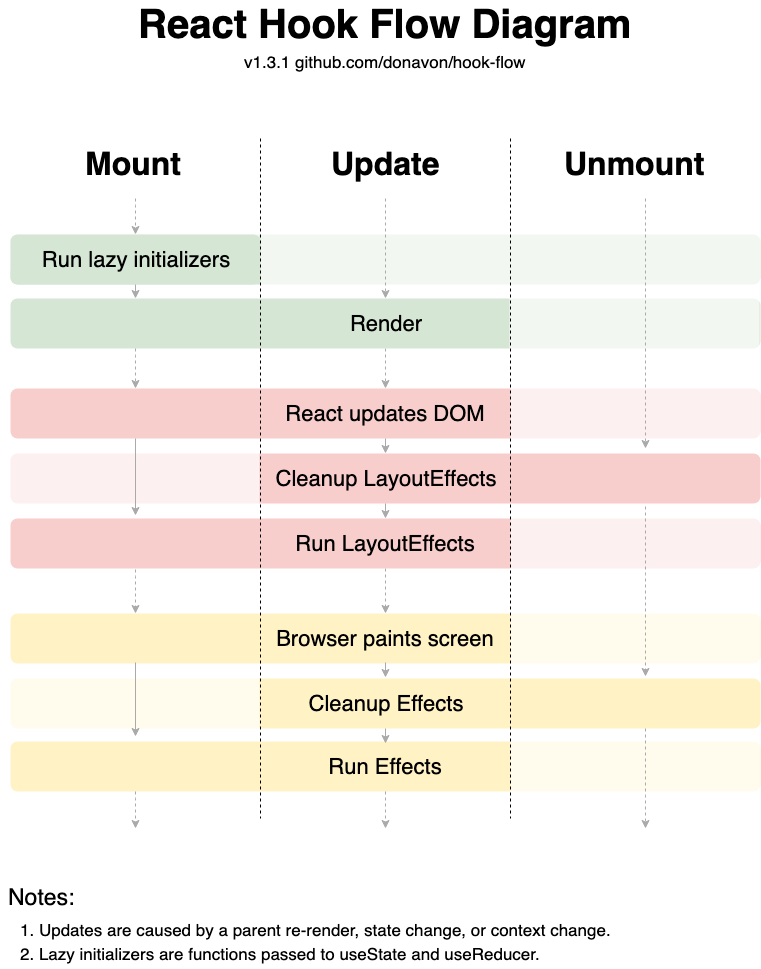
There aren’t any generic patterns to follow here, but instead, I’ll show an example. By the end, you’ll have a few ideas for your own rewrites.
withScreenSize is a utility that provides the current screen size to our component. It’s implemented like this:
import React from ‘react’;
import debounce from ‘debounce’;
const withScreenSize = Comp => {
  return class extends React.Component {
    state = { width: null, height: null };
    updateScreenSize = debounce(() => {
      this.setState({
        width: window.screen.width,
        height: window.screen.height
      });
    }, 17);
    componentDidMount() {
      window.addEventListener(‘resize’, this.updateScreenSize);
    }
    componentWillUnmount() {
      window.removeEventListener(‘resize’, this.updateScreenSize);
    }
    render() {
      return <Comp {...this.props} screenSize={this.state} />
    }
  };
}
We can implement this with Hooks like so:
import React from ‘react’;
import debounce from ‘debounce’;
const useScreenSize = () => {
  const [screenSize, setScreenSize] = React.useState({
    width: window.innerWidth,
    height: window.innerHeight,
  });
  const updateScreenSize = debounce(() => {
    setScreenSize({
      width: window.innerWidth,
      height: window.innerHeight,
    });
  }, 17);
  React.useEffect(() => {
    window.addEventListener(‘resize’, updateScreenSize);
    return () => {
      window.removeEventListener(‘resize’, updateScreenSize);
    };
  }, []);
 return screenSize;
};
We store the width and height via the useState hook, and initialize it to be the window dimensions while mounting the component. Then, we re-implement the updateScreenSize method by using the setter from the useState call above. Finally, we apply the resize listener by using the useEffect hook. Notice that we’re passing an empty dependency array — that means it’ll only run once.
Remember — if you want to keep supporting class components, you can write a wrapper HOC:
const withScreenSize = Comp => props => {
 const screenSize = useScreenSize();
 return <Comp {…props} screenSize={screenSize} />;
};
Hooks are here to stay, and they’re about to simplify your code base in a big way. In order to migrate away from existing patterns, however, you’re going to have to compromise at times.
This article shows how you can write wrappers around your existing HOCs and render props components, as well as how you can get started refactoring your existing HOCs to be Hooks.
What challenges have you faced while migrating away from HOCs?
Install LogRocket via npm or script tag. LogRocket.init() must be called client-side, not
server-side
$ npm i --save logrocket

// Code:

import LogRocket from 'logrocket';
LogRocket.init('app/id');
// Add to your HTML:

<script src="https://cdn.lr-ingest.com/LogRocket.min.js"></script>
<script>window.LogRocket && window.LogRocket.init('app/id');</script>

Discover how React Fiber works under the hood. Learn how React builds the DOM, handles concurrent rendering, and works alongside React 19 features and the new React Compiler.

Learn how to use Skybridge, an open-source React framework, to build and deploy cross-platform AI apps and interactive UI widgets for ChatGPT, Claude, and MCP clients from a single codebase.

Learn how to set up Meilisearch, index documents, and build keyword, semantic, and hybrid search with AI-powered retrieval.
Compare pnpm and npm across security defaults, disk usage, dependency strictness, and workspace policy to decide which package manager fits your project.
Hey there, want to help make our blog better?
Join LogRocket’s Content Advisory Board. You’ll help inform the type of content we create and get access to exclusive meetups, social accreditation, and swag.
Sign up now


 Learn more →





