Every time you explain your team’s coding standards to Claude, you are doing work that should be reusable. The same thing happens when you re-explain how to scaffold components, review pull requests, format commit messages, or avoid JavaScript-heavy solutions for problems CSS already solves.

Claude skills help solve that repetition problem. A skill is a reusable instruction set that Claude Code can load when a task matches the skill’s description. Instead of pasting the same prompt into every session, you can save the process once in a SKILL.md file and let Claude apply it when it is relevant.
For React teams, this matters because most AI coding failures are not syntax failures. They are convention failures: the component compiles, but it lands in the wrong folder, uses the wrong design tokens, skips the wrong test, or applies the wrong architectural pattern. Skills turn those recurring preferences into project-level guardrails.
In this article, we’ll look at five Claude skills that can make React development more consistent: planning, project memory, component scaffolding, PR review, and CSS-first architecture. We’ll also look at a few skills that sounded useful but were not worth keeping.
Claude skills are Markdown-based instruction files that extend Claude Code for a specific task or workflow. Anthropic’s docs describe skills as SKILL.md files with instructions that Claude adds to its toolkit. Claude can invoke a skill automatically when it matches the task, or you can invoke one directly with a slash command such as /review-pr or /scaffold-component.
Skills are useful when you keep pasting the same checklist, convention, or multi-step process into chat. They are especially useful for teams because project skills can live in .claude/skills/ at the root of a repo, which makes them shareable through source control.
A simple skill looks like this:
---
name: scaffold-component
description: >
  ALWAYS invoke when the user asks to create, scaffold, or
  generate a React component.
---
The description is not decorative. It is one of the main ways Claude decides whether the skill should activate. If the description is vague, the skill may not fire when you need it, or it may fire too often.
This is why skills are different from one-off prompting. A normal prompt helps with one task. A skill defines a repeatable workflow that Claude can apply across many tasks. If you are already experimenting with AI coding tools, LogRocket’s overview of AI code generation is a useful baseline for understanding where skills fit into the broader AI-assisted development workflow.
Claude does not need to load every skill body into context at once. Instead, Claude Code uses the skill’s metadata to decide whether the skill is relevant. When it is, Claude can load the skill body and follow its instructions.
That distinction matters. If you put every team convention into one giant instruction file, you pay a context cost on every request. A better pattern is to make each skill small and procedural, then point it to supporting files when the task needs deeper reference material.
For example, a React component scaffolding skill might contain the steps Claude should follow, while a neighboring REFERENCE.md file contains design-token mappings, folder examples, and naming conventions. The skill tells Claude when to load the reference file instead of dumping the whole reference into every task.
Anthropic recommends keeping SKILL.md focused and moving detailed reference material into supporting files. Its docs also note that the description and when_to_use text are truncated in the skill listing, so the first sentence should state the most important trigger clearly.
The most useful skill in my React workflow is also one of the shortest. It prevents Claude from jumping directly from “build this feature” to “here are three new files.”
Without a planning skill, Claude can be fast, confident, and subtly wrong. It may build a component that works, but with assumptions you never approved: the wrong empty state, the wrong debounce behavior, or the wrong ownership boundary between client and server code.
The fix is to make Claude interview you before it plans.
---
name: plan-with-me
description: >
  ALWAYS invoke when the user describes a new feature, page,
  or significant change. Do not write code or produce a plan
  without this skill. Use when the user says "build", "create",
  "add", "implement", or describes any non-trivial task.
---

## Steps
1. Interview me relentlessly about every aspect of this task.
   Walk down each branch of the design tree, resolving
   dependencies between decisions one by one.
   If a question can be answered by exploring the codebase,
   explore the codebase instead of asking me.
   For each question, provide your recommended answer.

2. Once we reach shared understanding, produce a plan:
   - Summary of what we agreed on
   - Task breakdown with file paths
   - Blocking relationships between tasks
   - Open questions we deliberately deferred

3. Wait for my approval before writing any code.
The important part is not that Claude asks questions. It is that the skill makes questioning part of the workflow instead of a courtesy step Claude may skip.
In one dashboard search feature, this skill forced Claude to ask about debounce timing, empty states, index updates, and server/client boundaries before generating code. Those questions surfaced decisions that would have become review comments later.
This pattern works well with Claude Code because Claude can inspect the codebase when the answer is discoverable. If the question is “Where do search components usually live?” Claude should look. If the question is “Should empty search results show recent searches or suggestions?” Claude should ask.
The result is a plan that becomes a lightweight spec for the rest of the session. Claude can reference the agreed decisions while building, and you can reject the plan before code exists.
Project memory is the skill that keeps the other skills accurate. Every other skill in this article reads from reference material. This one updates that reference material when the project changes.
The problem is simple: your reference file says UserProfile lives in src/features/user/, but the component moved three weeks ago. Now your scaffolding skill writes to a dead directory. Your PR review skill checks against an outdated convention. Your architecture skill reasons from stale structure.
A project memory skill maintains a current project index, such as PROJECT-STATE.md, and updates only the parts that changed.
---
name: update-project-memory
description: >
  ALWAYS invoke after completing any task that adds, removes,
  renames, or relocates files, components, routes, API endpoints,
  dependencies, or design tokens. Also invoke when project
  conventions change. Do not skip this after structural changes.
---

## What to maintain
- .claude/skills/PROJECT-STATE.md

## On every update:
1. Read the current PROJECT-STATE.md
2. Diff what changed against what is documented
3. Update ONLY the sections that changed:
   - Components: name, path, client/server, purpose (one line)
   - Routes: path, page component, layout
   - API endpoints: path, method, what it does
   - Dependencies: package, why it is here, version
   - Design tokens: new/removed tokens in Tailwind config
   - Conventions: any pattern that changed
4. Timestamp the update
5. Do NOT rewrite sections that did not change
6. Keep each entry to one line. This is an index, not documentation
The “one line” rule is doing real work. Without it, Claude tends to turn the project index into full documentation. That sounds helpful until the file becomes too long to scan and too expensive to keep current.
The goal is not to create a wiki. It is to create a live table of contents for the codebase.
Once this exists, other skills can read from PROJECT-STATE.md before acting. The component scaffolding skill can check current folder structure. The PR review skill can compare diffs against current conventions. The API pattern skill can see which endpoints already exist.
This also creates a useful handoff artifact. A technical writer or onboarding engineer can expand the index into documentation without reverse-engineering the repo from scratch. For teams thinking about AI-readable documentation more broadly, this connects closely to the ideas in LogRocket’s article on recreating Claude Skills in GitHub Copilot, which frames skills as a way to package domain knowledge for AI tools.
Claude can generate clean React components. The problem is that it does not generate them consistently unless you define your conventions clearly.
A component scaffolding skill encodes your project’s component architecture once: where files go, how props are typed, when to use Server Components, when to add tests, and which design tokens are allowed.
---
name: scaffold-component
description: >
  ALWAYS invoke when the user asks to create, scaffold, or
  generate a React component. Do not create components
  directly without this skill.
disable-model-invocation: true
argument-hint: "[ComponentName]"
---

## Steps
1. Read REFERENCE.md for naming conventions and directory map
2. Create directory: src/features/[feature]/components/[ComponentName]/
3. Generate:
   - [ComponentName].tsx — typed props interface, functional component
   - [ComponentName].test.tsx — describe block + placeholder test
   - index.ts — barrel export
4. Default to Server Components. Add 'use client' ONLY if
   useState, useEffect, or event handlers are required
5. Use Tailwind classes from design tokens in REFERENCE.md.
   Do not use arbitrary values
6. Run tsc --noEmit to verify compilation
7. Report: files created, props interface, client/server decision + reason
This skill should stay procedural. Put the rules in REFERENCE.md: naming rules, directory examples, design-token mappings, and examples of existing components that follow the convention.
That separation matters. When process steps and reference material live in the same file, Claude may cherry-pick. It follows some instructions, skips others, and still produces something plausible. Keeping SKILL.md as the router and REFERENCE.md as the reference file makes the workflow easier to maintain.
The disable-model-invocation: true field is also worth considering. In this case, scaffolding creates files, so you may want to invoke it manually rather than letting Claude infer when to run it.
For React teams, the biggest win is not that Claude writes the component. It is that Claude writes the component the way the codebase expects. That includes folder structure, test placement, prop typing, export style, and client/server reasoning.
A PR review skill is useful because most review feedback is repetitive. Naming, structure, error handling, type safety, and unnecessary re-renders all come up again and again.
A one-off “review this PR” prompt usually produces generic feedback. A skill can force Claude to review against the project’s actual conventions and return feedback in a format that is easy to act on.
---
name: review-pr
description: >
  ALWAYS invoke when the user asks to review code, review a PR,
  check a diff, or asks "what do you think of this code".
  Do not provide code review feedback without this skill.
---

## Steps
1. Read CONVENTIONS.md for project-specific patterns
2. Check the diff against these categories:
   - Naming: components PascalCase, hooks use*, utilities camelCase
   - Structure: no prop drilling past 2 levels, no barrel export cycles
   - Error handling: async operations wrapped, error boundaries present
   - Types: no `any`, no type assertions without comment explaining why
   - Performance: no unnecessary re-renders, memo only when measured
3. For each finding:
   - File and line
   - What is wrong (one sentence)
   - Suggested fix (code, not prose)
4. Severity: must fix | should fix | nit
5. If nothing found in a category, skip it. Do not pad the review.
The last line is the difference between a helpful review and a noisy one. If you ask Claude to review every category, it may invent weak comments just to satisfy the checklist. Telling it to skip empty categories reduces padding.
A good PR review skill should also separate correctness from style. Bugs and broken assumptions should appear before naming or formatting comments. Otherwise, serious issues get buried under low-stakes suggestions.
For larger teams, this skill works best as a pre-review step rather than a replacement for human review. Claude can catch repeatable issues early, and reviewers can spend more time on product behavior, architecture, and tradeoffs. LogRocket’s guide to leveling up Claude Code covers adjacent workflow improvements, including hooks and commands that can make AI review more constrained and repeatable.
The CSS-first skill started as a refactoring helper. Its original job was to find JavaScript used for layout, responsiveness, or visual state and replace it with native CSS where possible.
That was useful but too narrow. The skill only fired during refactors, which meant Claude still reached for JavaScript while building new components. The better version makes CSS-first thinking the default for visual behavior.
---
name: css-first
description: >
  ALWAYS invoke when the user asks to style a component, handle
  responsive layout, add animations, or implement any visual behavior.
  Also invoke when reviewing components that use JS for layout concerns.
  Do not write layout/animation/responsive JS without this skill.
---

## CSS-first rules
- container queries over JS/resize-observer breakpoints
- scroll-driven animations over JS scroll listeners
- content-visibility: auto over JS virtualization for lists under 10,000 items
- :has() selector over JS parent-state toggling
- Tailwind classes from design tokens only; no arbitrary values
- Logical properties (margin-inline, padding-block) over physical ones

## Steps
1. Read the component requirements
2. For each visual behavior, check if CSS handles it natively
3. Only reach for JS when CSS genuinely cannot handle the behavior:
   - Drag-and-drop
   - Complex gesture handling
   - Canvas/WebGL rendering
   - Lists exceeding 10,000 items
4. For each CSS solution, include browser support notes
5. Output as component code with styles
6. If reviewing existing code, output as a unified diff
This kind of skill is valuable because AI coding assistants tend to overuse the tools they know are broadly available. For visual behavior, that often means more state, more event listeners, and more effects than the component actually needs.
A CSS-first skill forces Claude to check native platform capabilities before adding JavaScript. That does not mean JavaScript is wrong. It means JavaScript should be a deliberate choice, not the default answer for every layout or interaction problem.
This skill pairs naturally with LogRocket’s argument to stop using JavaScript to solve CSS problems. If that article is the principle, this skill is the operational version Claude can apply while writing components.
Not every skill earns its keep. The skills I removed fell into three categories: skills that duplicated what Claude already does well, skills that did not run often enough to justify the maintenance cost, and skills where the output looked confident but carried too much risk.
| Deleted skill | Why I removed it | Better replacement |
|---|---|---|
| Prop documentation | Claude can usually infer decent prop docs from TypeScript interfaces without a dedicated skill | Ask for docs only when publishing or onboarding requires them |
| Storybook story generation | The stories compiled, but they rarely captured interesting states or realistic interactions | Provide explicit story states in the prompt or maintain a Storybook reference file |
| Accessibility audit | Useful, but periodic rather than daily | Run as a manual review workflow with axe-core and human checks |
| Bundle analysis | The trigger description was too vague and activation was unreliable | Move it to a shell script or CI workflow |
| Class-to-hooks migration | The code compiled, but subtle lifecycle behavior changed | Treat migrations as human-led refactors with AI assistance |
The migration skill was the clearest example of confidence becoming dangerous. Claude could convert lifecycle methods into useEffect calls that looked right, passed lint, and still changed behavior. Stale closures, missing cleanup, and effect timing problems are easy to miss until QA or production exposes them.
Test generation had a similar failure mode at first. Claude’s default tests often assert on implementation details, pass on day one, and break during harmless refactors. That skill became useful only after adding strict rules: test behavior, include failure cases, avoid implementation details, and describe coverage gaps.
The lesson is that skills should encode repeatable judgment. If the task requires too much contextual discretion, a skill may create false confidence instead of quality.
Start with the task you repeat most often. Do not start by installing a large collection of community skills or turning every preference into a new workflow.
The best first skill is usually boring:
Specific skills outperform generic ones. A skill for “better React code” is vague. A skill for “scaffold a dashboard filter component using our route structure, design tokens, and server/client conventions” gives Claude something concrete to execute.
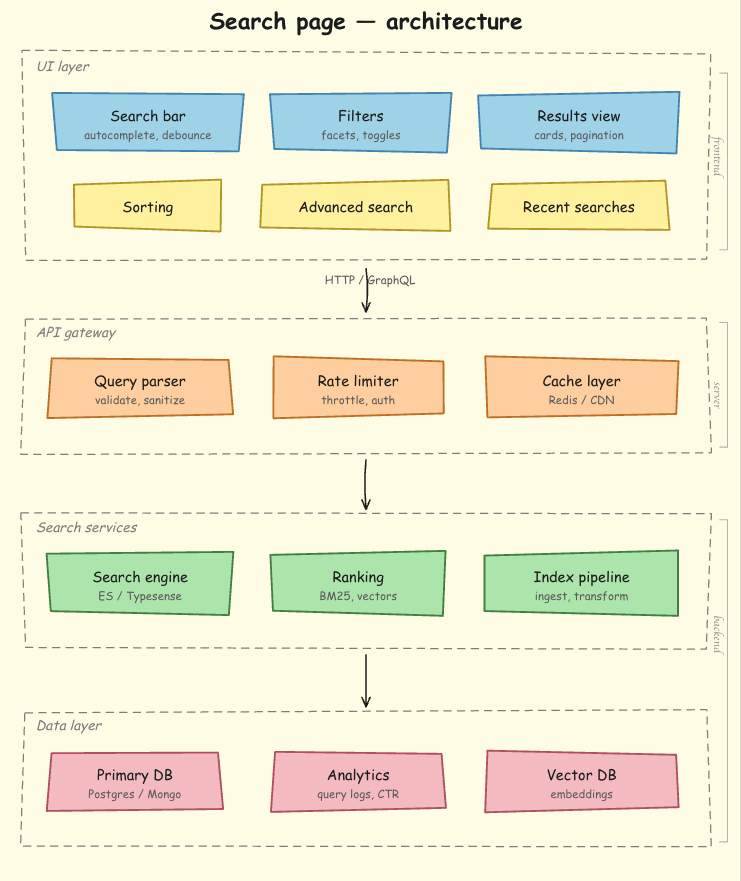
If you are building a search page, store the search behavior, indexing assumptions, empty states, and component structure as project reference material:
If you are building an ecommerce checkout, the checkout flow conventions should become reference material. If you are building an analytics dashboard, chart states, loading states, permission rules, and data-fetching patterns should be documented somewhere Claude can read them.
The more specific the skill, the better the output.
Claude skills are most useful when they capture the repeated parts of your development workflow: planning, scaffolding, review, memory, and architectural preferences. They do not make Claude a perfect engineer, but they do make its output more consistent.
For React teams, that consistency is the real value. A good skill does not just tell Claude what to write. It tells Claude how your team thinks about components, boundaries, state, styles, tests, and review quality.
Start with one skill. Keep it short. Test it for a week. Then refine the description, supporting files, and activation rules based on where Claude gets confused. The boring skills compound because they remove the same friction from every session after that.

Is react-markdown slowing down your app? We benchmarked three top streaming Markdown renderers to find the fastest, most efficient alternative for React.

Learn how coding agents streamline TDD with automated tests, quality guardrails, and mutation testing to catch bugs and build reliable software.

We tested five AI code review tools for speed, setup, security, and code quality to compare their strengths and help you choose the right tool.

Learn how to generate a versioned component contract from Primer React, point Claude Code at it, and enforce it in CI. Includes benchmark results.
Hey there, want to help make our blog better?
Join LogRocket’s Content Advisory Board. You’ll help inform the type of content we create and get access to exclusive meetups, social accreditation, and swag.
Sign up now
 Learn more →