Editor’s note: This post was updated on 30 July 2026 by David Omotayo to reflect modern React architecture and updates to React Fiber from React v16 through React 19. Key additions include coverage of concurrent rendering, automatic batching, modern root APIs (createRoot), Actions and asynchronous transitions in React 19, useDeferredValue, the Activity component introduced in React 19.2, expanded Suspense capabilities like selective hydration and sibling scheduling, and a new comparison of React Fiber and the React Compiler.

Ever wondered what actually happens under the hood when you render a React application? We know that ReactDOM builds the DOM tree and displays your UI on screen, but how does React construct that tree, and how does it efficiently update it when state changes?
In this guide, we’ll explore React Fiber, React’s core reconciliation engine. We’ll look at how React built the DOM up through v15, the performance pitfalls of that early stack model, and how Fiber’s asynchronous architecture solved those issues from React v16 through React 19.
React Fiber is an internal engine change geared to make React faster and smarter. The Fiber reconciler, which became the default reconciler for React 16 and above, is a complete rewrite of React’s reconciliation algorithm to solve some long-standing issues in React.
Because Fiber is asynchronous, React can:
This change allows React to break away from the limits of the synchronous stack reconciler. Previously, you could add or remove items, for example, but it had to work until the stack was empty, and tasks couldn’t be interrupted.
This change also allows React to fine-tune rendering components, ensuring that the most important updates happen as soon as possible. Now, to truly understand the powers of Fiber, let’s talk about the old reconciler: the stack reconciler.
Let’s start with our familiar ReactDOM.render(<App />, document.getElementById('root')). The ReactDOM module passes the <App /> to the reconciler, but there are two questions here:
<App /> refer to?Let’s unpack these two questions.
<App />?<App /> is a React element, and “elements describe the tree.” According to the React blog, “An element is a plain object describing a component instance or DOM node and its desired properties.”
In other words, elements are not actual DOM nodes or component instances; they are a way to describe to React what kind of elements they are, what properties they hold, and who their children are.
This is where React’s real power lies: React abstracts away the complex pieces of how to build, render, and manage the lifecycle of the actual DOM tree by itself, effectively making the life of the developer easier.
To understand what this really means, let’s look at a traditional approach using object-oriented concepts.
React elements let developers describe the desired interface without manually creating, updating, and destroying every DOM object.
In the typical object-oriented programming world, developers must instantiate and manage the lifecycle of every DOM element. For instance, if you want to create a simple form and a submit button, the state management still requires some effort from the developer.
Let’s assume the Button component has a isSubmitted state variable. The lifecycle of the Button component looks something like the flowchart below, where each state must be managed by the app:
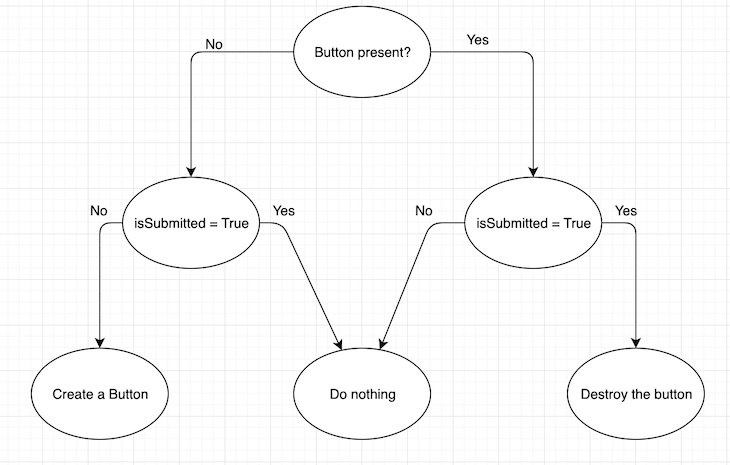
The size of the flowchart and the number of lines of code grow exponentially as the number of state variables increases.
So, React has elements to solve this problem; in React, there are two kinds of elements: the DOM element and the component element.
The DOM element is an element that’s a string; for instance, <button class="okButton"> OK </button>.
The component element is a class or a function, for example, <Button className="okButton"> OK </Button>, where <Button> is either a class or a functional component. These are the typical React components we generally use.
It is important to understand that both types are simple objects. They are mere descriptions of what must be rendered on the screen and don’t instigate rendering when you create and instantiate them.
React reconciliation is the process React uses to compare component trees and determine which parts of the rendered output need to change.
This makes it easier for React to parse and traverse them to build the DOM tree. The actual rendering happens later when traversing finishes.
When React encounters a class or a function component, it will ask that element what element it renders based on its props.
For instance, if the <App> component rendered the following, then React will ask the <Form> and <Button> components what they render based on their corresponding props:
<Form>
  <Button>
    Submit
  </Button>
</Form>
So, if the Form component is a functional component that looks like the following, React will call render() to know what elements it renders and see that it renders a <div> with a child
const Form = (props) => {
  return(
    <div className="form">
      {props.form}
    </div>
  )
}
React will repeat this process until it knows the underlying DOM tag elements for every component on the page.
This exact process of recursively traversing a tree to know the underlying DOM tag elements of a React app’s component tree is known as reconciliation. By the end of the reconciliation, React knows the result of the DOM tree, and a renderer like react-dom or react-native applies the minimal set of changes necessary to update the DOM nodes. This means that when you call ReactDOM.render() or setState(), React performs reconciliation.
In the case of setState, it performs a traversal and determines what changed in the tree by diffing the new tree with the rendered tree. Then, it applies those changes to the current tree, thereby updating the state corresponding to the setState() call.
Note: ReactDOM.render() is used in this section because it reflects the API available when Fiber was introduced. It was deprecated in React 18 and removed in React 19. Modern client-rendered applications use createRoot() instead.
import { createRoot } from "react-dom/client";

const root = createRoot(document.getElementById("root"));

root.render(<App />);
Now that we understand what reconciliation is, let’s look at the pitfalls of this model.
The stack reconciler was React’s original reconciliation system. It recursively processed the component tree using the JavaScript call stack and could not pause once rendering began. Its name is derived from the stack data structure, which is a last-in, first-out (LIFO) mechanism.
You might wonder what stack behavior has to do with what we just covered. As it turns out, because we are performing recursion, it has everything to do with the call stack.
React’s old reconciler recursively rendered each component and then moved through its children until it reached the leaf DOM elements.
To understand why that’s the case, let’s take a simple example and see what happens in the call stack:
function fib(n) {
  if (n < 2){
    return n
  }
  return fib(n - 1) + fib (n - 2)
}

fib(10)
As we can see, the call stack pushes every call to fib() into the stack until it pops fib(1), which is the first function call to return.
Then, it continues pushing the recursive calls and pops again when it reaches the return statement. In this way, it effectively uses the call stack until fib(3) returns and becomes the last item pop from the stack.
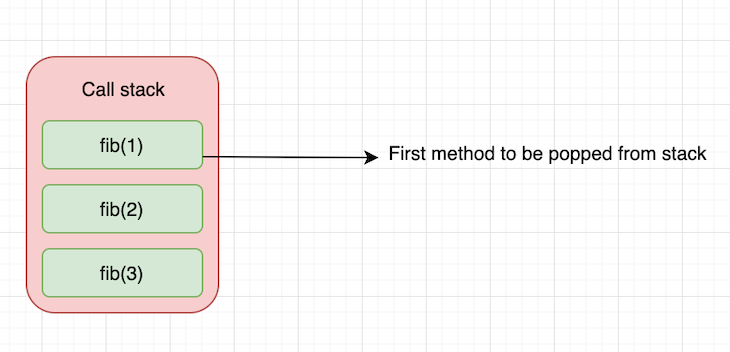
The reconciliation algorithm we just saw is a purely recursive algorithm. An update results in the entire subtree re-rendering immediately. While this works well, this has some limitations.
As Andrew Clark notes, in a UI, it’s not necessary for every update to apply immediately; in fact, doing so can be wasteful, causing frames to drop and degrading the user experience.
Also, different types of updates have different priorities; an animation update must be completed faster than an update from a data store.
Frame rate is the frequency at which consecutive images appear on a display. Everything we see on our computer screens is composed of images or frames played on the screen at a rate that appears instantaneous to the eye.
To understand what this means, think of the computer display as a flipbook and the pages of the flipbook as frames played at some rate when you flip them.
Comparatively, a computer display is nothing but an automatic flipbook that plays continuously when things change on the screen.
Typically, for a video to feel smooth and instantaneous to the human eye, the video must play at a rate of about 30 frames per second (FPS); anything higher gives a better experience.
Most devices these days refresh their screens at 60 FPS, 1/60 = 16.67ms, which means a new frame displays every 16ms. This number is important because if the React renderer takes more than 16ms to render something on the screen, the browser drops that frame.
In reality, however, the browser has housekeeping to do, so all your work must be completed within 10ms. When you fail to meet this budget, the frame rate drops, and the content judders on screen. This is often referred to as jank, and it negatively impacts the user’s experience.
Of course, this is not a big concern for static and textual content. But in the case of displaying animations, this number is critical.
If the React reconciliation algorithm traverses the entire app tree and re-renders it on every update, and that traversal takes longer than 16ms, the browser will drop frames.
This is a big reason why many wanted updates categorized by priority and not blindly applying every update passed down to the reconciler. Also, many wanted the ability to pause and resume work in the next frame. This way, React could have better control over working with the 16ms rendering budget.
This led the React team to rewrite the reconciliation algorithm, which is called Fiber. So, let’s look at how Fiber works to solve this problem.
Now that we know what motivated Fiber’s development, let’s summarize the features needed to achieve it. Again, I am referring to Andrew Clark’s notes for this:
One of the challenges with implementing something like this is how the JavaScript engine works and the lack of threads in the language. To understand this, let’s briefly explore how the JavaScript engine handles execution contexts.
JavaScript normally executes synchronous functions until the call stack is empty. React’s old recursive reconciler relied on this stack, so it could not pause rendering to handle more urgent browser work.
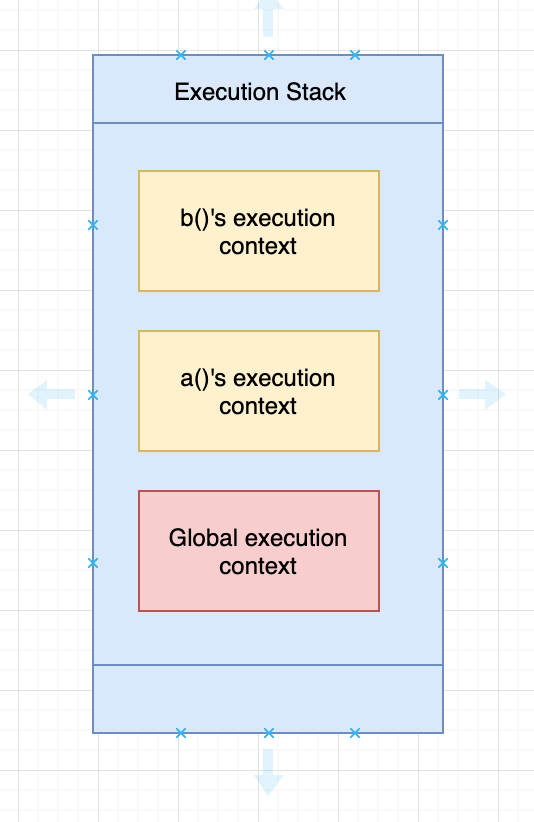
Whenever you write a function in JavaScript, the JavaScript engine creates a function execution context. Each time the JavaScript engine starts, it creates a global execution context that holds the global objects; for example, the window object in the browser and the global object in Node.js.
JavaScript handles both contexts using a stack data structure also known as the execution stack. So, when you write something like this, the JavaScript engine first creates a global execution context and pushes it into the execution stack:
function a() {
  console.log("i am a")
  b()
}

function b() {
  console.log("i am b")
}

a()
Then, it creates a function execution context for the a() function. Since b() is called inside a(), it creates another function execution context for b() and pushes it into the stack.
When the b() function returns, the engine destroys the context of b(). When we exit the a() function, the a() context is destroyed. The stack during execution looks like this:
But, what happens when the browser makes an asynchronous event like an HTTP request? Does the JavaScript engine stack the execution stack and handle the asynchronous event, or does it wait until the event completes?
The JavaScript engine does something different here: on top of the execution stack, the JavaScript engine has a queue data structure, also known as the event queue. The event queue handles asynchronous calls like HTTP or network events coming into the browser.
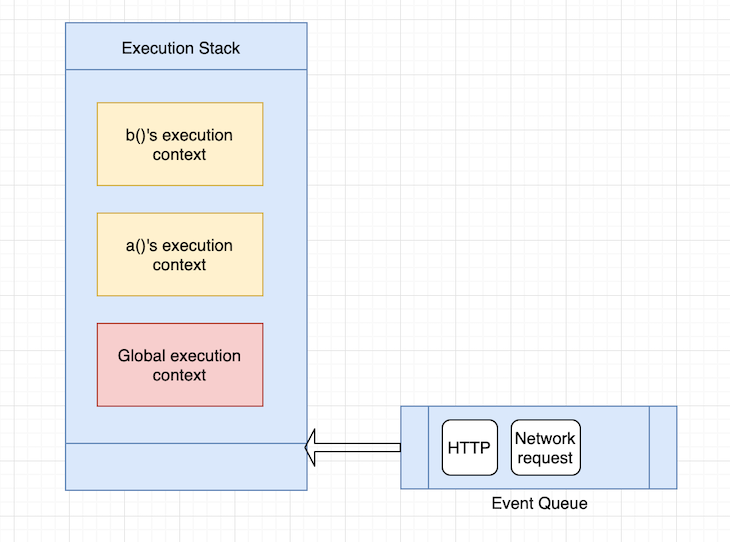
The JavaScript engine handles the items in the queue by waiting for the execution stack to empty. So, each time the execution stack empties, the JavaScript engine checks the event queue, pops items off the queue, and handles the event.
It is important to note that the JavaScript engine checks the event queue only when the execution stack is empty or the only item in the execution stack is the global execution context.
Although we call them asynchronous events, there is a subtle distinction here: the events are asynchronous with respect to when they arrive in the queue, but they’re not really asynchronous with respect to when they are actually handled.
Coming back to our stack reconciler, when React traverses the tree, it does so in the execution stack. So, when the updates arrive, they arrive in the event queue (sort of). And only when the execution stack empties are the updates handled.
This is precisely the problem Fiber solves by almost reimplementing the stack with intelligent capabilities—pausing, resuming, and aborting, for example.
Again referencing Andrew Clark, “Fiber is a reimplementation of the stack, specialized for React components. You can think of a single fiber as a virtual stack frame.
“The advantage of reimplementing the stack is that you can keep stack frames in memory and execute them however and whenever you want. This is crucial for accomplishing the goals we have for scheduling.
“Aside from scheduling, manually dealing with stack frames unlocks the potential for features such as concurrency and error boundaries.” We will cover these topics in future sections.
In simple terms, a fiber represents a unit of work with its own virtual stack. In the previous implementation of the reconciliation algorithm, React created a tree of objects (React elements) that are immutable and traversed the tree recursively.
In the current implementation, React creates a tree of fiber nodes that can mutate. The fiber node effectively holds the component’s state, props, and underlying DOM element it renders to.
And, since fiber nodes can mutate, React doesn’t need to recreate every node for updates; it can simply clone and update the node when there is an update.
In the case of a fiber tree, React doesn’t perform recursive traversal. Instead, it creates a singly-linked list and performs a parent-first, depth-first traversal.
A fiber node represents a stack frame and an instance of a React component. A fiber node comprises the following members:
<div> and <span>, for example, host components (strings), classes, or functions for composite components.
The key is the same as the key we pass to the React element.
Represents the element returned when we call render() on the component:
const Name = (props) => {
  return(
    <div className="name">
      {props.name}
    </div>
  )
}
The child of <Name> is <div> because it returns a <div> element.
Represents a case where render returns a list of elements:
const Name = (props) => {
  return([<Customdiv1 />, <Customdiv2 />])
}
In the above case, <Customdiv1> and <Customdiv2> are the children of <Name>, which is the parent. The two children form a singly-linked list.
Return is the return back to the stack frame, which is a logical return back to the parent fiber node, and thus, represents the parent.
pendingProps and memoizedPropsMemoization means storing the values of a function execution’s result so you can use it later, thereby avoiding recomputation. pendingProps represents the props passed to the component, and memoizedProps initializes at the end of the execution stack, storing the props of this node. When the incoming pendingProps are equal to memoizedProps, it signals that the fiber’s previous output can be reused, preventing unnecessary work.
pendingWorkPrioritypendingWorkPriority is a number indicating the priority of the work represented by the fiber. The ReactPriorityLevel module lists the different priority levels and what they represent. With the exception of NoWork, which is zero, a larger number indicates a lower priority.
For example, you could use the following function to check if a fiber’s priority is at least as high as the given level. The scheduler uses the priority field to search for the next unit of work to perform:
function matchesPriority(fiber, priority) {
  return fiber.pendingWorkPriority !== 0 &&
         fiber.pendingWorkPriority <= priority
}
At any time, a component instance has at most two fibers that correspond to it: the current fiber and the in-progress fiber. The alternate of the current fiber is the fiber in progress, and the alternate of the fiber in progress is the current fiber. The current fiber represents what is rendered already, and the in-progress fiber is conceptually the stack frame that has not returned.
The output is the leaf nodes of a React application. They are specific to the rendering environment (for example, in a browser app, they are div and span). In JSX, they are denoted using lowercase tag names.
Conceptually, the output of a fiber is the return value of a function. Every fiber eventually has an output, but the output is created only at the leaf nodes by host components. The output is then transferred up the tree.
The output is eventually given to the renderer so that it can flush the changes to the rendering environment. For example, let’s look at how the fiber tree looks for an app with the following code:
const Parent1 = (props) => {
  return([<Child11 />, <Child12 />])
}

const Parent2 = (props) => {
  return(<Child21 />)
}

class App extends Component {
  constructor(props) {
    super(props)
  }
  render() {
    <div>
      <Parent1 />
      <Parent2 />
    </div>
  }
}

ReactDOM.render(<App />, document.getElementById('root'))
We can see that the fiber tree is composed of singly-linked lists of child nodes linked to each other (sibling relationship) and a linked list of parent-to-child relationships. This tree can be traversed using a depth-first search.
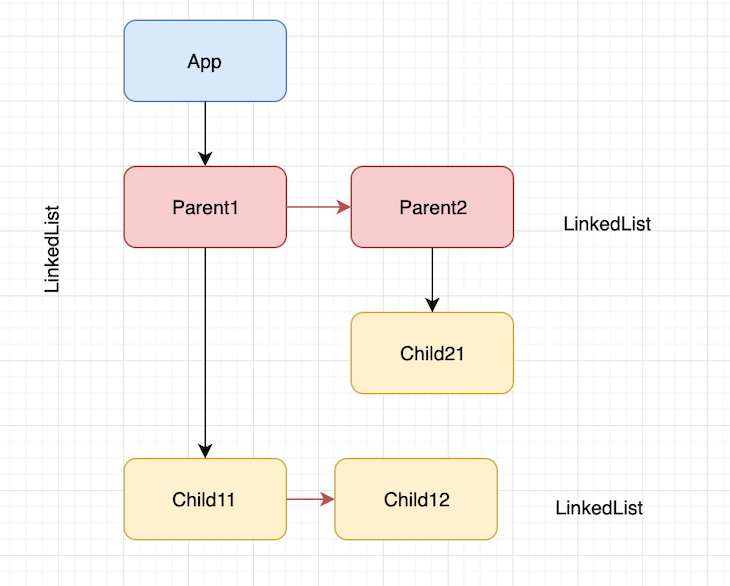
During the render phase, React builds or updates the work-in-progress fiber tree and determines which changes may need to be committed.
To understand how React builds this tree and performs the reconciliation algorithm on it, let’s look at a unit test in the React source code with an attached debugger to follow the process; you can clone the React source code and navigate to this directory.
To begin, add a Jest test and attach a debugger. This is a simple test for rendering a button with text. When you click the button, the app destroys the button and renders a <div> with different text, so the text is a state variable here:
'use strict';

let React;
let ReactDOM;

describe('ReactUnderstanding', () => {
  beforeEach(() => {
    React = require('react');
    ReactDOM = require('react-dom');
  });

  it('works', () => {
    let instance;

    class App extends React.Component {
      constructor(props) {
        super(props)
        this.state = {
          text: "hello"
        }
      }

      handleClick = () => {
        this.props.logger('before-setState', this.state.text);
        this.setState({ text: "hi" })
        this.props.logger('after-setState', this.state.text);
      }

      render() {
        instance = this;
        this.props.logger('render', this.state.text);
        if(this.state.text === "hello") {
        return (
          <div>
            <div>
              <button onClick={this.handleClick.bind(this)}>
                {this.state.text}
              </button>
            </div>
          </div>
        )} else {
          return (
            <div>
              hello
            </div>
          )
        }
      }
    }
    const container = document.createElement('div');
    const logger = jest.fn();
    ReactDOM.render(<App logger={logger}/>, container);
    console.log("clicking");
    instance.handleClick();
    console.log("clicked");

    expect(container.innerHTML).toBe(
      '<div>hello</div>'
    )

    expect(logger.mock.calls).toEqual(
      [["render", "hello"],
      ["before-setState", "hello"],
      ["render", "hi"],
      ["after-setState", "hi"]]
    );
  })

});
In the initial render, React creates a current tree that renders initially. createFiberFromTypesAndProps() is the function that creates each React fiber using the data from the specific React element. When we run the test, put a breakpoint at this function, and look at the call stack:
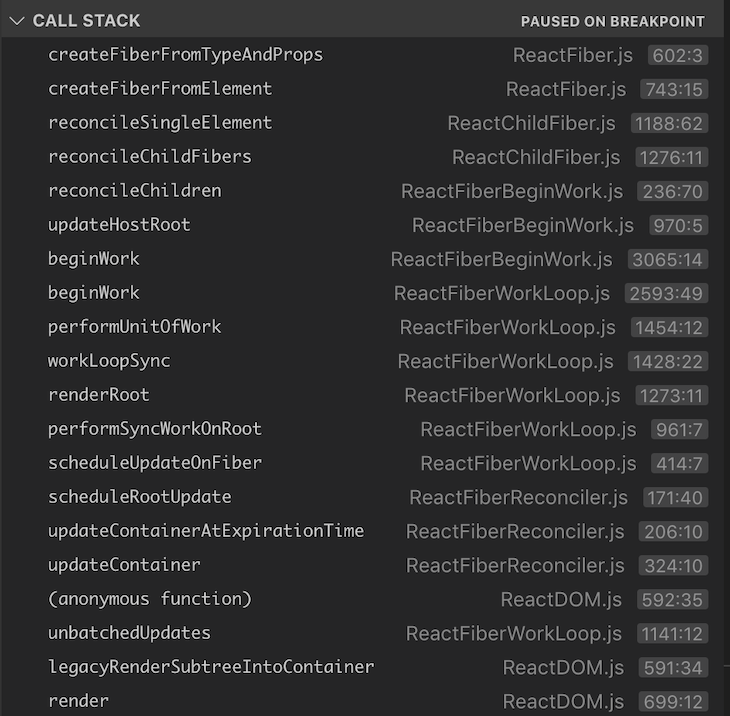
As we can see, the call stack tracks back to a render() call, which eventually goes down to createFiberFromTypeAndProps(). There are a few other functions that are of interest here: workLoopSync(), performUnitOfWork(), and beginWork().
workLoopSync()workLoopSync() is when React starts building up the tree, starting with the <App> node and recursively moving on to <div>, <div>, and <button>, which are the children of <App>. The workInProgress function holds a reference to the next fiber node that has work to do.
performUnitOfWork()performUnitOfWork() takes a fiber node as an input argument, gets the alternate of the node, and calls beginWork(). This is the equivalent of starting the execution of the function execution contexts in the execution stack.
beginWork()When React builds the tree, beginWork() simply leads up to createFiberFromTypeAndProps() and creates the fiber nodes. React recursively performs work and eventually performUnitOfWork() returns a null, indicating that it has reached the end of the tree.
instance.handleClick()Now, what happens when we perform instance.handleClick(), which clicks the button and triggers a state update? In this case, React traverses the fiber tree, clones each node, and checks whether it needs to perform any work on each node.
When we look at the call stack of this scenario, it looks something like this:
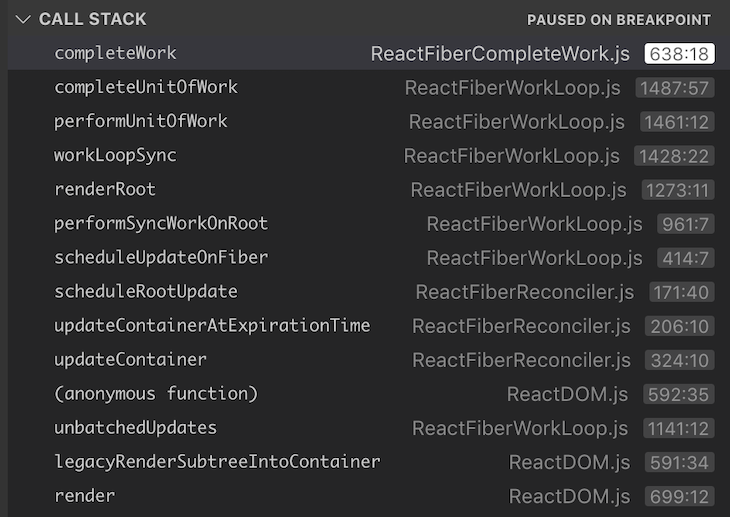
Although we did not see completeUnitOfWork() and completeWork() in the first call stack, we can see them here. Just like performUnitOfWork() and beginWork(), these two functions perform the completion part of the current execution, which means returning back to the stack.
As we can see, together these four functions execute the unit of work and give control over the work being done currently, which is exactly what was missing in the stack reconciler.
The image below shows that each fiber node is composed of four phases required to complete that unit of work.
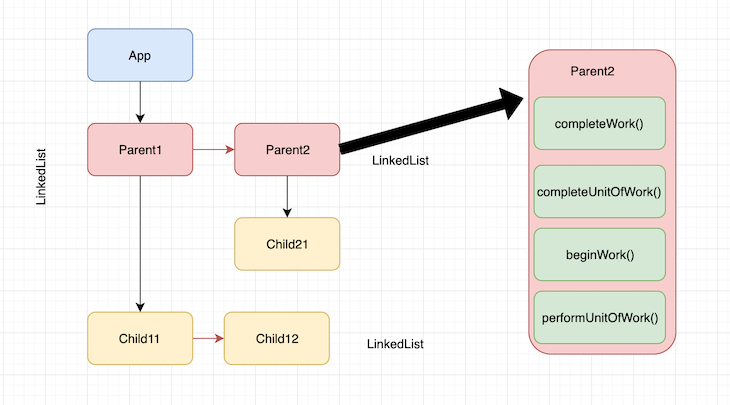
It’s important to note here that each node doesn’t move to completeUnitOfWork() until its children and siblings return completeWork().
For instance, it starts with performUnitOfWork() and beginWork() for <App/>, then moves on to performUnitOfWork() and beginWork() for Parent1, and so on. It comes back and completes the work on <App> once all the children of <App/> complete the work.
This is when React completes its render phase. The tree that’s newly built based on the click() update is called the workInProgress tree. This is basically the draft tree waiting to be rendered.
Once the render phase completes, React moves on to the commit phase, where it basically swaps the root pointers of the current tree and workInProgress tree, thereby effectively swapping the current tree with the draft tree it built up based on the click() update.
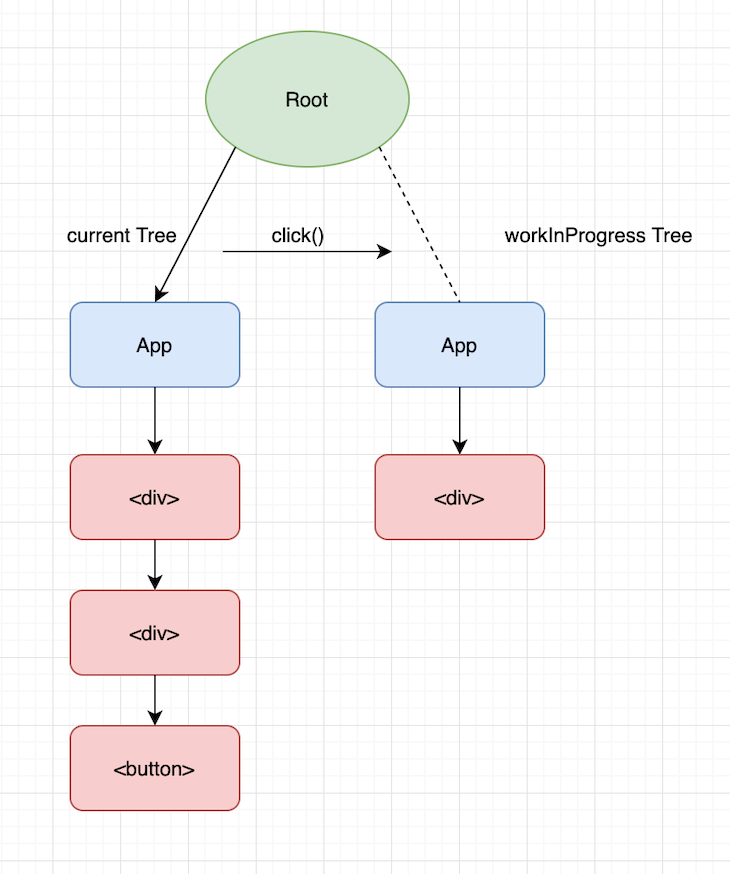
Not just that, React also reuses the old current tree after swapping the pointer from root to the workInProgress tree. The net effect of this optimized process is a smooth transition from the previous state of the app to the next state and the next state, and so on.
And what about the 16ms frame time? React effectively runs an internal timer for each unit of work being performed and constantly monitors this time limit while performing the work.
The moment the time runs out, React pauses the current unit of work, hands the control back to the main thread, and lets the browser render whatever is finished at that point.
Then, in the next frame, React picks up where it left off and continues building the tree. Then, when it has enough time, it commits the workInProgress tree and completes the render.
Fiber changed React from a synchronous tree traversal into a schedulable rendering system. Modern React builds on that foundation by allowing work to be prioritized, interrupted, streamed, moved between server and client environments, and optimized at build time.
Here are the key improvements and changes to fiber since React v16:
The most significant update to React Fiber since its inception is concurrent rendering. It is a foundational enhancement to React’s rendering model that builds on the capabilities of React Fiber to provide interruptible rendering.
Concurrent rendering lets React prepare certain updates in the background and interrupt them when more urgent work arrives. In other words, React can begin rendering one update, interrupt it to handle a more urgent update, and then later restart or abandon the earlier render.
This is a stark contrast to the traditional synchronous rendering model, where React must complete each render in a single, uninterrupted transaction before responding to other work.
Although concurrency was part of the original vision for Fiber, React 18 and React 19 made its capabilities broadly available through APIs such as transitions, Suspense, useDeferredValue, and Activity, along with the new root API.
Suspense is a feature that is closely tied to concurrent mode and was initially introduced with React Fiber in v16, but its capabilities were greatly expanded with updates in React 17 and 18.
The feature has undergone significant improvements since its initial release. It was originally designed to manage lazy loading (code splitting) of components using React.lazy, but its functionality has expanded, especially with the introduction of concurrent rendering in v18.
Now, Suspense plays a key role in handling asynchronous operations like data fetching and offers more granular control over UI rendering during these operations. You can declaratively specify what React should show when a part of the tree is not yet ready to render.
This is done using a fallback option, which renders a component or string while the asynchronous task is in operation:
<Suspense fallback={<div>Loading data...</div>}>
  <SomeComponent />
</Suspense>
Another key improvement is streaming in server-side rendering (SSR) and selective hydration. Instead of waiting for the server to finish rendering the full page before sending its HTML to the browser, Suspense boundaries allow React to divide the page into independent sections. The server can send an initial HTML shell first and stream the remaining content as it becomes ready.
With selective hydration, Suspense boundaries divide the tree into smaller hydration units. React then hydrates these sections independently, allowing some controls to become interactive while other sections are still waiting for code or data.
Suspense continues to evolve in React 19, particularly in how it schedules sibling work. When a component suspends, React can commit the nearest fallback sooner and then schedule another render to pre-warm lazy resources in the remaining sibling tree. This allows the fallback to appear sooner without preventing other resources from beginning to load.
The Suspense API is nuanced. If you’d like to learn more about it, check out our comprehensive article on Suspense.
Transitions are one of the main APIs for using concurrent rendering. They let you distinguish between urgent and non-urgent state updates.
Urgent updates include tasks like user inputs or animations where immediate feedback is expected. Non-urgent updates, like rendering a list of search results, are low priority, and slight delays are acceptable.
The transitions API comprises a useTransition hook which allows you to mark state updates as not urgent, as every state update not marked is considered urgent by default.
useTransition?The useTransition hook handles transitions between UI states in a non-blocking manner. It returns an array with two values:
isPending — A boolean indicating if the transition is in progressstartTransition — A function to start the transitionFor example, consider a page with tabs where one tab takes a long time to render:
import { useState, useTransition } from "react";
import About from "./About";
import Posts from "./Posts";

export default function TabContainer() {
  const [activeTab, setActiveTab] = useState("about");
  const [isPending, startTransition] = useTransition();

  function selectTab(nextTab) {
    startTransition(() => {
      setActiveTab(nextTab);
    });
  }
  return (
    <>
      <button onClick={() => selectTab("about")}> About </button>
      <button onClick={() => selectTab("posts")}> Posts </button>
      {isPending && <p>Loading tab...</p>}
      {activeTab === "about" ? <About /> : <Posts />}
    </>
  );
}
The state update inside startTransition is treated as non-urgent. If the user clicks another button while React is rendering the Posts tab, React can interrupt the first render and handle the new interaction.
Transitions do not delay the function passed to startTransition. React calls that function immediately. Only the state updates scheduled while it runs are marked as transitions.
This means that wrapping an expensive JavaScript calculation in startTransition does not move the calculation into the background:
startTransition(() => {
  // This calculation still runs immediately
  const filteredItems = items.filter(expensiveFilter);
  setFilteredItems(filteredItems);
});
The filter() call still blocks the main thread until it returns. startTransition only changes the priority of the React state update.
In React 19, functions passed to startTransition are called an Action. An Action can perform asynchronous work, such as a request, while isPending represents the pending interaction.
function SettingsForm() {
  const [settings, setSettings] = useState(initialSettings);
  const [isPending, startTransition] = useTransition();
  function saveSettings(nextSettings) {
    startTransition(async () => {
      const savedSettings = await updateSettings(nextSettings);
      startTransition(() => {
        setSettings(savedSettings);
      });
    });
  }
  return (
    <button
      disabled={isPending}
      onClick={() => saveSettings({ theme: "dark" })}
    >
      {" "}
      {isPending ? "Saving..." : "Save settings"}{" "}
    </button>
  );
}
State updates that occur after an await currently need another startTransition call to remain transition updates. This is a known limitation caused by React losing the transition context across the asynchronous boundary.
Async transitions connect concurrent rendering with newer React features such as Actions, form Actions, useActionState, and useOptimistic. They allow React to coordinate pending UI, asynchronous work, and the final render as one interaction.
useDeferredValue?The useDeferredValue hook lets one part of the UI update later than another part. It is useful when a value changes urgently, but a component that depends on that value is slow to render.
For example, an input should reflect each keystroke immediately, but a large list of search results can update at a lower priority:
import { Suspense, useDeferredValue, useState } from "react";
export default function SearchPage() {
  const [query, setQuery] = useState("");
  const deferredQuery = useDeferredValue(query);
  const isStale = query !== deferredQuery;
  return (
    <>
      {" "}
      <input
        value={query}
        onChange={(event) => setQuery(event.target.value)}
        placeholder="Search"
      />{" "}
      <div style={{ opacity: isStale ? 0.5 : 1 }}>
        {" "}
        <Suspense fallback={<p>Loading results...</p>}>
          {" "}
          <SearchResults query={deferredQuery} />{" "}
        </Suspense>{" "}
      </div>{" "}
    </>
  );
}
In this example, when query changes, React first renders the input with the latest value while deferredQuery keeps its previous value.
React then attempts another render in the background using the latest value. This background render is interruptible. If the user types again before it finishes, React can abandon it and restart with the newest value.
Unlike traditional debouncing, useDeferredValue does not wait for a fixed amount of time. Instead, React attempts the deferred render as soon as it can.
The main difference between useTransition and useDeferredValue is where they are applied.
startTransition.useDeferredValue when you receive a value through props, a Hook, or another source and want a slower part of the tree to lag behind it.<Activity> component in React 19.2?React 19.2 introduced the <Activity> component as another feature built on concurrent rendering. Activity lets React hide and restore part of the UI without discarding its internal state.
import { Activity, useState } from "react";
export default function Tabs() {
  const [activeTab, setActiveTab] = useState("home");
  return (
    <>
      {" "}
      <button onClick={() => setActiveTab("home")}> Home </button>{" "}
      <button onClick={() => setActiveTab("settings")}> Settings </button>{" "}
      <Activity mode={activeTab === "home" ? "visible" : "hidden"}>
        {" "}
        <Home />{" "}
      </Activity>{" "}
      <Activity mode={activeTab === "settings" ? "visible" : "hidden"}>
        {" "}
        <Settings />{" "}
      </Activity>{" "}
    </>
  );
}
When an Activity boundary is visible, React renders it normally and mounts its Effects. When it becomes hidden, React hides its DOM content, cleans up its Effects, and preserves its component and DOM state. Updates to hidden content can still be rendered, but they are scheduled at a lower priority than visible work. When the Activity becomes visible again, React restores the preserved state and recreates its Effects.
Activity clearly demonstrates how Fiber can preserve completed work, lower its priority while it is hidden, and reuse it when it becomes relevant again.
Together, transitions, Suspense, selective hydration, streaming server rendering, Activity, and deferred values expose different aspects of React’s concurrent rendering model.
useSyncExternalStore protect external state in concurrent React?Concurrent rendering introduces an important challenge for state stored outside React. Because React can pause while rendering a component tree, an external store may change during that pause. If different components read different versions of the store, React could produce an inconsistent user interface.
React 18 introduced useSyncExternalStore to give React a reliable way to subscribe to external stores and read a consistent snapshot of their state:
import { useSyncExternalStore } from "react";
function OnlineStatus() {
  const isOnline = useSyncExternalStore(
    subscribe,
    getSnapshot,
    getServerSnapshot,
  );
  return <p>{isOnline ? "Online" : "Offline"}</p>;
}
Here, the first argument subscribes to changes in the external source. The second returns its current value, and the optional third argument provides the value used during server rendering.
useSyncExternalStore is especially useful for state-management libraries and browser APIs whose values can change outside React’s update system.
Automatic batching is a key feature that is the direct result of the underlying changes in React Fiber. It helps to reduce the number of re-renders that happen when a state changes by allowing React to group multiple state updates into a single re-render.
For example, when you call multiple setState functions in a single render cycle, React automatically batches them together into a single update. This can be observed in the code example below:
function MyComponent() {
  const [count, setCount] = useState(0);

  const handleClick = () => {
    // Multiple state updates within a single event handler
    setCount(count + 1);
    setCount(count + 2);
  };

  console.log("Rendering")

  return (
    <div>
      <p>Count: {count}</p>
      <button onClick={handleClick}>Increment</button>
    </div>
  );
}
The handleClick function calls setCount twice, once to increment the count by 1 and then again to increment it by 2.
React automatically batches these two state updates into a single update. This means that only one re-render will occur, and “rendering” will only log once in the terminal.
Before the release of React v18, batched updates were performed inside the React event handler. This meant that outside of React’s lifecycle (such as inside a setTimeout or a promise), updates would not be batched automatically. With React Fiber’s improved update in v18, updates are batched across all contexts, including asynchronous code, setTimeout, promises, and native event handlers.
The React Compiler complements Fiber by adding build-time memoization that reduces the amount of work Fiber needs to perform at runtime.
Earlier, we saw that a fiber node stores both pendingProps and memoizedProps during reconciliation to decide whether work needs to be done for a fiber.
By comparing pendingProps with memoizedProps, React can determine if the inputs to a component have changed. If they are the same and there are no other updates affecting the fiber, React can skip re-rendering that part of the tree and reuse the previous result. This process is known as memoization.
Memoization happens at runtime after React has already received an update and entered the reconciliation process. Fiber then decides whether part of the tree can be reused.
Hooks such as React.memo, useMemo, and useCallback can help React memoize components, values, or functions where appropriate.
import { memo, useCallback, useMemo } from "react";
const ProductList = memo(function ProductList({ products, onSelect }) {
  const availableProducts = useMemo(() => {
    return products.filter((product) => product.inStock);
  }, [products]);
  const handleSelect = useCallback(
    (productId) => {
      onSelect(productId);
    },
    [onSelect],
  );
  return (
    <ul>
      {" "}
      {availableProducts.map((product) => (
        <Product key={product.id} product={product} onSelect={handleSelect} />
      ))}{" "}
    </ul>
  );
});
Each hook handles a different part of memoization:
React.memo: lets React skip rendering ProductList when its props have not changeduseMemo: caches the filtered productsuseCallback: preserves the function reference between rendersAlthough these APIs help reduce the amount of work that reaches Fiber, developers still have to decide what to memoize, where to memoize it, and keep dependency arrays up to date.
The React Compiler was introduced to reduce this manual work by adding another layer of optimization. Instead of waiting until runtime to identify unnecessary work, the compiler analyzes components and Hooks during the build process and automatically inserts memoization where it is safe to do so.
This means we can rewrite the same component without the manual memoization hooks:
function ProductList({ products, onSelect }) {
  const availableProducts = products.filter((product) => product.inStock);
  function handleSelect(productId) {
    onSelect(productId);
  }
  return (
    <ul>
      {" "}
      {availableProducts.map((product) => (
        <Product key={product.id} product={product} onSelect={handleSelect} />
      ))}{" "}
    </ul>
  );
}
During the build process, the compiler analyzes how values depend on props, state, and other values in the component. It can then generate cache checks that reuse availableProducts, handleSelect, JSX elements, or child component output as long as their relevant inputs remain unchanged.
This does not mean the compiler stores the final DOM or bypasses reconciliation. The compiled component still runs within React’s normal rendering system. Fiber still creates and reconciles the work-in-progress tree and decides what should be committed.
Because these two systems serve different purposes, it is easy to mix up their roles. The table below breaks down their key responsibilities and answers common questions about how they work together.
| Question | React Fiber | React Compiler |
|---|---|---|
| When does each system operate? | Operates at runtime while React renders and reconciles the component tree | Operates primarily at build time, analyzing and transforming the application code before it runs |
| What information does each system rely on? | Uses runtime data such as Fiber props, state, context, update priorities, lanes, and previously completed work | Uses static analysis of components, Hooks, values, functions, JSX, and their dependencies |
| How much developer involvement is required for optimization? | React handles reconciliation automatically, but developers often need to manually add React.memo, useMemo, and useCallback to optimize performance |
The compiler handles optimization by adding much of this memoization automatically |
| What is the relationship between each system and concurrent rendering? | Fiber acts as the scheduler that can pause, restart, prioritize, or abandon rendering work | The compiler reduces the overall amount of work that the concurrent renderer needs to execute |
| How do they affect the DOM? | Fiber eventually commits the necessary DOM mutations through the renderer | The compiler does not update the DOM directly |
| Does the React Compiler replace React Fiber? | No. Fiber remains React’s core runtime reconciler | Compiled components still render through Fiber at runtime |
React Fiber transformed React from a rigid tree-traversal tool into an intelligent, schedulable rendering engine. As React continues to evolve through v19 and beyond, Fiber remains the key mechanism powering it all. I hope you enjoyed reading this post.
Install LogRocket via npm or script tag. LogRocket.init() must be called client-side, not
server-side
$ npm i --save logrocket

// Code:

import LogRocket from 'logrocket';
LogRocket.init('app/id');
// Add to your HTML:

<script src="https://cdn.lr-ingest.com/LogRocket.min.js"></script>
<script>window.LogRocket && window.LogRocket.init('app/id');</script>

I tested Jev against popular LLMs to compare speed, cost, and accuracy on real bank support messages.

Is react-markdown slowing down your app? We benchmarked three top streaming Markdown renderers to find the fastest, most efficient alternative for React.

Learn how coding agents streamline TDD with automated tests, quality guardrails, and mutation testing to catch bugs and build reliable software.

We tested five AI code review tools for speed, setup, security, and code quality to compare their strengths and help you choose the right tool.
Would you be interested in joining LogRocket's developer community?
Join LogRocket’s Content Advisory Board. You’ll help inform the type of content we create and get access to exclusive meetups, social accreditation, and swag.
Sign up now
 Learn more →