React’s programming model has been hard to beat. Components, hooks, and unidirectional state have shaped how most frontend developers think about building UIs. But you pay for that model at runtime. React builds a virtual DOM on every state change and reconciles it against the previous tree. Much of that work is predictable, which means a compiler could do it ahead of time.

Octane is a framework built on that idea. It’s an ahead-of-time (AOT) compiled JavaScript framework that keeps React’s programming model while dropping the runtime Virtual DOM.
In this article, we’ll build a task dashboard with Octane and use it to answer the practical questions: how does it handle async UI, dependency tracking, lists, and events?
By the end, you’ll understand how Octane differs from React, its trade-offs, and whether it’s worth trying.
If you want to try out the code in this article, you will need the following:
Octane is an ahead-of-time (AOT) compiled JavaScript framework.
The project describes itself as “React’s programming model, compiled,” and it’s positioned as the successor to Inferno, Gannaway’s earlier React-like renderer.
In practice, that means Octane supports the APIs you already know (useState, useEffect, useRef, useContext, and Suspense) while skipping the runtime Virtual DOM entirely.
Instead of reconciling an in-memory tree on every state change, the compiler analyzes your components at build time and emits direct DOM manipulation instructions.
Five architectural decisions drive the framework’s performance:
useEffect, useMemo, and useCallback, so you don’t hand-maintain dependency arrays@for, @if, and @try make the structure of the UI explicit to the compiler, replacing inline .map() calls and nested ternaries<style> blocks next to your component markup get automatic scope boundaries without external post-processorsOctane is currently beta software. The documentation recommends pinning versions for real projects.
We’ll come back to what that means for adoption.
React gives developers a familiar component and state model, but some of that flexibility comes with runtime work.
Octane’s approach is to preserve the programming model while using compilation to determine more of that work ahead of time.
Here are the differences:
React performs reconciliation at runtime.
It builds a virtual tree, compares it against the previous one, and applies the differences to the DOM. Octane does this comparison once, in the compiler.
The build output knows exactly which DOM nodes depend on which state, so an update targets specific nodes directly instead of diffing anything.
React tracks hooks using an internal call-order array, which is why the Rules of Hooks exist.
Hooks must run in the same sequence every render so their state doesn’t get mixed up.
Octane replaces runtime array indices with static compiler slots.
Each hook call site gets a stable slot assigned during the build, independent of execution order.
That’s the mechanism behind the most visible difference.
In React, this is invalid:
if (editable) {
  useEffect(() => {
    // ...
  });
}
In Octane, the compiler accepts the same code:
if (editable) {
  useEffect(() => {
    // ...
  });
}
In React, omitting the dependency array in useEffect or useMemo means the callback runs on every render. In Octane, omitting the array tells the compiler to analyze the lexical scope and infer the reactive bindings itself.
You can still write explicit arrays where you want them, but the common case is inference.
React attaches events at the root and dispatches them through a synthetic event system.
Octane attaches native browser events directly to elements.
Handlers receive native DOM events, so onInput, onChange, and onBlur behave the way they do in plain JavaScript.
Octane uses TSRX, a superset of TSX that adds control flow directives directly to your markup.
Instead of embedding runtime .map() calls and ternary expressions inside JSX tags, TSRX introduces block directives that model logical branches:
@if (condition) { ... } @else { ... }: Conditional rendering paths@for (const item of items; key item.id) { ... } @empty { ... }: Keyed collection rendering with an empty-list fallback@switch (val) { @case (a) { ... } @default { ... } }: Constant value branching@try { ... } @pending { ... } @catch (err) { ... }: Error boundaries and asynchronous data statesWhen the compiler sees @for, it knows it’s generating a keyed list region and can emit targeted node insertions and removals for it.
An @if tells it the two branches are alternative shapes of the same region, so it can prepare both.
A runtime .map() or ternary forces the framework to figure that structure out during rendering.
For a deeper dive into the syntax itself, check out LogRocket’s article on TypeScript Render Extensions for React beyond JSX.
Now let’s build something to see these features in practice.
In the course of building the task dashboard, we will answer the following questions about Octane:
To create a new Octane project, open your terminal and run:
npm create octane@latest app-name
The task dashboard application uses the following folder layout:
components/
TaskDashboard.tsrxTeamPage.tsrxservices/
api.tsApp.tsrxWe use an in-memory store for the mock API, shared between requests so data persists.
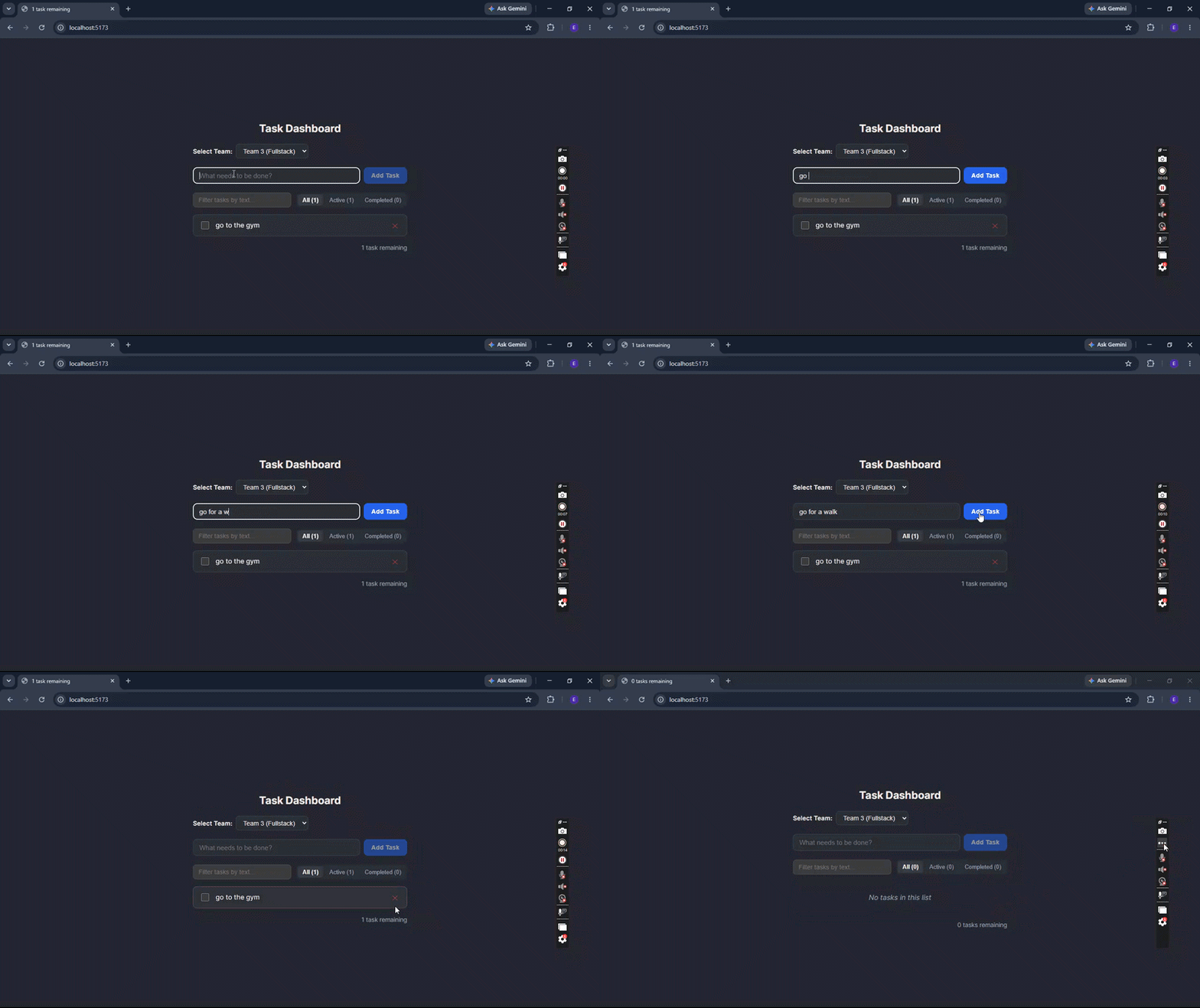
This is the app running in the browser:
We’ll start by creating the API service to handle asynchronous task operations.
In your workspace, create a file at src/services/api.ts and add the following code:
export type Task = {
  id: number;
  title: string;
  completed: boolean;
};

export function fetchTasks(teamId: number): Promise<Task[]> {
  return fetch(`/api/teams/${teamId}/tasks`).then(res => {
    if (!res.ok) throw new Error(`Request failed with status ${res.status}`);
    return res.json() as Promise<Task[]>;
  });
}

export function createTask(teamId: number, title: string): Promise<Task> {
  return fetch(`/api/teams/${teamId}/tasks`, {
    method: 'POST',
    headers: { 'Content-Type': 'application/json' },
    body: JSON.stringify({ title }),
  }).then(res => {
    if (!res.ok) throw new Error(`Failed to create task (${res.status})`);
    return res.json() as Promise<Task>;
  });
}

export function updateTask(teamId: number, taskId: number, updates: Partial<Task>): Promise<Task> {
  return fetch(`/api/teams/${teamId}/tasks/${taskId}`, {
    method: 'PATCH',
    headers: { 'Content-Type': 'application/json' },
    body: JSON.stringify(updates),
  }).then(res => {
    if (!res.ok) throw new Error(`Failed to update task (${res.status})`);
    return res.json() as Promise<Task>;
  });
}

export function deleteTask(teamId: number, taskId: number): Promise<{ success: boolean }> {
  return fetch(`/api/teams/${teamId}/tasks/${taskId}`, {
    method: 'DELETE',
  }).then(res => {
    if (!res.ok) throw new Error(`Failed to delete task (${res.status})`);
    return res.json();
  });
}
By returning raw Promises from these functions, we let the UI delegate loading and error states to template-level compiler blocks.
Next, we’ll build the presentation container in src/components/TeamPage.tsrx. This component manages loading and error states around our dashboard while allowing users to dynamically select a team.
Create src/components/TeamPage.tsrx and add the following code:
import { useState } from 'octane';
import { TaskDashboard } from './TaskDashboard';

export function TeamPage() @{
  const [teamId, setTeamId] = useState(3);

  <>
    <div class="team-selector-bar">
      <label for="team-select" class="team-label">Select Team:</label>
      <select
        id="team-select"
        class="team-select"
        value={teamId}
        onChange={event => setTeamId(Number(event.currentTarget.value))}
      >
        <option value={1}>Team 1 (Frontend)</option>
        <option value={2}>Team 2 (Backend)</option>
        <option value={3}>Team 3 (Fullstack)</option>
      </select>
    </div>

    @try {
      <TaskDashboard teamId={teamId} />
    } @pending {
      <p class="loading">Loading team tasks...</p>
    } @catch (error) {
      <p class="error">Could not load tasks: {error.message as string}</p>
    }

    <style>
    /////
    </style>
  </>
}
In React, displaying loading and fallback UI means wrapping components in Suspense boundaries and writing separate error boundary classes. Octane’s TSRX declares these behaviors natively with @try, @pending, and @catch directives.
Because the directives are compiler-visible, the framework knows these are the three states of the same region at build time. The compiler also turns the sibling <style> block into unique hash classes, scoping styles strictly to this component without post-processors.
Now let’s build the core dashboard interface in src/components/TaskDashboard.tsrx.
This component handles input filtering, synchronized state, task actions, and directive-based list rendering.
Create src/components/TaskDashboard.tsrx and paste the following code:
import { useState, useLinkedState, use, useEffect } from 'octane';
import { fetchTasks, createTask, updateTask, deleteTask, type Task } from '../services/api';

export function TaskDashboard({ teamId }: { teamId: number }) @{
  const fetched = use(fetchTasks(teamId));
  const [tasks, setTasks] = useLinkedState(fetched, source => [...source]);
  const [query, setQuery] = useState("");
  const [filter, setFilter] = useState<'all' | 'active' | 'completed'>('all');
  const [newTaskTitle, setNewTaskTitle] = useState("");
  const [editingId, setEditingId] = useState<number | null>(null);
  const [editingTitle, setEditingTitle] = useState("");

  const handleAddTask = (e: Event) => {
    e.preventDefault();
    const title = newTaskTitle.trim();
    if (!title) return;
    setNewTaskTitle("");
    createTask(teamId, title).then(newTask => {
      setTasks([...tasks, newTask]);
    });
  };

  const handleToggleComplete = (task: Task) => {
    const updatedCompleted = !task.completed;
    setTasks(tasks.map(t => (t.id === task.id ? { ...t, completed: updatedCompleted } : t)));
    updateTask(teamId, task.id, { completed: updatedCompleted });
  };

  const handleStartEdit = (task: Task) => {
    setEditingId(task.id);
    setEditingTitle(task.title);
  };

  const handleSaveEdit = (taskId: number) => {
    const title = editingTitle.trim();
    if (title) {
      setTasks(tasks.map(t => (t.id === taskId ? { ...t, title } : t)));
      updateTask(teamId, taskId, { title });
    }
    setEditingId(null);
  };

  const handleCancelEdit = () => {
    setEditingId(null);
  };

  const handleDelete = (taskId: number) => {
    setTasks(tasks.filter(t => t.id !== taskId));
    deleteTask(teamId, taskId);
  };

  const visible = tasks.filter(task => {
    const matchesQuery = task.title.toLowerCase().includes(query.toLowerCase());
    if (!matchesQuery) return false;
    if (filter === 'active') return !task.completed;
    if (filter === 'completed') return task.completed;
    return true;
  });

  const remainingCount = tasks.filter(task => !task.completed).length;

  useEffect(() => {
    document.title = `${remainingCount} ${remainingCount === 1 ? 'task' : 'tasks'} remaining`;
  });

  <>
    <form class="add-task-form" onSubmit={handleAddTask}>
      <input
        type="text"
        class="add-input"
        placeholder="What needs to be done?"
        value={newTaskTitle}
        onInput={event => setNewTaskTitle(event.currentTarget.value)}
      />
      <button type="submit" class="btn btn-primary" disabled={!newTaskTitle.trim()}>
        Add Task
      </button>
    </form>

    <div class="dashboard-controls">
      <input
        type="search"
        class="search-input"
        placeholder="Filter tasks by text..."
        value={query}
        onInput={event => setQuery(event.currentTarget.value)}
      />

      <div class="filter-tabs">
        <button
          class={{ 'filter-btn': true, active: filter === 'all' }}
          onClick={() => setFilter('all')}
        >
          All ({tasks.length})
        </button>
        <button
          class={{ 'filter-btn': true, active: filter === 'active' }}
          onClick={() => setFilter('active')}
        >
          Active ({remainingCount})
        </button>
        <button
          class={{ 'filter-btn': true, active: filter === 'completed' }}
          onClick={() => setFilter('completed')}
        >
          Completed ({tasks.length - remainingCount})
        </button>
      </div>
    </div>

    <ul class="task-list">
      @for (const task of visible; key task.id) {
        <li class={{ 'task-item': true, done: task.completed }}>
          <input
            type="checkbox"
            class="task-checkbox"
            checked={task.completed}
            onChange={() => handleToggleComplete(task)}
          />

          @if (editingId === task.id) {
            <input
              type="text"
              class="edit-input"
              value={editingTitle}
              onInput={event => setEditingTitle(event.currentTarget.value)}
              onBlur={() => handleSaveEdit(task.id)}
              onKeyDown={event => {
                if (event.key === 'Enter') handleSaveEdit(task.id);
                else if (event.key === 'Escape') handleCancelEdit();
              }}
              autoFocus
            />
          } @else {
            <span
              class="task-title-text"
              onClick={() => handleStartEdit(task)}
              title="Click to edit"
            >
              {task.title as string}
            </span>
          }

          <button
            type="button"
            class="delete-btn"
            onClick={() => handleDelete(task.id)}
            title="Delete task"
          >
            ✕
          </button>
        </li>
      } @empty {
        <li class="empty">
          {query ? `No tasks match "${query as string}"` : 'No tasks in this list'}
        </li>
      }
    </ul>

    <div class="dashboard-footer">
      <span>{remainingCount} {remainingCount === 1 ? 'task' : 'tasks'} remaining</span>
    </div>

    <style>
    /////
    </style>
  </>
}
Let’s walk through how this component works, focusing on the parts where the compiler takes over work you’d normally do yourself:
use(): Evaluates our asynchronous API call. Because the compiler tracks the teamId variable reference, it caches results and refetches when teamId changes, so there’s no manual useEffect watcher and no stale request race to guard againstuseLinkedState: Manages a mutable, localized copy of fetched. When the source data refreshes with a new array, useLinkedState updates the internal state tracking automatically, so the local copy stays in sync without a syncing effectonInput: Binds input state using direct DOM mechanics, skipping React’s synthetic event delegation layer. Note the value bindings: the compiler links them to state and updates the DOM properties directlyuseEffect hook omits a manual dependency array. The compiler scans the closure scope, identifies the remainingCount reference, and manages execution triggers automatically@for and @empty: The compiler transforms these into direct, fast-path node mutations keyed on task.id, while @empty provides a declarative fallback when the filtered list is emptyFor most teams, a framework is only practical if adoption can be incremental. Octane provides two compatibility bridges for exactly that.
To render a React component inside an Octane component, use the ReactCompat bridge:
import { ReactCompat } from 'octane/react';
import { ReactCalendar } from 'react-calendar';

export function Dashboard() @{
  <div>
    <h1>My Octane App</h1>
    <ReactCompat>
      <ReactCalendar />
    </ReactCompat>
  </div>
}
To run an Octane component inside an existing React codebase instead, use the OctaneCompat wrapper:
import { OctaneCompat } from 'octane/react';
import { FastTaskGrid } from './FastTaskGrid.tsrx';

export function ReactApp() {
  return (
    <div>
      <ReactHeader />
      <OctaneCompat>
        <FastTaskGrid />
      </OctaneCompat>
    </div>
  );
}
Here’s a trade-off comparison of the two frameworks:
| Feature | React | Octane |
|---|---|---|
| Rendering model | Runtime reconciliation | Compiler-generated DOM updates |
| Hooks | React hooks | React-compatible hooks |
| Hook ordering | Rules of Hooks | Compiler-managed slots |
| Dependency arrays | Explicit in common cases | Compiler can infer them |
| Events | React event system | Native DOM events |
| Template syntax | JSX/TSX | JSX/TSX + TSRX |
| React interoperability | Native | ReactCompat / OctaneCompat |
| Project maturity | Established | Beta |
Octane takes a familiar React programming model and pushes more of the work into the compiler.
It is worth adopting if your application has real rendering performance constraints and your team is comfortable with a newer, compiler-driven approach to React. Its ability to optimize rendering automatically, combined with incremental adoption through OctaneCompat, makes it a compelling choice for performance-sensitive applications.
However, you should not choose Octane simply because it is newer or promises better performance. If your application already performs well, depends heavily on the React ecosystem, or requires a highly stable production stack, stick with React. The maturity and ecosystem benefits outweigh Octane’s potential gains in those cases.
Install LogRocket via npm or script tag. LogRocket.init() must be called client-side, not
server-side
$ npm i --save logrocket

// Code:

import LogRocket from 'logrocket';
LogRocket.init('app/id');
// Add to your HTML:

<script src="https://cdn.lr-ingest.com/LogRocket.min.js"></script>
<script>window.LogRocket && window.LogRocket.init('app/id');</script>

Explore Vercel’s vgpu, a WebGPU library for AI agents. Learn to build a dynamic shader in Next.js and validate rendering output with headless testing in Node.js.

Compare some of the best Node.js unit testing frameworks in 2023, including Mocha, Jest, Supertest, and Webdriver.

Explore the most useful React date and time pickers, such as the Material Design date and time pickers, React DayPicker, and React-Date-Picker.

Explore how looping Transformers reuse layers and compare with traditional GPT models in reasoning tasks.
Would you be interested in joining LogRocket's developer community?
Join LogRocket’s Content Advisory Board. You’ll help inform the type of content we create and get access to exclusive meetups, social accreditation, and swag.
Sign up now
 Learn more →