JSX has been React’s templating syntax since 2013, and for most of that time, its friction points have been treated as the cost of doing business. Conditionals get squeezed into ternaries or && chains. Lists go through .map() callbacks. Styles live in separate files or runtime injection libraries. Hooks cannot sit behind a conditional without splitting the component.

Those trade-offs all come from the same place: JSX is expression-based syntax layered onto a language that was not designed around UI structure. That has worked remarkably well, but it also means React developers have spent years learning patterns that exist mostly to work around JSX’s shape.
TSRX, or TypeScript Render Extensions, is a TypeScript-compatible language extension by Dominic Gannaway, creator of Inferno.js and the Ripple framework and a former core engineer on both React and Svelte. It gives UI templates first-class control flow through syntax such as @if, @for, @switch, and scoped <style> blocks, rather than forcing everything through function calls and expression slots. The compiler parses component source into an AST, then hands it to framework-specific plugins that emit idiomatic output for React, Preact, Solid, Vue, and Ripple.
TSRX is not a proposal for a future JavaScript standard, and it is not a new framework. It is a source language React developers can install, test in the official playground, and evaluate against real components today. This article looks at what TSRX changes, where it improves on JSX, and what teams should consider before adopting it.
A TSRX component is still an ordinary TypeScript function. The key difference is that TSRX can use a statement-container body, written as @{...}, when local setup, control flow, rendered elements, and scoped styles belong together in the same component body.
In regular React, a function component returns a single JSX expression from its body. In TSRX, a statement container lets TypeScript setup come first and the rendered output come last. The compiler then assembles the correct output for the target runtime.
// TSRX
export function Button({ label, onClick }: { label: string; onClick: () => void }) @{
  <button className="btn" {onClick}>
    {label}
  </button>
}
The {onClick} syntax is prop shorthand, equivalent to writing onClick={onClick}. Dynamic values still use {} as they do in JSX. Static text can be written directly inside the element.
Because TSRX keeps the template body structurally explicit, it can reason about where UI output starts and where TypeScript setup ends. That is the core trade-off: the authoring model stays close to JSX, but the compiler gets a clearer view of component structure.
For background on how TypeScript models JSX today, see LogRocket’s guide to declaring JSX types in TypeScript 5.1.
Ternary chains and .map() callbacks work in JSX because everything inside a React component’s render path must eventually evaluate to an expression. TSRX keeps that familiar JSX shape, but adds template-aware control flow through directives such as @if and @for.
Here is a conditional rendered in TSRX and the kind of React output @tsrx/react can emit for it:
// TSRX source
function StatusBadge({ status }: { status: string }) @{
  <div>
    @if (status === 'active') {
      <span className="badge active">Online</span>
    } @else {
      <span className="badge">Offline</span>
    }
  </div>
}
// Compiled React output
const StatusBadge__static1 = <span className="badge">{'Offline'}</span>;
const StatusBadge__static2 = <span className="badge active">{'Online'}</span>;

function StatusBadge({ status }: { status: string }) {
  return (
    <div>
      {status === 'active' ? StatusBadge__static2 : StatusBadge__static1}
    </div>
  );
}
Multi-branch logic with @else if stays readable as nested conditions rather than collapsing into chained ternaries or a stack of && expressions. Ryan Carniato made this point in his analysis of TSRX: the mechanical advantage is not only the output, but that control flow becomes statically analyzable structure the compiler can reason about.
List rendering follows the same pattern. The @for (... of ...) construct accepts optional index and key clauses directly in the loop header, removing the need to thread a separate counter variable or extract a key inside the callback body.
// TSRX source
function TodoList({ items }: { items: Todo[] }) @{
  <ul>
    @for (const item of items; index i; key item.id) {
      <li>{i + 1}. {item.text}</li>
    }
  </ul>
}
// Compiled React output
function TodoList({ items }: { items: Todo[] }) {
  return (
    <ul>
      {items.map((item, i) => {
        return (
          <li key={item.id}>
            {i + 1}
            {'. '}
            {item.text}
          </li>
        );
      })}
    </ul>
  );
}
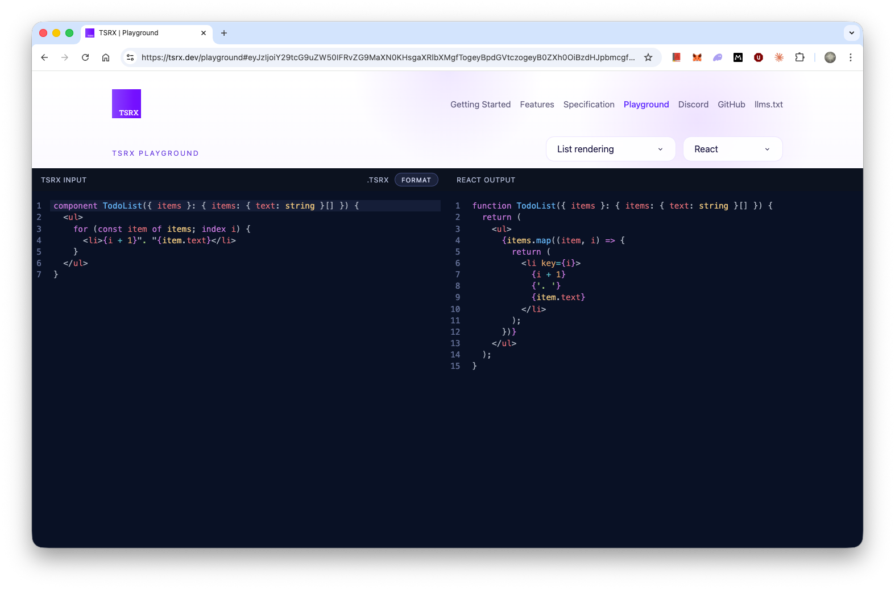
One hard constraint worth knowing up front: @for (... of ...) is the template loop construct. Regular for, while, for...in, and do...while are not template rendering constructs. Imperative loops still belong inside plain functions, not in the template itself.
If you want to compare this with current React patterns, LogRocket’s guide to React conditional rendering methods covers the expression-based approaches TSRX is trying to make less awkward.
React’s Rules of Hooks require every hook call to sit unconditionally at the top level of a component function. The standard fix is to split the conditional path into a separate component, which may add a file, a prop interface, and an indirection that exists mostly to satisfy the rules rather than to model anything in the domain.
// JSX: forced split to gate a hook behind a condition
function ProfileContent({ userId }: { userId: string }) {
  const user = useUser(userId);
  return <h1>{user.name}</h1>;
}

function Profile({ userId }: { userId: string | null }) {
  if (!userId) return <a href="/login">Sign in</a>;
  return <ProfileContent userId={userId} />;
}
TSRX removes some of that manual ceremony. When targeting React or Preact, hooks that appear inside conditional, loop, switch, try, or statement-container scopes can be isolated behind generated child components when the compiler can do so safely.
// TSRX source
function Profile({ userId }: { userId: string | null }) @{
  @if (!userId) {
    <a href="/login">Sign in</a>
  } @else {
    const user = useUser(userId);
    <h1>{user.name}</h1>
  }
}
The compiler performs the component split you would otherwise write by hand, but derives it from the branch structure in your source. The authored code reads as a single linear component. The Rules of Hooks are satisfied by construction in the output through branch isolation, not through manual restructuring.
This is the most important practical feature in TSRX today. React developers who have run into conditional hook problems will recognize the pain point immediately; LogRocket has covered the same constraint in its discussion of common frustrations with React Hooks.
Scoped styles in a React project typically require CSS Modules with a separate file, a runtime CSS-in-JS library, or a framework-level convention like Tailwind. TSRX handles scoping as a compiler feature.
A <style> block placed inside a TSRX template is scoped automatically. The compiler appends a deterministic hash as a scoped class to the component’s elements, then rewrites CSS selectors so they target that hash.
// TSRX source
function Card() @{
  <>
    <div className="card">
      <h2>Scoped title</h2>
      <p>Styles here won't leak out.</p>
    </div>

    <style>
      .card {
        padding: 1.5rem;
        border: 1px solid #ddd;
      }
      h2 { color: #333; }
    </style>
  </>
}
// Compiled React output (class names rewritten with scope hash)
const Card__static1 = (
  <div className="card tsrx-1nelzo7">
    <h2 className="tsrx-1nelzo7">{'Scoped title'}</h2>
    <p className="tsrx-1nelzo7">{'Styles here do not leak out.'}</p>
  </div>
);

function Card() {
  return Card__static1;
}

/* CSS */
.card.tsrx-1nelzo7 {
  padding: 1.5rem;
  border: 1px solid #ddd;
}

h2.tsrx-1nelzo7 {
  color: #333;
}
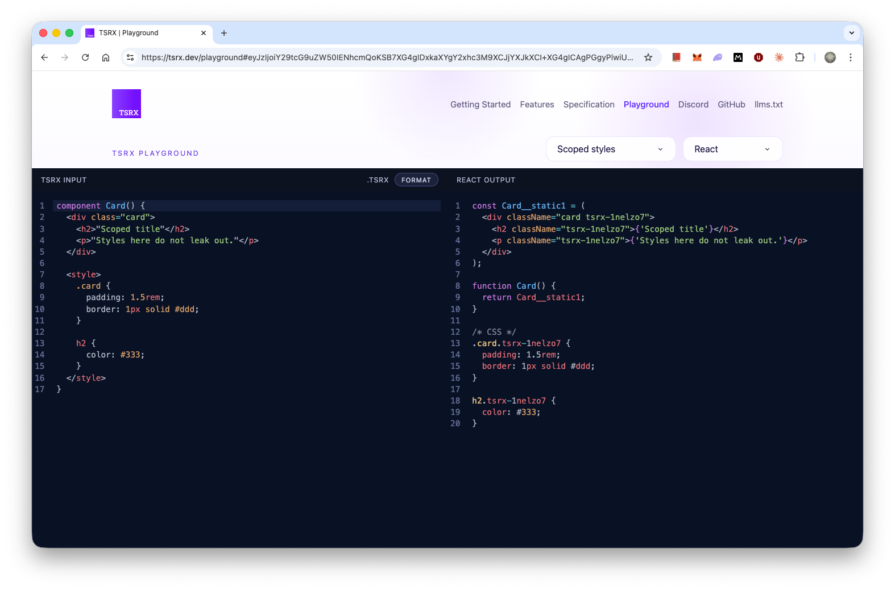
Parent scoped styles do not bleed into child components. When you need to pass scoped class names down, TSRX can expose classes from a <style> expression as a class map. React components use className, while Ripple, Preact, Solid, and Vue examples typically use class for host elements.
This puts TSRX closer to component-scoped styling systems than to ordinary JSX. For a broader comparison of today’s options, see LogRocket’s overview of styling React apps with inline styles, CSS Modules, styled-components, and more.
TSRX makes concrete exchanges. Some are acceptable depending on your project; some are non-negotiable blockers today.
| Area | Cost |
|---|---|
| Statement-container syntax | Components that mix setup and markup use @{...}, which is new syntax for most React teams |
| Template control flow | Uses TSRX directives such as @if, @for, and @switch, not plain JavaScript control flow everywhere |
| Loop constructs | @for (... of ...) is the template loop construct; imperative loops belong in ordinary functions |
| Toolchain | Requires TSRX-aware build tooling and type checking, rather than plain tsserver alone |
| Editor support | Needs TSRX-aware language tooling for diagnostics, navigation, completion, and formatting |
| Stability | The language is still new, and the spec, compiler behavior, and plugin APIs are still evolving |
The community’s co-location critique is worth taking seriously as an architectural concern, not dismissing as resistance to new syntax. TSRX mixes markup, logic, and styles in one component scope, which trades traditional separation for locality. The counterargument is that TSRX gives the compiler an explicit structure it can understand, making this different from arbitrary file-level mixing. Both positions are defensible. The question is whether your team values locality enough to accept tighter coupling inside component boundaries.
For additional context on Dominic Gannaway’s broader framework work, LogRocket has covered RippleJS and how it compares to React.
TSRX is compelling because it addresses practical JSX pain points instead of offering a purely cosmetic syntax change. Its strongest feature right now is the ability to isolate hooks inside conditional or template scopes without forcing developers to split components apart manually. Scoped styles are also useful immediately, especially because they compile away without adding a runtime styling library. Those two features alone make the playground at tsrx.dev/playground worth testing against a real component in your codebase.
Still, TSRX is in its early days. It’s active beta software with an evolving spec, changing APIs, and the usual tooling questions that come with any source-language extension. Most React teams should not redesign around it yet. For now, the practical next step is to try it in the playground, follow the Ripple-TS/ripple repository, and revisit it once the API and ecosystem support are more stable.
Install LogRocket via npm or script tag. LogRocket.init() must be called client-side, not
server-side
$ npm i --save logrocket

// Code:

import LogRocket from 'logrocket';
LogRocket.init('app/id');
// Add to your HTML:

<script src="https://cdn.lr-ingest.com/LogRocket.min.js"></script>
<script>window.LogRocket && window.LogRocket.init('app/id');</script>

We tested five AI code review tools for speed, setup, security, and code quality to compare their strengths and help you choose the right tool.

Compare five React toast libraries for features, bundle size, accessibility, performance, and React 19 compatibility.
See how Tecovas built a patching agent that turns LogRocket’s Galileo AI issue analysis into GitHub PRs, with a developer reviewing every fix before it ships.

Explore OctaneJS, a compiler-first alternative to React. Build a task dashboard and learn about rendering, hooks, asynchronous UI, and React compatibility.
Hey there, want to help make our blog better?
Join LogRocket’s Content Advisory Board. You’ll help inform the type of content we create and get access to exclusive meetups, social accreditation, and swag.
Sign up now

 Learn more →