As a product manager, you’ve likely experienced this scenario: You’re putting out fires, managing the roadmap, and fielding feature requests when your CEO adds one more: “We need an AI feature ASAP to show how innovative our product is.”

You get your tech lead or architect and start discussing options. Chances are, someone suggests a chatbot that “guides users to do X” or a “copilot” that helps them on their path to Y. But what problem would it solve, and would AI actually make the experience better?
Think about your last interaction with a chatbot in a digital product. Did it help you achieve something, or add steps to something that should’ve been simple? Conversation can be the right interface, but it needs to earn its place.
The way I approach these requests is through what I call AI value framing: a three-step framework that helps you define AI features around user needs, business value, and reliability:
In this article, I’ll walk through each step with examples from my own projects to show you how to validate the need, weigh the investment, and define what your AI feature needs to work reliably.
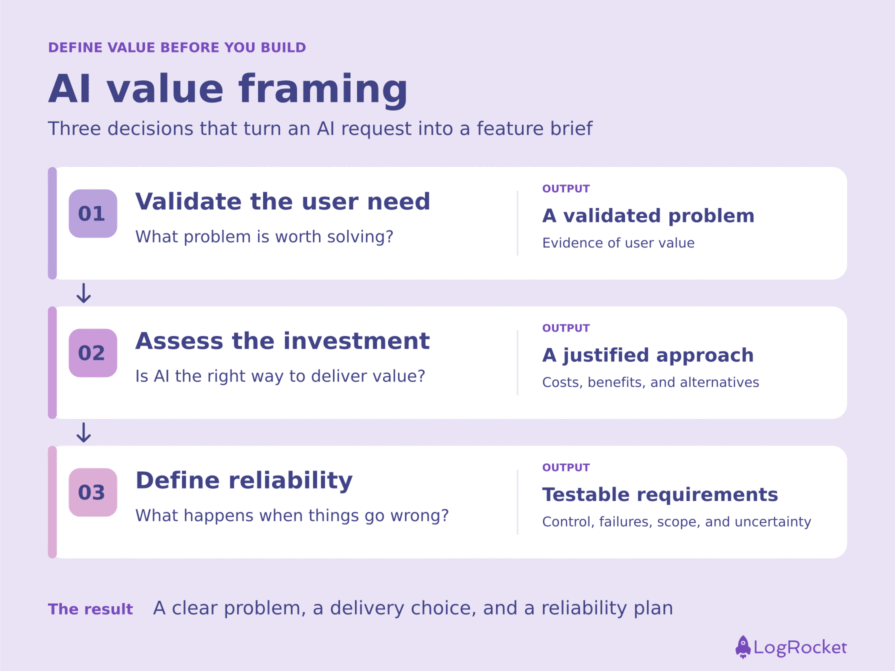
When it comes to AI, we’re often looking for a problem to fit our solution, not the other way around. Whenever a new feature request comes in, it’s important to consider whether it addresses a real user need or if it’s just another flashy idea. Your job, after all, is to build something users will use that also delivers value to the business.
First, take the time to understand how users handle the task today, where they struggle, and what a better outcome would look like. Would success mean saving time, reducing errors, or completing something they currently can’t?
Once that’s clear, go into solution mode. Brainstorm ways to solve the problem, and don’t assume AI is the answer yet. I like to build a quick prototype to experience the idea myself and see if it makes sense, then test it with a few users. At this stage, you’re testing whether the proposed solution delivers value. Whether AI is the right way to deliver it is the next question.
Be careful here: Enthusiasm is easy to get, and “this is great” tells you little. A stronger signal is when someone says, “This saved me a lot of time,” without prompting, then keeps using the prototype after the session. Look for behavior that supports the benefit you’re testing, such as completing the task faster or needing fewer corrections.
Go hunting for reasons the idea won’t work as hard as reasons it will. If it survives that scrutiny and users keep finding value in it, you have a stronger case for moving forward.
At this stage, you have a promising feature idea, a prototype, and positive signals from users. The next step is AI due diligence: assessing whether AI is the right approach and whether the expected value justifies the costs and business implications.
Here are the questions I ask:
Now, let’s look at an example to help show what AI due diligence looks like in practice. Three members of the marketing team came to me with a request: They wanted an AI agent to help prepare content packs for events the business development team attends. Each event has a slightly different target audience, so the marketing team spends a lot of time manually reusing, repurposing and tailoring materials to each industry.
Together, we brainstormed a full system that went beyond text generation into managing the content packs. It was a tempting idea, so before committing, I ran it through the due diligence questions.
The team got a quick win right away instead of waiting for a custom system. It didn’t deliver everything we had brainstormed, but it addressed the time-consuming drafting work that prompted the request.
The final step is the easiest to skip, especially without an experienced AI architect or engineer alongside you. This is where you define what success looks like and the guardrails that help your AI feature deliver on its promise.
Before building an AI feature, make four product decisions:
I learned these lessons the hard way while building Caliber, a job search agent I created at an Agent Buildathon. It helps job seekers assess whether roles match their career goals, experience and company culture preferences.
The user starts by answering a few questions about their preferred workplace culture. Next comes a focused conversation with the chatbot about career goals and role preferences, followed by a resume upload to provide details about their experience. For each job the user adds, Caliber assesses the fit across those three dimensions and recommends whether to apply.
From the beginning, I made one boundary clear: The agent would recommend, but never act on the user’s behalf. Handling failures and communicating uncertainty took more work.
During development, the large language model (LLM) repeatedly behaved in ways I hadn’t intended, including generating fit scores without enough supporting evidence. Those failures exposed decisions I still needed to make about how Caliber handled missing information and explained its recommendations.
For product managers, designing for reliability means deciding where users retain control, how failures are handled and what limits the system must respect. These four principles help you turn those decisions into requirements your team can build and test.
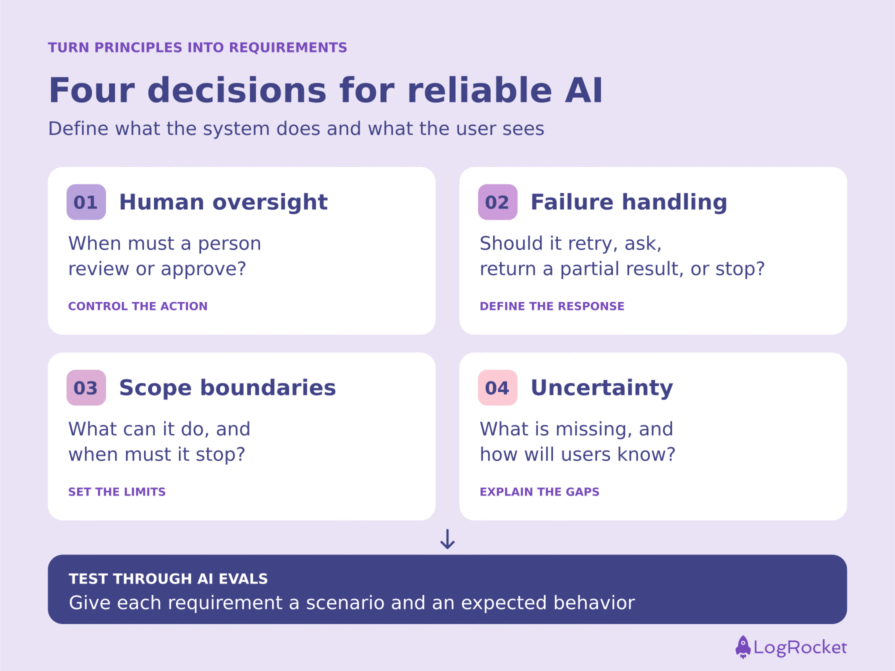
The higher the stakes, the more control the user needs. An AI agent can research, analyze, and recommend, but when a decision has significant consequences, define where a person must review the output or approve an action.
In Caliber, the agent never applies to jobs on the user’s behalf or removes roles it considers unsuitable. It generates a weighted fit score across company culture, experience, and role preferences. The user sees the reasoning and makes the call. Keeping that decision with the user was a conscious product choice from the beginning.
Before building, decide which actions the AI can take independently and which require human approval. Make sure users have enough information to exercise that control.
When we don’t consider failure modes, we risk shipping AI that misleads users without giving them a way to recognize the problem.
In Caliber, a search that returned no relevant information didn’t stop the agent from producing a recommendation. Instead, it filled the gaps with generic content. The workflow needed to treat missing evidence as a condition to handle explicitly.
I changed the workflow and instructions so the agent would acknowledge unsuccessful searches instead of silently filling in the blanks. I also added searches for information that was often missing, such as employee reviews that could provide more context about company culture.
Before your engineers get to work, define what can go wrong and what the system should do in each case. Should it retry a search, ask the user for information, return a partial result or stop? If another attempt still produces no useful evidence, define what happens next.
You can use an LLM to brainstorm potential failures, then review those scenarios with your team and test how the system handles them.
When you don’t clearly define the scope, an AI agent can fill in the blanks or take the interaction in an unintended direction.
For Caliber’s conversation agent, I defined a clear purpose, a limited conversation length, and specific topics to cover. Once the agent had gathered enough information, it would stop asking questions and provide a career goal summary.
Those boundaries helped keep the conversation focused. Without them, the agent could ask endless questions, explore less relevant topics, and consume additional tokens after it already had what it needed.
Define what your AI feature will do, what it won’t do, and when it should stop. Those boundaries shape both the user experience and the cost of delivering it.
Handling missing information is only part of the job. Users also need to understand how those gaps affect the recommendation they receive.
In Caliber, the overall fit score initially reflected only the dimensions with available data. That could produce a very high score even when important information was missing. A user could reasonably interpret that number as a complete assessment when it was only a partial one.
I revised the scoring instructions and highlighted missing information so users could see where the assessment was incomplete.
Before building, decide how an insufficiently supported result should appear to the user. Should the system withhold an overall score, mark individual dimensions as unknown or label the assessment as partial? Choose a presentation that makes the limits clear.
Missing evidence shouldn’t silently disappear from a score. Users need to understand what the recommendation is based on, what remains unknown, and how those gaps limit its usefulness.
Together, these principles give you behaviors to test through AI evaluations, or evals. As the PM, you define the user outcomes and business metrics that matter, then work with your tech lead or architect to translate them into evaluation criteria.
For example, a test case could provide enough evidence to assess a candidate’s experience fit but none to assess company culture. The expected behavior would be to identify the missing evidence and explain the assessment’s limits, without inventing a culture-fit judgment.
Build similar tests for human approval requirements, failed searches, and scope boundaries. That’s how reliability becomes something you can assess before launch and monitor as the product evolves.
The next time someone asks you to “add an AI feature,” start by defining the value it should deliver. Validate the user’s needs, assess whether AI is worth the investment, and decide how the feature should behave when things don’t go as planned.
That process might lead to a custom AI feature. It might also lead to an existing tool or a simpler solution. Your job as a PM is to make that choice based on the problem, the expected benefit, and the constraints you’re working within.
If you move forward with AI, turn your reliability requirements into evals you can test before launch and revisit as the product evolves. A promising prototype shows what’s possible. How it handles real tasks, missing information and failures determines whether it becomes a product people rely on.
Featured image source: IconScout
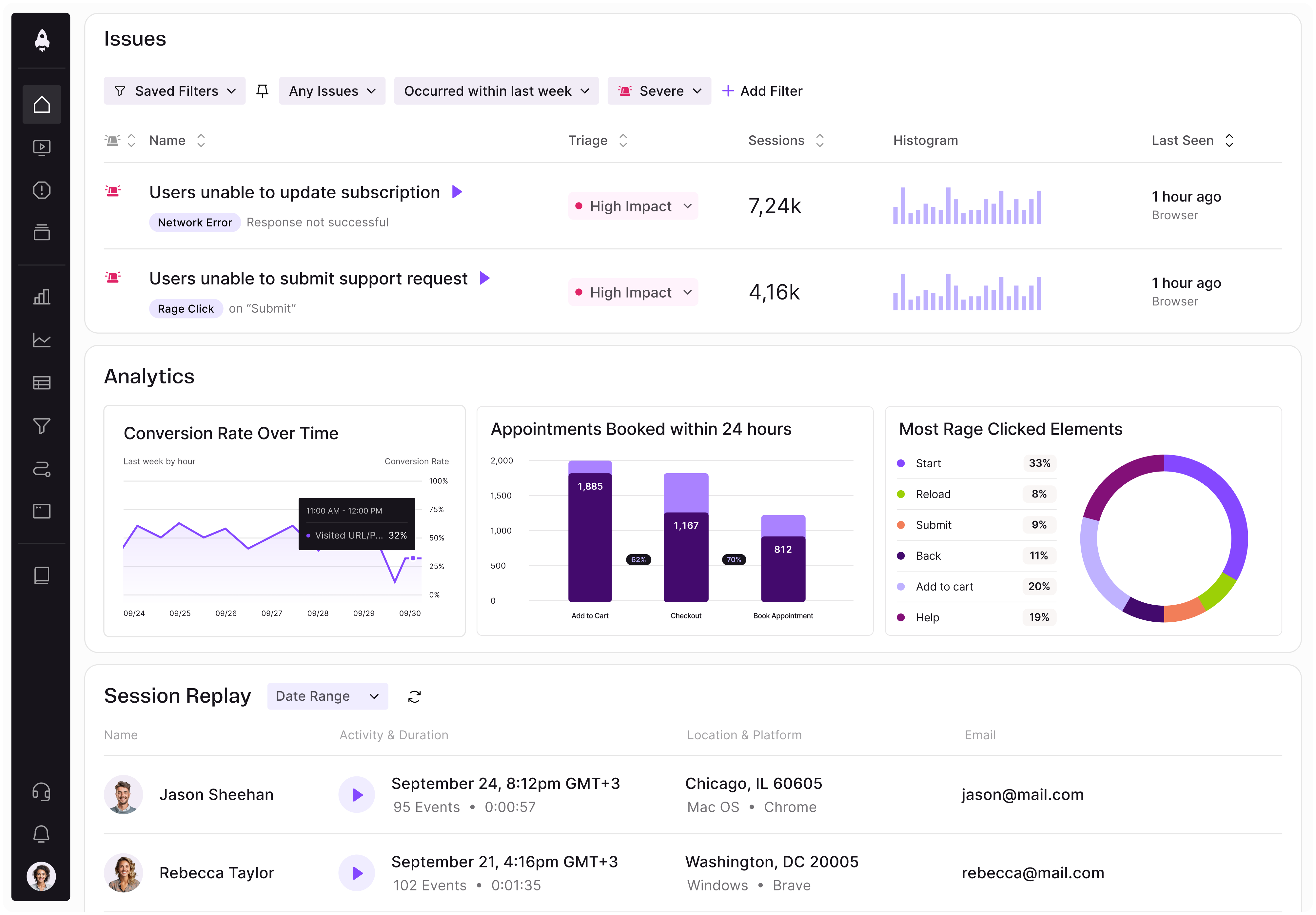
LogRocket identifies friction points in the user experience so you can make informed decisions about product and design changes that must happen to hit your goals.
With LogRocket, you can understand the scope of the issues affecting your product and prioritize the changes that need to be made. LogRocket simplifies workflows by allowing Engineering, Product, UX, and Design teams to work from the same data as you, eliminating any confusion about what needs to be done.
Get your teams on the same page — try LogRocket today.

Spot misleading KPIs, balance targets with counter-metrics, and keep your team focused on better product outcomes instead of dashboard wins.

Keep the reasoning behind product decisions within reach. Build a clear system to track customer feedback, priorities, and project progress.
Discover how Meilisearch uses LogRocket’s MCP and Galileo to improve free trial conversion and adoption of newly shipped features across its Cloud product.

Resolve cross-functional conflict in AI product development with a 3-step framework to clarify risks, assign owners, and align teams to act.

 Learn more →