On December 11 2025, Cursor unveiled a visual editor that lets you make changes directly to web elements. You can drag and drop headers, change your font-family, resize grids, or select an element and prompt an agent for modification. “Click on a thing, talk to it, and iterate” was how their head of design described the process. They said this new tool “will bring design and engineering closer together.”
Over the next few months, more design tools have appeared, all offering the same thing: designing (in code) with AI. And, just like Prompt engineering, design engineering is the new buzzword. However, it’s not an entirely new concept; it’s just shifting from a bridge to an execution role.
This post will explore this shift over the years, exploring the tools that have attempted to bridge the gap, and the modern tools bearing the torch in the age of AI.
Web design and development have long been compared to manufacturing and construction. A building needs both an architect and a civil/structural engineer. Somewhere between the blueprints and the laying of the foundation, both worlds have to meet.
Design engineering is the fusion or intersection of design thinking and engineering practice. Designers concern themselves with how a product should look and feel, and engineers with how it should work. A design engineer does both.
In traditional design-to-code systems, design engineering matters most during the handoff, when the designs are passed to the developers for implementation. A team is usually split with UI/UX designers on one side and engineers/developers on the other. Handoffs are delicate periods where things could break down.
The design engineer is someone who speaks both languages, with the responsibility of supervising the implementation of designs. They’re the translator making sure what is developed and deployed looks like what was designed.
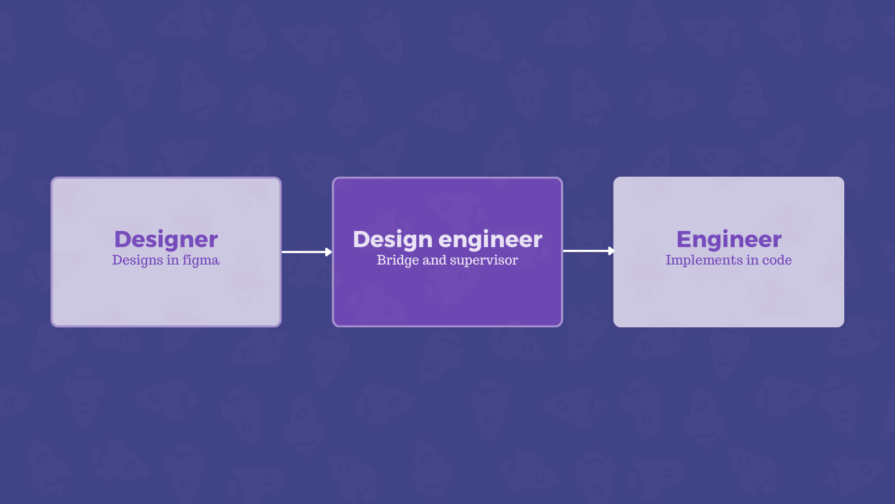
A team could have an individual wearing both hats — a designer who can code or a developer who can design. They’re comfortable navigating a Figma file and won’t get lost in a codebase. In practice, these individuals were rarely called “design engineers,” but that was the role they performed. Design job titles have always been fluid and depend on the company (or individual) who may just be making up these terms.
Design handoff tools make the gap easier to cross, but you could argue that they didn’t close it. Third-party tools were popular until UI design tools like Figma started bundling native handoff features. This was the clearest answer to handoff problems.
Before design engineering was a thing, before it was a job title, before AI became mainstream, some tools were already closing the gap between design and engineering in their own unique ways.
This is the true pioneer and original design-to-code editor. Dreamweaver was released in December 1997 and acquired by Adobe in 2005. It’s a WYSIWYG (What You See Is What You Get) visual editor that lets you build web pages while generating code in real time.
You could drag and drop web elements without needing to learn to code, although the tool also allows those with the knowledge to write code. It was game-changing for its era, but eventually, issues like bloated, insecure code meant developers preferred writing vanilla HTML and CSS.
They took a different approach using a template-based system for web publishing. WordPress is straightforward; choose a theme, add your content, and publish. For many bloggers and small businesses, this was the perfect way to build for the web without needing to know how the web worked, let alone how to code. However, the best templates for premium designs and plugins for more functionality are often trapped behind paywalls.
Webflow required more technical knowledge. Unlike WordPress, you need to know how layouts, box models, animation keyframes, and more work, even if it’s wrapped in a visual editor. Webflow made the abstract engineering aspects more visible and easier to learn. It was a tool that helped build the engineering literacy of web designers.
The most modern tool in this group started as a code-based tool before transitioning into a visual builder built on React. Framer has been described as Figma with publishing. Think of Figma with a deploy button.
All three of these tools, WordPress to Framer, have since added AI into their workflows, an inevitability in this category of tools, given the present reality.
These tools collapsed the distance between design and code, but another effort was happening inside the tools designers were already using.
UXPin Merge, for example, lets developers create a component library that designers can pull from. Designers get to work with production-ready UI components when creating mockups and prototypes. The design file stayed in sync with the codebase, ensuring designers and engineers remain on the same page, drawing from the same source.
There are also Figma plugins, like those by <div>RIOTS that translate Figma designs into usable code. Handoffs can be done without leaving the design tool.
For years, the process was the same: design, handoff, implement, iterate. The UX designers create designs and hand them over to the developers, who build them. If something doesn’t match or needs to change, the cycle repeats.
Modern design and code tools actively encourage new, non-traditional workflows that challenge the old sequence in different ways.
First up is Cursor’s model, code-to-design. Rather than starting in a design tool and implementing later, you can build or drop in an existing codebase and refine visually from there. Design and implementation happen on the same surface, at the same time. The handoff doesn’t exist in this model because there’s nothing to hand off.
The second is vibe coding. Now, you prompt, then code, then design. A designer describes what they want, AI generates a working UI, and refinement comes after. This is similar to Cursor’s model, with prompting coming first. With this approach, the product exists before design.
The third approach is relatively new — vibe design. We have a fancy new AI-inspired buzzword. Here, AI generates the design, a designer refines it, and the output is handed over to developers or deployed directly, depending on the tool. So, prompt, then design, then code.
For its many flaws, AI has made it so nobody has to stare at a blank canvas for too long. These new workflow models make design and code bidirectional. Code can become design, and prompts can become either.
This changes what designers and engineers actually do. Less time will be spent creating UI components from scratch. More time will be spent directing and refining what the AI has produced. “Code is the canvas,” and “design is the code.”
These tools aim to eliminate the gap between design and engineering, with a lot of help from AI.
Cursor made the engineering environment the design environment. With its visual editor/design mode, you can select any web element, and Cursor will add it to an agent chat for context. You can drag and drop elements across the DOM, swap button orders, rotate sections, and test grid configurations. When the layout looks right, you tell the agent to apply it. It finds the relevant web components and updates the underlying code.
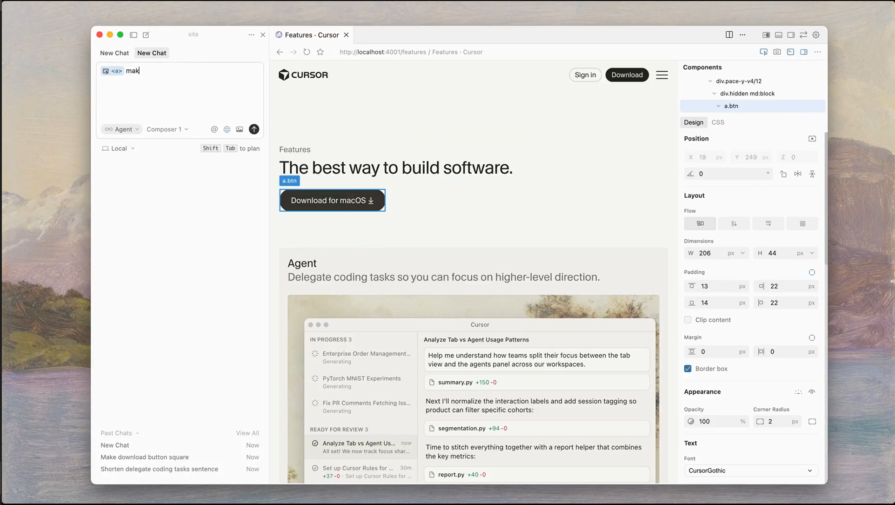
The sidebar would be familiar to Framer users. It lays out your own design tokens, all interactive and live. You can click on a color and see it change in real time. Adjusts typography, flexbox layouts, and spacing with the controls.
There’s also the point-and-prompt layer. Click on any web element and describe what you want, and the AI agents make it happen. As Cursor put it, the goal is to help you “better articulate what you want so that execution is not limited by mechanics.”
Google’s Stitch made Vibe design an official term. Stitch is an AI-powered UI design and development tool that generates web and mobile designs along with corresponding code from text prompts. No wireframes are needed; you describe what you want in plain language, and the Stitch handles the execution.
Stitch can also export to Figma, meaning you can remain (or return to) a design-to-code workflow if you prefer. Figma’s stock dropped following Google’s announcement. It’s a sign that the industry is taking this seriously, and Figma’s monopoly, especially on the early stages of web and digital products, might be ending soon.
On April 17, 2026, Claude Design arrived on the scene, making the same case. It lets designers collaborate with Claude to create designs, prototypes, wireframes, and more. Claude design builds a design system for your team by reading your codebase and design files. Every project that comes afterwards uses that defined system.
You can start from text prompts, uploaded files, your codebase, or by capturing elements directly from your live site. From there, “fine-grained controls” let you comment on specific web elements, tweak spacing and layout, and push your changes across the full design. Finished work can be exported to Canva, HTML, PDF, or PPTX — or it’s packaged by Claude into a handoff bundle and passed to Claude Code.
It might be a coincidence, but for the second time, Figma’s (and Adobe’s) shares dropped some more following Claude’s update.
Anima is a vibe designing platform that’s “breaking the boundaries between design and development.” It lets you “build apps from designs, ideas, or by cloning.” That is, you can start from scratch or copy an existing website or application. IBM invested in the design-to-code platform; maybe they see their potential.
They say they want to solve the problem with vibe coding, but they also encourage you to vibe code.
There seems to be a new vibe coding or designing platform popping up each week. They may just be jumping on the bandwagon, but it always triggers the same reactions.
However, tools like Cursor, Stitch, Claude Design, and Anima show that the question is no longer about how to get design into code. Designers and engineers will spend less time building UI components from scratch and more time directing, refining, shaping, and steering what the AI has produced. “Code is the canvas,” “Design is the code,” these are phrases that have circulated in web communities.
These shining new design tools are, or appear to be, better. The workflows are faster, but speed has side effects, especially with AI.
AI can generate a UI in seconds, and there’s a temptation to keep generating until it works well enough to be released. There are even posts actively encouraging designers to start with Claude and then move to ChatGPT later in the process. You could end up with Frankenstein UI: a visually inconsistent, incoherent, stitched-together mess from a dozen AI outputs. The underlying code is often the worst. Speed of iteration does not often translate into quality.
AI output still needs a human touch. Knowing when to accept changes or start over are decisions that requires context and experience, which can’t come from the tool.
Most designers are designers first. With AI bringing design and engineering together in one environment, it will expose the skill gap. Designers think about visual hierarchy, flows, user experience, and more. Execution of these concepts requires engineering thinking. Yes, designers can generate a working prototype with a few prompts in a few minutes, but do they understand what they have built? Can they iterate on it and ship to users without creating more problems?
Component architecture needs to be a foundation, and is one of the first things to break down. Engineers can navigate a well-structured design system. These systems should serve as constraints when building a website or application with AI design tools.
When Cursor announced its Design mode, a demo was shared with a flaw. It featured, and by extension encouraged vague prompts like “Make this less muted,” “Make this bigger,” “Drop this section,” and “Make this more vibrant.” Also, the changes aren’t made locally; there’s an LLM call every time a change is applied, which costs tokens
It seems counterintuitive because designers can perform the same task with a few clicks rather than chatting with the AI. And it makes you wonder if these tools are actually aimed at professional designers. Maybe it’s for their clients to see that “Hey, you don’t need to pay that designer, just subscribe to our tool, and it’ll do the job for you!”
Designers cannot rely on vibes. Vague prompts will produce vague results. The ability to describe precisely enough for an AI agent to act correctly is a skill in itself. Vibe coding can be a valuable skill for a designer, but they’ll need to understand how frontend code works. Designers don’t need to become engineers, but they do need code literacy to direct AI properly. Understanding even the basics can help you vibe more effectively.
There’s always a risk with these tools encouraging vibes, it’s skill loss — or, to be more technical, skill atrophy. The more AI handles, the less practice designers and engineers get. Knowledge built through hours of hands-on work wrestling with Figma doesn’t get built when AI does it on the first try. Overreliance is hard to notice until you run out of tokens and need the skill, but it isn’t there.
Some share demos and say, “I built this insane, flawless UI in 5 minutes. Zero back and forth. Designers are cooked; AI ate your job. Prompt in the comments.” You see the prompt, and it’s well-crafted and detailed and could only have been produced by one of the “cooked” designers. It’s even funnier when the prompt starts with something like “You’re a senior UX designer…” Can you see the irony?
Prompt engineering is an essential skill for designers and engineers looking to embrace AI in their workflows. It’s the art of carefully planning and crafting prompts to get consistent, high-quality results. Prompt engineering fell out of fashion, particularly as a job role, but just like design engineering is emerging now, the underlying disciplines matter. For designers working with AI, knowing how to construct prompts, set constraints, provide context, and specify output is the difference between generating a useful result and one that only gives the appearance of usefulness.
Traditional or dedicated design tools still matter. Figma is not going away. Every time, it’s the same cycle, and the hype always dies down. If everyone can do the same things, there’s no value. True designers will stand out because they’ll have a level of interest and attention to detail that most casual users don’t. Everyone using the same AI-generated template will start producing similar designs. AI appears to have leveled the playing field, but you still need world-class designers to produce the highest quality work, with or without AI.
A design engineer cannot abandon design tools entirely for prompt-based tools.
Every tool works better with a solid design system behind it to guide the AI. Design tokens carry your colors, typography, spacing, and more, and give AI tools something concrete to work with. For example, Cursor’s visual editor lets you apply your tokens directly from the sidebar, and Claude design can build a design system from your codebase before it generates anything. AI tools work well on top of a solid system. Otherwise, outputs are inconsistent.
Component-driven frameworks make this possible on the engineering or code level. Framer, for example, is built on React, a component-based JavaScript framework. Cursor highlights and edits individual JSX components directly. When your UI has well-defined, reusable pieces, AI agents can locate and modify them with higher precision.
Here’s a design engineering job posting from Anthropic:
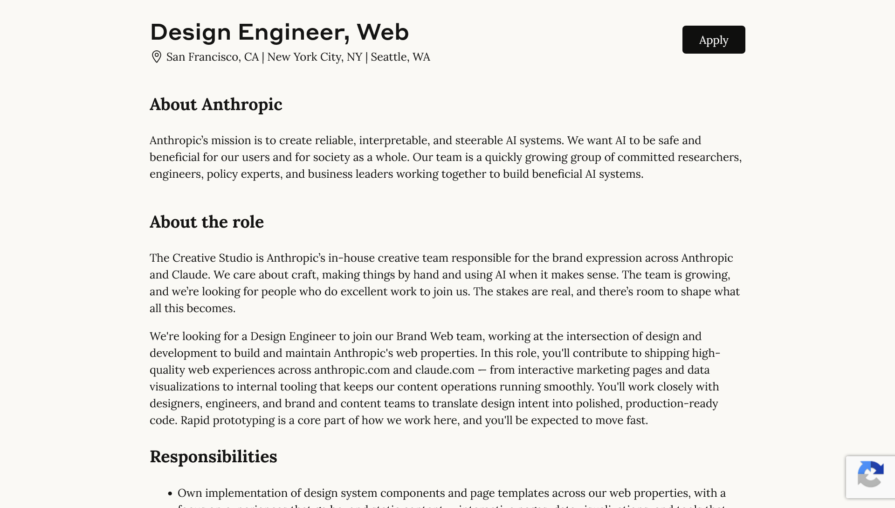
It gives you an idea of what is expected of a design engineer today. They need to operate across different modes of thinking. Design thinking to identify problems and the right solutions, and engineering thinking to understand how components relate, and anticipating what is buildable and maintainable.
The bridge is collapsing, not because designers want to be engineers or there’s a vendetta against designers (which AI hype cycles seem to suggest), but because the tools have changed what the work looks like.
Dreamweaver created the path, Webflow and Framer followed, and now we have AI. Design decisions inside the codebase, a working UI without wireframes first, and no handoffs. The tools are changing what is possible, and the skills required to use them are changing too. Design engineering might just have found its era.
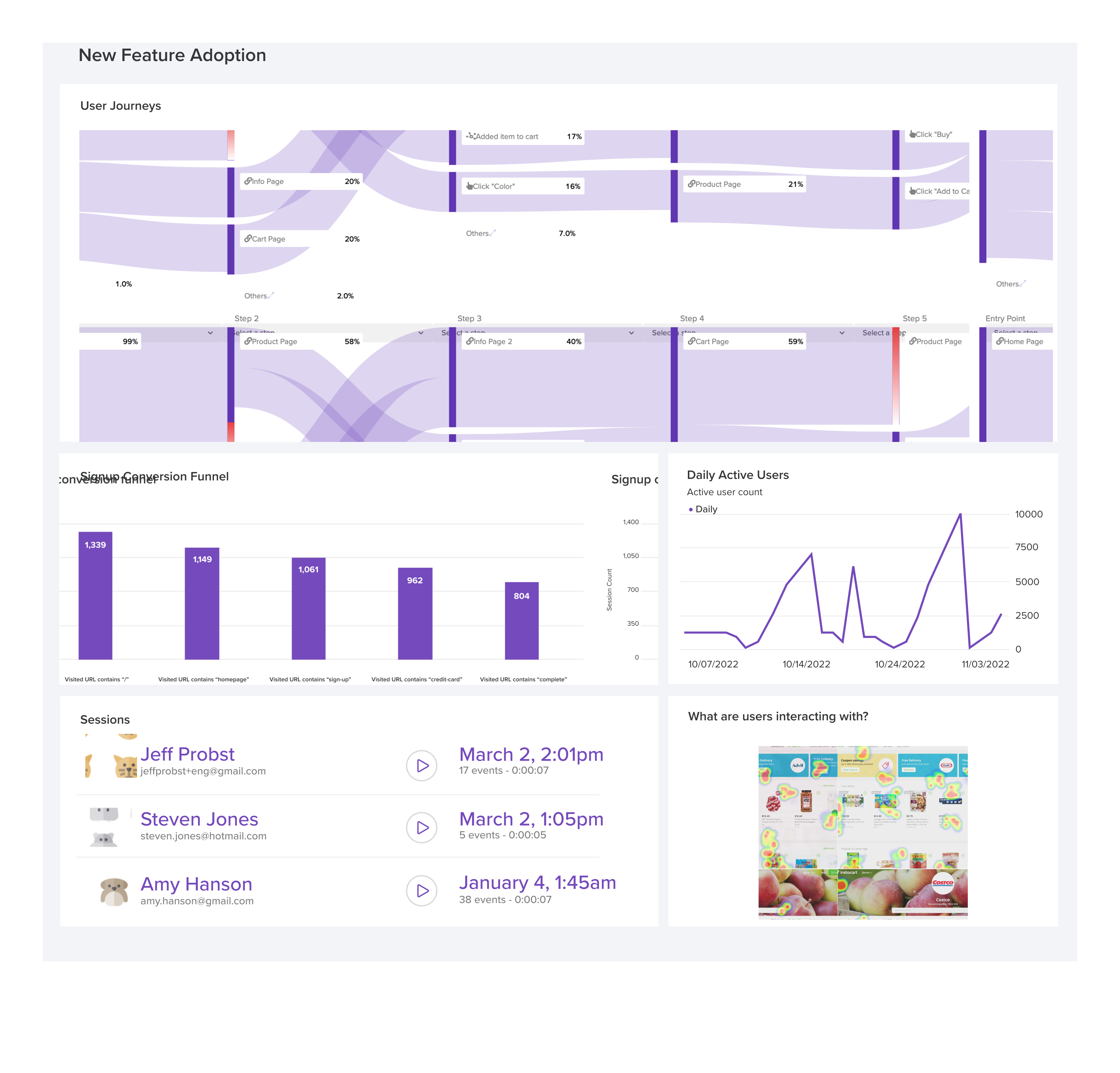
LogRocket's Galileo AI watches sessions and understands user feedback for you, automating the most time-intensive parts of your job and giving you more time to focus on great design.
See how design choices, interactions, and issues affect your users — get a demo of LogRocket today.

Fixed user flows still have a place, but AI is changing how products respond to user intent. Here’s what designers need to rethink when flows become dynamic.
Framer brings design, CMS, publishing, and AI into one workspace. Here’s how its 2026 workflow compares with Figma Sites, Relume, and Webflow—and when consolidation makes sense.

Three predictions for the next UX era, revisited against Liquid Glass, Material 3 Expressive, and spatial widgets—with a practical, conditional outlook for 2027.
AI-first helpdesks can answer questions and take action, but good UX depends on accurate information, clear approval limits, and human handoffs that preserve context.

 Learn more →