Over the past few years, ESLint has established itself as the de facto linting tool for JavaScript and TypeScript teams. Developers have long valued it for its reliability and its expansive plugin ecosystem, which gives teams the flexibility to enforce rules tailored to their own codebases or build on top of existing shared configurations:
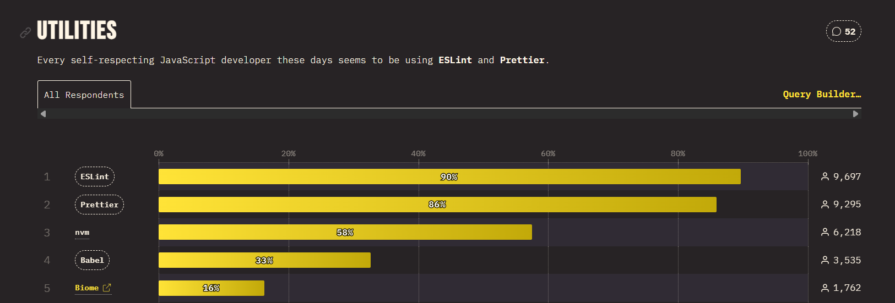
At the same time, a new generation of faster JavaScript tooling has introduced a new class of linters, including Biome and Oxlint. Biome serves as an alternative to both Prettier and ESLint, but that discussion is outside the scope of this article. If you want a broader look at it, see this guide to Biome.
Oxlint, by contrast, is a linter written in Rust specifically for the JavaScript and TypeScript ecosystem. It is part of Oxc, a broader suite of developer tools maintained by the VoidZero team. Oxlint claims to be 50–100 times faster than ESLint and twice as fast as Biome, and its adoption has steadily increased since its release.
That raises the obvious question: why move away from ESLint at all, and why make the case for retiring it?:
The Replay is a weekly newsletter for dev and engineering leaders.
Delivered once a week, it's your curated guide to the most important conversations around frontend dev, emerging AI tools, and the state of modern software.
| Category | ESLint | Oxlint |
|---|---|---|
| Performance | Slower in large repos, especially with type-aware rules | Extremely fast, often 50–100 times faster in benchmarks |
| Language/runtime | JavaScript | Rust |
| Default rules | Minimal, requires setup | 100+ rules enabled by default |
| Type-aware linting | Uses typescript-eslint with tsc |
Uses oxlint-tsgolint with tsgo |
| Plugin ecosystem | Mature and extensive | Growing, with experimental ESLint plugin support |
| Migration difficulty | N/A | Incremental migration is possible |
| Best for | Teams deeply tied to ESLint plugins | Teams prioritizing speed and simpler setup |
For all of its strengths, ESLint comes with several recurring pain points that become more visible as projects grow.
Oxlint’s appeal is not just that it is newer. It addresses several long-standing pain points in ESLint directly, especially around performance, usability, and migration.
Speed is Oxlint’s clearest advantage. As noted earlier, the project claims performance improvements in the 50–100 times range over ESLint. We will look at those numbers more closely in the next section, but even at a practical level, the difference is significant. Faster linting changes the experience of using the tool. It stops feeling like a chore and starts feeling lightweight enough to run continuously in development and CI.
Some ESLint rules require type-checking in order to determine whether a violation has occurred. ESLint typically handles this through typescript-eslint, which relies on the TypeScript compiler, tsc, to analyze the project before applying those rules. That works, but it also means type-aware linting inherits the compiler’s performance costs, which become increasingly noticeable in large repositories.
Oxlint takes a different route through oxlint-tsgolint. This is a Go-based TypeScript linter focused exclusively on type-aware rules. When paired with tsgo in TypeScript v7, it can run 20–40 times faster than the typical ESLint plus typescript-eslint workflow.
Oxlint is also easier to get started with. At the time of writing, it enables 107 rules by default, which means it delivers useful feedback immediately after installation. Its configuration model is more approachable than ESLint’s, and the documentation is noticeably clearer. It also includes non-type-aware TypeScript rules out of the box.
One of Oxlint’s more pragmatic strengths is that it does not demand an abrupt break from the ESLint world. It already supports many ESLint rules and continues to expand that coverage. That makes migration far less disruptive than it might sound. Oxlint can also work with ESLint JavaScript plugins, though that support is still experimental, and teams can run both tools side by side as part of an incremental rollout.
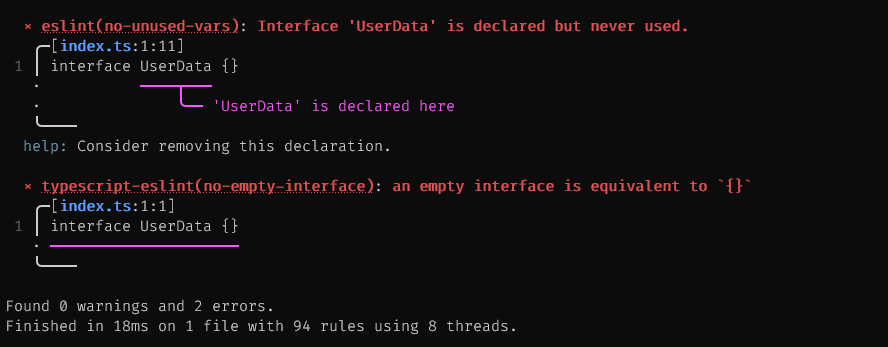
Oxlint also feels more in tune with how developers work today. Its error messages are clearer, more structured, and easier for both humans and LLM-based tools to interpret. The command-line output is cleaner as well, without some of the visual clutter developers have long associated with ESLint. In practice, Oxlint feels less like a radical departure and more like a modernized version of a familiar tool.
Oxlint is usually the stronger choice when:
That brings us to the obvious test: is Oxlint actually 50–100 times faster than ESLint in practice? The Oxc team maintains a repository called bench-linter that compares Oxlint, ESLint, and Biome across several scenarios. I tried reproducing those benchmarks on an HP EliteBook 1040 G7 with 16GB of RAM and four physical cores running eight threads.
After adapting the shell commands for Windows, here are the results from linting the Vue Core repository:
============================================
Vue Core Benchmark - Type-Aware Rules
============================================

Oxlint vs TypeScript ESLint with type-aware rules
-------------------------------------------
Benchmark 1: oxlint
  Time (mean ± σ):      1.343 s ±  0.154 s    [User: 2.529 s, System: 1.200 s]
  Range (min … max):    1.163 s …  1.538 s    10 runs

  Warning: Ignoring non-zero exit code.

Benchmark 2: eslint
  Time (mean ± σ):     133.864 s ± 23.217 s    [User: 192.252 s, System: 9.172 s]
  Range (min … max):   97.851 s … 162.867 s    10 runs

  Warning: Ignoring non-zero exit code.

Summary
  oxlint ran
   99.65 ± 20.71 times faster than eslint
Here is a second benchmark, this time using the React Router repository. You can reproduce it by cloning this repository:
Benchmark 1: oxlint
  Time (mean ± σ):     434.9 ms ± 108.6 ms    [User: 420.6 ms, System: 325.6 ms]
  Range (min … max):   306.7 ms … 610.0 ms    10 runs

  Warning: Ignoring non-zero exit code.

Benchmark 2: eslint
  Time (mean ± σ):     29.459 s ±  2.838 s    [User: 41.063 s, System: 4.579 s]
  Range (min … max):   26.508 s … 34.602 s    10 runs

  Warning: Ignoring non-zero exit code.

Summary
  oxlint ran
   67.74 ± 18.14 times faster than eslint
Across other large repositories, the pattern was similar. In practice, Oxlint does appear to deliver the kind of performance gains its benchmarks advertise.
For all that, there are still cases where ESLint remains the better fit:
In those situations, Oxlint may still be worth evaluating alongside ESLint, but a full migration may not yet be the most sensible choice.
As with most technical decisions, moving to Oxlint comes with tradeoffs.
To start, there is no guarantee that every ESLint rule you rely on will already be available. Oxlint includes more than 650 built-in rules spanning ESLint core, TypeScript, and popular ecosystems like React, Jest, and jsx-a11y. For most projects, that will be more than enough, but gaps can still matter. If you want to track coverage closely, you can follow implementation progress here.
There is also the ecosystem question. ESLint remains the dominant JavaScript and TypeScript linter, and Oxlint has not yet matched its popularity. That said, Oxlint’s trajectory is notable, with downloads reportedly more than tripling over the past six months.
Adopting a less common tool also means living with a smaller surrounding community. There may be fewer tutorials, fewer examples in the wild, and less familiarity from LLM-based assistants. Even so, Oxlint does provide support channels that make adoption more manageable.
One of Oxlint’s advantages is that migration is relatively straightforward. The process does not require a wholesale rewrite of your linting setup, and in many cases it can be handled incrementally.
| Project situation | Recommended migration path |
|---|---|
| ESLint v9+ flat config | Use @oxlint/migrate directly |
| ESLint v8 or older config | First convert with @eslint/migrate-config, then run @oxlint/migrate |
| Heavy plugin dependence | Start with --js-plugins and test incrementally |
| Type-aware rules required | Use --type-aware and install oxlint-tsgolint |
| Unsure whether full migration is safe | Run ESLint and Oxlint side by side first |
Oxlint provides the package @oxlint/migrate specifically for migration. If your project already uses ESLint’s flat config in v9+, you can migrate automatically with:
npx @oxlint/migrate [optional-eslint-config-path]
This command converts supported ESLint rules to Oxlint, reports anything that could not be converted, and can even offer experimental Oxlint replacements where no stable equivalent is available yet.
If you still need Oxlint to work with JavaScript-based ESLint plugins where native support is missing, use:
npx @oxlint/migrate --js-plugins
This enables Oxlint to use JavaScript plugins alongside native Oxlint rules. Not every ESLint plugin is supported yet, but Oxlint already implements most of the ESLint v9 API, so many existing plugins will work without much trouble.
If your migration includes type-aware rules, use:
npx @oxlint/migrate --type-aware
For that path, you also need to install oxlint-tsgolint, which powers the type-aware functionality.
If your project still relies on the legacy ESLint config format from v8 or earlier, convert it to the flat config format introduced in v9+ first:
npx @eslint/migrate-config [legacy-config-file]
Once that is done, you can run @oxlint/migrate to generate the Oxlint configuration.
For most modern JavaScript and TypeScript projects, yes. Oxlint already delivers the improvement most teams care about most: dramatically faster linting with less configuration overhead.
The clearest reason to wait is not performance, but compatibility. If your project depends on ESLint plugins or custom rules that Oxlint does not yet support, staying on ESLint a little longer may still be the practical decision.
For everyone else, Oxlint has moved beyond being a promising alternative. It is now a strong default.
This article has looked at where ESLint still creates friction, what Oxlint improves, and what tradeoffs come with migrating. It also tested Oxlint’s headline performance claims and outlined the most practical migration paths for existing projects.
So, is it time to retire ESLint? For most projects, yes. The gains are most dramatic in larger codebases, where linting time can shrink from minutes to seconds. The main exception is projects that rely heavily on plugins or rules Oxlint does not yet support.
For everyone else, Oxlint represents a straightforward upgrade: faster, easier to configure, and better aligned with the expectations of modern JavaScript development.

If your AI app or agent works perfectly in development but falls apart in production, you’re not alone. In a […]

Discover five practical ways to scale knowledge sharing across engineering teams and reduce onboarding time, bottlenecks, and lost context.

Discover what’s new in The Replay, LogRocket’s newsletter for dev and engineering leaders, in the March 4th issue.

Paige, Jack, Paul, and Noel dig into the biggest shifts reshaping web development right now, from OpenClaw’s foundation move to AI-powered browsers and the growing mental load of agent-driven workflows.
Hey there, want to help make our blog better?
Join LogRocket’s Content Advisory Board. You’ll help inform the type of content we create and get access to exclusive meetups, social accreditation, and swag.
Sign up now


 Learn more →