If you’re building a React Native app that plays audio, whether for lightweight sound effects, voice recording, or a full music streaming experience, choosing a playback library is one of the earliest architectural decisions you’ll make.
That choice affects much more than calling play() and pause(). Your audio library determines how the app integrates with the operating system’s media services, how lock-screen controls behave, whether playback continues when the user switches apps, and how much native code you’ll eventually need to maintain.
If audio is central to the product, choosing the wrong abstraction early can mean a painful migration later.
For years, React Native Track Player (RNTP) has been the default choice for React Native projects that need serious audio capabilities, including background playback, lock-screen controls, queue management, and remote event handling.
Now Expo has a much stronger answer. expo-audio, the modern replacement for the deprecated expo-av package, has evolved quickly across recent Expo SDK releases. It now supports many of the capabilities that once made RNTP the obvious choice, including background playback, native playlists, lock-screen support, preloading, gapless playback, and recording.
The two libraries still make different architectural tradeoffs, though. RNTP’s headless playback model remains better suited to some advanced media applications, while Expo Audio offers a simpler integration for a much broader range of apps.
In this article, we’ll compare the two based on actual implementations and look at:
Before comparing APIs, it helps to identify how important audio actually is to your application.
Most React Native apps fall into one of three categories:
A sound-effect button and a podcast client technically both “play audio,” but they need very different infrastructure.
| Use case | Typical requirements |
|---|---|
| Simple audio / SFX | UI sounds, game effects, short clips, or basic voice notes |
| Embedded player | Play, pause, seek, and lightweight audio or video playback inside another experience |
| Dedicated audio app | Persistent background playback, media controls, queues, Bluetooth controls, CarPlay, Android Auto, and other OS-level integration |
Where your app falls on this spectrum should be the first filter in your library decision.
When I started this comparison, I wanted to answer a simple question: if I were starting a React Native audio project today, which library would I choose?
To test that properly, I built the same music-player application with both libraries and compared the areas that matter most in practice: background playback, lock-screen controls, playlist management, API design, and general developer experience.
Both implementations are available in the companion GitHub repository.
Let’s start with the architectural difference between them.
RNTP was built specifically for dedicated audio applications. Its architecture reflects that focus.
The most important thing to understand about RNTP is that playback runs through a dedicated native service rather than being tied directly to the React component lifecycle.
On Android, RNTP uses a foreground Service backed by ExoPlayer. On iOS, it integrates with the platform’s background audio session and media-control APIs.
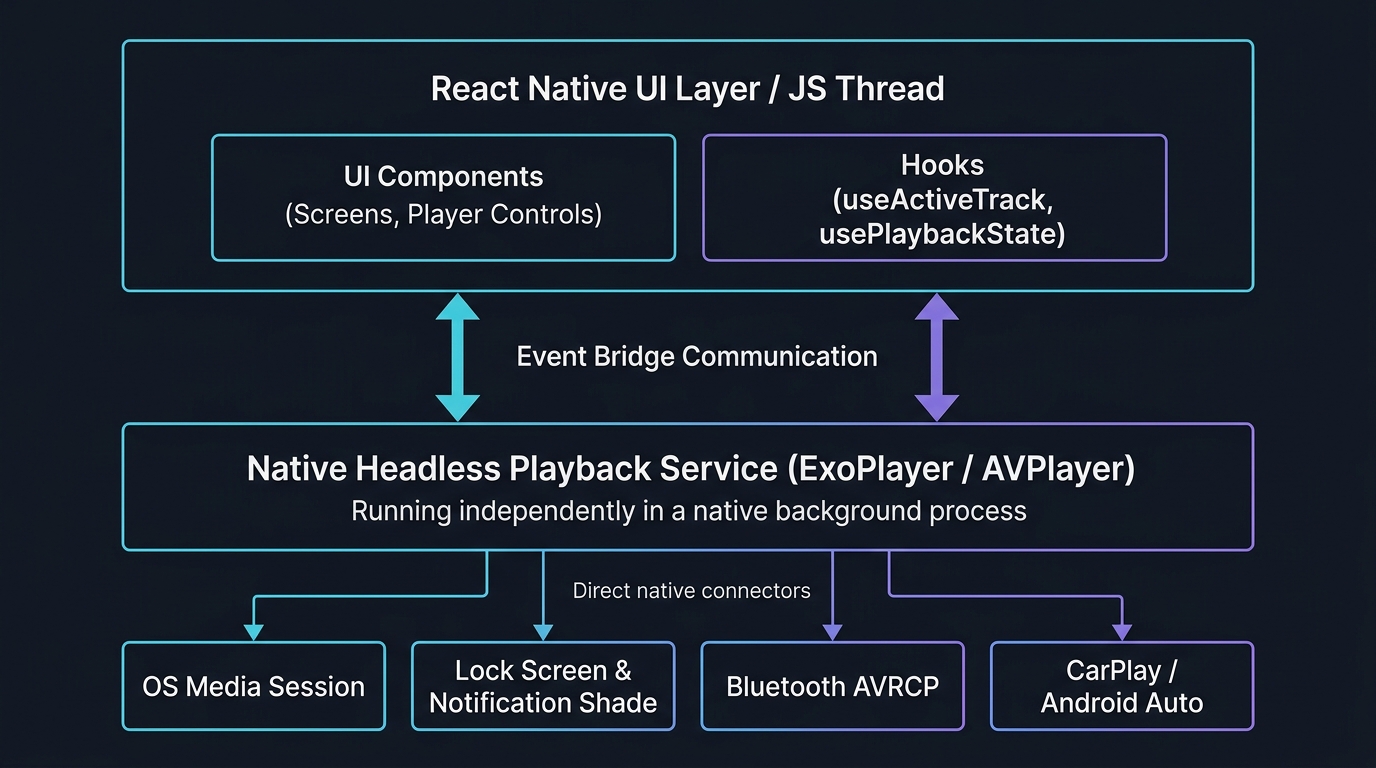
The practical effect is that the native player owns playback state while the React layer acts more like a controller.
That architecture enables several of RNTP’s strongest features:
RemotePlay, RemotePause, RemoteNext, RemotePrevious, RemoteSeek, and RemoteDuck. You can intercept each event and attach custom behavior.setQueue, add, remove, skip, and move operate on a queue managed by the native player instead of React state.For a dedicated music, podcast, or audiobook app, this architecture is a major advantage.
RNTP also comes with some important tradeoffs.
In my own testing with RNTP v4, I ran into three categories of problems:
Getting the project running meant patching code inside node_modules and preserving those changes with patch-package.
That can work, but it changes the maintenance equation. Every React Native upgrade becomes another opportunity for those patches to break. Managing technical debt like this should be part of any honest evaluation of RNTP v4 for production use.
For teams considering RNTP v4 specifically to avoid v5’s commercial license, that engineering overhead should be part of the cost calculation.
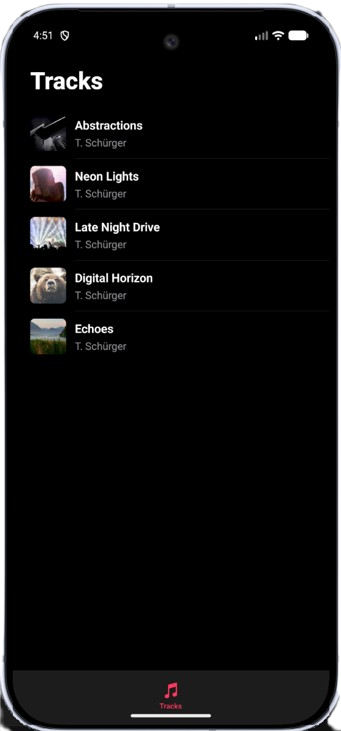
The final implementation still produces a capable audio player with playlist support, lock-screen controls, and background playback:
Expo Audio takes a different approach. Instead of exposing a dedicated headless playback service, it is implemented as an Expo Module and integrates with the application’s native runtime through Expo’s module system and config plugins.
As of recent Expo SDK releases, its feature set covers a large percentage of React Native audio use cases.
Expo Audio includes:
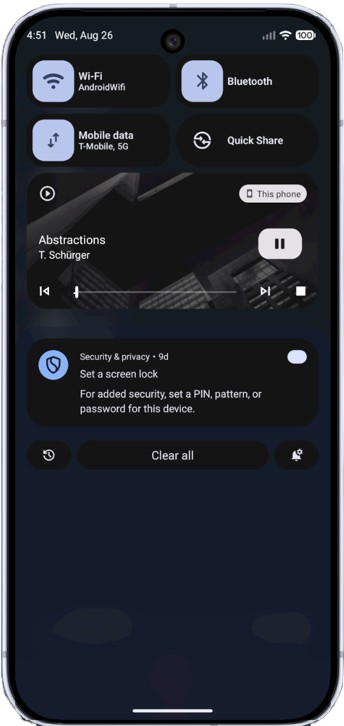
useAudioPlayer handles playback, while useAudioRecorder supports recording.setAudioModeAsync.useAudioPlaylist manages multiple tracks and supports adding, removing, and skipping items.setActiveForLockScreen() publishes track information to the system media session.preload() can prepare media before playback, while playlists can transition between tracks without gaps.setAudioModeAsync controls background behavior, interruptions, ducking, and interaction with other audio apps.Here is the same player built with Expo Audio:
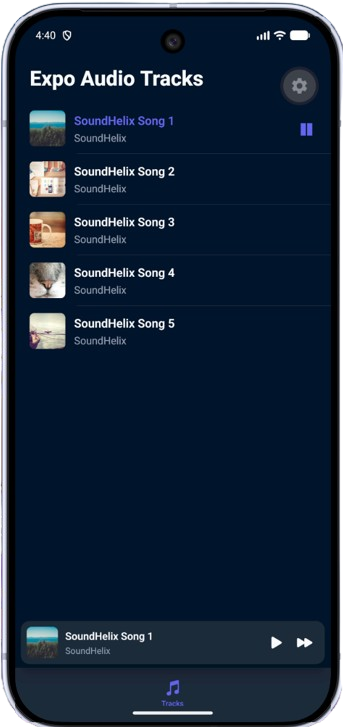
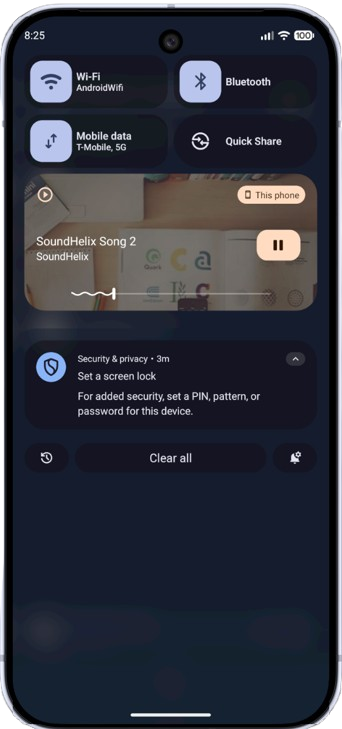
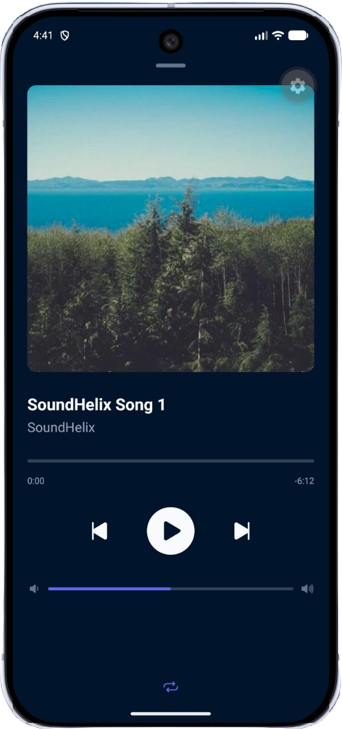
Expo Audio has become much more capable, but RNTP still offers deeper control in several areas.
The architecture isn’t the only difference. After building the same application with both libraries, I found RNTP’s API more complete for audio-centric applications.
RNTP exposes a global TrackPlayer singleton.
You can call it from a React component, background service, utility, or other module:
import TrackPlayer from "react-native-track-player";

await TrackPlayer.play();
await TrackPlayer.pause();
await TrackPlayer.skipToNext();
await TrackPlayer.seekTo(position);

const queue = await TrackPlayer.getQueue();
Expo Audio leans more heavily on hooks and player instances created inside React.
That is convenient for component-driven applications, but RNTP’s global API is more flexible when playback logic needs to live outside the UI layer. This is a pattern familiar to anyone who has built complex multi-agent or service-oriented architectures where state needs to be shared across layers.
RNTP also exports a broad set of TypeScript types and enums:
import TrackPlayer, {
  State,
  RepeatMode,
  Event,
  Capability,
  Track,
} from "react-native-track-player";
The same Track interface flows through queue operations, event payloads, active-track hooks, and player methods.
const tracks: Track[] = [
  {
    id: "1",
    url: "https://example.com/track.mp3",
    title: "Abstractions",
    artist: "T. Schürger",
    artwork: "https://example.com/art.jpg",
    duration: 337,
  },
];
Repeat modes are similarly explicit:
if (repeatMode === RepeatMode.Off) {
  await TrackPlayer.setRepeatMode(RepeatMode.Track);
} else if (repeatMode === RepeatMode.Track) {
  await TrackPlayer.setRepeatMode(RepeatMode.Queue);
}
Expo Audio takes a lighter approach. Playback state is exposed through properties such as player.playing and player.isLoaded, while some configuration uses booleans or string unions rather than exported enums.
That gives you more freedom, but it also means you may end up defining more application-level state yourself. If you’re interested in visualizing how these TypeScript dependencies interact across your project, dedicated tooling can make that much clearer.
RNTP exposes player events directly:
import {
  Event,
  useTrackPlayerEvents,
} from "react-native-track-player";

useTrackPlayerEvents(
  [Event.PlaybackError, Event.PlaybackQueueEnded],
  (event) => {
    if (event.type === Event.PlaybackError) {
      console.warn("Playback error:", event);
    }
  }
);
This is particularly useful when application behavior needs to respond to native playback events independently from the visible UI.
Expo Audio exposes a smaller event surface, so some state needs to be derived through the player API instead.
useActiveTrackInstead of maintaining a currentIndex and resolving it against the queue manually:
import { useActiveTrack } from "react-native-track-player";

const activeTrack = useActiveTrack();
The hook returns the active track’s metadata directly.
useIsPlayingRNTP distinguishes active playback from buffering:
import { useIsPlaying } from "react-native-track-player";

const {
  playing,
  bufferingDuringPlay,
} = useIsPlaying();
That distinction is useful for building loading and buffering UI.
useProgressuseProgress() exposes position, duration, and buffered progress:
import { useProgress } from "react-native-track-player";

const {
  position,
  duration,
  buffered,
} = useProgress(200);
For streaming applications, knowing how far the media has buffered can be more useful than playback position alone.
The biggest nontechnical change in the React Native audio ecosystem is RNTP v5’s commercial licensing model.
Historically, RNTP was available under the MIT license. With v5, commercial applications are subject to a paid subscription.
Maintaining a native audio library across Kotlin, Swift, TypeScript, Android, iOS, media-session APIs, and React Native’s changing architecture is substantial work. The shift toward paid maintenance is understandable.
For smaller teams, however, it changes the economics of choosing RNTP. This is the kind of decision that belongs in a profit and loss analysis alongside other infrastructure costs when evaluating your stack.
At the time of writing, RNTP lists two commercial plans:
The project also offers a credit option that allows some teams to defer payment while validating an application.
For a company building an audio-first commercial product, that cost may be minor compared with the engineering time the library saves.
For an indie developer, freelancer, or early-stage startup, recurring licensing becomes a more meaningful architectural consideration.
RNTP v4.1.2 remains MIT-licensed.
That doesn’t necessarily make it free in practice.
Running it on a modern React Native stack can introduce maintenance work around native patches, New Architecture compatibility, Kotlin changes, and event handling.
In my test application, I encountered:
A production application using a larger portion of RNTP’s API could expose additional issues.
The tradeoff therefore becomes recurring license cost versus ongoing engineering maintenance.
RNTP’s licensing shift creates three realistic paths:
Based on testing with Expo SDK 54 and React Native 0.81+, the main differences look like this:
| Feature | React Native Track Player | Expo Audio |
|---|---|---|
| Primary focus | Dedicated audio playback | Playback, playlists, and recording |
| Audio recording | No | Yes |
| Background playback | Yes | Yes |
| Lock-screen controls | Extensive | Supported |
| Queue management | Advanced | Native playlist API |
| Queue reordering | Yes | Limited |
| Preloading | Yes | Yes |
| Gapless playback | Yes | Yes |
| Persistent offline cache | RNTP v5 | No built-in cache |
| Remote-event control | Extensive | More limited |
| CarPlay / Android Auto | RNTP v5 | No equivalent integration |
| Expo Go | Requires native build | Basic features supported |
| New Architecture | v4 requires work; v5 supports it | Native Expo Module |
| Recording | No | Yes |
| Licensing | v4 MIT; v5 commercial | MIT |
| Setup overhead | Higher | Lower |
The important shift is how many rows now overlap.
Background playback, lock-screen integration, playlists, preloading, and gapless playback were once capabilities that made RNTP an easy recommendation for media-heavy apps. Expo Audio now covers many of them.
That leaves a smaller set of differentiators: deep remote-event control, persistent caching, advanced queue behavior, and automotive integration.
If your application doesn’t need those, Expo Audio becomes much harder to dismiss.
RNTP and Expo Audio are the strongest general-purpose options for modern React Native audio, but a few other libraries are still worth knowing about.
react-native-soundreact-native-sound was one of the earliest popular React Native audio libraries. It provides a straightforward API for playing local and remote sounds without introducing a full media-service architecture.
Its scope is much narrower than RNTP or Expo Audio. It does not target advanced background playback, queue management, or lock-screen media controls.
Verdict: For new projects that only need lightweight sound playback, Expo Audio generally offers a more modern path with stronger ecosystem integration.
react-native-videoBecause video playback includes audio, some applications use react-native-video for both media types.
That can make sense when video is already a central part of the application. Reusing the same playback engine reduces the number of media dependencies and can avoid conflicts between multiple audio sessions.
Verdict: Too broad for an audio-only application, but a reasonable option for products that already depend heavily on
react-native-video.
react-native-audio-recorder-playerreact-native-audio-recorder-player focuses on recording and straightforward local playback.
It is most relevant to bare React Native applications that need voice recording without adopting a larger media framework.
Verdict: Useful when recording is the primary requirement in a bare React Native project. Expo-based applications will usually find
expo-audioeasier to integrate.
For most new React Native projects, I would start with the application’s actual media requirements rather than choosing based on library popularity. This is the same thinking that applies when you choose and adapt frameworks in product management: match the tool to the problem, not the other way around.
Choose Expo Audio when:
Choose RNTP when:
For simple sound effects, either may be more infrastructure than you need.
Expo Audio has grown well beyond basic playback. It now covers playlists, background playback, lock-screen integration, preloading, gapless playback, and recording, making it sufficient for many React Native applications.
RNTP remains stronger when the application needs specialized playback infrastructure: a dedicated service model, advanced queue behavior, persistent caching, granular system-event handling, or automotive integration.
The decision is therefore less about which library is “better” and more about how deeply audio needs to integrate with the operating system. It is a question worth revisiting as React app architectures continue to evolve and new patterns emerge for delivering leaner, more efficient experiences.
For many new React Native projects, Expo Audio is now the simpler default. For applications where audio is the product rather than a feature, RNTP still provides a deeper playback architecture.

Compare five React toast libraries for features, bundle size, accessibility, performance, and React 19 compatibility.
See how Tecovas built a patching agent that turns LogRocket’s Galileo AI issue analysis into GitHub PRs, with a developer reviewing every fix before it ships.

Explore OctaneJS, a compiler-first alternative to React. Build a task dashboard and learn about rendering, hooks, asynchronous UI, and React compatibility.

Explore Vercel’s vgpu, a WebGPU library for AI agents. Learn to build a dynamic shader in Next.js and validate rendering output with headless testing in Node.js.
Hey there, want to help make our blog better?
Join LogRocket’s Content Advisory Board. You’ll help inform the type of content we create and get access to exclusive meetups, social accreditation, and swag.
Sign up now
 Learn more →