
useEffectEvent
If I were to ask you what React’s biggest source of bugs is, what would you say? You’d probably say what everyone says: useEffect. It’s the Hook with the obtuse name that allows you to do async work. That’s great, but it can cause a lot of issues. In particular, infinite loops, where we keep fetching and fetching from the server.
Now, credit where credit is due: the React team saw this issue, and they have come up with a new Hook called useEffectEvent. And I get that it’s a mouthful of a name, but it’s also a lifesaver when it comes to stabilizing your React app.
Let me walk you through a very common problem. We’ll start with the Hooks we have today, so that we can see the issue, and then I’ll show you how useEffectEvent fixes it.
useEffectCloudflare is one of the biggest deployment providers on the planet, and they have an excellent engineering team. But even they can make mistakes when it comes to useEffect. Recently, they distributed denial of service’d (DDOS’ed) their own dashboard when they errantly put an object into a dependency array. That object changed its identity with every re-render, causing an infinite loop that took down their whole dashboard.
It’s an embarrassing mistake that’s all too easy to make. This is why enhancements like the React compiler and new Hooks like useEffectEvent are so important. In the case of the compiler, they stabilize object references, which helps reduce potential bugs around object identity. And useEffectEvent removes objects from the dependency array entirely!
Here is a simple component that has an editable user name:
function MyUserInfo() {
  const [userName, setUserName] = useState("Bob");

  return (
    <div>
      <input
        value={userName}
        onChange={(evt) => setUserName(evt.target.value)}
      />
    </div>
  );
}
So far, so good; we can change the user name. Now let’s say that we want to track how long the user has been logged in for, and then display it:
function MyUserInfo() {
  const [userName, setUserName] = useState("Bob");

  useEffect(() => {
    let loggedInTime = 0;
    const interval = setInterval(() => {
      loggedInTime++;
    }, 1000);
    return () => clearInterval(interval);
  }, []);

  return (
    <div>
      <input
        value={userName}
        onChange={(evt) => setUserName(evt.target.value)}
      />
    </div>
  );
}
So we add a useEffect which sets up a timer to track the number of seconds this person has been logged in. (Yeah, I get that it’s not really truly logged in; it’s demo code.)
Now this code actually works, and there are no bugs. It only runs once, on component mount, because of the empty dependency array. And it cleans up after itself by returning a cleanup function that clears the interval, which kills the timer.
It only runs once, on component mount, because of the empty dependency array. And it cleans up after itself by returning a cleanup function that clears the interval, which kills the timer.
But, in terms of functionality, it’s not actually working because we don’t display that number anywhere. To fix that, let’s add a loginMessage string that we can use to show that number:
function MyUserInfo() {
  const [userName, setUserName] = useState("Bob");
  const [loginMessage, setLoginMessage] = useState("");

  useEffect(() => {
    let loggedInTime = 0;
    const interval = setInterval(() => {
      loggedInTime++;
      setLoginMessage(
        `${userName} has been logged in for ${loggedInTime} seconds`
      );
    }, 1000);
    return () => clearInterval(interval);
  }, []);

  return (
    <div>
      <div>{loginMessage}</div>
      <input
        value={userName}
        onChange={(evt) => setUserName(evt.target.value)}
      />
    </div>
  );
}
Now, on the face of it, this looks like it should work. And in fact, it kinda does. Right off the bat, it says “Bob has been logged in for 1 second”. And then it dutifully clicks forward every second. Great success!
Whoops, actually, there is a bug. Because the function that we have sent to useEffect can “stale”: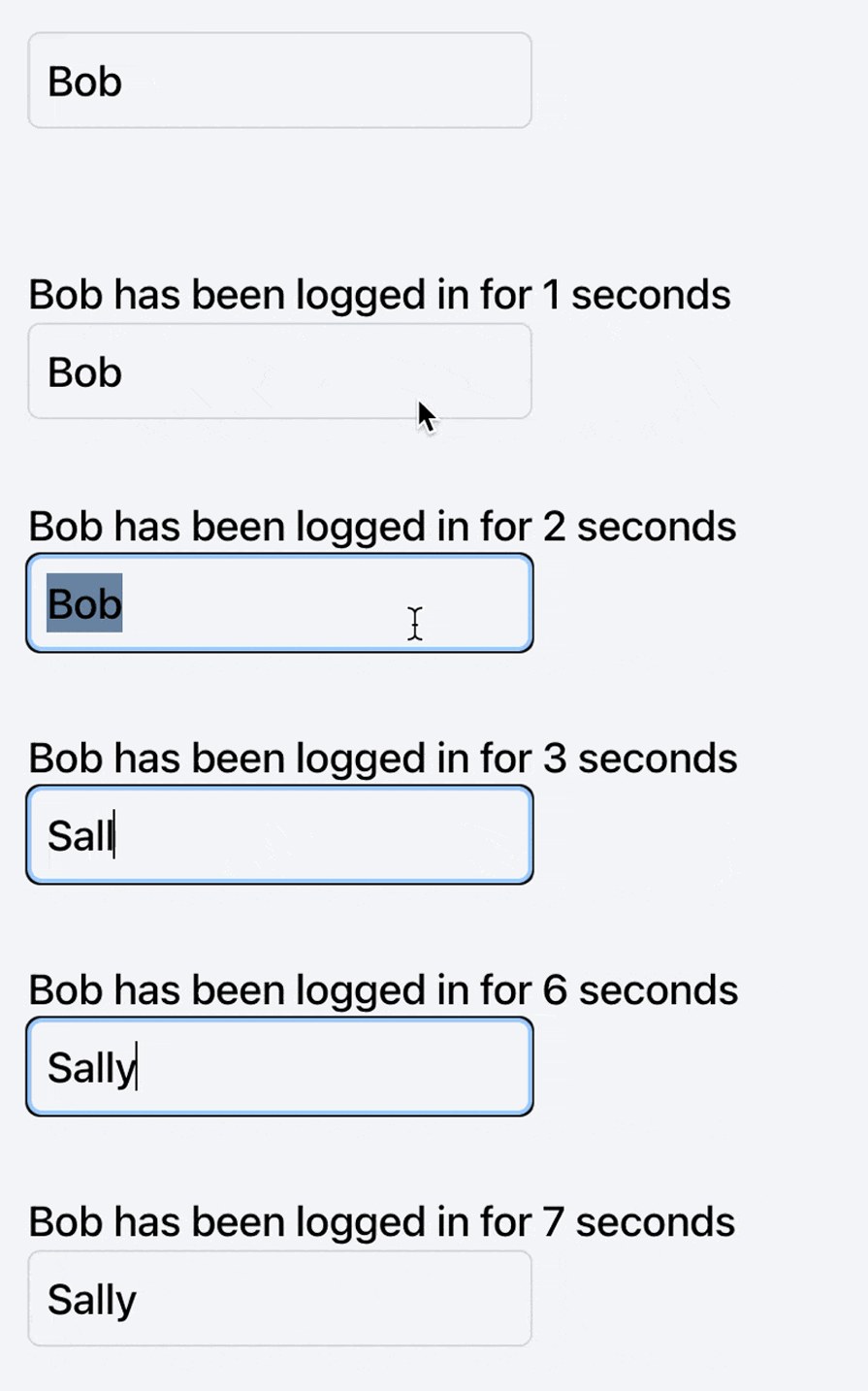
What happens if I change the user name? Well, sure, the input changes, but the login message keeps saying the user name is “Bob”. But it’s not; we’ve changed it.
So that function that we sent to useEffect has created a “closure” which has captured the value of userName at its current value at that time (“Bob”). And it isn’t going to change, ever. And because it’s now out of sync with the real value, we would consider it “stale”. That means we have a “stale closure”.
Good news, though: React has a fix for that (it’s not useEffectEvent, bear with me). We can just add userName to the dependency array:
useEffect(() => {
  let loggedInTime = 0;
  const interval = setInterval(() => {
    loggedInTime++;
    setLoginMessage(
      `${userName} has been logged in for ${loggedInTime} seconds`
    );
  }, 1000);
  return () => clearInterval(interval);
}, [userName]);
Tada! Problem solved. Now, when we edit the userName, the login message changes! Awesome. Oh, wait. What? The login time goes back to 1 second again, each time we make a change:
Ahhh, so, every time we are creating a new closure with the new userName value we are killing the old timer (that’s good). But we are also creating a new loggedInTime and starting it at zero again. That’s decidedly not good.
Now I get that one easy fix for this would just be to track loggedInTime as state and just format the string in JSX. Fine. But, let’s just say we can’t do that.
useRef to the rescueHow can we fix this? Well, before useEffectEvent we probably would use a ref for this:
const nameRef = useRef(userName);
nameRef.current = userName;

useEffect(() => {
  let loggedInTime = 0;
  const interval = setInterval(() => {
    loggedInTime++;
    setLoginMessage(
      `${nameRef.current} has been logged in for ${loggedInTime} seconds`
    );
  }, 1000);
  return () => clearInterval(interval);
}, []);
Here we have done a few things. First, we’ve created a reference where we have stored the current value of userName, and we update the current value on every render. It’s ok to set the current value of a ref during a render because React doesn’t monitor refs like it does state.
Next, we use nameRef.current in our template string instead of userName, so we are always getting the current value of userName because it’s updated on each render. Finally, we removed the userName from the dependency array, and that got rid of the reset bug: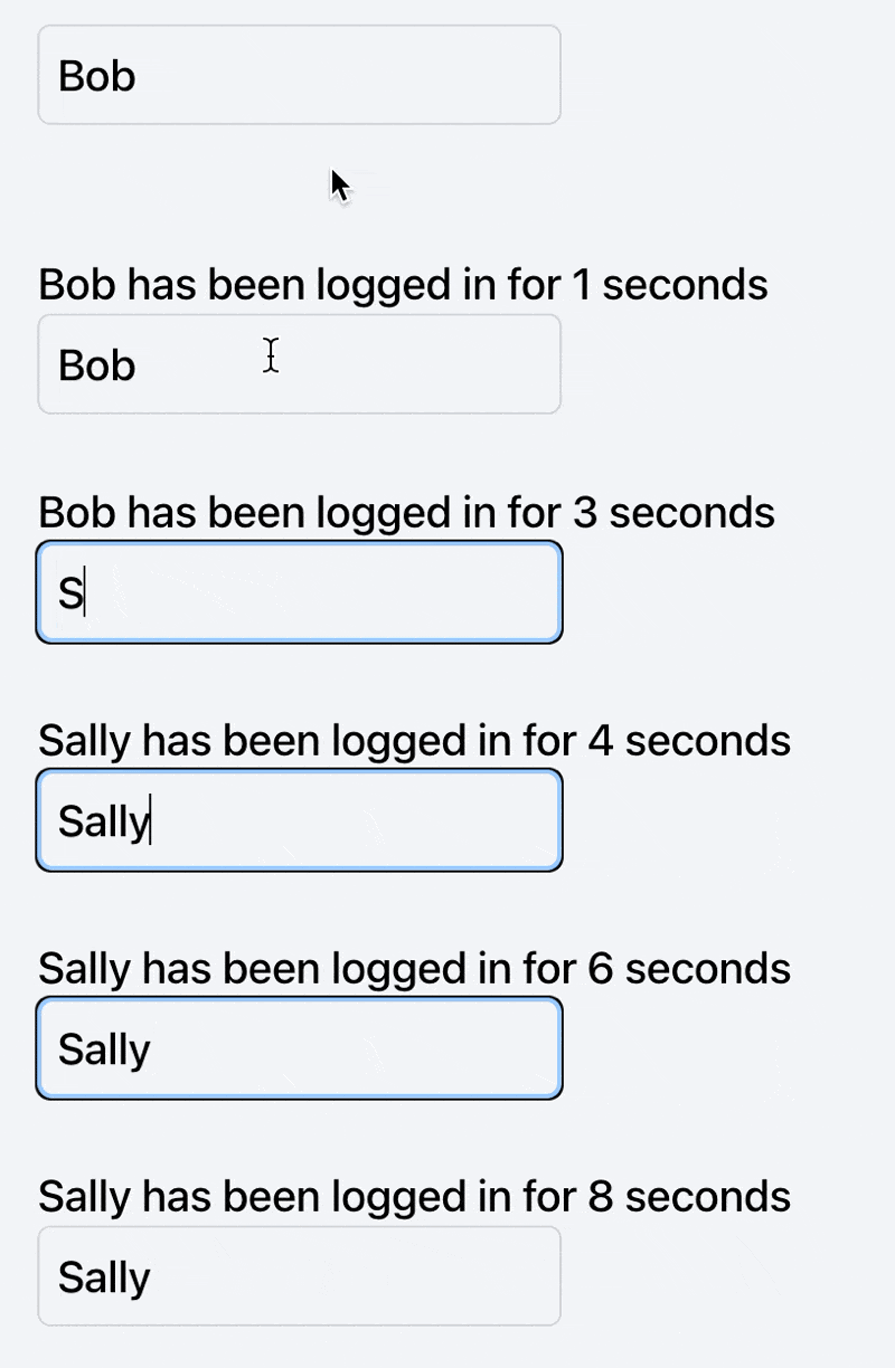
And now it actually works. No caveats! Except that, it’s kinda clunky, and that’s where useEffectEvent comes in.
useEffectEvent is way betterCheck out this version:
const getName = useEffectEvent(() => userName);

useEffect(() => {
  let loggedInTime = 0;
  const interval = setInterval(() => {
    loggedInTime++;
    setLoginMessage(
      `${getName()} has been logged in for ${loggedInTime} seconds`
    );
  }, 1000);
  return () => clearInterval(interval);
}, []);
We use the new useEffectEvent Hook to create a getter function that returns the current value of userName. And, it can be called within the useEffect, and it will never stale. It’s really clean. Much cleaner and clearer than the useRef version.
But, it actually gets a little better than that, because it allows us to think about useEffect more generally. I mean, come to think of it, we kind of have a more generic “timer” with that useEffect:
const onTick = useEffectEvent((tick: number) =>
  setLoginMessage(`${userName} has been logged in for ${tick} seconds`)
);

useEffect(() => {
  let ticks = 0;
  const interval = setInterval(() => onTick(++ticks), 1000);
  return () => clearInterval(interval);
}, []);
Now we’ve moved all the state stuff into the useEffectEvent. And see how much cleaner our useEffect has gotten? The useEffect is just handling the timer. And the onTick is handling all the logic of what to do with that timer.
useEffectEvent is a game changerBetter still, the useEffect has no dependencies on state. And it’s state dependencies where useEffect gets into trouble (as we’ve seen). Bad dependency arrays that depend on the wrong state can cause stale closure issues, invalid resets, or even infinite loops. And useEffectEvent allows us to remove state from the dependency array. And that helps us write better useEffects.
We can even make it more generic and turn it into a custom Hook:
function useInterval(onTick: (tick: number) => void) {
  const onTickEvent = useEffectEvent(onTick);
  useEffect(() => {
    let ticks = 0;
    const interval = setInterval(() => onTickEvent(++ticks), 1000);
    return () => clearInterval(interval);
  }, []);
}
Now we have a full useInterval implementation that is super clean and bug-free.
If you want a fun little challenge, how would you implement a version where the number of milliseconds (currently 1000) was adjustable?:
function useInterval(onTick: (tick: number) => void, timeout: number = 1000) {
  // ????
}
So, let me show you what I came up with:
function useInterval(onTick: (tick: number) => void, timeout: number = 1000) {
  const onTickEvent = useEffectEvent(onTick);
  useEffect(() => {
    let ticks = 0;
    const interval = setInterval(() => onTickEvent(++ticks), timeout);
    return () => clearInterval(interval);
  }, [timeout]);
}
Oh, wait, that’s wrong, that’s the stale closure problem again since the counter restarts at zero every time. Shoot. Oh, right, I can use another useEffectEvent:
function useInterval(onTick: (tick: number) => void, timeout: number = 1000) {
  const onTickEvent = useEffectEvent(onTick);
  const getTimeout = useEffectEvent(() => timeout);

  useEffect(() => {
    let ticks = 0;
    let mounted = true;
    function onTick() {
      if (mounted) {
        onTickEvent(++ticks);
        setTimeout(onTick, getTimeout());
      }
    }
    setTimeout(onTick, getTimeout());
    return () => {
      mounted = false;
    };
  }, []);
}
The approach I took this time is a little different. Instead of setInterval I’m using setTimeout and adjusting the timeout on each iteration. Let me know if you can golf this down at all.
In the meantime, I hope you can see how this new Hook with a crazy name seems like a small enhancement, but is actually a huge win for React. The React team has acknowledged that there is an issue with useEffect code running amok. They clearly identified the problem; useEffects connected to state. And they have come up with an elegant solution to decouple useEffects from state.
It’s great to see the React team taking on the issues that cause so many problems in our React apps. With new tools like the compiler and enhancements like useEffectEvent we are able to write far more reliable and resilient React code. React sure ain’t dead, and it’s getting better with each release!
You should definitely check out React 19.2 to try out useEffectEvent for yourself to see how much cleaner and safer your useEffect Hooks can be by using useEffectEvent.
Install LogRocket via npm or script tag. LogRocket.init() must be called client-side, not
server-side
$ npm i --save logrocket

// Code:

import LogRocket from 'logrocket';
LogRocket.init('app/id');
// Add to your HTML:

<script src="https://cdn.lr-ingest.com/LogRocket.min.js"></script>
<script>window.LogRocket && window.LogRocket.init('app/id');</script>

Explore how looping Transformers reuse layers and compare with traditional GPT models in reasoning tasks.

Learn how one solo developer used multiple Grok Bot AI agents to test, report bugs, fix code, and monitor deployments — hands-free, on a $30/month plan.

Compare the top AI development tools and models of October 2026. View updated rankings, feature breakdowns, and find the best fit for you.

Can AI agents debug React bugs across browsers? I tested Chrome, Safari, and Firefox debugging MCPs on four bugs to compare their findings, workflows, and effectiveness.
Hey there, want to help make our blog better?
Join LogRocket’s Content Advisory Board. You’ll help inform the type of content we create and get access to exclusive meetups, social accreditation, and swag.
Sign up now

 Learn more →




