

Editor’s note: This post was last updated on 14 September 2021 to improve code and update any outdated information.

Stripe is a suite of APIs that make it easy to set up online payment processing, and in this post, we’ll leverage Stripe to create a bare-bones payment system using React.
Whether you’re implementing a subscription-based service, an ecommerce store, or a crowdfunding solution, Stripe offers the flexibility to get it done. We’re going to build a small proof-of-concept payment system to enable one-time purchases on a website.
By the end of this tutorial, you should be able to set up a backend and frontend for processing online payments in your React app.
This tutorial requires that you have the following:
If you do not have Node installed, you can get the latest version from the official website. All the code written in this tutorial can be accessed here.
If you do not have a Stripe developer account, you can get started for free by signing up for an account here. After signing up, complete the following steps to get set up:
You should now have a base account set up. You can update the name of the account by clicking the Add a name link at the top left of the page.
You’ll need to copy your Publishable and Secret keys from the dashboard and store them somewhere because we’ll need them very soon.
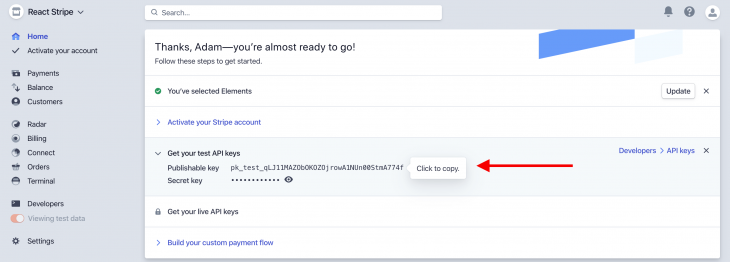
Before we go ahead with building the React app, we’ll need to set up a server to handle payment requests.
We’ll need to set up a RESTful endpoint on an Express server, which will act as a middleman between our React code and the Stripe backend. If you’ve never built an API before, don’t worry — it’ll be pretty basic because we’re not implementing a production-ready backend.
Let’s get started. First, create a new project folder and name it whatever you want (I’m going with react-stripe-payment). Open your terminal in the folder and run npm init -y.
Next, install the dependencies by running npm install express dotenv body-parser stripe and create a src folder under the root folder by running mkdir src.
server.jsLet’s create a server to listen for payment requests. Create a new file called server.js under the src folder and paste the following in it:
const path = require('path')
const express = require('express')
const bodyParser = require('body-parser')
require('dotenv').config()
const postCharge = require('./stripe')

const app = express()
const router = express.Router()
const port = process.env.PORT || 7000

router.post('/stripe/charge', postCharge)
router.all('*', (_, res) =>
  res.json({ message: 'please make a POST request to /stripe/charge' })
)
app.use((_, res, next) => {
  res.header('Access-Control-Allow-Origin', '*')
  res.header(
    'Access-Control-Allow-Headers',
    'Origin, X-Requested-With, Content-Type, Accept'
  )
  next()
})
app.use(bodyParser.json())
app.use('/api', router)
app.use(express.static(path.join(__dirname, '../build')))

app.get('*', (_, res) => {
  res.sendFile(path.resolve(__dirname, '../build/index.html'))
})

app.listen(port, () => console.log(`server running on port ${port}`))
Let’s break down this file section by section. Here, we’re importing the required packages. Notice that they are all third-party imports except for postCharge, which imports from a file called stripe. We’ll create that file later:
const path = require('path')
const express = require('express')
const bodyParser = require('body-parser')
require('dotenv').config()
const postCharge = require('./stripe')
dotenv allows us to read sensitive information from the Node process so we don’t have to hardcode secret values in our code.
Then, we initialize a new Express instance into a variable called app and create a new Router instance and store it in a variable called router. This is what we’ll use to define the payment endpoint:
const app = express()
const router = express.Router()
const port = process.env.PORT || 7000
Then, we initialize a new variable called port and assign it a value from the Node process (process.env.PORT), and if that is undefined, it is assigned 7000.
Remember the router we initialized earlier? On the first line, we set up an endpoint called /stripe/charge and assign postCharge to handle all POST requests to this route.
We then can catch all other requests to the server and respond with a JSON object containing a message directing the user to the appropriate endpoint:
router.post('/stripe/charge', postCharge)
router.all('*', (_, res) =>
  res.json({ message: 'please make a POST request to /stripe/charge' })
)
app.use((_, res, next) => {
  res.header('Access-Control-Allow-Origin', '*')
  res.header(
    'Access-Control-Allow-Headers',
    'Origin, X-Requested-With, Content-Type, Accept'
  )
  next()
})
app.use(bodyParser.json())
app.use('/api', router)
app.use(express.static(path.join(__dirname, '../build')))
Next, we define a middleware on the app instance to enable CORS for all requests. On the following line, we attach another middleware that enables us to parse JSON objects from the request body.
We tell our app instance to use the router instance to handle all requests to the /api endpoint followed by telling Express to serve up the /build folder. This folder will hold the transpiled code for the app’s frontend.
We need to also tell the app instance to handle all GET requests by serving the index.html file located in the /build folder. This is how we’ll serve the frontend in production.
Finally, we spin up the server on the port we defined earlier and log a message to the console on a successful startup:
app.get('*', (_, res) => {
  res.sendFile(path.resolve(__dirname, '../build/index.html'))
})

app.listen(port, () => console.log(`server running on port ${port}`))
stripe.js to create the postCharge handlerWe’ll now create the postCharge handler we required in server.js above. Under the src folder, create a new file, stripe.js, and paste the following in it:
const stripe = require('stripe')(<your_secret_key>)

async function postCharge(req, res) {
  try {
    const { amount, source, receipt_email } = req.body

    const charge = await stripe.charges.create({
      amount,
      currency: 'usd',
      source,
      receipt_email
    })

    if (!charge) throw new Error('charge unsuccessful')

    res.status(200).json({
      charge,
      message: 'charge posted successfully'
    })
  } catch (error) {
    res.status(500).json({
      message: error.message
    })
  }
}

module.exports = postCharge
Let’s break it down. Here, we initialize a new Stripe instance by requiring the stripe package and calling it with the secret key we copied earlier as a string. We save this instance in a variable called stripe:
const stripe = require('stripe')(<your_secret_key>)
We then create a new function called postCharge. This function is a request handler, so we have to take in two parameters: req and res.
Opening a try catch block inside this function, we destructure all the variables we’re expecting to be sent with the request from the request object; in this case, those variables are amount, source, and receipt_email.
We must then create a new variable called charge, which holds the result of an asynchronous call to the Stripe API to create a new charge (stripe.charges.create):
async function postCharge(req, res) {
  try {
    const { amount, source, receipt_email } = req.body

    const charge = await stripe.charges.create({
      amount,
      currency: 'usd',
      source,
      receipt_email
    })
If the result of the Stripe call is a falsy value — undefined, in this case — it means our payment request failed, and we throw a new error with the message charge unsuccessful:
if (!charge) throw new Error('charge unsuccessful')
Otherwise, we respond to the request with a 200 status code and a JSON object containing a message and the charge object.
res.status(200).json({
  charge,
  message: 'charge posted successfully'
})
In the catch block, we intercept all other errors and send them to the client with a 500 status code and a message containing the error message.
At the end of the file, we export the postCharge function using module.exports:
} catch (error) {
    res.status(500).json({
      message: error.message
    })
  }
}

module.exports = postCharge
And that is all there is to the payment server. Of course, this isn’t production-ready and should not be used in a real application processing real payments, but it is enough for our current use case. Let’s move on to the frontend.
Since we’re done building the payments server, it’s time to flesh out the frontend. It’s not going to be anything fancy since I’m trying to keep this tutorial bite-sized.
Here are the different components of the app:
Let’s get started.
First, run the following command to install the required packages:
npm install axios babel-polyfill history parcel parcel-bundler react react-dom react-router-dom react-stripe-elements
Then, in the project root, run the following command:
mkdir public && touch public/index.html
This creates a folder called public and create an index.html file in this new folder. Open the index.html file and paste the following:
<!DOCTYPE html>
<html lang="en">
  <head>
    <meta charset="utf-8" />
    <meta name="viewport" content="width=device-width, initial-scale=1" />
    <meta name="description" content="React + Stripe" />
    <title>React and Stripe Payment</title>
  </head>
  <body>
    <noscript>You need to enable JavaScript to run this app.</noscript>
    <div id="root"></div>
    <script src="https://js.stripe.com/v3/"></script>
    <script src="../src/index.js"></script>
  </body>
</html>
If you’re already familiar with React, this should be nothing new; this is simply the entry point of our app. Also notice that we import the Stripe SDK in the first <script> tag — the Stripe SDK import must come before our own code.
Inside the src folder, run the following command:
touch src/index.js && touch src/products.js
Then, open index.js and paste the following:
import React from 'react'
import ReactDOM from 'react-dom'
import App from './components/App'
import 'babel-polyfill'

const rootNode = document.querySelector('#root')
ReactDOM.render(<App />, rootNode)
Now we need to get the list of products from somewhere. Usually, this would be from a database or some API, but for this simple use case, we can just hardcode two or three products in a JavaScript file. This is why we need products.js. Open it and paste the following:
export const products = [
  {
    name: 'Rubber Duck',
    desc: `Rubber ducks can lay as many eggs as the best chicken layers, and they
  are fun to watch with their antics in your backyard, your barnyard, or
  your pond.`,
    price: 9.99,
    img:
      'https://encrypted-tbn0.gstatic.com/images?q=tbn%3AANd9GcSqkN8wkHiAuT2FQ14AsJFgihZDzKmS6OHQ6eMiC63rW8CRDcbK',
    id: 100
  },
  {
    name: 'Chilli Sauce',
    desc: `This Chilli Sauce goes well with some nice roast rubber duck. Flavored with
    the best spices and the hottest chillis, you can rest assured of a tasty Sunday
    rubber roast.`,
    price: 12.99,
    img:
      'https://encrypted-tbn0.gstatic.com/images?q=tbn%3AANd9GcRTREm1dEzdI__xc6O8eAz5-4s88SP-Gg9dWYMkBKltGMi84RW5',
    id: 101
  }
]
This is an array of products that are available for purchase. We can add as many as we like and then move on to creating the components.
Run mkdir src/components from the project root. This creates a new folder called components inside the src folder to hold our React components. Let’s go ahead and create the first component.
App.jsx componentThis is the root component and will route to the various pages we have in our app. Start by creating a new file called App.jsx inside the components folder and paste in the following:
import React, { useState } from 'react'
import { Router, Route, Switch } from 'react-router-dom'
import { createBrowserHistory } from 'history'
import Products from './Products'
import Checkout from './Checkout'
import { products } from '../products'

const history = createBrowserHistory()

const App = () => {
  const [selectedProduct, setSelectedProduct] = useState(null)

  return (
    <Router history={history}>
      <Switch>
        <Route
          exact
          path="/"
          render={() => (
            <Products
              products={products}
              selectProduct={setSelectedProduct}
              history={history}
            />
          )}
        />
        <Route
          path="/checkout"
          render={() => (
            <Checkout
              selectedProduct={selectedProduct}
              history={history}
            />
          )}
        />
      </Switch>
    </Router>
  )
}

export default App
Let’s break it down.
This first part is just a bunch of dependency imports. The first three imports are required for any single-page React application. The next two imports are custom components that we’ll write later on.
The last import is the hardcoded products we created earlier. We’ll pass it down as a prop to the Products component:
import React, { useState } from 'react'
import { Router, Route, Switch } from 'react-router-dom'
import { createBrowserHistory } from 'history'
import Products from './Products'
import Checkout from './Checkout'
import { products } from '../products'

const history = createBrowserHistory()
Finally, we create a new history instance from the history package and save it in a variable aptly named history.
We then create a new functional component called App. App has a state variable called selectedProduct, which holds the product currently selected to be purchased:
const App = () => {
  const [selectedProduct, setSelectedProduct] = useState(null)

  return (
    <Router history={history}>
      <Switch>
        <Route
          exact
          path="/"
          render={() => (
            <Products
              products={products}
              selectProduct={setSelectedProduct}
              history={history}
            />
          )}
        />
        <Route
          path="/checkout"
          render={() => (
            <Checkout
              selectedProduct={selectedProduct}
              history={history}
            />
          )}
        />
      </Switch>
    </Router>
  )
}

export default App
We return a Router instance that defines all the routes and their respective components.
In the first route, /, we render the Products component and pass in three props: the list of hardcoded products, a function to set a product in the App state, and the history object to enable us to navigate to new pages without breaking the browser history.
In the second route, /checkout, we render the Checkout component and pass in a couple props: the currently selected product and the history object.
At the end of the file, we export the App component as the default export.
Products.jsx componentThe Products.jsx component is responsible for rendering the list of products to the DOM and it’s fairly simple. Create a new file called Products.jsx in the components folder and paste in the following:
import React from 'react'
import './Products.scss'

const Products = ({ products, selectProduct, history }) => {
  const handlePurchase = prod => () => {
    selectProduct(prod)
    history.push('/checkout')
  }

  return products.map(prod => (
    <div className="product" key={prod.id}>
      <section>
        <h2>{prod.name}</h2>
        <p>{prod.desc}</p>
        <h3>{'$' + prod.price}</h3>
        <button type="button" onClick={handlePurchase(prod)}>
          PURCHASE
        </button>
      </section>
      <img src={prod.img} alt={prod.name} />
    </div>
  ))
}

export default Products
Note that we can get the Products.scss contents here.
Let’s break it down. We start off defining a functional component that takes in three props:
productsselectProducthistoryconst Products = ({ products, selectProduct, history }) => {
const handlePurchase = prod => () => {
selectProduct(prod)
history.push('/checkout')
}
products is the array of products we hardcoded earlier. We’ll be mapping over this array later on to render the individual products to the DOM.
selectProduct is a function that takes in a single product object. It updates the App component’s state to hold this product so that the Checkout component can access it through its props.
history is the history object that will allow us to navigate to other routes safely.
Then we define the handlePurchase function, which will be called when a user wants to purchase a certain product. It takes in a single parameter, prod, and calls selectProduct with this parameter.
After calling selectProduct, it then navigates to the /checkout route by calling history.push.
It’s time to render the products to the DOM. We map over the products array and, for each product in the array, return a bunch of JSX:
return products.map(prod => (
    <div className="product" key={prod.id}>
      <section>
        <h2>{prod.name}</h2>
        <p>{prod.desc}</p>
        <h3>{'$' + prod.price}</h3>
        <button type="button" onClick={handlePurchase(prod)}>
          PURCHASE
        </button>
      </section>
      <img src={prod.img} alt={prod.name} />
    </div>
  ))
}

export default Products
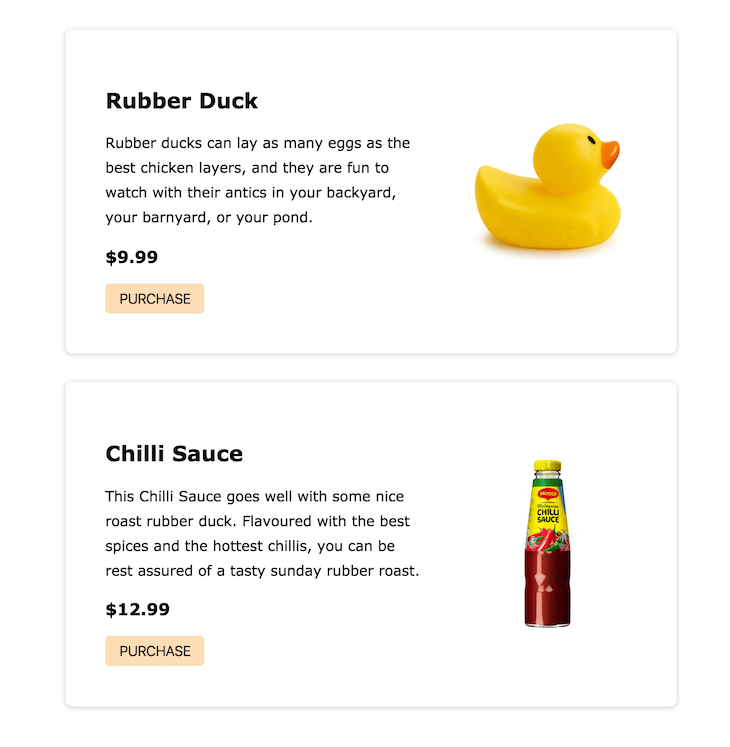
The JSX should be pretty straightforward and will result in the following image onscreen:
Checkout.jsx componentNext, we want to create the checkout page where the user will be routed to when they click the PURCHASE button on a product.
Create a Checkout.jsx file under the components folder and paste the following in it:
import React, { useEffect } from 'react'
import { StripeProvider, Elements } from 'react-stripe-elements'
import CheckoutForm from './CheckoutForm'

const Checkout = ({ selectedProduct, history }) => {
  useEffect(() => {
    window.scrollTo(0, 0)
  }, [])

  return (
    <StripeProvider apiKey="pk_test_UrBUzJWPNse3I03Bsaxh6WFX00r6rJ1YCq">
      <Elements>
        <CheckoutForm selectedProduct={selectedProduct} history={history} />
      </Elements>
    </StripeProvider>
  )
}

export default Checkout
This is when we begin to bring Stripe into the mix. In the second line, we’re importing something called StripeProvider and Elements from the react-stripe-elements package we installed at the beginning of this section.
StripeProvider is required for our app to access the Stripe object; any component that interacts with the Stripe object must be a child of StripeProvider.
Elements is a React component that wraps around the actual checkout form. It helps group the set of Stripe Elements together and makes it easy to tokenize all the data from each Stripe Element.
The Checkout component itself is fairly simple. It takes in two props, selectedProduct and history, and it passes on to a CheckoutForm component we’ll create next.
There’s also a useEffect call that scrolls the document to the top when the page mounts for the first time. This is necessary because react-router-dom preserves the previous scroll state when we switch routes.
Notice that we’re passing a prop, apiKey, to StripeProvider. This key is the publishable key we copied earlier when setting up Stripe. Note that this prop is required because it serves as a way to authenticate our application to the Stripe servers.
CheckoutForm.jsx componentThis is the last component we’ll be creating, and it’s also the most important. The CheckoutForm component holds the inputs for getting a user’s card details as well as making a call to the backend to process the payment charge.
To do this, create a new file called CheckoutForm.jsx inside the components directory. We’re going to go through the content of this file section by section.
First, we import the required packages we’ll be working with into the file. Notice the imports from the react-stripe-elements package:
import React, { useState } from 'react'
import { Link } from 'react-router-dom'
import {
  CardNumberElement,
  CardExpiryElement,
  CardCVCElement,
  injectStripe
} from 'react-stripe-elements'
import axios from 'axios'
import './CheckoutForm.scss'
...to be continued below...
This is a good time to talk more about Stripe Elements: Stripe Elements are a set of prebuilt UI elements that allow us to collect our user’s card information without managing such sensitive information ourselves.
The react-stripe-elements package is a wrapper for Stripe Elements that exposes these elements as React components we can just plug into our app — no need to create them from scratch.
We are importing some of these components into this file along with a higher-order component (HOC), injectStripe.
injectStripe basically takes the Stripe object initialized in the StripeProvider component and injects the object into any component wrapped with it. This is how we’ll get access to the Stripe Object.
We then import a package called axios. Axios is just a promise-based HTTP client for the browser that we’ll use to communicate with our payments server. We can get the contents of CheckoutForm.scss from here:
...continued...
const CheckoutForm = ({ selectedProduct, stripe, history }) => {
  if (selectedProduct === null) history.push('/')

  const [receiptUrl, setReceiptUrl] = useState('')

  const handleSubmit = async event => {
    event.preventDefault()

    const { token } = await stripe.createToken()

    const order = await axios.post('http://localhost:7000/api/stripe/charge', {
      amount: selectedProduct.price.toString().replace('.', ''),
      source: token.id,
      receipt_email: '[email protected]'
    })

    setReceiptUrl(order.data.charge.receipt_url)
  }
...to be continued...
Next up is the actual CheckoutForm component itself. It takes in three props:
selectedProductstripehistoryselectedProduct is the product the user clicked to purchase. It’s coming from the root App component’s state and passed down as props.
stripe is the actual Stripe object that is injected as a prop by the injectStripe HOC we imported. And, we already know what history does.
The first thing we do in the component is check whether selectedProduct actually exists. If it doesn’t, we route the user to the homepage. In a production-grade app, this would probably be handled by a route guard HOC.
We then define a new piece of state to hold the receipt URL for successful payments. It will initially be empty.
Next, we must define a function called handleSubmit, which is called when the checkout form is submitted (that is, when the Pay button is clicked). Let’s go through this function.
handleSubmitFirst, we must prevent the default behavior of the form element so the page doesn’t refresh. We can then destructure a token value from the result of an async call to stripe.createToken.
createToken tokenizes the card information from the form and sends it to the Stripe server. It then returns a token object, where we can get a token.id value as an alias for the actual card info.
This ensures that we never actually send the user’s card details to the payment server.
Secondly, we must make an HTTP POST request to localhost:7000/api/stripe/charge with a request body containing three things:
amountsourcereceipt_emailamount is the price of the item being purchased. We have to convert it to a string and remove all special characters like . and ,. This means that a cost of $9.99 will be sent to the payment server as 999.
source is where the payment will be charged. In our case, it will be the ID of the token we just generated.
Finally, receipt_email is where the receipt of the payment is sent. It is usually the customer’s email address, but in our case, we’re just hardcoding it because, again, we’re not implementing authentication.
After the request is done, we can grab the URL of the receipt from the response object and set it to state. This is assuming that there are no errors, so in a production-grade app, we would usually implement error handling:
...continued...
if (receiptUrl) {
    return (
      <div className="success">
        <h2>Payment Successful!</h2>
        <a href={receiptUrl}>View Receipt</a>
        <Link to="/">Home</Link>
      </div>
    )
  }
...to be continued...
recieptyUrlImmediately after the handleSubmit function, we have an if check to see if there’s a receiptUrl in the state. If there is, we want to render a div containing a success message, a link to view the receipt, and a link back to the homepage:
...continued...
  return (
    <div className="checkout-form">
      <p>Amount: ${selectedProduct.price}</p>
      <form onSubmit={handleSubmit}>
        <label>
          Card details
          <CardNumberElement />
        </label>
        <label>
          Expiration date
          <CardExpiryElement />
        </label>
        <label>
          CVC
          <CardCVCElement />
        </label>
        <button type="submit" className="order-button">
          Pay
        </button>
      </form>
    </div>
  )
}

export default injectStripe(CheckoutForm)
Otherwise, we. must render the actual checkout form. Here, we’re using the prebuilt Elements components instead of recreating them from scratch and having to manage sensitive information.
At the end of this file, we wrap the CheckoutForm component in the injectStripe HOC so that we can access the Stripe object we use in the component.
Let’s go through what we’ve accomplished so far:
handleSubmit function to send a request to the server to process a payment chargeWe just about have everything set up, so it’s time to actually run our app and see whether we’re able to purchase a rubber duck. We have to add our scripts first, so open the package.json file and replace the scripts section with the following:
"scripts": {
    "build": "parcel build public/index.html --out-dir build --no-source-maps",
    "dev": "node src/server.js & parcel public/index.html",
    "start": "node src/server.js"
  },
Open the terminal and run the npm run build command to build the app and then run npm run dev. This should start the payments server and expose the frontend on port 1234. If there is no .env file present, the server will expose the frontend at port 7000.
Next, open a browser, navigate to http://localhost:1234 or http://localhost:7000 as the case may be, and follow the steps below:
If everything goes well, we should see a Payment Successful message with links to view our receipt and go back to the homepage.
To confirm payment, log into your Stripe dashboard, click on Payments, and you should see the payment there.
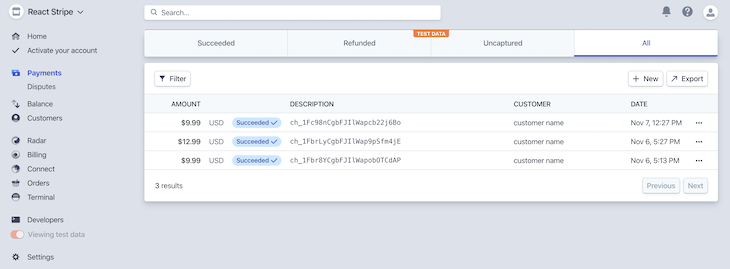
This is a very simplified (and definitely not suitable for production) implementation of a payments system using Stripe. Let’s summarize the necessary components that are required for a real, production-ready implementation in case you’d like to try it out:
While this tutorial should be enough to get you started with the basics, it’s not nearly enough to build a fully-fledged payments solution, so please spend some time in the Stripe docs.
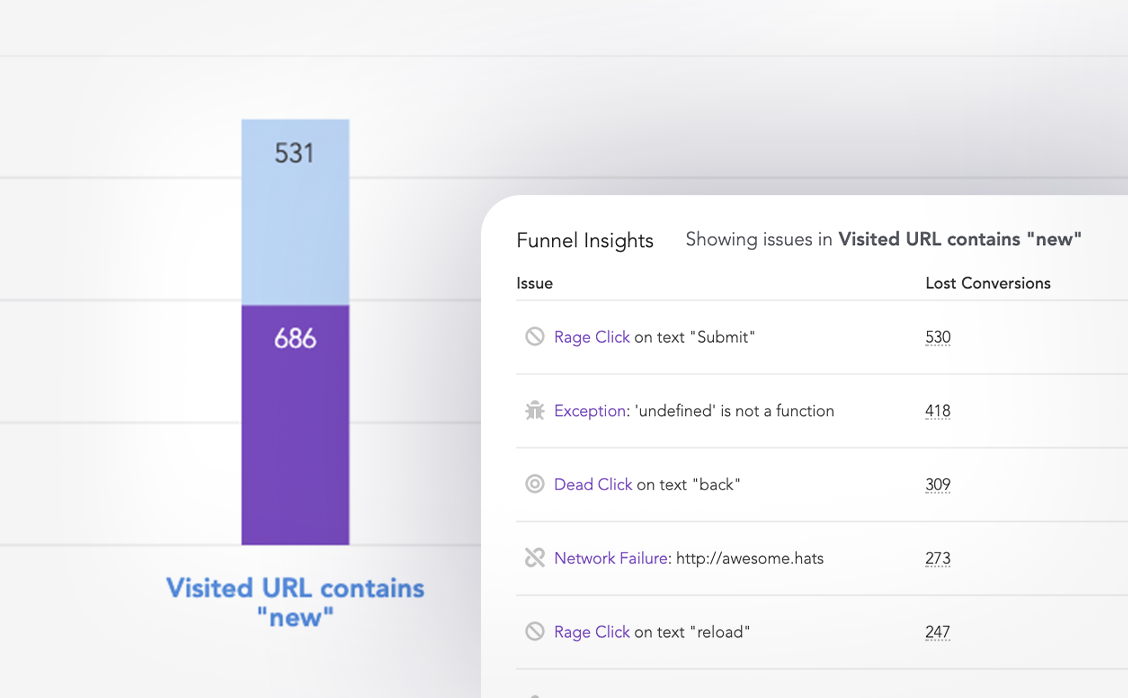
LogRocket lets you replay user sessions, eliminating guesswork around why users don't convert by showing exactly what users experienced. It captures console logs, errors, network requests, and pixel-perfect DOM recordings — compatible with all frameworks.
LogRocket's Galileo AI watches sessions for you, instantly identifying and explaining user struggles with automated monitoring of your entire product experience.
Start proactively monitoring your ecommerce apps — try LogRocket for free.

Compare the top AI development tools and models of October 2026. View updated rankings, feature breakdowns, and find the best fit for you.

Can AI agents debug React bugs across browsers? I tested Chrome, Safari, and Firefox debugging MCPs on four bugs to compare their findings, workflows, and effectiveness.

React 19.3 and modern CSS make several common patterns unnecessary. Here are 10 features that let you delete old React code and simplify your apps.

Explore the top AI agent frameworks in 2026 and compare how they handle tools, memory, structured output, streaming, and step limits.
Would you be interested in joining LogRocket's developer community?
Join LogRocket’s Content Advisory Board. You’ll help inform the type of content we create and get access to exclusive meetups, social accreditation, and swag.
Sign up now

 Learn more →



