

Have you ever created a web application that needed to accept images from the user and later realized that users tend to provide images in all shapes and sizes that break your fancy website theme? Working with images on the web can easily become a pain — unless, of course, you’re using the right tools.
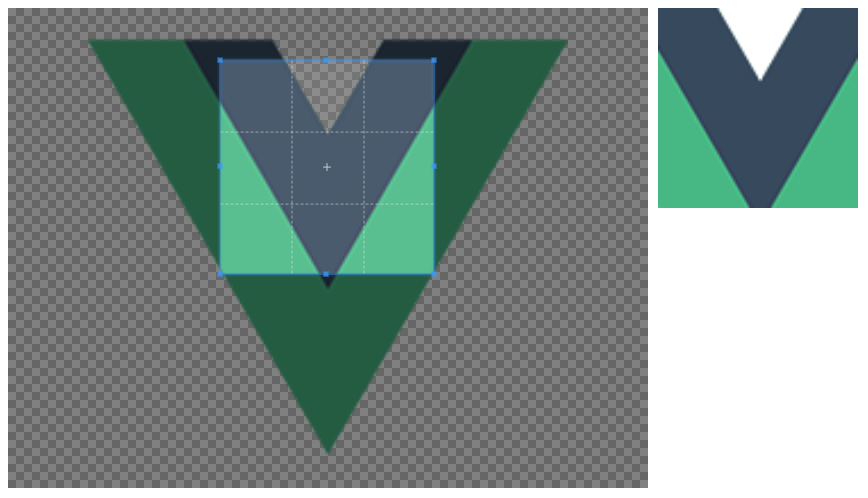
In this tutorial, we’re going to explore how to use a JavaScript library within the browser to manipulate images in preparation for storage on your server and use within your web application. We’ll do this using Vue.js instead of vanilla JavaScript.
To get an idea of what we want to accomplish, take a look at the image above. We have our original image on the left and a preview of our new image on the right. We can move the cropping box and resize it, and the preview image will change with it. Users can download the preview image if they’d like.
The heavy lifting is done with a library called Cropper.js.
The first step toward success with this example is to create a new project and get the necessary dependencies installed. The assumption is that you’ve got the Vue CLI installed and configured.
From the command line, execute the following:
vue create cropper-project
When prompted, choose the default options. This is going to be a simple project, so it isn’t necessary to worry about routing and all of that good Vue.js stuff.
Navigate into your new project and execute the following:
npm install cropperjs --save
The above command will install Cropper.js into our project. We could have easily used a CDN for this, but because we’re using a framework that takes advantage of webpack, the npm route makes the most sense.
While our dependency is installed, there is one more thing we need to do. Because we’re using npm, the CSS information is not included — only the JavaScript information. We need to include the CSS information either locally or through a CDN. We’re going to use a CDN.
Open the project’s public/index.html file and include the following HTML markup:
<!DOCTYPE html>
<html lang="en">
    <head>
        <meta charset="utf-8">
        <meta http-equiv="X-UA-Compatible" content="IE=edge">
        <meta name="viewport" content="width=device-width,initial-scale=1.0">
        <link rel="icon" href="<%= BASE_URL %>favicon.ico">
        <title>image-cropping</title>
        <link rel="stylesheet" href="https://cdnjs.cloudflare.com/ajax/libs/cropperjs/1.5.1/cropper.min.css">
    </head>
    <body>
        <noscript>
            <strong>We're sorry but image-cropping doesn't work properly without JavaScript enabled. Please enable it to continue.</strong>
        </noscript>
        <div id="app"></div>
        <!-- built files will be auto injected -->
    </body>
</html>
Notice that in the <head> tags we’ve included the cropper.min.css file. Again, it doesn’t matter how you get that CSS information as long as you get it. Without the CSS information, we won’t have the fancy crop box for our images.
At this point, the project should be nearly configured and ready to go for cropping images on the web. To keep our project clean, we’re going to create a new Vue.js component to handle all of our image manipulation.
Create a src/components/ImageCropper.vue file within your project and include the following boilerplate code:
<template>
    <div>
        <div class="img-container">
            <img ref="image" :src="src" crossorigin>
        </div>
        <img :src="destination" class="img-preview">
    </div>
</template>

<script>
    import Cropper from "cropperjs";
    export default {
        name: "ImageCropper",
        data() {
            return {
                cropper: {},
                destination: {},
                image: {}
            }
        },
        props: {
            src: String
        },
        mounted() { }
    }
</script>

<style scoped>
    .img-container {
        width: 640px;
        height: 480px;
        float: left;
    }
    .img-preview {
        width: 200px;
        height: 200px;
        float: left;
        margin-left: 10px;
    }
</style>
The <style> tag information isn’t too important for this example; it just cleaned up the page and didn’t have any real effect from the library.
Take note of the src and destination variables that appear in the <template> block. These variables represent the source image, as defined by the user through the props object, and the destination image, which has already been manipulated. We’ll be able to access the source image directly through the ref variable, which is similar to using a querySelector on a DOM object.
While we’ve laid the groundwork for our images, we’re not actually doing anything to them yet. We’re going to configure the cropping utility and our events in the mounted method, which is triggered after the view initializes.
The mounted method might look something like this:
mounted() {
    this.image = this.$refs.image;
    this.cropper = new Cropper(this.image, {
        zoomable: false,
        scalable: false,
        aspectRatio: 1,
        crop: () => {
            const canvas = this.cropper.getCroppedCanvas();
            this.destination = canvas.toDataURL("image/png");
        }
    });
}
When the method is called, we obtain a reference to our image, found in the <template> block. We then use the image when initializing our cropping utility while defining some configurations, none of which are mandatory.
The crop method is where the magic happens. Any time something happens to our image, this crop method is called. When the crop method is executed, we should get the crop, zoom, etc. information and create a new image from it — hence the destination image.
At this point, we’ve created the component but are not yet making use of it.
Open the project’s src/App.vue file and include the following:
<template>
    <div id="app">
        <ImageCropper src="/logo.png" />
    </div>
</template>

<script>
    import ImageCropper from "./components/ImageCropper.vue"
    export default {
        name: "app",
        components: {
            ImageCropper
        }
    }
</script>

<style></style>
Notice that we’ve imported the ImageCropper component and are making use of it in the <template> block. Remember, the src attribute is one of the props in the JavaScript. In my example, there is a public/logo.png file, but feel free to change it up as you see fit. In more realistic scenarios, you’ll probably use an image that the user plans to upload.
If you want to learn how to upload files such as cropped images, you can check out my previous tutorial, “Upload Files to a Remote Web Service via a Vue.js Web Application.”
You just saw how to manipulate images using the Cropper.js library from within a Vue.js web application. This is useful if you need to accept images from users to be used as part of their profile or similar because you want consistent sizing so your theme doesn’t break.
Using the image cropping library isn’t much different than how you’d use it with vanilla JavaScript, but there are a few things that need to be done to interact with the HTML components with Vue.js.
Debugging Vue.js applications can be difficult, especially when users experience issues that are difficult to reproduce. If you’re interested in monitoring and tracking Vue mutations and actions for all of your users in production, try LogRocket.

LogRocket lets you replay user sessions, eliminating guesswork by showing exactly what users experienced. It captures console logs, errors, network requests, and pixel-perfect DOM recordings — compatible with all frameworks.
With Galileo AI, you can instantly identify and explain user struggles with automated monitoring of your entire product experience.
Modernize how you debug your Vue apps — start monitoring for free.
A React chatbot that streams Markdown has to render a document while it is still being written. Each incoming chunk […]

Learn how coding agents streamline TDD with automated tests, quality guardrails, and mutation testing to catch bugs and build reliable software.
We tested five AI code review tools for speed, setup, security, and code quality to compare their strengths and help you choose the right tool.

Compare five React toast libraries for features, bundle size, accessibility, performance, and React 19 compatibility.
Hey there, want to help make our blog better?
Join LogRocket’s Content Advisory Board. You’ll help inform the type of content we create and get access to exclusive meetups, social accreditation, and swag.
Sign up now

 Learn more →





