
Data tables are more expensive to maintain than they look. What starts as a sorted list of rows can quickly turn into duplicated filter logic, inconsistent pagination behavior, and subtle bugs where the mobile card view runs different sorting code than the desktop table. As the UI grows, table components often become one of the most fragile parts of the codebase.

A headless table engine solves that by separating data behavior from markup. In Vue 3, you can put filtering, sorting, pagination, and table state into a reusable composable, then expose that logic through a renderless component or use it directly in any view. The result is one source of truth for table behavior and multiple rendering options: a classic table, a card grid, a product list, or any other layout your design system needs.
In this tutorial, we’ll build a small headless table engine in Vue 3 with the Composition API. It will not replace a full-featured library like TanStack Table for advanced grids, virtualization, column pinning, or enterprise data workflows. Instead, it gives you a lightweight pattern for shared table logic when your app needs reusable sorting, filtering, and pagination without locking every screen into the same HTML structure.
The goal is to build one reusable data engine and render it three different ways:
| Piece | Purpose |
|---|---|
useTableEngine |
A Vue composable that owns filtering, sorting, pagination, and table state |
TableEngine.vue |
A renderless component that exposes the composable through a scoped slot |
UsersTableView.vue |
A classic table layout powered by the engine |
UsersCardView.vue |
A card grid powered by the same engine |
ProductsView.vue |
A direct composable example that skips the wrapper component |
This is the core benefit of a headless architecture: the engine decides what the data is doing, while each consumer decides how that data should look.
Headless table logic is useful when table behavior needs to survive UI changes. It is less useful when you only need a simple, one-off table.
| Use case | Headless table engine fit |
|---|---|
| One table on one internal admin page | Probably overkill |
| Same data shown as a table on desktop and cards on mobile | Strong fit |
| Shared filtering, sorting, and pagination across multiple screens | Strong fit |
| Highly customized design system tables | Strong fit |
| Enterprise grid features like virtualization, resizing, column pinning, and grouping | Use a mature table/grid library |
| Server-side pagination, search, and sorting | Use this pattern as a client wrapper, but move the heavy data work to the API |
The pattern in this tutorial is intentionally small. That makes it easier to understand, adapt, and extend, but it also means you should be honest about where the abstraction stops.
We’ll use:
Vue composables are a natural fit here because they let you extract reusable stateful logic out of a component and reuse it across different UI surfaces. LogRocket has a deeper introduction to Vue composables if you want more background on the pattern.
A headless component provides behavior without rendering its own UI. It manages state and actions, such as the active page, active sort column, sort direction, and current filter query, but leaves all markup to the consumer.
In Vue, one common way to do this is with scoped slots. A renderless component passes its state and methods into a slot, and the parent component uses those values to render whatever HTML it needs. The logic and layout stay separate.
That separation matters for tables because table logic is often useful outside a <table>. A desktop view might need <thead>, <tbody>, and <tr> elements. A mobile view might need cards. A compact sidebar might need a list. If each layout owns its own sorting and filtering, the implementations drift over time.
A headless engine avoids that drift by making the data behavior reusable. If you want a broader explanation of slots and renderless components, see LogRocket’s guide to slots in Vue.js.
Component-level coupling usually starts harmlessly. You write a DataTable component. It sorts when users click a column header. It paginates at 10 rows per page. It works.
Then the design team asks for a mobile card view. The card view needs the same sorting and pagination behavior, but it cannot use table rows and cells. So you copy the logic into a new component.
Now two components own the same behavior. A bug gets fixed in one and not the other. The filter behavior on mobile quietly diverges from the desktop version. Later, the pagination page size changes from 10 to 25, and you find three hardcoded values but update only two. Tables are very good at becoming boring until they are suddenly not boring at all.
The headless pattern addresses this by placing state management in one location and letting any number of consumers render it however they need.
Create a new Vue project with Vite:
npm create vite@latest headless-table -- --template vue
cd headless-table
npm install
Vite’s current docs support this template-based setup for Vue projects. Make sure your local Node.js version satisfies Vite’s current requirements before starting.
Now create two directories:
mkdir src/composables
mkdir src/views
The src/composables directory will hold the reusable table logic. Vue does not require this folder name, but it is a common convention for Composition API code. The src/views directory will hold the page-level examples that consume the table engine.
For the tutorial, we’ll use Tailwind’s browser-based CDN so the examples are easy to run without extra configuration. Tailwind’s docs describe the Play CDN as a development/prototyping tool, not a production setup, so use the official Vite or PostCSS setup for real applications.
Open index.html and add the Tailwind browser script inside the <head> tag:
<!doctype html>
<html lang="en">
<head>
  <meta charset="UTF-8" />
  <link rel="icon" type="image/svg+xml" href="/favicon.svg" />
  <meta name="viewport" content="width=device-width, initial-scale=1.0" />
  <title>headless-table</title>
  <script src="https://cdn.jsdelivr.net/npm/@tailwindcss/browser@4"></script>
</head>
<body>
  <div id="app"></div>
  <script type="module" src="/src/main.js"></script>
</body>
</html>
Start the dev server:
npm run dev
Open http://localhost:5173 in your browser. You should see the default Vite welcome page. Once that is working, clear out src/App.vue; we’ll replace it as we build each view.
useTableEngine composableThe composable is the core of the headless table engine. It accepts raw data and an options object, then returns a stable API for filtering, sorting, and pagination. It contains no HTML and does not know whether its data will be rendered as a table, grid, or list.
Create src/composables/useTableEngine.js and start with the imports and function signature:
import { ref, computed, watch } from 'vue'

export function useTableEngine(rawData, options = {}) {
The rawData argument should be a reactive ref, such as ref([...]) or toRef(props, 'data'). Passing a ref keeps the engine synchronized if the source array changes.
Next, extract the options with defaults:
  const {
    defaultPageSize = 10,
    defaultSortKey = null,
    defaultSortDirection = 'asc',
  } = options
These options let each consumer decide the starting page size, default sort column, and default sort direction without changing the engine.
Now add the internal state:
  const currentPage = ref(1)
  const pageSize = ref(defaultPageSize)
  const sortKey = ref(defaultSortKey)
  const sortDirection = ref(defaultSortDirection)
  const filterQuery = ref('')
Each value is a ref, so Vue tracks changes and recomputes any dependent values. The filterQuery ref is what we’ll bind to a search input in the views.
Add the filtered data computed property:
  const filteredData = computed(() => {
    const query = filterQuery.value.trim().toLowerCase()

    if (!query) {
      return rawData.value
    }

    return rawData.value.filter((row) =>
      Object.values(row).some((value) =>
        String(value ?? '').toLowerCase().includes(query)
      )
    )
  })
This performs a simple global search across every value in each row. For production tables, you may want column-specific filtering, custom filter functions, or server-side filtering. For this tutorial, a global text search keeps the engine readable while demonstrating the pattern.
Now add sorting:
  const sortedData = computed(() => {
    if (!sortKey.value) {
      return filteredData.value
    }

    return [...filteredData.value].sort((a, b) => {
      const aValue = a[sortKey.value]
      const bValue = b[sortKey.value]

      if (aValue == null && bValue == null) return 0
      if (aValue == null) return 1
      if (bValue == null) return -1

      if (typeof aValue === 'number' && typeof bValue === 'number') {
        return sortDirection.value === 'asc'
          ? aValue - bValue
          : bValue - aValue
      }

      const comparison = String(aValue).localeCompare(String(bValue))
      return sortDirection.value === 'asc' ? comparison : -comparison
    })
  })
The spread operator creates a copy before sorting so the original array is not mutated. Numeric values use a numeric comparison. Other values use localeCompare, which handles string ordering better than raw > and < comparisons.
Add pagination:
  const totalRows = computed(() => filteredData.value.length)

  const totalPages = computed(() =>
    Math.max(1, Math.ceil(totalRows.value / pageSize.value))
  )

  const paginatedData = computed(() => {
    const start = (currentPage.value - 1) * pageSize.value
    return sortedData.value.slice(start, start + pageSize.value)
  })
The page count is based on filteredData, not the raw dataset, so it updates correctly when users search. paginatedData is the final array consumers render: filtered, sorted, and sliced to the current page.
Next, add actions for sorting and navigation:
  function toggleSort(key) {
    if (sortKey.value === key) {
      if (sortDirection.value === 'asc') {
        sortDirection.value = 'desc'
      } else {
        sortKey.value = null
        sortDirection.value = 'asc'
      }

      return
    }

    sortKey.value = key
    sortDirection.value = 'asc'
  }

  function goToPage(page) {
    currentPage.value = Math.min(Math.max(1, page), totalPages.value)
  }

  function nextPage() {
    goToPage(currentPage.value + 1)
  }

  function prevPage() {
    goToPage(currentPage.value - 1)
  }
toggleSort cycles through three states: ascending, descending, and unsorted. goToPage clamps the requested page between 1 and totalPages, preventing consumers from accidentally navigating out of bounds.
Add watchers to keep pagination valid as the dataset changes:
  watch([filterQuery, sortKey, sortDirection, pageSize], () => {
    currentPage.value = 1
  })

  watch(totalPages, () => {
    if (currentPage.value > totalPages.value) {
      goToPage(totalPages.value)
    }
  })
The first watcher resets the page when the filter, sort, or page size changes. Without this, a user could filter down to two rows while still sitting on page three. The second watcher handles cases where the raw dataset changes and the current page is no longer valid.
Finally, return the public API:
  return {
    filterQuery,
    currentPage,
    pageSize,
    sortKey,
    sortDirection,
    filteredData,
    sortedData,
    paginatedData,
    totalRows,
    totalPages,
    toggleSort,
    goToPage,
    nextPage,
    prevPage,
    isSorted: (key) => sortKey.value === key,
    sortDirectionFor: (key) =>
      sortKey.value === key ? sortDirection.value : null,
  }
}
This return object is the contract between the engine and its consumers. Everything else can change internally as long as this API stays stable.
Here is the complete composable:
import { ref, computed, watch } from 'vue'

export function useTableEngine(rawData, options = {}) {
  const {
    defaultPageSize = 10,
    defaultSortKey = null,
    defaultSortDirection = 'asc',
  } = options

  const currentPage = ref(1)
  const pageSize = ref(defaultPageSize)
  const sortKey = ref(defaultSortKey)
  const sortDirection = ref(defaultSortDirection)
  const filterQuery = ref('')

  const filteredData = computed(() => {
    const query = filterQuery.value.trim().toLowerCase()

    if (!query) {
      return rawData.value
    }

    return rawData.value.filter((row) =>
      Object.values(row).some((value) =>
        String(value ?? '').toLowerCase().includes(query)
      )
    )
  })

  const sortedData = computed(() => {
    if (!sortKey.value) {
      return filteredData.value
    }

    return [...filteredData.value].sort((a, b) => {
      const aValue = a[sortKey.value]
      const bValue = b[sortKey.value]

      if (aValue == null && bValue == null) return 0
      if (aValue == null) return 1
      if (bValue == null) return -1

      if (typeof aValue === 'number' && typeof bValue === 'number') {
        return sortDirection.value === 'asc'
          ? aValue - bValue
          : bValue - aValue
      }

      const comparison = String(aValue).localeCompare(String(bValue))
      return sortDirection.value === 'asc' ? comparison : -comparison
    })
  })

  const totalRows = computed(() => filteredData.value.length)

  const totalPages = computed(() =>
    Math.max(1, Math.ceil(totalRows.value / pageSize.value))
  )

  const paginatedData = computed(() => {
    const start = (currentPage.value - 1) * pageSize.value
    return sortedData.value.slice(start, start + pageSize.value)
  })

  function toggleSort(key) {
    if (sortKey.value === key) {
      if (sortDirection.value === 'asc') {
        sortDirection.value = 'desc'
      } else {
        sortKey.value = null
        sortDirection.value = 'asc'
      }

      return
    }

    sortKey.value = key
    sortDirection.value = 'asc'
  }

  function goToPage(page) {
    currentPage.value = Math.min(Math.max(1, page), totalPages.value)
  }

  function nextPage() {
    goToPage(currentPage.value + 1)
  }

  function prevPage() {
    goToPage(currentPage.value - 1)
  }

  watch([filterQuery, sortKey, sortDirection, pageSize], () => {
    currentPage.value = 1
  })

  watch(totalPages, () => {
    if (currentPage.value > totalPages.value) {
      goToPage(totalPages.value)
    }
  })

  return {
    filterQuery,
    currentPage,
    pageSize,
    sortKey,
    sortDirection,
    filteredData,
    sortedData,
    paginatedData,
    totalRows,
    totalPages,
    toggleSort,
    goToPage,
    nextPage,
    prevPage,
    isSorted: (key) => sortKey.value === key,
    sortDirectionFor: (key) =>
      sortKey.value === key ? sortDirection.value : null,
  }
}
From here, we can consume the engine in two ways: through a renderless component or by importing the composable directly.
TableEngine componentThe renderless component is a convenience wrapper around useTableEngine. It accepts data and initial options as props, creates the engine, then exposes that engine through a scoped slot.
Create src/components/TableEngine.vue:
<script setup>
import { reactive, toRef, watch } from 'vue'
import { useTableEngine } from '../composables/useTableEngine'

const props = defineProps({
  data: {
    type: Array,
    required: true,
  },
  pageSize: {
    type: Number,
    default: 10,
  },
  defaultSortKey: {
    type: String,
    default: null,
  },
  defaultSortDirection: {
    type: String,
    default: 'asc',
  },
})

const engine = reactive(
  useTableEngine(toRef(props, 'data'), {
    defaultPageSize: props.pageSize,
    defaultSortKey: props.defaultSortKey,
    defaultSortDirection: props.defaultSortDirection,
  })
)

watch(
  () => props.pageSize,
  (newSize) => {
    engine.pageSize = newSize
    engine.currentPage = 1
  }
)
</script>

<template>
  <slot :engine="engine"></slot>
</template>
There are two details worth calling out:
toRef(props, 'data') passes the data prop into the composable as a reactive reference, so the engine stays synchronized with parent updates.reactive(useTableEngine(...)) lets templates access engine.filterQuery and engine.currentPage directly, without adding .value everywhere.This component renders only a slot. That is the whole point: TableEngine.vue owns behavior, while the parent owns markup.
Now we’ll build the first consumer: a traditional HTML table. Sorting, filtering, and pagination come from the engine. The view only decides how to render rows and controls.
Create src/views/UsersTableView.vue and add the script block:
<script setup>
import { ref } from 'vue'
import TableEngine from '../components/TableEngine.vue'

const users = ref([
  { id: 1, name: 'Amara Nwosu', role: 'Engineer', status: 'Active', joined: 2021 },
  { id: 2, name: 'Luca Ferretti', role: 'Designer', status: 'Active', joined: 2022 },
  { id: 3, name: 'Sara Lindqvist', role: 'Manager', status: 'Inactive', joined: 2019 },
  { id: 4, name: 'Kenji Mori', role: 'Engineer', status: 'Active', joined: 2023 },
  { id: 5, name: 'Priya Mehta', role: 'Analyst', status: 'Active', joined: 2020 },
])

const columns = ['name', 'role', 'status', 'joined']
</script>
There are no local sorting, filtering, or pagination methods here. The component only owns its sample data and column list.
Now add the template:
<template>
  <TableEngine :data="users" :page-size="3" default-sort-key="name">
    <template #default="{ engine }">
      <div class="mx-auto max-w-4xl rounded-2xl border border-gray-200 bg-white p-6 shadow-sm">
        <div class="mb-4 flex flex-col gap-3 sm:flex-row sm:items-center sm:justify-between">
          <div>
            <h1 class="text-lg font-semibold text-gray-900">Users</h1>
            <p class="text-sm text-gray-500">
              Shared filtering, sorting, and pagination from the table engine.
            </p>
          </div>

          <input
            v-model="engine.filterQuery"
            type="search"
            placeholder="Search users..."
            class="w-full rounded-md border border-gray-300 px-4 py-2 text-sm sm:w-64"
          />
        </div>

        <div class="overflow-x-auto rounded-lg border border-gray-200">
          <table class="w-full text-left text-sm text-gray-700">
            <thead class="bg-gray-50 text-xs uppercase text-gray-500">
              <tr>
                <th
                  v-for="col in columns"
                  :key="col"
                  scope="col"
                  class="px-6 py-3"
                  :aria-sort="
                    engine.sortKey === col
                      ? engine.sortDirection === 'asc'
                        ? 'ascending'
                        : 'descending'
                      : 'none'
                  "
                >
                  <button
                    type="button"
                    class="flex items-center gap-1 font-semibold uppercase hover:text-gray-900"
                    @click="engine.toggleSort(col)"
                  >
                    {{ col }}
                    <span class="text-gray-400">
                      {{ engine.sortKey === col ? (engine.sortDirection === 'asc' ? '↑' : '↓') : '↕' }}
                    </span>
                  </button>
                </th>
              </tr>
            </thead>

            <tbody class="divide-y divide-gray-100 bg-white">
              <tr
                v-for="row in engine.paginatedData"
                :key="row.id"
                class="hover:bg-blue-50"
              >
                <td class="px-6 py-4 font-medium">{{ row.name }}</td>
                <td class="px-6 py-4">{{ row.role }}</td>
                <td class="px-6 py-4">
                  <span
                    :class="[
                      'rounded-full px-2 py-0.5 text-xs font-semibold',
                      row.status === 'Active'
                        ? 'bg-green-100 text-green-700'
                        : 'bg-gray-100 text-gray-500',
                    ]"
                  >
                    {{ row.status }}
                  </span>
                </td>
                <td class="px-6 py-4">{{ row.joined }}</td>
              </tr>

              <tr v-if="engine.paginatedData.length === 0">
                <td colspan="4" class="px-6 py-12 text-center text-gray-400">
                  No results found.
                </td>
              </tr>
            </tbody>
          </table>
        </div>

        <div class="mt-4 flex items-center justify-between text-sm text-gray-600">
          <span>
            {{ engine.totalRows }} result{{ engine.totalRows !== 1 ? 's' : '' }}
          </span>

          <div class="flex items-center gap-2">
            <button
              type="button"
              @click="engine.prevPage"
              :disabled="engine.currentPage === 1"
              class="rounded border border-gray-300 px-3 py-1 hover:bg-gray-50 disabled:opacity-40"
            >
              Previous
            </button>

            <span>Page {{ engine.currentPage }} of {{ engine.totalPages }}</span>

            <button
              type="button"
              @click="engine.nextPage"
              :disabled="engine.currentPage === engine.totalPages"
              class="rounded border border-gray-300 px-3 py-1 hover:bg-gray-50 disabled:opacity-40"
            >
              Next
            </button>
          </div>
        </div>
      </div>
    </template>
  </TableEngine>
</template>
The important line is v-for="row in engine.paginatedData". By the time the template sees the data, the engine has already applied filtering, sorting, and pagination.
The sort controls also call the engine directly:
@click="engine.toggleSort(col)"
The table layout does not own the sort algorithm. It only chooses how users trigger it.
To render this view, replace src/App.vue with:
<template>
  <main class="min-h-screen bg-gray-50 p-8">
    <UsersTableView />
  </main>
</template>

<script setup>
import UsersTableView from './views/UsersTableView.vue'
</script>
Save the file. You should now see a working table with search, sorting, and pagination.
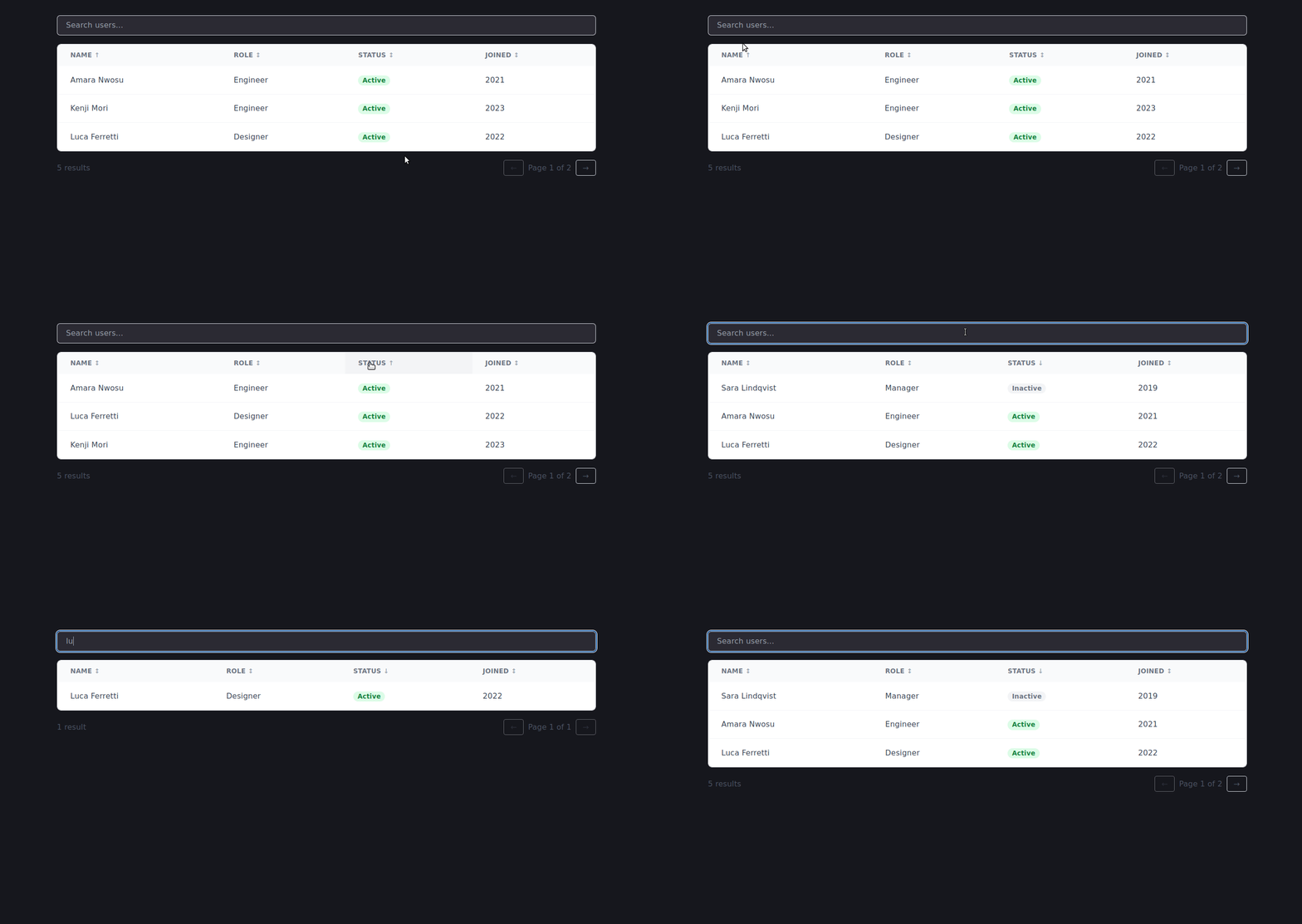
The second consumer uses the same engine for a card-based layout. None of the data logic changes. Only the markup changes.
Create src/views/UsersCardView.vue:
<script setup>
import { ref } from 'vue'
import TableEngine from '../components/TableEngine.vue'

const users = ref([
  { id: 1, name: 'Amara Nwosu', role: 'Engineer', status: 'Active', joined: 2021 },
  { id: 2, name: 'Luca Ferretti', role: 'Designer', status: 'Active', joined: 2022 },
  { id: 3, name: 'Sara Lindqvist', role: 'Manager', status: 'Inactive', joined: 2019 },
  { id: 4, name: 'Kenji Mori', role: 'Engineer', status: 'Active', joined: 2023 },
  { id: 5, name: 'Priya Mehta', role: 'Analyst', status: 'Active', joined: 2020 },
])
</script>
Now add the template:
<template>
  <TableEngine :data="users" :page-size="4">
    <template #default="{ engine }">
      <div class="mx-auto max-w-4xl rounded-2xl border border-gray-200 bg-white p-6 shadow-sm">
        <div class="mb-4 flex flex-col gap-3 sm:flex-row sm:items-center sm:justify-between">
          <input
            v-model="engine.filterQuery"
            type="search"
            placeholder="Search users..."
            class="w-full rounded-xl border border-gray-200 px-4 py-3 text-sm sm:w-64"
          />

          <div class="flex flex-wrap gap-2">
            <button
              v-for="col in ['name', 'role', 'joined']"
              :key="col"
              type="button"
              @click="engine.toggleSort(col)"
              class="rounded-full border border-gray-300 px-3 py-1 text-xs capitalize hover:bg-gray-100"
            >
              Sort by {{ col }}
            </button>
          </div>
        </div>

        <div class="grid grid-cols-1 gap-4 sm:grid-cols-2">
          <article
            v-for="user in engine.paginatedData"
            :key="user.id"
            class="rounded-2xl border border-gray-200 bg-white p-5"
          >
            <div class="flex items-start justify-between">
              <div>
                <p class="font-semibold text-gray-900">{{ user.name }}</p>
                <p class="text-sm text-gray-500">{{ user.role }}</p>
              </div>

              <span
                :class="[
                  'rounded-full px-2 py-0.5 text-xs font-semibold',
                  user.status === 'Active'
                    ? 'bg-green-100 text-green-700'
                    : 'bg-gray-100 text-gray-400',
                ]"
              >
                {{ user.status }}
              </span>
            </div>

            <p class="mt-3 text-xs text-gray-400">Joined {{ user.joined }}</p>
          </article>
        </div>

        <p
          v-if="engine.paginatedData.length === 0"
          class="py-12 text-center text-sm text-gray-400"
        >
          No results found.
        </p>

        <div class="mt-6 flex justify-center gap-3">
          <button
            type="button"
            @click="engine.prevPage"
            :disabled="engine.currentPage === 1"
            class="rounded-full border px-4 py-2 text-sm disabled:opacity-40"
          >
            Previous
          </button>

          <button
            type="button"
            @click="engine.nextPage"
            :disabled="engine.currentPage === engine.totalPages"
            class="rounded-full border px-4 py-2 text-sm disabled:opacity-40"
          >
            Next
          </button>
        </div>
      </div>
    </template>
  </TableEngine>
</template>
This view uses engine.paginatedData, engine.filterQuery, and engine.toggleSort, just like the table view. But the UI is completely different. That is the whole payoff: the engine stays fixed while the rendering changes freely.
Update App.vue to render the card view:
<template>
  <main class="min-h-screen bg-gray-50 p-8">
    <UsersCardView />
  </main>
</template>

<script setup>
import UsersCardView from './views/UsersCardView.vue'
</script>
Refresh the browser. The card grid appears with the same search, sorting, and pagination behavior.
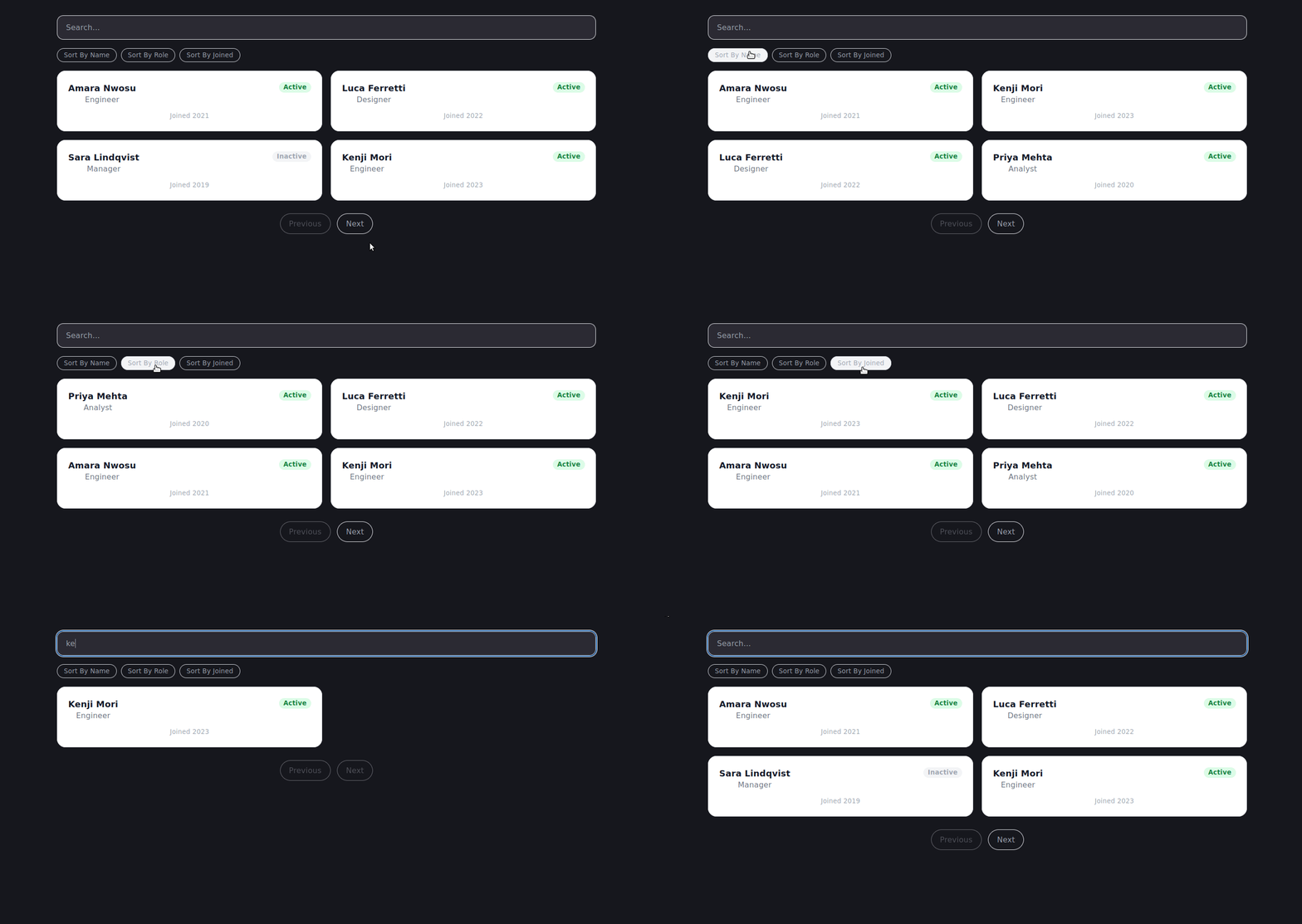
You do not always need the renderless wrapper component. If a team prefers less indirection, or if a component only needs the table logic locally, it can import useTableEngine directly.
This approach is closer to standard Composition API usage and may feel more familiar if your team already organizes reusable logic through composables. LogRocket’s guide to the Vue Composition API covers the broader pattern in more detail.
Create src/views/ProductsView.vue:
<script setup>
import { ref } from 'vue'
import { useTableEngine } from '../composables/useTableEngine'

const products = ref([
  { id: 1, name: 'Widget Pro', category: 'Hardware', price: 49.99 },
  { id: 2, name: 'SoftSuite', category: 'Software', price: 199.0 },
  { id: 3, name: 'Cable Pack', category: 'Hardware', price: 12.5 },
  { id: 4, name: 'CloudStorage 1TB', category: 'Software', price: 9.99 },
  { id: 5, name: 'ErgoMouse', category: 'Hardware', price: 85.0 },
  { id: 6, name: 'DevFlow IDE', category: 'Software', price: 250.0 },
  { id: 7, name: '4K Monitor', category: 'Hardware', price: 349.99 },
  { id: 8, name: 'Security Shield', category: 'Software', price: 59.0 },
  { id: 9, name: 'Mechanical Keyboard', category: 'Hardware', price: 129.5 },
])

const {
  paginatedData,
  filterQuery,
  toggleSort,
  nextPage,
  prevPage,
  currentPage,
  totalPages,
  totalRows,
} = useTableEngine(products, {
  defaultPageSize: 4,
})
</script>
Because the composable returns refs and computed refs, Vue templates automatically unwrap them. That means v-model="filterQuery" and v-for="product in paginatedData" work naturally in the template.
Add the template:
<template>
  <div class="mx-auto max-w-2xl rounded-2xl border border-gray-200 bg-white p-6 shadow-sm">
    <div class="mb-4">
      <h1 class="text-lg font-semibold text-gray-900">Products</h1>
      <p class="text-sm text-gray-500">
        This view uses the composable directly, without the renderless component.
      </p>
    </div>

    <input
      v-model="filterQuery"
      type="search"
      placeholder="Filter products..."
      class="mb-4 w-full rounded border border-gray-300 p-2"
    />

    <div class="mb-4 flex gap-2">
      <button
        type="button"
        @click="toggleSort('name')"
        class="rounded-full border px-3 py-1 text-sm hover:bg-gray-50"
      >
        Sort by name
      </button>

      <button
        type="button"
        @click="toggleSort('price')"
        class="rounded-full border px-3 py-1 text-sm hover:bg-gray-50"
      >
        Sort by price
      </button>
    </div>

    <ul class="space-y-2">
      <li
        v-for="product in paginatedData"
        :key="product.id"
        class="flex justify-between rounded-lg border bg-white p-4"
      >
        <span class="font-medium">{{ product.name }}</span>
        <span class="text-gray-500">{{ product.category }}</span>
        <span class="font-semibold">${{ product.price }}</span>
      </li>
    </ul>

    <p
      v-if="paginatedData.length === 0"
      class="py-10 text-center text-sm text-gray-400"
    >
      No products found.
    </p>

    <div class="mt-4 flex items-center justify-between">
      <span class="text-sm text-gray-500">
        {{ totalRows }} result{{ totalRows !== 1 ? 's' : '' }}
      </span>

      <div class="flex gap-2">
        <button
          type="button"
          @click="prevPage"
          :disabled="currentPage === 1"
          class="rounded border px-3 py-1 disabled:opacity-40"
        >
          Prev
        </button>

        <button
          type="button"
          @click="nextPage"
          :disabled="currentPage === totalPages"
          class="rounded border px-3 py-1 disabled:opacity-40"
        >
          Next
        </button>
      </div>
    </div>
  </div>
</template>
Update App.vue one more time:
<template>
  <main class="min-h-screen bg-gray-50 p-8">
    <ProductsView />
  </main>
</template>

<script setup>
import ProductsView from './views/ProductsView.vue'
</script>
Refresh the browser. You now have a product list with filtering, sorting, and pagination, powered directly by the composable.
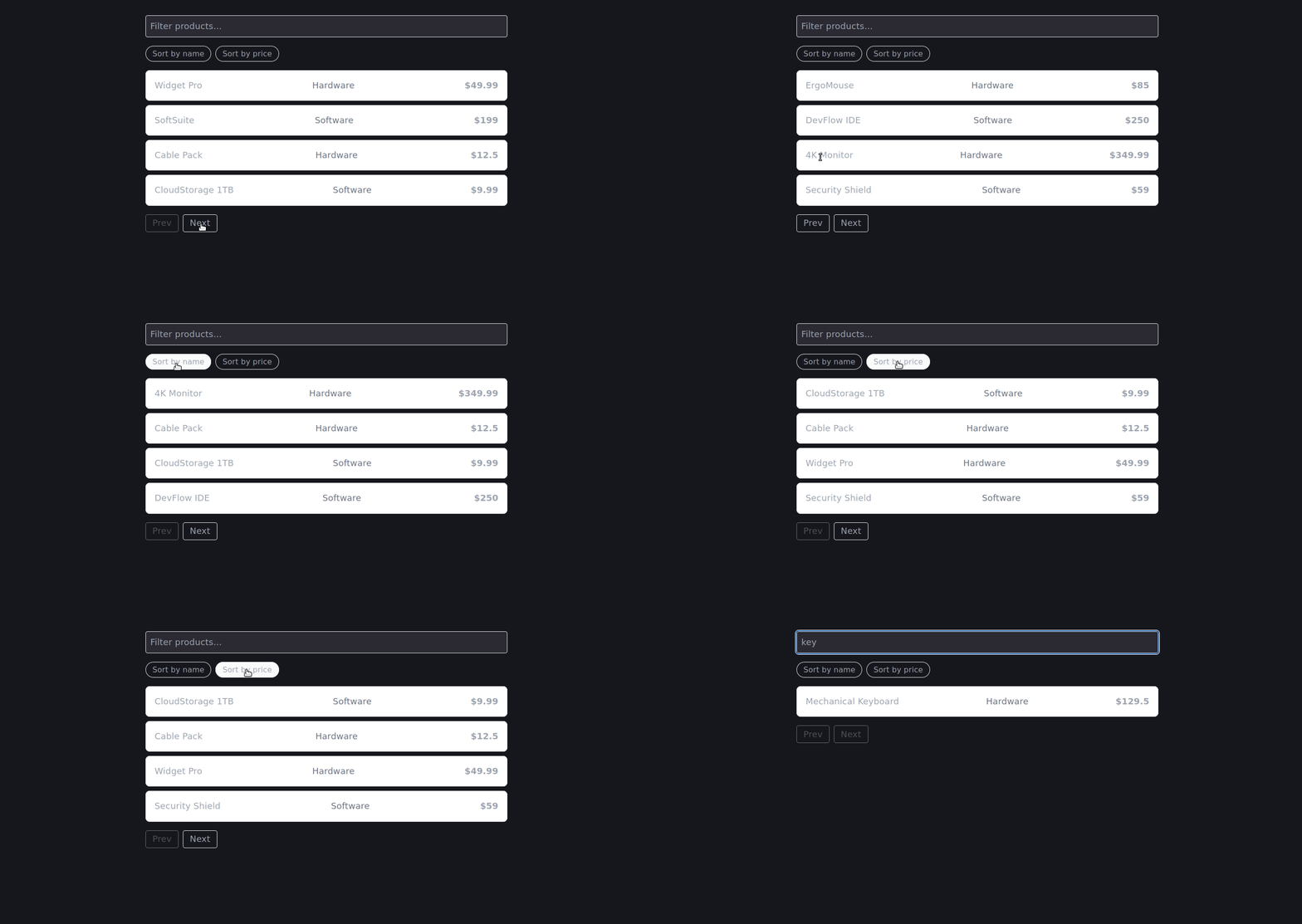
Both approaches are valid. The better choice depends on how your team wants to expose table behavior.
| Approach | Best for | Tradeoff |
|---|---|---|
TableEngine.vue renderless component |
Teams that want a declarative template API and reusable slot contract | Scoped slot syntax adds some indirection |
Direct useTableEngine composable |
Teams comfortable with Composition API and local setup in each view | Each consumer has to import and wire the composable manually |
| Pre-styled table component on top of the engine | Product teams that need a fast default table | Less flexible than the headless layer |
In practice, many teams use all three layers: a low-level composable, a renderless component for flexible screens, and a default styled table for standard admin pages. That gives developers a fast path without closing off customization.
Headless architecture is useful, but it is not free. It moves responsibility from the component to the consumer, and that affects how your team writes and maintains UI.
A standard table component such as <DataTable :data="users" /> can produce a working table in one line. The headless approach requires the consumer to write the <thead>, <tbody>, every row, and every control. For one-off internal tools or quick prototypes, that may not be worth it.
A practical compromise is to build a pre-styled DefaultTable.vue on top of the engine. Teams can use the default renderer for speed and drop down to the headless API when they need full control.
The pattern <template #default="{ engine }"> is straightforward once explained, but it may be unfamiliar to junior developers or teams coming from React. A short internal guide with two or three approved examples is usually enough to make the pattern comfortable.
The engine in this tutorial covers filtering, sorting, and pagination. It does not include:
That is intentional. The goal is not to rebuild a full grid library. It is to make shared table behavior reusable across layouts. If your requirements include thousands of rows, column virtualization, resize handles, grouping, or advanced keyboard interaction, use a mature table or grid library instead.
This tutorial filters and sorts in the browser. That is fine for small to moderate datasets. For larger datasets, move filtering, sorting, and pagination to the server, then use the headless engine to manage UI state and display the current page.
For example, the engine can still track filterQuery, sortKey, and currentPage, but those values would become request parameters sent to your API rather than being applied to a local array.
Maintaining data tables does not have to mean rewriting the same logic every time the design changes. By placing filtering, sorting, and pagination in a composable, then leaving rendering to the consumer, you avoid the duplication that causes table behavior to drift across an application.
The headless pattern works well when the same data behavior needs to power multiple UI shapes: a table on desktop, a card grid on mobile, or a compact list in a sidebar. It also gives teams a clean place to extend table behavior over time without tying every decision to one component’s markup.
The engine we built here is intentionally small, but the architecture scales. The composable handles what the data is doing. The consumer decides how it looks. When one changes, the other does not need to.
Debugging Vue.js applications can be difficult, especially when users experience issues that are difficult to reproduce. If you’re interested in monitoring and tracking Vue mutations and actions for all of your users in production, try LogRocket.

LogRocket lets you replay user sessions, eliminating guesswork by showing exactly what users experienced. It captures console logs, errors, network requests, and pixel-perfect DOM recordings — compatible with all frameworks.
With Galileo AI, you can instantly identify and explain user struggles with automated monitoring of your entire product experience.
Modernize how you debug your Vue apps — start monitoring for free.
useTableEngine to TypeScript and make the row type genericDefaultTable.vue on top of the engine
Tailwind CSS component libraries provide pre-built components to streamline the process of developing aesthetic, user-friendly interfaces.

Vibe coding makes building apps faster, but speed without engineering can create serious failures. Here are five real-world examples and practical checks to help you ship AI-generated code safely.

Compare React ViewTransition and Motion across four animation patterns. The native build saved ~38.6kB of gzipped JS, but required 179 more lines of CSS.

Learn how to run Cline locally with Ollama to build a secure, private AI coding agent that keeps your proprietary code off cloud servers.
Would you be interested in joining LogRocket's developer community?
Join LogRocket’s Content Advisory Board. You’ll help inform the type of content we create and get access to exclusive meetups, social accreditation, and swag.
Sign up now


 Learn more →




