Editor’s note: This guide was last updated by Marie Starck on 1 May 2024 to provide a comparison of props vs. state in React, as well as to compare the use of useRef and useState for tracking previous values, and to answer commonly asked questions for working with state in React, such as how Hooks differ from class components when handling state.

Accessing the previous props or state from within a functional component is one of those deceptively simple problems you might face as you work with React Hooks. While no React Hook currently does this out of the box, you can manually retrieve either the previous state or props from within a functional component by using the useRef, useState, and useEffect Hooks in React. In this article, we’ll learn how.
Before we get started, brush up on your React Hooks knowledge with our React Hooks cheat sheet:

React offers a declarative approach to UI manipulation. Instead of directly modifying specific UI elements, we define the various states our component can take on via variables known as state.
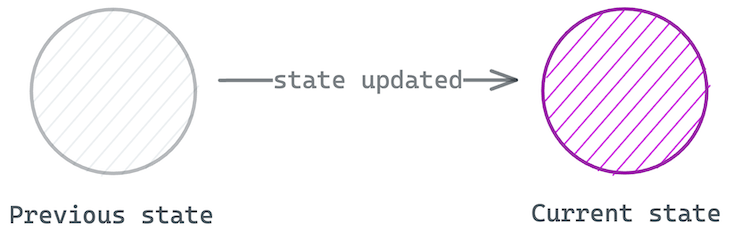
Similarly, the previous state refers to the value of a state variable before it was updated. When multiple updates occur, the previous state refers to the state value before the current one. Here’s a visual to break it down:
It’s important to access previous state only for the right reasons. For example, if you only need previous state to clean up an effect, you should rely on the native React support. Consider the example below:
useEffect(() => {
  UserService.subscribe(props.userId);
  return () => UserService.unsubscribe(props.userId);
}, [props.userId]);
In this example, getting the previous userId prop is unnecessary because the cleanup function will capture it in a closure. If userId changes from 3 to 4, UserService.unsubscribe(3) will run first before UserService.subscribe(4).
Alternatively, if you find yourself updating some state value in response to changes in another state or prop, this may be a sign of redundancy. Consider refactoring or simplifying your state representation. This will keep your component updates predictable and easy to understand.
If your use case doesn’t fall in the use cases mentioned above, then perhaps you need the previous state for the right reasons. This is usually a rare case, e.g., building a <Transition> component. Now, let’s consider our solution using useRef.
useRefConsider the following annotated example with a Counter component:
import { useEffect, useState, useRef } from "react";
const INITIAL_COUNT = 0;

function Counter() {
  const [count, setCount] = useState(INITIAL_COUNT);
  // The useRef Hook allows you to persist data between renders
  const prevCountRef = useRef<number>(INITIAL_COUNT);
  useEffect(() => {
    /**
     * assign the latest render value of count to the ref
     * However, assigning a value to ref doesn't re-render the app
     * So, prevCountRef.current in the return statement displays the
     * last value in the ref at the time of render i.e., the previous state value.
     */
    prevCountRef.current = count;
  }, [count]); //run this code when the value of count changes
  return (
    <h1>
      Now: {count}, before: {prevCountRef.current}
      {/* Increase count on click  */}
      <br />
      <button onClick={() => setCount((count) => count + 1)}>
        Increase count
      </button>
    </h1>
  );
}
export default Counter;
The code above generates the following output:
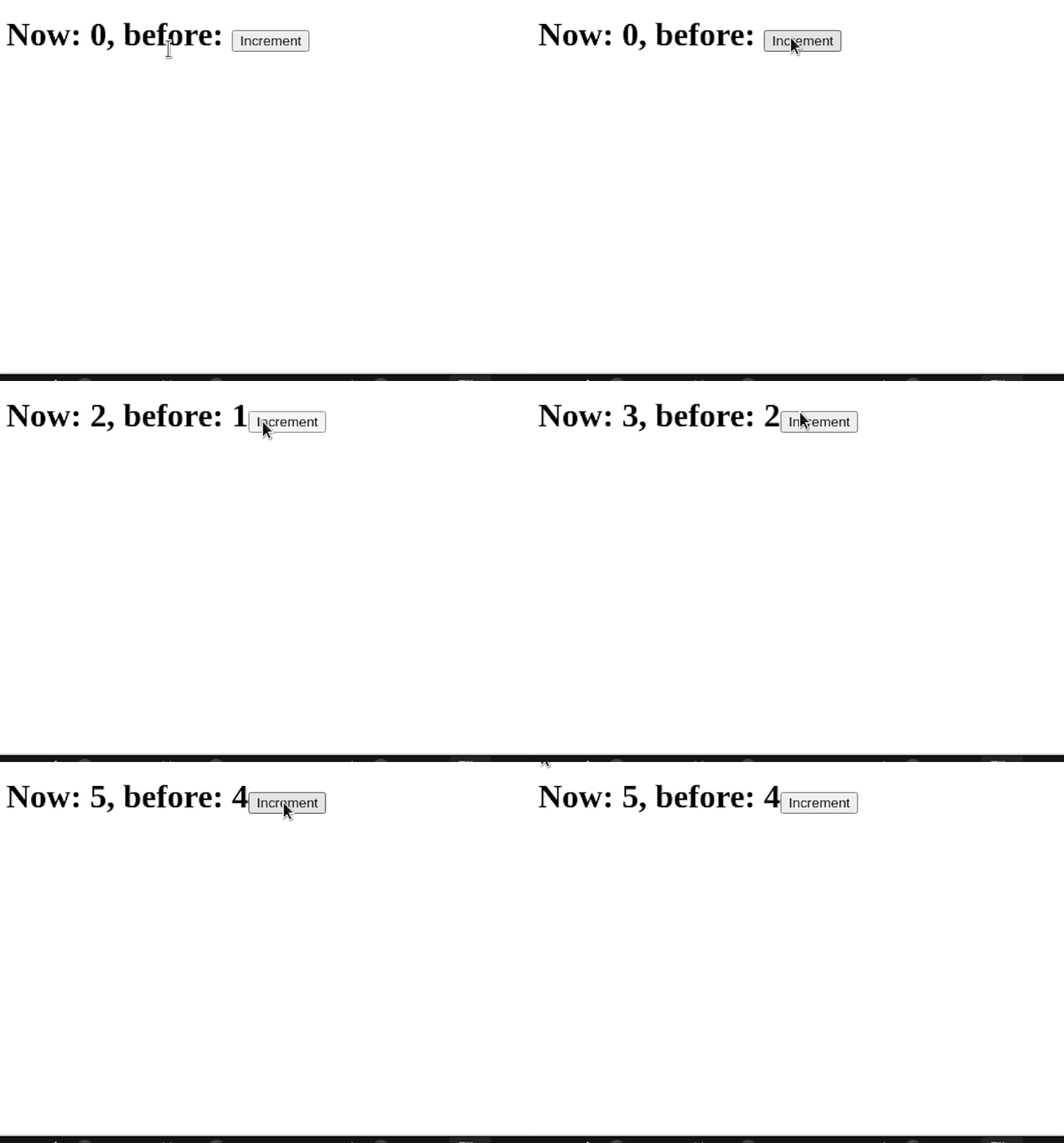
In the annotated code block above, we update the count state as usual via the state updater function. As soon as the state is updated, we also update the ref current value to the new state value.
However, because ref assignments do not re-trigger component renders, the value prevCountRef.current in the render method (or return statement) will always point to the previous state value (the value of the ref before we made the update in useEffect).
usePrevious HookBuilding upon the previous solution, we may create an abstraction via a usePrevious Hook:
function usePrevious(value) {
  const ref = useRef();
  useEffect(() => {
    ref.current = value; //assign the value of ref to the argument
  },[value]); //this code will run when the value of 'value' changes
  return ref.current; //in the end, return the current ref value.
}
export default usePrevious;
To use the custom Hook within your app, write the following code:
function Counter() {
  const [count, setCount] = useState(0);
  // 👇 look here
  const prevCount = usePrevious(count)

  return <h1> Now: {count}, before: {prevCount} </h1>;
}
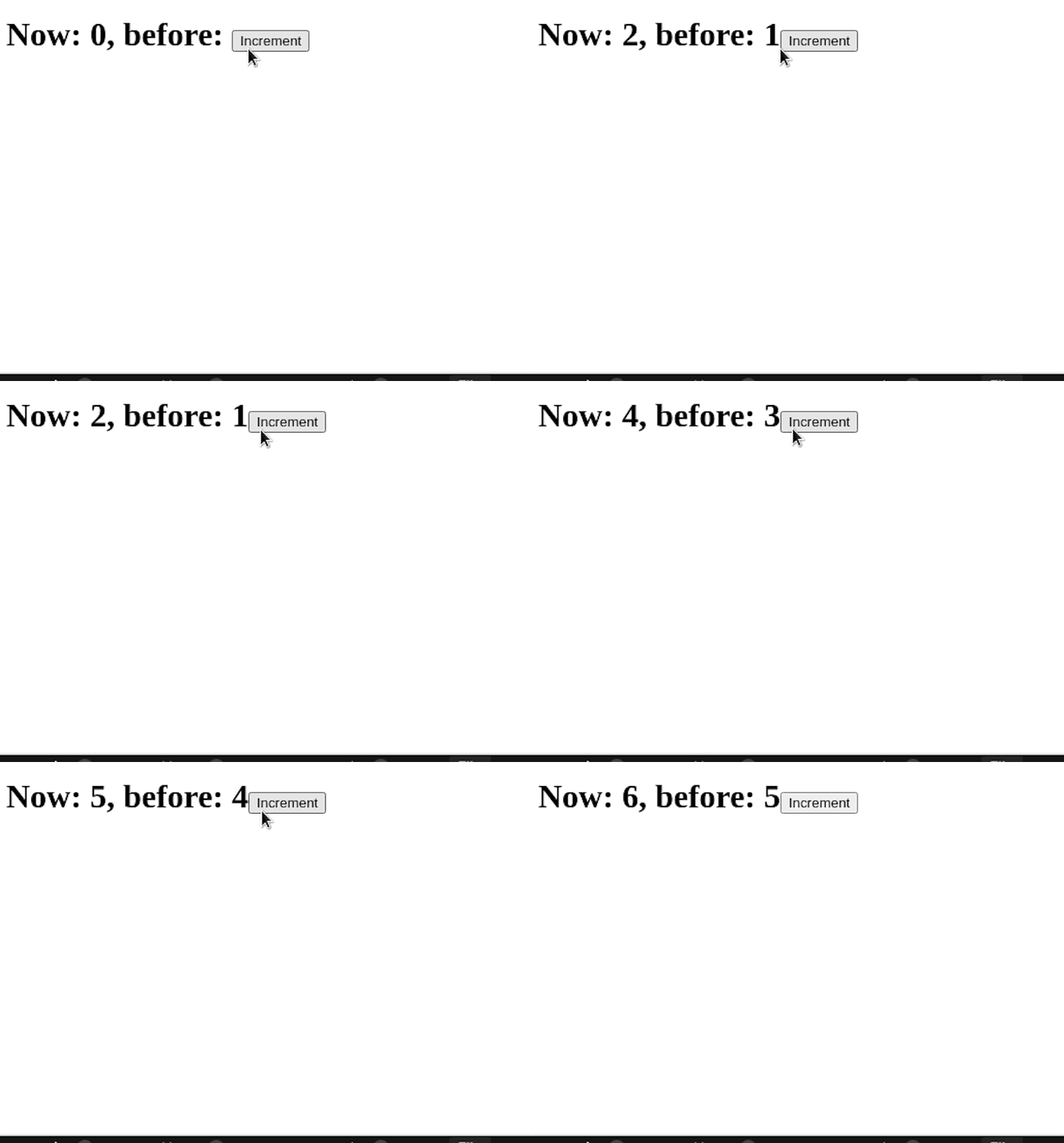
Although this example seems straightforward, can you really explain how the usePrevious Hook works? Let’s explore in clear terms what’s happening within the Hook and how the previous value is retained.
useRef in depth: An overlooked React HookI work with Hooks daily, both for personal and professional workplace projects. In my experience, I’ve found that very few people understand and take advantage of the useRef Hook. Apart from being great at handling DOM refs, useRef is a perfect substitute for implementing instance-like variables within functional components.
Furthermore, it remembers data between UI renders, allowing developers to access previous, overwritten values. Consider the following example with class components:
// class component
class Count extends React.Component {

   constructor() {
     this.specialVariable = "SPECIAL_VARIABLE"
   }

  render() {
    return null
  }
}
Every instantiated copy of the Count class will have its own specialVariable instance variable. The useRef Hook can simulate this behavior with an even more interesting feature:
// functional component

function Count() {
  const specialVariable = useRef("SPECIAL_VARAIBLE"); //store initial value into the specialVariable Hook.
  return null
}
The useRef Hook takes in an initial value to be stored, i.e., useRef("INITIAL_VALUE"), and it returns an object with a current property {current: "INITIAL_VALUE"}. Whatever value was initially passed into useRef is saved to the current property of the ref object:
function Count() {
  const specialVariable = useRef("SPECIAL_VARAIBLE");
  // specialVariable resolves to {current: "SPECIAL_VARIABLE"}
  console.log(specialVariable); //for debugging purposes, log out its value
  return null;
}
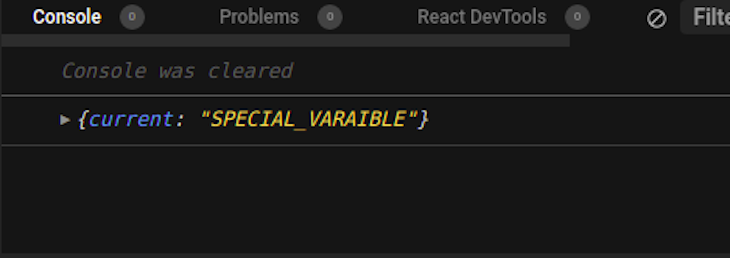
Unlike a normal variable, the specialVariable ref object is not recomputed when the Count component is re-rendered. With useRef, the value saved in the ref object is kept the same across re-renders. The value is neither lost nor recomputed; it remains the same.
useRefIt’s worth mentioning that the only way to update the ref object is to directly set the value of the current property, i.e., specialVariable.current = "NEW_SPECIAL_VARIABLE. Why is this explanation important?
Well, to understand what’s going on, let’s walk through the step-by-step execution of the aforementioned solution to retrieving previous props and state:
// custom hook for getting previous value
function usePrevious(value) {
  const ref = useRef();
  useEffect(() => {
    ref.current = value;
  },[value]);
  return ref.current;
}

// the App where the hook is used
function Counter() {
  const [count, setCount] = useState(0);
  // 👇 look here
  const prevCount = usePrevious(count)

  return <h1>Now: {count}, before: {prevCount}</h1>;
}

// How the App is rendered
<Counter />
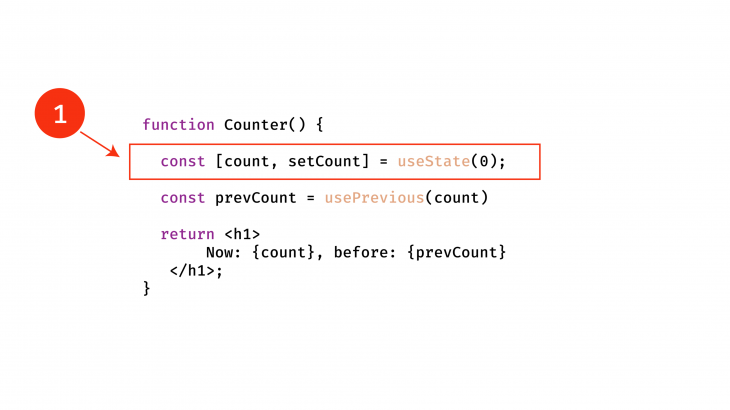
When the rendering process for the Counter app begins, first, the useState Hook is invoked, and the variables count and setCount are set. Note that count is now 0:
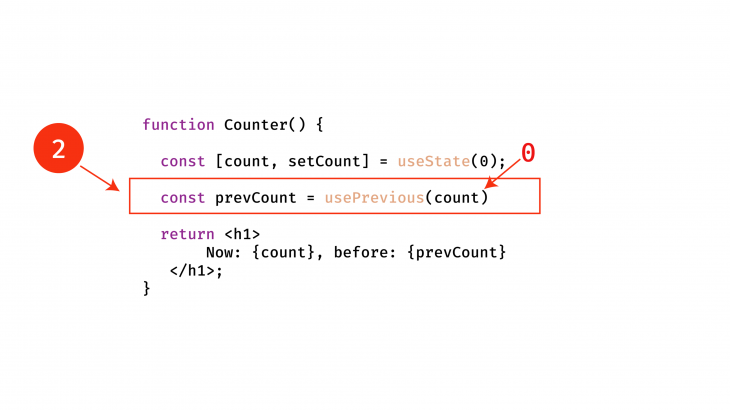
Afterward, the next line will be executed. The usePrevious Hook is invoked with the current value of the count state variable, 0:
Upon invoking the usePrevious Hook, React creates a new useRef instance:
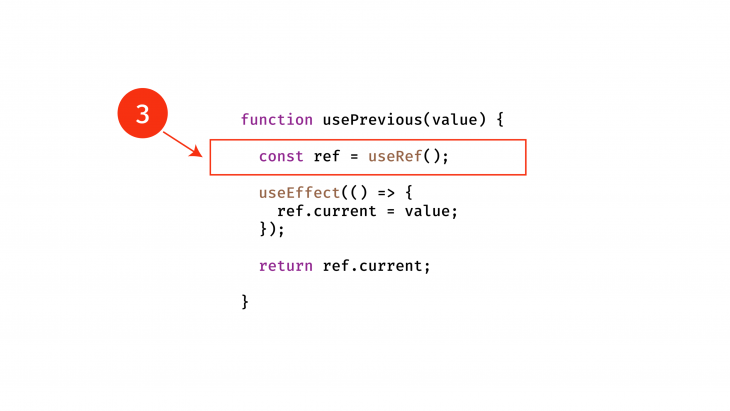
The initial value of this Hook is undefined. The console returns {current: undefined} because the current data doesn’t exist. This next step is where most people slip up. React doesn’t execute the useEffect call. Instead, the current value of the custom Hook is returned, as shown below:
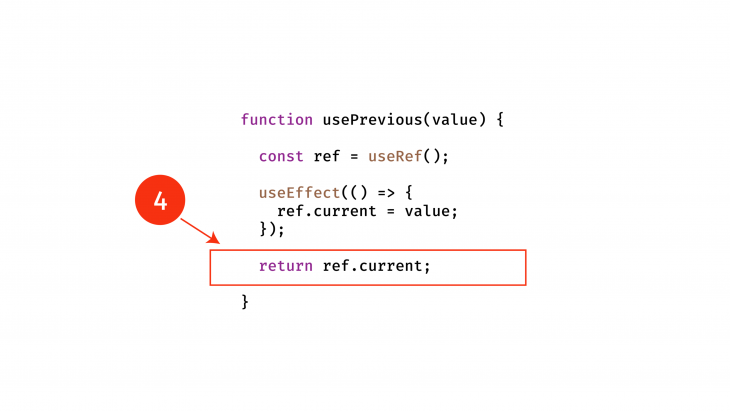
The useEffect Hook is invoked only after the component from which it is called has been rendered. Essentially, the return value of the component must be executed first. Next, the execution within the component resumes. This time, the prevCount variable holds the value undefined:
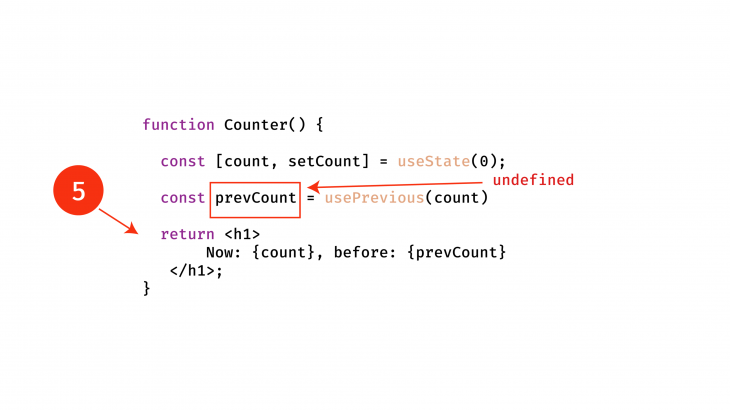
The return value of the component is evaluated, as shown below:
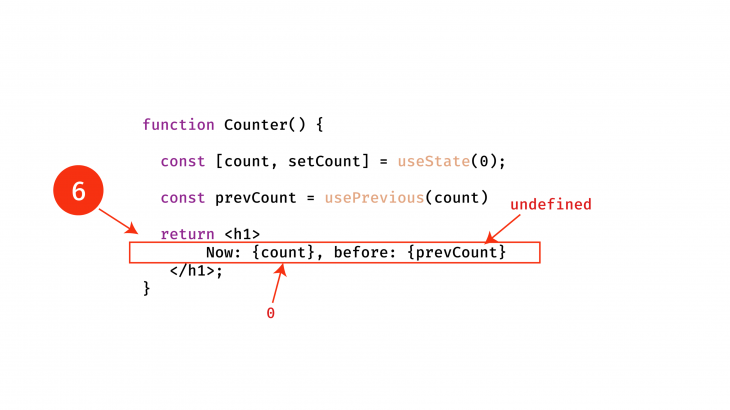
This process returns <h1>Now: {count}, before: {prevCount}</h1> to the screen, where count and prevCount are 0 and undefined, respectively. To avoid blocking the browser from painting the DOM changes, the useEffect call within the usePrevious Hook is now invoked asynchronously. useEffect is invoked after the functional component renders:
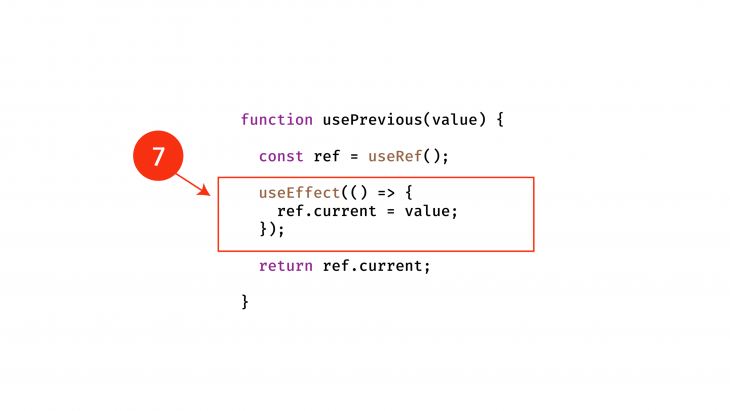
Within the effect function, we have the following:
useEffect(() => {
    ref.current = value;
},[value]);
The line within the useEffect function updates the current property of the ref object to value. value now represents what the custom Hook was initially called with. In this case, the value is 0. In this current flow, remember usePrevious has only been called once with the initial value of 0:
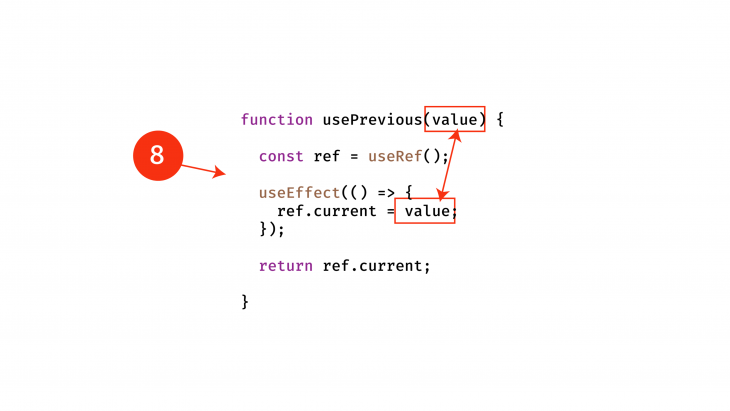
Now, the ref holds the value 0. When the count state variable within the app is updated from 0 to 1, or to a new count, the app will run this piece of code again. The usePrevious Hook is invoked with the new state value 1.
Then, the return statement is evaluated, returning ref.current, which would be 0, not 1, because the ref object isn’t updated yet. Here, ref.current is the previous value stored before the useEffect was triggered, or 0. The return statement of the component is equally evaluated with the previous value successfully returned.
Only after the render is the useEffect call within the usePrevious Hook updated with the new value, 1. This cycle continues, and in this way, you’ll always get the previous value passed into the custom Hook, usePrevious.
To understand why we can access previous props or state in this manner, you must remember the following:
ref object will always return the same value held in ref.current, except when it is explicitly updateduseEffect is only called after the component is rendered with the previous value. Only after the render is done is the ref object updated within useEffectBy taking advantage of these two facts, you can easily replicate this functionality on your own.
useState vs. useRef for tracking previous valuesSo far, this article has focused on using useRef for tracking purposes. There is, however, a way to track the previous values using only useState. Indeed, useState allows us to access the previous state.
For example, using the counter example:
setCount((count) => count + 1)
In this example, count is our previous state and we are deciding how to transform it before setting it to the current count.
As a result, it would therefore be possible to store that previous count in a separate value for tracking purposes:
import { useState } from "react";
const INITIAL_COUNT = 0;

function App() {
  /* Have two separate values for count and previous count */
  const [count, setCount] = useState(INITIAL_COUNT);
  const [previousCount, setPreviousCount] = useState(INITIAL_COUNT);

  const setCounters = () => {
    setCount((prevState) => {
      const newCount = prevState + 1;
      /* set PreviousCount to the previous state of count aka the old count and then return the new count so the count value can be updated */
      setPreviousCount(prevState);
      return newCount;
    });
  };

  return (
    <h1>
      Now: {count}, before: {previousCount}
      {/* Increase count on click  */}
      <br />
      <button onClick={setCounters}>Increase count</button>
    </h1>
  );
}
While this solution looks simpler than using useRef to track states, be very careful with useState.
React is asynchronous and uses batch updates when dealing with components so you have to be cautious when setting the state of a variable with another state. If not, you may end up with an infinite loop if you use previousCount to update something that also impacts count.
Using useRef is more complex as it requires three different hooks: useState, useRef, and useEffect. The main advantage of useRef is that it doesn’t cause a component to re-render.
Is there a way to get the previous props in React? Back in the day, when developers used class components and lifecycles functions, there used to be a function called componentDidUpdate that gave you the freedom to access a prop before and after component mutation. Since then, React has moved away from these functions. As a result, props (or properties), are the latest values in a component and should be treated as read-only within that component.
If a developer wants to keep a history of the values, they can therefore use the state like the previous example with count and previousCount.
The answer is: not necessarily. Take this example. We have a component called Counter that accepts a props and is used to set the initial value of count:
export const Counter = ({initial_count}) => {
    const [count, setCount] = useState(initial_count)

    return (<div>{count}</foo>)
}
In this example, even if the props changes, the count won’t. The reason for this is that despite the component re-rendering as a result of the props change, useState doesn’t re-render. The best way to fix this would be to move useState into the parent component and then pass count as a props. Then, the updated count would display.
useEffect Hook?Yes, we can use the usePrevious Hook with a useEffect Hook.
For example, we can create a component called Counter and pass the current count as a props. Then, we can call usePrevious to create a ref with the previous count. As the props count changes, the usePrevious Hook will also update and useEffect will console log the result and it will look like this:
count:  1
prevCount:  0
// click
count:  2
prevCount:  1
// click
count:  3
prevCount:  2
// click
count:  4
prevCount:  3


import usePrevious from "./usePrevious";
import { useEffect } from "react";

export const Counter = ({ count }) => {
  const prevCount = usePrevious(count);

  useEffect(() => {
    console.log("count: ", count);
    console.log("prevCount: ", prevCount);
  }, [count, prevCount]);

  return <div>count: {count}</div>;
};
As we mentioned earlier, historically, React offered many lifecycle functions such as componentDidUpdate, componentDidMount, and many more. These functions were used by developers to handle the state at various stages of the render cycle.
Developers would use these lifecycle methods inside of class components. For example, here is a class component:
import { Component } from 'react';

class Counter extends Component {
  render() {
    return <h1>Count: {this.props.count}</h1>;
  }
}
Since then, React has stepped away from these and pushed for hooks. This reduces the amount of code written, while also increasing reusability. Hooks are a great way to extract and reuse code easily.
Today, class components and lifecycle methods are only available under the legacy part of React and are not recommended for new projects.
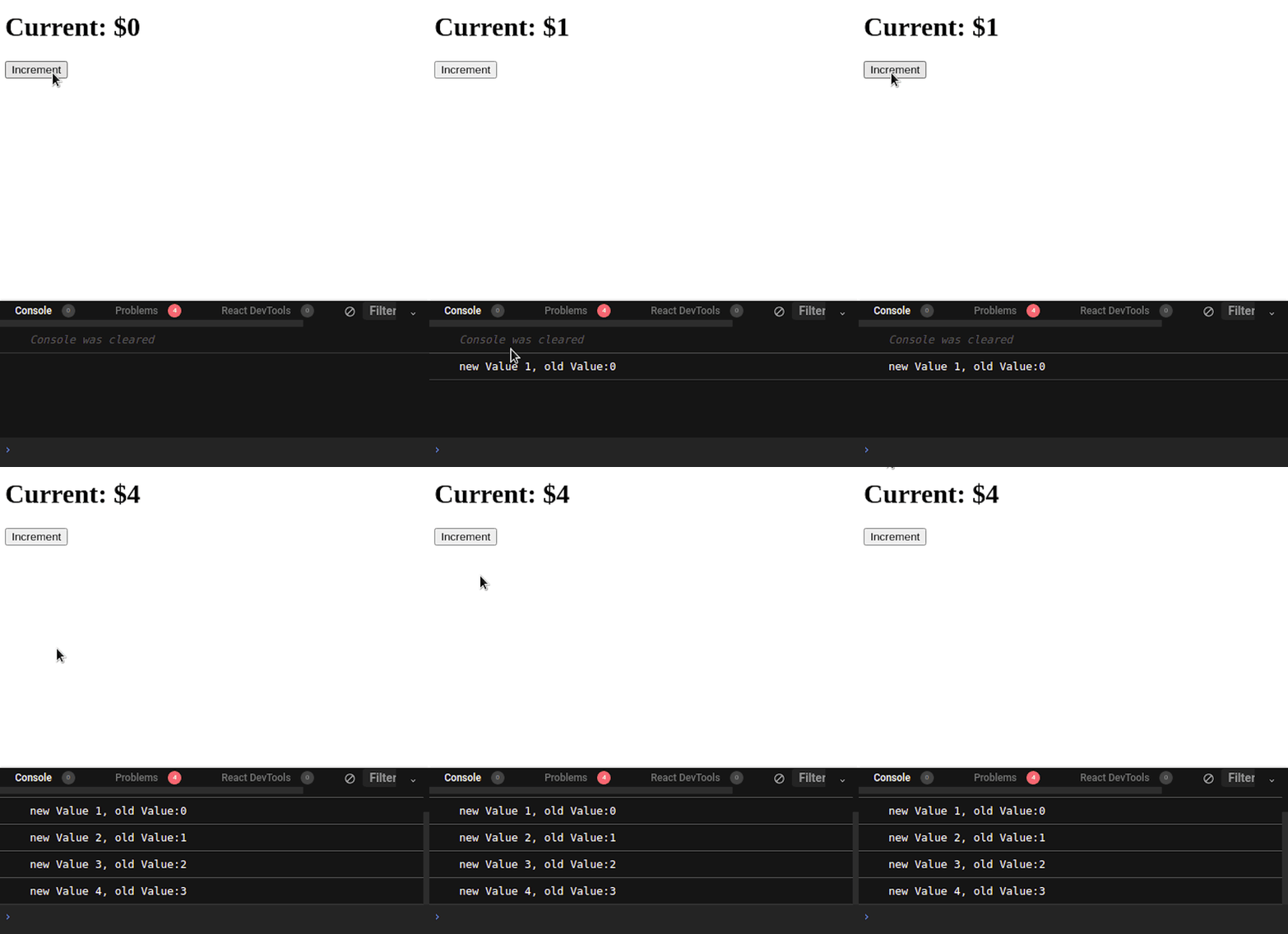
If you want to use a third-party library for easy state management, I recommend the Zustand API. Zustand allows you to create subscribers, which are functions that let you get the previous and current values of your state variables. First, create a store and its subscriber as follows:
import create from "zustand";
const useStore = create((set) => ({
  dollars: 0,
  increaseIncome: () => set((state) => ({ dollars: state.dollars + 1 }))
}));
//create a subscriber
const unsubscribe = useStore.subscribe((newValue, oldValue) => {
  console.log(
    "new Value " + newValue.dollars + ", old Value:" + oldValue.dollars
  );
});
Above, we first declared a global variable called dollars. Its initial value will be 0. Then, we created a function called increaseIncome. If the user executes this method, the program will increment the dollars state.
We then coded a subscriber function that will log out the current value and an old value of the dollars variable. To use this store in action, write the following code:
export default function App() {
  //extract our state and functions
  const dollars = useStore((state) => state.dollars);
  const increaseIncome = useStore((state) => state.increaseIncome);
  return (
    <div>
      <h1> Current: ${dollars} </h1>
      {/*When clicked, execute the 'increaseIncome' function */}
      <button onClick={() => increaseIncome()}>Increment </button>
    </div>
  );
With the code above, we procured the dollars variable and the increaseIncome function from our custom store:
In this article, we learned how to procure previous values from the useRef, useState, usePrevious, and useEffect Hooks in React. The ref object returned from invoking useRef remains the same across re-renders of a functional component, which is a powerful feature to embrace. It does this without you having to pass in any array dependency, like in useMemo or useCallback.
When you combine the ability to use useRef as an instance variable with the fact that the useEffect Hook is always triggered after the return statement of the parent component is evaluated, you have an invaluable weapon at your fingertips.

Compare five React toast libraries for features, bundle size, accessibility, performance, and React 19 compatibility.

See how Tecovas built a patching agent that turns LogRocket’s Galileo AI issue analysis into GitHub PRs, with a developer reviewing every fix before it ships.

Explore OctaneJS, a compiler-first alternative to React. Build a task dashboard and learn about rendering, hooks, asynchronous UI, and React compatibility.

Explore Vercel’s vgpu, a WebGPU library for AI agents. Learn to build a dynamic shader in Next.js and validate rendering output with headless testing in Node.js.
Hey there, want to help make our blog better?
Join LogRocket’s Content Advisory Board. You’ll help inform the type of content we create and get access to exclusive meetups, social accreditation, and swag.
Sign up now

 Learn more →