AI is being adopted into modern design workflows. AI tools helping with content generation, ideation, and even prototyping are rapidly evolving, becoming essential in all parts of the design processes. Its use increases the efficiency of design teams, both big and small, enhancing how we, as designers, create, think, and problem-solve.
However, AI also has its downsides. A study interviewing 20 UX professionals found that the advent of AI has brought about varying degrees of concern regarding the integration of AI in the design process. While some believed that there is nothing to worry about, others expressed that UX design should be user-centered, and letting AI take a central place in the design process could result in outcomes that don’t align with the users’ needs and goals.
Personally, I think AI is here to stay, and it can be a great tool to increase productivity in the design process, but only if the user-centric nature of UX design is maintained. At its core, UX must always be ‘human’ and in the ever-evolving landscape of AI and design, intentional practices must be taken to counterbalance the tradeoffs that come with using AI.
Editor’s note: We updated this article on 21 October 2026 to examine synthetic research limits and add practical checks for validating AI claims. We also clarified the limits of drawing conclusions about AI from a single research workflow.
AI tools can shorten the distance between idea and product, but they cto examine the limits of synthetic users, assess a recent research comparison, and add practical checks for evaluating AI-generated claims against real user evidence.an also flatten creativity and create distance between the designer and the user. To achieve the right balance, we need to understand what AI is good for in design as well as when it should take a backseat — in other words, where it does and doesn’t belong.
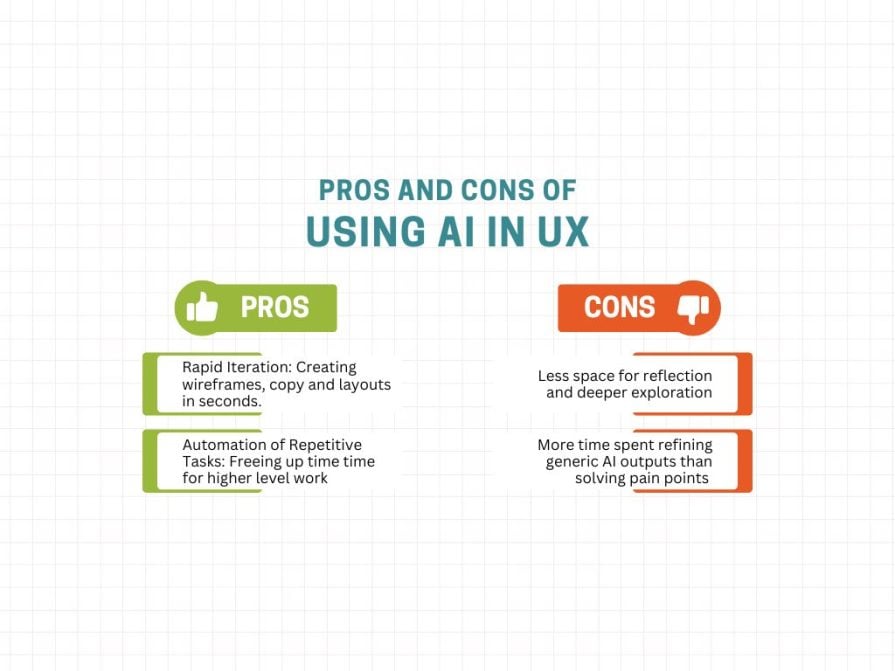
Some benefits of using AI tools include rapid iteration and automation. AI tools for creating wireframes, copy, and layouts in seconds have made it faster for me to go from idea to prototype. I can create and test many iterations of an idea, then use that data to create the final product. Additionally, AI tools allow me to automate boring and repetitive tasks like creating multiple variants of UI components, creating mockups with placeholder content, and summarizing user research, saving me time I can invest elsewhere.
However, the importance of iteration isn’t measured by how quickly an idea can be produced, but rather in the reflective process leading to the final product. Understanding why an iteration is good through assessing various wireframes, trying different copy, and experimenting with different layout options is the type of work that leads to truly great user-centric design.
Focusing instead on refining and improving decent AI outputs takes away from the in-depth reflection that comes from addressing real pain points and prioritizing the user. That’s why the initial creation of the layout and wireframing has ended up on my “never delegate to AI” list of tasks.
While I’m more than happy to delegate boring tasks like generating filler content and copy to AI, the layout and wireframe have a different level of importance, at least in my eyes.
See, content can be changed over time to better fit the project requirements, but the initial layout and wireframing are where the ideas really start flowing for me. That part of the process is where I ask myself key questions like: who is the primary user? What are their goals and pain points? Can users immediately tell what this page is about? Can users immediately find what they’re looking for in three clicks?
These questions make me really think about the user, how the product can best serve them, and usually set the tone for the rest of the product, so leaving that to AI would take away a major part of my own design process.
A synthetic participant can give a persuasive explanation of why someone would use your product. That explanation does not tell you whether a real person can find the right control, recover from an error, or understand what happens next. Before accepting a claim that AI research matches human research, ask: matches on what?
Agreement on a popular answer is a much narrower result than reliable evidence about user behavior. For a banking flow, the question is not whether a model can describe a sensible confirmation screen. It is whether people notice the recipient and amount, understand the consequences, and catch a mistake before sending money.
A 2026 comparison published by Nielsen Norman Group illustrates that distinction. It compared 604 human respondents with 120 synthetic respondents on one open-ended UX terminology question. The dominant answer aligned, but the synthetic responses contained far fewer distinct labels. That is evidence about a particular survey task, not validation of an interface. The groups differed in professional makeup, and the platform sometimes rephrased questions, limiting how cleanly the comparison isolates the effect of replacing people with a model. The study itself cautions against treating synthetic responses as user research.
The useful challenge for product teams goes beyond deciding whether synthetic answers sound realistic. Ask what evidence would make those answers trustworthy enough for the decision at hand:
This still leaves useful work for AI. It can help draft a discussion guide, suggest alternative explanations, and organize transcripts for review. Those are contributions to the research process; they do not remove the need to check the underlying observations.
For example, use an AI-generated banking persona to propose questions about a transfer confirmation. Then ask relevant participants to complete a test transfer, observe hesitation and mistakes, and ask them to explain what they expect to happen. Compare their behavior with the hypothesis before recommending a change. This is a proposed workflow, not a claim that a simulated test has already validated the design.
Record where AI was used, which model and date produced the output, and which conclusions remain untested. For practical recruitment and screening advice, see our guide to finding quality UX research participants in the age of AI.
AI has tradeoffs, and they aren’t just theoretical. On the human side of UX design, AI is negatively impacting three main aspects in today’s design landscape.
I’ve seen AI be used to automate part of the research process; hell, I’ve been part of the problem. Things like summarizing user interviews and organizing user feedback are so easy when you have an AI tool that lets you input data and quickly analyze it. However, even though this speeds things up, it sometimes removes much of the context that helped me and other designers understand the user’s motivation.
For example, while designing a mobile banking app a while back, my team and I had usability tests done with a small pool of 5 participants for an early version of the prototype at the request of some stakeholders. It was a bit too early in the process, but they wanted to know how some users might react to the product early on, and I guess feel more confident in their investments. So we obliged.
I had AI summarize the transcripts of the tests and asked it to outline key pain points and patterns that we could work from page by page. While the AI was somewhat helpful, after looking back at these interviews, I found a small issue in the confirmation screens for sending money to another user.
Part of the test involved sending money (obviously fake) to different users and making sure there was no confusion. This was easy to do when transferring to the first user, but once a second one came into the mix a lot of users took a bit longer to do so as they had to go back and check that they were sending it to the right person.
That’s when I realized we had forgotten to include confirmation screens. A basic mistake that would have probably been caught later in the design process, but AI didn’t notice it at all, nor flag it. That failure shows the limits of the transcript-summary workflow I used: a summary can omit hesitation, repeated checks, and other context needed to interpret a session. It does not establish what every AI tool can or cannot detect. The important step is to check the analysis against the original recording and observations.
So now, while I can use AI to analyze some basic information first so I have a broad overview, I always make sure to directly view user interviews myself, because there’s always going to be something I can see that AI misses.
When I’ve used AI to generate wireframes or layouts, for example, I’ve found that the results always look good, but tend to be the same. While that’s not always a problem, there are established layouts for a reason; all designs quickly become generic if you use these AI tools too much. It’s easy to accept such outputs as good wireframes or layouts without thinking about what actually makes them good for the user.
So, to deal with this, I put using them on my “never delegate to AI” list as previously mentioned. Now, the title of this list is a bit misleading; it doesn’t mean that I never use AI tools to create a wireframe. Instead, I do the work first, determine the layout, draw out a wireframe, ask myself important questions, come up with a couple of iterations, and then, and only then, do I use AI to polish some of my ideas just to get the ball rolling faster. So I guess it would be more accurate to call it my “never delegate to AI first” list.
AI tools are great for ideas and brainstorming; in fact, I’d argue it’s the best way to use AI. However, team brainstorming sessions, a collaborative environment where a UX team comes together to come up with ideas, can get pretty dry when everyone’s just regurgitating AI outputs at each other. The team debates less, there’s less creativity, and fewer perspectives are shared, but everyone has the same perspective, and that’s whatever the AI told them.
To deal with this, my last team lead instituted an electronic ban during all brainstorming sessions. Only they had access to the presentation and the internet and could search things as needed, but everyone else had a pen and paper to take notes or work through some ideas. While I’m not sure whether this was the most effective way of doing things, it did force all of us to actually think about the problem and give ideas before relying on the crutch that is AI.
| Human aspect impacted | Problem | Outcome of using AI |
|---|---|---|
| User insight | In order for a product to solve a problem, there must be a genuine understanding of the user and their needs. This can only be done by listening to the needs of real users. | Using AI to automate tasks such as summarizing user research means that a lot of context needed to understand the user and their problems can be lost. |
| Deep thinking | Doing an in-depth analysis of user insights and slowly reflecting on user problems can result in creative problem-solving and unique designs. | Using AI to generate quick outputs can create viable solutions for users. However, these solutions are often surface-level and generic, separated from the user. |
| Team connection | Design sprints and other creative brainstorming activities are central parts of the ideation process in many design teams. | Using AI to handle ideation can result in less collaborative brainstorming, leading to fewer shared insights and meaningful debates. |
Ultimately, the danger isn’t that AI takes our jobs, as tools created to perform specific tasks, AI lacks the necessary understanding of human psychology required to solve a user’s problems. Instead, the uncontrolled use of AI risks undermining the foundational aspects that make UX design so human and meaningful. Namely, user insight, creativity, and teamwork.
Rather than outright rejecting the use of AI in UX, it’s important to properly utilize the efficiency that these tools provide while preserving the foundational design work. To that end, there are four main strategies to ensure that UX remains as human as possible within design teams:
AI can be great for summarizing notes, transcripts, and survey responses, but these summaries shouldn’t replace actual user interviews and direct engagement with the users. User insights come from listening to users and their problems, not reading AI-generated bullet points of what the machine thinks users need.
Actionable steps:
In order to preserve creativity and collaboration in design teams, making space for non-AI brainstorming and problem-solving sessions is important. This will create space for deep thinking and creative problem-solving.
Actionable steps:
It’s also important to note that this doesn’t necessarily have to take 4 days; it could happen all in one day, or a couple of weeks, depending on the team’s overall workflow.
Deciding on team guidelines for the use of AI can go a long way in maintaining the balance between its benefits and tradeoffs. Requiring UX research to analyze all AI outputs, involving human judgment in all critical design decisions, and refining AI-generated content with real user insights are a few core principles that all design teams should follow. This will also make designers comfortable with challenging AI outputs and feel more secure in their importance over these tools.
Here are two basic checklists I’ve created that can be used as basic guidelines:
It’s important to note that these checklists shouldn’t make up your guidelines, but instead be treated as jump-off points for design teams to start establishing proper AI usage guidelines.
Who better to determine how and to what extent AI tools should be present in their work than designers themselves? Creating spaces for discussion (e.g., workshops) where designers can openly discuss what tasks should or shouldn’t be replaced with AI will open up the floor for meaningful conversation. UX involves the collaboration of designers to solve user problems; applying this same teamwork to this issue could result in unforeseen insights.
A basic workshop could work as follows:
Ideally, the insights created from these workshops should be recorded for future use in shaping AI use guidelines and monitoring the use of AI across different projects. Moreover, having regular check-in sessions to discuss with designers what is and isn’t working throughout the year will encourage ongoing conversations and help further improve policies.
Designers shouldn’t avoid using AI tools in their design processes; they have too many advantages to ignore. If used effectively, these tools can help us process large amounts of data, accelerate the ideation process, and make it possible to efficiently cycle through multiple ideas in a short amount of time. However, the overuse of AI risks the creation of hollow products that fail to reach the hearts of our users. In order to mitigate the impacts to the human aspects of UX design brought about by AI it’s important to ensure that all designs remain as human as possible by employing the key strategies mentioned in this article.
While these strategies are geared towards design teams, they can also be applied to individual designers. Individuals can also prioritize human research, carve out AI-free sessions, establish guidelines, and think about the appropriate way to use AI in their workflows. Ultimately, UX designers should treat AI tools as copilots, tools to explore multiple ideas and options more efficiently, while using user insights, creativity, and teamwork to create solutions that will solve user problems.
LogRocket's Galileo AI watches sessions and understands user feedback for you, automating the most time-intensive parts of your job and giving you more time to focus on great design.
See how design choices, interactions, and issues affect your users — get a demo of LogRocket today.

Fixed user flows still have a place, but AI is changing how products respond to user intent. Here’s what designers need to rethink when flows become dynamic.
Framer brings design, CMS, publishing, and AI into one workspace. Here’s how its 2026 workflow compares with Figma Sites, Relume, and Webflow—and when consolidation makes sense.

Three predictions for the next UX era, revisited against Liquid Glass, Material 3 Expressive, and spatial widgets—with a practical, conditional outlook for 2027.
AI-first helpdesks can answer questions and take action, but good UX depends on accurate information, clear approval limits, and human handoffs that preserve context.

 Learn more →