TanStack Start added React Server Components support in April 2026, giving React developers another way to build server-rendered UI outside the Next.js App Router model. But the real question is not whether TanStack Start can run RSC. It is whether you should ship it in production today.

To find out, I built the same content-heavy dashboard in both frameworks using the same markdown content, dependencies, styling, and feature set. The app included server-rendered markdown, client-side filters, a pin toggle mutation, and detail pages for each post.
The results were more split than I expected. TanStack Start shipped about 40 percent less client JavaScript and built nearly 4x faster. Next.js was faster to set up, easier to reason about for content pages, and more production-ready for RSC today. TanStack’s RSC layer is still early, but its explicit server functions, typed loaders, and simpler cache invalidation point to a compelling alternative.
In this article, we’ll compare TanStack Start RSC and Next.js RSC across setup, data fetching, caching, mutations, bundle size, build speed, developer experience, and production readiness, then decide which one makes more sense to ship.
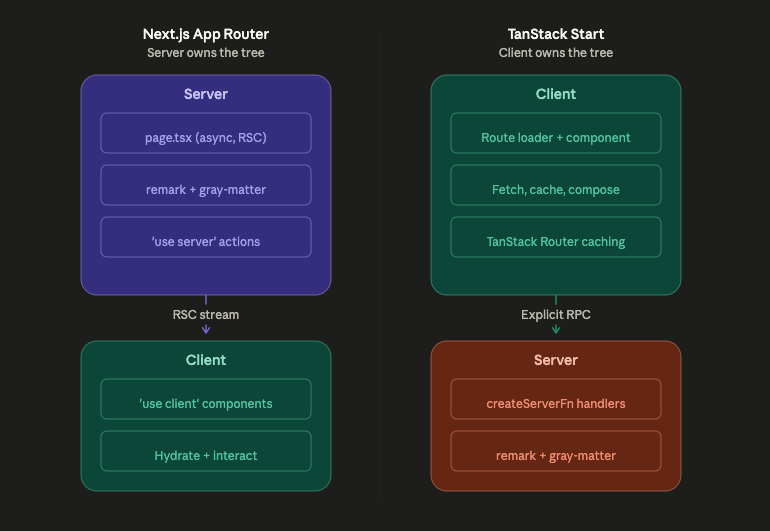
Next.js owns the tree. Every component is a Server Component by default, and you opt into the client with 'use client'. The framework decides what runs where.
TanStack Start flips that model. The client owns the tree, and server work happens through explicit createServerFn calls that you wire into route loaders. RSCs are a tool you reach for, not a default you build around.
This is not a small API difference. It shapes how you think about data fetching, caching, mutations, and where your code actually runs.
For this article, I built a content dashboard with five markdown blog posts. Each post had frontmatter for its title, date, tags, and pinned status.
The feature set included:
remark and gray-matter, which is an ideal RSC use case because the parsing libraries should never ship to the clientuseStateBoth implementations used the same markdown content, dependencies (gray-matter, remark, remark-html, remark-gfm), and Tailwind styling. The only variable was the framework.

The setup took about three minutes. The scaffold returned one non-blocking typegen error and a workspace root warning from a stray package-lock.json in my home directory, but neither issue blocked the build.
The Server Component model was invisible in the best way. page.tsx is async by default, so I called getAllPosts() directly. remark and gray-matter ran on the server without any extra annotation:
// src/app/page.tsx
export const dynamic = 'force-dynamic'

export default async function HomePage() {
  const posts = await getAllPosts()
  const postData = posts.map(({ content, ...rest }) => rest)
  return <PostFilter posts={postData} />
}
The Server Action for the pin toggle was clean too:
// src/app/actions/pin.ts
'use server'
import { revalidatePath } from 'next/cache'
import { togglePin } from '@/lib/posts'

export async function togglePinAction(slug: string) {
  await togglePin(slug)
  revalidatePath('/')
  return { success: true }
}
The full feature set took seven files and about 290 lines of code. The 'use server' directive plus revalidatePath handled the mutation-and-refresh cycle.
Three things tripped me up.
First, export const dynamic = 'force-dynamic' was required on both routes. Without it, Next.js cached the Server Component output via the Full Route Cache, and the pin state went stale after toggling. The build output marked the routes as ○ (Static) instead of ƒ (Dynamic), which was the only hint.
Second, params is a Promise in Next.js 16. The detail page needed const { slug } = await params instead of direct destructuring. The error showed up as a generic type mismatch rather than a clear migration message.
Third, the Router Cache was unintuitive. After a Server Action called revalidatePath('/'), the data was invalidated on the server, but the client-side Router Cache still held the old RSC payload. Navigating away and back showed fresh data. Pressing the browser back button showed stale data. The Router Cache has a 30-second TTL by default, and revalidatePath does not clear it immediately.

Setup took about eight minutes, or 2.5x longer than Next.js. The first --template flag attempt failed with Could not resolve template id, the CLI’s @tanstack/intent step threw a non-blocking error, and the RSC config required reading the plugin source because the external docs did not surface rsc: { enabled: true } clearly.
Enabling RSC meant installing @vitejs/plugin-rsc and updating vite.config.ts:
// vite.config.ts
import { tanstackStart } from '@tanstack/react-start/plugin/vite'
import rsc from '@vitejs/plugin-rsc'

export default defineConfig({
  plugins: [
    tanstackStart({ rsc: { enabled: true } }),
    rsc(), // Must come AFTER tanstackStart
    viteReact(),
  ],
})
Plugin order matters. Putting rsc() before tanstackStart() produced this error:
Cannot find module 'virtual:tanstack-rsc-runtime'
The error did not suggest the fix.
The createServerFn API is explicit and reads like an RPC layer:
// src/server-fns.ts
export const fetchAllPosts = createServerFn({ method: 'GET' }).handler(
  async () => {
    const posts = await getAllPosts()
    return posts.map(({ content, ...rest }) => rest)
  }
)

export const togglePinFn = createServerFn({ method: 'POST' })
  .validator((slug: string) => slug)
  .handler(async ({ data: slug }) => {
    const pinned = togglePin(slug)
    return { pinned }
  })
The route loader calls the server function, and the component consumes the data:
// src/routes/index.tsx
export const Route = createFileRoute('/')({
  loader: async () => ({ posts: await fetchAllPosts() }),
  component: function IndexPage() {
    const { posts } = Route.useLoaderData()
    return <PostFilter posts={posts} />
  },
})
The TanStack Start version took six files and about 345 lines of code, roughly 19 percent more than Next.js. Most of the extra code came from the explicit server functions layer.
I also tested renderServerComponent from @tanstack/react-start/rsc in isolation. It worked, allowing a full React component tree to stream from the server. For this app, though, passing pre-rendered HTML strings from remark was simpler, so I did not need it.
Both apps were built for production on the same machine: Apple Silicon with Node 22.14.0. They used the same markdown content and parsing libraries.
| Metric | Next.js 16.2.9 | TanStack Start 1.168.26 |
| Metric | Next.js 16.2.9 | TanStack Start 1.168.26 |
|---|---|---|
| Client bundle, gzipped | 193KB | 116KB |
| Build time | 5.1s | 1.3s |
| Build tool | Turbopack | Vite 8 / Rolldown |
| Files | 7 | 6 |
| Lines of code | 290 | 345 |
TanStack Start shipped about 40 percent less client JavaScript. The difference appears to come from framework runtime overhead: Next.js bundles its router, RSC hydration client, streaming infrastructure, and next/navigation hooks. TanStack Start’s runtime is leaner.
Build time showed a similar pattern. TanStack’s Vite 8 and Rolldown pipeline ran a five-phase RSC build: analyze client refs, analyze server refs, build RSC, build client, then build SSR. It still finished in 1.3 seconds. Next.js with Turbopack took 5.1 seconds, nearly 4x slower in this test. If you’re concerned about why real-time frontends break at scale, bundle size and build performance are worth watching closely alongside framework choice.
Neither app shipped gray-matter, remark, remark-gfm, or remark-html to the client. I checked the built chunks manually. The markdown parsing pipeline stayed server-side in both cases, which was the main hypothesis I wanted to validate.
Next.js gave better error messages for environment-boundary mistakes. Importing fs in a client component produced this message:
This error occurred in Server Component. Move this import to a Server Component.
TanStack’s equivalent error was less helpful:
Failed to resolve import 'node:fs'. Does the file exist?
That message does not distinguish between a wrong runtime environment and a missing file.
TanStack Start won on type safety. Route.useLoaderData() is fully typed based on the loader return value. TanStack Router’s typed link API rejected to="/post/${post.slug}" at compile time and suggested to="/post/$slug" params={{ slug: post.slug }} instead. Next.js required more manual type annotations across the server-client boundary. If you work heavily with TypeScript utility types you’re probably underusing, that extra type safety compounds quickly across a larger codebase.
Next.js has four caching layers: request memoization, Data Cache, Full Route Cache, and Router Cache. Each layer has different invalidation semantics. The Router Cache issue I ran into, where revalidatePath does not clear the client-side cache immediately, required understanding the difference between server-side invalidation and client-side RSC payload caching.
TanStack Start has router.invalidate(). It re-runs all active route loaders. That is clearer and more immediate. There are fewer hidden layers to reason about.
Next.js’s 'use server' directive creates implicit HTTP POST endpoints at generated URLs such as /_next/action/abc123. These action IDs are derivable from the RSC payload. The framework adds CSRF protections, including origin checks and content-type requirements, but the endpoints are discoverable. Using Next.js security headers is one practical step to strengthen your app’s overall security posture alongside these built-in protections.
TanStack Start’s createServerFn creates explicit RPC endpoints with predictable URLs and built-in input validation through the validator chain. The attack surface is deliberate and easier to audit. That said, @tanstack/react-start has also had a DoS vulnerability, so a newer or more explicit model does not mean invulnerable.
Both frameworks still require you to implement authorization checks. Neither framework automatically validates who is allowed to call a server function.
force-dynamic is required if your page reads runtime-mutable state. Without it, the page can silently pre-render stale data.params Promise change in Next.js 16 can produce a generic type error with little migration guidance.generateStaticParams plus force-dynamic is contradictory. Next.js builds successfully, but silently ignores generateStaticParams.remarkHtml({ sanitize: true }) strips class attributes from code blocks, which can break Tailwind typography styling.@vitejs/plugin-rsc must come after tanstackStart in the Vite plugins array, or you can get a cryptic virtual:tanstack-rsc-runtime error.{ data: value } input wrapping, not direct arguments.[email protected] prerelease 404ed during install, but the install succeeded when the lockfile already existed.--template flag did not work without a registry URL.For a content-heavy production app today, I’d still choose Next.js. Its Server Component model maps naturally to content-driven pages: fetch data on the server, render the page, and send less work to the client. The caching model is more complex than I’d like, especially around Router Cache behavior, but for content sites with relatively infrequent mutations, that complexity is manageable.
For a highly interactive SPA, I’d choose TanStack Start today, but with RSC disabled. The createServerFn + loader + useLoaderData() pattern fits the way SPAs already think about data: explicit server calls, typed route data, and immediate cache invalidation. TanStack’s RSC layer is promising, but at v0.1.25, it still feels too early to recommend for production. For teams evaluating where to move API logic, it’s also worth reading about when to move API logic out of Next.js as your app grows.
The surprise was the bundle gap. I expected Next.js to win here after years of RSC optimization, but TanStack Start shipped 116KB of gzipped client JavaScript compared to Next.js’s 193KB, and built in 1.3 seconds compared to 5.1 seconds. That is a real performance difference, especially for a dashboard where fast loads and quick iteration matter. Techniques for optimizing images in React can compound these gains further once your core bundle size is under control.
So the answer is not that one framework clearly wins. Next.js is still the safer production choice for content-heavy RSC apps. TanStack Start is the more interesting choice for interactive apps that want explicit data flow, stronger type safety, and a leaner runtime. Same app, same features, different tradeoffs. If you’re comparing approaches more broadly, the Astro vs Next.js comparison is another useful data point for content-heavy sites where SSG may outperform React-heavy frameworks.

Compare five React toast libraries for features, bundle size, accessibility, performance, and React 19 compatibility.
See how Tecovas built a patching agent that turns LogRocket’s Galileo AI issue analysis into GitHub PRs, with a developer reviewing every fix before it ships.

Explore OctaneJS, a compiler-first alternative to React. Build a task dashboard and learn about rendering, hooks, asynchronous UI, and React compatibility.

Explore Vercel’s vgpu, a WebGPU library for AI agents. Learn to build a dynamic shader in Next.js and validate rendering output with headless testing in Node.js.
Hey there, want to help make our blog better?
Join LogRocket’s Content Advisory Board. You’ll help inform the type of content we create and get access to exclusive meetups, social accreditation, and swag.
Sign up now

 Learn more →