
Most React form advice stops at React Hook Form and Zod, and for straightforward CRUD forms, that is usually the right answer. The architecture starts to break down when a form carries logic that cannot be expressed as simple field-level validation.

Think of fields that appear only after a running total crosses a threshold, steps that skip based on answers from two pages earlier, or visibility rules that a product or operations team needs to adjust without touching the UI layer.
This article builds a five-step business loan application in Next.js where a rule engine handles that kind of conditional logic. The rules are defined declaratively, exposed through a route handler, evaluated on the client after validated step changes, and re-evaluated on the server during submission through a Next.js Server Action.
That two-boundary model is the important part. Client-side evaluation keeps the form responsive, while server-side evaluation protects the submission boundary from stale state, tampered values, and rule-version drift.
The full component code, including the step components, StepIndicator, and page wiring, is available in the repository. This article focuses on the rule engine, its evaluation boundaries, and the architectural decisions that connect them.
For related form architecture patterns, see LogRocket’s guides to building reusable multi-step forms with React Hook Form and Zod and React Hook Form vs. React 19.
A rule engine is useful when form behavior is driven by business rules rather than purely by component state. It is not a replacement for React Hook Form, Zod, or basic conditional rendering. It is an abstraction for complex, testable, versioned decision logic.
The table below summarizes when inline form logic is enough and when a rule engine is worth the added complexity:
| Use case | Inline component logic | Rule engine |
|---|---|---|
| A field appears when one checkbox is selected | Usually enough | Overkill |
| A step appears based on multiple fields across different steps | Possible, but harder to test | Strong fit |
| Product teams need to change eligibility logic | Requires code changes unless externalized | Strong fit if rules are stored outside the bundle |
| The server must verify the same rules at submission | Easy to duplicate incorrectly | Strong fit |
| Rules affect access, pricing, eligibility, or compliance | Risky if client-only | Strong fit |
| A simple CRUD form with static validation | Best option | Overengineering |
The decision point is simple: if the component owns the behavior, keep the logic in the component. If the business owns the behavior, move the logic into a rule layer.
The form has five steps:
Financial History appears when the requested loan amount exceeds $50,000 or the business type is LLC or C-Corp. Collateral is skipped when annual revenue exceeds $500,000 and the applicant self-reports an Excellent credit profile. Loan purpose options are filtered by business type.
Start with a new Next.js App Router project:
npx create-next-app@latest loan-form --typescript --tailwind --eslint --app --src-dir --import-alias "@/*"
cd loan-form
npm install react-hook-form zod @hookform/resolvers json-rules-engine
npm install @types/json-rules-engine --save-dev
Current Next.js versions require Node.js ≥v20.9, so update your local environment if the CLI fails during installation.
The project structure separates rules, form state, and UI components into distinct layers:
src/
├── app/
│   ├── actions/
│   │   └── evaluate-rules.ts
│   ├── api/
│   │   └── rules/
│   │       └── route.ts
│   └── apply/
│       └── page.tsx
├── components/
│   ├── steps/
│   └── FormShell.tsx
└── lib/
    ├── rules/
    │   ├── definitions.ts
    │   ├── engine.ts
    │   └── types.ts
    └── form/
        ├── schema.ts
        └── state.ts
The important boundary is this: components should consume evaluation results, not rule definitions. A component can render loanPurposeOptions, but it should not need to know why those options were allowed.
json-rules-engine evaluates rules against a map of facts. A rule defines a condition tree and an event to emit when the condition resolves to true.
Before writing the rules, define the types that flow between the rule engine, the Server Action, and the components:
// src/lib/rules/types.ts

export type BusinessType = "Sole Proprietor" | "LLC" | "S-Corp" | "C-Corp";
export type CreditProfile = "Poor" | "Fair" | "Good" | "Excellent";
export type LoanPurpose =
  | "Working Capital"
  | "Equipment Purchase"
  | "Real Estate"
  | "Business Acquisition"
  | "Refinancing";

export interface LoanApplicationFacts {
  businessType: BusinessType;
  annualRevenue: number;
  numberOfEmployees: number;
  requestedAmount: number;
  creditProfile: CreditProfile;
}

export type RuleEventType =
  | "SHOW_FINANCIAL_HISTORY_STEP"
  | "SKIP_COLLATERAL_STEP"
  | "FILTER_LOAN_PURPOSE_OPTIONS"
  | "EXTEND_REPAYMENT_TERMS";

export interface RuleEventPayload {
  SHOW_FINANCIAL_HISTORY_STEP: { reason: string };
  SKIP_COLLATERAL_STEP: { reason: string };
  FILTER_LOAN_PURPOSE_OPTIONS: { allowedOptions: LoanPurpose[] };
  EXTEND_REPAYMENT_TERMS: { terms: string[] };
}

export interface RuleEvent<T extends RuleEventType = RuleEventType> {
  type: T;
  params: RuleEventPayload[T];
}

export interface EvaluationResult {
  firedEvents: RuleEvent[];
  stepVisibility: {
    showFinancialHistory: boolean;
    skipCollateral: boolean;
  };
  fieldOptions: {
    loanPurposeOptions: LoanPurpose[];
    repaymentTermOptions: string[];
  };
}
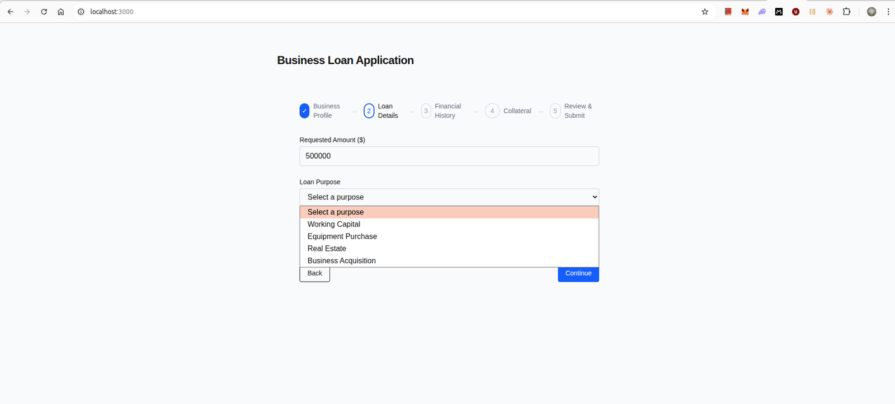
EvaluationResult is the contract the UI consumes. The LoanDetailsStep component does not evaluate business rules. It receives fieldOptions.loanPurposeOptions and renders the options it is given.
Conditions compose with all for logical AND and any for logical OR. The fact key references a field in the facts object passed to the engine at evaluation time.
// src/lib/rules/definitions.ts

import { TopLevelCondition } from "json-rules-engine";
import { LoanPurpose } from "./types";

export interface RuleDefinition {
  name: string;
  priority: number;
  conditions: TopLevelCondition;
  event: {
    type: string;
    params: Record<string, unknown>;
  };
}

export const loanApplicationRules: RuleDefinition[] = [
  {
    name: "show-financial-history-high-amount",
    priority: 10,
    conditions: {
      any: [
        { fact: "requestedAmount", operator: "greaterThan", value: 50000 },
        { fact: "businessType", operator: "in", value: ["LLC", "C-Corp"] },
      ],
    },
    event: {
      type: "SHOW_FINANCIAL_HISTORY_STEP",
      params: {
        reason: "Amount exceeds $50,000 or entity type requires financial review",
      },
    },
  },
  {
    name: "skip-collateral-low-risk",
    priority: 10,
    conditions: {
      all: [
        { fact: "annualRevenue", operator: "greaterThan", value: 500000 },
        { fact: "creditProfile", operator: "equal", value: "Excellent" },
      ],
    },
    event: {
      type: "SKIP_COLLATERAL_STEP",
      params: {
        reason: "Revenue above $500,000 with Excellent credit profile",
      },
    },
  },
  {
    name: "filter-purposes-sole-proprietor",
    priority: 20,
    conditions: {
      all: [{ fact: "businessType", operator: "equal", value: "Sole Proprietor" }],
    },
    event: {
      type: "FILTER_LOAN_PURPOSE_OPTIONS",
      params: {
        allowedOptions: ["Working Capital", "Equipment Purchase"] as LoanPurpose[],
      },
    },
  },
  {
    name: "filter-purposes-standard",
    priority: 15,
    conditions: {
      all: [{ fact: "businessType", operator: "in", value: ["LLC", "S-Corp"] }],
    },
    event: {
      type: "FILTER_LOAN_PURPOSE_OPTIONS",
      params: {
        allowedOptions: [
          "Working Capital",
          "Equipment Purchase",
          "Real Estate",
          "Business Acquisition",
        ] as LoanPurpose[],
      },
    },
  },
  {
    name: "filter-purposes-all",
    priority: 5,
    conditions: {
      all: [{ fact: "businessType", operator: "equal", value: "C-Corp" }],
    },
    event: {
      type: "FILTER_LOAN_PURPOSE_OPTIONS",
      params: {
        allowedOptions: [
          "Working Capital",
          "Equipment Purchase",
          "Real Estate",
          "Business Acquisition",
          "Refinancing",
        ] as LoanPurpose[],
      },
    },
  },
  {
    name: "extend-repayment-terms-high-amount",
    priority: 10,
    conditions: {
      all: [{ fact: "requestedAmount", operator: "greaterThan", value: 50000 }],
    },
    event: {
      type: "EXTEND_REPAYMENT_TERMS",
      params: {
        terms: ["24 months", "36 months", "60 months", "84 months"],
      },
    },
  },
];
The three loan purpose rules are mutually exclusive because a business can have only one businessType value. That means priority is not doing much work in this exact example.
If you later add overlapping rules that emit the same event type, do not rely on returned event order as your conflict-resolution strategy. Make precedence explicit in your own reducer, or design events so they can be merged predictably.
The engine factory takes rule definitions and a facts map, runs the evaluation, and returns a typed EvaluationResult. It has no React dependency, so it can run in a Server Action, a unit test, or a client-side hook.
// src/lib/rules/engine.ts

import { Engine } from "json-rules-engine";
import { loanApplicationRules, RuleDefinition } from "./definitions";
import {
  EvaluationResult,
  LoanApplicationFacts,
  LoanPurpose,
  RuleEvent,
  RuleEventType,
} from "./types";

const DEFAULT_LOAN_PURPOSE_OPTIONS: LoanPurpose[] = [
  "Working Capital",
  "Equipment Purchase",
];

const DEFAULT_REPAYMENT_TERMS = ["12 months", "24 months", "36 months"];

function buildEngine(rules: RuleDefinition[]): Engine {
  const engine = new Engine();

  for (const rule of rules) {
    engine.addRule(rule);
  }

  return engine;
}

export async function evaluateRules(
  facts: LoanApplicationFacts,
  rules: RuleDefinition[] = loanApplicationRules
): Promise<EvaluationResult> {
  const engine = buildEngine(rules);
  const { events } = await engine.run(facts);

  const firedEvents = events as RuleEvent[];
  const firedTypes = new Set<RuleEventType>(
    firedEvents.map((event) => event.type as RuleEventType)
  );

  const purposeEvent = firedEvents.find(
    (event) => event.type === "FILTER_LOAN_PURPOSE_OPTIONS"
  ) as RuleEvent<"FILTER_LOAN_PURPOSE_OPTIONS"> | undefined;

  const termsEvent = firedEvents.find(
    (event) => event.type === "EXTEND_REPAYMENT_TERMS"
  ) as RuleEvent<"EXTEND_REPAYMENT_TERMS"> | undefined;

  return {
    firedEvents,
    stepVisibility: {
      showFinancialHistory: firedTypes.has("SHOW_FINANCIAL_HISTORY_STEP"),
      skipCollateral: firedTypes.has("SKIP_COLLATERAL_STEP"),
    },
    fieldOptions: {
      loanPurposeOptions:
        purposeEvent?.params.allowedOptions ?? DEFAULT_LOAN_PURPOSE_OPTIONS,
      repaymentTermOptions: termsEvent?.params.terms ?? DEFAULT_REPAYMENT_TERMS,
    },
  };
}
This implementation creates a new engine instance for each evaluation. That is the simplest safe default because it avoids shared mutable state across concurrent server requests, custom facts, or future engine configuration.
If rule evaluation becomes a performance bottleneck, you can memoize compiled rules or reuse an immutable engine instance after benchmarking. For this tutorial, per-request construction keeps the example easier to reason about.
The defaults also matter. If no FILTER_LOAN_PURPOSE_OPTIONS event fires, the component still receives a renderable option list instead of an empty array.
Because evaluateRules is a plain function, tests run without a DOM, a server, or React context.
Install Jest and ts-jest, then add a jest.config.ts with preset: "ts-jest" and testEnvironment: "node" before running the test file.
// src/lib/rules/engine.test.ts

import { evaluateRules } from "./engine";
import { LoanApplicationFacts } from "./types";

const baseFacts: LoanApplicationFacts = {
  businessType: "Sole Proprietor",
  annualRevenue: 200000,
  numberOfEmployees: 3,
  requestedAmount: 30000,
  creditProfile: "Good",
};

describe("evaluateRules", () => {
  it("does not show financial history for a low-amount sole proprietor", async () => {
    const result = await evaluateRules(baseFacts);

    expect(result.stepVisibility.showFinancialHistory).toBe(false);
    expect(result.stepVisibility.skipCollateral).toBe(false);
  });

  it("shows financial history when the amount exceeds $50,000", async () => {
    const result = await evaluateRules({
      ...baseFacts,
      requestedAmount: 75000,
    });

    expect(result.stepVisibility.showFinancialHistory).toBe(true);
  });

  it("shows financial history for an LLC regardless of amount", async () => {
    const result = await evaluateRules({
      ...baseFacts,
      businessType: "LLC",
      requestedAmount: 10000,
    });

    expect(result.stepVisibility.showFinancialHistory).toBe(true);
  });

  it("skips collateral for high-revenue applicants with excellent credit", async () => {
    const result = await evaluateRules({
      ...baseFacts,
      annualRevenue: 750000,
      creditProfile: "Excellent",
    });

    expect(result.stepVisibility.skipCollateral).toBe(true);
  });

  it("does not skip collateral when only one condition is met", async () => {
    const result = await evaluateRules({
      ...baseFacts,
      annualRevenue: 750000,
      creditProfile: "Good",
    });

    expect(result.stepVisibility.skipCollateral).toBe(false);
  });

  it("filters loan purpose options for sole proprietors", async () => {
    const result = await evaluateRules(baseFacts);

    expect(result.fieldOptions.loanPurposeOptions).toEqual([
      "Working Capital",
      "Equipment Purchase",
    ]);
  });

  it("extends repayment terms for amounts above $50,000", async () => {
    const result = await evaluateRules({
      ...baseFacts,
      requestedAmount: 60000,
    });

    expect(result.fieldOptions.repaymentTermOptions).toContain("84 months");
  });
});
Run the test directly:
npx jest src/lib/rules/engine.test.ts
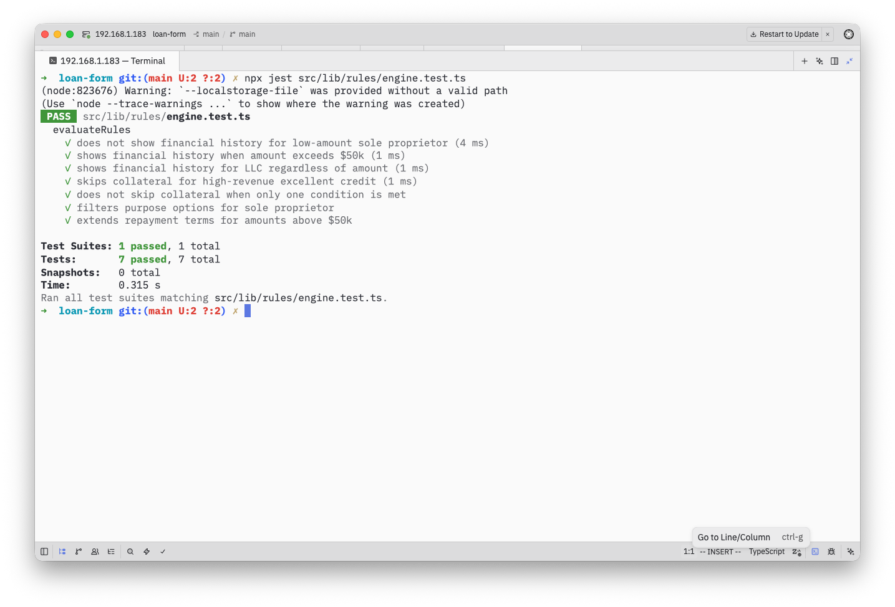
All seven tests pass. The showFinancialHistory flag fires correctly for both branches of the any condition. The skipCollateral flag only fires when both conditions in the all block are met.
With the rule output confirmed against typed facts, wiring the engine to the form shell becomes mostly mechanical.
The FormShell component tracks three things separately:
None of these should live inside individual step components. Step components receive what they need as props, validate their own fields, and call back with validated data.
The step registry is a plain data structure describing each step. resolveActiveSteps is the only place in the codebase that maps rule evaluation results to step inclusion decisions.
// src/lib/form/state.ts

import { EvaluationResult } from "@/lib/rules/types";

export type StepId =
  | "business-profile"
  | "loan-details"
  | "financial-history"
  | "collateral"
  | "review";

export interface StepDefinition {
  id: StepId;
  title: string;
  conditional: boolean;
  terminal?: boolean;
}

export const STEP_REGISTRY: StepDefinition[] = [
  { id: "business-profile", title: "Business Profile", conditional: false },
  { id: "loan-details", title: "Loan Details", conditional: false },
  { id: "financial-history", title: "Financial History", conditional: true },
  { id: "collateral", title: "Collateral", conditional: true },
  { id: "review", title: "Review and Submit", conditional: false, terminal: true },
];

export function resolveActiveSteps(
  evaluation: EvaluationResult | null
): StepDefinition[] {
  if (!evaluation) {
    return STEP_REGISTRY.filter(
      (step) => !step.conditional && !step.terminal
    );
  }

  return STEP_REGISTRY.filter((step) => {
    if (step.id === "financial-history") {
      return evaluation.stepVisibility.showFinancialHistory;
    }

    if (step.id === "collateral") {
      return !evaluation.stepVisibility.skipCollateral;
    }

    return true;
  });
}
When evaluation is null, the form shows only the steps that are safe before any facts are available. Once the user has entered enough information to evaluate the rules, conditional steps appear or disappear based on EvaluationResult.
If the collateral skip condition changes in the rule definition, resolveActiveSteps does not need to change. It still reads from evaluation.stepVisibility.skipCollateral rather than re-implementing the business condition in the component tree.
Each step schema validates only the fields it owns. The full schemas are in the repository. The accumulated FormValues type is what FormShell holds in state and passes to the Server Action during final submission.
The FormShell fetches the active rule definitions, evaluates facts as the accumulated form state changes, and renders the current step.
This version avoids importing loanApplicationRules into the client component. That keeps the architecture aligned with the rule-boundary goal: components consume rules fetched from the rule source, but do not import rule definitions directly.
// src/components/FormShell.tsx

"use client";

import { useCallback, useEffect, useMemo, useState } from "react";
import { evaluateRules } from "@/lib/rules/engine";
import { RuleDefinition } from "@/lib/rules/definitions";
import { resolveActiveSteps } from "@/lib/form/state";
import { EvaluationResult, LoanApplicationFacts } from "@/lib/rules/types";
import { FormValues } from "@/lib/form/schema";

function extractFacts(values: FormValues): LoanApplicationFacts {
  return {
    businessType: values.businessType ?? "Sole Proprietor",
    annualRevenue: values.annualRevenue ?? 0,
    numberOfEmployees: values.numberOfEmployees ?? 1,
    requestedAmount: values.requestedAmount ?? 0,
    creditProfile: values.creditProfile ?? "Good",
  };
}

export function FormShell() {
  const [currentStepIndex, setCurrentStepIndex] = useState(0);
  const [formValues, setFormValues] = useState<FormValues>({});
  const [evaluationResult, setEvaluationResult] =
    useState<EvaluationResult | null>(null);
  const [rules, setRules] = useState<RuleDefinition[] | null>(null);
  const [rulesError, setRulesError] = useState<string | null>(null);
  const [isEvaluating, setIsEvaluating] = useState(false);

  useEffect(() => {
    let cancelled = false;

    async function loadRules() {
      try {
        const response = await fetch("/api/rules");

        if (!response.ok) {
          throw new Error(`Failed to load rules: ${response.status}`);
        }

        const data = (await response.json()) as {
          rules: RuleDefinition[];
        };

        if (!cancelled) {
          setRules(data.rules);
        }
      } catch (error) {
        if (!cancelled) {
          setRulesError(
            error instanceof Error ? error.message : "Failed to load rules"
          );
        }
      }
    }

    loadRules();

    return () => {
      cancelled = true;
    };
  }, []);

  useEffect(() => {
    if (!rules) return;

    let cancelled = false;

    async function runEvaluation() {
      setIsEvaluating(true);

      try {
        const result = await evaluateRules(extractFacts(formValues), rules);

        if (!cancelled) {
          setEvaluationResult(result);
        }
      } finally {
        if (!cancelled) {
          setIsEvaluating(false);
        }
      }
    }

    runEvaluation();

    return () => {
      cancelled = true;
    };
  }, [formValues, rules]);

  const activeSteps = useMemo(
    () => resolveActiveSteps(evaluationResult),
    [evaluationResult]
  );

  useEffect(() => {
    setCurrentStepIndex((previousIndex) =>
      Math.min(previousIndex, Math.max(activeSteps.length - 1, 0))
    );
  }, [activeSteps.length]);

  const currentStep = activeSteps[currentStepIndex];

  const handleStepComplete = useCallback(
    (stepData: Partial<FormValues>) => {
      setFormValues((previousValues) => ({
        ...previousValues,
        ...stepData,
      }));

      setCurrentStepIndex((previousIndex) =>
        Math.min(previousIndex + 1, activeSteps.length - 1)
      );
    },
    [activeSteps.length]
  );

  const handleBack = useCallback(() => {
    setCurrentStepIndex((previousIndex) => Math.max(0, previousIndex - 1));
  }, []);

  if (rulesError) {
    return (
      <div className="max-w-2xl mx-auto py-10 px-4">
        <p className="rounded border border-red-200 bg-red-50 px-4 py-3 text-sm text-red-700">
          {rulesError}
        </p>
      </div>
    );
  }

  return (
    <div className="max-w-2xl mx-auto py-10 px-4">
      <StepIndicator steps={activeSteps} currentIndex={currentStepIndex} />

      <div className="mt-8">
        {currentStep?.id === "business-profile" && (
          <BusinessProfileStep
            defaultValues={formValues}
            onComplete={handleStepComplete}
          />
        )}

        {currentStep?.id === "loan-details" && (
          <LoanDetailsStep
            defaultValues={formValues}
            evaluationResult={evaluationResult}
            onComplete={handleStepComplete}
            onBack={handleBack}
          />
        )}

        {currentStep?.id === "financial-history" && (
          <FinancialHistoryStep
            defaultValues={formValues}
            onComplete={handleStepComplete}
            onBack={handleBack}
          />
        )}

        {currentStep?.id === "collateral" && (
          <CollateralStep
            defaultValues={formValues}
            onComplete={handleStepComplete}
            onBack={handleBack}
          />
        )}

        {currentStep?.id === "review" && (
          <ReviewStep
            formValues={formValues}
            activeSteps={activeSteps}
            evaluationResult={evaluationResult}
            isEvaluating={isEvaluating}
            onBack={handleBack}
          />
        )}
      </div>
    </div>
  );
}
The cancellation flag prevents stale evaluations from overwriting newer ones when values change quickly. The explicit isEvaluating state is more reliable here than useTransition, because the async rule evaluation itself is what the submit boundary needs to wait for.
This example evaluates rules when accumulated step data changes. If you need live evaluation on every keystroke, use React Hook Form’s useWatch inside the step component and push watched values up to FormShell. For this loan application flow, step-level evaluation is simpler and avoids unnecessary rule execution while the user is still typing.
The architectural split is most visible in LoanDetailsStep.
In a component-coupled approach, the step watches businessType and requestedAmount directly and computes option arrays inline. If the $50,000 threshold changes, that file changes. If a new business type needs a different option set, that file changes. Testing the option logic requires mounting the component.
The decoupled version receives options from the parent and renders whatever it is given:
// src/components/steps/LoanDetailsStep.tsx

"use client";

import { useForm } from "react-hook-form";
import { zodResolver } from "@hookform/resolvers/zod";
import {
  loanDetailsSchema,
  LoanDetailsData,
  FormValues,
} from "@/lib/form/schema";
import { EvaluationResult, LoanPurpose } from "@/lib/rules/types";

interface LoanDetailsStepProps {
  defaultValues: FormValues;
  evaluationResult: EvaluationResult | null;
  onComplete: (data: Partial<FormValues>) => void;
  onBack: () => void;
}

const DEFAULT_PURPOSE_OPTIONS: LoanPurpose[] = [
  "Working Capital",
  "Equipment Purchase",
];

const DEFAULT_TERM_OPTIONS = ["12 months", "24 months", "36 months"];

export function LoanDetailsStep({
  defaultValues,
  evaluationResult,
  onComplete,
  onBack,
}: LoanDetailsStepProps) {
  const purposeOptions =
    evaluationResult?.fieldOptions.loanPurposeOptions ?? DEFAULT_PURPOSE_OPTIONS;

  const termOptions =
    evaluationResult?.fieldOptions.repaymentTermOptions ?? DEFAULT_TERM_OPTIONS;

  const {
    register,
    handleSubmit,
    formState: { errors },
  } = useForm<LoanDetailsData>({
    resolver: zodResolver(loanDetailsSchema),
    defaultValues: {
      requestedAmount: defaultValues.requestedAmount,
      loanPurpose: defaultValues.loanPurpose,
      repaymentTerm: defaultValues.repaymentTerm,
    },
  });

  return (
    <form onSubmit={handleSubmit(onComplete)}>
      <div className="space-y-6">
        <div>
          <label
            htmlFor="requestedAmount"
            className="block text-sm font-medium"
          >
            Requested Amount ($)
          </label>
          <input
            id="requestedAmount"
            type="number"
            className="mt-1 block w-full rounded border border-gray-300 px-3 py-2"
            {...register("requestedAmount", { valueAsNumber: true })}
          />
          {errors.requestedAmount && (
            <p className="mt-1 text-sm text-red-600">
              {errors.requestedAmount.message}
            </p>
          )}
        </div>

        <div>
          <label htmlFor="loanPurpose" className="block text-sm font-medium">
            Loan Purpose
          </label>
          <select
            id="loanPurpose"
            className="mt-1 block w-full rounded border border-gray-300 px-3 py-2"
            {...register("loanPurpose")}
          >
            <option value="">Select a purpose</option>
            {purposeOptions.map((option) => (
              <option key={option} value={option}>
                {option}
              </option>
            ))}
          </select>
          {errors.loanPurpose && (
            <p className="mt-1 text-sm text-red-600">
              {errors.loanPurpose.message}
            </p>
          )}
        </div>

        <div>
          <label htmlFor="repaymentTerm" className="block text-sm font-medium">
            Repayment Term
          </label>
          <select
            id="repaymentTerm"
            className="mt-1 block w-full rounded border border-gray-300 px-3 py-2"
            {...register("repaymentTerm")}
          >
            <option value="">Select a term</option>
            {termOptions.map((option) => (
              <option key={option} value={option}>
                {option}
              </option>
            ))}
          </select>
          {errors.repaymentTerm && (
            <p className="mt-1 text-sm text-red-600">
              {errors.repaymentTerm.message}
            </p>
          )}
        </div>

        <div className="flex justify-between pt-4">
          <button
            type="button"
            onClick={onBack}
            className="px-4 py-2 text-sm border rounded"
          >
            Back
          </button>
          <button
            type="submit"
            className="px-4 py-2 text-sm bg-blue-600 text-white rounded"
          >
            Continue
          </button>
        </div>
      </div>
    </form>
  );
}
The step has no knowledge of businessType, annualRevenue, or the facts that drive option selection. If the rule governing purpose options changes in definitions.ts, this file does not change.
A user can manipulate browser state. They cannot manipulate the server execution environment in the same way. That is why the same evaluateRules function should run again at the submission boundary.
In Next.js, a Server Action is an asynchronous function that runs on the server and can be used for form submissions and mutations. For this form, the Server Action receives the submitted values, extracts facts, evaluates the current rule set, and compares the server result against the client result.
For more on when API logic belongs in Next.js versus a separate backend, see LogRocket’s guide on when to move API logic out of Next.js.
This route exposes the current rule definitions to the client.
// src/app/api/rules/route.ts

import { NextResponse } from "next/server";
import { loanApplicationRules } from "@/lib/rules/definitions";

export const dynamic = "force-dynamic";

const RULES_VERSION = process.env.RULES_VERSION ?? "1.0.0";

export async function GET() {
  return NextResponse.json({
    version: RULES_VERSION,
    rules: loanApplicationRules,
  });
}
force-dynamic tells Next.js to treat the route as dynamic. That matters if the rule source can change at runtime.
However, this demo still imports rules from definitions.ts, so changing the actual rules still requires a code change and deployment. The RULES_VERSION value only versions the rule set being served; it does not make hardcoded rules editable by non-engineers.
For production systems where product, risk, operations, or compliance teams need to update rules without deployment, move rule definitions to a database, CMS, feature flag service, or dedicated rules service. The route handler can still expose those rules to the client, but the source of truth should not be a bundled TypeScript file.
The Server Action fetches the active rule definitions, evaluates the submitted facts, and compares the authoritative server result with the client’s last known result.
// src/app/actions/evaluate-rules.ts

"use server";

import { evaluateRules } from "@/lib/rules/engine";
import { RuleDefinition } from "@/lib/rules/definitions";
import { EvaluationResult, LoanApplicationFacts } from "@/lib/rules/types";
import { FormValues } from "@/lib/form/schema";

function extractFacts(values: FormValues): LoanApplicationFacts {
  return {
    businessType: values.businessType ?? "Sole Proprietor",
    annualRevenue: values.annualRevenue ?? 0,
    numberOfEmployees: values.numberOfEmployees ?? 1,
    requestedAmount: values.requestedAmount ?? 0,
    creditProfile: values.creditProfile ?? "Good",
  };
}

async function fetchRuleDefinitions(): Promise<{
  version: string;
  rules: RuleDefinition[];
}> {
  const baseUrl = process.env.NEXT_PUBLIC_APP_URL ?? "http://localhost:3000";

  const response = await fetch(`${baseUrl}/api/rules`, {
    next: { revalidate: 60 },
  });

  if (!response.ok) {
    throw new Error(`Failed to fetch rule definitions: ${response.status}`);
  }

  return response.json();
}

export interface ServerEvaluationResponse {
  success: boolean;
  evaluationResult: EvaluationResult;
  rulesVersion: string;
  diverged: boolean;
  divergenceDetails: string[];
  submittedValues: FormValues;
}

export async function evaluateAndSubmit(
  formValues: FormValues,
  clientEvaluationResult: EvaluationResult | null
): Promise<ServerEvaluationResponse> {
  const { version, rules } = await fetchRuleDefinitions();
  const serverResult = await evaluateRules(extractFacts(formValues), rules);

  const divergenceDetails: string[] = [];

  if (clientEvaluationResult) {
    const clientTypes = new Set(
      clientEvaluationResult.firedEvents.map((event) => event.type)
    );

    const serverTypes = new Set(
      serverResult.firedEvents.map((event) => event.type)
    );

    for (const type of serverTypes) {
      if (!clientTypes.has(type)) {
        divergenceDetails.push(`Server fired ${type}, client did not`);
      }
    }

    for (const type of clientTypes) {
      if (!serverTypes.has(type)) {
        divergenceDetails.push(`Client fired ${type}, server did not`);
      }
    }
  }

  if (divergenceDetails.length > 0) {
    console.warn("Rule evaluation divergence detected:", divergenceDetails);
  }

  return {
    success: true,
    evaluationResult: serverResult,
    rulesVersion: version,
    diverged: divergenceDetails.length > 0,
    divergenceDetails,
    submittedValues: formValues,
  };
}
revalidate: 60 caches rule definitions for 60 seconds between Server Action invocations. That is a deliberate tradeoff: rule updates can take up to 60 seconds to propagate, but the server avoids fetching the rule source on every submission.
For rules tied to real-time business events, use a stricter caching strategy, such as revalidate: 0, cache: "no-store", or a direct call to the authoritative rule source.
There is also an important production note: if rules live in the same codebase, the Server Action can import the rule source directly and avoid the internal HTTP request. Calling your own route handler from a Server Action is useful for demonstrating a shared client/server rule source, but it adds a network hop. In production, prefer a shared server-only rule service or repository function when possible.
Because Server Actions are callable over the network, always validate authentication and authorization inside the Server Action itself. Do not rely on the UI step flow as a security boundary.
The ReviewStep calls evaluateAndSubmit with the accumulated values and the latest client evaluation result. The submit button is disabled while evaluation is pending so the client does not send a result that is one cycle behind the current form values.
// src/components/steps/ReviewStep.tsx

"use client";

import { useState } from "react";
import { FormValues } from "@/lib/form/schema";
import { EvaluationResult } from "@/lib/rules/types";
import { StepDefinition } from "@/lib/form/state";
import { evaluateAndSubmit } from "@/app/actions/evaluate-rules";

interface ReviewStepProps {
  formValues: FormValues;
  activeSteps: StepDefinition[];
  evaluationResult: EvaluationResult | null;
  isEvaluating: boolean;
  onBack: () => void;
}

export function ReviewStep({
  formValues,
  activeSteps,
  evaluationResult,
  isEvaluating,
  onBack,
}: ReviewStepProps) {
  const [isSubmitting, setIsSubmitting] = useState(false);
  const [submitError, setSubmitError] = useState<string | null>(null);
  const [divergenceWarning, setDivergenceWarning] = useState<string[] | null>(
    null
  );
  const [submitted, setSubmitted] = useState(false);

  async function handleSubmit() {
    setIsSubmitting(true);
    setSubmitError(null);
    setDivergenceWarning(null);

    try {
      const response = await evaluateAndSubmit(formValues, evaluationResult);

      if (response.diverged) {
        setDivergenceWarning(response.divergenceDetails);
        return;
      }

      setSubmitted(true);
    } catch (error) {
      setSubmitError(
        error instanceof Error
          ? error.message
          : "Submission failed. Please try again."
      );
    } finally {
      setIsSubmitting(false);
    }
  }

  if (submitted) {
    return (
      <div className="rounded border border-green-200 bg-green-50 px-6 py-8 text-center">
        <p className="text-lg font-semibold text-green-800">
          Application submitted
        </p>
        <p className="mt-2 text-sm text-green-700">
          Your loan application has been received and is under review.
        </p>
      </div>
    );
  }

  return (
    <div className="space-y-6">
      <h2 className="text-lg font-semibold">Review your application</h2>

      {divergenceWarning && (
        <div className="rounded border border-yellow-300 bg-yellow-50 px-4 py-3 text-sm text-yellow-800">
          <p className="font-medium mb-1">
            Your application could not be submitted as entered.
          </p>
          <p className="mb-2">
            The server detected a discrepancy between the information entered
            and the evaluation at submission time. Please review your answers
            and resubmit.
          </p>
          <ul className="list-disc list-inside space-y-1">
            {divergenceWarning.map((detail, index) => (
              <li key={index}>{detail}</li>
            ))}
          </ul>
        </div>
      )}

      {submitError && (
        <div className="rounded border border-red-200 bg-red-50 px-4 py-3 text-sm text-red-700">
          {submitError}
        </div>
      )}

      <dl className="divide-y divide-gray-100 rounded border border-gray-200">
        {Object.entries(formValues).map(([key, value]) => (
          <div key={key} className="flex justify-between px-4 py-3 text-sm">
            <dt className="font-medium text-gray-600 capitalize">
              {key.replace(/([A-Z])/g, " $1")}
            </dt>
            <dd className="text-gray-900">{String(value)}</dd>
          </div>
        ))}
      </dl>

      <div className="flex justify-between pt-4">
        <button
          type="button"
          onClick={onBack}
          disabled={isSubmitting}
          className="px-4 py-2 text-sm border rounded disabled:opacity-50"
        >
          Back
        </button>
        <button
          type="button"
          onClick={handleSubmit}
          disabled={isSubmitting || isEvaluating || !evaluationResult}
          className="px-4 py-2 text-sm bg-blue-600 text-white rounded disabled:opacity-60"
        >
          {isEvaluating
            ? "Evaluating..."
            : isSubmitting
              ? "Submitting..."
              : "Submit application"}
        </button>
      </div>
    </div>
  );
}
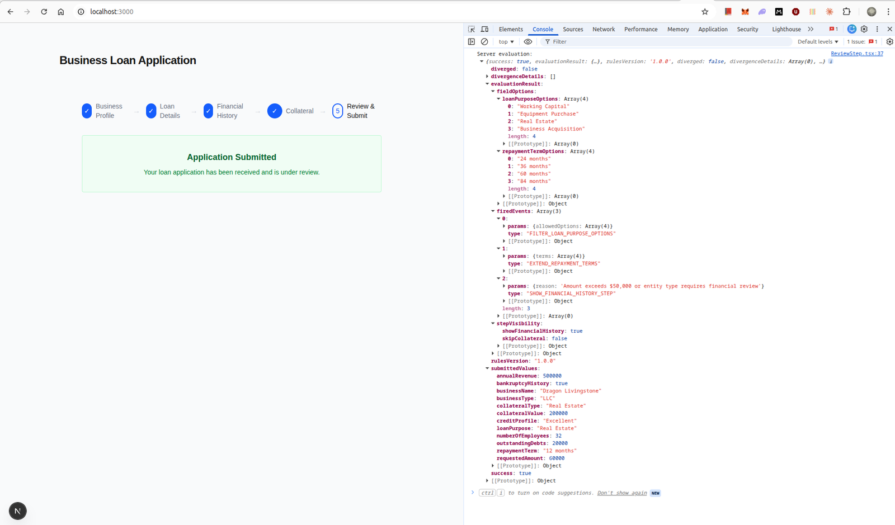
The divergence check is the architectural payoff. If the client evaluated rules against facts that were later changed before submission, the server result will not match. In a financial application, that divergence would typically block submission and prompt the user to restart from the step where the facts changed.
For production observability, log divergence events with enough context to debug them later: rule version, fired event types, submitted facts, and user/session identifiers where appropriate. LogRocket’s guide to logging and error management best practices in SSR apps covers related SSR and server-side debugging concerns.
The most common failure mode is stale client evaluation. That is why isEvaluating gates the submit button.
Beyond that, the Server Action fetches rule definitions and runs evaluation before returning. On a cold request with no cached definitions, that means one fetch plus engine execution. That is acceptable at the submission boundary, but it is not ideal for step-by-step evaluation on every keystroke.
The two caching layers also operate independently. The client fetches /api/rules once on mount, while the Server Action fetches with revalidate: 60. Those two boundaries could serve different rule versions within the same user session.
The rulesVersion field in ServerEvaluationResponse surfaces that mismatch. For applications where rules change frequently, add rule-version comparison to the divergence check:
| Failure mode | Why it happens | Mitigation |
|---|---|---|
| Stale client evaluation | User submits before async evaluation finishes | Disable submit while isEvaluating is true |
| Different client/server rule versions | Client fetched rules on mount, server fetched newer rules later | Include rulesVersion in divergence checks |
| Extra latency on submit | Server Action fetches rules before evaluation | Cache rules, import server-only rule sources, or use a direct rule service call |
| Bundle size increase | json-rules-engine runs in the browser |
Evaluate only when needed, or keep complex/private rules server-only |
| Hard-to-debug rule outcomes | Logic moves out of components | Add unit tests, rule names, reason strings, and structured logs |
This is why the architecture separates preview logic from authoritative logic. The client helps the user move through the form. The server decides whether the submission is valid.
This architecture is the right answer when a form carries rules that are complex, versioned, or owned by the business rather than the component tree. It is also useful when the same rules need to run at both the client and server boundaries.
The cost is real. Two evaluation boundaries must stay synchronized. The fetch on mount adds a failure mode that a static import would not have. Debugging requires understanding the engine’s condition evaluation instead of reading local JSX conditionals.
For a flat CRUD form with a handful of conditional fields, this is overengineering. For eligibility flows, lending applications, insurance quotes, admin-configured workflows, and compliance-sensitive forms, the pattern can pay for itself quickly:
| Pattern | Pros | Cons | Best fit |
|---|---|---|---|
| Inline React conditionals | Simple, local, easy to read | Hard to reuse, duplicate, or audit | Small forms with UI-owned logic |
| Zod refinements | Strong validation model | Not ideal for step visibility or option filtering | Field and cross-field validation |
| Rule engine | Testable, declarative, reusable across boundaries | Adds abstraction and runtime complexity | Business-owned conditional logic |
| Server-only rules | Stronger security and smaller client bundle | Less responsive UI unless mirrored client-side | Sensitive eligibility or pricing logic |
| External rules service | Editable without deployment | Adds operational overhead | High-change business rules |
The decision point is still the same: if the component owns the rules, inline conditionals are correct. If the business owns the rules and the component is just the renderer, a rule engine is the better abstraction.
A rule engine does not remove the complexity of a form with genuinely complex logic. It relocates that complexity to a layer where it can be tested, versioned, logged, and reused across client and server boundaries.
That tradeoff is only worth making when the rules are business logic, not rendering logic. If a field appears because a user checked a box, keep the condition in React. If a step appears because risk, eligibility, revenue, entity type, and credit profile combine into a business decision, move that decision out of the component tree.
For advanced Next.js forms, the strongest architecture is usually a layered one: React Hook Form handles input state, Zod handles validation, the rule engine handles business decisions, and Server Actions re-evaluate those decisions at the submission boundary. That keeps the UI responsive without making the browser the source of truth.
Install LogRocket via npm or script tag. LogRocket.init() must be called client-side, not
server-side
$ npm i --save logrocket

// Code:

import LogRocket from 'logrocket';
LogRocket.init('app/id');
// Add to your HTML:

<script src="https://cdn.lr-ingest.com/LogRocket.min.js"></script>
<script>window.LogRocket && window.LogRocket.init('app/id');</script>

React 19.3 and modern CSS make several common patterns unnecessary. Here are 10 features that let you delete old React code and simplify your apps.

Explore the top AI agent frameworks in 2026 and compare how they handle tools, memory, structured output, streaming, and step limits.

Tailwind CSS component libraries provide pre-built components to streamline the process of developing aesthetic, user-friendly interfaces.

Jev is a TypeSafe AI decision model that classifies messages using typed questions. Learn how to use it for routing to reduce unnecessary LLM calls.
Would you be interested in joining LogRocket's developer community?
Join LogRocket’s Content Advisory Board. You’ll help inform the type of content we create and get access to exclusive meetups, social accreditation, and swag.
Sign up now


 Learn more →




