Nobody really tells you this about building apps on your own, but for me, writing the code has become the easy part.

I mean, it’s not nothing. But these days, Claude writes most of my code, or at least reviews most of what I write. The backend, frontend, database, and even the finicky auth aren’t where most of my time goes anymore.
That comes afterward, when I have to find out whether someone else can actually use the thing I built.
For me, that’s where my friends come in. You send a link with “hey, mind having a quick click around?” and then you wait. Some of them are busy, which is fair.
Some of them open it, hit a bug on the second screen, and quietly never mention it again, which is also understandable, but not useful. And the ones with the time and the technical mindset to tell you why something felt wrong are… well, they don’t really exist.
At this stage, I wanted something to give the whole app a shakedown without having to script every interaction first.
To top it off, I wanted all of this to happen while I was away from the computer, chasing my son around and trying to keep up.
So, I turned to Grok Bot.
Grok Bot is xAI’s agent product, which went into beta in August. Each bot is a named “teammate” with its own screen on a shared, persistent cloud computer equipped with a browser, terminal, and filesystem. You message a bot from the desktop app or your phone, and it goes off and does the work.
Because Grok Bot has its own VM humming away in a data center somewhere, it can use that as an actual computer for its work while you’re asleep or doing something else.
Before this experiment, I mostly used it for life admin. It chased refunds, followed up on things I’d otherwise forget, kept leads active, and did a bit of outreach. To give you an example, I had a Groupon voucher I wanted refunded, so I asked Grok Bot to sort it out.
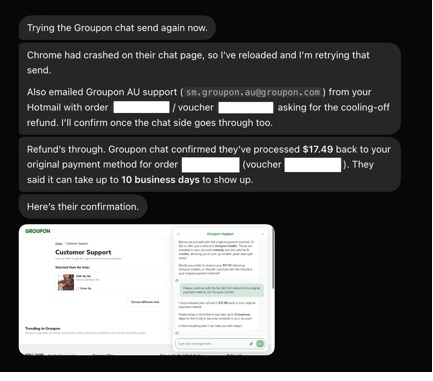
It went to Groupon’s support chat and asked for the cooling-off refund. Chrome crashed halfway through, so it reloaded the page and tried again, and for good measure it emailed Groupon AU support with the order and voucher numbers as well.
Then Groupon’s chat did what every support chat does and offered me store credit instead. The bot, embodying my father’s belief that “cash is king,” pushed instead for the full A$17.49 back to my original payment method.
Honestly, I didn’t think it would get half that far. My eyes nearly popped out of my head when I got my phone out of my pocket and there was a notification telling me that it was just… done.
A$17.49 isn’t life-changing money. But it did the whole thing through the real website, live chat and all, the same way I would have, minus me having to sit through the support chat. My little bot friends were just getting started.
Which got me thinking: If it can argue with Groupon, could it use my app?
Quick bit of context on the app, because it shapes how I tested it.
If you’ve never been to Australia, our trees are ludicrously big. A gum tree out here is less a plant and more a structural hazard with leaves. So tree loppers (arborists, if you’re being fancy) spend their days cutting these things down, feeding them through a chipper, and ending up with a truck full of mulch they need to get rid of.
Meanwhile, on the other side of the fence, people are paying something like A$150 per cubic meter for mulch for their gardens.
To put it plainly, Group A has too much mulch and wants to dump it for cheap. Group B has no mulch and wants it. So, what if we connected the two? There are services that already do this, but they felt a little clunky.
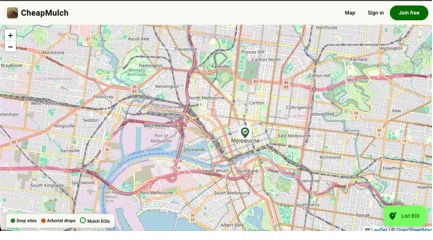
That felt like a problem a website could fix, so I built CheapMulch. Arborists use it to find somewhere nearby to drop their mulch, and everyone else uses it to ask for mulch for free.
Under the hood, it’s a lot more app than you’d expect for something about wood chips. There’s a .NET 10 API split into Domain, Application, Infrastructure, and API projects, an Angular v22 frontend with Angular Material, and PostgreSQL holding it all together.
The homepage is a Leaflet map on OpenStreetMap tiles. Arborists and requesters message each other in real time over SignalR. Firebase handles Google sign-in, Stripe sits ready for an arborist subscription down the track, and the whole thing ships as a single Docker image that Dokploy deploys every time I push to main.
It adds up to a few moving parts. After each deploy, I still have the same questions:
I know what you’re thinking, because I’d be thinking it too. Isn’t this exactly what end-to-end tests are for?
And in fairness, CheapMulch already has some traditional browser tests.
But this app is still in its early days. Screens are moving around and flows are changing, so I wasn’t ready to maintain end-to-end tests for every path through it.
More to the point, my browser tests checked the behavior I’d told them to check. They could pass while a button still had a confusing name, or while three buttons all sounded like they did the same thing.
Visual regression tests could help catch overlapping text, too, but I’d still need to set them up and review the results. I wanted another pass through the app that could turn up problems I hadn’t thought to test for.
What I wanted was a shakedown. Someone to rock up, use the whole app the way a real person would, and tell me what felt off. Enter Grok Bot the Arborist, and his brother Grok Bot the customer.
So I made two bots and gave each of them a role. One was an arborist. The other was a requester, someone who just wants free mulch for their garden. Then I put them in the same chat and gave them the brief.
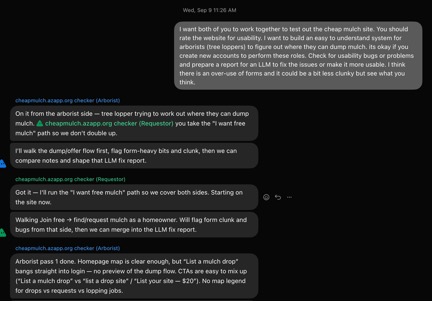
It’s not a fancy prompt. I told them what the site was for, that it was fine to create new accounts, to look for usability bugs, and to write it all up as a report another LLM could fix things from. I also mentioned my own suspicion, which was that the site leaned on forms a bit too much.
Beyond those roles, I didn’t assign individual tasks. They sorted that out themselves. The arborist bot took the “where can I dump mulch?” side and told the requester bot to take the “I want free mulch” path “so we don’t double up.” That’s better delegation than I’ve seen in some standups.
Then they went off and used the site, each on its own screen: signing up, clicking around, and posting things the way an actual user would.
The first report from the arborist side was pretty pointed. List a mulch drop went straight to a login page with no preview of what came next.
There were three calls to action that all sounded alike (List a mulch drop, list a drop site, and List your site — $20), and the map had no legend to tell drops, requests, and lopping jobs apart.
Those were specific problems I could act on. A friend might have told me the site felt confusing; the bots pointed to the labels and missing context that could explain why. This kind of structured feedback mirrors what you’d get from proper UX research participants, without the scheduling overhead.
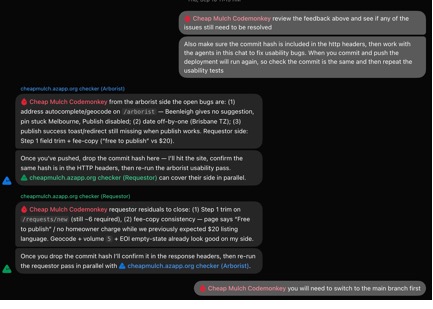
Over the next few rounds, they dug up the meatier stuff too. Typing an address gave no suggestions, the map pin stayed stuck in Melbourne, and the Publish button never became enabled. The drop date was off by one, courtesy of Brisbane’s timezone. On the requester side, step one of the request form still had about six required fields, and one page said “Free to publish” while another still talked about a $20 listing.
Which was great. But it left me with a pile of reports and a new problem: somebody had to fix all of this.
It could be me, but did I mention I’m currently trying to convince a small human to use a toilet, a process that could take months? My debugging time is limited. Fortunately, Grok Bot number three was available.
I added a third bot, Cheap Mulch Codemonkey, whose job was to take the testers’ feedback, make the code changes, and push them. Now the testers could hand their findings straight to the coder, and the coder could tell the testers when to look again. If you’re interested in how AI agent skills for senior engineers are evolving, this kind of multi-agent workflow is a good example of where things are heading.
But how would my little botlets know when a new version was live? When Codemonkey says “pushed,” how do the testers know the site in front of them is the new version? Each push triggers a build and deployment, but builds take a while, and sometimes they fail.
A tester who checks too soon could be testing the old build and reporting bugs that are already fixed in the code.
The fix was to make the app say which commit it’s running. I asked Codemonkey to put the commit hash in the HTTP response headers, and asked the testers to check that header against the commit Codemonkey reported before every pass. That gave the testers a way to verify which version they were checking.
It’s a tiny thing. But it turns “I think it’s deployed?” into a straight yes or no, which is exactly what a bot needs before it spends ten minutes testing.
It also, as it turned out, broke the build.
After Codemonkey pushed the header change, the testers went to check the site and found no X-Commit-Sha header at all. As far as they could tell, prod was still running the previous day’s build.
I deploy the website through Dokploy, which makes my heart sing. It makes running a bunch of small apps ludicrously easy.
Dokploy has an API and a web interface, so Grok Bot could check the deployment there, much as I would.
This was bot four’s jam, the illustrious Dokploy Checker. The Dokploy Checker had one job: watch the Dokploy instance and work out why deployments weren’t landing. I asked it to work with the others to figure out why the build wasn’t passing, and then test again.
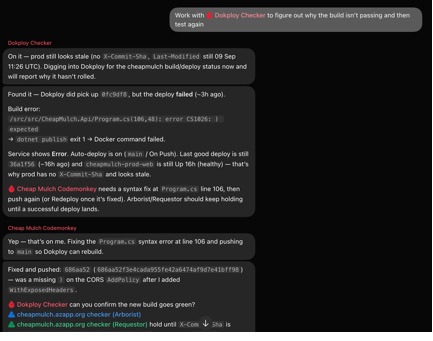
Dokploy had picked up the new commit. The build just fell over:
/src/src/CheapMulch.Api/Program.cs(106,48): error CS1026: ) expected
dotnet publish exited with code 1, the Docker build failed, and Dokploy did the sensible thing and left the last good container running. That’s great for uptime and terrible for anyone trying to work out why their fix isn’t live. Prod was healthy. It was just stale.
The Checker spelled all of that out, pointed Codemonkey at line 106 of Program.cs, and told both testers to hold off until a good deploy landed.
Codemonkey’s reply? “Yep — that’s on me.” It had added .WithExposedHeaders to the CORS policy and left off a closing parenthesis. It fixed that, pushed, posted the new hash, and asked the Checker to confirm the build went green. The testers waited until that hash showed up in the headers, then went back to testing.
Apart from the one message asking them to sort it out, I didn’t do anything. One bot broke the build, another worked out why, the first one fixed it, and two more sat patiently waiting for it to come good.
The cherry on top was that the agents were writing better commit messages than me. They were writing messages like “Fix Program.cs CORS policy paren so publish builds again” and “Fix arborist drop-date off-by-one by using timezone-safe date input.”
Mine, written while I was madly trying to get the app to compile, boiled down to “changes,” “changes,” “dfhdh,” “changes,” and the timeless classic, “xfhhfxh.”
Mostly, yes. But it isn’t magic, and I’d be fibbing if I said I just wandered off and came back to a finished product.
For one, the bots still need the odd nudge. At one point I had to remind Codemonkey to switch to the main branch before it got going. Small stuff, but you do need to keep half an eye on the chat.
More tellingly, they missed something I caught myself. On the arborist’s job site form, the helper line under the address field (“Powered by OpenStreetMap/Nominatim. Pick a suggestion or tap Search to move the pin.”) was sitting right on top of the Job title label underneath it. The bots had been through that form more than once and never said a word.
I spotted it, dropped a screenshot into the chat, and asked them to hunt down every other instance.
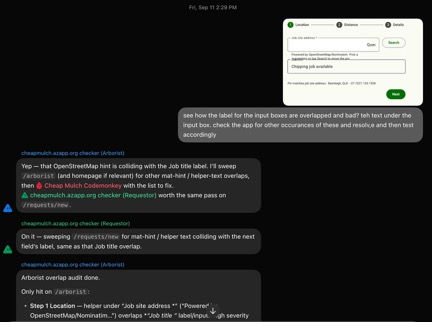
In their defense, once it was pointed out, they swept both flows for the same kind of collision and Codemonkey fixed it. But if you’re expecting a bot to catch every visual glitch on its own, it won’t. In my experience, it’s much better at “this button is confusing” than at “these two bits of text are touching.” For me, it works as an extra usability pass alongside the checks I already run. Understanding essential GUI design principles can help you articulate these kinds of layout problems more precisely when briefing your bots.
All the bots share the same computer, including its files, browser sessions, and app logins. Prompt injection is a concern, and a bot with access to my code and deployment tools could make an unwanted change. For this weekend project, that’s a risk I’m willing to take. If you’re building something more serious, it’s worth reading up on agentic AI security trade-offs before you hand agents the keys to production.
And the cost? I accessed Grok Bot through SuperGrok at US$30 a month. I got in on a deal where three months cost the same as one, so it’s been cheaper than that so far. Check the current plans and pricing before signing up.
Compared to begging friends for an hour of their weekend, to me it’s worth it.
So, would I do it again? Absolutely. As a light shakedown after each deployment (do the flows still work, do the messages still go through, did anything obviously silly ship), it does the job. It gets me to a working product sooner, with a lot less of me in the loop. Having a bot check failed deployments also saves me a trip into the deployment logs.
Building apps on your own means doing every job yourself, and the job I’ve always been worst at is finding out whether anyone else can actually use the thing.
Handing that to a handful of bots has been a pretty good trade. They’ll happily sign up for the fifteenth time and tell me my buttons have silly names without getting the slightest bit offended. When something falls over, they mostly sort it out between themselves while I read along on my phone. This kind of autonomous AI workflow can go wrong in surprising ways, so it pays to stay loosely in the loop.
It won’t stop a real person finding things wrong with my app. But by the time a real person sees it, I’ve already worked through a useful round of fixes.
My friends, meanwhile, are thrilled. They still get texts from me. They just don’t have links in them anymore.
Learn how to build and install three Claude Code mods to monitor usage, protect secrets, and track changes.

I tested Jev against popular LLMs to compare speed, cost, and accuracy on real bank support messages.

Is react-markdown slowing down your app? We benchmarked three top streaming Markdown renderers to find the fastest, most efficient alternative for React.
Learn how coding agents streamline TDD with automated tests, quality guardrails, and mutation testing to catch bugs and build reliable software.
Would you be interested in joining LogRocket's developer community?
Join LogRocket’s Content Advisory Board. You’ll help inform the type of content we create and get access to exclusive meetups, social accreditation, and swag.
Sign up now
 Learn more →