
Editor’s note: This tutorial was last updated on 15 March 2022 to address deprecation warnings in the source triggered by the latest version of Dart.
User engagement is crucial to the success of any mobile application. Push notifications help attract user attention and, when implemented properly in tandem with high-quality content, can contribute to major marketing success.
In this tutorial, we’ll demonstrate how to integrate and deliver push notifications to a Flutter application using an awesome service provided by Firebase called Firebase Cloud Messaging. It’s free, easy to get started with, and you don’t need to manage your backend infrastructure.
We’ll cover the following with detailed examples and step-by-step instructions:
You can also check out the full code for the example at this GitHub repository. Let’s get started!
The Replay is a weekly newsletter for dev and engineering leaders.
Delivered once a week, it's your curated guide to the most important conversations around frontend dev, emerging AI tools, and the state of modern software.
If you use a smartphone, you almost certainly encounter push notifications daily. Push notifications are clickable pop-up messages that appear on your users’ devices, regardless of whether they are using that particular app at the time.
Even when the device is idle or the user is using another app, a user will receive push notifications as long as the device is online and notification permissions are granted. Push notifications can be used to inform a user of status updates, message requests, reminders, alerts, and more.
In this tutorial, we’ll use Firebase Cloud Messaging to send push notifications.
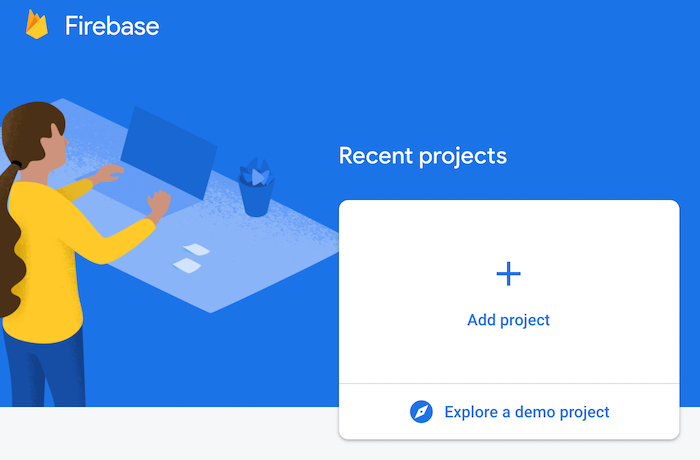
To start using Firebase, you have to create new Firebase project. Log into your Google account, navigate to the Firebase console, and click Add project:
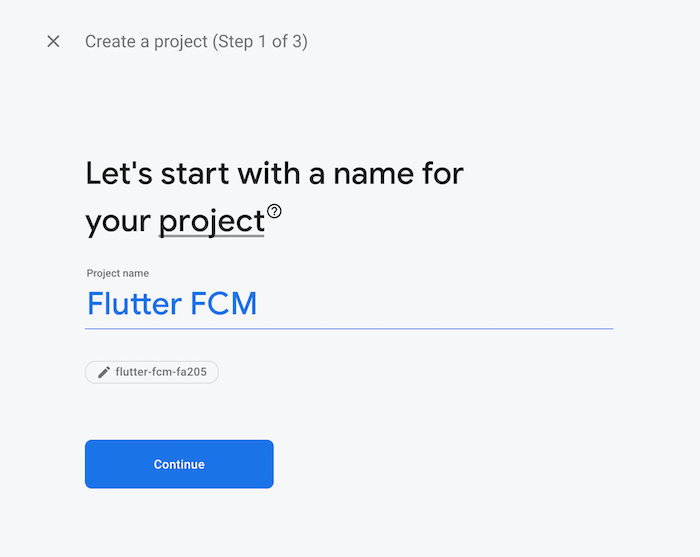
Enter a project name and click Continue:
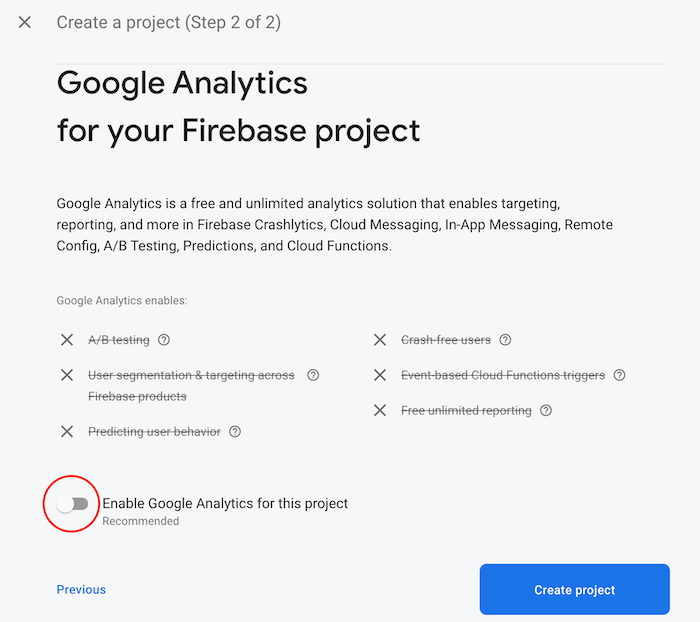
Disable Google Analytics; we don’t need it for our sample project. Then, click Create project:
After the project initializes, click Continue:
This will take you to the Project Overview screen. Here, you’ll find options to integrate the Firebase project with your Android and iOS app:
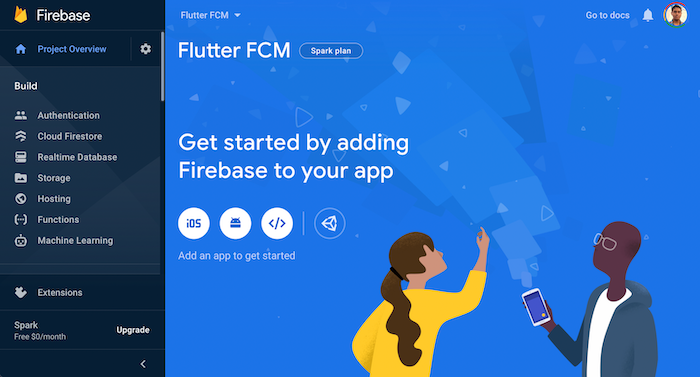
Now, our Firebase project is ready to be integrated with the mobile app. Though we’re using Flutter, which is a cross-platform framework, we still have to perform the initial Firebase setup for both platforms separately.
First, create a new Flutter application:
flutter create notify
Next, open the Flutter project on your favorite IDE. To open it in VS Code, you can use the following command:
code notify
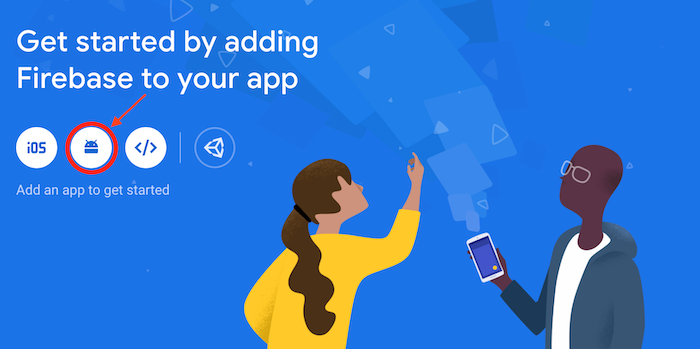
To integrate your Firebase project with the Android side of the app, first, click the Android icon on the project overview page:
You should be directed to a form. First, enter the Android package name. You can find this in your project directory → android → app → src → main → AndroidManifest.xml. On the second line, you’ll see your package name. Just copy and paste it into the form.
Optionally, you can choose a nickname for your app. If you leave this field empty, an auto-generated app name will be used:
You’ll have to enter the SHA-1 hash. Just hover over the help icon ? and click on See this page, which will take you to the Authenticating Your Client page:
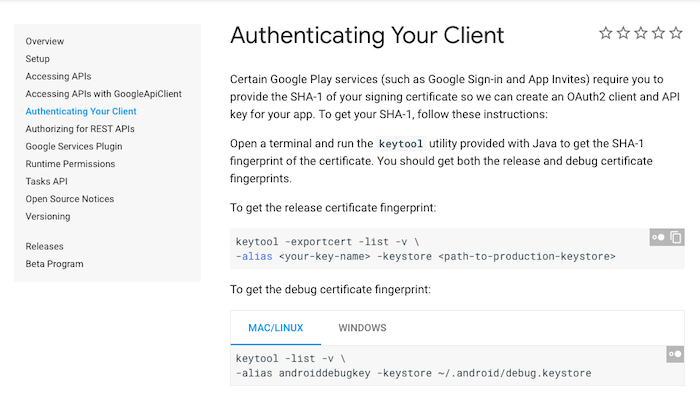
From here, you’ll get the command to generate the SHA-1 hash. Paste this command into your terminal, then just copy and paste the generated SHA-1 hash into the form. Click Register app, which will take you to the next step.
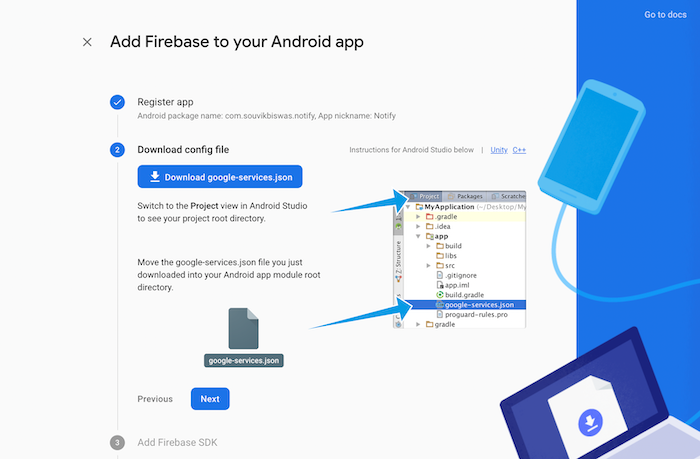
Download the google-services.json file, drag and drop it into your project directory → android → app, then, click Next:
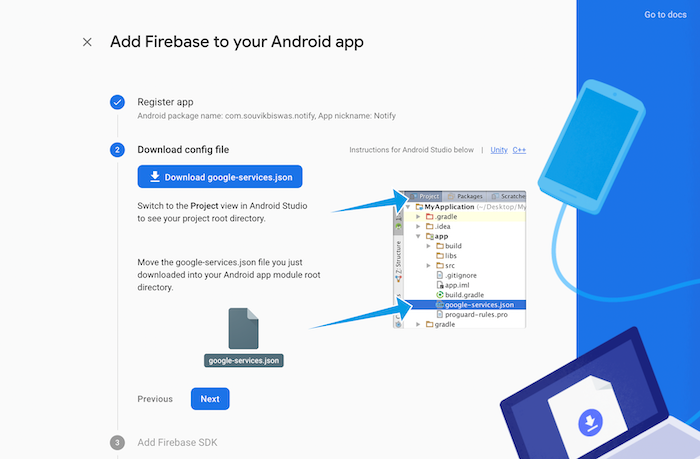
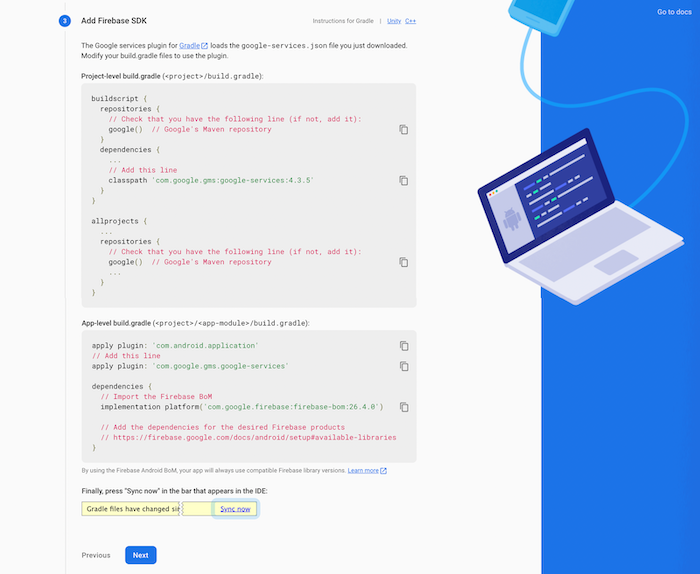
Follow the instructions and add the code snippets in the specified position. Then, click Next:
Finally, click Continue to console:
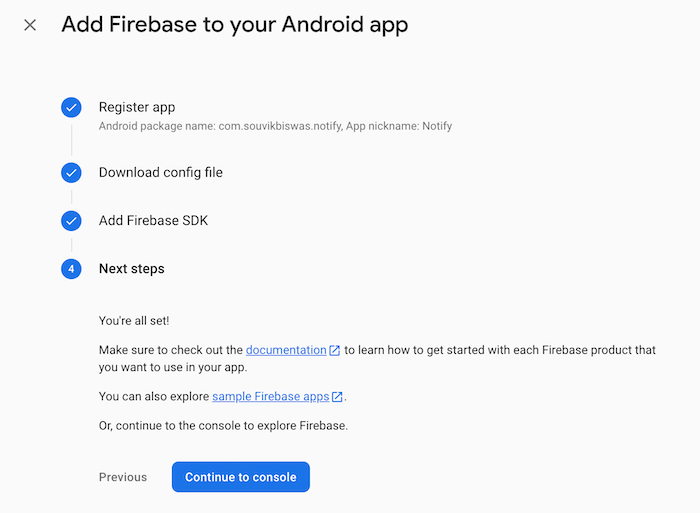
With this, you’ve completed the Firebase setup for the Android side of your app.
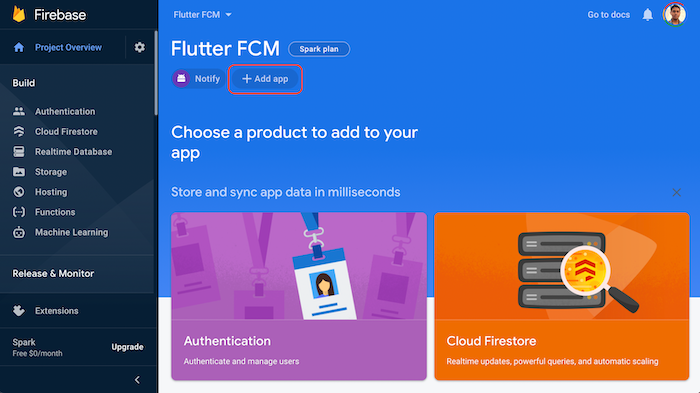
To integrate your Firebase project with the iOS side of your app, first, click the Add app button on the project overview page, then select iOS:
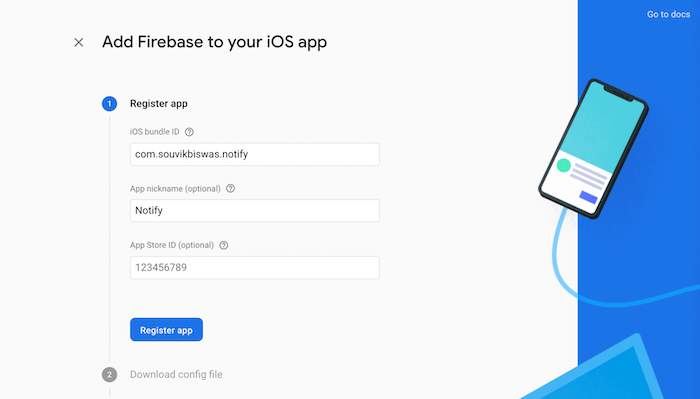
Enter the iOS bundle ID and your App nickname. Then, click Register app. You can leave the App store ID blank for now; you’ll get this when you deploy your app to the iOS App Store:
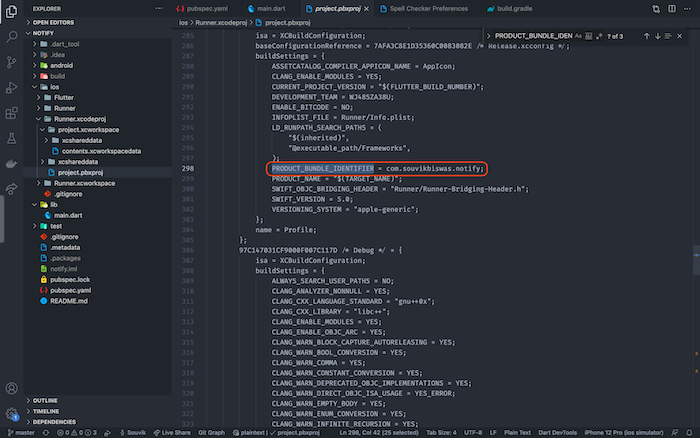
You can find the bundle ID inside ios → Runner.xcodeproj → project.pbxproj by searching for PRODUCT_BUNDLE_IDENTIFIER:
Next, select Download GoogleService-Info.plist:
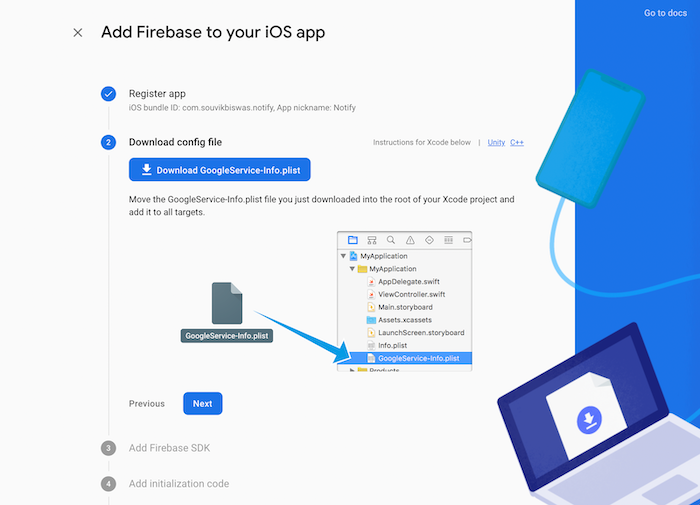
Open the ios folder of the project directory in Xcode. Drag and drop the file you downloaded into the Runner subfolder. When a dialog box appears, make sure the Copy items if needed of the Destination property is checked and Runner is selected in the Add to targets box. Then, click Finish:
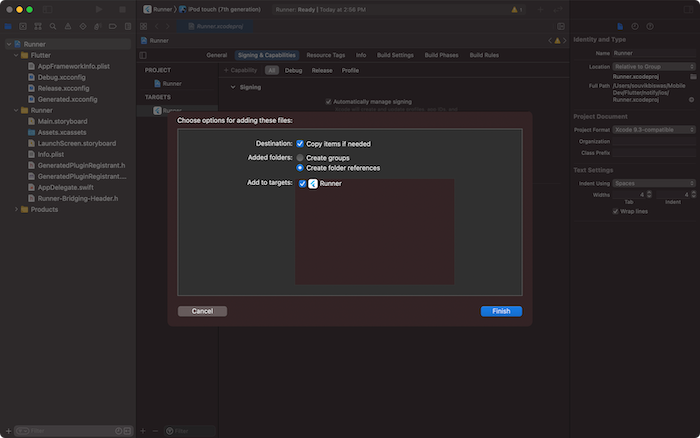
You can close Xcode now. You can skip steps three and four, Add Firebase SDK and Add initialization code. These will be handled by the Flutter Firebase plugin, which we’ll add soon. Then, click Continue to console.
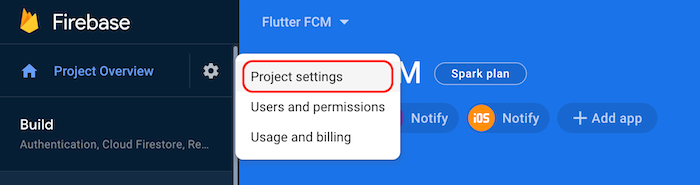
Before diving into the Flutter code, you need to complete one more step in Firebase;
go to Project settings:
Under the General tab, enter your Support email:
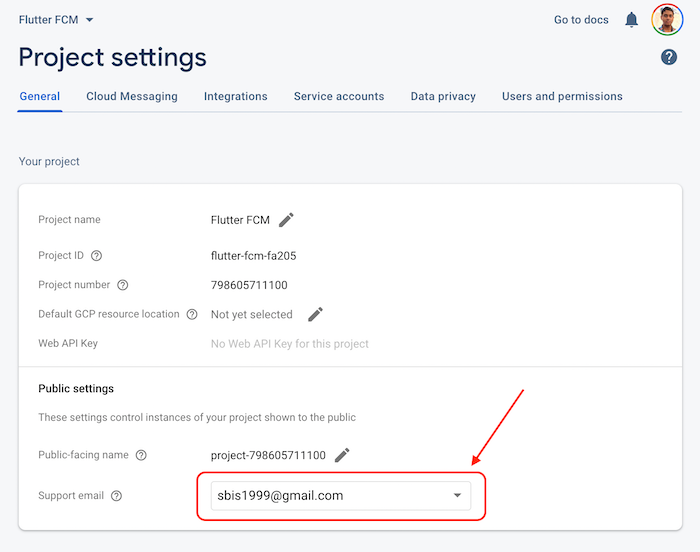
Now, the Firebase setup and integration are complete. Let’s move on to the Flutter code.
We require the following Flutter plugins for this project:
firebase_core: Required to use any Firebase service with Flutterfirebase_messaging: Used for receiving notifications in the appoverlay_support: Builds overlay UIYou can get these packages from pub.dev with their latest versions. Add them to the pubspec.yaml file of the Flutter project:
flutter pub add firebase_core //installs firebase core
flutter pub add firebase_messaging //installs firebase massaging package
flutter pub add overlay_support //installs overlay support
If you look into your pubspec.yaml file, you should see the following dependencies added:
dependencies:
  firebase_core: ^1.13.1
  firebase_messaging: ^11.2.11
  overlay_support: ^1.2.1
We’ll keep the UI of our Flutter app simple so we can focus on the functionality for our push notifications. The app will contain an AppBar and some Text widgets inside a Column to display the notification content:
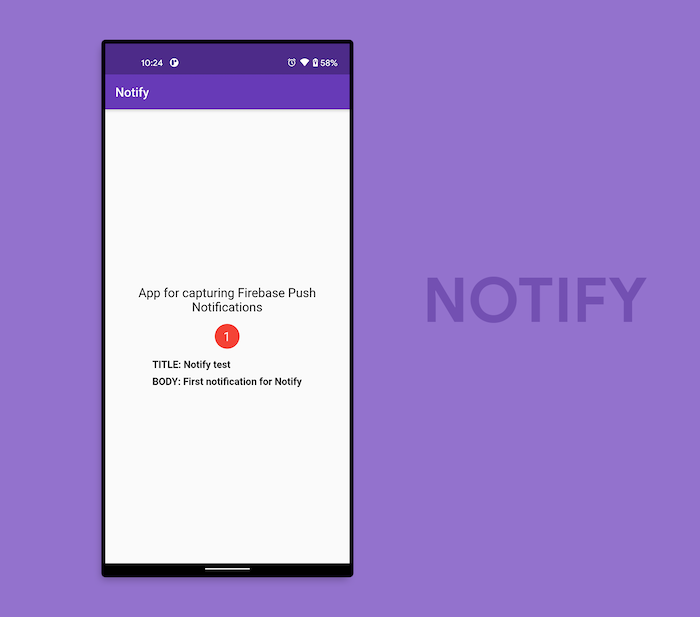
Navigate to the lib folder from the root project directory where the Dart code is. Replace the entire code with the following code:
void main() {
  runApp(MyApp());
}

class MyApp extends StatelessWidget {
  @override
  Widget build(BuildContext context) {
    return MaterialApp(
      title: 'Notify',
      theme: ThemeData(
        primarySwatch: Colors.deepPurple,
      ),
      debugShowCheckedModeBanner: false,
      home: HomePage(),
    );
  }
}
Now, we have to define the HomePage widget, which will be a StatefulWidget because we’ll need to update the UI as soon as a notification is generated:
class HomePage extends StatefulWidget {
  @override
  _HomePageState createState() => _HomePageState();
}

class _HomePageState extends State {
  late int _totalNotifications;

  @override
  void initState() {
    _totalNotifications = 0;
    super.initState();
  }

  @override
  Widget build(BuildContext context) {
    return Scaffold(
      appBar: AppBar(
        title: Text('Notify'),
        brightness: Brightness.dark,
      ),
      body: Column(
        mainAxisAlignment: MainAxisAlignment.center,
        children: [
          Text(
            'App for capturing Firebase Push Notifications',
            textAlign: TextAlign.center,
            style: TextStyle(
              color: Colors.black,
              fontSize: 20,
            ),
          ),
          SizedBox(height: 16.0),
          NotificationBadge(totalNotifications: _totalNotifications),
          SizedBox(height: 16.0),
          // TODO: add the notification text here
        ],
      ),
    );
  }
}
Here, we have a Scaffold containing an AppBar and a Column. The column contains a basic Text widget followed by the NotificationBadge widget for displaying the total number of notifications received. You may have noticed the TODO, which is where we’ll display the notification information.
The code for the NotificationBadge is as follows:
class NotificationBadge extends StatelessWidget {
  final int totalNotifications;

  const NotificationBadge({required this.totalNotifications});

  @override
  Widget build(BuildContext context) {
    return Container(
      width: 40.0,
      height: 40.0,
      decoration: new BoxDecoration(
        color: Colors.red,
        shape: BoxShape.circle,
      ),
      child: Center(
        child: Padding(
          padding: const EdgeInsets.all(8.0),
          child: Text(
            '$totalNotifications',
            style: TextStyle(color: Colors.white, fontSize: 20),
          ),
        ),
      ),
    );
  }
}
Now, it’s time for us to add the functionality for our push notifications. To start using the Firebase Cloud Messaging service, first, define a variable for FirebaseMessaging:
class _HomePageState extends State {
  late final FirebaseMessaging _messaging;
  // ...

  @override
  Widget build(BuildContext context) {
    // ...
  }
}
Create a method called registerNotification() inside the _HomePageState class. registerNotification() will initialize the Firebase app, request notification access, which is required only on iOS devices, and finally, configure the messaging to receive and display push notifications:
void registerNotification() async {
  // 1. Initialize the Firebase app
  await Firebase.initializeApp();

  // 2. Instantiate Firebase Messaging
  _messaging = FirebaseMessaging.instance;

  // 3. On iOS, this helps to take the user permissions
  NotificationSettings settings = await _messaging.requestPermission(
    alert: true,
    badge: true,
    provisional: false,
    sound: true,
  );

  if (settings.authorizationStatus == AuthorizationStatus.authorized) {
    print('User granted permission');
    // TODO: handle the received notifications
  } else {
    print('User declined or has not accepted permission');
  }
}
In the code above, we first initialized the Firebase app, without which we wouldn’t be able to access any Firebase services inside the app. After that, we instantiated Firebase Messaging. The requestPermission() method takes user consent on iOS devices. If the app is being run on an Android device, this is ignored.
To receive push notifications that arrive on the device and perform a UI change according to the notification, use the following code:
void registerNotification() async {
  //...

  if (settings.authorizationStatus == AuthorizationStatus.authorized) {
    print('User granted permission');

    // For handling the received notifications
    FirebaseMessaging.onMessage.listen((RemoteMessage message) {
      // Parse the message received
      PushNotification notification = PushNotification(
        title: message.notification?.title,
        body: message.notification?.body,
      );

      setState(() {
        _notificationInfo = notification;
        _totalNotifications++;
      });
    });
  } else {
    print('User declined or has not accepted permission');
  }
}
The PushNotification is a model class for storing the notification content.
The PushNotification model class looks like the code below:
class PushNotification {
  PushNotification({
    this.title,
    this.body,
  });
  String? title;
  String? body;
}
To show the notification on the UI, you can use the overlay_support plugin we added earlier. You can easily create a simple or even a custom UI effect as any notification arrives on the device.
Wrap the MaterialApp widget with the OverlaySupport widget:
class MyApp extends StatelessWidget {
  @override
  Widget build(BuildContext context) {
    return OverlaySupport(
      child: MaterialApp(
        // ...
      ),
    );
  }
}
Then, use the showSimpleNotification() method to display the notification inside the app:
void registerNotification() async {
  //...

  if (settings.authorizationStatus == AuthorizationStatus.authorized) {
    FirebaseMessaging.onMessage.listen((RemoteMessage message) {
      // ...
      if (_notificationInfo != null) {
        // For displaying the notification as an overlay
        showSimpleNotification(
          Text(_notificationInfo!.title!),
          leading: NotificationBadge(totalNotifications: _totalNotifications),
          subtitle: Text(_notificationInfo!.body!),
          background: Colors.cyan.shade700,
          duration: Duration(seconds: 2),
        );
      }
    });
  } else {
    print('User declined or has not accepted permission');
  }
}
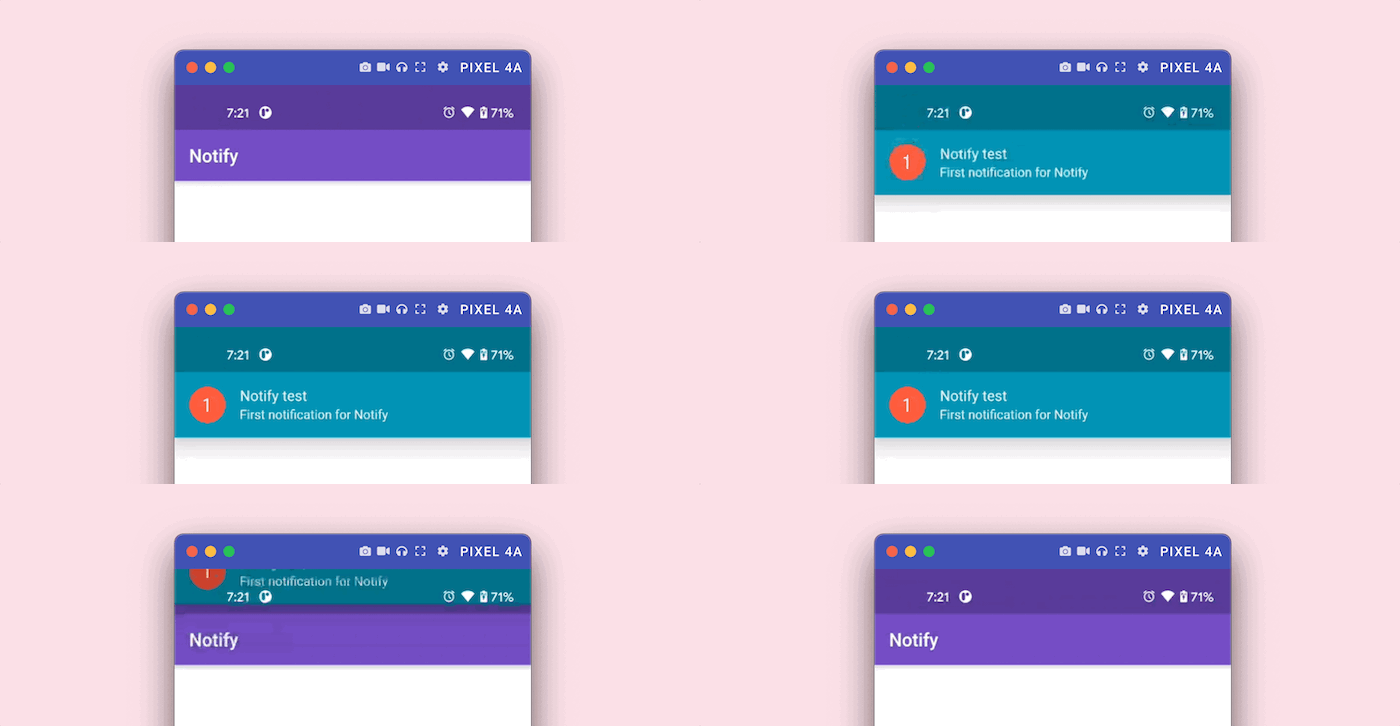
You might remember that we left a TODO to be completed where we have to show the notification data on the screen. You can use the _notificationInfo and _totalNotifications variables to show the information:
class _HomePageState extends State {
  late int _totalNotifications;
  PushNotification? _notificationInfo;

  //...

  @override
  Widget build(BuildContext context) {
    return Scaffold(
      appBar: AppBar(
        title: Text('Notify'),
        brightness: Brightness.dark,
      ),
      body: Column(
        mainAxisAlignment: MainAxisAlignment.center,
        children: [
          //...

          _notificationInfo != null
              ? Column(
                  crossAxisAlignment: CrossAxisAlignment.start,
                  children: [
                    Text(
                      'TITLE: ${_notificationInfo!.title}',
                      style: TextStyle(
                        fontWeight: FontWeight.bold,
                        fontSize: 16.0,
                      ),
                    ),
                    SizedBox(height: 8.0),
                    Text(
                      'BODY: ${_notificationInfo!.body}',
                      style: TextStyle(
                        fontWeight: FontWeight.bold,
                        fontSize: 16.0,
                      ),
                    ),
                  ],
                )
              : Container(),
        ],
      ),
    );
  }
}
As you can see, we’re displaying a Column with two Text widgets to show the title and body of the notification. When the _notificationInfo is null, we just show an empty Container:
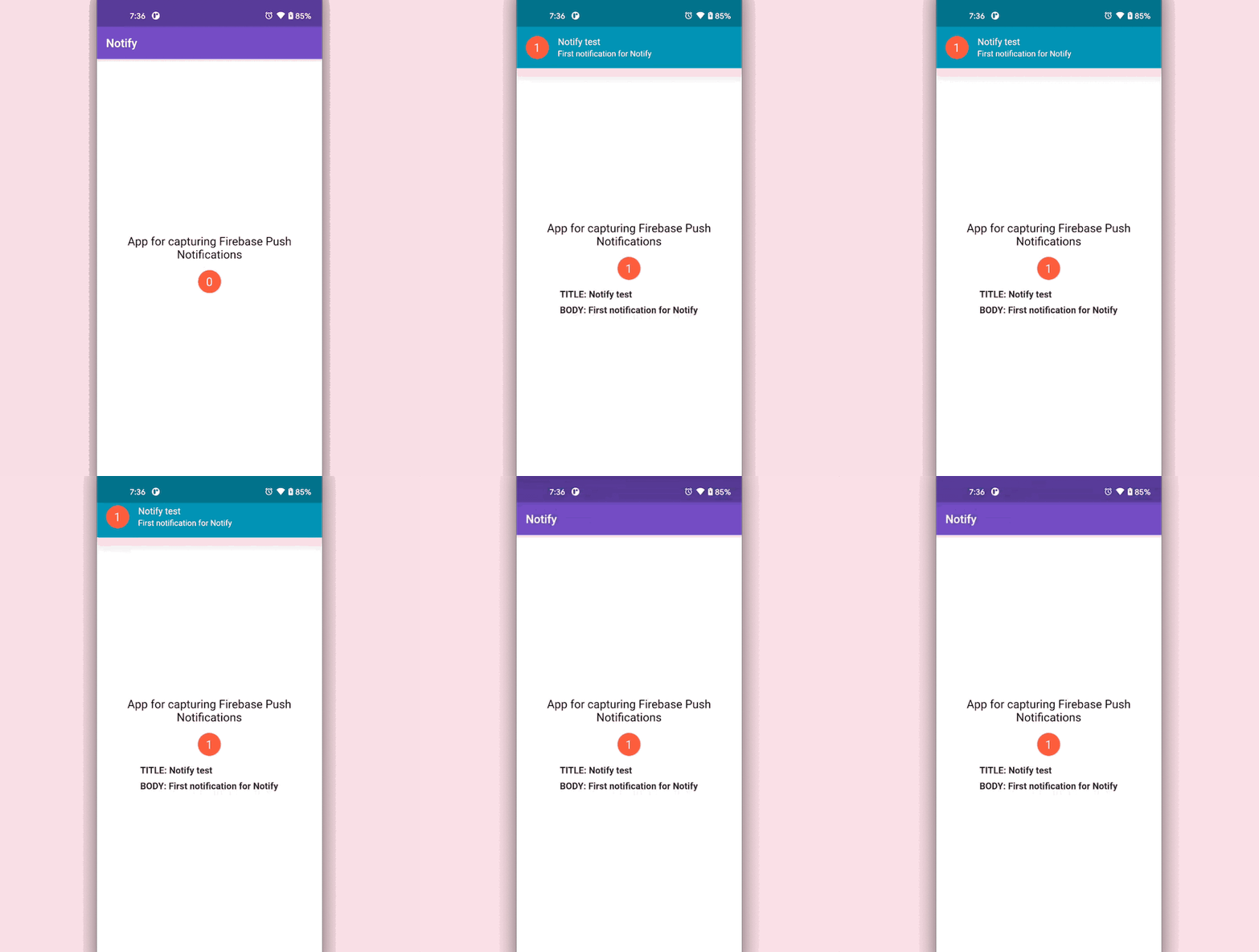
If you try to put the app in the background, you’ll still receive the notification. Since we haven’t yet configured how to handle background notifications, you won’t see any change in the UI as you tap on the notification to open the app:
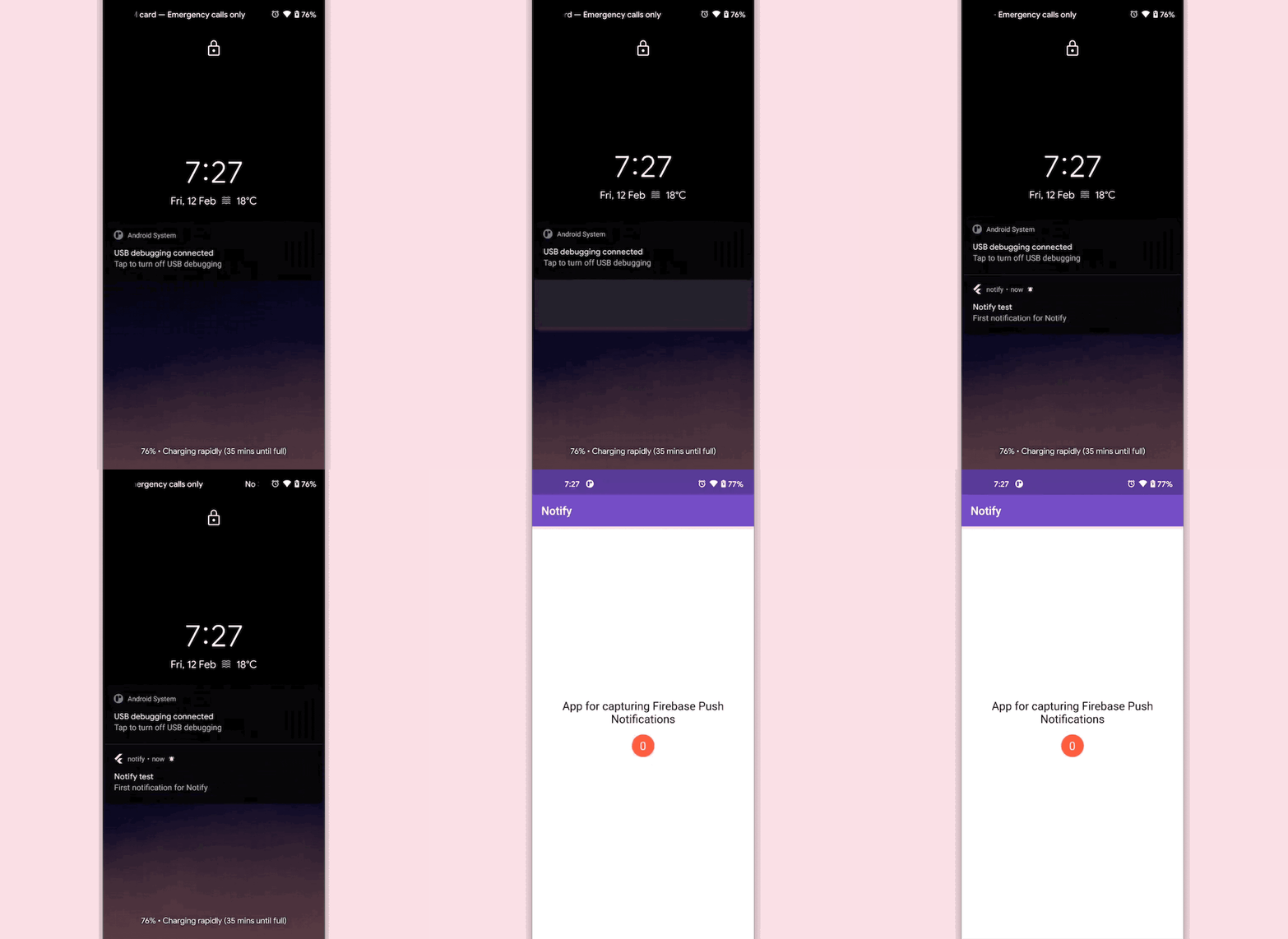
To handle background notifications, we have to define a top-level function called _firebaseMessagingBackgroundHandler() and pass it to the onBackgroundMessage() inside the registerNotification() method.
You can define the _firebaseMessagingBackgroundHandler() function as follows:
Future _firebaseMessagingBackgroundHandler(RemoteMessage message) async {
  print("Handling a background message: ${message.messageId}");
}
Keep in mind that you have to define this as a top-level function, which means it should be outside of any class.
Call the onBackgroundMessage() method:
void registerNotification() async {
  await Firebase.initializeApp();
  _messaging = FirebaseMessaging.instance;

  // Add the following line
  FirebaseMessaging.onBackgroundMessage(_firebaseMessagingBackgroundHandler);

  // ...
}
If you just define this, you won’t be able to retrieve and show data within the app.
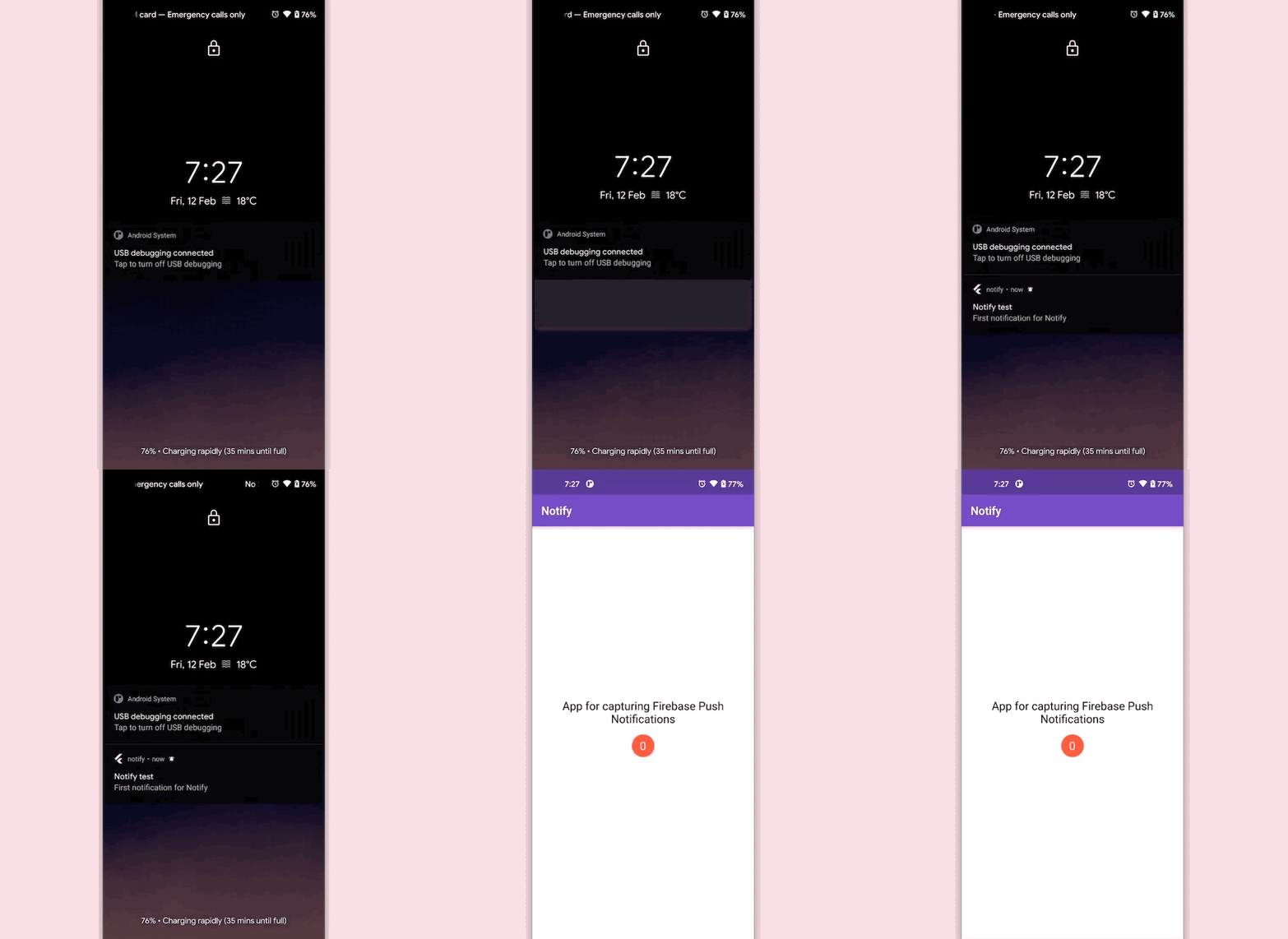
To handle the action when the app is in the background and the notification is tapped, you have to add the following code to the initState() method:
@override
void initState() {
  //...

  // For handling notification when the app is in background
  // but not terminated
  FirebaseMessaging.onMessageOpenedApp.listen((RemoteMessage message) {
    PushNotification notification = PushNotification(
      title: message.notification?.title,
      body: message.notification?.body,
    );
    setState(() {
      _notificationInfo = notification;
      _totalNotifications++;
    });
  });

  super.initState();
}
But, the initState() method won’t be enough to retrieve the information if the app is in terminated state and is brought back by tapping on the notification. Define a method called checkForInitialMessage() and add the following code to it:
// For handling notification when the app is in terminated state
checkForInitialMessage() async {
  await Firebase.initializeApp();
  RemoteMessage? initialMessage =
      await FirebaseMessaging.instance.getInitialMessage();

  if (initialMessage != null) {
    PushNotification notification = PushNotification(
      title: initialMessage.notification?.title,
      body: initialMessage.notification?.body,
    );
    setState(() {
      _notificationInfo = notification;
      _totalNotifications++;
    });
  }
}
Call checkForInitialMessage() from the initState() method:
@override
void initState() {
  // ...

  // Call here
  checkForInitialMessage();

  // ...
  super.initState();
}
You can send some additional data in the format of a key-value pair using the Firebase Cloud Messaging console. We’ll demonstrate that by sending the following key-value pair:

title and body are the keys. Their respective values are listed on the left. To store this data, you have to make a minor modification to the model class:
class PushNotification {
  PushNotification({
    this.title,
    this.body,
    this.dataTitle,
    this.dataBody,
  });

  String? title;
  String? body;
  String? dataTitle;
  String? dataBody;
}
We defined two additional fields for the data message. Now, retrieve the data as follows:
PushNotification notification = PushNotification(
  title: message.notification?.title,
  body: message.notification?.body,
  dataTitle: message.data['title'],
  dataBody: message.data['body'],
);

setState(() {
  _notificationInfo = notification;
  _totalNotifications++;
});
To show the data in the UI, you can make these modifications to the Text widgets where you display that information:
Text(
  'TITLE: ${_notificationInfo!.dataTitle ?? _notificationInfo!.title}',
  // ...
),
Text(
  'BODY: ${_notificationInfo!.dataBody ?? _notificationInfo!.body}',
  // ...
),
Doing so will display the information from the data message. If it’s empty, the notification message information will be shown:
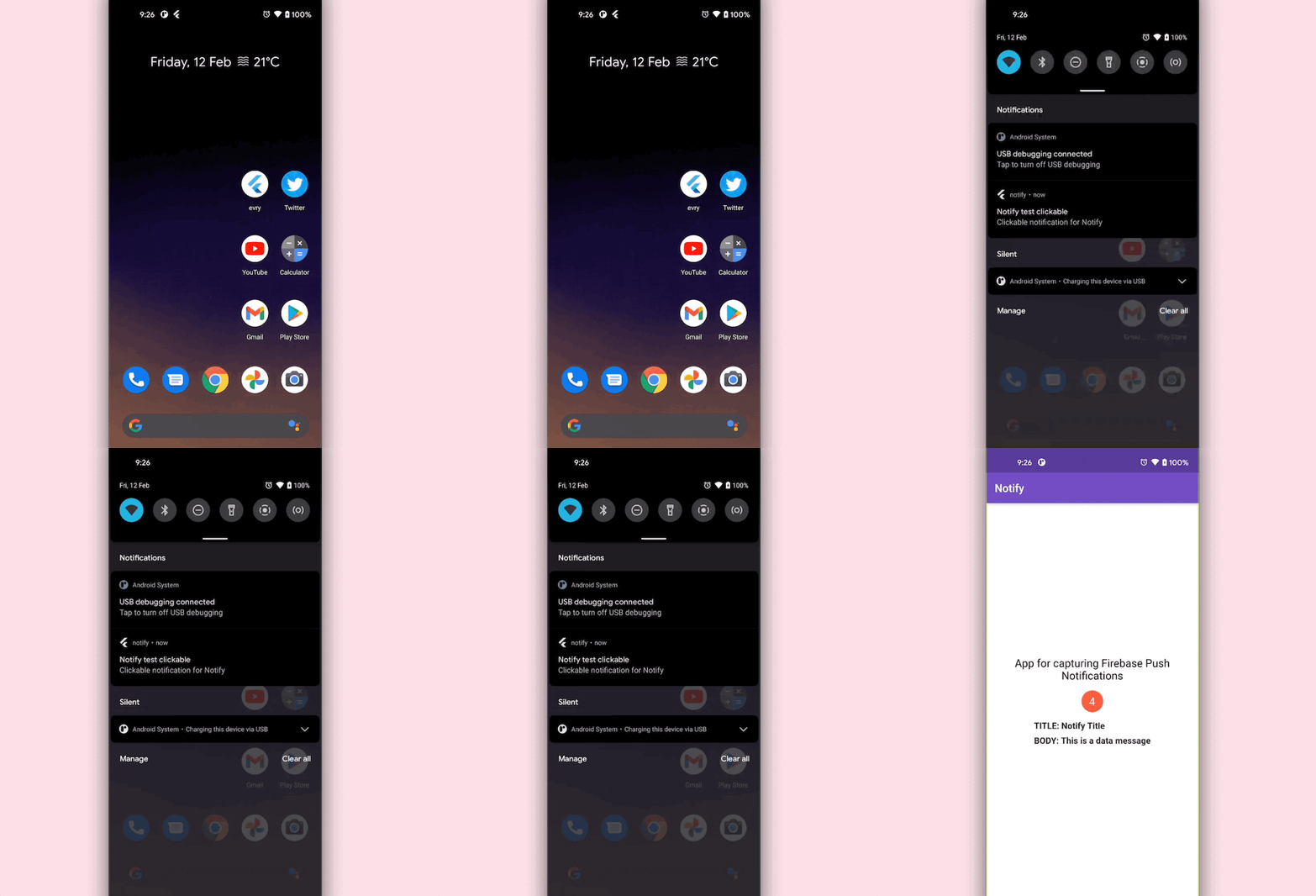
Now that we’ve completed our example Flutter app with push notifications, it’s time to run it. To do so, we need to add some configurations to both the Android and iOS sides of the app.
When running the application for the first time on iOS, be sure to set your deployment targets to 10.0 as firebase_messaging: ^11.2.11 requires it to run effectively without errors.
To run the app on your Android device, go to android → app → build.gradle, and enable multidex support:
android {
    defaultConfig {
        // ...
        multiDexEnabled true
    }
}
Inside android → app → src → main → AndroidManifest.xml, add the <intent-filter> tag inside the <activity>:
<manifest xmlns:android="http://schemas.android.com/apk/res/android"
    package="<your_package_name>">
   <application
        android:label="notify"
        android:icon="@mipmap/ic_launcher">
        <activity
            android:name=".MainActivity"
            <!-- ... -->
            <!-- Add this tag -->
            <intent-filter>
              <action android:name="FLUTTER_NOTIFICATION_CLICK" />
              <category android:name="android.intent.category.DEFAULT" />
            </intent-filter>
        </activity>
        <!-- ... -->
    </application>
</manifest>
The <intent-filter> tag will help to retrieve the data message while a notification arrives.
If you’re running the app on an iOS device, you’ll need to perform some additional setup, including enabling push notifications and background modes in Xcode.
In addition, you must have an Apple Developer account. Since Firebase Cloud Messaging integrates with the Apple Push Notification service, which only works with real devices, you’ll also need access to a physical iOS device to receive push notifications.
You can find a detailed, step-by-step guide to configuring your iOS app to receive push notifications in the official FireFlutter docs.
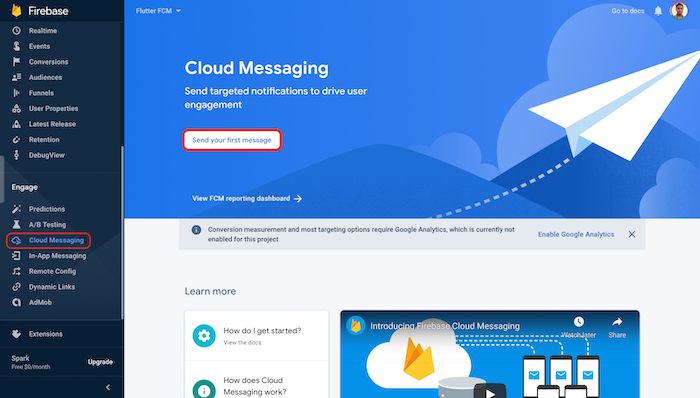
You can send notifications from the Firebase Cloud Messaging console directly. Go to the Cloud Messaging section from the left menu of the project overview page and click Send your first message:
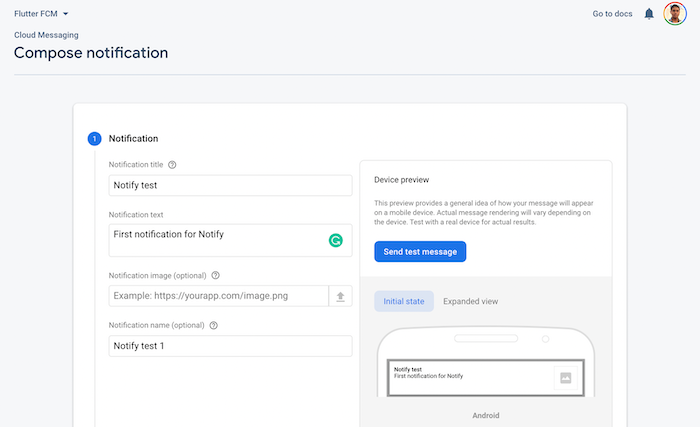
Enter a notification title, text, and name, then click Next:
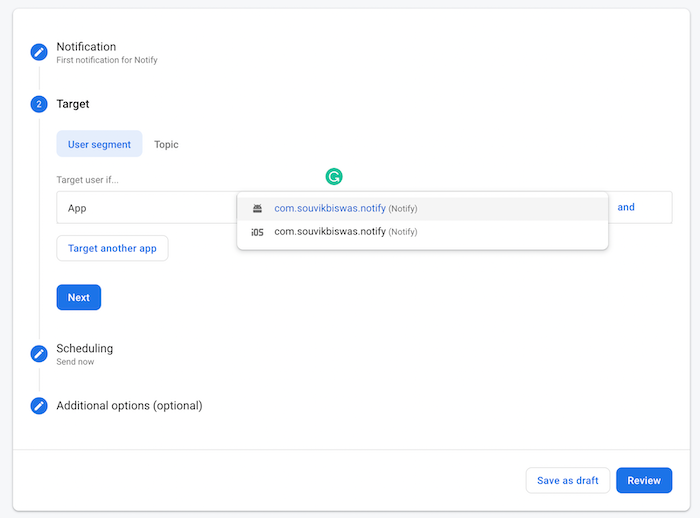
Set the Target to be either your Android or iOS app, or both. Click Next:
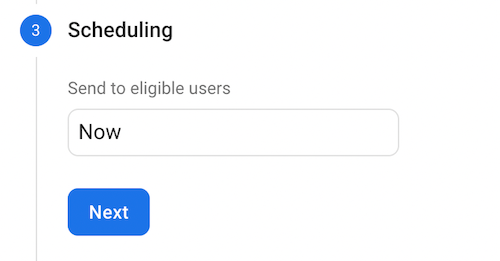
Specify the Scheduling as Now. Click Next:
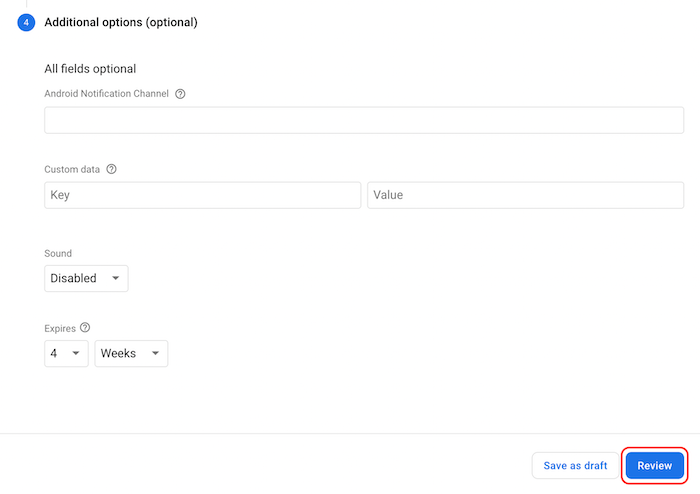
For a simple notification, you don’t need to provide anything in the Additional options field. Click Review:
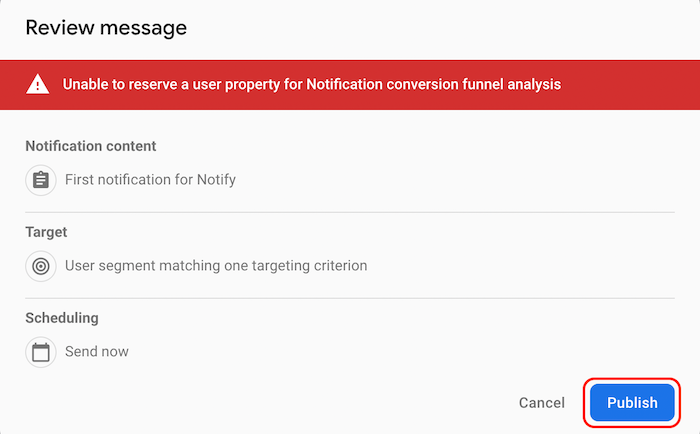
Click Publish to send the notification. Don’t worry about the warning at the top; it’s telling us we haven’t set up Google Analytics for this project:
You can send data by specifying the following in the Additional options. The click_action key with the value FLUTTER_NOTIFICATION_CLICK is mandatory. Otherwise, your app won’t be able to retrieve the data message on the device:
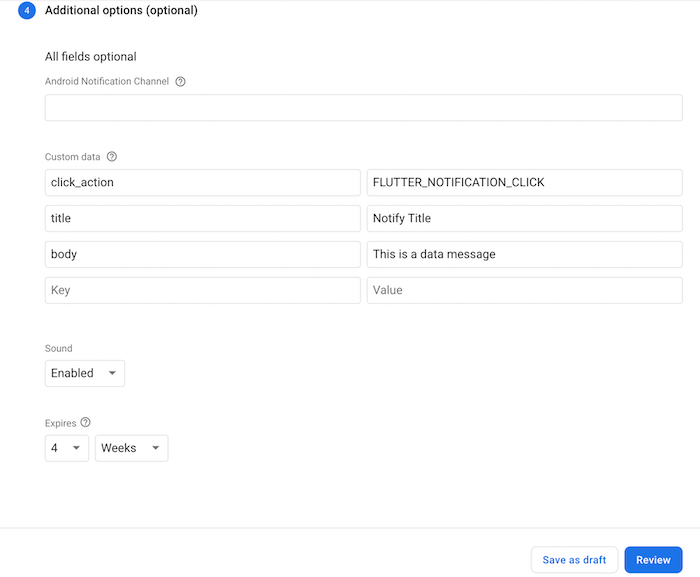
Click Review, then Publish to send the data notification.
If you’ve made it to this point, you should have a solid understanding of what push notifications are, how to integrate push notification functionality with a Flutter app, and how to send push notifications using Firebase Cloud Messaging.
There are countless other customizations you can explore when implementing push notifications in Flutter. To continue building on the Flutter example in this article, I recommend adding Firebase authentication.
I hope you enjoyed this article, and be sure to leave a comment if you have any questions!
Install LogRocket via npm or script tag. LogRocket.init() must be called client-side, not
server-side
$ npm i --save logrocket

// Code:

import LogRocket from 'logrocket';
LogRocket.init('app/id');
// Add to your HTML:

<script src="https://cdn.lr-ingest.com/LogRocket.min.js"></script>
<script>window.LogRocket && window.LogRocket.init('app/id');</script>

Why the future of DX might come from the web platform itself, not more tools or frameworks.

A hands-on test of Claude Code Review across real PRs, breaking down what it flagged, what slipped through, and how the pipeline actually performs in practice.

CSS art once made frontend feel playful and accessible. Here’s why it faded as the web became more practical and prestige-driven.

Learn how inline props break React.memo, trigger unnecessary re-renders, and hurt React performance — plus how to fix them.
Would you be interested in joining LogRocket's developer community?
Join LogRocket’s Content Advisory Board. You’ll help inform the type of content we create and get access to exclusive meetups, social accreditation, and swag.
Sign up now


 Learn more →




