AI coding agents have a tendency to generate code that isn’t particularly maintainable. They often duplicate logic, create massive files, and produce overly complex functions that are difficult for humans to understand. As these issues accumulate over time, they can turn a codebase into a significant maintenance burden.

In many cases, asking an agent to refactor simply results in even more code being added. Manually cleaning up the code isn’t always a practical alternative either, as reviewing and refactoring large AI-generated codebases can be extremely time-consuming.
Enter Fallow, a TypeScript and JavaScript code analysis tool designed to help you keep your codebase healthy. Fallow identifies unused code, duplicate logic, and large, complex sections of code that are likely to become technical debt if left unchecked. It gives you a clear picture of where your codebase is becoming difficult to maintain before those problems grow into something much larger.
In this article, you’ll learn how to set up Fallow in your project, understand the reports it generates, and integrate it into your AI-assisted development workflow.
One thing many developers believe AI will take away is the need to write clean code. The push for clean code has always been about preventing technical debt and spending less time untangling messy logic, making future changes easier and less expensive.
But what if the average developer believes they no longer need to worry about what their code looks like in the future because they see it as AI’s responsibility? That’s one way AI is changing the software industry. And to be fair, it’s a reasonable perspective. AI is becoming increasingly capable of maintaining and modifying its own code. But AI is still AI, and the results can be unpredictable.
That said, this isn’t always the reality. Most developers don’t write messy code because they lack the knowledge or don’t care about quality. More often, they’re working under tight deadlines, shifting priorities, and constant pressure to deliver. That’s understandable.
The problem comes later. When a codebase has accumulated years of technical debt and become difficult to understand, relying entirely on AI may not be enough. If that tool fails, you could find yourself hiring a team of developers to rewrite large parts of the application. That’s an expensive outcome, especially since many developers are hesitant to work with codebases that are difficult to maintain.
That’s why clean code still matters in the age of AI. Whether code is written by a human, an AI agent, or a combination of both, maintainability should remain a priority throughout a project’s lifecycle. AI can speed up development, but it shouldn’t become an excuse to neglect the long-term health of your codebase.
Fallow?Fallow is a free, Rust-native codebase intelligence tool designed to analyze TypeScript and JavaScript projects. It acts as an automated code audit tool that provides factual analysis about a project’s overall code quality, structure, and execution pattern.
Unlike formatters and linters, which treat a codebase as a collection of individual files, Fallow treats it as an interconnected system. Because it is built on the Oxc parser ecosystem, it can sweep through codebases at sub-second speeds, making it significantly faster than older tools like knip or jscpd.
A major differentiator for Fallow is its native compatibility with AI agents. Because LLMs have limited context windows and cannot easily map a massive repository’s dependency graph, Fallow can serve as the source of truth for the AI.
Fallow combines several distinct auditing responsibilities into a single binary, which generates the following report in a single run:
To integrate seamlessly into modern developer workflows, it provides an MCP server and structured JSON output that contains machine-actionable action arrays, which enable AI agents to trigger automated tools, catch structural clutter, and self-correct code before it is ever committed.
FallowFallow has two intelligence layers: Static Intelligence and Runtime Intelligence.
The Static Intelligence layer is free and analyzes how your codebase is wired together. It helps you understand relationships between files, identify unused code, detect dead exports, and uncover other structural issues.
The Runtime Intelligence layer is optional and paid. It provides insights into what gets executed in production,
This article focuses only on the Static Intelligence layer because it’s free and provides everything you need to improve your codebase. Setting it up is straightforward too.
Simply run the following command in your project’s root directory:
npx fallow
Fallow doesn’t require any configuration. After you run the command above, it automatically detects your project’s setup by inspecting your package.json file and enables the appropriate plugins and presets. It supports frameworks such as Next.js, Vite, NestJS, SvelteKit, TanStack, and many others.
By default, the command generates a comprehensive report that combines dead code detection, code duplication, and code health and complexity into a single, structured output.
If you prefer, you can run each analysis separately using any of the following commands:
npx fallow dead code
npx fallow dupes
npx fallow health
You can also install Fallow as a development dependency if you want everyone who works on the repository to have access to it.
npm install --save-dev fallow
The first time you run Fallow, the output can feel overwhelming because of the amount of information it provides. In this section, we’ll run Fallow against a vibe-coded application and walk through each part of the report so you can understand what it means and how to act on it.
As mentioned earlier, Fallow‘s report is divided into three main sections: Dead Code, Duplication, and Health.
This section highlights code that isn’t structurally connected to anything else in the project, including unused files, exports, dependencies, types, and more.
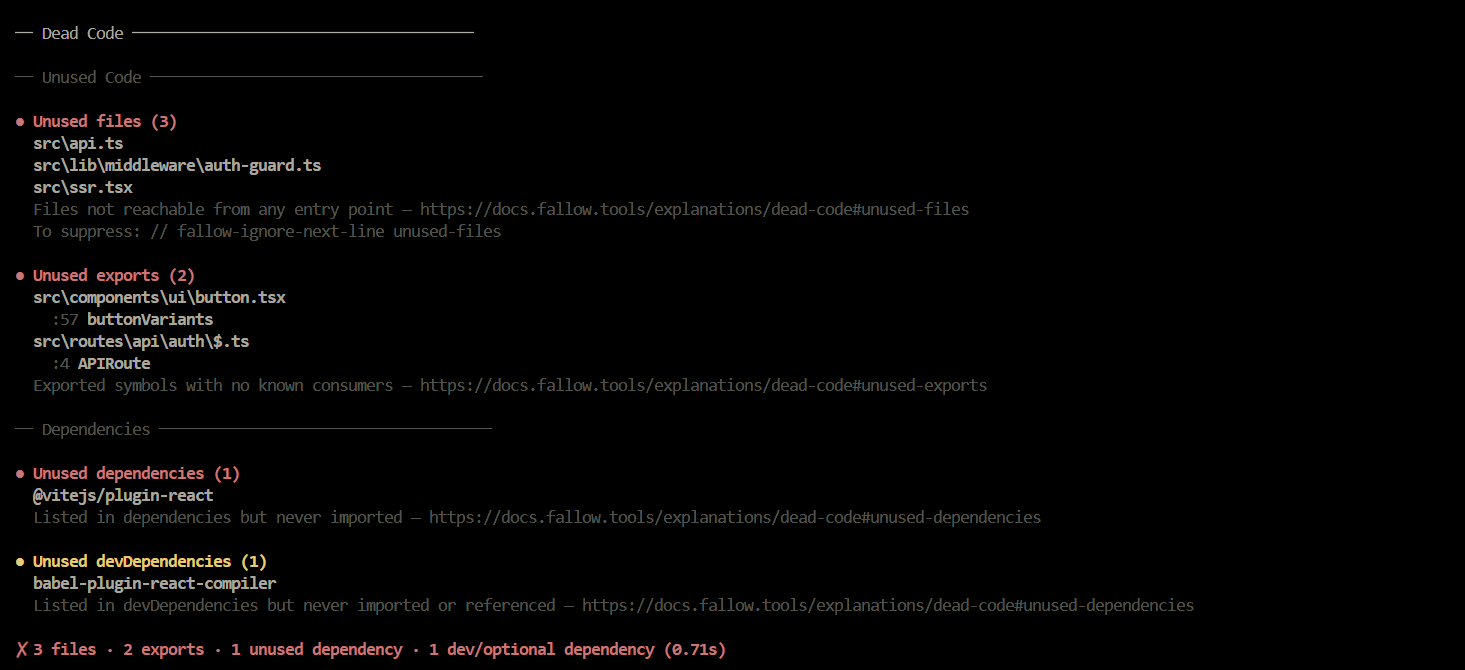
As shown in the image above, each category is grouped into its own subsection under the Dead Code report.
Each subsection contains a list of file paths and the functions, exports, or declarations that Fallow has identified as unused.
To remove them, open the listed file and locate the corresponding code. Since dead code isn’t referenced anywhere else in the codebase, it’s generally safe to remove without breaking your application.
That said, Fallow can occasionally flag entry-point code as dead because it’s referenced from outside the file rather than through the project’s internal dependency graph. It’s worth reviewing these cases before deleting anything.
If you’d rather let Fallow handle the cleanup, you can run the following command to automatically remove dead code:
fallow fix –dry-run
This command may not always produce the expected results, so it’s a good idea to review the changes before committing them.
The Duplication section is one of the most valuable parts of the report because it highlights code blocks that are repeated across your codebase. The output looks like this:
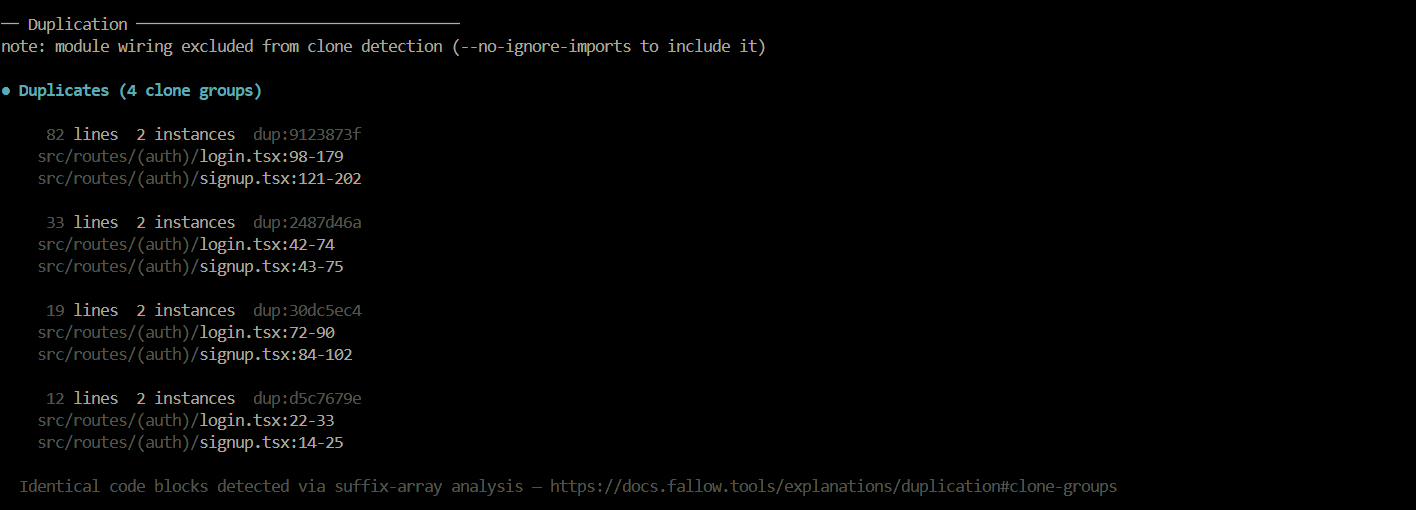
Like the Dead Code section, the Duplication report is divided into individual entries. However, there are a few important differences. Fallow uses AST-equivalent token matching to detect duplicate code, grouping each set of matches into what it calls a clone group.
Let’s use the first clone group in the report shown above as an example.
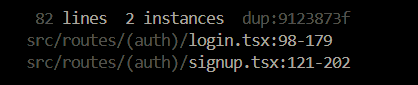
In this case, the clone group indicates that the code block within the 98 – 179 line range inside the login.tsx file has 82 lines of repeated code in the signUp.tsx file.
Fallow‘s duplication detection is also more nuanced than a simple text comparison. It supports multiple detection modes that can identify duplicated logic even when variable names, strings, or other identifiers have been renamed. You can learn more about these modes in the documentation.
This section focuses on code complexity metrics for individual functions and files. It measures how difficult different parts of your codebase are to understand and maintain.
The report is organized into several subsections that highlight files with large functions, highly complex functions, low file health scores, and other maintainability concerns.
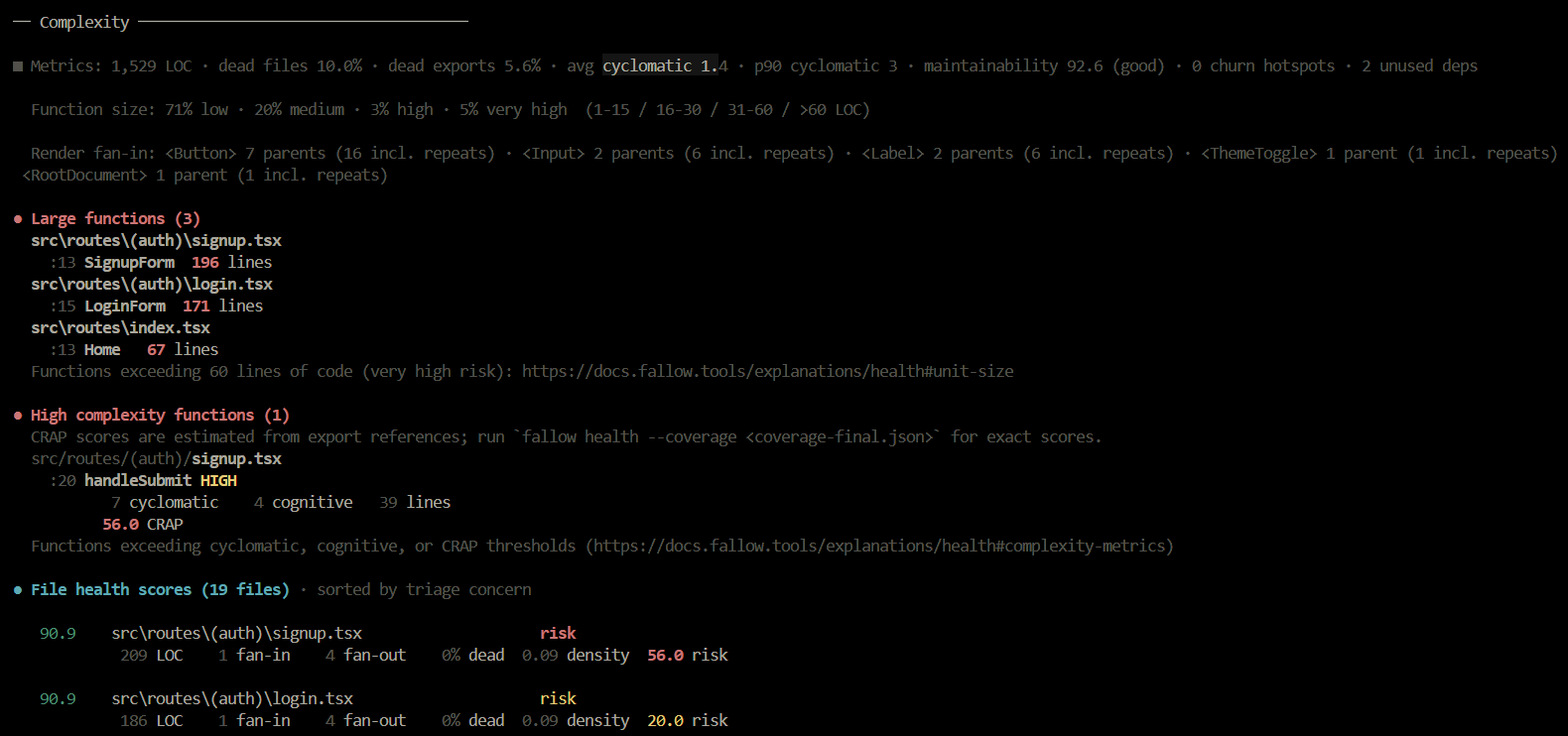
The Large Functions section lists every function that exceeds Fallow‘s size threshold, along with its location in the codebase. For each entry, it shows the function name, the starting line, and the total line range.
Using the first entry in the example above, we can see that the signup.tsx file contains a signupForm function that starts on line 13 and spans 196 lines.
The High Complexity Functions section can look intimidating at first, but it simply measures how difficult a function is to understand, maintain, and test. Fallow reports three complexity metrics for each function:
The File Health Score section provides an overall assessment of each file’s maintainability. It takes several factors into account, including the file’s complexity, the amount of dead code it contains, the number of files it imports, and how many other files depend on it.
These metrics are combined to produce a health score and an associated risk level. The risk score is influenced by multiple factors, with high CRAP scores contributing significantly because they indicate complex code with insufficient test coverage.
The Hotspots section identifies the files that are most likely to become maintenance problems over time. It analyzes your Git history to determine which files change most frequently and combines that information with each file’s maintainability metrics.
This is because a complex file that is modified in almost every pull request is far more likely to accumulate bugs and technical debt than one that’s rarely touched.
As a result, files that change frequently and have poor maintainability scores are ranked highest in the Hotspots report.
This is the final section of the report. It provides a ranked list of the best places to start refactoring based on the effort required and the potential impact.
Files are ranked using a combination of complexity, duplication, and dead code metrics, helping you identify the changes that are likely to deliver the greatest return for the least amount of work.
Think of this section as a high-level cleanup roadmap. Instead of focusing on individual issues, it helps you decide where to invest your refactoring effort first.
Although Fallow doesn’t require any configuration to generate a useful report, as we’ve seen in the previous sections, it can occasionally produce false positives, particularly in the Dead Code and Duplication reports.
This happens because static analysis can’t always distinguish intentional patterns from actual issues. For example, duplicated code in test files, repeated data structures, or application entry points may be flagged as duplicate or unused even though they’re required.
To reduce these false positives, you can create a configuration file. This allows you to specify your project’s entry points, define files and directories to ignore, and customize other settings so Fallow can produce more accurate results.
npx fallow init
This command generates a .fallowrc.json file in your project’s root directory. Open the file, set your project’s entry points, and add any files or directories you want Fallow to ignore to the ignorePattern field, as shown below:
{
   "$schema":      "https://raw.githubusercontent.com/fallow-rs/fallow/main/schema.json",
  "entry": ["src/workers/*.ts", "scripts/*.ts"],
   "ignorePatterns": [
    "src/data/data/**",
    "**/*.generated.ts",
    "**/__tests__/**"
    ]
 }
You can also configure the severity of individual rules on a per-file basis, or disable rules you’re not ready to enforce by setting their severity to off. Fallow also lets you customize its duplication detection mode and many other aspects of its analysis.
{
    "rules": {
    "unused-files": "error",
    "unused-exports": "warn",
    "unused-types": "off",
  },
  "duplicates": {
    "mode": "mild",
    "minTokens": 50,
    "minLines": 5,
    "threshold": 10
  },
}
In cases where you have unused exports that are consumed by external projects and therefore have no internal references, you don’t have to exclude the entire file. Instead, you can use Fallow‘s inline suppression comments (fallow-ignore) or JSDoc visibility tags to selectively ignore those exports.
// Suppress all issues on the next line
// fallow-ignore-next-line
export const keepThis = 1;
// Suppress a specific issue type
// fallow-ignore-next-line unused-export
export const keepThisToo = 2;
Fallow recognizes four JSDoc visibility tags: @public, @internal, @beta, @alpha:
/** @public */
export function createClient() {
  // Not imported anywhere in this repo, but consumed by users of the library
}
/** @internal */
export function resetState() {
  // Used by sibling packages in the monorepo, not public API
}
Fallow also provides the @expected-unused JSDoc tag for exports that are intentionally unused. Unlike visibility tags, this annotation is tracked. If the export is eventually referenced, Fallow marks the tag as stale, letting you know it’s no longer needed and can be removed.
/** @expected-unused */
export const deprecatedHelper = () => {
  // Intentionally kept but not used anywhere
};
To learn more about inline suppressions and the many ways you can configure Fallow, refer to the documentation.
Fallow into your workflowWhere Fallow really shines is its integration with AI-assisted development workflows. The idea is to instruct your coding agent to run Fallow against every newly implemented feature and use the report to fix any issues before considering the task complete.
Every Fallow command accepts the --format json flag, which returns a structured JSON object that AI agents can easily parse. For example, running the default fallow command with the flag:
npx fallow --format json
Executes every analysis combined: dead code, duplication, and health metrics, and returns a single JSON report like the one in the image below.
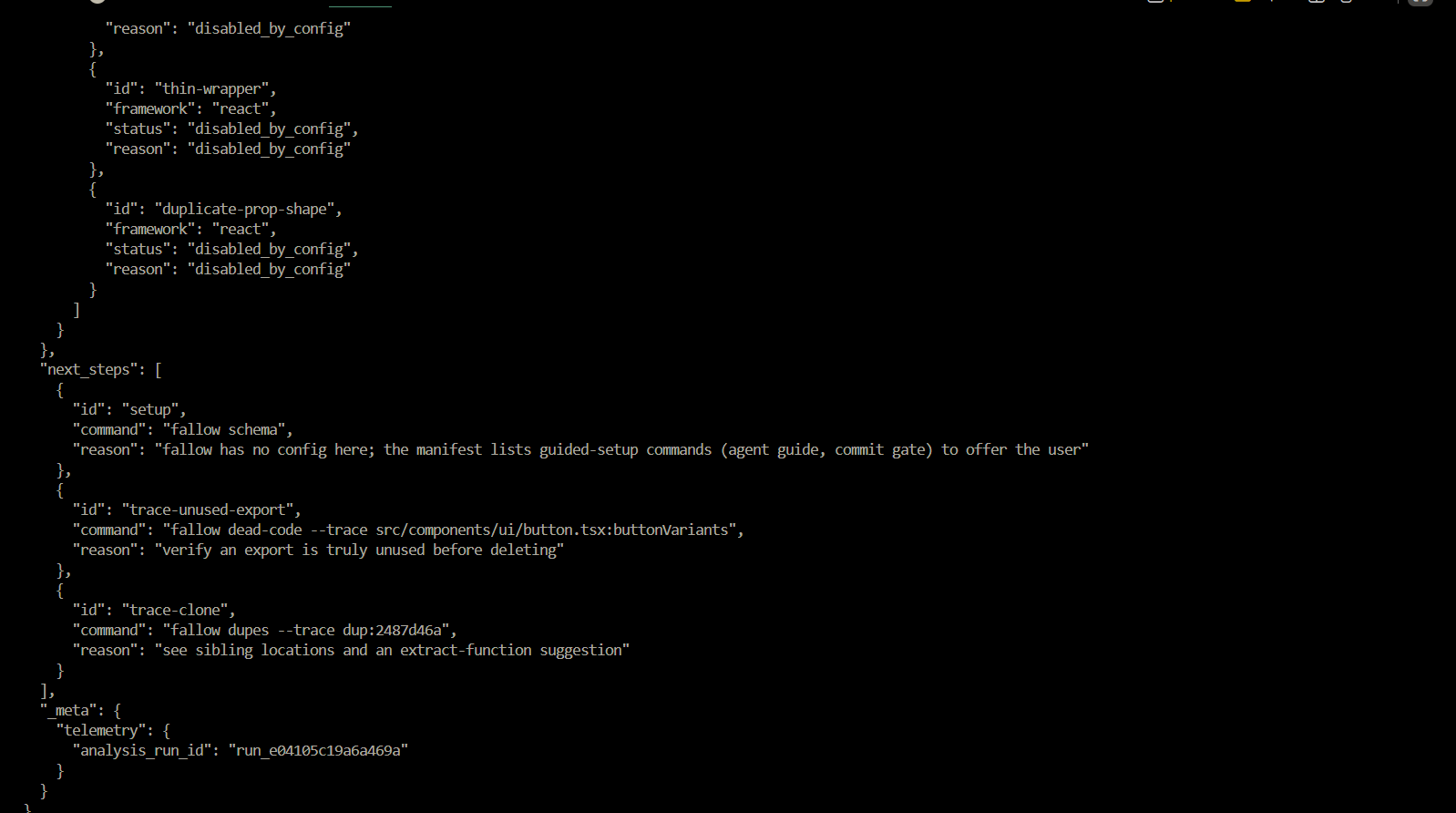
The returned JSON object includes an actions array containing suggested fixes, along with an auto_fixable flag that tells the agent whether an issue can be resolved automatically. This allows the agent to decide whether to run fallow fix –yes for straightforward fixes or implement the changes manually when needed.
You can then instruct your AI agent, either through an agent.md file or manually, to run Fallow with the --format json flag before every commit, ensuring new code meets your project’s quality standards.
Fallow AI skill?An even better option is to install Fallow‘s official AI skill if your coding agent supports it. The skill gives the agent access to Fallow‘s commands directly, so it doesn’t have to guess which commands to run or how to use them.
You can install it in Claude through the plugin marketplace or by running the following command:
/plugin marketplace add fallow-rs/fallow-skills
/plugin install fallow-skills@fallow-rs/fallow-skills
For Codex, Copilot, Cursor, and other supported agents, install the skill into the agent’s respective skills directory using the following command:
git clone https://github.com/fallow-rs/fallow-skills.git
Once the skill is installed, the agent can automatically choose the appropriate Fallow analysis, Dead Code, Duplication, or Health, based on the task you’ve given it. It then uses the results to perform the actions you’ve instructed, whether that’s fixing issues, refactoring code, or generating recommendations.
fallow-mcpserver?Another way to integrate Fallow into your workflow is by installing the fallow-mcp server, provided your AI client supports MCP. Once installed, all you need to do is add the following configuration to your client’s MCP settings:
{
  "mcpServers": {
    "fallow": {
      "command": "fallow-mcp"
    }
  }
}
With that in place, your agent will have access to tools such as analyze, check_changed, and find_dupes, which allow it to inspect your codebase and return structured results that it can act on.
While your AI agent will generally follow Fallow‘s recommendations and the policies you’ve configured, it won’t always get it right. It’s still an AI, and there may be times when it ignores an issue, proceeds with the implementation, and pushes code that shouldn’t make it into production.
To guard against this, you can add Fallow as a final quality gate in your CI/CD pipeline. This ensures every change is analyzed before it’s merged or deployed, even if your AI agent fails to follow your instructions.
Fallow integrates with virtually any CI platform. For example, to use it with GitHub Actions, simply add the following code to your workflow file:
name: Fallow analysis
on: [push, pull_request]


jobs:
  fallow:
    runs-on: ubuntu-latest
    steps:
      - uses: actions/checkout@v4
      - uses: fallow-rs/fallow@v2
        with:
          format: sarif
With this in place, your CI pipeline will catch dead code, duplication, complexity, and other code quality issues that slip past your AI agent or manual review on every push or pull request.
For instructions on integrating Fallow with other CI platforms and customizing its configuration, refer to the documentation.
In this article, you learned how to use Fallow to analyze your codebase, identify dead code, duplicate logic, and maintainability issues, and integrate those insights into your AI-assisted development workflow.
Fallow offers far more than we’ve covered here, with additional configuration options, analysis modes, and integrations to suit different projects and workflows. Explore the documentation to customize its behavior and make it a regular part of your development process. As AI-generated code becomes more common, tools like Fallow can help ensure your codebase stays clean, maintainable, and easy to evolve.
See how Tecovas built a patching agent that turns LogRocket’s Galileo AI issue analysis into GitHub PRs, with a developer reviewing every fix before it ships.

Explore OctaneJS, a compiler-first alternative to React. Build a task dashboard and learn about rendering, hooks, asynchronous UI, and React compatibility.

Explore Vercel’s vgpu, a WebGPU library for AI agents. Learn to build a dynamic shader in Next.js and validate rendering output with headless testing in Node.js.

Compare some of the best Node.js unit testing frameworks in 2023, including Mocha, Jest, Supertest, and Webdriver.
Hey there, want to help make our blog better?
Join LogRocket’s Content Advisory Board. You’ll help inform the type of content we create and get access to exclusive meetups, social accreditation, and swag.
Sign up now

 Learn more →