The rise of progressive web applications has resulted in a commensurate increase in the number of desktop apps that are released every day. To see evidence of this, just go to Flathub’s new apps page or GitHub’s trending page. For example, immediately after the release of the ChatGPT API, hundreds of desktop applications emerged. Desktop apps are native, fast, and secure and provide experiences that web applications can’t match.

cmOf all the programming languages used in desktop app development, Rust is one of the more popular. Rust is widely regarded as being reliable, performant, productive, and versatile. In fact, many organizations are migrating their applications to Rust. The GNOME Linux development environment is an example. Personally, I especially love Rust’s reliability principle: “If it compiles, it works.”
In this article, we’ll demonstrate how to build a desktop application using Qt (a mature, battle-tested framework for cross-platform development) and Rust.
Jump ahead:
To follow along with the demo and other content included in this guide, you should have a working knowledge of Rust. To learn more, you can read the book.
Rust has several Qt bindings. The most popular are Ritual, CXX-Qt, and qmetaobject. Ritual is not maintained anymore, and qmetaobject doesn’t support QWidgets. So CXX-Qt is our best bet for now.
Because Rust is a relatively new language. So is the ecosystem. CXX-Qt is not as mature as PyQt. But it is on the way there. The current latest release already has a good and simple API.
Install Rust using the following command:
curl --proto '=https' --tlsv1.2 -sSf https://sh.rustup.rs | sh
If you’re using Windows, go to https://rustup.rs/ to download the installer. To ensure everything is okay, run the following command in your terminal:
rustc --version
Next, install Qt:
# Ubuntu
sudo apt install qt6-base-dev qt6-declarative-dev

# Fedora
sudo dnf install qt6-qtbase-devel qt6-qtdeclarative-devel

# If you are unsure. Just install all Qt dependencies
# It is no more than 200 MB
sudo apt install qt6*
sudo dnf install qt6*
To check that Qt is successfully installed, check that you’re able to run the following:
qmake --version
Everything looks great! We are good to go now.
CXX-Qt is the Rust Qt binding. It provides a safe mechanism for bridging between Qt code and Rust. Unlike typical one-to-one bindings. CXX-Qt uses CXX to bridge Qt and Rust. This gives more powerful code, safe API, and safe multi-threading between both codes. Unlike the previous version. You don’t need to touch any C++ code in the latest version.
QML is a programming language to develop the user interface. It is very readable because it offers JSON-like syntax. QML also has support for imperative JavaScript expressions and dynamic property bindings; this will be helpful for writing our Caesar Cipher application. If you need a refresher, see this QML intro.
To demonstrate how to work with Qt and Rust, we’ll build a simple “Hello World” application.
First, we need to create a Rust project, like so:
❯ cargo new --bin demo
     Created binary (application) `demo` package
Next, open the Cargo.toml file and add the dependencies:
[dependencies]
cxx = "1.0.83"
cxx-qt = "0.5"
cxx-qt-lib = "0.5"

[build-dependencies]
cxx-qt-build = "0.5"
Now, let’s create the entry point for our application. In the src/main.rs file we’ll initialize the GUI application and the QML engine. Then we’ll load the QML file and tell the application to start:
// src/main.rs

use cxx_qt_lib::{QGuiApplication, QQmlApplicationEngine, QUrl};

fn main() {
    // Create the application and engine
    let mut app = QGuiApplication::new();
    let mut engine = QQmlApplicationEngine::new();

    // Load the QML path into the engine
    if let Some(engine) = engine.as_mut() {
        engine.load(&QUrl::from("qrc:/main.qml"));
    }

    // Start the app
    if let Some(app) = app.as_mut() {
        app.exec();
    }
}
To set up communication between Rust and Qt, we’ll define the object in the src/cxxqt_oject.rs file:
// src/cxxqt_object.rs

#[cxx_qt::bridge]
mod my_object {

    #[cxx_qt::qobject(qml_uri = "demo", qml_version = "1.0")]
    #[derive(Default)]
    pub struct Hello {}

    impl qobject::Hello {
        #[qinvokable]
        pub fn say_hello(&self) {
            println!("Hello world!")
        }
    }
}
Attribute macro is used to enable CXX-Qt features.
#[cxx_qt::bridge]: marks the Rust module to be able to interact with C++#[cxx_qt::qobject]: expose a Rust struct to Qt as a QObject subclass#[qinvokable]: expose a function on the QObject to QML and C++ as a Q_INVOKABLE.Next, we’ll create a struct, named Hello, derived from the qobject traits. Then we can implement our regular Rust function to print a greeting:
// src/main.rs

+ mod cxxqt_object;

use cxx_qt_lib::{QGuiApplication, QQmlApplicationEngine, QUrl};
N.B., don’t forget to tell Rust if you have a new file
We’ll use QML to design the user interface. The UI file is located in the qml/main.qml file:
// qml/main.qml

import QtQuick.Controls 2.12
import QtQuick.Window 2.12

// This must match the qml_uri and qml_version
// specified with the #[cxx_qt::qobject] macro in Rust.
import demo 1.0

Window {
    title: qsTr("Hello App")
    visible: true
    height: 480
    width: 640
    color: "#e4af79"

    Hello {
        id: hello
    }

    Column {
        anchors.horizontalCenter: parent.horizontalCenter
        anchors.verticalCenter: parent.verticalCenter
        /* space between widget */
        spacing: 10

        Button {
            text: "Say Hello!"
            onClicked: hello.sayHello()
        }
    }
}
If you look closely at sayHello function, you‘ll notice that CXX-Qt converts the Rust function’s snake case to the camelCase C++ convention. Now our QML code doesn’t look out of place!
Next, we have to tell Qt about the QML location using the Qt resource file. It should be located in the qml/qml.qrc file:
<!DOCTYPE RCC>
<RCC version="1.0">
    <qresource prefix="/">
        <file>main.qml</file>
    </qresource>
</RCC>
The last step is to build the application. To teach Rust how to build the cxxqt_object.rs and QML files, we need to first define it in build.rs file:
// build.rs

use cxx_qt_build::CxxQtBuilder;

fn main() {
    CxxQtBuilder::new()
        // Link Qt's Network library
        // - Qt Core is always linked
        // - Qt Gui is linked by enabling the qt_gui Cargo feature (default).
        // - Qt Qml is linked by enabling the qt_qml Cargo feature (default).
        // - Qt Qml requires linking Qt Network on macOS
        .qt_module("Network")
        // Generate C++ from the `#[cxx_qt::bridge]` module
        .file("src/cxxqt_object.rs")
        // Generate C++ code from the .qrc file with the rcc tool
        // https://doc.qt.io/qt-6/resources.html
        .qrc("qml/qml.qrc")
        .setup_linker()
        .build();
}
The final structure should look like this:
⬢ ❯ exa --tree --git-ignore
.
├── qml
│  ├── main.qml
│  └── qml.qrc
├── src
│  ├── cxxqt_object.rs
│  └── main.rs
├── build.rs
├── Cargo.lock
└── Cargo.toml
Now, let’s use cargo check to make sure we have a correct code.
# `cargo c` is an alias to `cargo check`
❯ cargo c
  Finished dev [unoptimized + debuginfo] target(s) in 0.04s
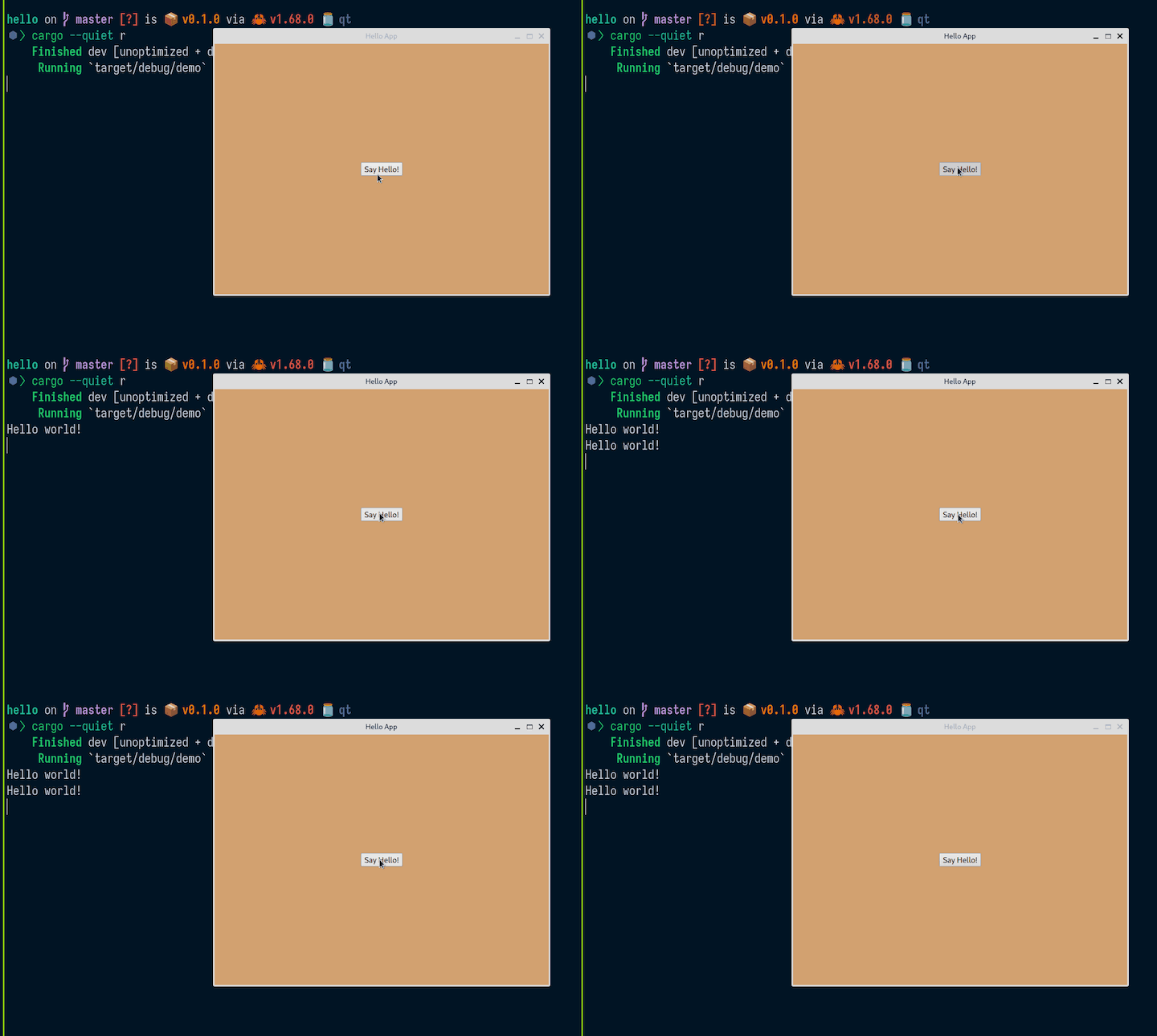
Finally, let’s run the application:
⬢ ❯ cargo --quiet r
   Compiling demo v0.1.0
    Finished dev [unoptimized + debuginfo] target(s) in 0.49s
     Running `target/debug/demo`
Hello world!
A task runner can save you time by automating repetitive development tasks. I recommend using Just. To install Just, use the following command:
cargo install just
Just is similar to Make, but without Make’s complexity and idiosyncrasies.
Simply add the justfile file into your root directory and put your repetitive tasks there:
#!/usr/bin/env -S just --justfile

alias d := dev
alias r := run
alias f := fmt
alias l := lint
alias t := test

# List available commands.
_default:
    just --list --unsorted

# Develop the app.
dev:
    cargo watch -x 'clippy --locked --all-targets --all-features'

# Develop the app.
run:
    touch qml/qml.qrc && cargo run

# Format the codebase.
fmt:
    cargo fmt --all

# Check if the codebase is properly formatted.
fmt-check:
    cargo fmt --all -- --check

# Lint the codebase.
lint:
    cargo clippy --locked --all-targets --all-features

# Test the codebase.
test:
    cargo test run --all-targets

# Tasks to make the code base comply with the rules. Mostly used in git hooks.
comply: fmt lint test

# Check if the repository complies with the rules and is ready to be pushed.
check: fmt-check lint test
For more convenience, you can use j as an alias for just in your shell:
alias j='just'
Now you can use j r for cargo run and so on.
Let’s further improve the application by modifying the text input. We’ll add some simple encryption using Caesar Cipher encoding.
First, let’s rename the application to "caesar":
# Cargo.toml

[package]
-name = "demo"
+name = "caesar"
Then, we’ll add the encrypt function:
// cxxqt_object.rs

#[cxx_qt::bridge]
mod my_object {

    unsafe extern "C++" {
        include!("cxx-qt-lib/qstring.h");
        type QString = cxx_qt_lib::QString;
    }

    #[cxx_qt::qobject(qml_uri = "caesar", qml_version = "1.0")]
    pub struct Rot {
        #[qproperty]
        plain: QString,
        #[qproperty]
        secret: QString,
    }

    impl Default for Rot {
        fn default() -> Self {
            Self {
                plain: QString::from(""),
                secret: QString::from(""),
            }
        }
    }

    impl qobject::Rot {
        #[qinvokable]
        pub fn encrypt(&self, plain: &QString) -> QString {
            let result = format!("{plain} is a secret");
            QString::from(&result)
        }
    }
}
Next, we need to import the Qstring, because our encrypt function accepts Qstring as an argument and also has Qstring as a return type. The struct now contains two fields: plain and secret. The encrypt function is a regular Rust function, but it accepts and returns a type from CXX-Qt: Qstring.
In the user interface, let’s add a TextArea text field component and a Button:
// main.qml

import QtQuick.Controls 2.12
import QtQuick.Window 2.12

// This must match the qml_uri and qml_version
// specified with the #[cxx_qt::qobject] macro in Rust.
import caesar 1.0

Window {
    title: qsTr("Caesar")
    visible: true
    height: 480
    width: 640
    color: "#e4af79"

    Rot {
        id: rot
        plain: ""
        secret: ""
    }

    Column {
        anchors.horizontalCenter: parent.horizontalCenter
        anchors.verticalCenter: parent.verticalCenter
        /* space between widget */
        spacing: 10

        Label {
            text: "Keep your secret safe 🔒"
            font.bold: true
        }

        TextArea {
            placeholderText: qsTr("[email protected]")
            text: rot.plain
            onTextChanged: rot.plain = text

            background: Rectangle {
                implicitWidth: 400
                implicitHeight: 50
                radius: 3
                color:  "#e2e8f0"
                border.color:  "#21be2b"
            }
        }

        Button {
            text: "Encrypt!"
            onClicked: rot.secret = rot.encrypt(rot.plain)
        }

        Label {
            text: rot.secret
        }
    }
}
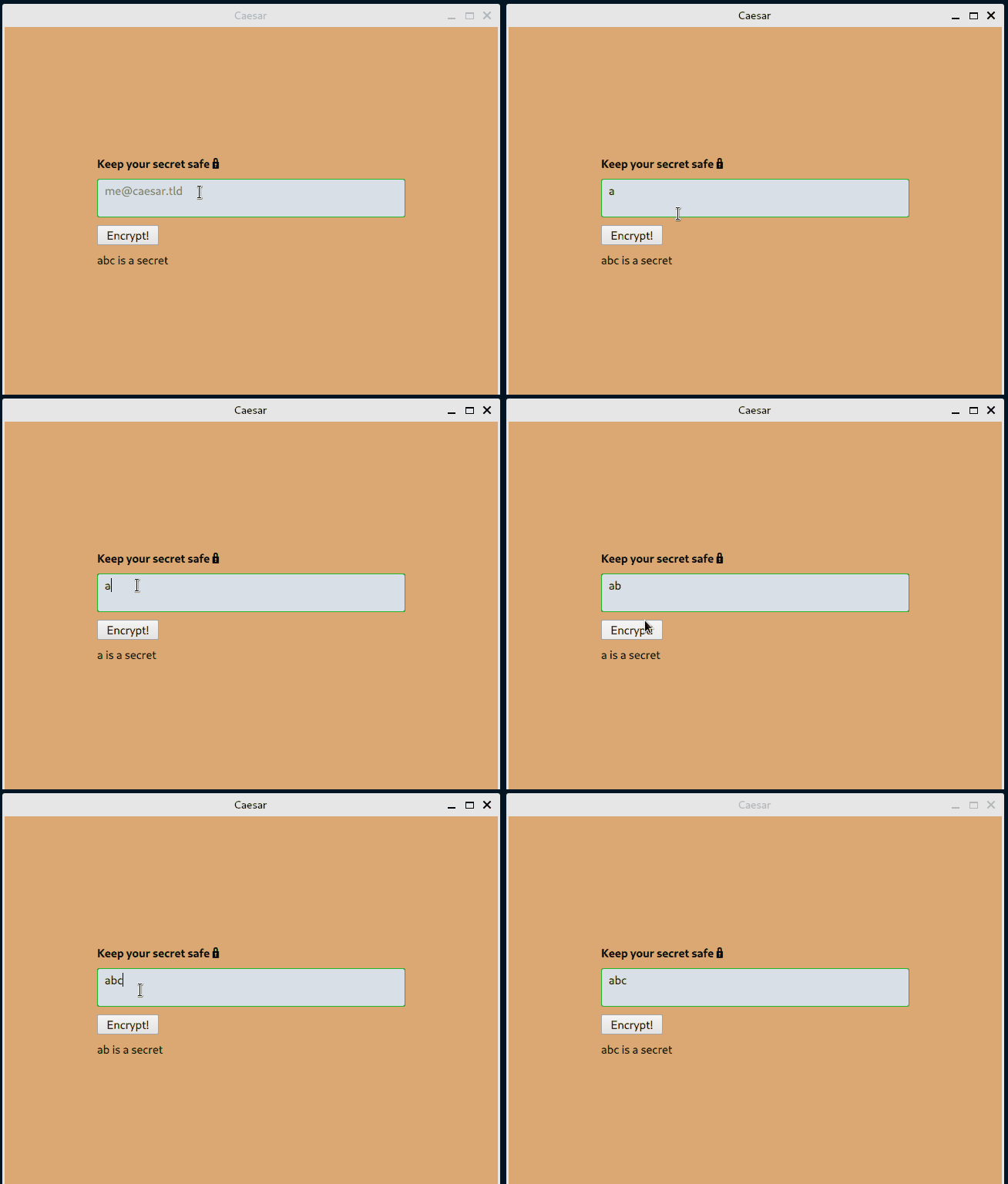
In the TextArea we use the onTextChanged signal to set the plain field of the Rot struct to be assigned the value of the TextArea input whenever anything changes.
Then, we use the onClicked signal in the Button component to assign the return value of the encrypt function to the secret field. Also, we pass the value of plain to the encrypt function.
Finally, we display the value of the secret field in the Label component.
Now, let’s run the application:
⬢ ❯ j r
touch qml/qml.qrc && cargo run
   Compiling caesar v0.1.0
    Finished dev [unoptimized + debuginfo] target(s) in 8.12s
     Running `target/debug/caesar`
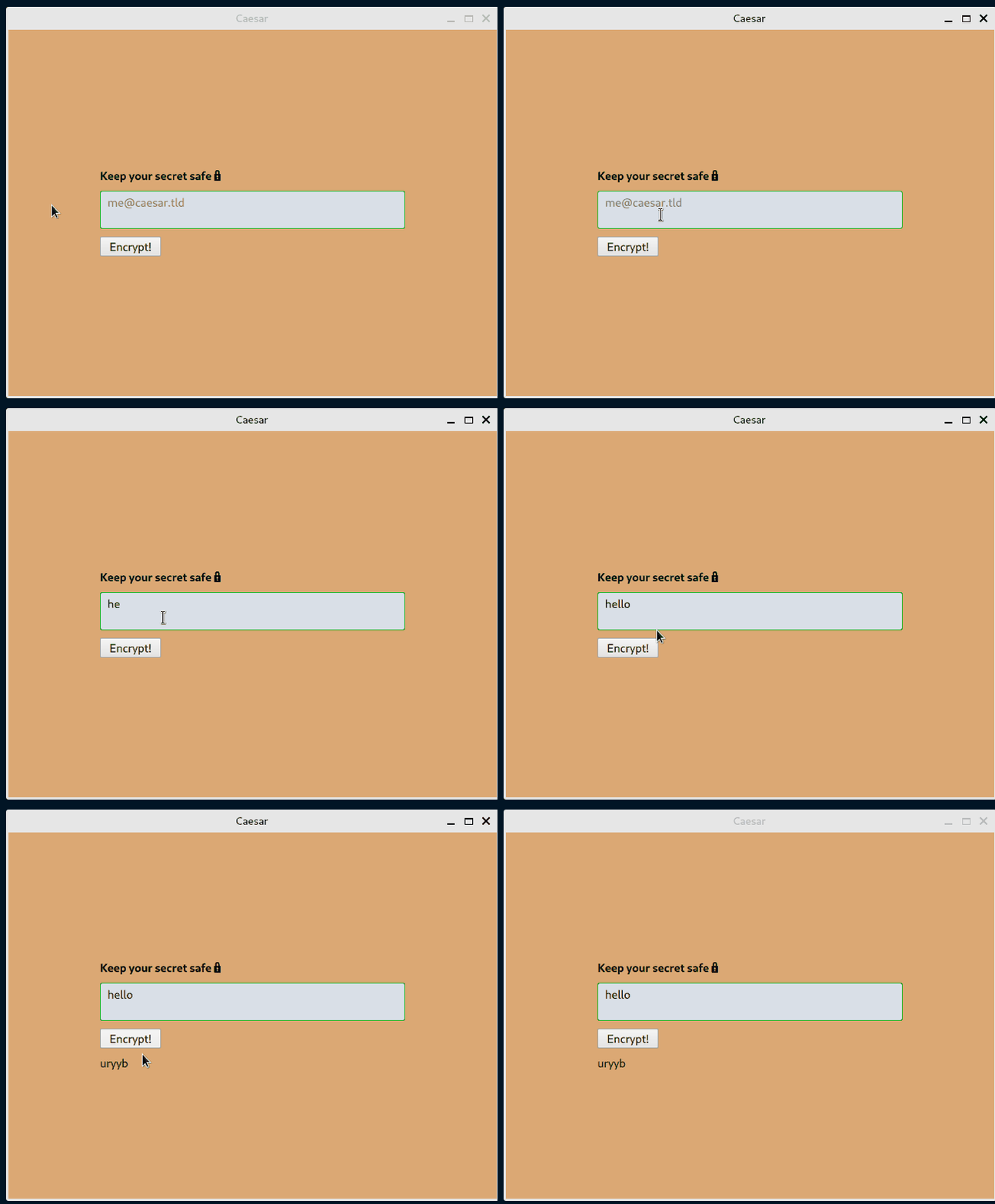
One approach for encrypting the user input (secret message) text is to use the nrot third-party library.
First, let’s add the dependency:
# Cargo.toml

+[dependencies]
+nrot = "2.0.0"

+# UI
cxx = "1.0.83"
Then, import the crate:
 mod my_object {

+    use nrot::{rot, rot_letter, Mode};
+
     unsafe extern "C++" {
Next, let’s use nrot to improve our app’s encrypt function:
        pub fn encrypt(&self, plain: &QString) -> QString {
            let rotation = 13; // common ROT rotation
            let plain = plain.to_string();
            let plain = plain.as_bytes();

            let bytes_result = rot(Mode::Encrypt, plain, rotation);
            let mut secret = format!("{}", String::from_utf8_lossy(&bytes_result));

            if plain.len() == 1 {
                let byte_result = rot_letter(Mode::Encrypt, plain[0], rotation);
                secret = format!("{}", String::from_utf8_lossy(&[byte_result]));
            };

            QString::from(&secret)
        }
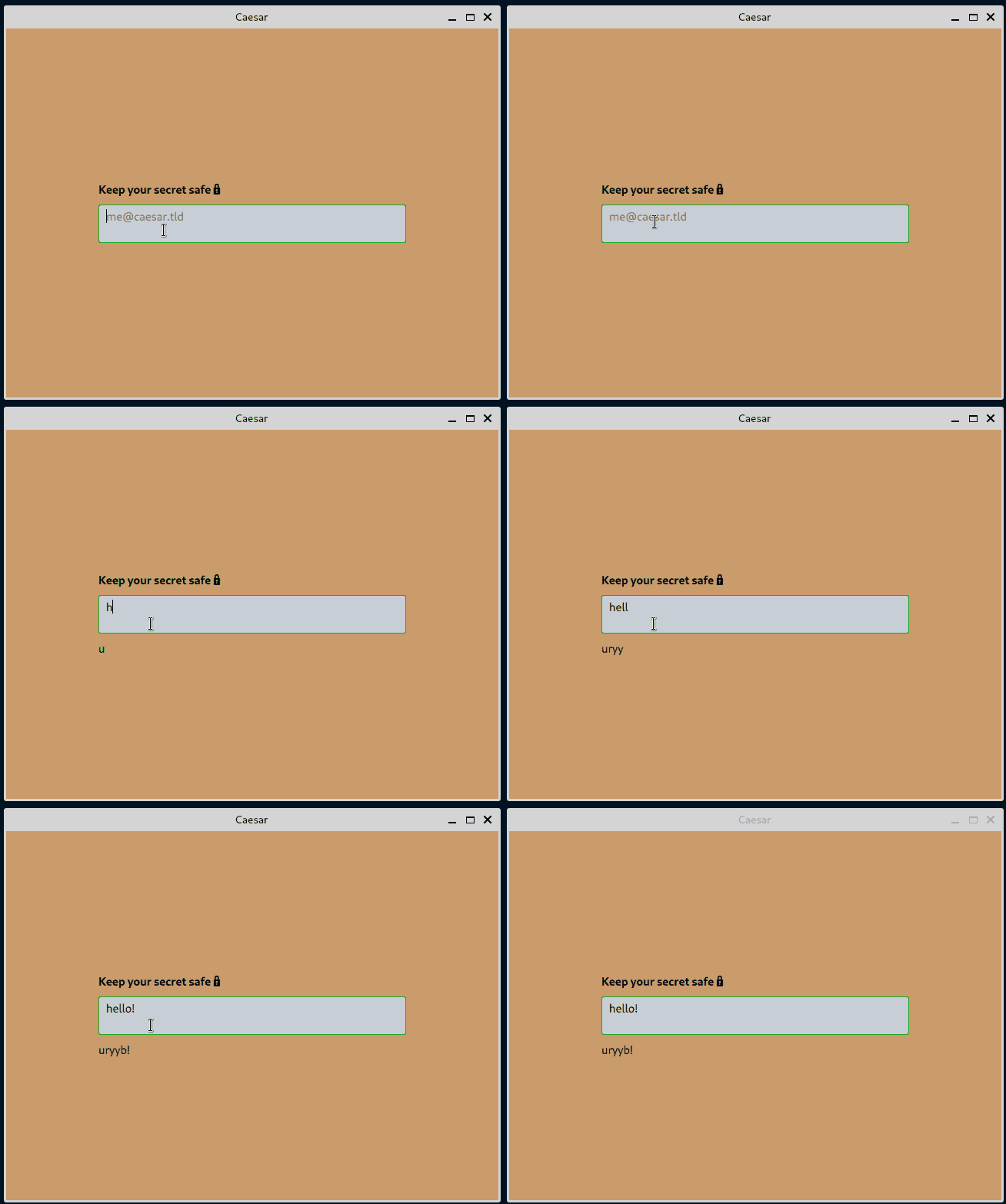
Another approach for encrypting the user input (secret message) text is to use on-the-fly encryption. This will enable us to eliminate the old-fashioned button and actually encrypt the secret message as the user is typing.
First, let’s remove the Button component and set the value of the secret field to update every time the user makes a change to the input field:
modified   qml/main.qml
             placeholderText: qsTr("[email protected]")
             text: rot.plain
-            onTextChanged: rot.plain = text
+            onTextChanged: rot.secret = rot.encrypt(text)

-        Button {
-            text: "Encrypt!"
-            onClicked: rot.secret = rot.encrypt(rot.plain)
-        }
-
Now, let’s add the decryption functionality. We’ll use the following decrypt function:
        #[qinvokable]
        pub fn decrypt(&self, secret: &QString) -> QString {
            let rotation = 13; // common ROT rotation
            let secret = secret.to_string();
            let secret = secret.as_bytes();

            let bytes_result = rot(Mode::Decrypt, secret, rotation);
            let mut plain = format!("{}", String::from_utf8_lossy(&bytes_result));

            if secret.len() == 1 {
                let byte_result = rot_letter(Mode::Decrypt, secret[0], rotation);
                plain = format!("{}", String::from_utf8_lossy(&[byte_result]));
            };

            QString::from(&plain)
        }
Then, we’ll add the second TextArea component for interchangeable input:
        TextArea {
            placeholderText: qsTr("[email protected]")
            text: rot.secret
            onTextChanged: rot.plain = rot.decrypt(text)

            background: Rectangle {
                implicitWidth: 400
                implicitHeight: 50
                radius: 3
                color: "#e2e8f0"
                border.color: "#21be2b"
            }
        }
    }
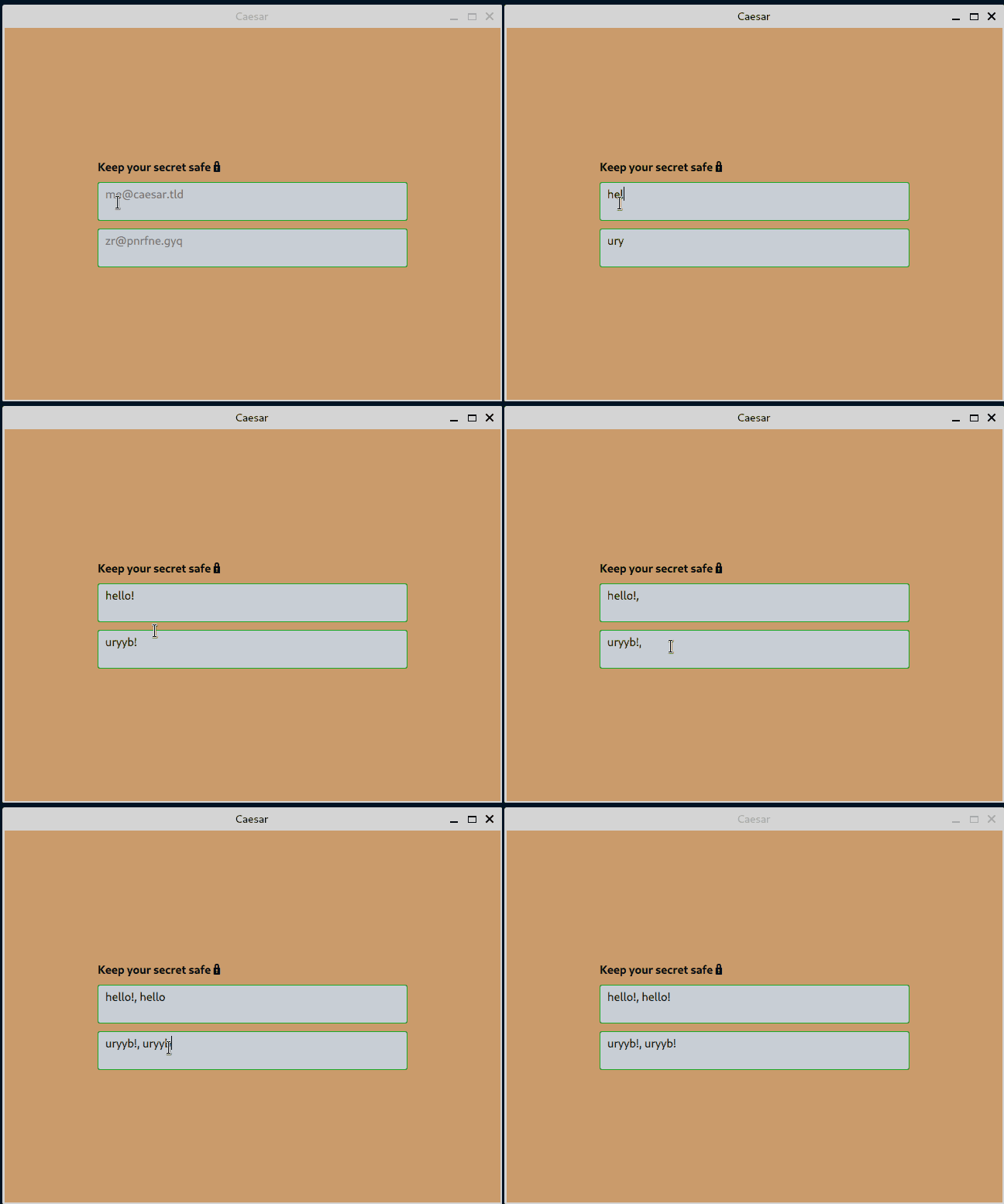
We have two very similar TextArea text fields. To avoid duplication, let’s create a custom component.
First, create an InputArea.qml file in the qml directory with the content of the previous TextArea component:
// InputArea.qml

import QtQuick 2.12
import QtQuick.Controls 2.12

TextArea {
    background: Rectangle {
        implicitWidth: 400
        implicitHeight: 50
        radius: 3
        color:  "#e2e8f0"
        border.color: "#21be2b"
    }
}
Include the file in the Qt resource:
<RCC version="1.0">
    <qresource prefix="/">
        <file>main.qml</file>
+        <file>InputArea.qml</file>
    </qresource>
</RCC>
Next, modify the main.qml file to use InputArea:
// main.qml

        InputArea {
            placeholderText: qsTr("[email protected]")
            text: rot.plain
            onTextChanged: rot.secret = rot.encrypt(text)
        }

        InputArea {
            placeholderText: qsTr("[email protected]")
            text: rot.secret
            onTextChanged: rot.plain = rot.decrypt(text)
        }
As a final step, to ensure that we have the correct code in each commit, let’s create a GitHub CI workflow:
name: Caesar

jobs:
  code_quality:
    name: Code quality
    runs-on: ubuntu-22.04

  build:
    name: Build for GNU/Linux
    runs-on: ubuntu-22.04
    strategy:
      fail-fast: false

    steps:
      - name: Checkout source code
        uses: actions/checkout@v3

      - name: Install Rust toolchain
        uses: dtolnay/rust-toolchain@stable
        with:
          target: x86_64-unknown-linux-gnu

      - name: Install Qt
        if: matrix.os == 'ubuntu-22.04'
        run: |
          sudo apt-get update
          sudo apt-get install -y --no-install-recommends --allow-unauthenticated \
            qt6-base-dev                                                          \
            qt6-declarative-dev

      - name: Build
        run: cargo build --release --locked
In this article, we demonstrated how to build a desktop Qt application using Rust and QML. Along the way, we discussed QObject, Qt signals, and CXX-Qt attribute macros.
If you’d like, you can further improve the demo app by adding more rotation features. Currently, the rotation value is hardcoded to 13. Also, you can play with the current QML user interface to make it fancier. The code for this article’s demo application is available on GitHub.
I hope you enjoyed this article. If you have questions, feel free to leave a comment.
Debugging Rust applications can be difficult, especially when users experience issues that are hard to reproduce. If you’re interested in monitoring and tracking the performance of your Rust apps, automatically surfacing errors, and tracking slow network requests and load time, try LogRocket.
LogRocket lets you replay user sessions, eliminating guesswork around why bugs happen by showing exactly what users experienced. It captures console logs, errors, network requests, and pixel-perfect DOM recordings — compatible with all frameworks.
LogRocket's Galileo AI watches sessions for you, instantly identifying and explaining user struggles with automated monitoring of your entire product experience.

Modernize how you debug your Rust apps — start monitoring for free.

Learn how to use the TypeScript Compiler API and AST traversal to extract imports and build a file dependency graph CLI.

Stop generating AI slop with Claude Code. Discover 5 actionable developer tips to manage context windows, enforce rules with hooks, and improve code quality.

Choosing between skills and MCP tools comes down to auditability versus flexibility. By building the exact same capability twice, this guide reveals when your agent needs a deterministic tool and when it needs an interpretive skill.

Learn how to replace React state, Context, and event handlers with native HTML and CSS features for dark mode, modals, accordions, carousels, and more.
Would you be interested in joining LogRocket's developer community?
Join LogRocket’s Content Advisory Board. You’ll help inform the type of content we create and get access to exclusive meetups, social accreditation, and swag.
Sign up now


 Learn more →