

Editor’s note: This article was last updated by Eze Sunday on 14 March 2024 to include information about mocking external modules and APIs when testing Next apps, testing with React Hooks, and performing integration testing in Next.js.

As a developer, you know the importance of testing for production-level projects. While every developer knows the importance of writing tests, as it helps prevent bugs and aids in early bug/error detection in your code, not everyone does it because it can be tedious to write and time-consuming.
Jest is an amazing tool to test React apps. And since the release of Next.js v12, Next.js has a built-in Jest configuration, which saves you valuable time for setting up and writing tests.
In this tutorial, we’ll walk you through setting up Jest with Next.js by writing a simple test for a calculator app. By the end, you’ll not only understand the process but also see how Jest helps identify errors in your code.
If you get stuck somewhere in the tutorial, feel free to refer to the GitHub repository.
Navigate to a safe directory and enter the following command in the terminal to set up your new Next.js application:
npx create-next-app jest-tutorial
You can replace jest-tutorial with any other name for the application. You can also run an automatic setup of Jest with your Next.js by running this:
npx create-next-app --example with-jest with-jest-app
But for the sake of this tutorial, we’ll follow the first method. Once the installation is complete, open the project in your code editor and run the following command in the terminal to fire up the development server:
npm run dev
Because our focus is on testing, we won’t explain the calculator’s logic. I’ll provide the code for the key components of the app, which should work perfectly with your existing setup after the above commands. Here’s the calculator code for the index.js file in the pages directory:
import Head from "next/head";
import Image from "next/image";
import { useState } from "react";
import styles from "../styles/Home.module.css";
export default function Home() {
  const [num1, setNum1] = useState(0);
  const [num2, setNum2] = useState(0);
  const [result, setResult] = useState(0);

  const add = () => {
    setResult(parseInt(num1) + parseInt(num2));
  };

  const subtract = () => {
    setResult(parseInt(num1) - parseInt(num2));
  };

  const multiply = () => {
    setResult(parseInt(num1) * parseInt(num2));
  };

  const divide = () => {
    setResult(parseInt(num1) / parseInt(num2));
  };

  return (
    <div className={styles.container}>
      <Head>
        <title>Create Next App</title>
        <meta name="description" content="Generated by create next app" />
        <link rel="icon" href="/favicon.ico" />
      </Head>
      <div className={styles.result} data-testid="result">
        {result}
      </div>
      <input
        type="number"
        className={styles.input}
        data-testid="num1"
        value={num1}
        onChange={(e) => setNum1(e.target.value)}
      />
      <input
        type="number"
        className={styles.input}
        data-testid="num2"
        value={num2}
        onChange={(e) => setNum2(e.target.value)}
      />
      <button onClick={add} className={styles.button} data-testid="add">
        Add
      </button>
      <button
        onClick={subtract}
        className={styles.button}
        data-testid="subtract"
      >
        Subtract
      </button>
      <button
        onClick={multiply}
        className={styles.button}
        data-testid="multiply"
      >
        Multiply
      </button>
      <button onClick={divide} className={styles.button} data-testid="divide">
        Divide
      </button>
    </div>
  );
}
One thing to note about the above code is that the data-testid attribute is added to elements, such as a result area, input fields, and buttons. This ID helps us identify the specific fields in our test files and perform actions on them while testing. These IDs won’t make any difference in production.
Here is the content for Home.module.css in the styles directory:
.container {
  padding: 0 2rem;
  display: flex;
  flex-direction: column;
  align-items: center;
  justify-content: center;
  height: 100vh;
  background-color: #121212;
  color: white;
}
.result {
  font-size: 4rem;
  font-weight: bold;
  margin-bottom: 1rem;
}
.input {
  margin: 0.5rem 0;
  padding: 0.5rem;
  font-size: large;
  width: 13rem;
  background-color: #121212;
  border: 1px solid #525252;
  color: white;
  border-radius: 10px;
}
.button {
  font-size: large;
  padding: 0.5rem;
  width: 13rem;
  margin: 0.5rem 0;
  border: 1px solid black;
  background-color: black;
  border-radius: 10px;
  color: white;
}
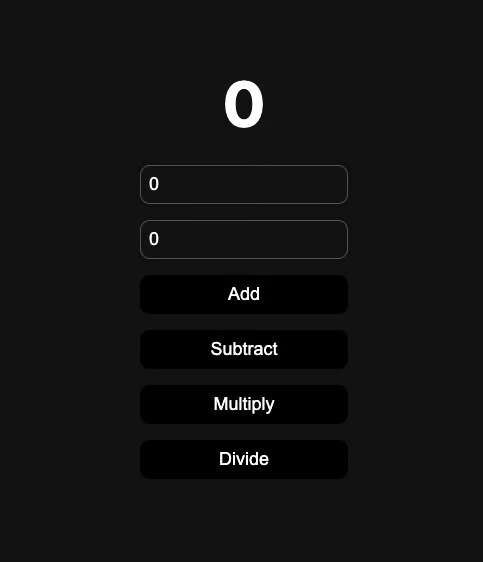
Now that you’ve replaced the code in those files, run the project again with the command npm run dev if you stopped it initially, then visit http://localhost:3000 in your browser to verify that you can see the functioning calculator up and running as shown below:
Now, let’s move on to testing this calculator using Jest!
To set up Jest, we need to install a few required packages. Run the following command in the terminal to install them:
npm install --save-dev jest @testing-library/react @testing-library/jest-dom
Remember, we are using --save-dev here, which means these packages are included in our devDependencies and won’t be used in production.
Now, let’s create a new file to store our Jest configuration. In the project root folder, create a new file named jest.config.js with the following configuration (these configurations are from the official Next documentation):
const nextJest = require("next/jest");
const createJestConfig = nextJest({
  dir: "./",
});
const customJestConfig = {
  moduleDirectories: ["node_modules", "<rootDir>/"],
  testEnvironment: "jest-environment-jsdom",
};
module.exports = createJestConfig(customJestConfig);
Now, go to package.json and add a script called test, which runs the command jest --watch.
Your scripts should look like this:
"scripts": {
  "dev": "next dev",
  "build": "next build",
  "start": "next start",
  "lint": "next lint",
  "test": "jest --watch"
},
Now that our configurations are ready, we can move forward with writing tests.
In the project root directory, create a new folder called tests, which Jest will use to look up tests. Then, create a new file called index.test.js.
First, let’s import some dependencies:
import Home from "../pages/index";
import "@testing-library/jest-dom";
import { fireEvent, render, screen } from "@testing-library/react";
We are importing the Home component directly from our Next app because we will render it during the test.
Now, let’s write a test to see if all the elements are rendering correctly:
describe("Calculator", () => {
  it("renders a calculator", () => {
    render(<Home />);
    // check if all components are rendered
    expect(screen.getByTestId("result")).toBeInTheDocument();
    expect(screen.getByTestId("num1")).toBeInTheDocument();
    expect(screen.getByTestId("num2")).toBeInTheDocument();
    expect(screen.getByTestId("add")).toBeInTheDocument();
    expect(screen.getByTestId("subtract")).toBeInTheDocument();
    expect(screen.getByTestId("multiply")).toBeInTheDocument();
    expect(screen.getByTestId("divide")).toBeInTheDocument();
  });
});
These tests are generally human-readable. Let’s see what’s happening in the above code:
First, the describe function describes what the module is. You can give it any name you want; the name will be displayed in the console when the tests are run.
Next, the it function specifies an individual test. You can have multiple its within describe. We are then rendering out the <Home/> component, which we imported from index.js under the pages directory. This will simulate a DOM and render the component on it.
The following expect function checks whether a condition is true or false. Its outcome pretty much tells you the result of the test. If any of these expect statements are false, the test will fail and you will see an error message in the console.
Finally, we are using toBeInTheDocument() to check if the element exists in the DOM created by Jest. We provided test IDs on the page, so it’s easier for Jest to identify these elements. Now, you can run the test. Use the following command in your terminal:
npm run test
You should see a test result like this:
 PASS  __tests__/index.test.js
  Calculator
    ✓ renders a calculator (15 ms)

Test Suites: 1 passed, 1 total
Tests:       1 passed, 1 total
Snapshots:   0 total
Time:        0.554 s, estimated 1 s
Ran all test suites.

Watch Usage: Press w to show more.
Once you run the test command, it automatically reruns the test once any file in the project is saved, so we don’t need to kill and restart the test terminal.
Now, let’s create a test to check if the numbers add up properly:
it("adds numbers", () => {
  render(<Home />);
  // check if adds properly
  const num1input = screen.getByTestId("num1");
  const num2input = screen.getByTestId("num2");
  const addButton = screen.getByTestId("add");
  const resultArea = screen.getByTestId("result");
  fireEvent.change(num1input, { target: { value: 5 } });
  fireEvent.change(num2input, { target: { value: 8 } });
  addButton.click();
  expect(resultArea).toHaveTextContent("13");
});
In the above code, we are simulating typing and pressing a button in the calculator. We are also providing two numbers to add, and checking if the result the calculator provides is the same.
Once you save the file, check the terminal, and your test should automatically rerun and provide the following output:
 PASS  __tests__/index.test.js
  Calculator
    ✓ renders a calculator (18 ms)
    ✓ adds numbers (9 ms)

Test Suites: 1 passed, 1 total
Tests:       2 passed, 2 total
Snapshots:   0 total
Time:        0.526 s, estimated 1 s
Ran all test suites.

Watch Usage: Press w to show more.
Perfect! Now, let’s try to simulate an error in the application. First, we will make a change in the actual calculator application so that it deliberately does not work as expected. To do so, change the add function in index.js as follows:
const add = () => {
  setResult(parseInt(num1) - parseInt(num2));
};
Here we changed the function so that it subtracts instead of adds. When you save the file, you should immediately see an error:
 FAIL  __tests__/index.test.js
  Calculator
    ✓ renders a calculator (14 ms)
    ✕ adds numbers (13 ms)

  ● Calculator › adds numbers

    expect(element).toHaveTextContent()

    Expected element to have text content:
      13
    Received:
      -3

      28 |     addButton.click();
      29 |
    > 30 |     expect(resultArea).toHaveTextContent("13");
         |                        ^
      31 |   });
      32 | });
      33 |

      at Object.<anonymous> (__tests__/index.test.js:30:24)

Test Suites: 1 failed, 1 total
Tests:       1 failed, 1 passed, 2 total
Snapshots:   0 total
Time:        0.667 s, estimated 1 s
Ran all test suites.

Watch Usage: Press w to show more.
Jest tried to add numbers and didn’t see the number we expected, which means there is some problem with the add function. That’s how you can check problems in your code when a test fails. Revert the changes you made in the index.js file so that the contents are back to the original working order.
Now, let’s add a few more tests to check if all the operations are working well. Here’s the entire code for index.test.js:
import Home from "../pages/index";
import "@testing-library/jest-dom";
import { fireEvent, render, screen } from "@testing-library/react";
describe("Calculator", () => {
  it("renders a calculator", () => {
    render(<Home />);
    // check if all components are rendered
    expect(screen.getByTestId("result")).toBeInTheDocument();
    expect(screen.getByTestId("num1")).toBeInTheDocument();
    expect(screen.getByTestId("num2")).toBeInTheDocument();
    expect(screen.getByTestId("add")).toBeInTheDocument();
    expect(screen.getByTestId("subtract")).toBeInTheDocument();
    expect(screen.getByTestId("multiply")).toBeInTheDocument();
    expect(screen.getByTestId("divide")).toBeInTheDocument();
  });
  it("adds numbers", () => {
    render(<Home />);
    // check if adds properly
    const num1input = screen.getByTestId("num1");
    const num2input = screen.getByTestId("num2");
    const addButton = screen.getByTestId("add");
    const resultArea = screen.getByTestId("result");
    fireEvent.change(num1input, { target: { value: 5 } });
    fireEvent.change(num2input, { target: { value: 8 } });
    addButton.click();
    expect(resultArea).toHaveTextContent("13");
  });
  it("subtracts numbers", () => {
    render(<Home />);
    // check if subtracts properly
    const num1input = screen.getByTestId("num1");
    const num2input = screen.getByTestId("num2");
    const subtractButton = screen.getByTestId("subtract");
    const resultArea = screen.getByTestId("result");
    fireEvent.change(num1input, { target: { value: 8 } });
    fireEvent.change(num2input, { target: { value: 5 } });
    subtractButton.click();
    expect(resultArea).toHaveTextContent("3");
  });
  it("multiplies numbers", () => {
    render(<Home />);
    // check if multiplies properly
    const num1input = screen.getByTestId("num1");
    const num2input = screen.getByTestId("num2");
    const multiplyButton = screen.getByTestId("multiply");
    const resultArea = screen.getByTestId("result");
    fireEvent.change(num1input, { target: { value: 5 } });
    fireEvent.change(num2input, { target: { value: 8 } });
    multiplyButton.click();
    expect(resultArea).toHaveTextContent("40");
  });
  it("divides numbers", () => {
    render(<Home />);
    // check if divides properly
    const num1input = screen.getByTestId("num1");
    const num2input = screen.getByTestId("num2");
    const divideButton = screen.getByTestId("divide");
    const resultArea = screen.getByTestId("result");
    fireEvent.change(num1input, { target: { value: 20 } });
    fireEvent.change(num2input, { target: { value: 2 } });
    divideButton.click();
    expect(resultArea).toHaveTextContent("10");
  });
});
Once you save the file, you should see all the tests passing like so:
 PASS  __tests__/index.test.js
  Calculator
    ✓ renders a calculator (14 ms)
    ✓ adds numbers (6 ms)
    ✓ subtracts numbers (4 ms)
    ✓ multiplies numbers (4 ms)
    ✓ divides numbers (4 ms)

Test Suites: 1 passed, 1 total
Tests:       5 passed, 5 total
Snapshots:   0 total
Time:        0.674 s, estimated 1 s
Ran all test suites.

Watch Usage: Press w to show more.
Sometimes, testing external dependencies within your business logic can be costly or impractical. Mocking these dependencies allows you to isolate your code and create more reliable test suites by providing the necessary data in a controlled manner.
Here is a simple example of how we can mock an API:
// __mocks__/axios.js
const mockAxios = jest.genMockFromModule('axios');

mockAxios.get = jest.fn(() => Promise.resolve({ data: [{ id: 1, item: 'Beans' }, { id: 2, item: 'Garri' }] }));

export default mockAxios;
The code above should mimic a GET API call that returns a JSON object of food items.
Hooks are functions introduced in React 16.8 to allow you to manage state and side effects in functional components. They replace the need for class components in many scenarios and help improve code readability and organization.
Testing React Hooks in Next.js can be tricky because when you are testing the hooks — which are supposed to be isolated functions — you have to consider how your target user will interact with the component. You will need to ensure you are rendering the component using the hooks in your test as well. You’ll just be testing the component using the hook as shown in the code samples below:
//Custom Hook
function useCounter(initialCount) {
  const [count, setCount] = useState(initialCount);

  const increment = () => setCount(count + 1);

  return { count, increment };
}

export default useCounter;
// the test
import { renderHook, act } from '@testing-library/react';
import useCounter from './useCounter';

test('should increment counter', () => {
  const { result } = renderHook(() => useCounter(0));

  act(() => {
    result.current.increment();
  });

  expect(result.current.count).toBe(1);
});
Integration tests allow you to test the core business logic and workflow of your application by testing the pages and their interaction with API routes and other external dependencies. These tests ensure that all the relevant parts of the application are working properly to give the expected experience to the user.
Jest and the React Testing Library are great tools to help you create an integration testing test suite in Next.js.
Automated testing is an important part of the software development life cycle, especially for mission-critical projects. Jest and other testing tools have been instrumental in shaping the testing landscape for React applications and, consequently, for Next.js.
I hope this article helps you get started with testing your Next.js application. We’ve only just scratched the surface, so for further learning, please refer to the Jest and Next documentation for more information.
Debugging Next applications can be difficult, especially when users experience issues that are difficult to reproduce. If you’re interested in monitoring and tracking state, automatically surfacing JavaScript errors, and tracking slow network requests and component load time, try LogRocket.
LogRocket captures console logs, errors, network requests, and pixel-perfect DOM recordings from user sessions and lets you replay them as users saw it, eliminating guesswork around why bugs happen — compatible with all frameworks.
LogRocket's Galileo AI watches sessions for you, instantly identifying and explaining user struggles with automated monitoring of your entire product experience.
The LogRocket Redux middleware package adds an extra layer of visibility into your user sessions. LogRocket logs all actions and state from your Redux stores.


Modernize how you debug your Next.js apps — start monitoring for free.

Explore how looping Transformers reuse layers and compare with traditional GPT models in reasoning tasks.

Learn how one solo developer used multiple Grok Bot AI agents to test, report bugs, fix code, and monitor deployments — hands-free, on a $30/month plan.

Compare the top AI development tools and models of October 2026. View updated rankings, feature breakdowns, and find the best fit for you.

Can AI agents debug React bugs across browsers? I tested Chrome, Safari, and Firefox debugging MCPs on four bugs to compare their findings, workflows, and effectiveness.
Would you be interested in joining LogRocket's developer community?
Join LogRocket’s Content Advisory Board. You’ll help inform the type of content we create and get access to exclusive meetups, social accreditation, and swag.
Sign up now

 Learn more →




