Editor’s Note: This article was updated in July 2021 to reflect current technical statistic comparisons of both React Hook Form and Formik.

As JavaScript developers, we are all aware of the complexities and intricacies that we may encounter when working with React and forms. We have all struggled with form verbosity, form validations, and managing the state of the form and its components.
It was these struggles that led to the development of Formik. Formik addressed several shortcomings of its “predecessor,” Redux Form. Then, React Hook Form was released, which in turn addressed some of the shortcomings of Formik.
Formik outperformed Redux Form in terms of size, best practices, and performance, but in this article, we will see how Formik measures up against React Hook Form.
Below are the download statistics for React Hook Form and Formik. Formik still leads with well over 1 million weekly downloads:
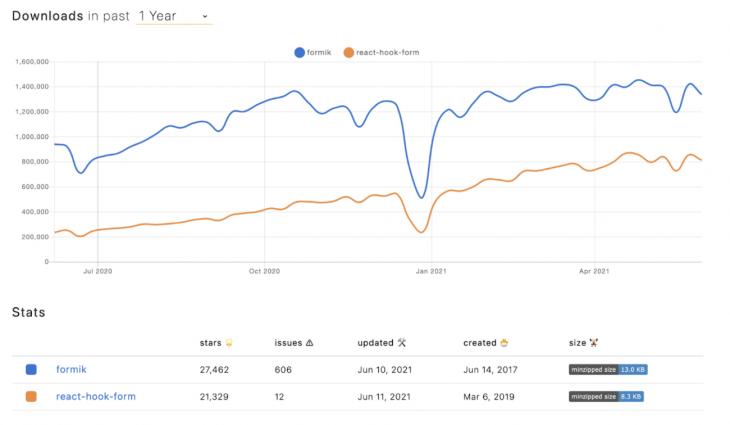
But apart from the number of downloads, the above also shows the size, last updates, and the open issues, which are all good metrics on which to judge the libraries.
Based on the minzipped size, React Hook Form comes in at less than half the size of Formik, and it can also be deducted that both libraries are in active development because they get updated regularly. One thing to note is the difference in open issues. Here, React Hook Form outperforms Formik,
Next, let’s compare the codebase and the dependencies:
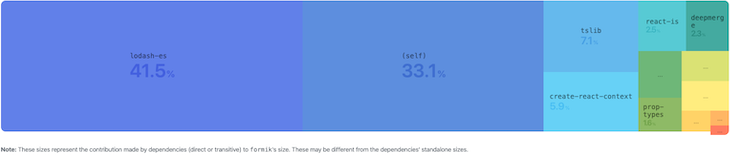
React Hook Form module composition:

So what does the above mean? The fewer dependencies a library has, the better. Take the infamous “left pad” disaster as an example. The left pad disaster occurred when one developer unpublished his npm modules and broke thousands of other modules that were dependent on it, so yes — fewer dependencies is definitely better.
So, to summarize:
| Formik | React Hook Form | |
|---|---|---|
| Weekly Downloads | 1,486,953 | 893,036 |
| Size | 12.6kB | 5.2kB |
| Open Issues | 510 | 2 |
| Dependencies | 9 | 0 |
| Winner | 🥇 |
With its smaller size and zero dependencies, React Hook Form is the clear winner here.
Component re-renders are an important factor to consider when implementing any functionality in React. We want to avoid unnecessary re-render cycles as much as possible, as this could lead to major performance issues as an app grows. So let’s see how Formik measures up to React Hook Form:
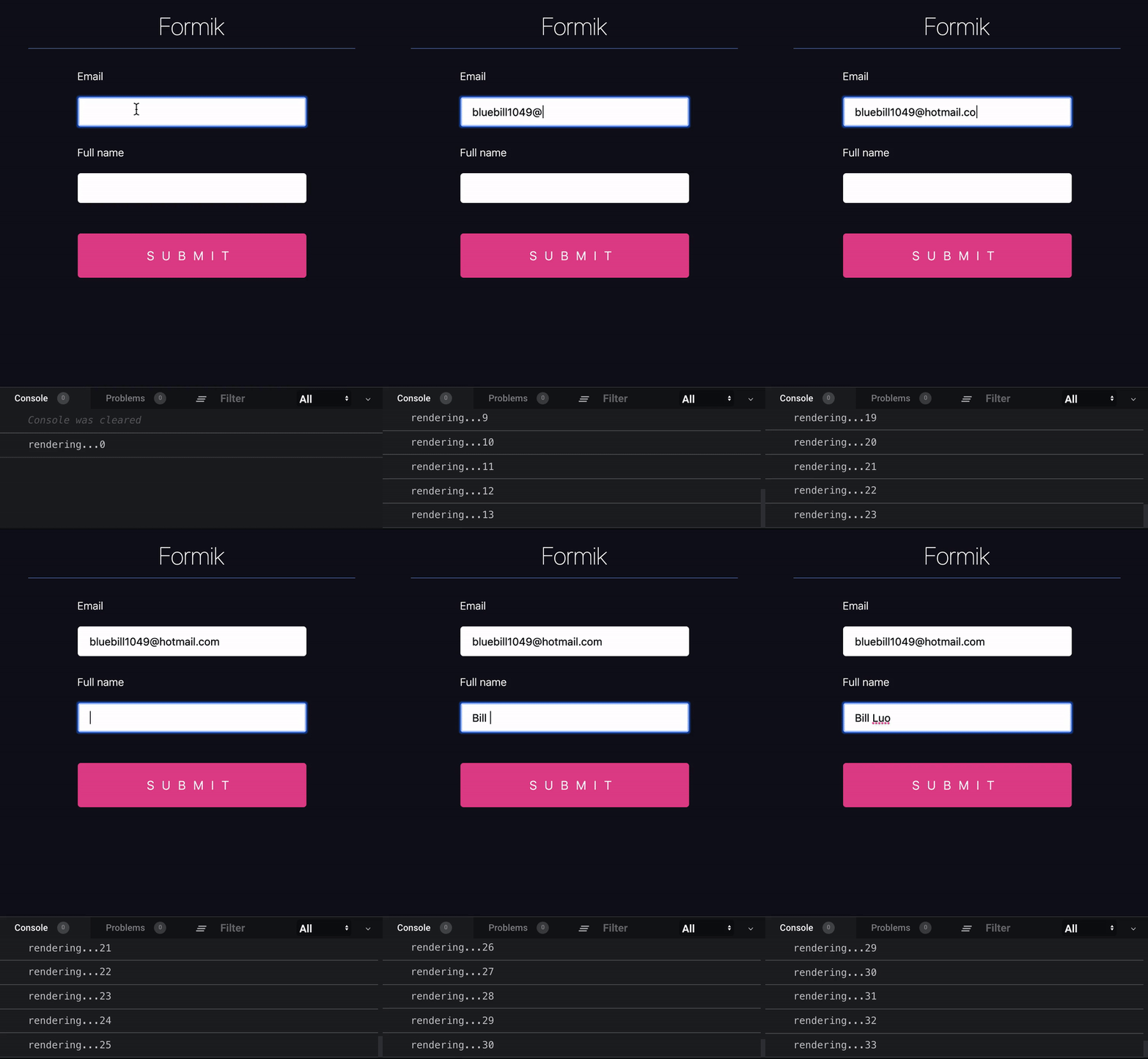
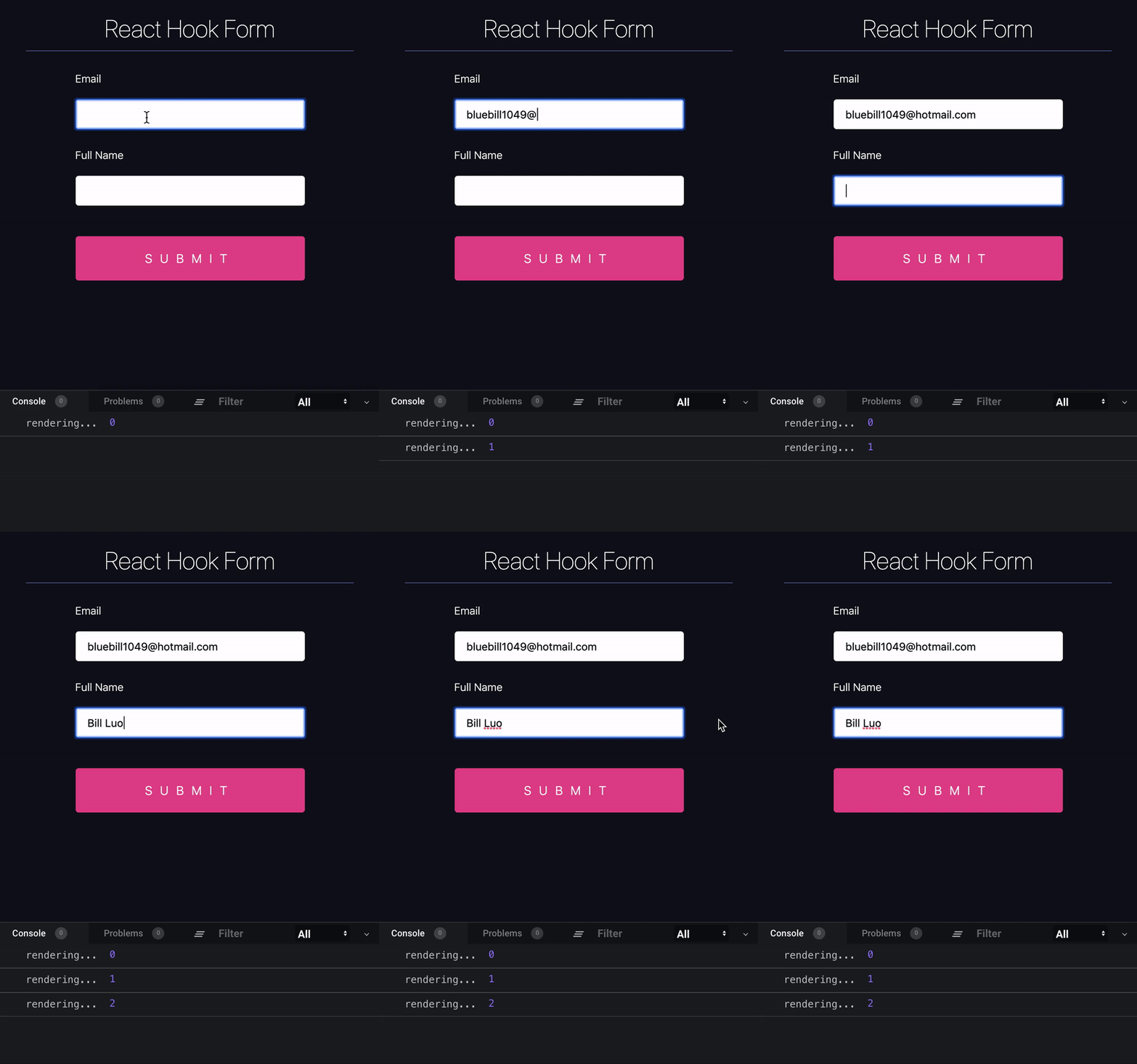
But why is there such a large difference in the number of renders between the two libraries? And why hasn’t Formik yet caught up with React Hook Form? The answer relies on the architecture of the libraries and the way they are designed from the core. React Hook Form isolates input components from the rest, preventing the whole form to re-render for a single field change.
Other libraries, including Formik, rely on form updates to cascade changes to the inputs, and although it has some advantages in terms of flexibility, this has a huge cost on performance.
Another performance concern when developing React applications is the time to mount, which refers to the time it takes React to insert a component into the DOM. Naturally, we aim for the lowest time to mount possible because longer mounting times can cause perceived latencies and delays. Again, let’s square up Formik vs. React Hook Form:
Formik:
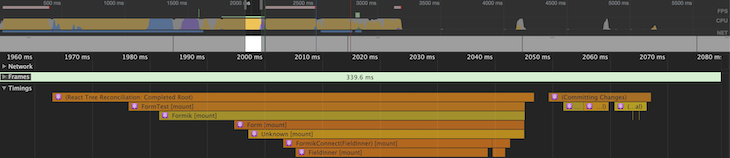
- No. of mounts: 6
- No. of committing changes: 1
- Total time: 2070ms
React Hook Form:

- No. of mounts: 1
- No. of committing changes: 1
- Total time: 1800ms
The above tests are based on a very simple form, so increasing the complexities would also cause the difference in time to mount to increase, but it is clear that React Hook Form outperforms Formik. In summary:
| Formik | React Hook Form | |
|---|---|---|
| Re-renders | Updates occur on form level | Renders occur in isolation for particular fields |
| No. of mounts | It mounts the form, some additional components, and uses a special component for fields | Only requires mounting the form |
| No. of comitting changes | 1 | 1 |
| Total mounting time | 2070ms | 1800ms |
| Winner | 🥇 |
With its fewer re-renders and quicker time to mount, React Hook Form is the clear winner.
The tests are from the React Hook Form website, and the code and text explanations can be found there.
To evaluate the subtle differences and the caveats of each library, we are going to build a form with several different input types and validations:
| Field Name | Field Type | Field Validation | Required |
|---|---|---|---|
| Username | Text | Max length = 20 | ✅ |
| Name | Text | Max length = 50 | ✅ |
| Valid Email (Pattern) | ✅ | ||
| Mobile Number | Tel | Max length = 12 | ❌ |
| Website | URL | None | ❌ |
| Password | Password | Uppercase, lowercase, number/special char, and min. 8 chars | ✅ |
| Gender | Radio | None | ❌ |
| Date of Birth | Date | MM/DD/YYYY | ❌ |
| About | Textarea | None | ❌ |
| Subscribe to Newsletter | Checkbox | None | ❌ |
I added Bootstrap to the form for aesthetics, but also to demonstrate how easy it is integrated into each respective module. The submit event will log the form data to the console.
I did not include any additional libraries for validations or assisting with the state management; we will rely purely on the functionality of each library.
As I started with developing the form, I discovered the React Hook Form form builder:
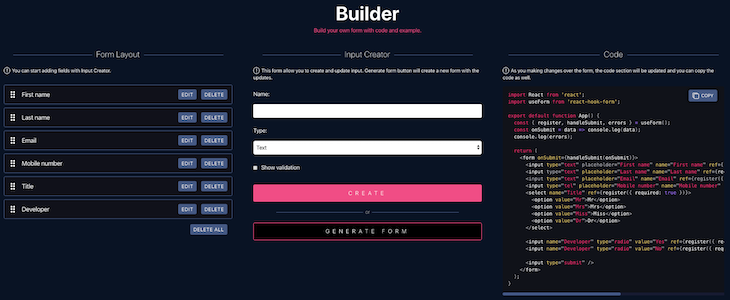
This proved to be a game-changer, as it allows users to very easily create the form fields and their respective validations.
Note that the form builder is not a one-size-fits-all solution, but it does allow us to quickly bootstrap a form with generic HTML5 input fields. I needed to adjust a few minor things, especially when applying the Bootstrap elements and classes, but it did still save a lot of time.
Below is the CodeSandbox for the React Hook Form form:
React Hook Form Example
React Hook Form Example by sieg-g using react, react-dom, react-hook-form, react-scripts
I found the development to be really simple, and the great thing about React Hook Form is that it allows you to plug it into basically any framework or UI library.
In this example, we are using React Hook Form with a standard HTML5 form, inputs, and validation patterns. The error message integration also proved to be quick, simple, and easy to implement.
Below is an example of a form input, validation, and error message:
<div className="form-group">
   <input
       className="form-control"
       type="text"
       placeholder="Username"
       {...register("Username", { required: true, maxLength: 20 })}
   />
   {errors.Username &&
       errors.Username.type === "required" &&
       errorMessage(required)}
   {errors.Username &&
       errors.Username.type === "maxLength" &&
       errorMessage(maxLength)}
</div>
Overall, I found React Hook Form to be a developer-friendly experience. I enjoy how light, clear, and concise the code is!
It is important to highlight that Formik has two different ways to build forms, one that makes use of a Formik component and Formik-provided fields. This method harnesses the full power of Formik, enabling all its features and characteristics.
The second way to build a Formik form is by using the useFormik hook, which is a simpler way to build forms, but comes with limitations and is recommended only for simpler scenarios.
Let’s now introduce our form using the Formik component:
fervent-albattani-2kums
fervent-albattani-2kums by bajcmartinez using formik, react, react-dom, react-scripts
Just like React Hook Form, Formik also proved to be an excellent development tool and was simple to implement.
Below is an example of form input, validation, and an error message:
<div className="form-group">
   <Field
       className="form-control"
       type="text"
       placeholder="Username"
       name="username"
       validate={validateUserName}
   />
   {errors.username &&
       touched.username &&
       errorMessage(errors.username)}
</div>
It is implemented in a very similar way to React Hook Form, but notice that Formik makes use of the <Field/> component, unlike React Hook Form, which can be used with just HTML5 input elements.
Validation with Formik also needs to be explicitly developed and applied to each input, or through the help of validation libraries like Yup:
const validateUserName = value => {
  let error;
  if (!value) {
    error = required;
  } else if (value.length > 12) {
    error = maxLength;
  }
  return error;
};
Both Formik and React Hook Form are powerful libraries that will enable you to build any form you may need. They are architectured differently, with React Hook Form leading in terms of performance and ease of implementation — in part thanks to being a newer library built for modern React applications.
It may not come as a surprise that I’m in favor of React Hook Form for the reasons presented in this post, but I’ve worked with Formik many times and always had pleasant experiences. Both libraries will get the job done well, and ultimately, it’s up to you to choose one in favor of the other. Keep in mind that if you are working with class components, you must choose Formik.
To summarize the discussion on this article:
<Field component="textarea" />
And the winner is:
Install LogRocket via npm or script tag. LogRocket.init() must be called client-side, not
server-side
$ npm i --save logrocket

// Code:

import LogRocket from 'logrocket';
LogRocket.init('app/id');
// Add to your HTML:

<script src="https://cdn.lr-ingest.com/LogRocket.min.js"></script>
<script>window.LogRocket && window.LogRocket.init('app/id');</script>
| Formik | React Hook Form | |
|---|---|---|
| Winner | 🥇 |
| Formik | React Hook Form | |
|---|---|---|
| React Native | ✅ | ✅ |
| TypeScript | ✅ | ✅ |
| Nested components | ✅ | ✅ |
| Class components | ✅ | ❌ |
| Code examples | ✅ | ✅ |
| Clear documentation | ✅ | ✅ |
| YUP integration | ✅ | ✅ |
| Redux integration | ✅ | ✅ |

Ten AI agent skills that solve real productivity problems for senior engineers, install commands, use cases, and when each one isn’t worth the overhead.

Google holds vast training data, an evolving agentic AI IDE called Antigravity, and AdSense billions. Here’s why it’s likely to dominate the AI race.

React scheduler component libraries provide software developers with a wide range of tools to build powerful scheduling applications in their React projects.

A step-by-step guide to building a fully local, real-time voice AI agent in the browser, no external APIs, no network latency, just Transformers.js and WebGPU.
Hey there, want to help make our blog better?
Join LogRocket’s Content Advisory Board. You’ll help inform the type of content we create and get access to exclusive meetups, social accreditation, and swag.
Sign up now


 Learn more →