
Building async UIs has always been difficult. Navigation hides content behind spinners, search boxes create race conditions as responses arrive out of order, and form submissions require manual state management for every loading flag and error message. Every async operation forces you to orchestrate the coordination manually.
This isn’t a performance problem; it’s a coordination problem. And React’s primitives now solve it declaratively.
For development teams, this marks a fundamental shift in how we build. Instead of each developer reinventing async handling across every component, React now provides standardized primitives that handle coordination automatically. This means fewer bugs, more consistent UX, and less time debugging race conditions.
The Async React demo, presented by Ricky Hanlon from the React team at React Conf 2025, demonstrates what’s possible: a lesson browser with search, tabs, and mutations that feels instant on fast networks and smooth on slow ones. UI updates coordinate automatically without flickering.
This isn’t a new library; it’s the combination of React 19’s coordination APIs and React 18’s concurrent features. Together, they form what the React team calls “Async React”, a complete system for building responsive asynchronous applications through composable primitives:
useTransition: Tracks pending async work.useOptimistic: Provides instant feedback during mutations.Suspense: Handles loading boundaries declaratively.useDeferredValue: Maintains a stable UX during rapid updates.use(): Makes data fetching (and context reading) declarative.Understanding how these pieces work together is key to shifting from imperative async code to declarative coordination.
Before these primitives, developers had to manually orchestrate every async operation. Form submissions required explicit loading and error states:
function SubmitButton() {
  const [isLoading, setIsLoading] = useState(false);
  const [error, setError] = useState(null);

  async function handleSubmit() {
    setIsLoading(true);
    setError(null);
    try {
      await submitToServer();
      setIsLoading(false);
    } catch (e) {
      setError(e.message);
      setIsLoading(false);
    }
  }

  return (
    <div>
      <button onClick={handleSubmit} disabled={isLoading}>
        {isLoading ? 'Submitting...' : 'Submit'}
      </button>
      {error && <div>Error: {error}</div>}
    </div>
  );
}
Data fetching followed a similar imperative pattern with useEffect:
function UserProfile({ userId }) {
  const [user, setUser] = useState(null);
  const [isLoading, setIsLoading] = useState(true);
  const [error, setError] = useState(null);

  useEffect(() => {
    setIsLoading(true);
    setError(null);
    fetchUser(userId)
      .then(data => {
        setUser(data);
        setIsLoading(false);
      })
      .catch(e => {
        setError(e.message);
        setIsLoading(false);
      });
  }, [userId]);

  if (isLoading) return <div>Loading...</div>;
  if (error) return <div>Error: {error}</div>;

  return <div>{user.name}</div>;
}
Every async operation repeated this pattern: track loading, handle errors, coordinate state updates. Multiply this across dozens of components, and you get inconsistent loading states, forgotten error handling, and subtle race conditions that are hard to debug.
React 19 introduces Actions to handle async coordination declaratively. Wrapping an async function in startTransition lets React track the entire operation:
const [isPending, startTransition] = useTransition();

function submitAction() {
  startTransition(async () => {
    await submitToServer();
  });
}
The isPending flag remains true until the promise resolves. React handles this state automatically, and errors thrown within transitions bubble to error boundaries instead of being handled in scattered try/catch blocks (you’ll still handle expected errors like validation failures yourself).
React calls any function invoked in a transition an “Action.” The naming convention matters: suffixing functions with “Action” signals they run in transitions (e.g., submitAction, deleteAction).
Here’s the same button rewritten with Actions:
function SubmitButton() {
  const [isPending, startTransition] = useTransition();

  function submitAction() {
    startTransition(async () => {
      await submitToServer();
    });
  }

  return (
    <button onClick={submitAction} disabled={isPending}>
      {isPending ? 'Submitting...' : 'Submit'}
    </button>
  );
}
Another option is to use React 19’s <form> component, which can handle this for you by accepting an action prop and wrapping it in a transition automatically:
async function submitAction(formData) {
  await submitToServer(formData);
}

<form action={submitAction}>
  <input name="username" />
  <button>Submit</button>
</form>
Errors still bubble to error boundaries, just like with manual Actions. When you want to reflect form state in the UI, React 19 provides form utilities: useFormStatus gives child components access to the form’s pending state, while useActionState lets you update component state based on the action’s result (like displaying validation errors or a “like” count).
The same pattern applies to reusable components like buttons, inputs, and tabs. Your design components can expose Action props such as action, submitAction, or changeAction, and use transitions internally to manage pending states and other async behavior. We will return to this pattern later.
Actions provide pending states, but pending isn’t always the right feedback. When you click a checkbox to mark a task complete, it should toggle instantly. Waiting for the server round-trip breaks the flow.
useOptimistic() works inside transitions to show instant updates while async Actions run in the background:
function CompleteButton({ complete }) {
  const [optimisticComplete, setOptimisticComplete] = useOptimistic(complete);
  const [isPending, startTransition] = useTransition();

  function completeAction() {
    startTransition(async () => {
      setOptimisticComplete(!optimisticComplete);
      await updateCompletion(!optimisticComplete);
    });
  }

  return (
    <button
      onClick={completeAction}
      className={isPending ? 'opacity-50' : ''}
    >
      {optimisticComplete ? <CheckIcon /> : <div></div>}
    </button>
  );
}
The checkbox toggles instantly. If the request succeeds, the server state matches the optimistic update. If it fails, the server state remains the old value, so the checkbox automatically reverts to its original state.
Unlike useState (which defers updates inside transitions), useOptimistic updates immediately. The transition boundary defines the lifespan of the optimistic state: it persists only while the async action is pending, then automatically “settles” to the source of truth (props or server state) once the transition completes.
Optimistic updates handle mutations, but what about initial data loading? The useEffect pattern forced us to manage isLoading states manually. Suspense solves this by letting us define loading boundaries declaratively. We control what fallback UI to show and how to segment loading, so independent parts of the app can load in parallel.
Suspense works with “Suspense-enabled” data sources: async Server Components, promises read with the use() API (which we’ll cover next), and libraries like TanStack Query, which provides useSuspenseQuery for caching and deduplication.
Here is how Suspense coordinates multiple independent data streams:
function App() {
  return (
    <div>
      <h1>Dashboard</h1>
      <Suspense fallback={<ProfileSkeleton />}>
        <UserProfile />
      </Suspense>
      <Suspense fallback={<PostsSkeleton />}>
        <UserPosts />
      </Suspense>
    </div>
  );
}
Each component can suspend independently with its own fallback. The parent component handles loading states through Suspense boundaries instead of coordinating multiple useEffect calls.
But there’s a problem: when you trigger updates that cause components to refetch (like switching tabs or navigating), the loading fallback would show again, hiding content you’ve already seen and creating jarring loading states.
Combining transitions with Suspense solves this by telling React to keep existing content visible instead of immediately showing fallbacks again. Here is an example adapted for tab switching:
function App() {
  const [tab, setTab] = useState('profile');
  const [isPending, startTransition] = useTransition();

  function handleTabChange(newTab) {
    startTransition(() => setTab(newTab));
  }

  return (
    <div>
      <nav>
        <button onClick={() => handleTabChange('profile')}>Profile</button>
        <button onClick={() => handleTabChange('posts')}>Posts</button>
      </nav>
      <Suspense fallback={<LoadingSkeleton />}>
        <div style={{ opacity: isPending ? 0.7 : 1 }}>
          {tab === 'profile' ? <UserProfile /> : <UserPosts />}
        </div>
      </Suspense>
    </div>
  );
}
Now the loading fallback only shows on initial load. When you switch tabs, the transition keeps the current content visible while the new data loads in the background. The opacity style dims it to signal that an update is in progress. Once ready, React swaps in the new content atomically. No jarring loading states, no jank.
This is the key: transitions “hold back” the UI update until async work completes, preventing the Suspense boundary from falling back during navigation. Frameworks like Next.js use this to keep pages visible while new routes load.
use() reads async data directlyEarlier, we saw Suspense working with “Suspense-enabled” data sources. The use() API is one of those sources: it offers an alternative to useEffect for data fetching, allowing you to read promises during render.
Here’s the useEffect example from the start rewritten with Suspense and use():
function UserProfile({ userId }) {
  const user = use(fetchUser(userId));
  return <div>{user.name}</div>;
}

function App({ userId }) {
  return (
    <ErrorBoundary fallback={<div>Error loading user</div>}>
      <Suspense fallback={<div>Loading...</div>}>
        <UserProfile userId={userId} />
      </Suspense>
    </ErrorBoundary>
  );
}
The component suspends when reading the promise, triggering the nearest Suspense boundary, then re-renders with the data when the promise resolves. Errors are caught by error boundaries. Unlike Hooks, use() can be called conditionally.
One caveat: the promise needs to be cached. Otherwise, it will be recreated on every render. In practice, you use a framework (like Next.js) that handles caching and deduplication.
Actions and Suspense handle discrete operations: clicks, submissions, navigation. But rapid inputs (like search) need a different approach because you want the field to stay responsive even while results load.
One way to do this could be a SearchInput design component that keeps the input responsive with an internal optimistic state and calls a changeAction in a transition, so the parent only passes value and changeAction.
When you do not have a design component, useDeferredValue() gives you a similar split. While you can use it to defer expensive CPU calculations (performance), the goal here is stable UX.
Combined with Suspense, use(), and an error boundary, we get a complete search experience:
function SearchApp() {
  const [query, setQuery] = useState('');
  const deferredQuery = useDeferredValue(query);
  const isStale = query !== deferredQuery;

  return (
    <div>
      <input value={query} onChange={(e) => setQuery(e.target.value)} />
      <ErrorBoundary fallback={<div>Error loading results</div>}>
        <Suspense fallback={<div>Searching...</div>}>
          <div style={{ opacity: isStale ? 0.5 : 1 }}>
            <SearchResults query={deferredQuery} />
          </div>
        </Suspense>
      </ErrorBoundary>
    </div>
  );
}

function SearchResults({ query }) {
  if (!query) return <div>Start typing to search</div>;
  const results = use(fetchSearchResults(query));
  return <div>{results.map(r => <div key={r.id}>{r.name}</div>)}</div>;
}
The Suspense fallback only shows on the initial load. During subsequent searches, useDeferredValue keeps the old results visible (with reduced opacity via isStale) while new results load in the background. The error boundary isolates failures, keeping the search input functional even if the data request fails.
So far, we have looked at each primitive in isolation. The Async React demo shows what happens when a framework brings them together across routing, data fetching, and the design system:
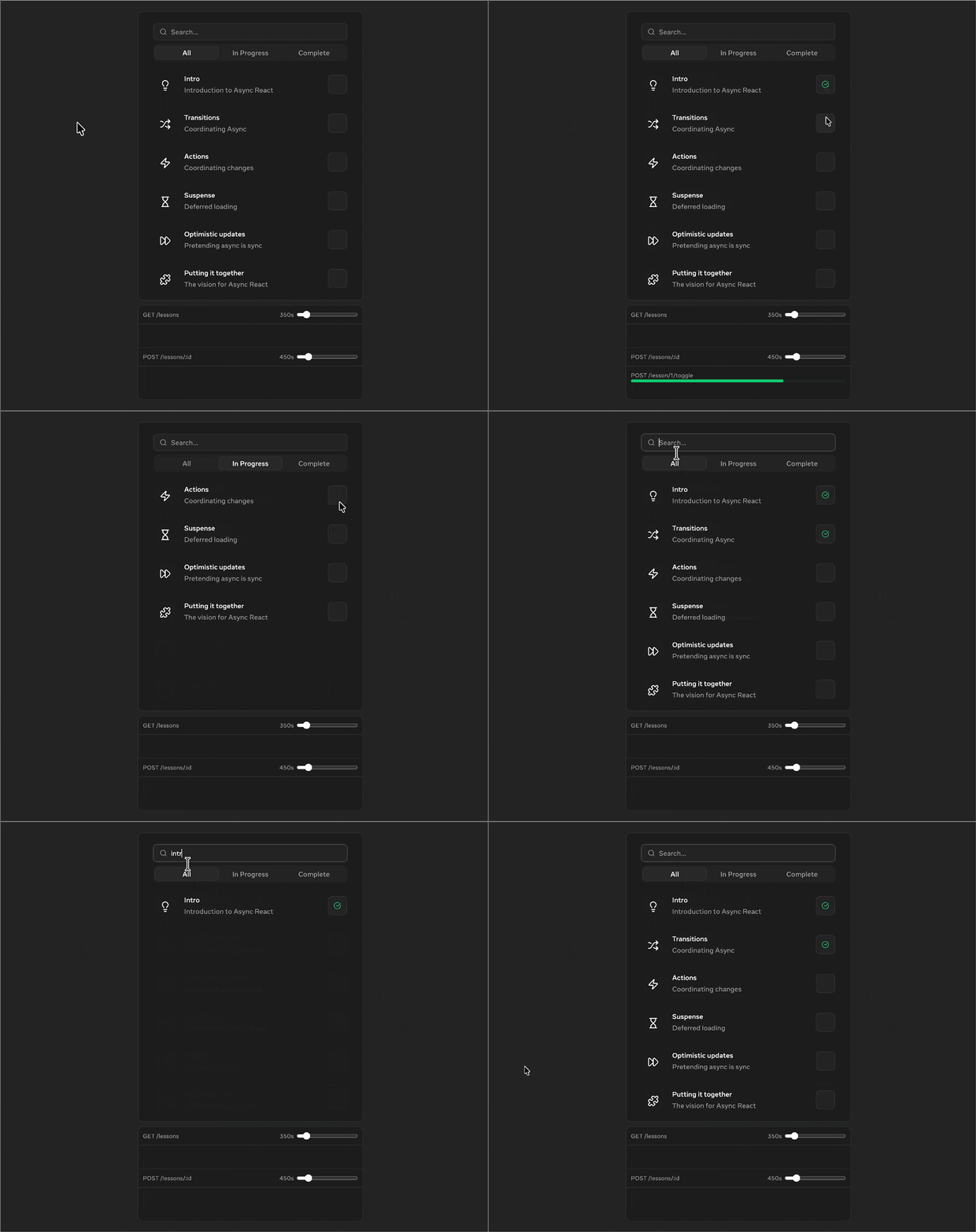
Try toggling the network speed to see how the UI adapts: instant on fast connections, smooth on slow ones.
function searchAction(value) {
  router.setParams("q", value);
}
Updating search params is async, changing the URL and triggering data refetching while the transition tracks everything.
use() with cached promises:function LessonList({ tab, search, completeAction }) {
const lessons = use(data.getLessons(tab, search));
return (
<Design.List>
{lessons.map(item => (
<Lesson item={item} completeAction={completeAction} />
))}
</Design.List>
);
}
The component suspends while data loads, with Suspense showing a fallback on initial load, but during tab switches and search, transitions keep old content visible.
<Design.SearchInput value={search} changeAction={searchAction} />
SearchInput uses useOptimistic internally to update the input value immediately while the transition to the new URL is pending. TabList similarly optimistically updates the selected tab.
The naming convention (“changeAction”) signals that the passed function will run inside a transition.
async function completeAction(id) {
  await data.mutateToggle(id);
  router.refresh();
}
This completeAction is passed down through LessonList to Design.CompleteButton, which also exposes an action prop. The button optimistically updates the completed state while the action runs.
Here’s a simplified example of the lesson app:
export default function Home() {
  const router = useRouter();
  const search = router.search.q || "";
  const tab = router.search.tab || "all";

  function searchAction(value) {
    router.setParams("q", value);
  }

  function tabAction(value) {
    router.setParams("tab", value);
  }

  async function completeAction(id) {
    await data.mutateToggle(id);
    router.refresh();
  }

  return (
    <>
      <Design.SearchInput value={search} changeAction={searchAction} />
      <Design.TabList activeTab={tab} changeAction={tabAction}>
        <Suspense fallback={<Design.FallbackList />}>
          <LessonList
            tab={tab}
            search={search}
            completeAction={completeAction}
          />
        </Suspense>
      </Design.TabList>
    </>
  );
}
Coordination happens at every level:
On fast networks, updates are instant. On slow ones, optimistic UI and transitions maintain responsiveness without manual logic. The complexity of the primitives is handled by the router, the data fetching setup, and the design system. Application code just wires them together.
Most applications will likely use components from libraries that already implement these patterns. But you can also implement them yourself to build custom async components.
Here’s a practical example for Next.js: a reusable select component that syncs with URL params.
This is useful for filters, sorting, or any UI state you want to persist in the URL:
import { useRouter, useSearchParams } from 'next/navigation';

export function RouterSelect({ name, value, options, selectAction }) {
  const [optimisticValue, setOptimisticValue] = useOptimistic(value);
  const [isPending, startTransition] = useTransition();
  const router = useRouter();
  const searchParams = useSearchParams();

  function changeAction(e) {
    const newValue = e.target.value;
    startTransition(async () => {
      setOptimisticValue(newValue);
      await selectAction?.(newValue);

      const params = new URLSearchParams(searchParams);
      params.set(name, newValue);
      router.push(`?${params.toString()}`);
    });
  }

  return (
    <select
      name={name}
      value={optimisticValue}
      onChange={changeAction}
      style={{ opacity: isPending ? 0.7 : 1 }}
    >
      {options.map(opt => (
        <option key={opt.value} value={opt.value}>{opt.label}</option>
      ))}
    </select>
  );
}
The component handles coordination internally. The parent can inject side effects through selectAction:
function Filters() {
  const [progress, setProgress] = useState(0);
  const [optimisticProgress, incrementProgress] = useOptimistic(
    progress,
    (prev, increment) => prev + increment
  );

  return (
    <>
      <LoadingBar progress={optimisticProgress} />
      <RouterSelect
        name="category"
        selected={selectedCategory}
        options={categoryOptions}
        selectAction={(items) => {
          incrementProgress(30);
          setProgress(100);
        }}
      />
    </>
  );
}
In this example, the progress bar’s optimistic updates and router navigation are coordinated together. Anything passed to selectAction benefits from the same async coordination. The naming convention (“Action”) signals that it runs in a transition and that we can call optimistic updates inside.
This is the pattern the Async React demo’s design components use. SearchInput, TabList, and CompleteButton all expose action props, handling transitions, optimistic updates, and pending states internally.
ViewTransition (Canary)While primitives solve when updates happen, ViewTransition solves how they look. It wraps the browser’s View Transition API, activating specifically when a component is updated inside a React Transition (triggered by useTransition, useDeferredValue, or Suspense).
By default, it cross-fades between states, but you can customize animations with CSS.
Here’s how the Async React demo uses it to animate the lesson list:
return (
  <ViewTransition key="results" default="none" enter="auto" exit="auto">
    <Design.List>
      {lessons.map(item => (
        <ViewTransition key={item.id}>
          <Lesson item={item} completeAction={completeAction} />
        </ViewTransition>
      ))}
    </Design.List>
  </ViewTransition>
);
The outer ViewTransition animates the entire list when Suspense resolves or when switching between states (like showing “No Results”). The inner ViewTransition on each item animates individual lessons: when searching, existing items slide to their new positions while new items fade in and removed items fade out.
Note: ViewTransition is currently only available in React’s canary releases.
Adopting these patterns is often simpler than the manual logic it replaces. You’re not adding complexity; you’re offloading coordination to React. That said, thinking in transitions, optimistic updates, and Suspense boundaries does require a mental shift.
These primitives shine in apps with rich interactivity: dashboards, admin panels, and search interfaces. They eliminate entire categories of bugs. Race conditions vanish. Navigation feels seamless. You get a “native app” feel with less boilerplate.
If useState and useEffect are working reliably for you, there’s no need to tear them out. If you’re not fighting race conditions, jarring loading states, or input lag, you don’t need to solve problems you don’t have.
Adoption is incremental. Next time you build a feature with complex async state, try a transition instead of another isLoading flag. Add optimistic UI where instant feedback matters. These tools coexist with existing code, so you can adopt them feature-by-feature.
Async React, the combination of concurrent rendering and coordination primitives, forms a complete system for handling async work that previously required manual orchestration.
This shift becomes practical as these primitives are adopted across the ecosystem. The Async React Working Group, announced at React Conf 2025, is actively working to standardize these patterns in routers, data fetching libraries, and design components.
We are already seeing this in action:
Ultimately, this moves the complexity of async handling from application code to the framework. You describe what should happen (the action, the mutation, the navigation) and React coordinates how it happens (pending states, optimistic updates, loading boundaries). The next era of React isn’t just about new features; it’s about making seamless async coordination the default way apps function.
Install LogRocket via npm or script tag. LogRocket.init() must be called client-side, not
server-side
$ npm i --save logrocket

// Code:

import LogRocket from 'logrocket';
LogRocket.init('app/id');
// Add to your HTML:

<script src="https://cdn.lr-ingest.com/LogRocket.min.js"></script>
<script>window.LogRocket && window.LogRocket.init('app/id');</script>
Tailwind CSS component libraries provide pre-built components to streamline the process of developing aesthetic, user-friendly interfaces.

Vibe coding makes building apps faster, but speed without engineering can create serious failures. Here are five real-world examples and practical checks to help you ship AI-generated code safely.

Compare React ViewTransition and Motion across four animation patterns. The native build saved ~38.6kB of gzipped JS, but required 179 more lines of CSS.

Learn how to run Cline locally with Ollama to build a secure, private AI coding agent that keeps your proprietary code off cloud servers.
Hey there, want to help make our blog better?
Join LogRocket’s Content Advisory Board. You’ll help inform the type of content we create and get access to exclusive meetups, social accreditation, and swag.
Sign up now


 Learn more →




