
Building an application that meets the needs of a local market is paramount for developers who want to improve user satisfaction and reach business goals by increasing conversion rates.

With React applications, there are many internationalization options available to target this type of audience. In this guide, we’ll review one of the most popular solutions out there: i18next.
This framework seamlessly adapts an application to specific local markets and cultures thanks to the localization process, also known as l10n.
Localization goes beyond translating words from one language to another. In addition to translation, it helps us consider cultural differences like currency, unit placement, number and date formatting, pluralization, and even the local appearance.
This is what a localized application looks like:
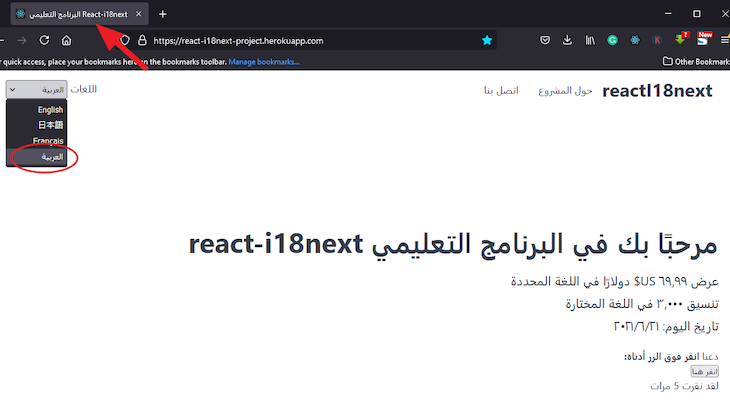
In this tutorial, we build this app together. You can interact with the final project here.
The Replay is a weekly newsletter for dev and engineering leaders.
Delivered once a week, it's your curated guide to the most important conversations around frontend dev, emerging AI tools, and the state of modern software.
The i18next framework is flexible due to its support for plugins, letting us add features that we would otherwise have to build ourselves.
We also have options to separate translations into different files and load them when required. This means we don’t need to load all the translation files before loading a page, reducing slow loading times.
With this simple React project to work with, let’s run the following command in our computer terminal:
git clone https://github.com/Ibaslogic/react_i18next_starter
Once that is done, open the project folder with a code editor. Inside the project directory, run npm install to generate a node_modules folder.
Then, start the development server by running npm start, and wait to see the application load in the browser at http://localhost:3000/.
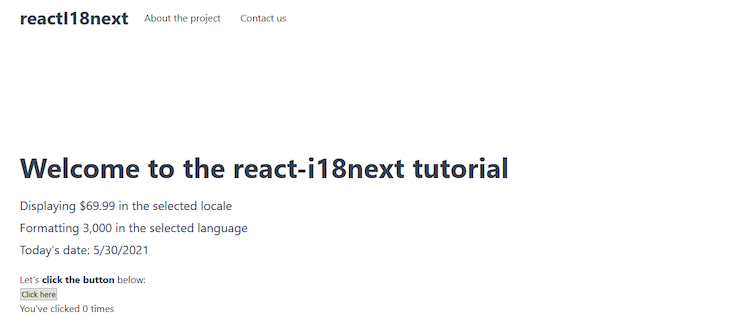
The project structure should look like this:
project_folder
    ├── node_modules
    ├── public
    ├── src
    │    ├── components
    │    │      ├── App.js
    │    │      ├── Content.js
    │    │      ├── Footer.js
    │    │      └── Header.js
    │    ├── index.css
    │    └── index.js
    ├── .gitignore
    ├── package-lock.json
    ├── package.json
    ├── README.md
    └── yarn.lock
Our focus, for now, is on the src folder. There, we have all our React components containing the content we can localize.
i18next and react-i18next packagesTo localize a React application using the i18next, we must add the i18next and react-i18next packages to our project.
i18next provides all the translation functionalities while react-i18next adds some extra React features like Hooks, HOCs, render props, and more.
Install them by running the following command:
npm install react-i18next i18next
Create a file called i18n.js in the src folder and add this translation configuration:
import i18n from "i18next";
import { initReactI18next } from "react-i18next";

i18n
  .use(initReactI18next)
  .init({
    resources: {
      en: {
        translation: {
          //English translations here
        },
      },
      ja: {
        translation: {
          //Japanese translations here
        },
      },
    },
    lng: "en",
    fallbackLng: "en",
  });

export default i18n;
By importing the i18n instance from the i18next core, we can bind the react-i18next module to it via the initReactI18next object provided by the module. This ensures that the i18next framework passes the i18n instance to the react-i18next module.
Invoking the use() function loads and binds any plugins to the i18n instance.
We then initialize our configuration by calling the init() function and defining the basic configuration options.
We’ve also added resources, lng, and fallbackLng object properties. Within resources, we provide the translation object for two languages, English and Japanese.
en and ja are ISO standard codes representing the English and Japanese languages, respectively. See all the ISO standard abbreviations for languages here.
Next, import the configuration file in the src/index.js, like so:
import "./i18n";
Don’t forget to save the files!
To begin, let’s translate a simple header message from our starter project, “Welcome to the react-i18next tutorial.”
Update the src/i18n.js file to include the English and Japanese translations:
// ...
resources: {
  en: {
    translation: {
      //English translations here
      "welcome text": "Welcome to the react-i18next tutorial",
    },
  },
  ja: {
    translation: {
      //Japanese translations here
      "welcome text": "react-i18nextチュートリアルへようこそ",
    },
  },
},
// ...
Save the file.
As seen in the translation object, we defined our message in a JSON format, giving it a unique key across the supported locale.
In this project, we are translating to the target language using Google Translate.
t()i18next through the i18n instance provides a translation function called t(). It accepts a key that looks up the translation object and returns the string that matches the key for the current language.
Depending on the type of React component, we can access t() in different ways, such as using:
withTranslation higher order component (HOC)Translation render prop in both class and function componentsIn this guide, we’ll use the useTranslation Hook.
useTranslation HookOpen the components/Content.js file and import the useTranslation Hook, like so:
import { useTranslation } from 'react-i18next';
Then, above the return statement, add this line:
const { t, i18n } = useTranslation();
From the Hook, we can access the t function and the i18n instance. We only need the t function to translate our content. Later in this guide, we will use the i18n instance to change the application language. For now, we can remove the i18n.
Next, replace the h1 text with the t function containing the translation key so we have the following:
import { useTranslation } from "react-i18next";

const Content = () => {
  const { t } = useTranslation();

  return (
    <div className="container hero">
      <h1>{t("welcome text")}</h1>
      {/* ... */}
    </div>
  );
};

export default Content;
Save the file and reload the frontend.
Nothing changes. But, let’s temporarily change the lng property in the src/i18n.js file to Japanese (ja) and save the file:
i18n
  .use(initReactI18next)
  .init({
    resources: {
      // ...
    },
    lng: "ja",
    fallbackLng: "en",
  });
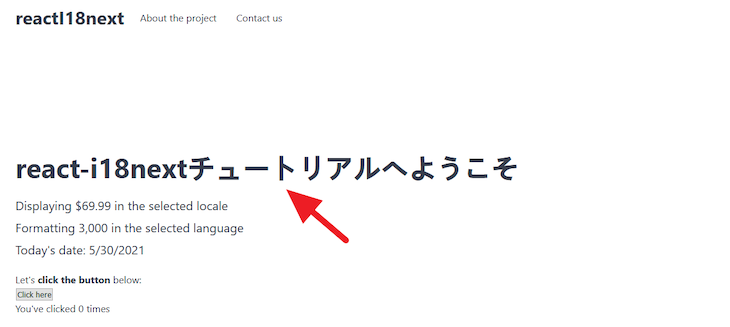
We’ll now see the Japanese text rendered once we reload the page:
At the moment, we have all our translations loaded in the configuration file. This is not ideal, especially if we are working on a larger project where we add more languages and content.
i18next provides a better way to optimize our code by separating translations from the code and loading them when required. To do this, we’ll install a plugin.
i18next-http-backendThe i18next-http-backend package loads translation files from the backend server:
npm install i18next-http-backend
Next, update the i18n.js configuration file to include the plugin:
import i18n from "i18next";
import { initReactI18next } from "react-i18next";
import Backend from "i18next-http-backend";

i18n
  .use(Backend)
  .use(initReactI18next)
  .init({
    ...
  });

export default i18n;
By default, this plugin expects to load our translation files from the public/locales/{lng}/translation.json directory where lng is the language code.
While we can also change the directory from the configuration file to a custom directory, we will stick to the default.
Let’s create the translation.json file for each of our supported languages. In this instance, we’ll support English, Arabic, French, and Japanese.
The file structure should look like this:
public
  ├── locales
  │     ├── ar
  │     │   └── translation.json
  │     ├── en
  │     │   └── translation.json
  │     ├── fr
  │     │   └── translation.json
  │     ├── ja
  │     │   └── translation.json
Inside the en/translation.json file, add this:
{
  "welcome text": "Welcome to the react-i18next tutorial"
}
In the ar/translation.json file, add this:
{
  "welcome text": "مرحبًا بك في البرنامج التعليمي react-i18next"
}
Use Google Translate for the other supported locales. Later, we will update our translation files to accommodate other text.
Remember to save all the files.
We can now remove the resources property in the src/i18n.js file since we can now load the translations from the backend.
The configuration file now looks like this:
// ...
i18n
  .use(Backend)
  .use(initReactI18next)
  .init({
    lng: "en",
    fallbackLng: "en",
  });
// ...
If we save the file and reload the frontend, we’ll encounter an app break. The i18next framework expects us to handle the state of the app while waiting for the translation text to load from the backend.
To do this, we’ll wrap the top-level component inside a Suspense component from React. This allows us to display some fallback — for example, a loading indicator — during the waiting phase.
Open the src/index.js file and use the Suspense component, like so:
ReactDOM.render(
  <React.StrictMode>
    <Suspense fallback={<div>Loading...</div>}>
      <App />
    </Suspense>
  </React.StrictMode>,
  document.getElementById("root")
);
Next, import the Suspense component at the top of the file:
import React, { Suspense } from "react";
The fallback prop accepts a text string or any React elements that we’d like to render. Save the file and the app should work.
If we change the lng property in the configuration file to ar or any of the supported languages, we’ll see the translation in the frontend.
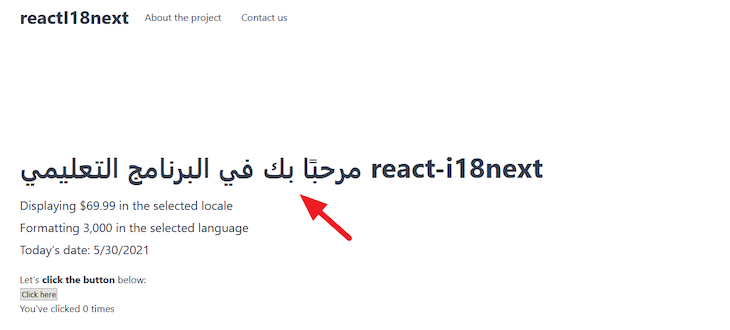
Now that we covered the fundamentals, let’s quickly translate the other page content.
Up to this moment, we’ve covered how to translate a simple text string. As mentioned earlier, localization goes beyond translation between languages. Cultural differences must be considered.
Going forward, we’ll cover how to format and translate a text-rich message. If we look at our application, we’ll see that we have numbers, the date, and the currency placement to format for different locales.
We also have a number count that increases as users click a button, and must format the text to respect pluralization.
When text has a number or date that must be formatted, we use interpolation. This is one of the functionalities that allows inserting values into our translations.
Using the frontend text, “Formatting 3,000 in the selected language,” we will interpolate “3000” into the text.
In the en/translation.json file, add this to the JSON:
{
  ...
  "formatNumber": "Formatting {{num}} in the selected language"
}
Notice how we are replacing the number with a placeholder.
In the Arabic file, add this:
{
  ...
  "formatNumber": "تنسيق {{num}} في اللغة المختارة"
}
Make sure to add translations for the other supported locales and save all the files.
Next, we will use the translation function, t(), to translate and format our message based on the current language.
In components/Content.js, find this element:
<p>Formatting 3,000 in the selected language</p>
Replace it with this:
<p>{t("formatNumber", { num: 3000 })}</p>
Here, we are passing the number to interpolate as the second argument of the t() function. The num used in the object property must match the placeholder in the translation files — in our case, {{num}}.
Save the file and test the work.
If we change the lng property in the i18n.js file to ar, we’ll have this:
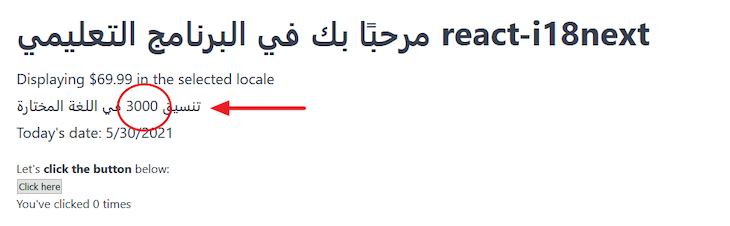
Next, we must format the interpolated number based on the current language.
i18next does not support formatting numbers or dates by default. But, it does allow us to format using libraries like moment.js, Luxon, and date-fns, or via the Intl API.
In this project, we’ll use the Intl API to format for us; it’s simple and works well with i18next. This Intl API through its Intl object provides us with the required constructors.
For us to format, we only need the Intl.NumberFormat() and Intl.DateTimeFormat() constructors.
To format the number we interpolated earlier, we must add another translation option called interpolation inside the configuration, and define a function that handles formatting.
The configuration now looks like this:
i18n
  .use(Backend)
  .use(initReactI18next)
  .init({
    lng: "ar",
    fallbackLng: "en",
    interpolation: {
      format: (value, format, lng) => {
        if (format === "number") {
          return new Intl.NumberFormat(lng).format(value);
        }
      },
    },
  });
The focus is on the format function. There, we defined a condition that checks if the value we need to format is a number. We must then return the formatted value in the current language using the Intl API.
To ensure the condition returns true, we must update the placeholder, {{ }}, in our translation to include the number.
For English, update en as the following:
"formatNumber": "Formatting {{num, number}} in the selected language"
For Arabic, update ar as the following:
"formatNumber": "تنسيق {{num, number}} في اللغة المختارة"
Update the translation files for the other supported locales as well, and save them.
Now the app should look like this:
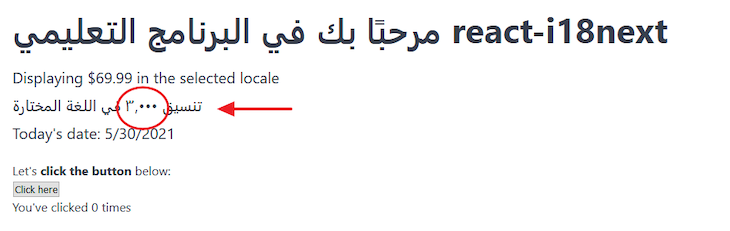
Using the same approach, let’s translate the other text in the components/Content.js file and format the date and currency placement.
Update the en/translation.json to include the following:
{
  ...
  "formatCurrency": "Displaying {{price, currency}} in the selected locale",
  "formatDate": "Today's date: {{today, date}}"
}
In the ar/translation.json, add:
{
  ...
  "formatCurrency": "عرض {{price, currency}} دولارًا في اللغة المحددة",
  "formatDate": "تاريخ اليوم: {{today, date}}"
}
Again, add translations for the other supported locales.
After that, update the components/Content.js file to access the translations:
const Content = () => {
  // ...

  return (
    <div className="container hero">
      <h1>{t("welcome text")}</h1>
      <p>{t("formatCurrency", { price: 69.99 })}</p>
      <p>{t("formatNumber", { num: 3000 })}</p>
      <p>{t("formatDate", { today: new Date() })}</p>
    </div>
  );
};
Finally, in the i18n.js file, update the format function:
format: (value, format, lng) => {
  // ...
  if (format === "date") {
    return new Intl.DateTimeFormat(lng).format(value);
  }
  if (format === "currency") {
    return new Intl.NumberFormat(lng, {
      style: "currency",
      currency: "USD",
    }).format(value);
  }
},
In this file, we are using the Intl.DateTimeFormat() constructor to format the date. Notice how we are providing additional options to Intl.NumberFormat() to format the currency. Find the list of currency codes here.
Save all the files and reload the frontend.
By default, i18next escapes values to reduce cross-site scripting (XSS) attacks, seen in the image below.
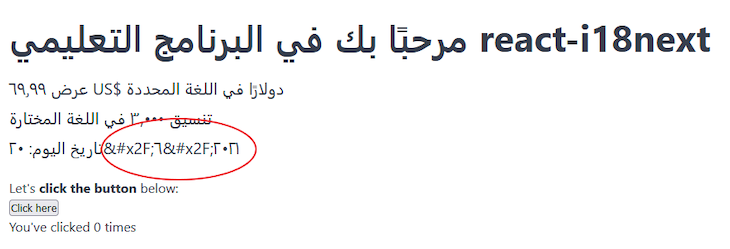
But, a React app is XSS-protected. So, let’s prevent i18next from escaping the value by adding escapeValue in the interpolation and assign a false value.
interpolation: {
  format: (value, format, lng) => {
    // ...
  },
  escapeValue: false // react already safes from xss
},
Save and reload the frontend, and it should work.
At the moment in our app, clicking on the frontend count button doesn’t change the count statement. For instance, when the count is singular, the statement should read “You clicked 1 time.”
So, let’s start adding translations into the various translation files. Update the en/translation.json file to include the following:
{
  ...
  "clickCount": "You've clicked {{count}} time",
  "clickCount_plural": "You've clicked {{count}} times"
}
Here, we are replacing the dynamic count in the message with a placeholder. This placeholder variable must be called count. We are also providing the plural equivalent of our translation.
To tell i18next whether to render the singular or plural message, we must pass the clickCount key, without _plural, alongside the dynamic count value to the t function in the render.
If the count is 1, the singular message renders, otherwise, it renders the plural form.
Let’s update the translation files for the other locales. For the ja/translation.json file, add the following:
{
  ...
  "clickCount": "{{count}}回クリックしました"
}
Notice we are not adding the plural equivalent. This is because Japanese (ja) only has one plural form. See the appropriate plural form for each language.
Like English, French has two plural forms. However, some of the words have the same form in the singular and plural.
For instance, if we translate the message to French, we’ll have the following in the fr/translation.json file:
{
  ...
  "clickCount": "Vous avez cliqué {{count}} fois",
  "clickCount_plural": "Vous avez cliqué {{count}} fois"
}
Since both are of the same form, we can ignore the second one and have this:
{
  ...
  "clickCount": "Vous avez cliqué {{count}} fois",
}
For Arabic, there are five plural forms alongside the singular, so we must define every form, like so:
clickCount_0; //c = 0 i.e zero
clickCount_1; //c = 1 i.e singular
clickCount_2; //c =2 i.e two
clickCount_3; //3 <= c <=10 i.e few
clickCount_4; //11 <= c <=99 i.e many
clickCount_5; //>= 100 i.e other
We must maintain the same key name, which, in our case, is maintaining clickCount, just like we’ve used in the other translation files.
i18next automatically selects the suitable form based on the count. When the count is 0, 1, or 2, i18next renders translations assigned to their respective keys clickCount_0, clickCount_1, and clickCount_2.
However, when the count is between 3 and 10, i18next renders translations assigned to clickCount_3, 11 to 99 renders translations assigned to clickCount_4, and a count at 100 or above renders translations assigned to clickCount_5.
If we translate the string, “You’ve clicked {{n}} times” to Arabic where “n” is a number from 0 to infinity, we can use Google Translate to get the following:
{
  ...
  "clickCount_0": "لقد نقرت {{count}} مرة",
  "clickCount_1": "لقد نقرت مرة واحدة",
  "clickCount_2": "لقد نقرت مرتين",
  "clickCount_3": "لقد نقرت {{count}} مرات",
  "clickCount_4": "لقد نقرت {{count}} مرة",
  "clickCount_5": "لقد نقرت {{count}} مرة"
}
Now, save the files.
Open the components/Footer.js file to access the t function. First, import the translation Hook, like so:
import { useTranslation } from "react-i18next";
Above the return statement, access the t function from the Hook:
const { t } = useTranslation();
Now, we can use it to replace the text to translate it; so, find the following element:
<p>You've clicked {count} times</p>
Then, replace it with this:
<p>{t("clickCount", { count: count })}</p>
Save the file, reload the frontend, and test the project.
Trans componentTo translate a string formatted with the strong, i, or br element, or to include a link, we must use the Trans component from i18next.
If we open the components/Footer.js file, we can translate and format the following element:
<p>
  Let's <strong> click the button </strong> below:
</p>
The logic here is simple; we will break the p element text into nodes and assign an index number to them, like so:
  Let's --> index 0
  <strong> click the button </strong> --> index 1
  below: --> index 2
Next, import the Trans component in the Footer.js file to wrap the text:
// ...

import { useTranslation, Trans } from "react-i18next";

const Footer = () => {
  // ...

  return (
    <div className="container mt">
      {/* Footer content here */}
      <p>
        <Trans i18nKey="clickButtonText">
          Let's <strong> click the button </strong> below:
        </Trans>
      </p>
      {/* ... */}
    </div>
  );
};

// ...
Notice we’ve added the i18nKey prop to the Trans component. We will use its value as a key in the translation files.
We can now use this index number as a placeholder to reference the inner element in the translation files.
In the en/translation.json file, we have the following:
{
  ...
  "clickButtonText": "Let's <1>click the button</1> below:"
}
The key is coming from the Trans i18nKey prop.
In the ar/translation.json file, we have the following:
{
  ...
  "clickButtonText": "دعنا <1> انقر فوق الزر </ 1> أدناه: "
}
Update the other supported translation files, save them, and reload the frontend and see the changes.
To translate the button text, let’s replace the text in the component/Footer.js file with the t function:
<button onClick={onChange}>{t("click")}</button>
Then, update the translation files to include the key-value pair.
In the en/translation.json file, add:
"click": "Click here"
In the ar/translation.json file, add:
"click": "انقر هنا"
Use Google Translate to update the other translation files.
For translating the menu items, start by adding this to the en/translation.json file:
"menu" : {
  "aboutProject" : "About the project",
  "contactUs": "Contact us"
}
Then, add this to ar/translation.json file:
"menu" : {
  "aboutProject" : "حول المشروع",
  "contactUs": "اتصل بنا"
}
Again, use Google Translate to update the other translation files and save them.
Next, open the components/Header.js file and import the useTranslation at the top:
import { useTranslation } from "react-i18next";
Then, use the t function to translate the menu titles:
import { useTranslation } from "react-i18next";

const Header = () => {
  const { t } = useTranslation();
  const menu = [
    {
      title: t("menu.aboutProject"),
      // ...
    },
    {
      title: t("menu.contactUs"),
      // ...
    },
  ];

  return (
    // ...
  );
};

// ...
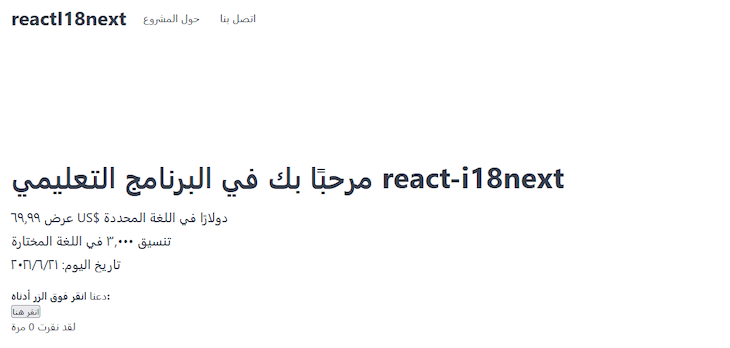
If we save the file and reload the frontend, we’ll see the menu items and all the page content properly translated.
We must provide an option for users to switch languages in the frontend while persisting the selected locale in the browser storage. This enables content to display in the preferred language on a subsequent visit.
i18next provides a plugin for this, so let’s install it using this command:
npm install i18next-browser-languagedetector
Once installed, import and add the plugin to the configuration file:
// ...
import LanguageDetector from "i18next-browser-languagedetector";

i18n
  // ...
  .use(LanguageDetector)
  .init({
    fallbackLng: "en",
    detection: {
      order: ["path", "localStorage", "htmlTag", "cookie"],
      caches: ["localStorage", "cookie"], // cache user language on
    },
    interpolation: {
      // ...
    },
  });

export default i18n;
In the setup, we removed the lng property since the app now depends on the plugin to detect the current language. In the detection property, we’ve specified the order to detect the user’s language.
The first item in the order has the highest priority and decreases in that order. This means that the plugin first checks the path, followed by localStorage, and so on.
Now, we can access the locale content from the URL path http://localhost:3000/ar.
We must specify the path as the first item in the array to access the locale content through the path. However, note the user’s locale is still detected from the other specified storage.
Save the file and reload the frontend; test the project by passing a locale to the URL path http://localhost:3000/ar.
To create a language switcher, begin by opening the components/Header.js file and adding the supported languages above the return statement:
// Languages
const languages = [
  { name: "English", code: "en" },
  { name: "日本語", code: "ja" },
  { name: "Français", code: "fr" },
  { name: "العربية", code: "ar" },
];
Next, find this element in the JSX:
<div className="switcher">
  {/* Language switch dropdown here */}
</div>
Update it so we have the following:
<div className="switcher">
  {/* Language switch dropdown here */}
  <span>Languages</span>{" "}
  <select>
    {languages.map(({ name, code }) => (
      <option key={code} value={code}>
        {name}
      </option>
    ))}
  </select>
</div>
Save the file. The code should be self-explanatory because it is basic React.
The switcher should now display in the frontend, although it is not working yet. We need to make the dropdown element a controlled component.
All we need to do is to pass a value prop and onChange to the select element:
<select onChange="" value="">
  {/* ... */}
</select>
The value prop takes the current locale while onChange triggers a function that updates the locale.
We can get the current locale value from the storage by installing a package called js-cookie. This allows us to get the locale string from the cookie:
npm install js-cookie
Next, import the Cookies object at the top of the Header.js file:
import Cookies from "js-cookie";
Then, add this code above the return statement:
const currentLocale = Cookies.get("i18next") || "en";
This package uses the get() method to read a cookie from the storage and accepts the name of the cookie.
For the i18next framework, the cookie name is i18next. We can find this name in the storage cookies of the browser devtools.
Next, define a state that takes the current locale and assigns it to the value prop of our dropdown element.
Still in the Header.js file, import the useState at the top of the file:
import { useState } from "react";
Then, define a language variable and pass in the current locale via the useState Hook.
Add the following above the return statement:
const [language, setLanguage] = useState(currentLocale);
Now that the language has the current locale, we can pass it to the value prop:
<select onChange={handleChangeLocale} value={language}>
  {/* ... */}
</select>
Notice we’ve also added the handleChangeLocale handler to trigger an update.
Let’s quickly create it. Add this code above the return statement:
const handleChangeLocale = (e) => {
  const lang = e.target.value;
  setLanguage(lang);
};
The code is updating the language dropdown to the user’s selection. We must go a step further and update the application language.
As mentioned earlier, the i18n instance is required to change the language. Now, we can use it to grab the changeLanguage() API to accept the user’s selected language.
Like the t function, we also have access to the i18n instance from the useTranslation() Hook.
So, update the Hook to include the i18n:
const { t, i18n } = useTranslation();
Then, use it in the handleChangeLocale handler:
const handleChangeLocale = (e) => {
  const lang = e.target.value;
  setLanguage(lang);
  i18n.changeLanguage(lang);
};
Save and test the application.
If we temporarily open the browser devtools and add a dir="rtl" to the body element, we’ll see the content displayed from right to left. In our app, we need to locate the body element and add the dir attribute when the page loads.
Update the Arabic language in the languages array to include its direction in the components/Header.js file:
const languages = [
  // ...
  { name: "العربية", code: "ar", dir: "rtl" },
];
After that, add the following code above the return statement:
const currentLangObj = languages.find((lang) => lang.code === currentLocale);

useEffect(() => {
  document.body.dir = currentLangObj.dir || 'ltr'
}, [currentLangObj])
Import the useEffect
Hook at the top of the file:
import { useState, useEffect } from "react";
The find() method allows us to get the language object for the selected locale. In this object, we have access to the Arabic direction, which we assign to the body.dir attribute when the page loads.
Here, we will add translations for our app title and the Languages text beside the dropdown.
In the en/translation.json, add:
{
  ...
  "app_title": "React-i18next tutorial",
  "languages": "Languages"
}
Add translations for the other supported locales and save all the files.
Back to the components/Header.js file, update useEffect to include the translation function for the app title:
useEffect(() => {
  document.body.dir = currentLangObj.dir || "ltr";
  document.title = t("app_title");
}, [currentLangObj, t]);
Finally, locate this element within the JSX:
<span>Languages</span>
Replace it with the translation function:
<span>{t('languages')}</span>
Save the file and test the app. Everything should work as expected.
Congratulations! We’re done!
I’m excited you are here. You’ve learned a lot in regards to using the i18next framework in a React application. We covered almost all the use cases needed to utilize i18next. Now, you know how to use it to localize a React application.
If you enjoyed this guide, please share it around the web. And if you have questions or contributions, please let me know through the comment section.
You can see the entire i18next project source code in this GitHub repository.
Install LogRocket via npm or script tag. LogRocket.init() must be called client-side, not
server-side
$ npm i --save logrocket

// Code:

import LogRocket from 'logrocket';
LogRocket.init('app/id');
// Add to your HTML:

<script src="https://cdn.lr-ingest.com/LogRocket.min.js"></script>
<script>window.LogRocket && window.LogRocket.init('app/id');</script>

Why the future of DX might come from the web platform itself, not more tools or frameworks.

A hands-on test of Claude Code Review across real PRs, breaking down what it flagged, what slipped through, and how the pipeline actually performs in practice.

CSS art once made frontend feel playful and accessible. Here’s why it faded as the web became more practical and prestige-driven.

Learn how inline props break React.memo, trigger unnecessary re-renders, and hurt React performance — plus how to fix them.
Would you be interested in joining LogRocket's developer community?
Join LogRocket’s Content Advisory Board. You’ll help inform the type of content we create and get access to exclusive meetups, social accreditation, and swag.
Sign up now


 Learn more →




