There is a kind of code every React developer writes from muscle memory: a mounted flag, a Provider that passes along a single prop, and the wrapper <div> that exists mainly to give a ref somewhere to live.
In 2026, a lot of that code became optional. React 19.3 shipped on September 9 and retired several of these patterns, while the browser took care of a few more. The problem is that the news is scattered across release notes, changelogs, and a single newsletter issue.
So I picked ten patterns and built each one twice: once the old way and once the new way. I tested them on a MacBook M4 with React 19.3.0, Next.js 16.3.8, Node 26.10.0, Chrome 154, Firefox 157, and Safari 26.6.2. Here’s the GitHub repo.
For each one, I’ll show you what it replaces, what I measured, and whether you can use it today. Most of the results were good. One was surprising enough to make me rethink my own list.
Server Components can’t create context. Previously, you’d need a 'use client' file to export the context, along with a UserProvider component whose only job was to pass a prop into it.
With React 19.3, a Server Component can render the context directly:
// user-context.tsx
'use client';
export const UserContext = createContext<User | null>(null);

// page.tsx (Server Component)
export default async function Page() {
  const user = await getUser();
  return <UserContext value={user}><UserCard /></UserContext>;
}
The wrapper is gone. In my test, I removed 10 lines and an entire component, and the client child could still read the user with useContext.
One rule still applies, though: the context itself must be created in a 'use client' file. I tried calling createContext from a server file, and the build stopped with an error: “You’re importing a module that depends on createContext into a React Server Component module.”
Verdict: Use it now. It runs on the server, so there’s no browser runtime to break.
mounted flags with SuspenseYou should be familiar with this one. A component needs the browser, so you add useState(false), flip it inside useEffect, and return a loading line until then.
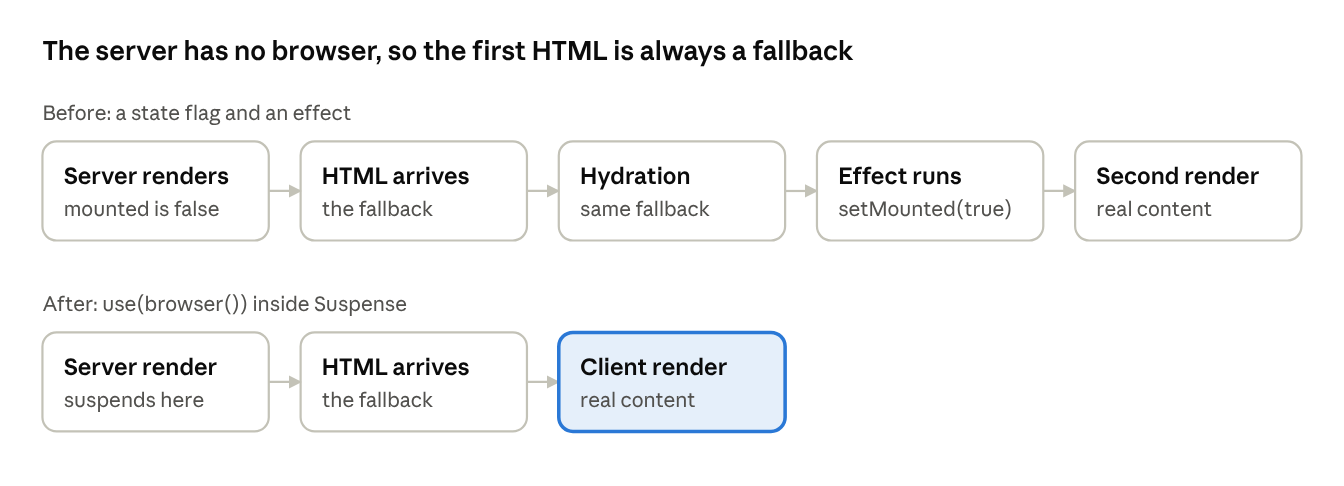
The flag exists because the server can’t run browser code. Suspense now does the swap that the effect used to do.
function TimezoneContent() {
  use(browser());
  const timeZone = Intl.DateTimeFormat().resolvedOptions().timeZone;
  return <p>{timeZone}</p>;
}

<Suspense fallback={<p>Loading timezone...</p>}>
  <TimezoneContent />
</Suspense>
use(browser()) suspends on the server and does nothing in the browser. I opened the server HTML, and the fallback text was there, as expected.
To be honest about the numbers. You don’t save lines. With the Suspense boundary, the new version is a little longer. What you delete is the state, the effect, and the hidden if (!mounted) branch. The loading state now lives in Suspense, where React already knows what to do with it.
Verdict: Use it now.
You want to observe a group of cards, or move focus to the first input in a group. A ref needs one DOM node, so you add a <div>. The <div> breaks your flex layout, so you add display: contents. Now you have a hack sitting on top of a hack.
const fragmentRef = useRef<React.FragmentInstance>(null);

<Fragment ref={fragmentRef}>
  {items.map((name) => <Card key={name} name={name} />)}
</Fragment>

// inside an effect
fragmentRef.current.observeUsing(observer);
Fragment refs are stable in 19.3. The ref gives you a FragmentInstance with observeUsing(), focus(), and focusLast(). My observer setup went from about 8 lines to 2, and the extra DOM node disappeared. One thing to watch: the type is React.FragmentInstance, and its methods come from @types/react-dom.
Verdict: Use it now.
useEffect with event propsTracking fullscreen meant a useEffect, two document.addEventListener calls, two matching removals, and a ref. In my test that was 15 lines wrapped around two lines of real logic.
<div
  onFullscreenChange={(e) =>
    setIsFullscreen(document.fullscreenElement === e.currentTarget)
  }
  onFullscreenError={(e) => setError(`Fullscreen error: ${e.type}`)}
>
React 19.3 adds both as event props. Fifteen lines became six. The catch is TypeScript. @types/[email protected] doesn’t know these props yet, so the build complains until you add a type assertion.
Verdict: Use it now, and expect to argue with the types for a while.
useEffect with onResetWhen a form action succeeds, React clears the uncontrolled fields for you. It does not clear your own state. So a character counter stays at 12/280 above an empty box, and you write an effect to fix it:
useEffect(() => {
  if (state.success) {
    setCharCount(0);
  }
}, [state]);
React 19.3 now fires onReset when it resets a form after an action. The effect becomes one prop:
<form action={formAction} onReset={() => setCharCount(0)}>
I posted a comment, and the counter went from 12/280 back to 0/280. That is five lines gone, counting the useEffect import.
One surprise. I made the action return { success: false } without throwing. React still reset the form, and onReset still fired, so the counter cleared on a failed post. The old if (state.success) check would have kept it.
Verdict: Use it now. Remember that it also fires when your action returns an error.
requestAnimationFrame throttling from resizeMost useWindowSize hooks wrap setState in requestAnimationFrame, with a ref and a cleanup to cancel it. That is six extra lines.
The 19.3 changelog has a quiet entry: react-dom now batches updates from resize events until the next frame. So I removed the throttle:
const handleResize = () => {
  setSize({ width: window.innerWidth, height: window.innerHeight });
};
Then I dragged the window edge on both pages in Chrome 154 and counted renders. With the throttle, the page rendered 386 times. Without it, 408. That is a gap of about 6%, from a test I ran by hand. On 19.3, those six lines buy you almost nothing.
Verdict: Use it now.
loaded flags with ViewTransition and SuspenseConfession first. This slot was meant for React’s <img> preloading, which got a new docs page this year. I server-rendered an image on React 19.0, 19.1, 19.2, and 19.3. All four already add the preload link. The docs are new, but the feature is not, so it lost its seat.
Its replacement is still about images. To stop an image from popping in half-loaded, you hold a flag:
const [loaded, setLoaded] = useState(false);

{!loaded && <Skeleton />}
<img
  onLoad={() => setLoaded(true)}
  style={{ display: loaded ? 'block' : 'none' }}
/>
In React 19.3, an image inside <ViewTransition> can trigger Suspense while it loads:
<ViewTransition>
  <Suspense fallback={<Skeleton />}>
    <Profile />
  </Suspense>
</ViewTransition>
Make the state update inside startTransition. I delayed the image by 1.5 seconds. Both versions showed the skeleton at 0.5 seconds and the image at 2 seconds. The new one did it without the flag, the handler, or the style switch. That is seven lines gone.
Now the limit. I delayed the image by 15 seconds. After 2 seconds, the skeleton was gone, and the <img> was on the page, still loading. React waits for a while, then stops. The docs say this is on purpose, so a slow image can’t block the update forever.
Verdict: Use it now for images that load fast. Keep the flag where a slow image must never show an empty box.
Placing a tooltip has always needed JavaScript. Measure the button, measure the tooltip, flip it when it hits the edge, and repeat on scroll.
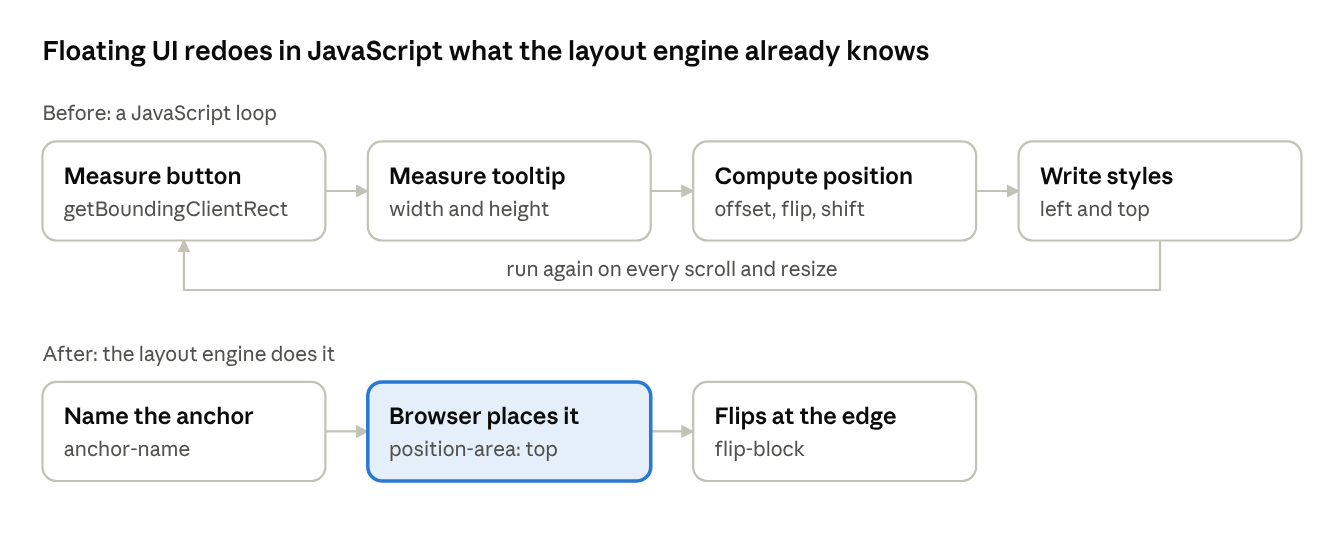
The loop exists because JavaScript can’t see a layout until it measures it. CSS anchor positioning moves that work into the layout engine.
const ref = useRef<HTMLDivElement>(null);
<button
  style={{ anchorName: '--tip' } as React.CSSProperties}
  onMouseEnter={() => ref.current?.showPopover()}
  onMouseLeave={() => ref.current?.hidePopover()}
>
  Hover me
</button>
<div ref={ref} popover="manual" className="tooltip"
  style={{ positionAnchor: '--tip' } as React.CSSProperties}>
  Tooltip text
</div>
A fair warning about the date: CSS anchor positioning did not ship in 2026. Chrome has had it since version 125. What happened in 2026 is that Firefox 147 shipped it in January. That made it safe to use in every major browser.
position-try-fallbacks: flip-block does the job of Floating UI’s flip(). CSS places the tooltip, but it does not open it. You still write two mouse handlers that call showPopover() and hidePopover().
To be honest about the numbers again. My Floating UI file, with a tooltip and a dropdown, was 93 lines. The CSS anchor version is 75 lines of React plus a 35-line CSS file. That is 18 fewer lines of React but 110 lines in total, so you write more code, not less. The win is the 8.8 KB library you no longer ship.
Verdict: Use it now for simple cases. Keep Floating UI if you need arrows or virtual anchors.
A textarea that grows as you type is a small feature with an annoying implementation. You hold a ref, reset the height, then set it to scrollHeight on every change:
useLayoutEffect(() => {
  const el = textareaRef.current;
  if (!el) return;
  el.style.height = 'auto';
  el.style.height = el.scrollHeight + 'px';
}, [value]);
field-sizing: content reached every major browser on June 16, 2026, when Firefox 152 shipped it. Now the whole thing is CSS:
textarea {
  field-sizing: content;
  min-height: 3lh;
  max-height: 10lh;
}
I typed ten lines into both versions in Chrome 154. The old one grew from 72px to 256px. The new one grew from 72px to 240px, then stopped and scrolled, because max-height: 10lh caps it at ten lines. Loading a draft from code resized both, and deleting the text shrank both back to 72px.
The two are not pixel-identical. The same draft measured 136px the old way and 138px the new way, so check any tight layout.
The effect was four lines in my test. If you use react-textarea-autosize instead, that is 1.7 KB gzipped, you can drop.
Verdict: Use it now.
A staggered list animation needs each item to know its position. CSS could not count, so React did it:
{items.map((item, i) => (
  <li key={item} style={{ '--i': i } as React.CSSProperties}>{item}</li>
))}
li { animation-delay: calc(var(--i) * 60ms); }
sibling-index() became Baseline in August 2026, when Firefox 154 shipped it. CSS can count now:
{items.map((item) => <li key={item}>{item}</li>)}
li { animation-delay: calc((sibling-index() - 1) * 60ms); }
In Chrome 154, both versions gave the same delays for five items: 0s, 0.06s, 0.12s, 0.18s, and 0.24s. Adding an item at the top updated both.
Concerns: sibling-index() counts every element sibling, not only your list items. I put a heading inside the list container as its first child, and every delay moved up by 60ms. The .map() index did not care. Keep your items in a container that holds nothing else.
This is the smallest delete here. You lose the index argument, the inline style, and the as React.CSSProperties cast.
Verdict: Use it now, in a clean container.
| # | Feature | Replaces | Use it today? | Lines removed |
|---|---|---|---|---|
| 1 | Context in Server Components | Provider wrapper | Yes | 10 |
| 2 | use(browser()) |
mounted flag |
Yes | 0 |
| 3 | Fragment refs | Wrapper <div ref> |
Yes | About 6 |
| 4 | Fullscreen event props | useEffect listeners |
Yes, types lag | 9 |
| 5 | onReset after an action |
Reset useEffect |
Yes, fires on returned errors too | 5 |
| 6 | Resize batching | requestAnimationFrame throttle |
Yes | 6 |
| 7 | <ViewTransition> image waiting |
loaded flag |
Yes, for fast images | 7 |
| 8 | Anchor positioning | Floating UI, simple cases | Yes | 18 |
| 9 | field-sizing: content |
Auto-grow textarea effect | Yes | 4 |
| 10 | sibling-index() |
Index passed into CSS | Yes, in a clean container | 3 |
Added up, that is over 60 lines across ten small demos.
mounted flags, and wrapper divsonReset fires on returned errors, React stops waiting for slow images, and sibling-index() counts every siblingNone of these ten made a keynote. They are small, and that is the point. Each one removes code you only wrote because the platform had a gap. Start with the three safe ones this week: delete a Provider wrapper, a mounted flag, and a wrapper div. Then delete the textarea effect. It is four lines, and you will not miss them.
Install LogRocket via npm or script tag. LogRocket.init() must be called client-side, not
server-side
$ npm i --save logrocket

// Code:

import LogRocket from 'logrocket';
LogRocket.init('app/id');
// Add to your HTML:

<script src="https://cdn.lr-ingest.com/LogRocket.min.js"></script>
<script>window.LogRocket && window.LogRocket.init('app/id');</script>

Learn how coding agents streamline TDD with automated tests, quality guardrails, and mutation testing to catch bugs and build reliable software.

We tested five AI code review tools for speed, setup, security, and code quality to compare their strengths and help you choose the right tool.

Compare five React toast libraries for features, bundle size, accessibility, performance, and React 19 compatibility.
See how Tecovas built a patching agent that turns LogRocket’s Galileo AI issue analysis into GitHub PRs, with a developer reviewing every fix before it ships.
Would you be interested in joining LogRocket's developer community?
Join LogRocket’s Content Advisory Board. You’ll help inform the type of content we create and get access to exclusive meetups, social accreditation, and swag.
Sign up now

 Learn more →