
Editor’s note: This article was last updated by Ibadehin Mojeed on 1 March 2024 to update code snippets and content, specifically adding sections about using the Fetch API for POST requests, fetching data using hooks such as useFetch and useEffect, fetching using the TanStack Query library, and more.

Over the years, how we fetch data into React applications has evolved. For developers who aim to be ahead of the curve, understanding how fetching data works in the current dispensation is essential.
In this guide, we’ll explore the modern React data-fetching methods. We’ll cover what you need to know about each method, edge cases, and benefits so that you can decide the right solution for your project.
You can check out the project code in this GitHub repo to see the code examples we’ll explore in this tutorial. You can see the live demo here as well. Let’s get started!
The Replay is a weekly newsletter for dev and engineering leaders.
Delivered once a week, it's your curated guide to the most important conversations around frontend dev, emerging AI tools, and the state of modern software.
API, or Application Programming Interface, is a protocol or contract that allows one application to communicate with another. In other words, APIs act as intermediaries, enabling the exchange of information between different systems.
Let’s think of an application where a section displays the daily weather forecast of the present city. While building this type of app, we can create our backend to handle the weather data logic or we can simply make our app communicate with a third-party system that has all the weather information so we only need to render the data.
Either way, the app must communicate with the backend. This communication is possible via an API, and, in this case, a web API, which allows communication over the internet, typically using HTTP (Hypertext Transfer Protocol).
With the API, we don’t need to create everything from scratch, which will simplify our process. It allows access to where the data is located so we can use it in our app. The two common styles for designing web APIs are REST and GraphQL. While this guide focuses on data fetching from the REST API, the fetching strategies are similar for both.
When a React app (client) needs to access resources from the backend (server), it makes the request through the API and expects a response. Each request and response cycle constitutes an API call.
To initiate API calls either to retrieve information or perform other operations, we will use HTTP methods like GET, POST, PUT, and DELETE.
While data fetching can be simple, handling the data upon returning to the client can be complicated.
Before we fetch data, we need to consider where the data will live, how we’ll manage the loading state to improve the user experience, and also the error state should anything go wrong. In addition, we need to consider adding optimizations like caching, request deduplication, and preventing race conditions.
Now that we have covered the basics, we can get started with the first fetching method.
fetch() in a useEffect HookThe Fetch API, through the fetch() method, allows us to make an HTTP request to the backend. With this method, we can perform different types of operations using HTTP methods like the GET method to request data from an endpoint, POST to send data to an endpoint, and more.
fetch() requires the URL of the resource we want to fetch and an optional parameter:
fetch(url, options)
We can also specify the HTTP method in the optional parameter. For the GET method, we have the following:
fetch(url, {
  method: "GET" // other options: POST, PUT, DELETE, etc.
})
Or, we can simply ignore the optional parameter because GET is the default:
fetch(url)
For the POST method, we will stringify the object we want to pass to the request body and also explicitly set the Content-Type in the headers like so:
fetch(url, {
  method: "POST",
  headers: {
    "Content-Type": "application/json"
  },
  body: JSON.stringify({})
})
As mentioned earlier, we will fetch data from a REST API. We could use any API, but here we will use a free online API called JSONPlaceholder to fetch a list of posts into our application; here is a list of the resources we can request.
By applying what we’ve learned so far, a typical fetch() request with fetch() looks like the following:
import { useEffect, useState } from 'react';

const FetchGetRequest = () => {
  const [data, setData] = useState(null);
  const [loading, setLoading] = useState(true);
  const [error, setError] = useState(null);

  useEffect(() => {
    const fetchDataForPosts = async () => {
      try {
        const response = await fetch(
          `https://jsonplaceholder.typicode.com/posts?_limit=8`
        );
        if (!response.ok) {
          throw new Error(`HTTP error: Status ${response.status}`);
        }
        let postsData = await response.json();
        setData(postsData);
        setError(null);
      } catch (err) {
        setError(err.message);
        setData(null);
      } finally {
        setLoading(false);
      }
    };

    fetchDataForPosts();
  }, []);

  return <div></div>;
};

export default FetchGetRequest;
In the code, we are using the fetch() function to request post data from the resource endpoint as seen in the useEffect Hook.
In React, we avoid performing side effects like data fetching directly within the component body to avoid inconsistencies. Instead, we isolate them from the rendering logic using the useEffect Hook as we did above.
The fetch function returns a promise that can either be resolved or rejected. Because this is an asynchronous operation, we often use async/await with a try/catch/finally statement to catch errors and manage the loading state. We may also use the pure promise with .then, .catch, and .finally statements.
If the promise resolves, we handle the response within the try block and then update the data while resetting the error state. Initially, the returned data is a Response object, which is not the actual format that we need. We must resolve the Response object to JSON format using the json() method. This also returns a promise and so we wait for it until the promise settles with the actual data.
In case the promise is rejected, we handle the error within the catch block and update the error state while also resetting the data state, which helps prevent inconsistencies for temporary server failure.
Be aware that the promise returned from the fetch() function only rejects on a network failure; it won’t reject if we hit a wrong or non-existing endpoint like …/postssss. For that reason, we’ve used the response object to check for the HTTP status and throw a custom error message for a “404 Not Found.” This way, the catch block can detect the error and use our custom message whenever we hit a “404 Not Found.”
fetch()After updating our state variables with setData, setError, and setLoading within the try/catch/finally block, we can now render the UI like so:
// ...
import { NavLink } from 'react-router-dom';

const FetchGetRequest = () => {
  // ...

  return (
    <div className="flex">
      <div className="w-52 sm:w-80 flex justify-center items-center">
        {loading && (
          <div className="text-xl font-medium">Loading posts...</div>
        )}
        {error && <div className="text-red-700">{error}</div>}

        <ul>
          {data &&
            data.map(({ id, title }) => (
              <li
                key={id}
                className="border-b border-gray-100 text-sm sm:text-base"
              >
                <NavLink
                  className={({ isActive }) => {
                    const baseClasses = 'p-4 block hover:bg-gray-100';
                    return isActive
                      ? `${baseClasses} bg-gray-100`
                      : baseClasses;
                  }}
                  to={`/posts/${id}`}
                >
                  {title}
                </NavLink>
              </li>
            ))}
        </ul>
      </div>

      <div className="bg-gray-100 flex-1 p-4 min-h-[550px]">
        Single post here...
      </div>
    </div>
  );
};

export default FetchGetRequest;
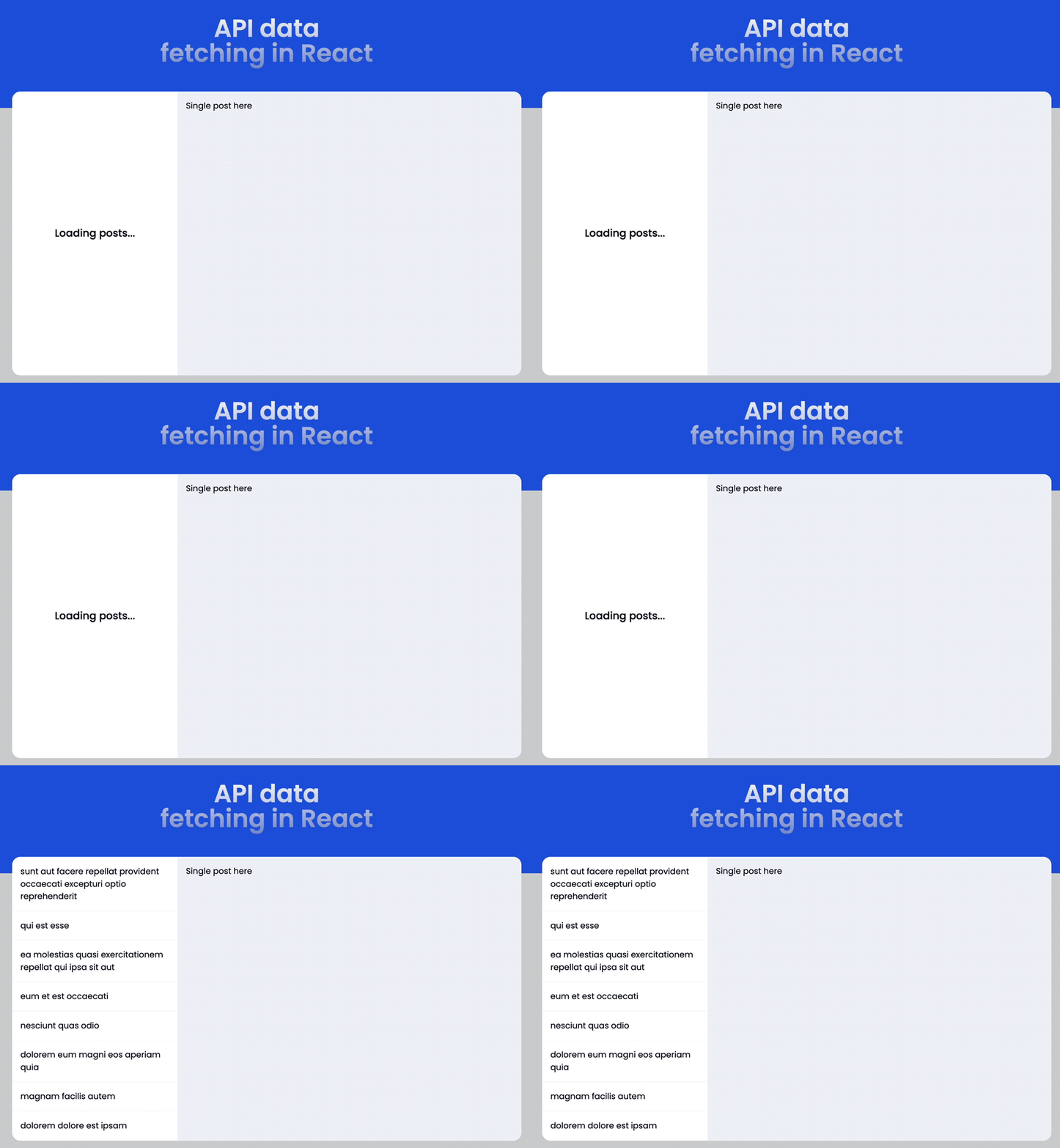
We grabbed the post data state, looped through the list, and rendered the post title. See the demo below. We’ve also added styles to improve the visuals:
Let’s improve the code readability by extracting the fetching logic into a separate file:
export const getRequestWithNativeFetch = async (url) => {
  const response = await fetch(url);

  if (!response.ok) {
    throw new Error(`HTTP error: Status ${response.status}`);
  }

  return response.json();
};
The useEffect now looks like this:
useEffect(() => {
  const fetchDataForPosts = async () => {
    try {
      const postsData = await getRequestWithNativeFetch(
        'https://jsonplaceholder.typicode.com/posts?_limit=8'
      );
      setData(postsData);
      setError(null);
    } catch (err) {
      setError(err.message);
      setData(null);
    } finally {
      setLoading(false);
    }
  };

  fetchDataForPosts();
}, []);
fetch()Using the same API endpoint, we can fetch individual posts by appending the postId:
useEffect(() => {
  const fetchSinglePost = async () => {
    try {
      const postData = await getRequestWithNativeFetch(
        `https://jsonplaceholder.typicode.com/posts/${postId}`
      );
      // ...
    } catch (err) {}
    finally {}
  };

  fetchSinglePost();
}, [postId]);
When we need to re-fetch data after the first render, we will add dependencies in the array literal to trigger a rerun of useEffect. In the code above, we will fetch the single post data based on the dynamic URL post ID.
The render looks like so:
return (
  <>
    {/* loading and error JSX here... */}
    <article>
      <h1 className="text-xl md:text-2xl font-medium mb-6">
        {data?.title}
      </h1>
      <p>{data?.body}</p>
    </article>
  </>
);
The result looks like this:
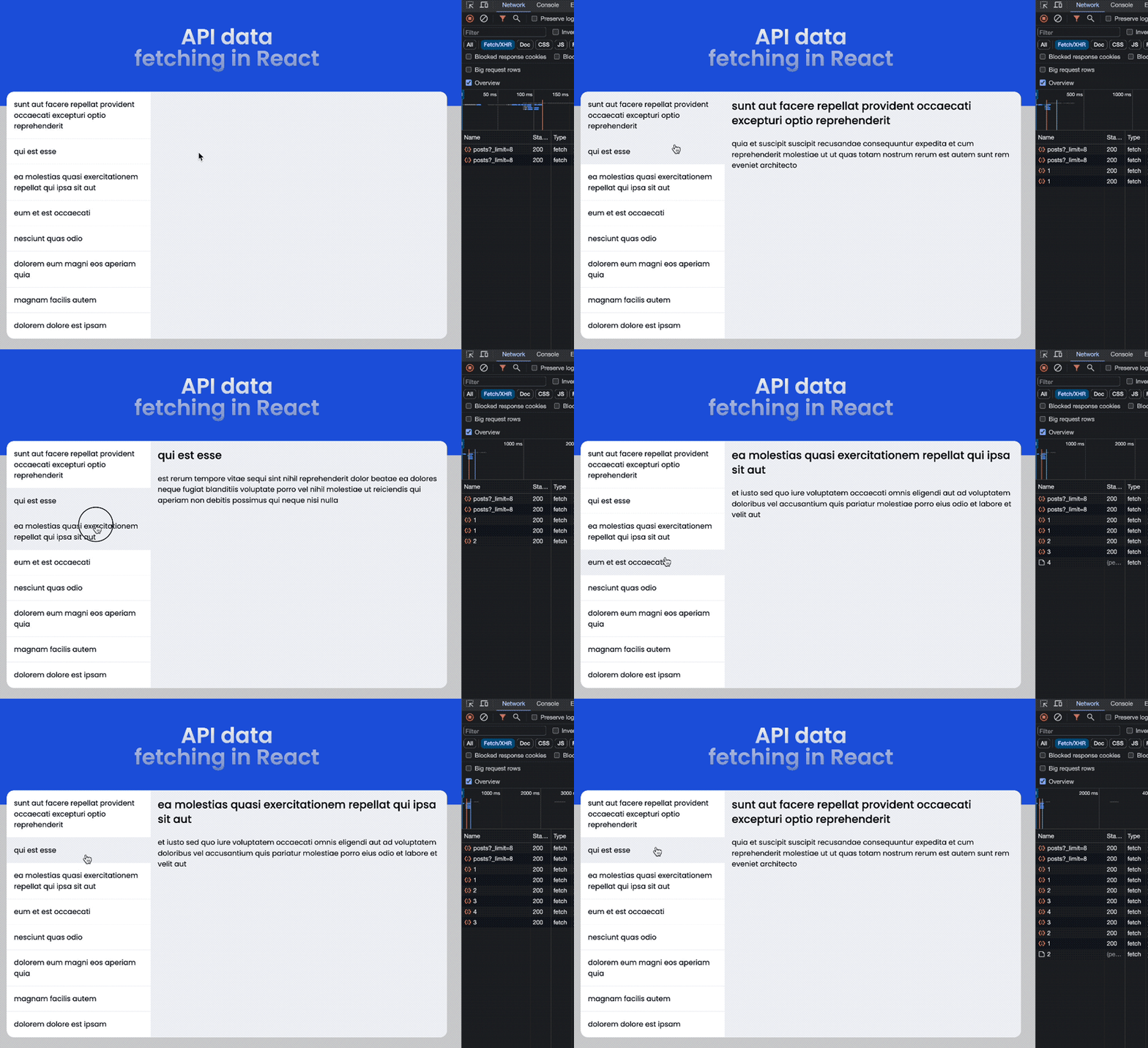
useEffectIf you pay attention to the Network tab in the demo above, the request data for individual posts is not cached when we revisit the page. This needs optimization! We may also consider adding other optimizations like deduping multiple requests for the same data, preventing race conditions.
useEffect race conditionIn our project, a race condition may occur when the single post ID frequently changes during user navigation. When postId changes and triggers a re-fetch using useEffect, there’s a possibility that network responses may arrive in a different order than the requests were sent, causing inconsistencies in the UI.
To address this issue, we’ll utilize the AbortController to cancel requests before subsequent ones are initiated. Within the single post file, we’ll initialize an AbortController in the useEffect Hook, passing its signal to the fetch function as an optional parameter.
We’ll handle AbortError instances when requests are canceled, and then call the abort function within the Hook’s cleanup phase. This approach ensures that requests are canceled properly, even if the component unmounts while a fetch promise is pending.
The useEffect in the single post file should include the AbortController like so:
useEffect(() => {
  const controller = new AbortController();

  const fetchSinglePost = async () => {
    try {
      const postData = await getRequestWithNativeFetch(
        `https://jsonplaceholder.typicode.com/posts/${postId}`,
        controller.signal
      );
      // ...
    } catch (err) {
      if (err.name === 'AbortError') {
        console.log('Aborted');
        return;
      }
      // ...
    } finally {}
  };

  fetchSinglePost();

  return () => controller.abort();
}, [postId]);
Then, we pass the signal to the fetch function:
export const getRequestWithNativeFetch = async (
  url,
  signal = null
) => {
  const response = await fetch(url, { signal });

  if (!response.ok) {
    throw new Error(`HTTP error: Status ${response.status}`);
  }

  return response.json();
};
Caching and other optimizations can get more complicated when we try to implement them ourselves. Later in this lesson, we’ll use the TanStack Query and SWR libraries to simplify the process.
Before we move to the next fetching method, let’s briefly showcase the Post requests with the fetch function.
POST requestsAs we briefly mentioned earlier, a POST request is used to send data to an endpoint. To use this method, we’ll send the post data via the body of the request as we showed in the syntax earlier.
A typical POST request with fetch() looks like the following:
useEffect(() => {
  const fetchDataForPosts = async () => {
    try {
      const postsData = await postRequestWithFetch({
        userId: 11,
        id: 101,
        title: 'New post title',
        body: 'The post body content',
      });
      // update state variables like before
    } catch (err) {}
    finally {}
  };
  fetchDataForPosts();
}, []);
Then, the postRequestWithFetch function receives the data, stringifies it, and passes it to the request body:
export const postRequestWithFetch = async (data) => {
  const response = await fetch(
    `https://jsonplaceholder.typicode.com/posts`,
    {
      method: 'POST',
      headers: {
        'content-type': 'application/json',
      },
      body: JSON.stringify(data),
    }
  );

  return response.json();
};
The server then processes the data and responds accordingly. We can render the data in the JSX like so:
return (
  <div className="py-12 px-3">
    <h2 className="text-2xl font-medium mb-6 underline">
      Post Request with Fetch
    </h2>
    {/* loading and error JSX */}

    {data && (
      <div>
        <h2 className="text-xl font-medium mb-6">{data.title}</h2>
        <p className="mb-2">{data.body}</p>
        <span className="text-gray-700 text-sm">
          Post ID: {data.id}
        </span>
      </div>
    )}
  </div>
);
Axios is a third-party promise-based HTTP client that we can add to our project via package manager to make HTTP requests.
It is a wrapper over the native Fetch API. It offers a comprehensive feature set, intuitive API, ease of use, and additional functionality compared to Fetch.
Let’s use Axios to fetch post data from our usual endpoint. We’ll start by installing it:
npm install axios
Similar to the earlier implementation, fetching a list of posts in the useEffect looks like so:
useEffect(() => {
  const fetchDataForPosts = async () => {
    try {
      const postsData = await fetcherWithAxios(
        'https://jsonplaceholder.typicode.com/posts?_limit=8'
      );
      setData(postsData);
      setError(null);
    } catch (err) {
      setError(err.message);
      setData(null);
    } finally {
      setLoading(false);
    }
  };

  fetchDataForPosts();
}, []);
However, the fetching logic in the fetcherWithAxios function is simplified like this:
import axios from 'axios';

export const fetcherWithAxios = async (url) => {
  const response = await axios.get(url);
  return response.data;
};
We started by importing axios and then performed a GET request to the provided URL endpoint. Unlike the fetch() method, the response returned from this library contains the JSON format we need.
It also has the advantage of robust error handling, so we don’t need to check and throw an error like we did earlier with the fetch() method.
Also, note that the actual data returned from the server is typically contained within the response.data property.
Using the same API endpoint and maintaining the earlier structure, we can fetch individual posts by passing the resource URL to the fetcherWithAxios function:
useEffect(() => {
  const fetchSinglePost = async () => {
    try {
      const postData = await fetcherWithAxios(
        `https://jsonplaceholder.typicode.com/posts/${postId}`
      );

      setData(postData);
      setError(null);
    } catch (err) {
      setError(err.message);
      setData(null);
    } finally {
      setLoading(false);
    }
  };

  fetchSinglePost();
}, [postId]);
This is straightforward and more concise compared to the fetch() method.
POST requestsUnlike Fetch, Axios automatically stringifies the post data when we send JavaScript objects. The following code performs a post request with Axios:
export const postRequestWithAxios = async (data) => {
  const response = await axios.post(
    'https://jsonplaceholder.typicode.com/posts',
    {
      headers: {
        'Content-Type': 'application/json',
      },
      data,
    }
  );
  return response.data;
};
We can then pass the post data like so:
useEffect(() => {
  const fetchDataForPosts = async () => {
    try {
      const postsData = await postRequestWithAxios({
        userId: 11,
        id: 101,
        title: 'New post title',
        body: 'The post body content',
      });
      setData(postsData.data);
      // ...
    } catch (err) {}
    finally {}
  };
  fetchDataForPosts();
}, []);
useFetch custom Hook from react-fetch-hookUp to this point, we’ve covered most of what we need to fetch data from an API endpoint. However, we can go a step further by simplifying data fetching using the useFetch Hook from the react-fetch-hook library.
The useFetch Hook encapsulates the Fetch API implementation, thereby reducing the pain of writing complicated code even on small-scale applications.
To use the library, let’s first install it:
npm i react-fetch-hook
To fetch the posts list with this Hook, we’ll pass the endpoint URL like so:
import useFetch from 'react-fetch-hook';

const ReactFetchHook = () => {
  const { isLoading, data, error } = useFetch(
    'https://jsonplaceholder.typicode.com/posts?_limit=8'
  );

  return (
    // ...
  );
};

export default ReactFetchHook;
The useFetch Hook exposes state (isLoading, data, error), which we can then use in our render.
Similarly, to fetch a single post, we’ll pass the resource URL to the Hook like so:
const {
  isLoading: loading,
  data,
  error,
} = useFetch(
  `https://jsonplaceholder.typicode.com/posts/${postId}`
);
We’ve renamed the isLoading state from the Hook to loading because we have used loading in the render:
{loading && (
  <div className="text-xl font-medium">A moment please...</div>
)}
TanStack Query, formally known as React Query, makes data fetching much more efficient. It lets us achieve a lot more than just fetching data.
At its core, TanStack Query offers functionalities such as caching, re-fetching, request deduplication, and various optimizations that impact the overall user experience by preventing irregularities and ensuring that our app feels faster.
Like the previous method, TanStack Query provides a custom Hook that we can reuse throughout our app to fetch data. To use the library, let’s install it:
npm i @tanstack/react-query
Next, go to the entry point of your app — in a React Vite project, the main.jsx file. In that file, we’ll create a query client and provide it to our app:
// ...
import {
  QueryClient,
  QueryClientProvider,
} from '@tanstack/react-query';

const router = createBrowserRouter([
  // ...
]);

// Create a client
const queryClient = new QueryClient();

ReactDOM.createRoot(document.getElementById('root')).render(
  <React.StrictMode>
    <QueryClientProvider client={queryClient}>
      <RouterProvider router={router} />
    </QueryClientProvider>
  </React.StrictMode>
);
We’ve wrapped the RouterProvider, which renders our app with the QueryClientProvider and passes the client instance to it.
We’ll start by importing a useQuery Hook from @tanstack/react-query. In this Hook, we must pass a unique query key identifying the data we are fetching and a function that the query will use to request data.
This query key is necessary for the library to cache data correctly and helps with re-fetching and sharing the queries throughout the application:
// ...
import { useQuery } from '@tanstack/react-query';
import { fetcherWithFetch } from '../lib/fetcherWithFetch';

const ReactQuery = () => {
  const { data, error, isPending: loading } = useQuery({
    queryKey: ['posts'],
    queryFn: () =>
      fetcherWithFetch(
        'https://jsonplaceholder.typicode.com/posts?_limit=8'
      ),
  });

  return (
    // ...
  );
};

export default ReactQuery;
In return, the Hook exposes the (isPending, data, error), which we can then use in our render.
The fetcherWithFetch should look familiar as we created something similar earlier:
export const fetcherWithFetch = async (url) => {
  const response = await fetch(url);

  if (!response.ok) {
    throw new Error(`HTTP error: Status ${response.status}`);
  }

  return response.json();
};
Please note that TanStack Query is an async state manager rather than a data-fetching library. That is why we still had to use HTTP clients like fetch to perform requests. TanStack Query helps resolve every other challenge that we may encounter with data fetching in real-world scenarios.
We may also decide to use Axios if we want:
const { data, error, isPending: loading } = useQuery({
  queryKey: ['posts'],
  queryFn: () =>
    fetcherWithAxios(
      'https://jsonplaceholder.typicode.com/posts?_limit=8'
    ),
});
The fetcherWithAxios should also look familiar:
import axios from 'axios';

export const fetcherWithAxios = async (url) => {
  const response = await axios.get(url);
  return response.data;
};
For individual posts, we will pass the post ID to the queryKey to uniquely identify the post data. Then, we set a staleTime to prevent re-fetching data:
const {
  data,
  error,
  isPending: loading,
} = useQuery({
  queryKey: ['post', parseInt(postId)],
  queryFn: () =>
    fetcherWithFetch(
      `https://jsonplaceholder.typicode.com/posts/${postId}`
    ),
  staleTime: 1000 * 60 * 10, // cache for 10 minutes
});
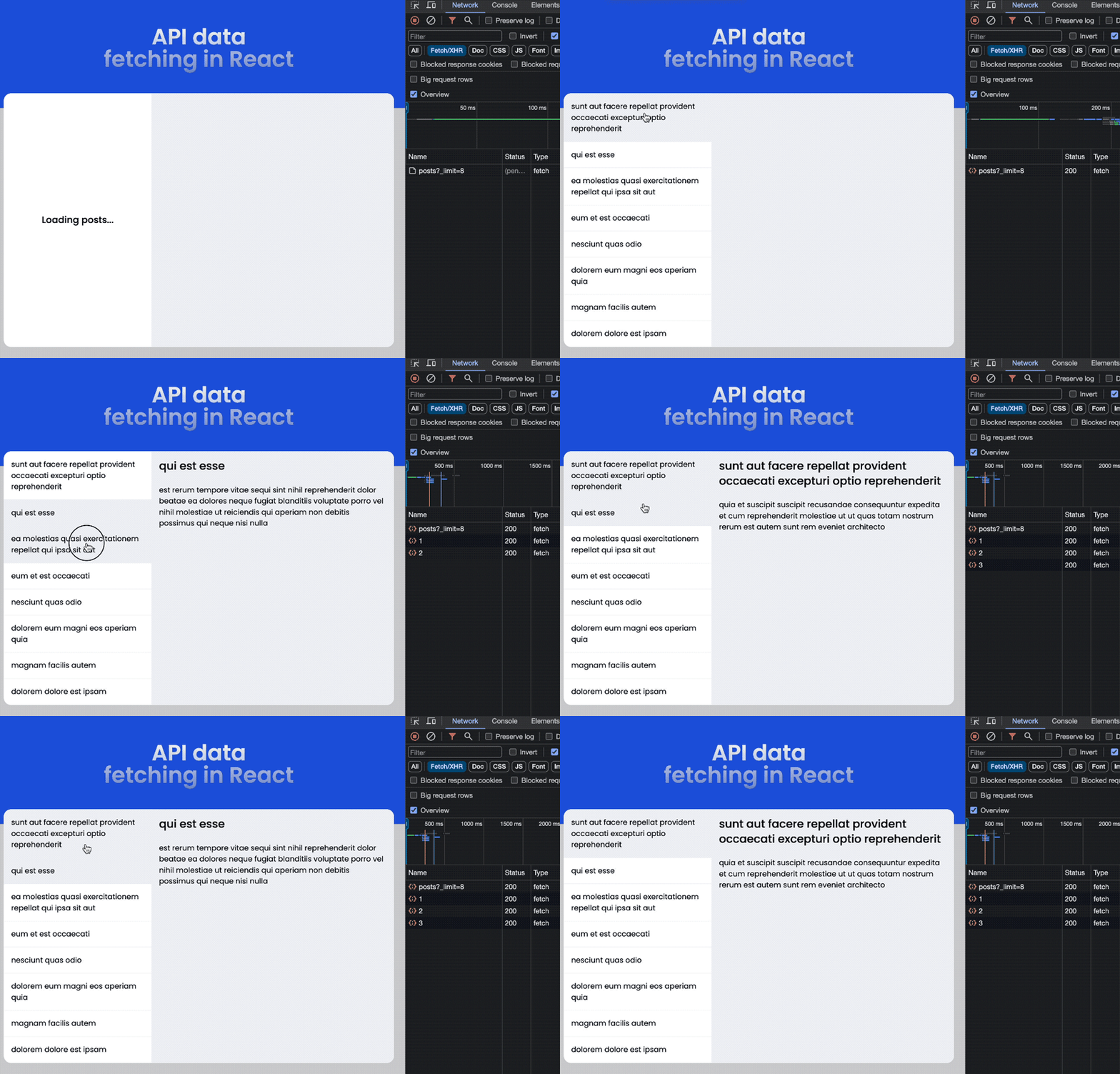
As you can see in the Network tab in the demo below, the data for individual posts is cached when we revisit the page. That is an improvement:
SWR (stale-while-revalidate) offers similar implementations and functionalities to TanStack Query. Like TanStack Query, SWR provides a custom Hook that we can use to fetch data. Let’s install it:
npm i swr
We’ll start by importing a useSWR Hook from swr. In this Hook, we must pass a unique key for the request and a function to fetch data. We can use any library to handle data fetching as we did with TanStack Query.
The following code shows how we fetch the posts list with the useSWR Hook:
// ...
import useSWR from 'swr';
import { fetcherWithFetch } from '../lib/fetcherWithFetch';

const FetchWithSwr = () => {
  const { data, error, isLoading } = useSWR(
    'https://jsonplaceholder.typicode.com/posts?_limit=8',
    fetcherWithFetch
  );

  return (
    // ...
  );
};

export default FetchWithSwr;
Usually, we use the resource URL for the request key. This key will be passed to the fetcher function as an argument automatically.
We can then use the returned state (isLoading, data, error) to populate the render.
For individual posts, we will pass the unique post URL endpoint as the key to uniquely identify the post data. Then, we set the cache time with dedupingInterval in the config object to prevent re-fetching data:
const {
  data,
  error,
  isLoading: loading,
} = useSWR(
  `https://jsonplaceholder.typicode.com/posts/${postId}`,
  fetcherWithFetch,
  {
    dedupingInterval: 1000 * 60 * 10, // cache for 10 minutes
  }
);
This comprehensive guide covers nearly all the essential aspects of modern data fetching techniques. We’ve delved into fetching data from API endpoints, mastering the handling of various states such as loading and error states, and showcasing the simplification of the fetching process using contemporary libraries. By now, you should feel more confident in integrating data fetching into your React applications.
If you found this guide interesting, please share it across the web. Additionally, feel free to leave any questions or contributions in the comment section below.
Install LogRocket via npm or script tag. LogRocket.init() must be called client-side, not
server-side
$ npm i --save logrocket

// Code:

import LogRocket from 'logrocket';
LogRocket.init('app/id');
// Add to your HTML:

<script src="https://cdn.lr-ingest.com/LogRocket.min.js"></script>
<script>window.LogRocket && window.LogRocket.init('app/id');</script>

Why the future of DX might come from the web platform itself, not more tools or frameworks.

A hands-on test of Claude Code Review across real PRs, breaking down what it flagged, what slipped through, and how the pipeline actually performs in practice.

CSS art once made frontend feel playful and accessible. Here’s why it faded as the web became more practical and prestige-driven.

Learn how inline props break React.memo, trigger unnecessary re-renders, and hurt React performance — plus how to fix them.
Would you be interested in joining LogRocket's developer community?
Join LogRocket’s Content Advisory Board. You’ll help inform the type of content we create and get access to exclusive meetups, social accreditation, and swag.
Sign up now


 Learn more →




