Large Language Models (LLMs) enable fluent, natural conversations, but most applications built on top of them remain fundamentally stateless. Each interaction starts from scratch, with no durable understanding of the user beyond the current prompt. This becomes a problem quickly. A customer support bot that forgets past orders or a personal assistant that repeatedly asks for preferences delivers an experience that feels disconnected and inefficient.

This article focuses on long-term memory for LLM-powered applications and why it is essential for building stateful, context-aware AI systems. We compare two emerging open-source libraries, mem0 and Supermemory, which approach memory management in fundamentally different ways while working with the same underlying LLMs.
LLMs maintain context by conditioning each response on the messages provided in the current request. In most applications, this takes the form of a conversation history passed as an ordered array of messages, where each message includes a role (system, user, or assistant) and associated text. The model generates its next response by attending to this entire sequence.
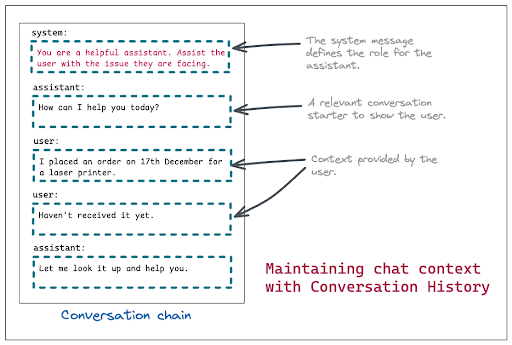
System messages are typically used to establish the assistant’s role or high-level behavior at the start of the conversation, while user and assistant messages capture the ongoing exchange. This approach works well for short-lived, single-session interactions, where all relevant context can be included directly in the prompt.
However, conversation history alone does not scale. As interactions grow longer or relevant context exists outside the current session, passing the full message history becomes inefficient and error-prone, setting the stage for approaches like retrieval and long-term memory.
This limitation led to Retrieval-Augmented Generation (RAG), a pattern that augments an LLM with external data at inference time. Relevant documents or records are retrieved based on the user’s query and injected into the prompt as additional context, allowing the model to generate responses grounded in up-to-date or user-specific information.
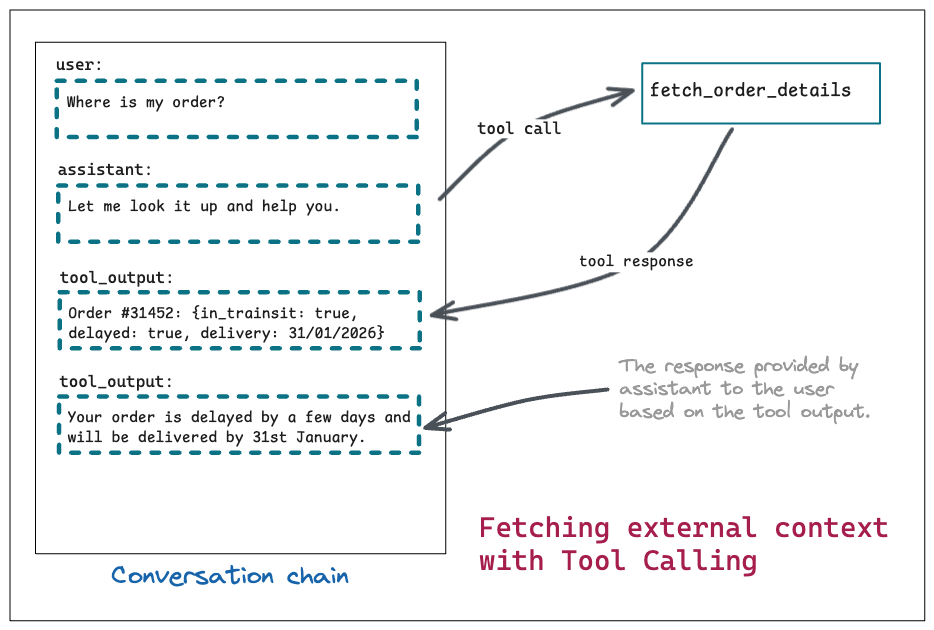
RAG helps by injecting relevant external data at inference time, but it still relies on the model to correctly interpret and carry that context forward. It also struggles with long-lived, user-specific preferences, such as tone, communication style, or dietary constraints, which is where dedicated memory systems become necessary:
RAG is fundamentally a retrieval mechanism, not a memory system. It assumes that relevant context can be searched for at query time and that retrieved documents accurately reflect the user’s current constraints and preferences. This assumption breaks down when preferences evolve gradually across interactions.
Fetching a user’s order history is relatively straightforward. You can expose an API for this data and invoke it through an LLM function call. By contrast, handling user preferences introduces a different class of problems:
The last problem is the most difficult to solve. Let’s try to understand this with an example. Here are some user interactions with an LLM:
October 2025
user: I love eating pistachio ice cream.
November 2025
user: I have been diagnosed with diabetes and need to avoid sugary foods.
December 2025
user: I have been recommended to follow a dairy-free diet by my nutritionist.
January 2026
user: I’m in the mood for a dessert. Any suggestions?
Given this conversation history, a naïve RAG setup using semantic search might enthusiastically suggest pistachio ice cream as a snack option. Unfortunately, that recommendation ignores two critical constraints: the user has diabetes and is following a dairy-free diet. In other words, the retrieval worked, but the memory failed.
This gap between retrieval and memory is what systems like mem0 and Supermemory are designed to address.
At first glance, managing user memory in-house may seem straightforward. A common approach is to store user preferences as JSON in a NoSQL database and periodically run batch jobs to summarize or prune that data. In practice, this approach quickly runs into fundamental limitations:
In practice, these constraints make general-purpose storage a poor fit for long-term memory. Purpose-built memory systems address these issues with semantic representations, relevance scoring, and built-in pruning mechanisms.
mem0 approaches long-term memory as a collection of explicit memory items managed through APIs. Developers are responsible for deciding when to add memories, how they should be structured, and when they should be retrieved. This design emphasizes control and observability, making memory behavior easy to inspect, debug, and audit over time.
Taken together, these capabilities allow applications to build a structured, queryable memory layer on top of unstructured conversation data, while retaining fine-grained control over how memory evolves.
mem0 also offers an MCP integration that exposes memory operations such as adding and searching memories as callable tools. This simplifies integration with MCP-compatible clients, but it requires the application to run within an MCP environment, which can limit its use in non-MCP workflows:
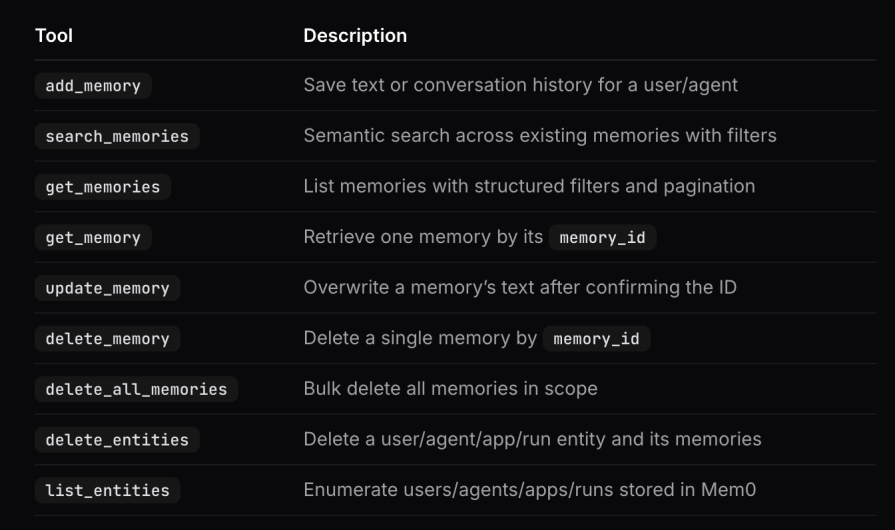
Overall, mem0 is well-suited for teams that want fine-grained control over how memory is captured, structured, and retrieved.
Supermemory takes a higher-level approach to memory management by organizing long-term context around user profiles. Instead of managing individual memory items directly, developers provide a user identifier and allow Supermemory to automatically infer, update, and retrieve relevant user context.
A user profile is an automatically maintained set of facts about a user, built incrementally from their interactions over time. The profile is continuously updated and selectively injected into the LLM’s context based on the current query. This reduces the need to search for individual memories on every request, while still allowing targeted memory retrieval when needed.
Developers do not need to manually maintain user profiles. Once a user ID is provided, Supermemory automatically handles the following steps:
In our LLM chat application, this means we do not need to explicitly separate memories into static and dynamic profiles. Instead, we integrate the tools exposed by Supermemory into the AI SDK and allow Supermemory to manage memory ingestion, updating, and retrieval end to end.
Supermemory also provides us with an alternative approach to integrate long-term memory into LLM applications using the memory router.
In this approach, our API request is proxied to Supermemory instead of hitting the LLM provider directly. Supermemory then takes care of fetching the relevant user profile and memories and adding them to the context before forwarding the request to the LLM provider.
This approach is easier to integrate as it does not require any changes to the existing application code. But it does add some latency to the LLM response time as the request has to go through Supermemory first. Also, there is no manual control over what memories are added to the context. Supermemory decides that based on its own algorithms. Another downside of this approach is the faster consumption of Supermemory tokens, as every LLM request is proxied via Supermemory.
Similar to mem0, Supermemory also provides an MCP (Memory Context Protocol) integration that can be used to integrate memory management into LLM applications seamlessly. Let us now look into explicit integrations where we get a more fine-grained control, and that can work irrespective of whether we are using an MCP client or not.
At a high level, mem0 and Supermemory solve the same problem but optimize for different tradeoffs. mem0 exposes memory as explicit, inspectable objects and gives developers precise control over memory lifecycle and retrieval. Supermemory abstracts memory into user profiles and prioritizes automatic context injection with minimal application logic.
The choice between them depends less on model compatibility and more on how much control, transparency, and automation an application requires.
As AI SDK by Vercel is the standard way to build LLM applications, we will look into how to integrate both mem0 and Supermemory into a Next.js application using ai-sdk. Some code snippets are mentioned below, but you can see the full code in this GitHub repo.
First, let us create a Next.js app.
pnpm create next-app@latest llm-memory-app
cd llm-memory-app
Then, let us install the packages required to make ai-sdk work.
pnpm add ai @ai-sdk/react @ai-sdk/openai zod
We also need to create a .env file in the root of the project to store our OpenAI API key.
OPENAI_API_KEY=your_openai_api_key
Then, create a new index.js file in the pages folder and a route to handle the /chat route. With these changes, we should be able to see a chat UI that responds to user messages using the OpenAI model.
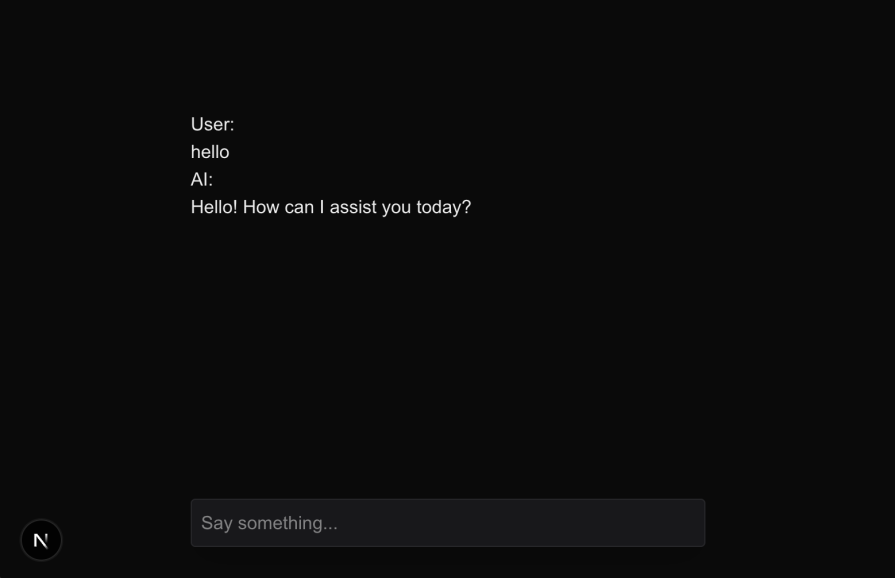
With that in place, let us now integrate Supermemory and mem0 into this.
With the chat application in place, we will now integrate Supermemory into this application. First, we need to install the Supermemory ai-sdk package.
pnpm add @supermemory/tools
Next, we need to create a Supermemory account and get the API key. The key can be obtained from the dashboard after creating a Supermemory account and a project (which is free). Once we have the API key, we need to import the Supermemory tools compatible with ai-sdk and supply it to the tools parameter of the streamText call.
This is what our final /chat route looks like with Supermemory integrated:
import { streamText, convertToModelMessages, stepCountIs } from 'ai';
import { openai } from "@ai-sdk/openai";
import { supermemoryTools } from '@supermemory/tools/ai-sdk'

const customerId = "test-user";

export async function POST(req) {
  const { messages } = await req.json();

  const result = streamText({
    model: openai("gpt-4o"),
    messages: await convertToModelMessages(messages),
    stopWhen: stepCountIs(5),
    tools: supermemoryTools(process.env.SUPERMEMORY_API_KEY, {
      containerTags: [customerId]
    }),
  });

  return result.toUIMessageStreamResponse();
}
This integration will start to add memories to Supermemory based on the conversations happening via this chat app. It will also maintain user profiles based on these conversations. We’ve hardcoded the customerId variable to a static value. In a real-world application, this should be dynamically generated based on the logged-in user.
Once enough memories have been stored, they will automatically be retrieved and added to the context while responding to user queries. Here is an example response from the LLM after storing some memories about the user when the user asks about suggestions to buy a gift for themselves:
{
  "chunks": [
    {
      "content": "User's favorite color is teal.",
      "position": 0,
      "isRelevant": true,
      "score": 0.6585373093441402
    }
  ],
  "createdAt": "2026-01-16T06:51:26.585Z",
  "documentId": "3kQFHH2D1S5NnLRP75upr5",
  "metadata": {},
  "score": 0.6585373093441402,
  "title": "User's Favorite Color: Teal",
  "updatedAt": "2026-01-16T06:51:26.585Z",
  "type": "text",
  "content": "User's favorite color is teal."
},
{
  "chunks": [
    {
      "content": "User is a sneakerhead.",
      "position": 0,
      "isRelevant": true,
      "score": 0.6341202695226393
    }
  ],
  "createdAt": "2026-01-16T06:51:27.903Z",
  "documentId": "K3pD6jzuB75ATS1EeXfDkX",
  "metadata": {},
  "score": 0.6341202695226393,
  "title": "Sneakerhead Profile Overview",
  "updatedAt": "2026-01-16T06:51:27.903Z",
  "type": "text",
  "content": "User is a sneakerhead."
}
Based on the user query, the LLM decided to call the tool to fetch relevant memories. The same response got added to the message array as a tool response. Based on that, the LLM generated the final response to the user:
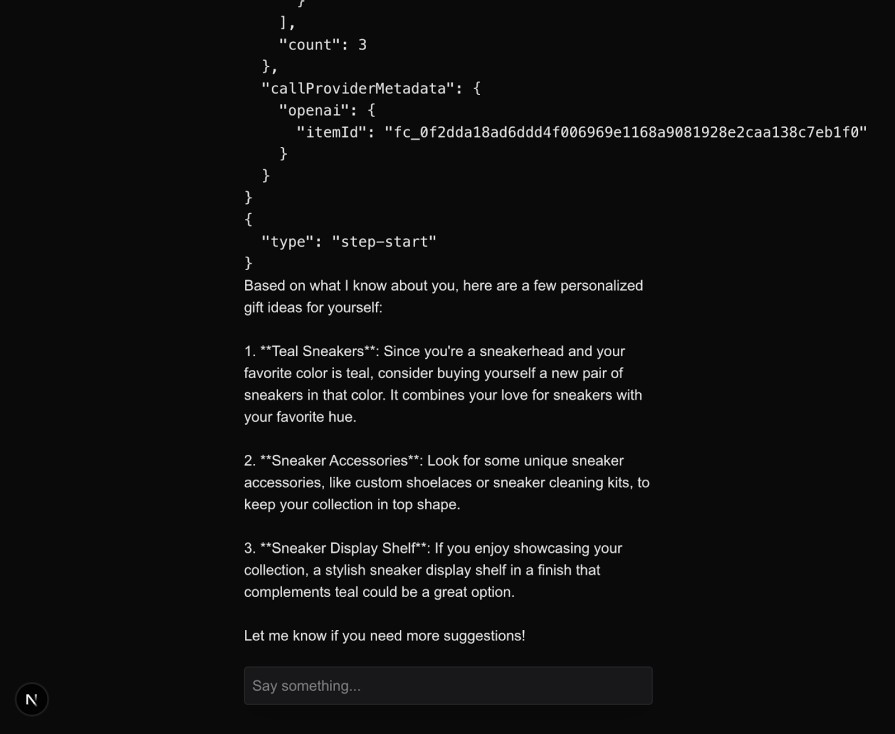
With the Supermemory tools integrated, we can effectively manage long-term memory and user profiles in our chat application.
Next, let’s integrate mem0 into our chat application. It is a little more verbose, because we don’t have an official ai-sdk tool package for mem0 yet. But we can use the mem0 function utilities to achieve the same result.
There are 3 utilities that mem0 provides us to integrate with ai-sdk:
retrieveMemories: This function can be used to fetch memories in text format. The response of this can be supplied as the system prompt.addMemories: This function can be invoked whenever the LLM finds a need to add memories for the user. The function takes a list of messages that the LLM can supply while invoking it based on the parts needed to save.getMemories: This function can be used to retrieve specific memories about a user based on a query. The LLM can invoke this function as needed to fetch relevant memories.We will modify the ai-sdk chat route as follows to integrate mem0:
import { streamText, convertToModelMessages, tool, stepCountIs } from 'ai';
import { openai } from "@ai-sdk/openai";
import { z } from 'zod';
import { addMemories, retrieveMemories, getMemories } from "@mem0/vercel-ai-provider";

const userId = "test-user";

export async function POST(req) {
  const { messages } = await req.json();

  const memories = await retrieveMemories('Fetch user details', { user_id: userId });

  const result = streamText({
    model: openai("gpt-4o"),
    messages: await convertToModelMessages(messages),
    stopWhen: stepCountIs(5),
    tools: {
      addMemories: tool({
        description: 'Add relevant memories for the user preferences, traits etc',
        inputSchema: z.object({
          user: z.string().describe('The user to add memories for'),
          messages: z.array(z.object({
            role: z.enum(['user', 'assistant', 'system']).describe('The role of the message part'),
            content: z.string().describe('The content of the message part'),
          })).describe('The relevant messages to add as memories'),
        }),
        execute: async ({ user, messages }) => await addMemories(messages, { user_id: user }),
      }),
      getMemories: tool({
        description: 'Add relevant memories for the user preferences, traits etc',
        inputSchema: z.object({
          user: z.string().describe('The user to add memories for'),
          prompt: z.string().describe('The prompt to retrieve memories for'),
        }),
        execute: async ({ user, prompt }) => await getMemories(prompt, { user_id: user }),
      }),
    },
    system: memories,
  });

  return result.toUIMessageStreamResponse();
}
We first retrieve the memories about the user using the retrieveMemories function and supply that as the system prompt. Next, we manually integrate the addMemories and getMemories functions as tools that can be invoked by the LLM as needed. We specified the inputs that the tools expect using zod schemas. We also set up the execute function to call the respective mem0 functions with the required parameters.
With that in place, whenever the user says something that needs to be remembered, the LLM invokes the tool as shown below: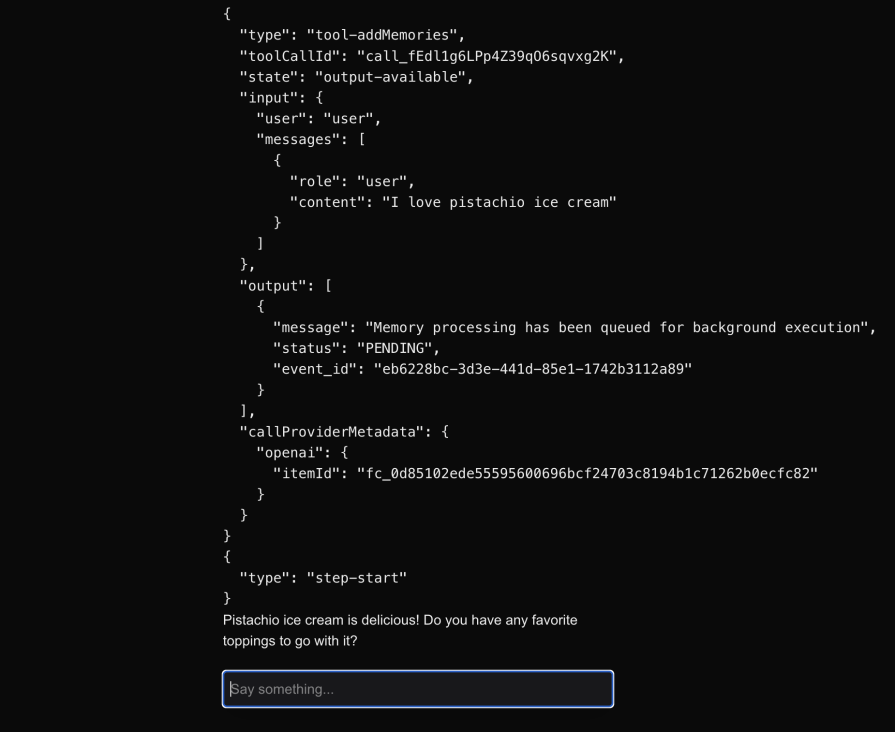
Once the processing has completed, the status of the memory moves out of the PENDING state.
After that, whenever the user asks something that needs to fetch relevant memories (even after several days in a completely new session), the LLM invokes the getMemories tool as shown below: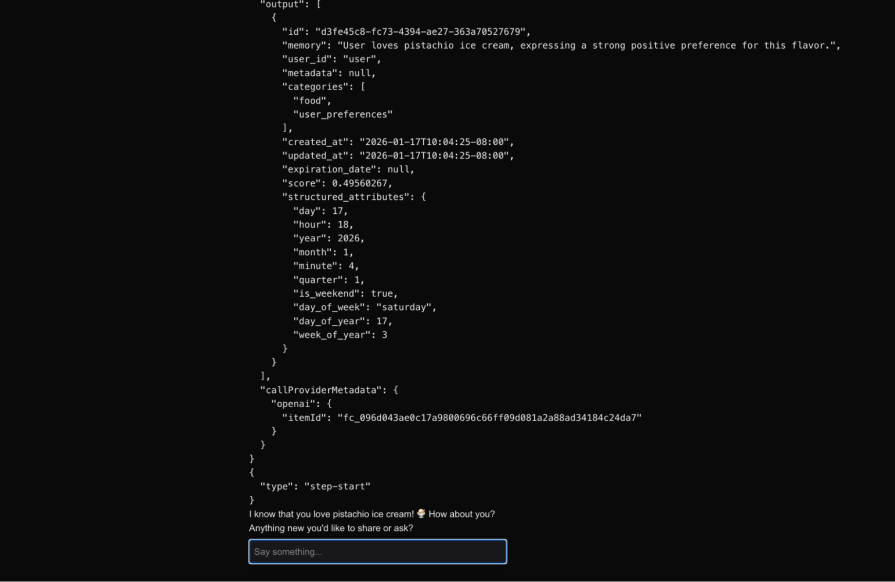
This shows that the memory about the user liking pistachio ice cream has been successfully retrieved from mem0 and persisted for longer durations. In the future, if the user mentions a change of preference, the LLM can invoke the addMemories tool again to update the memory in mem0.
Long-term memory is quickly becoming a baseline requirement for serious LLM applications. As we’ve seen, techniques like RAG help with retrieval, but they struggle to capture evolving, user-specific context, and rolling your own memory system introduces a lot of hidden complexity. Tools like mem0 and Supermemory offer practical ways to solve this today, each with a different philosophy around control and automation. As AI apps move beyond one-off chats and toward long-lived user relationships, choosing the right memory layer will increasingly shape how useful and reliable those experiences feel.

Learn how to build smooth staggered animations in CSS using modern features like sibling-index(), complete with practical examples, fallbacks, and accessibility tips.

Compare the top AI development tools and models of July 2026. View updated rankings, feature breakdowns, and find the best fit for you.

Learn how to detect unused and ghost dependencies in JavaScript projects using Knip, a project-level linter that keeps your dependency graph accurate.

Learn how Storybook MCP enables AI agents to understand your component library, generate accurate UI, and validate code using documentation, stories, and automated tests.
Would you be interested in joining LogRocket's developer community?
Join LogRocket’s Content Advisory Board. You’ll help inform the type of content we create and get access to exclusive meetups, social accreditation, and swag.
Sign up now