
Flutter has enjoyed widespread success since its initial stable release in 2019. But whether you are starting out with Flutter, or have been using it for a while, deciding what kind of IDE to use for your project can have a huge impact on how your project turns.

If you’re working in a team of people, you all need to reach a consensus, which can be surprisingly difficult.
These days, we are spoiled for choice when it comes to what IDE we can use. There’s a lot of high-quality competition in this space, so no matter what IDE you choose, you’ll probably have a good experience.
But there are still differences between these IDEs that can affect your development workflow, so in this article, we’ll compare some of the leading IDEs for Flutter that exist today, and hopefully help you make the best decision on what IDE you should use.
In this article, we’ll compare the IDEs based on:
The IDEs we’ll look at are:
To help us make this comparison, we’ll leverage a sample Flutter project that I created a little while ago. Now, let’s begin.
The Replay is a weekly newsletter for dev and engineering leaders.
Delivered once a week, it's your curated guide to the most important conversations around frontend dev, emerging AI tools, and the state of modern software.
Anecdotally, I would say that Visual Studio Code (VS Code) is the most popular IDE in use in the Flutter landscape today. I can’t back that up with any statistics, but every time I read a tutorial or watch a video on how to do something in Flutter, the IDE used is usually VS Code.
There’s little reason to be surprised by this; VS Code is a free, easy-to-use, and lightweight code editor that provides excellent support for Flutter; this support for Flutter is provided via an extension for VS Code.
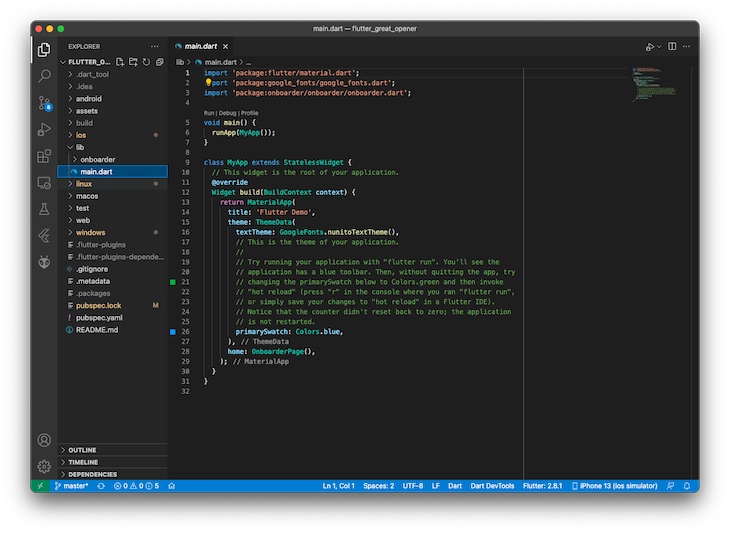
Files within your project are laid out on the left, and the main window shows you the contents of your files. VS Code also lets you open multiple files in tabs up at the top of the Window.
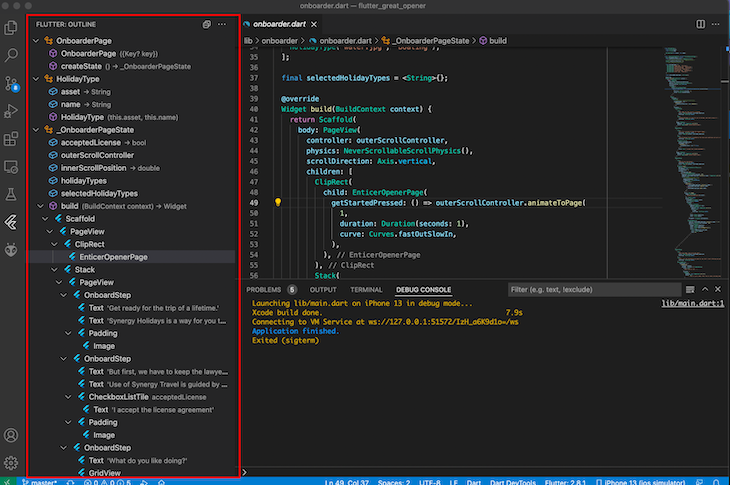
When working with widgets, VS Code shows the layout of your widgets on the left, which helps to lay out your app from a visual standpoint.

Launching simulators can be done by clicking on the device list down the bottom right, and then choosing what device you want to launch from the information bar.
When you have a simulator running, you can deploy and troubleshoot your code. VS Code’s support for Flutter means that all the standard functionality (such as breakpoints) are supported.
As previously mentioned, VS Code lets you set breakpoints, and when encountering them, it will show you the current call stack. It also gives you the ability to step into code, step over code, or open the Flutter DevTools via the top debugging bar.
You can’t globally mute exceptions at this point, so if you encounter a lot of exceptions because you are working on the your application’s UI, these aren’t easily muted.
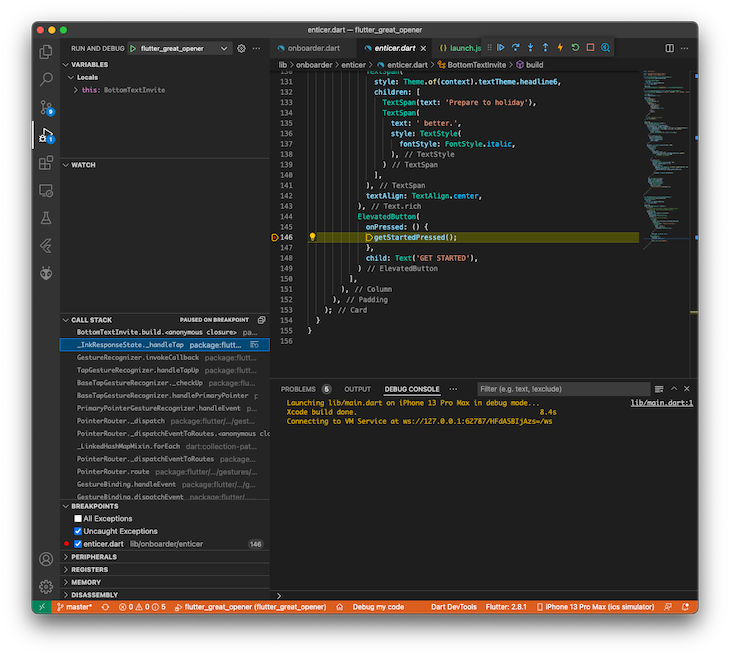
VS Code offers a lighter debugging experience out of the box, but it’s quite possible that this would suit most developers.
At the time of writing, there are 235 plugins relating to Flutter for VS Code. These are likely of varying quality, but the point is that there is considerable support for Flutter within VS Code.
Popular state management tools like flutter_bloc ship extensions for VS Code, which means you can create BLoCs automatically without writing them yourself every time.
VS Code is very lightweight, which means it installs and runs well on a variety of devices. The only caveat to this is that the performance can be influenced substantially by how many extensions you install and the quality of those extensions.
Poorly written extensions can quickly slow down how responsive VS Code can be, but as long as you are careful in what you install, you should be okay. Plus, even if you install an extension that does slow down your editor, you can get the extension bisect functionality to find the problem’s cause.
VS Code is a lightweight editor that has great Flutter support, good extensibility and sees widespread use across the developer community. So, what’s not to love?
Well, one personal bugbear of mine (and the reason why I don’t use VS Code) is because unlike every other editor that I’ve ever used, you can’t tear tabs off into new windows; you are limited to only one window.
You can do a lot within that window: you can split your workspace vertically or horizontally and get something that is similar to breaking out your code in a new window. But, you can’t tear off new tabs into separate windows.
When working on larger projects or chasing a bug through multiple files, being able to visualize the entire call stack within your app by having each window open for the files you are interested in is very appealing.
Otherwise, you must open each file in a new tab and rapidly switch between tabs to try to understand what is happening. I find not being able to tear off tabs into separate windows to be a pretty major impact to my productivity.
The issue tracking this was opened in 2016 and shows no sign of changing, so you should use VS Code knowing that it’s probably not going to come any time soon.
Of course, you may feel differently, and if you do, VS Code will likely give you everything that you need to debug and create Flutter apps.
In summary, the pros for using VS Code as your Flutter IDE are that it:
But, you should also know some of the downsides, which are:
Next up, we have the IDE heavyweight that is Google’s recommended IDE for Android development. But how does Android Studio hold up to Flutter development? Let’s find out.
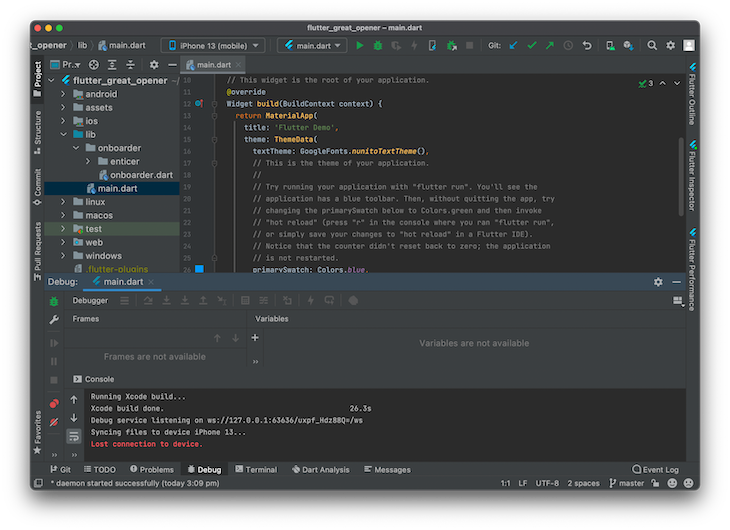
Straight away, we’re dealing with something that is visually more complex than Visual Studio Code. But, just because it looks more complex, does that make it harder to use? Not necessarily.
Android Studio became stable in December 2014, so it’s had a lot of time to mature and improve in quality as the years have gone on.
It also features broad compatibility, running on macOS, Windows, and Linux. But it’s a totally different story when it comes to system requirements.
Whereas VS Code can survive on a meager 1GB of RAM and a processor made in the last decade or two, Android Studio lists its requirements as 8GB of RAM. It’s true, Android Studio is a much heavier and more resource-intensive IDE than VS Code.
But, this heaviness has its benefits. For example, Android Studio has a lot of excellent functionality built-in. It’s easy to create emulators for the devices you’re likely to use by way of Android Studio’s Virtual Device Manager.
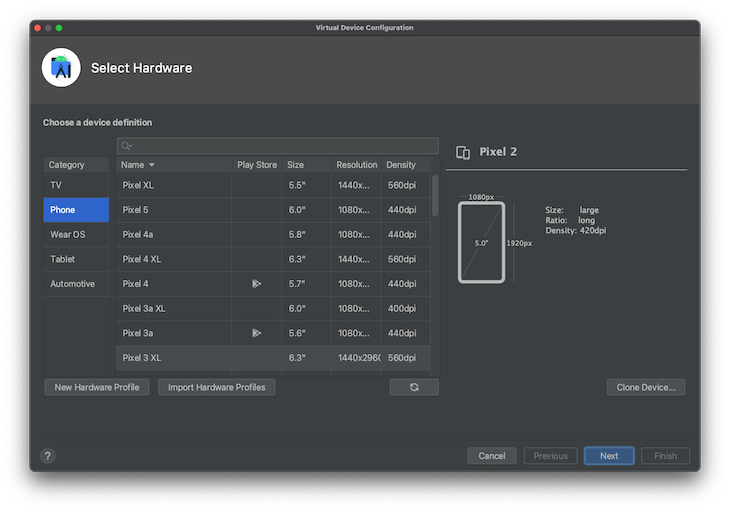
Also, Android Studio is a result of Google licensing the IntelliJ platform. IntelliJ produces a wide range of tools for developers, many of which require payment. However, you can use Android Studio for Flutter development without licensing or paying for IntelliJ, which is pretty neat.
We also gain a few Flutter-specific bits here, as the right of IDE gives us the performance, outline, and inspector, all from within the IDE.
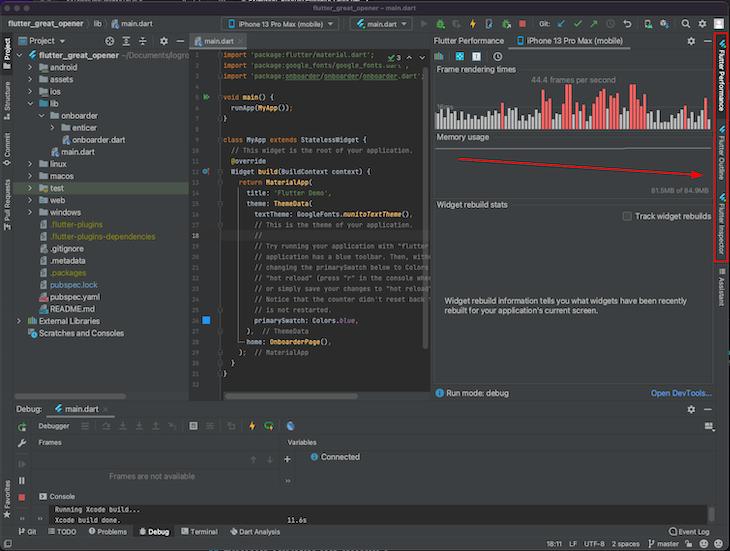
These panels show valuable insight into our Flutter app. For example, we can see how our app is performing, and how much memory is used by our app in the Flutter Performance tab.
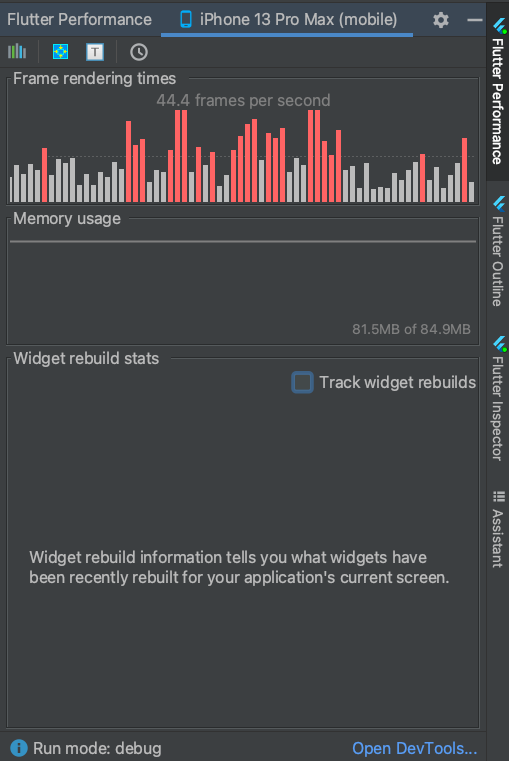
The other tabs give us a tree view of the widgets within our app, and the inspector gives us a more in-depth view of our app.
So, what’s it like to use Android Studio to create Flutter apps? For debugging, you get all the standard features you would expect from a debugger, like setting breakpoints or stepping forward and over certain code.
When your code encounters a breakpoint, Android Studio switches to the Debug tab, showing the current execution stack, the current variable values, and the options to step over/step into the code.
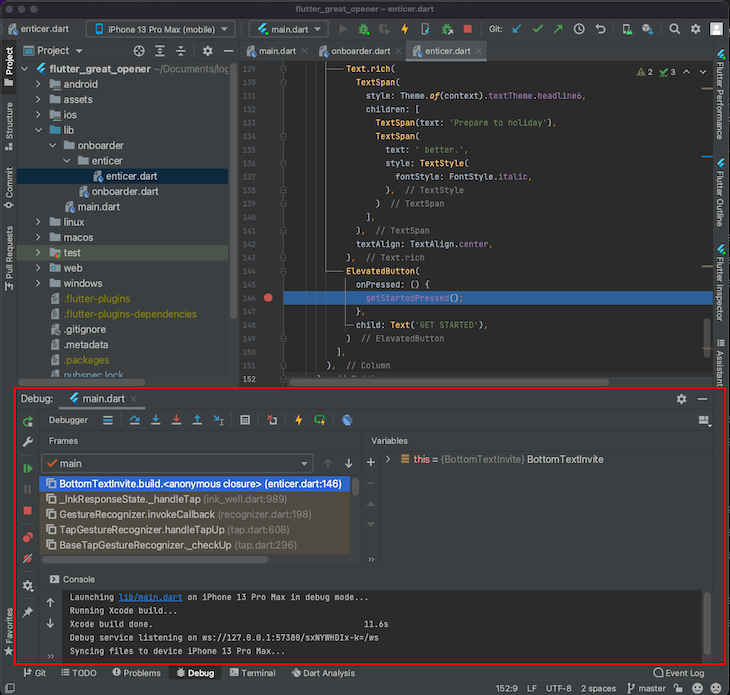
The stack reads from the bottom up, so we can easily see the execution path of code when it hits the breakpoint. Another particularly handy feature of this Debug tab is the ability to mute breakpoints (it’s the button on the left with the red circle and line through it).
This might sound like a strange feature, but occasionally within Flutter, if you try to lay out your app in a certain way, it’s possible you can get many exceptions thrown because Flutter’s layout engine struggles to lay out your widget tree.
At times like this, you can wind up playing around with the widget tree to see if you can get it to work, and every time you save, Flutter reloads the widget and all the exceptions are thrown again.
Being able to mute the breakpoints also mutes the debugger, stopping when encountering an exception in the layout component of Flutter, which can come in handy when designing your UI.
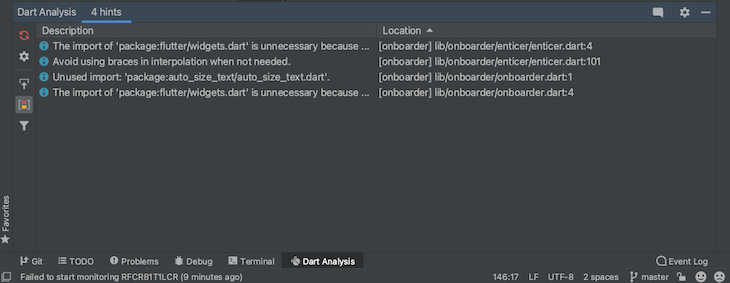
The Dart Analysis tab also shows the issues you currently have with our app. The little red refresh icon button on the top left lets you restart the Dart analysis server, which can come in handy if you recently loaded a large library (or the analysis server is acting up).
I use this particular button a lot when I regenerate libraries that my Flutter app depends on, and I want the typing information to be refreshed; it’s quite handy having it there.
Android Studio also offers great integration with Git and source control.
The final point worth mentioning in this section is that Android Studio lets you tear off tabs of your project, so you can view multiple parts of your project at the same time. This is incredibly convenient when tracing a bug through many different files and lines of code.
Android Studio has significantly less Flutter-related plugins than VS Code. Searching for “Flutter” on the Android Studio marketplace only yields 61 results.
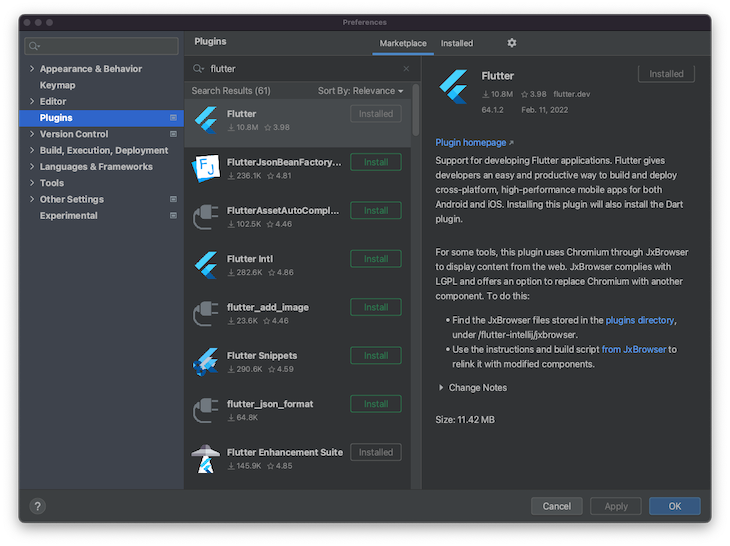
However, all of the critical tools, like packages to help with popular state management frameworks or converting JSON into Dart code are readily available.
On paper, Android Studio has significantly less plugins than VS Code, but in practicality, this doesn’t seem to matter much. Plus, as much functionality is baked in to Android Studio as possible and doesn’t require a third party extension, which can actually be a good thing.
Android Studio is a much heavier IDE than VS Code, consuming closer to a solid gigabyte of memory, while VS Code consumes substantially less. It also participates in fairly resource-intensive operations, like indexing your code when you load your project.
Once your code is indexed, however, you can search anywhere within your app by simply double-tapping the Shift key.
However, if you’re a developer, it’s likely you already have a fairly good computer to work on your development. So, Android Studio is unlikely to stress it more than the tools you already use.
Android Studio is certainly a heavier and more complex proposition than VS Code. But, it’s not complexity for the sake of it.
The added functionality and feature set can make it more straightforward to work on your apps. Plus, being able to tear off the tabs of the IDE into separate windows makes a better development experience.
However, if you are just scraping by on the minimum requirements, Android Studio will likely be slow to use and at times unresponsive. In that case, you would probably be better off with a lighter IDE like VS Code.
But, as a more comprehensive offering than VS Code, Android Studio is the IDE that I personally use for my Flutter development. The debugging performance and functionality makes it win over VS Code in every scenario.
In summary, consider Android Studio if:
But, you might want to skip it if your computer struggles to run Android Studio or only scrapes in on the minimum requirements.
Of course, because we live in the future, we have more than just two IDEs to choose between. There are at least two other options that are also involved in Flutter development that are worth considering.
IntelliJ IDEA is another good option for Flutter development. However, because it shares the same foundation as Android Studio (IntelliJ IDEA), you’re probably just better off using Android Studio.
Sometimes, particular fixes or problems are resolved in IntelliJ IDEA before they are resolved in Android Studio, so you might consider using it if you are experiencing a certain problem that isn’t fixed in Android Studio yet.
Another reason you could consider this option is if you already have this IDE installed to work on projects in other languages.
In that case, it’s not really worth installing Android Studio separately because installing Flutter support within IntelliJ IDEA Community Edition would essentially give you the same experience.
As for performance, IntelliJ Community Edition is largely the same as Android Studio.
You can also use Emacs to edit your Flutter code, but this will be a very minimal experience.
Some developers are extremely productive in Emacs, and they can continue this productivity within Emacs because they will likely be comfortable creating their own emulators and managing more of the development tooling themselves.
Emacs is also going to win the competition for resource usage. Originally released in 1985, it has the most minimal requirements of any possible Flutter development IDE available today.
So, if you are already very familiar with Emacs, and are trying to develop for Flutter on an old computer (or maybe, perhaps, something like a Raspberry Pi?), it’s possible that Emacs could be for you.
But, if you’re new to Flutter development and have a computer from the last ten years, it’s hard to imagine why you would choose Emacs as your IDE of choice.
As we can see, we’re not light on choices when it comes to choosing IDEs to use for our Flutter projects. Not only do we have a few good options, they’re all free as well, meaning you can change between IDEs until you find one that works for you.
Personally, I’ve found my IDE of choice to be Android Studio, but you might choose another IDE for your day-to-day development. Every choice has its own pros and cons, so it’s hard to definitively recommend a certain IDE as the “correct” choice.
Hopefully, this article has made that choice a little easier for you, and you can choose your IDE and move on to the next step of actually creating an app! That’s where things get really exciting.
But, what IDE did you choose, and why did you make that choice? We’d love to hear your reasoning on this in the comment section below.
Install LogRocket via npm or script tag. LogRocket.init() must be called client-side, not
server-side
$ npm i --save logrocket

// Code:

import LogRocket from 'logrocket';
LogRocket.init('app/id');
// Add to your HTML:

<script src="https://cdn.lr-ingest.com/LogRocket.min.js"></script>
<script>window.LogRocket && window.LogRocket.init('app/id');</script>

Why the future of DX might come from the web platform itself, not more tools or frameworks.

A hands-on test of Claude Code Review across real PRs, breaking down what it flagged, what slipped through, and how the pipeline actually performs in practice.

CSS art once made frontend feel playful and accessible. Here’s why it faded as the web became more practical and prestige-driven.

Learn how inline props break React.memo, trigger unnecessary re-renders, and hurt React performance — plus how to fix them.
Hey there, want to help make our blog better?
Join LogRocket’s Content Advisory Board. You’ll help inform the type of content we create and get access to exclusive meetups, social accreditation, and swag.
Sign up now


 Learn more →




