

A thread posted recently on r/nextjs asked what auth library to use for a new Next.js project. The top answers recommended NextAuth, Clerk, and “just roll your own,” all describing a version of the ecosystem that no longer exists.

Auth.js v5 (formerly NextAuth) hit stable in late 2024 as a near-complete rewrite. Better Auth shipped v1 in early 2025. Clerk updated its free tier to 50,000 monthly retained users. WorkOS quietly became the most competitive option for B2B applications that need SSO, not because it got cheaper but because it was already free up to one million MAUs for user management and nobody noticed. The comparison articles those Reddit threads are linking to were written for v4, the old Clerk pricing, and a pre-App Router mental model of how middleware works.
The confusion is compounded by CVE-2025-29927, disclosed in March 2025, which demonstrated that middleware-only session protection in Next.js is bypassable by spoofing the x-middleware-subrequest header. Every library here responds to that differently, and how they respond shapes which one is appropriate for your deployment. So, which auth library should you use for Next.js in 2026? This article runs all four through the same Next.js 16 project and produces a pick-by-constraint framework based on what each library actually requires.
The test project is a Next.js 16 App Router application with public marketing routes, an authenticated dashboard, GitHub and Google OAuth, and protected API routes backed by a Prisma/PostgreSQL database.
Each library gets evaluated on five axes: App Router integration (Server Components, Server Actions, Route Handlers), session mechanics (storage format, token lifecycle, invalidation), OAuth setup (configuration surface, redirect handling), middleware/proxy protection (what runs at the edge vs. what requires Node.js), and edge runtime behavior (what the library documents vs. what actually breaks).
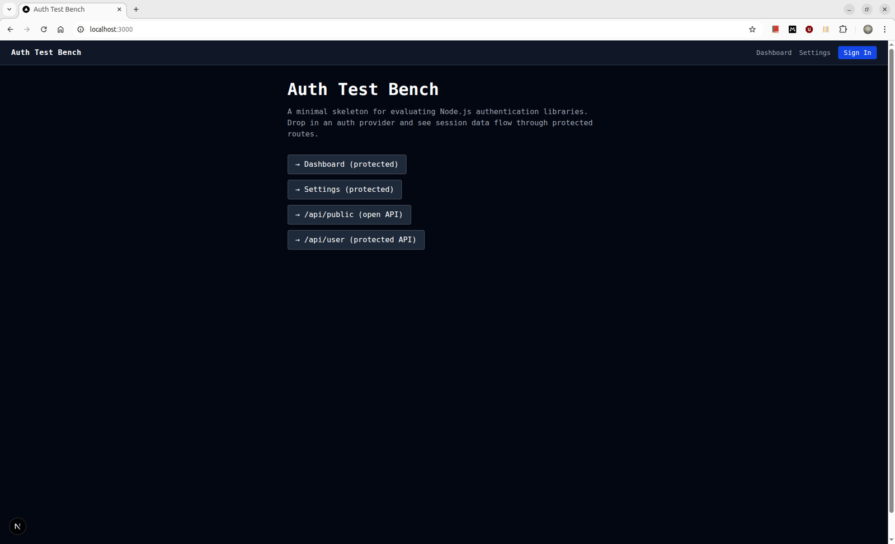
Auth.js v5 is a near-complete rewrite of NextAuth. The unified auth() function replaces both getServerSession and the middleware helper, and the AUTH_* environment variable prefix replaces NEXTAUTH_*. Provider credentials auto-infer from env: AUTH_GITHUB_ID and AUTH_GITHUB_SECRET require no explicit wiring in the config.
The install is two packages:
npm install next-auth@beta @auth/prisma-adapter
The split config pattern is the first thing the v5 docs push you toward, and it is non-negotiable when using a database adapter. auth.config.ts holds everything edge-safe, providers, callbacks, and pages. auth.ts imports that config, adds the Prisma adapter, and forces session: { strategy: "jwt" }:
// auth.config.ts
import type { NextAuthConfig } from "next-auth"
import GitHub from "next-auth/providers/github"
import Google from "next-auth/providers/google"

export const authConfig: NextAuthConfig = {
  providers: [GitHub, Google],
  callbacks: {
    authorized({ auth, request: { nextUrl } }) {
      const isLoggedIn = !!auth?.user
      const isProtected =
        nextUrl.pathname.startsWith("/dashboard") ||
        nextUrl.pathname.startsWith("/settings")
      if (isProtected && !isLoggedIn) return false
      return true
    },
  },
}

// auth.ts
import NextAuth from "next-auth"
import { PrismaAdapter } from "@auth/prisma-adapter"
import { prisma } from "@/lib/db"
import { authConfig } from "./auth.config"

export const { handlers, auth, signIn, signOut } = NextAuth({
  ...authConfig,
  adapter: PrismaAdapter(prisma),
  session: { strategy: "jwt" },
})
session: { strategy: "jwt" } is explicit because Auth.js defaults to database sessions when an adapter is present. Database sessions require a Prisma query on every request and cannot run in the edge runtime. Forcing JWT keeps session verification edge-compatible.
The route handler is two lines:
// app/api/auth/[...nextauth]/route.ts
import { handlers } from "@/auth"
export const { GET, POST } = handlers
The first thing that breaks on Next.js 16 is the proxy export. The Auth.js docs show:
export { auth as middleware }
On Next.js 16, this throws immediately:
Error: The Proxy file "/proxy" must export a function named `proxy` or a default function.
Next.js 16 renamed middleware.ts to proxy.ts and requires a proxy named export or a default export. Auth.js v5’s documented pattern predates this rename. The fix:
// proxy.ts
import NextAuth from "next-auth"
import { authConfig } from "./auth.config"

export default NextAuth(authConfig).auth

export const config = {
  matcher: ["/dashboard/:path*", "/settings/:path*"],
}
Note that authConfig is imported here, not auth.ts. Importing auth.ts in the proxy pulls in the Prisma adapter, which references Node.js APIs unavailable in the edge runtime. The split exists precisely to prevent this.
The matcher also matters. The generic negative lookahead pattern, /((?!api|_next/static|_next/image|.*\.png$).*), intercepts /api/auth/signin itself despite the api exclusion, producing an ERR_TOO_MANY_REDIRECTS loop. Explicit route matchers eliminate the ambiguity.
The second thing that breaks is Prisma v7’s schema format. @auth/prisma-adapter requires the full Auth.js schema, including Account, Session, and VerificationToken. But Prisma v7 removes url = env("DATABASE_URL") from schema.prisma entirely. Adding a datasource block with a url field throws:
Error: The datasource property `url` is no longer supported in schema files.
The datasource block in Prisma v7 takes only provider while the URL lives in prisma.config.ts. Here’s the working schema block:
datasource db {
  provider = "postgresql"
}
Once the schema is correct and prisma db push runs clean, the OAuth flow completes and the session cookie is set. The cookie name is authjs.session-token, flagged HttpOnly; SameSite=Lax, and contains a JWE-encrypted payload. The session object surfaced by auth() in a Server Component:
{
  "user": {
    "name": "0xull",
    "email": "[email protected]",
    "image": "https://avatars.githubusercontent.com/u/60588809?v=4"
  },
  "expires": "2026-05-05T05:46:42.523Z"
}
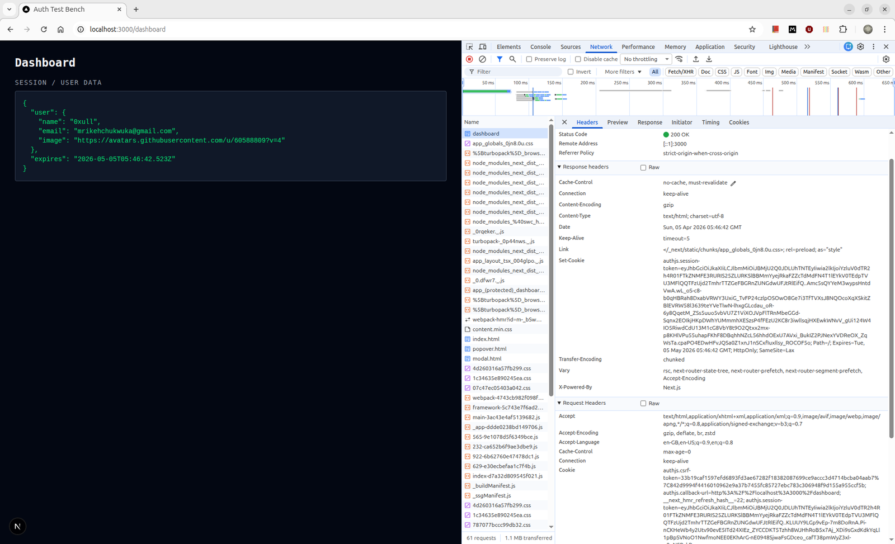
The token expiry is 30 days by default. Because the strategy is JWT, there is no database query on session reads as auth() decrypts the cookie locally. The tradeoff: a compromised token cannot be invalidated before expiry without building a token denylist yourself.
As of September 2025, the Better Auth team took over Auth.js maintenance, and the library is in security-patch mode. The Auth.js team’s own guidance for new projects points to Better Auth. For existing Auth.js v5 applications, nothing breaks, but choosing it for a new project today means betting on a library that its own maintainers are steering users away from.
Clerk’s architecture is fundamentally different from Auth.js v5. It is a hosted identity platform, not a session library. The session store, user database, and JWT signing keys all live in Clerk’s infrastructure. Your application is a client of Clerk’s API.
The install is one package:
npm install @clerk/nextjs
Three files to wire are ClerkProvider in app/layout.tsx, clerkMiddleware() in proxy.ts, and auth() in protected routes. The total configuration surface is smaller than Auth.js v5 by a significant margin because there is no adapter, no schema, and no split config pattern.
The first friction point on Next.js 16 is identical to Auth.js v5. Clerk’s docs show export default clerkMiddleware(), but Next.js 16 requires a named proxy export:
// proxy.ts
import { clerkMiddleware } from "@clerk/nextjs/server"

export const proxy = clerkMiddleware()

export const config = {
  matcher: [
    "/((?!_next|[^?]*\\.(?:html?|css|js(?!on)|jpe?g|webp|png|gif|svg|ttf|woff2?|ico|csv|docx?|xlsx?|zip|webmanifest)).*)",
    "/(api|trpc)(.*)",
  ],
}
clerkMiddleware() runs at the edge and validates the session token cryptographically against Clerk’s cached JWKS endpoint, with no database call and no Node.js runtime required. This is the core architectural difference from Auth.js v5: Clerk’s middleware works at the edge without any split config workaround because there is no database to avoid.
Route protection in Server Components uses auth() from @clerk/nextjs/server:
// app/(protected)/layout.tsx
import { auth } from "@clerk/nextjs/server"

export default async function ProtectedLayout({
  children,
}: {
  children: React.ReactNode
}) {
  const { redirectToSignIn, userId } = await auth()

  if (!userId) return redirectToSignIn()

  return <>{children}</>
}
For the session mechanics, Clerk sets multiple cookies: a __session that contains the short-lived JWT (60-second TTL), a __clerk_db_jwt, and __clerk_active_context carrying additional state. Token refresh happens client-side via background polling, not on the server response, which is why the dashboard response headers carry no Set-Cookie.
auth() reads the JWT from the cookie and verifies it locally, but currentUser() is different. It makes a Backend API call to Clerk’s servers and returns the full user object:
{
  "id": "user_3BvZEMJo4UlnPhLJIJzqYqTQ9IM",
  "username": "0xull",
  "emailAddresses": [{
    "emailAddress": "[email protected]",
    "verification": { "status": "verified", "strategy": "from_oauth_github" }
  }],
  "passwordEnabled": false,
  "publicMetadata": {},
  "privateMetadata": {}
}
That API call counts against Clerk’s Backend API rate limits. Their own docs recommend useUser() on the client instead wherever possible.
Remember the serialization boundary because passing the currentUser() result directly to a Client Component throws:
Error: Only plain objects, and a few built-ins, can be passed to Client Components
from Server Components. Classes or null prototypes are not supported.
Clerk’s User object is a class instance, not a plain object. It must be serialized before crossing the Server/Client boundary, and for that use JSON.parse(JSON.stringify(user)) as a workaround, though it drops any methods on the class.
OAuth configuration lives in the Clerk dashboard, not in code. GitHub and Google are toggled on through a UI. This means provider configuration is not version-controlled. Instead, a dashboard change takes effect immediately across all deployments with no code review or deployment step.
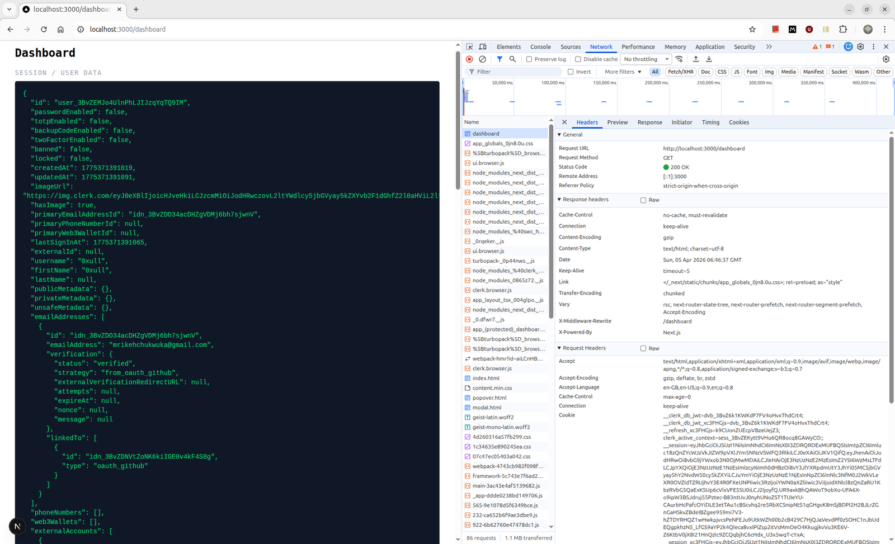
So far, Clerk’s setup is the fastest of the four, and edge middleware works without configuration tax. The cost is that you do not own the session store, the user records, or the signing keys.
WorkOS is not an auth library in the same sense as Auth.js or Better Auth. It is an enterprise feature platform offering SSO, Directory Sync, SCIM, Audit Logs, and a hosted auth UI called AuthKit with a Next.js SDK to wire it in. Choosing WorkOS means choosing the enterprise sales enablement platform first and getting authentication as part of that package.
The install is one package:
npm install @workos-inc/authkit-nextjs
Beyond installation, WorkOS requires explicit dashboard configuration before a single line of code works: a redirect URI registered at http://localhost:3000/callback and a sign-in endpoint at http://localhost:3000/login. Skipping either produces a hard error from WorkOS’s hosted UI before the OAuth flow can begin.
Four environment variables are required:
WORKOS_API_KEY="sk_test_..."
WORKOS_CLIENT_ID="client_..."
WORKOS_COOKIE_PASSWORD="<32+ char AES key>"
NEXT_PUBLIC_WORKOS_REDIRECT_URI="http://localhost:3000/callback"
WORKOS_COOKIE_PASSWORD is the AES key used to encrypt the session cookie locally. WorkOS never sees the plaintext session as encryption and decryption happen in your runtime. This is the fundamental difference from Clerk, where your server does not own the session decryption.
The integration requires four files. The root layout wraps with AuthKitProvider:
// app/layout.tsx
import { AuthKitProvider } from "@workos-inc/authkit-nextjs/components"
import "./globals.css"

export default function RootLayout({
  children,
}: {
  children: React.ReactNode
}) {
  return (
    <html lang="en">
      <body>
        <AuthKitProvider>{children}</AuthKitProvider>
      </body>
    </html>
  )
}
The callback route exchanges the authorization code for a session:
// app/callback/route.ts
import { handleAuth } from "@workos-inc/authkit-nextjs"

export const GET = handleAuth()
The login route generates the AuthKit authorization URL and redirects:
// app/login/route.ts
import { getSignInUrl } from "@workos-inc/authkit-nextjs"
import { redirect } from "next/navigation"

export const GET = async () => {
  const signInUrl = await getSignInUrl()
  return redirect(signInUrl)
}
The first friction point is the proxy. The SDK’s docs still show authkitMiddleware(), but the installed package marks it @deprecated in favor of authkitProxy(). The docs trail the package. The correct proxy for Next.js 16:
// proxy.ts
import { authkitProxy } from "@workos-inc/authkit-nextjs"

export const proxy = authkitProxy({
  middlewareAuth: {
    enabled: true,
    unauthenticatedPaths: ["/", "/api/public"],
  },
})

export const config = {
  matcher: ["/", "/dashboard/:path*", "/settings/:path*", "/api/public"],
}
middlewareAuth mode is necessary here. The alternative of calling withAuth({ ensureSignedIn: true }) in a layout Server Component will throw:
Error: Cookies can only be modified in a Server Action or Route Handler.
WorkOS needs to set a redirect cookie when bouncing unauthenticated users to AuthKit, and Next.js forbids cookie writes outside Server Actions and Route Handlers. The proxy is the only correct location for this redirect.
For session mechanics, WorkOS stores the session in a single wos-session cookie containing the access token, refresh token, and user object, all encrypted with your WORKOS_COOKIE_PASSWORD via iron-session. The proxy handles token refresh on every request, meaning when the access token expires, the proxy calls WorkOS’s token refresh endpoint and rewrites the cookie before the request reaches your page. The user object returned by withAuth() is a plain JavaScript object:
{
  "object": "user",
  "id": "user_01KNFK6T5RT23QQNDFC7R909VS",
  "email": "[email protected]",
  "emailVerified": true,
  "firstName": "0xull",
  "lastSignInAt": "2026-04-05T19:57:41.952Z",
  "createdAt": "2026-04-05T19:51:37.861Z",
  "metadata": {}
}
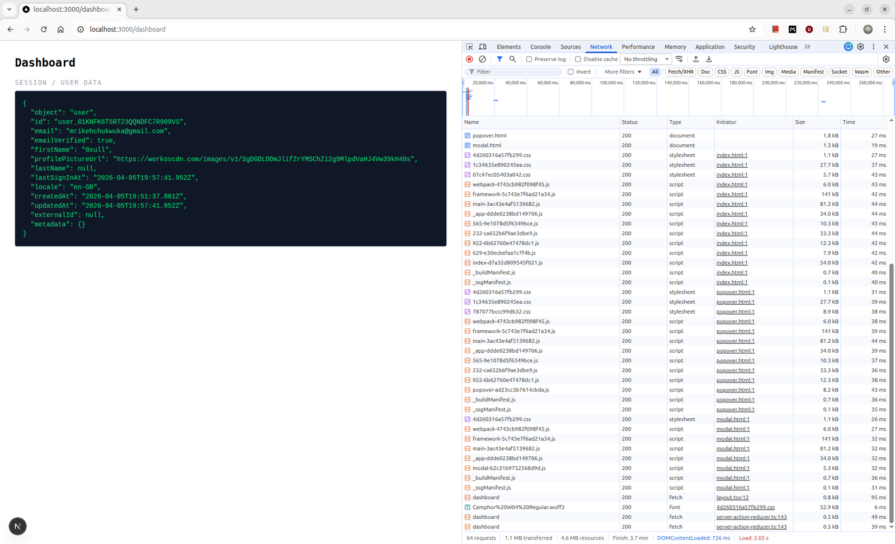
For the pricing reality, WorkOS User Management is free up to 1 million MAUs. The actual cost center is SSO connections, as each SAML or OIDC enterprise connection is priced per connection. For a consumer app with no enterprise SSO requirement, WorkOS is effectively free at any scale a startup will realistically hit. For a B2B SaaS selling to enterprise customers who require SSO, WorkOS becomes the most cost-effective option in this comparison.
Better Auth is the only library in this comparison that treats your database as the authoritative session store by design. There is no hosted infrastructure, no vendor JWT signing keys, and no class-instance user objects. The session token is a plain string stored in your database. The cookie holds that token, meaning every auth.api.getSession() call resolves it against the database and revocation is immediate by deleting the session row.
The install is one package:
npm install better-auth
Two environment variables:
BETTER_AUTH_SECRET="<openssl rand -base64 32>"
BETTER_AUTH_URL="http://localhost:3000"
The server instance lives in lib/auth.ts. Better Auth has its own Prisma adapter, which is separate from Auth.js’s @auth/prisma-adapter:
import { betterAuth } from "better-auth"
import { prismaAdapter } from "better-auth/adapters/prisma"
import { nextCookies } from "better-auth/next-js"
import { prisma } from "@/lib/db"

export const auth = betterAuth({
  database: prismaAdapter(prisma, {
    provider: "postgresql",
  }),
  socialProviders: {
    github: {
      clientId: process.env.AUTH_GITHUB_ID as string,
      clientSecret: process.env.AUTH_GITHUB_SECRET as string,
    },
    google: {
      clientId: process.env.AUTH_GOOGLE_ID as string,
      clientSecret: process.env.AUTH_GOOGLE_SECRET as string,
    },
  },
  plugins: [nextCookies()],
})
The nextCookies() plugin is required. Without it, calling auth functions inside Server Actions silently fails to set cookies. This means the response headers are produced, but Next.js discards them because Server Actions require cookies to be set through Next.js’s own cookies() API.
The route handler mounts at app/api/auth/[...all]/route.ts:
import { auth } from "@/lib/auth"
import { toNextJsHandler } from "better-auth/next-js"

export const { GET, POST } = toNextJsHandler(auth)
Better Auth provides a CLI to generate the database schema:
npx auth@latest generate
npx prisma db push
This generates Better Auth’s own schema, user, session, account, and verification, which differs from Auth.js’s adapter schema. The two are not compatible and cannot share a database without a migration.
Unlike Clerk and WorkOS, Better Auth ships no pre-built sign-in page. You build it, and the client handles the OAuth redirect:
await authClient.signIn.social({
  provider: "github",
  callbackURL: "/dashboard",
})
Then for middleware, Better Auth’s documented middleware pattern for edge runtimes uses getSessionCookie(), where a cookie existence check is done rather than a session validation:
import { getSessionCookie } from "better-auth/cookies"
import { NextRequest, NextResponse } from "next/server"

export async function proxy(request: NextRequest) {
  const sessionCookie = getSessionCookie(request)

  if (!sessionCookie && (
    request.nextUrl.pathname.startsWith("/dashboard") ||
    request.nextUrl.pathname.startsWith("/settings")
  )) {
    return NextResponse.redirect(new URL("/sign-in", request.url))
  }

  return NextResponse.next()
}
Better Auth’s own docs label this pattern “NOT SECURE” and explicitly state it is for optimistic redirects only. Actual session enforcement must happen in each page or layout via auth.api.getSession(), which requires a Node.js runtime and makes a database call. This is not a limitation but the correct architecture for a library that owns your session store. Whilst the proxy is a UX convenience, the database call is the security boundary.
The session object returned by auth.api.getSession():
{
  "session": {
    "expiresAt": "2026-04-12T20:29:38.059Z",
    "token": "7nFoj0IGlTxXK1T0bN2Cb9TCRkGLWCtH",
    "userId": "ms5gpUIV1d0RlpiYvpsZl1Dh3SJqpznN",
    "id": "P6LYqBURp0FPIo8aSPiGiTKXMcWOPRnG"
  },
  "user": {
    "name": "0xull",
    "email": "[email protected]",
    "emailVerified": true,
    "id": "ms5gpUIV1d0RlpiYvpsZl1Dh3SJqpznN"
  }
}
session and user are separate plain objects, therefore no serialization error when passing to Client Components.
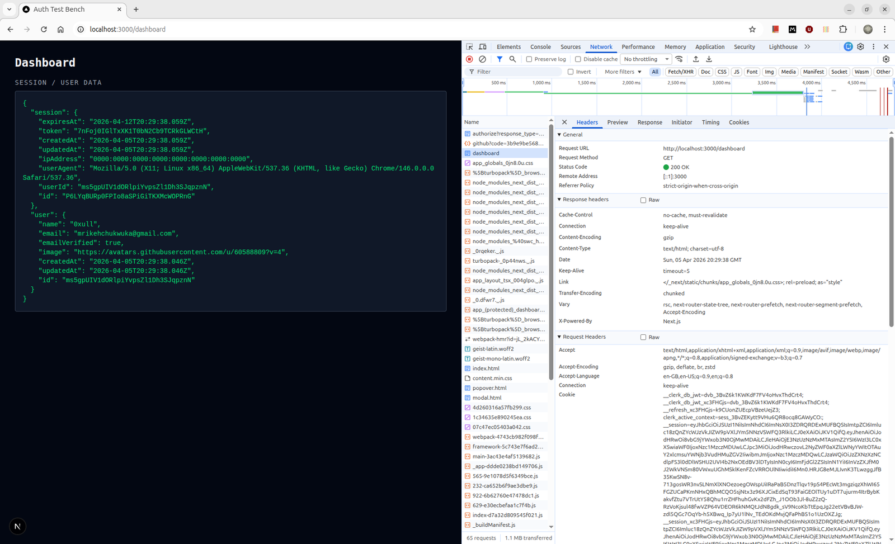
So far, Better Auth gives you complete data ownership, immediate session revocation, and a configuration surface that lives entirely in code. The cost is that the entire auth stack components are managed by you.
The table below summarizes how the four libraries differ across the constraints that matter most in production.
| Category | Auth.js v5 | Clerk | WorkOS | Better Auth |
|---|---|---|---|---|
| Session storage | JWE-encrypted JWT in authjs.session-token HttpOnly cookie. Decrypted locally using AUTH_SECRET, with no database call on reads when using JWT strategy |
Short-lived JWT (60s TTL) in __session cookie, signed by Clerk’s private keys and validated against their cached JWKS endpoint. Multiple cookies are set: __session, __clerk_db_jwt, __clerk_active_context |
iron-session encrypted cookie (wos-session) containing access token, refresh token, and user object. AES key (WORKOS_COOKIE_PASSWORD) never leaves your server |
Opaque session token string stored in your database. Cookie holds the token ID only. Every auth.api.getSession() call hits the database to resolve it |
| Session invalidation | On expiry only (30-day default). No revocation without a token denylist you build yourself | Immediate. Clerk controls token issuance so invalidation propagates instantly | On cookie deletion or token refresh failure. Refresh is handled by the proxy on every request | Immediate. Delete the session row and the token resolves to nothing on the next request |
| User data ownership | Yours, stored in your database via the Prisma adapter | Clerk’s servers. User records, OAuth connections, and session history live in Clerk’s infrastructure. Migration off is non-trivial | Yours, while WorkOS stores user data on their servers but the session is decrypted locally. You control the AES key | Fully yours. Users, sessions, and accounts all live in your database under Better Auth’s schema |
| OAuth config location | Code only. Providers declared in auth.config.ts, with credentials auto-inferred from AUTH_GITHUB_ID and AUTH_GITHUB_SECRET |
Dashboard only. Providers toggled through Clerk’s UI, with no provider code in your repo. Custom OAuth requires Pro plan | Dashboard and code. Providers configured in the WorkOS dashboard, while callback and login routes are required in code | Code only. socialProviders declared in lib/auth.ts. Entirely version-controlled, with no dashboard dependency |
| Edge middleware | JWT session verification works at the edge but requires the split config pattern. auth.config.ts must stay edge-safe, and auth.ts must stay out of the proxy |
Full edge support. clerkMiddleware() verifies the session token cryptographically against Clerk’s cached JWKS, with no database call and no split config required |
Full edge support via authkitProxy(). Token refresh can add a network call in the proxy when the access token expires |
Edge runtime supports cookie-existence checks only via getSessionCookie(). Full session validation through auth.api.getSession() requires Node.js and a database read |
| Next.js 16 proxy | export default NextAuth(authConfig).auth. The documented export { auth as middleware } pattern throws on Next.js 16 |
export const proxy = clerkMiddleware(). export default clerkMiddleware() throws on Next.js 16 |
export const proxy = authkitProxy(). authkitMiddleware() still works but is marked @deprecated in the installed package while the docs still show it |
export async function proxy(). Standard Next.js 16 named export, with no library-specific export helper required |
| Hosted sign-in UI | No. Auth.js provides a minimal default sign-in page at /api/auth/signin but no customizable component library |
Yes. Fully hosted, Clerk-branded sign-in and sign-up flows with prebuilt <UserButton />, <SignInButton />, and <Show> components |
Yes. AuthKit hosted UI built on Radix, customizable via WorkOS dashboard branding settings | No. You build the sign-in page. authClient.signIn.social() handles the OAuth redirect |
| Free tier | Unlimited. Self-hosted, no MAU limits, infrastructure cost only | 50,000 monthly retained users. “Retained” excludes users who never return after signup day one | 1,000,000 MAU free for User Management. SSO connections are the actual cost center, priced per connection | Unlimited. Self-hosted, no MAU limits, infrastructure cost only |
| Paid cost at 100K MAU | Infrastructure only, database and hosting | ~$1,800/month ($0.02 × 90K MAU over the 10K included in the $25 Pro plan) |
$0 for user management at 100K MAU. Cost only applies if you add SSO connections | Infrastructure only |
| Enterprise SSO | Requires manual SAML integration, with no built-in support | Available as a paid add-on, SAML only | Built-in first-class feature with SAML, OIDC, SCIM, Directory Sync, and Audit Logs included | Available via plugin, with additional setup |
| Project status | Maintenance mode as of September 2025. Security patches only. The Better Auth team now maintains it and recommends Better Auth for new projects | Active | Active | Active. Gained Auth.js maintenance responsibility in September 2025 and continues adding features |
| Best for | Migrating existing Auth.js v4 codebases only | B2C apps optimizing for time-to-ship under 50K MAU | B2B products with enterprise SSO as a current or near-term requirement | New projects requiring full data ownership with the capacity to operate auth infrastructure |
The comparison gets clearer once you evaluate each library as a session model rather than just an OAuth wrapper.
For most new self-hosted Next.js projects in 2026, Better Auth is the strongest default. It gives you full ownership, immediate session revocation, and a code-first integration model that aligns with how many teams already build internal infrastructure.
Clerk is the better fit when speed matters more than ownership. WorkOS is the right fit when enterprise SSO is part of the roadmap. Auth.js v5 still has a place, but mostly as a migration bridge rather than a default recommendation for greenfield apps.
The larger lesson is that choosing an auth library is really choosing a session model, an operational boundary, and a security tradeoff. These tools can look similar when the comparison stops at OAuth setup. They look very different once you factor in edge validation, session invalidation, pricing, and who owns the user record. Start with those constraints, and the right choice becomes much easier.
Debugging Next applications can be difficult, especially when users experience issues that are difficult to reproduce. If you’re interested in monitoring and tracking state, automatically surfacing JavaScript errors, and tracking slow network requests and component load time, try LogRocket.
LogRocket captures console logs, errors, network requests, and pixel-perfect DOM recordings from user sessions and lets you replay them as users saw it, eliminating guesswork around why bugs happen — compatible with all frameworks.
LogRocket's Galileo AI watches sessions for you, instantly identifying and explaining user struggles with automated monitoring of your entire product experience.
The LogRocket Redux middleware package adds an extra layer of visibility into your user sessions. LogRocket logs all actions and state from your Redux stores.


Modernize how you debug your Next.js apps — start monitoring for free.

Explore how looping Transformers reuse layers and compare with traditional GPT models in reasoning tasks.

Learn how one solo developer used multiple Grok Bot AI agents to test, report bugs, fix code, and monitor deployments — hands-free, on a $30/month plan.

Compare the top AI development tools and models of October 2026. View updated rankings, feature breakdowns, and find the best fit for you.

Can AI agents debug React bugs across browsers? I tested Chrome, Safari, and Firefox debugging MCPs on four bugs to compare their findings, workflows, and effectiveness.
Would you be interested in joining LogRocket's developer community?
Join LogRocket’s Content Advisory Board. You’ll help inform the type of content we create and get access to exclusive meetups, social accreditation, and swag.
Sign up now





