

Claude Code mods let you set rules your agent can’t ignore. To see why that matters, look at how LLMs differ from traditional software. With traditional software, you know exactly what the program will do with a given input; that’s what writing a program is. With LLMs, the same input can give a different output each time. The model might just ignore the flow you envisioned, and that can be frustrating. Almost every LLM user has seen this:
I’ve read someone got their database deleted by their agent; imagine the anguish!
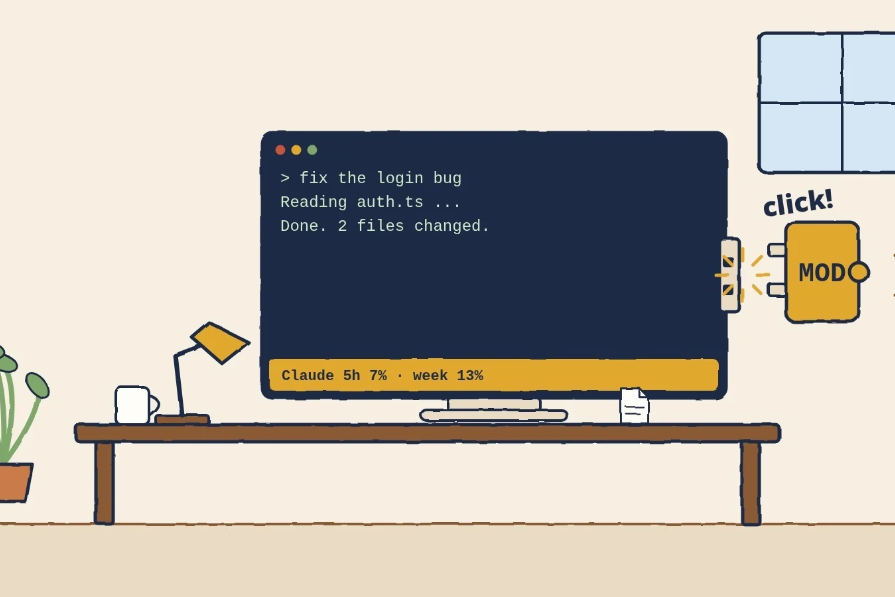
On October 1, Anthropic added mods to Claude Code, and they give you real control over how your agent acts. But what are mods?
A mod is a plugin made of small JavaScript or TypeScript functions that run inside Claude Code. Simply put, a mod is like a bouncer at a nightclub. It decides what gets in and out, and because code enforces it, it’s as deterministic as it gets.
When Claude reaches the door, an event fires: “Claude is about to run a command.” The bouncer is a small function you write for that specific door. Inside a mod, this function is called a hook.
The bouncer can do one of three things:
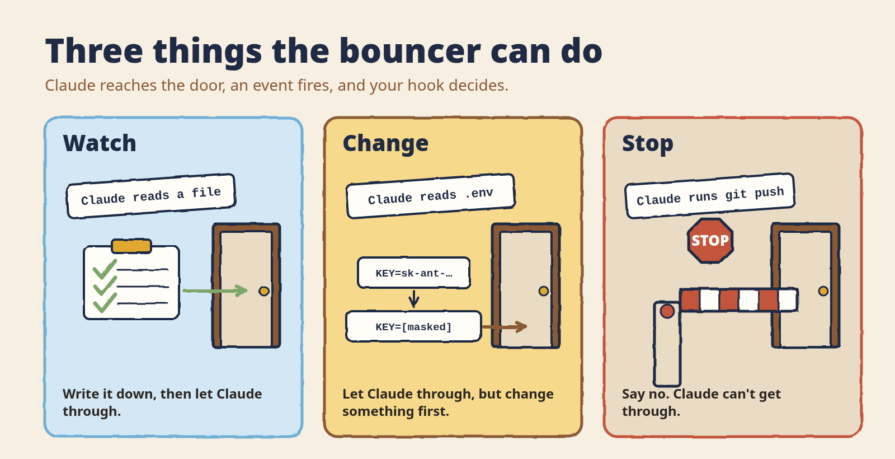
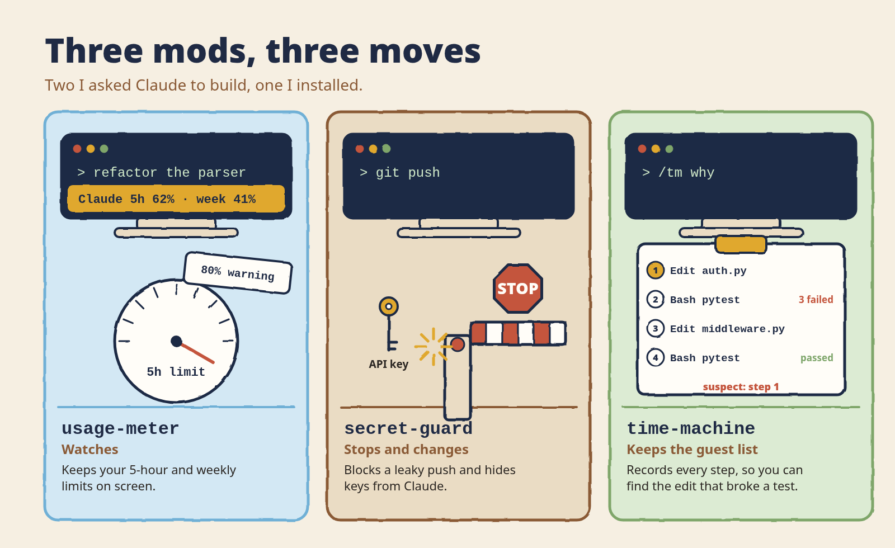
The three mods in this tutorial use all three moves. The first one watches your session and keeps your usage limits on screen, so a long task can’t quietly eat your quota. The second one stops a git push that would leak a secret, and hides your keys from Claude before it reads them. The third one keeps a record of every step Claude takes, so you can see which edit broke your code.
One warning first: a bouncer is only as honest as whoever trained them. Mods run with full access to your computer, so read a mod’s code before you install it.
Now that we have mods, hooks, skills, and MCP servers, things can get confusing fast. No worries, let’s go through each of them briefly.
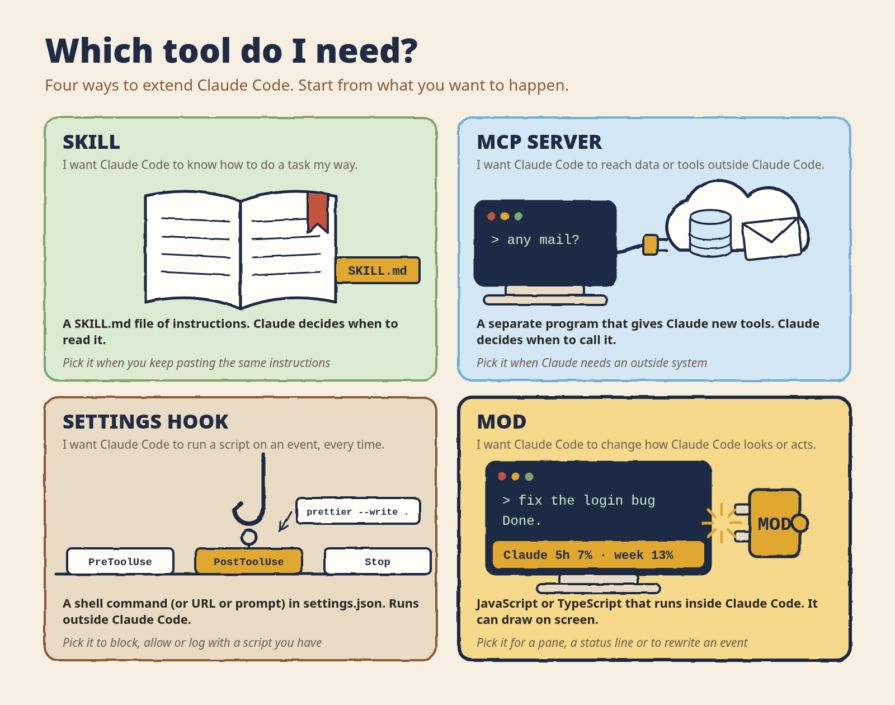
A skill is a folder of instructions, such as a SKILL.md file that Claude reads when the task matches. The catch is that Claude decides when to use it, so there’s no guarantee a skill will be invoked when it should be. You can call a skill yourself, but in complex flows you rely on Claude to pick it. Skills change how Claude works, not Claude Code itself.
MCP servers are separate programs that give Claude new tools or data, such as a database, GitHub, or a browser. Claude decides when to call them, and they live outside Claude Code.
Settings hooks are usually shell commands that you put in settings.json for a fixed moment, such as before a tool runs or when a session ends. They can also call a URL or send a prompt. They always run, and Claude doesn’t decide. A shell command hook runs outside Claude Code, as a new process each time.
Mods are JavaScript or TypeScript functions that run inside Claude Code, and they always run on their events. Claude does not decide when to run them. Because they run inside, they can also draw on the screen, which none of the others can do.
| You want to | Use | Who decides | Where it runs |
|---|---|---|---|
| Teach Claude a task your way | Skill | Claude | Inside Claude’s context |
| Give Claude a new tool or data | MCP server | Claude | A separate program |
| Run a script at a fixed moment | Settings hook | Always runs | A new process each time |
| Change Claude Code itself | Mod | Always runs | Inside Claude Code |
Anthropic’s mods docs have a longer version of this comparison.
One habit I had while working with Claude Code is to always check my subscription usage. How much of my five-hour session limit and weekly limit did I use? I’d always go to Claude’s usage screen and look there. The moment I learned about Claude mods, I built a mod for myself that shows me my session and weekly usage directly inside my terminal.
We are living in a different era now: it’s been more than a year since I touched a code editor. I don’t write code anymore; I ask Claude Code to write it for me, and I did the same for building this mod. Luckily for us, Claude Code has a built-in skill for this. It’s called plugin-authoring, and Claude uses it when you ask for a mod.
I first asked Claude for some mod ideas. Number 3 on its list was a usage meter, so I wrote:
I want you to build this, and open a public GitHub repo because I’ll share this with other people too: Usage meter. Status line, plus a toast at 80% and 90%. Claude 5h 62% (resets 18:40) · week 41%. Tells you when to hand work to Sonnet.
Four minutes later, the mod was working, and its tests passed. Three minutes after that, it was a public repo on GitHub. It wasn’t perfect on the first try: when I opened a new session, the meter didn’t show up. I told Claude, and it fixed how the mod loads.
If you peek inside the mod Claude built for me, you’ll see it’s just a small folder with a few files:
plugin.json is the mod’s name tag. It holds the name, the version, and a one-line descriptionhooks.json tells Claude Code where the mod’s code livesregister.ts is where the bouncer stands. It says which doors the mod watches and what to do at each oneThere’s also a helper file, a test file, and a file that lets others install it from GitHub.
The mod watches two doors. The first one is “a session starts”, so the usage line shows up the moment I open Claude Code. The second one is “usage changed”, which fires every time my numbers move. At that door, the mod updates the line and, once I pass 80% and again at 90%, pops up a warning.
Remember the three things a bouncer can do? This mod only watches. It never changes or stops anything. It just keeps count and shows me the result, which reads like this: Claude 5h 36% (resets 10:00) · week 48%.

You don’t need to write any of these by hand either. If you want to try it, clone the repo and start Claude Code with claude --plugin-dir usage-meter. Nothing gets installed, and it’s gone when you close the session.
Many people are getting into vibe coding now, that is, building without writing a single line of code. A lot of them have no programming experience, so they might not know the pitfalls of pushing their secrets to GitHub.
Even seasoned developers fall into this trap. You forget to create a .gitignore, or you forget to add your .env file to it, and bad things can happen from there, as red eyes in the dark forest are always watching for your keys.
Our bouncer says no: that push never happens, and your key never goes public.
I built this mod for myself too, because I’m only human and I make mistakes. I can just forget and push my keys to GitHub, and I for sure don’t want to wake up to thousands of dollars of API usage. I named this mod secret-guard. Before a git push runs, it checks if the repo is public, then looks through the new lines for keys, tokens, and home paths.
If it finds one, the push never runs.
What did the secret-guard mod catch? In its first 17 days, secret-guard stopped 30 pushes. Not one of them was an API key. Every finding was a home path, a line like /home/<my-username>/... in a notes file, which tells the world my username and how my computer is laid out. Most of those repos were ones where it couldn’t confirm the visibility, so it scanned to be safe.
There’s a second thing secret-guard does, and it’s the bouncer’s third move. Every time Claude runs a tool, say it reads my .env file, the mod hides any keys in the result before Claude reads it. Claude sees ANTHROPIC_API_KEY=[masked anthropic_key ...a1b2] instead of the real key. That’s the “change” move: Claude still gets through the door, but the key stays outside.
It isn’t perfect. It finds secrets by their pattern, so a random string with no known prefix can slip past. And it only sees pushes that Claude runs through its own shell tool. A push you type yourself in another terminal goes right past it. But it catches the mistakes I’m most likely to make on a tired night.
Want to try it? Clone the repo and start Claude Code with claude --plugin-dir secret-guard.
Lots of people share their mods on GitHub, and that’s great. But do your due diligence first.
A mod can do anything you can: it can read your files, run programs, use the internet, read your API keys. There is no sandbox!
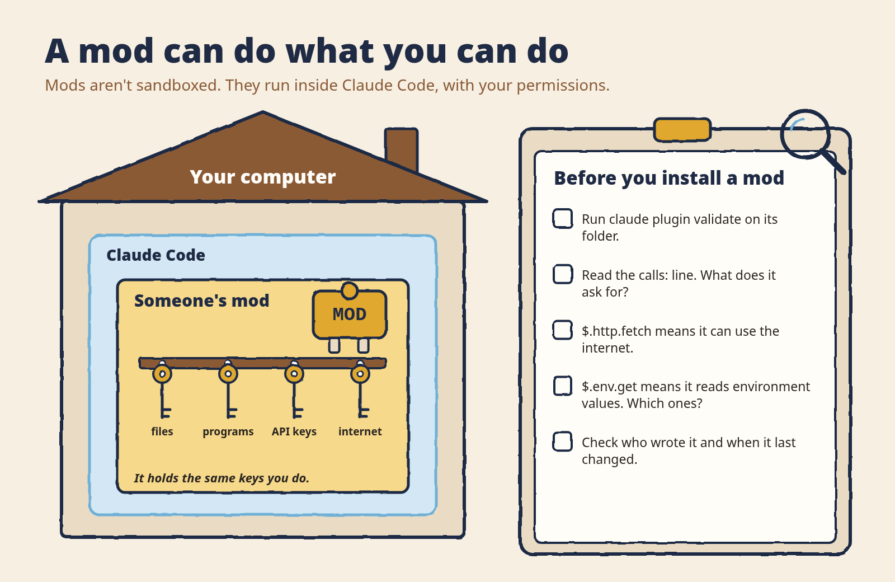
You can run claude plugin validate <path> on an unknown mod. Think of it as an X-ray for mods: it reads the mod’s files and tells you what it does, without running it.
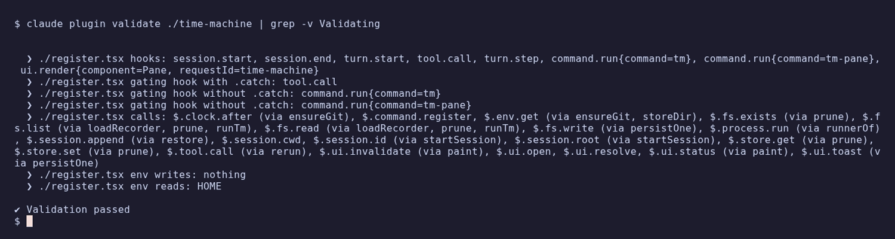
Here’s what it says about time-machine, the mod we’ll install next (shortened):
calls: $.env.get, $.fs.write, $.process.run, $.ui.status, ...
env writes: nothing
env reads: HOME
It runs programs, writes files, and reads your environment. Sounds scary, but each one has a reason: it runs git, saves snapshots, and the only environment value it reads is HOME, to find its folder. There’s no $.http.fetch, so it never uses the internet. If you see $.http.fetch (internet) or $.env.get reading values you didn’t expect, read the code before you install.
The third mod isn’t mine. It’s time-machine by YeonwooSung, and I use it every day.
Now imagine Claude changed several files and a test broke. git diff shows what changed, but not which step broke it.
Remember our bouncer? Now he keeps the guest list. Every step gets written down, with a snapshot of the files.
Install it with two lines inside Claude Code:
/plugin marketplace add YeonwooSung/my-claude-code-mods
/plugin install time-machine@my-claude-code-mods
Then type /tm why, and it shows you which edits most likely broke your tests.
Three mods, three moves of the bouncer. usage-meter watches and keeps count of your limits. secret-guard stops a push that would leak a key, and changes what Claude reads so the key stays hidden. time-machine keeps the guest list, so you can see and undo every step Claude took.
If you take three things from this article, take these:
plugin-authoring skill does the rest. My first one took seven minutes from my message to a public repoclaude plugin validate on any mod you didn’t write and read the calls: lineNot sure what to build next? Look at your own habits. Anything you check over and over, or any mistake you’ve made twice, is a mod waiting to happen. A few of mine started exactly like that: active-time shows how many hours I spent in Claude Code today and this week, snap puts a screenshot into my next message with one command, and shiplog keeps a log of my day’s work and drafts a post about it.
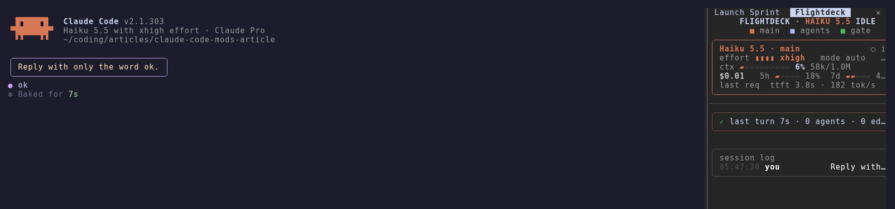
And if you’d rather start with someone else’s work, claude-flightdeck is a good one to look at: it puts a live dashboard beside your session, with your context, cost, every permission check, and your subagents. Just don’t forget the X-ray.

I tested Jev against popular LLMs to compare speed, cost, and accuracy on real bank support messages.

Is react-markdown slowing down your app? We benchmarked three top streaming Markdown renderers to find the fastest, most efficient alternative for React.

Learn how coding agents streamline TDD with automated tests, quality guardrails, and mutation testing to catch bugs and build reliable software.

We tested five AI code review tools for speed, setup, security, and code quality to compare their strengths and help you choose the right tool.
Hey there, want to help make our blog better?
Join LogRocket’s Content Advisory Board. You’ll help inform the type of content we create and get access to exclusive meetups, social accreditation, and swag.
Sign up now
 Learn more →