I was recently tasked with building a front-end camera component that allows users to upload images of their identification cards to a back-end service. In this post, I’ll demonstrate how I created the component by explaining how to configure a live media stream, capture a snapshot with React Hooks, and style and position the elements using styled-components.
As such, the article assumes a working knowledge of functional components in React 16.x and the styled-components library. Below, you can see a demo of the component in action, and feel free to play around with the complete solution on my CodeSandbox as you read along. Enjoy!
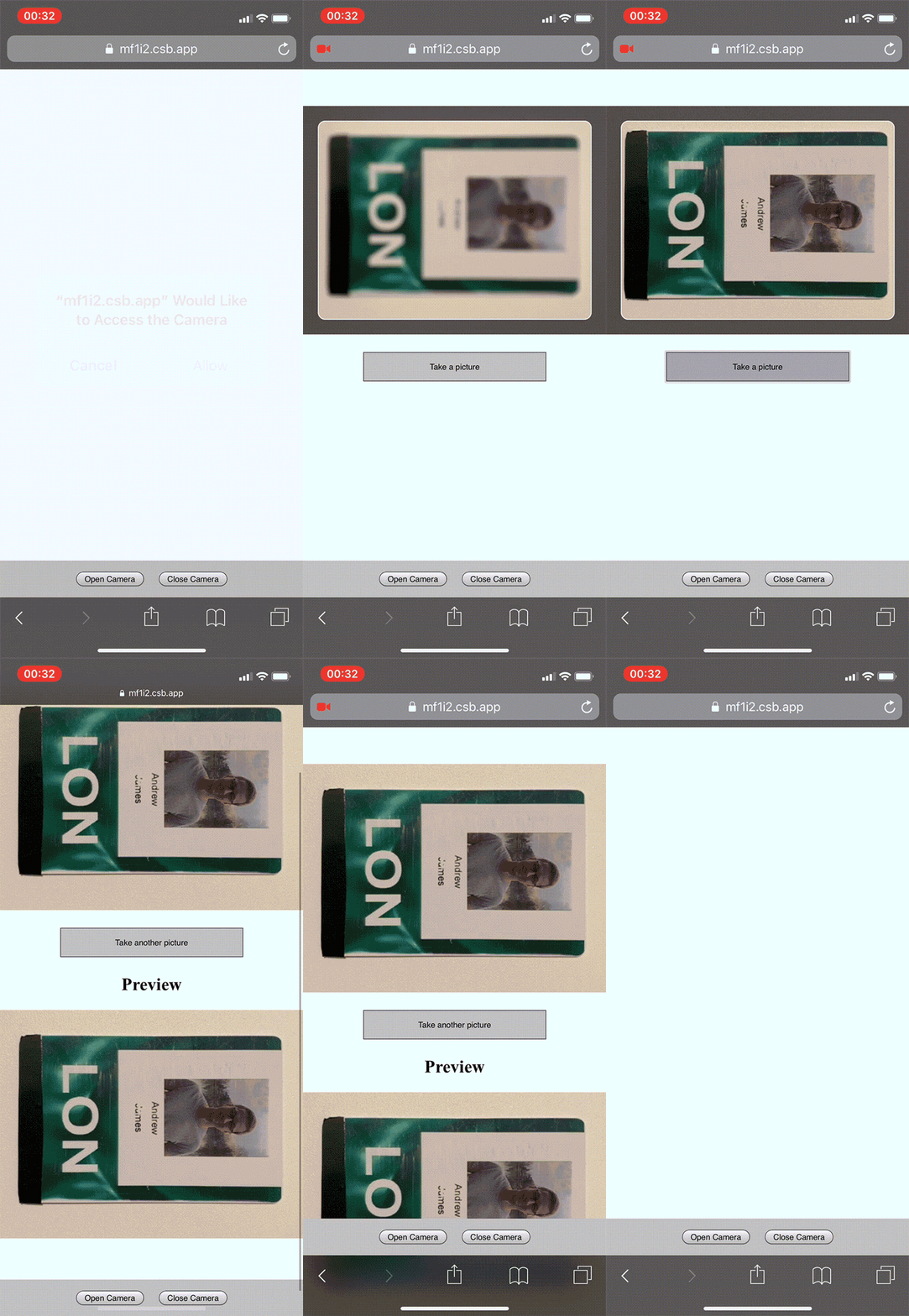
Let’s begin by accessing the browser navigator and invoking the getUserMedia() method to display a live video feed from the user’s camera.
Since the component is designed to take photographs of identity cards, we can pass a configuration object that does not require audio and defaults to the rear-facing camera on mobile devices. By passing an options object to the video property, video is assumed to be true.
const CAPTURE_OPTIONS = {
    audio: false,
    video: { facingMode: "environment" },
};
The getUserMedia() method requests permission from the user to access the media defined in the configuration. It then returns a promise that will either resolve and return a MediaStream object that can be stored in local state or reject and return an error.
Using one of React’s useEffect() Hooks, we create and store the requested stream if none exists (i.e., our local state is empty) or return a cleanup function to prevent any potential memory leaks when the component unmounts. The cleanup loops through and stops each of the media tracks stored in local state via the getTracks() method.
With the stream stored in local state, it can then be bound to a <video /> element. Since React does not support the srcObject attribute, we use a ref to target the video and assign the stream to the srcObject property. With a valid source, the video will trigger an onCanPlay() event where we can begin video playback.
This implementation is necessary since the video autoPlay attribute does not work consistently across all platforms. We can abstract all of this logic into a custom Hook that takes the configuration object as an argument, creates the cleanup function, and returns the stream to the camera component.
import { useState, useEffect } from "react";

export function useUserMedia(requestedMedia) {
  const [mediaStream, setMediaStream] = useState(null);

  useEffect(() => {
    async function enableStream() {
      try {
        const stream = await navigator.mediaDevices.getUserMedia(requestedMedia);
        setMediaStream(stream);
      } catch(err) {
        // Removed for brevity
      }
    }

    if (!mediaStream) {
      enableStream();
    } else {
      return function cleanup() {
        mediaStream.getTracks().forEach(track => {
          track.stop();
        });
      }
    }
  }, [mediaStream, requestedMedia]);

  return mediaStream;
}
import React, { useRef, useState } from 'react';
import { useUserMedia } from './useUserMedia';

const CAPTURE_OPTIONS = {
    audio: false,
    video: { facingMode: "environment" },
};

function Camera() {
  const videoRef = useRef();
  const mediaStream = useUserMedia(CAPTURE_OPTIONS);

  if (mediaStream && videoRef.current && !videoRef.current.srcObject) {
    videoRef.current.srcObject = mediaStream;
  }

  function handleCanPlay() {
    videoRef.current.play();
  }

  return (
    <video ref={videoRef} onCanPlay={handleCanPlay} autoPlay playsInline muted />
  );
}
With the media stream configured, we can start to position the video within the component. To enhance the user experience, the camera feed should resemble an identification card. This requires the preview container to maintain a landscape ratio regardless of the native resolution of the camera (desktop cameras typically have a square or landscape ratio, and we assume mobile devices will capture the images in portrait).
This is achieved by calculating a ratio that is ≥ 1 by always dividing by the largest dimension. Once the video is available for playback (i.e., when the onCanPlay() event is invoked), we can evaluate the native resolution of the camera and use it to calculate the desired aspect ratio of the parent container.
In order for the component to be responsive, it will need to be notified whenever the width of the parent container has changed so that the height can be recalculated. react-measure exports a <Measure /> component that provides the boundaries of a referenced element as an argument in an onResize() callback. Whenever the container mounts or is resized, the argument’s contentRect.bounds.width property is used to determine the container height by dividing it by the calculated ratio.
Similar to before, the ratio calculation is abstracted into a custom Hook and returns both the calculated ratio and setter function. Since the ratio will remain constant, we can utilize React’s useCallback() Hook to prevent any unnecessary recalculations.
import { useState, useCallback } from "react";

export function useCardRatio(initialRatio) {
  const [aspectRatio, setAspectRatio] = useState(initialRatio);

  const calculateRatio = useCallback((height, width) => {
    if (height && width) {
      const isLandscape = height <= width;
      const ratio = isLandscape ? width / height : height / width;

      setAspectRatio(ratio);
    }
  }, []);

  return [aspectRatio, calculateRatio];
}
import React, { useRef, useState } from 'react';
import { Measure } from 'react-measure';
import { useUserMedia } from './useUserMedia';
import { useCardRatio } from './useCardRatio';

const CAPTURE_OPTIONS = {
    audio: false,
    video: { facingMode: "environment" },
};

function Camera() {
  const videoRef = useRef();
  const mediaStream = useUserMedia(CAPTURE_OPTIONS);
  const [container, setContainer] = useState({ height: 0 });
  const [aspectRatio, setAspectRatio] = useCardRatio(1.586); // default card ratio

  if (mediaStream && videoRef.current && !videoRef.current.srcObject) {
    videoRef.current.srcObject = mediaStream;
  }

  function handleCanPlay() {
    calculateRatio(videoRef.current.videoHeight, videoRef.current.videoWidth);
    videoRef.current.play();
  }

  function handleResize(contentRect) {
    setContainer({
      height: Math.round(contentRect.bounds.width / aspectRatio)
    });
  }

  function handleCanPlay() {
    setAspectRatio(videoRef.current.videoHeight, videoRef.current.videoWidth);
    videoRef.current.play();
  }

  return (
    <Measure bounds onResize={handleResize}>
      {({ measureRef }) => (
        <div ref={measureRef} style={{ height: `${container.height}px` }}>
          <video ref={videoRef} onCanPlay={handleCanPlay} autoPlay playsInline muted />
        </div>
      )}
    </Measure>
  );
The current solution works well if the video element is smaller than the parent container, but in the event that the native resolution is larger, it will overflow and cause layout issues. Adding overflow: hidden and position: relative to the parent and position : absolute to the video will prevent the break in layout, but the video will appear off-center to the user.
To compensate for this, we center the feed by calculating axis offsets that subtract the dimensions of the video element from the parent container and halve the resulting value.
const offsetX = Math.round((videoWidth - containerWidth) / 2);
const offsetY = Math.round((videoHeight - containerHeight) / 2);
We only want to apply the offsets in the event that the video (v) is larger than the parent container (c). We can create another custom Hook that uses an effect to evaluate whether an offset is required and returns the updated results whenever any of the values change.
import { useState, useEffect } from "react";

export function useOffsets(vWidth, vHeight, cWidth, cHeight) {
  const [offsets, setOffsets] = useState({ x: 0, y: 0 });

  useEffect(() => {
    if (vWidth && vHeight && cWidth && cHeight) {
      const x = vWidth > cWidth
        ? Math.round((vWidth - cWidth) / 2)
        : 0;

      const y = vHeight > cHeight
        ? Math.round((vHeight - cHeight) / 2)
        : 0;

      setOffsets({ x, y });
    }
  }, [vWidth, vHeight, cWidth, cHeight]);

  return offsets;
}
import React, { useRef, useState } from 'react';
import { Measure } fropm 'react-measure';
import { useUserMedia } from './useUserMedia ';
import { useCardRatio } from './useCardRatio';
import { useOffsets } from './useOffsets';

const CAPTURE_OPTIONS = {
    audio: false,
    video: { facingMode: "environment" },
};

function Camera() {
  const videoRef = useRef();
  const mediaStream = useUserMedia(CAPTURE_OPTIONS);
  const [container, setContainer] = useState({ height: 0, width: 0 });
  const [aspectRatio, calculateRatio] = useCardRatio(1.586);
  const offsets = useOffsets(
    videoRef.current && videoRef.current.videoWidth,
    videoRef.current && videoRef.current.videoHeight,
    container.width,
    container.height
  );

  if (mediaStream && videoRef.current && !videoRef.current.srcObject) {
    videoRef.current.srcObject = mediaStream;
  }

  function handleResize(contentRect) {
    setContainer({
      height: Math.round(contentRect.bounds.width / aspectRatio),
      width: contentRect.bounds.width
    });
  }

  function handleCanPlay() {
    calculateRatio(videoRef.current.videoHeight, videoRef.current.videoWidth);
    videoRef.current.play();
  }

  return (
    <Measure bounds onResize={handleResize}>
      {({ measureRef }) => (
        <div ref={measureRef} style={{ height: `${container.height}px` }}>
          <video
            ref={videoRef}
            onCanPlay={handleCanPlay}
            style={{ top: `-${offsets.y}px`, left: `-${offsets.x}px` }}
            autoPlay
            playsInline
            muted
          />
        </div>
      )}
    </Measure>
  );
};
To emulate a camera snapshot, a <canvas/> element is positioned on top of the video with matching dimensions. Whenever the user initiates a capture, the current frame in the feed will be drawn onto the canvas and cause the video to become temporarily hidden.
This is achieved by creating a two-dimensional rendering context on the canvas, drawing the current frame of the video as an image, and then exporting the resulting Blob as an argument in a handleCapture() callback.
function handleCapture() {
  const context = canvasRef.current.getContext("2d");
  context.drawImage(image, sx, sy, sWidth, sHeight, dx, dy, dWidth, dHeight);
  canvasRef.current.toBlob(blob => onCapture(blob), "image/jpeg", 1);
}
The arguments supplied to the drawImage() method are broadly split into three groups: the source image, the source image parameters (s), and the destination canvas parameters (d). We need to consider the potential axis offsets when drawing the canvas, as we only want to snapshot the section of the video feed that is visible from within the parent container.
We’ll add the offsets to the source image’s starting axis coordinates and use the parent container’s width and height for both the source and destination boundaries. Since we want to draw the snapshot onto the entire canvas, no destination offsets are required.
context.drawImage(
  videoRef.current, // source
  offsets.x,        // sx
  offsets.y,        // sy
  container.width,  // sWidth
  container.height, // sHeight
  0,                // dx
  0,                // dy
  container.width,  // dWidth
  container.height  // dHeight
);
To discard the image, the canvas is reverted to its initial state via a handleClear() callback. Calling handleClear() will retrieve the same drawing context instance that was previously returned in the handleCapture() function.
We then pass the canvas’s width and height to the context clearRect() function to convert the requested pixels to transparent and resume displaying the video feed.
function handleClear() {
  const context = canvasRef.current.getContext("2d");
  context.clearRect(0, 0, canvasRef.current.width, canvasRef.current.height);
  onClear();
}
import React, { useRef, useState } from 'react';
import { Measure } fropm 'react-measure';
import { useUserMedia } from './useUserMedia ';
import { useCardRatio } from './useCardRatio';
import { useOffsets } from './useOffsets';

const CAPTURE_OPTIONS = {
    audio: false,
    video: { facingMode: "environment" },
};

function Camera() {
  const videoRef = useRef();
  const mediaStream = useUserMedia(CAPTURE_OPTIONS);
  const [container, setContainer] = useState({ height: 0, width: 0 });
  const [aspectRatio, calculateRatio] = useCardRatio(1.586);
  const [isCanvasEmpty, setIsCanvasEmpty] = useState(true);
  const offsets = useOffsets(
    videoRef.current && videoRef.current.videoWidth,
    videoRef.current && videoRef.current.videoHeight,
    container.width,
    container.height
  );

  if (mediaStream && videoRef.current && !videoRef.current.srcObject) {
    videoRef.current.srcObject = mediaStream;
  }

  function handleResize(contentRect) {
    setContainer({
      height: Math.round(contentRect.bounds.width / aspectRatio),
      width: contentRect.bounds.width
    });
  }

  function handleCanPlay() {
    calculateRatio(videoRef.current.videoHeight, videoRef.current.videoWidth);
    videoRef.current.play();
  }

  function handleCapture() {
    const context = canvasRef.current.getContext("2d");

    context.drawImage(
      videoRef.current,
      offsets.x,
      offsets.y,
      container.width,
      container.height,
      0,
      0,
      container.width,
      container.height
    );

    canvasRef.current.toBlob(blob => onCapture(blob), "image/jpeg", 1);
    setIsCanvasEmpty(false);
  }

  function handleClear() {
    const context = canvasRef.current.getContext("2d");
    context.clearRect(0, 0, canvasRef.current.width, canvasRef.current.height);
    onClear();
    setIsCanvasEmpty(true);
  }

  return (
    <Measure bounds onResize={handleResize}>
      {({ measureRef }) => (
        <div>
            <div ref={measureRef} style={{ height: `${container.height}px` }}>
              <video
                ref={videoRef}
                onCanPlay={handleCanPlay}
                style={{ top: `-${offsets.y}px`, left: `-${offsets.x}px` }}
                autoPlay
                playsInline
                muted
              />
            </div>

          <button onClick={isCanvasEmpty ? handleCapture : handleClear}>
            {isCanvasEmpty ? "Take a picture" : "Take another picture"}
          </button>
        </div>
      )}
    </Measure>
  );
With the ability to capture an image, all that remains is to implement a card-aid overlay, a flash animation on capture, and style the elements using styled-components.
The overlay component is a white, rounded border layered on top of the video to encourage the user to fit their identification card within the boundary, with an outer box-shadowed area acting as a safe-zone to prevent clipping.
The flash component has a solid white background and is also layered on top of the video, but will initially appear hidden due to a default opacity of zero.
Its keyframe animation triggers whenever the user captures an image, which briefly sets the opacity to 0.75 before quickly reducing it back to zero to emulate a flash effect.
We can pass the resolution of the camera as props to the parent container to determine its maximum width and height, add a local state variable — isVideoPlaying — to keep the video and overlay elements hidden until the camera begins streaming, and finally add display: none to -webkit-media-controls-play-button to hide the video’s play symbol on iOS devices. 💥
import styled, { css, keyframes } from 'styled-components';

const flashAnimation = keyframes`
  from {
    opacity: 0.75;
  }

  to {
    opacity: 0;
  }
`;

export const Wrapper = styled.div`
  display: flex;
  flex-flow: column;
  align-items: center;
  width: 100%;
`;

export const Container = styled.div`
  position: relative;
  overflow: hidden;
  width: 100%;
  max-width: ${({ maxWidth }) => maxWidth && `${maxWidth}px`};
  max-height: ${({ maxHeight }) => maxHeight && `${maxHeight}px`};
`;

export const Canvas = styled.canvas`
  position: absolute;
  top: 0;
  left: 0;
`;

export const Video = styled.video`
  position: absolute;

  &::-webkit-media-controls-play-button {
    display: none !important;
    -webkit-appearance: none;
  }
`;

export const Overlay = styled.div`
  position: absolute;
  top: 20px;
  right: 20px;
  bottom: 20px;
  left: 20px;
  box-shadow: 0px 0px 20px 56px rgba(0, 0, 0, 0.6);
  border: 1px solid #ffffff;
  border-radius: 10px;
`;

export const Flash = styled.div`
  position: absolute;
  top: 0;
  right: 0;
  bottom: 0;
  left: 0;
  opacity: 0;
  background-color: #ffffff;

  ${({ flash }) => {
    if (flash) {
      return css`
        animation: ${flashAnimation} 750ms ease-out;
      `;
    }
  }}
`;

export const Button = styled.button`
  width: 75%;
  min-width: 100px;
  max-width: 250px;
  margin-top: 24px;
  padding: 12px 24px;
  background: silver;
`;
import React, { useState, useRef } from "react";
import Measure from "react-measure";
import { useUserMedia } from "../hooks/use-user-media";
import { useCardRatio } from "../hooks/use-card-ratio";
import { useOffsets } from "../hooks/use-offsets";
import {
  Video,
  Canvas,
  Wrapper,
  Container,
  Flash,
  Overlay,
  Button
} from "./styles";

const CAPTURE_OPTIONS = {
  audio: false,
  video: { facingMode: "environment" }
};

export function Camera({ onCapture, onClear }) {
  const canvasRef = useRef();
  const videoRef = useRef();

  const [container, setContainer] = useState({ width: 0, height: 0 });
  const [isVideoPlaying, setIsVideoPlaying] = useState(false);
  const [isCanvasEmpty, setIsCanvasEmpty] = useState(true);
  const [isFlashing, setIsFlashing] = useState(false);

  const mediaStream = useUserMedia(CAPTURE_OPTIONS);
  const [aspectRatio, calculateRatio] = useCardRatio(1.586);
  const offsets = useOffsets(
    videoRef.current && videoRef.current.videoWidth,
    videoRef.current && videoRef.current.videoHeight,
    container.width,
    container.height
  );

  if (mediaStream && videoRef.current && !videoRef.current.srcObject) {
    videoRef.current.srcObject = mediaStream;
  }

  function handleResize(contentRect) {
    setContainer({
      width: contentRect.bounds.width,
      height: Math.round(contentRect.bounds.width / aspectRatio)
    });
  }

  function handleCanPlay() {
    calculateRatio(videoRef.current.videoHeight, videoRef.current.videoWidth);
    setIsVideoPlaying(true);
    videoRef.current.play();
  }

  function handleCapture() {
    const context = canvasRef.current.getContext("2d");

    context.drawImage(
      videoRef.current,
      offsets.x,
      offsets.y,
      container.width,
      container.height,
      0,
      0,
      container.width,
      container.height
    );

    canvasRef.current.toBlob(blob => onCapture(blob), "image/jpeg", 1);
    setIsCanvasEmpty(false);
    setIsFlashing(true);
  }

  function handleClear() {
    const context = canvasRef.current.getContext("2d");
    context.clearRect(0, 0, canvasRef.current.width, canvasRef.current.height);
    setIsCanvasEmpty(true);
    onClear();
  }

  if (!mediaStream) {
    return null;
  }

  return (
    <Measure bounds onResize={handleResize}>
      {({ measureRef }) => (
        <Wrapper>
          <Container
            ref={measureRef}
            maxHeight={videoRef.current && videoRef.current.videoHeight}
            maxWidth={videoRef.current && videoRef.current.videoWidth}
            style={{
              height: `${container.height}px`
            }}
          >
            <Video
              ref={videoRef}
              hidden={!isVideoPlaying}
              onCanPlay={handleCanPlay}
              autoPlay
              playsInline
              muted
              style={{
                top: `-${offsets.y}px`,
                left: `-${offsets.x}px`
              }}
            />

            <Overlay hidden={!isVideoPlaying} />

            <Canvas
              ref={canvasRef}
              width={container.width}
              height={container.height}
            />

            <Flash
              flash={isFlashing}
              onAnimationEnd={() => setIsFlashing(false)}
            />
          </Container>

          {isVideoPlaying && (
            <Button onClick={isCanvasEmpty ? handleCapture : handleClear}>
              {isCanvasEmpty ? "Take a picture" : "Take another picture"}
            </Button>
          )}
        </Wrapper>
      )}
    </Measure>
  );
}
For the moment, the component serves to provide images as proof of authenticity and is used alongside a form where users manually input field information from the identification cards. I’m hoping to follow this post up with an integration with OCR technology to scrape the fields from the images and remove the requirement for the form altogether.
Thanks for reading along, and special thanks to Pete Correia for taking the time to review the component code. Like the article? Say thanks on Twitter 🐦
Install LogRocket via npm or script tag. LogRocket.init() must be called client-side, not
server-side
$ npm i --save logrocket

// Code:

import LogRocket from 'logrocket';
LogRocket.init('app/id');
// Add to your HTML:

<script src="https://cdn.lr-ingest.com/LogRocket.min.js"></script>
<script>window.LogRocket && window.LogRocket.init('app/id');</script>

Ten AI agent skills that solve real productivity problems for senior engineers, install commands, use cases, and when each one isn’t worth the overhead.

Google holds vast training data, an evolving agentic AI IDE called Antigravity, and AdSense billions. Here’s why it’s likely to dominate the AI race.

React scheduler component libraries provide software developers with a wide range of tools to build powerful scheduling applications in their React projects.

A step-by-step guide to building a fully local, real-time voice AI agent in the browser, no external APIs, no network latency, just Transformers.js and WebGPU.
Hey there, want to help make our blog better?
Join LogRocket’s Content Advisory Board. You’ll help inform the type of content we create and get access to exclusive meetups, social accreditation, and swag.
Sign up now


 Learn more →