A digital product idea becomes a usable product through the well-known UX process, which involves identifying and designing optimal user flows. Every digital product usually has predefined user flows for every identified user goal, and users are trained to follow them to accomplish day-to-day tasks. For example, you remember the steps to send an email with an attachment, right? Digital products have already started replacing these predetermined user flows with dynamic, AI-powered ones through the intent-driven UX concept and generative UIs, which have emerged through recent UI/UX evolution.
The new intent-driven UX concept optimizes UX for every individual user by dynamically creating user flows based on the user’s intention, eliminating the common productivity issues with generalized, fixed user flows. Intent-driven UX is becoming the foundation of the next-generation UI/UX era; however, it’s a challenging design technique for designers : What does a UI/UX designer design when there is no longer one predetermined user flow?
In this article, I’ll explain why intent-driven UX is emerging, the fundamentals of dynamic user-flow design, and how to design next-generation products with intent-driven UX and generative UI while still getting the benefits of traditional user-flow design.
UI/UX designers identify UX flows during the UX research phase, optimize them through testing, and construct them as fixed using required UI components. Then the users learn, follow, and practice them as depicted below:
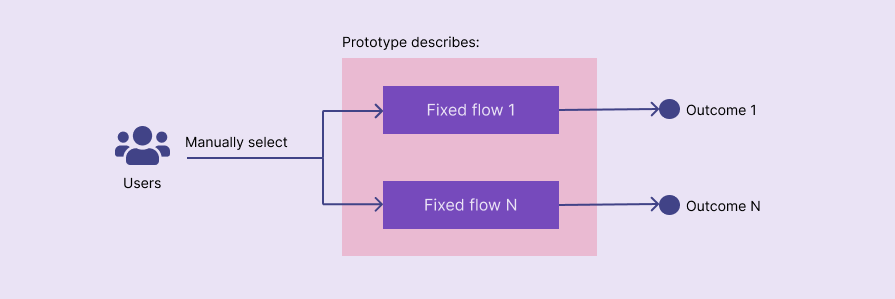
Predetermined user flows are the foundation of most digital products, but they can quickly reach their limits:
Pre-determined flows aren’t obsolete . They work effectively for process-oriented, complex, modularized products (i.e., special-purpose or enterprise products), but won’t work effectively for modern consumer product designs, especially during the current UX evolution, which moves toward intent-driven UX and AI integrations.
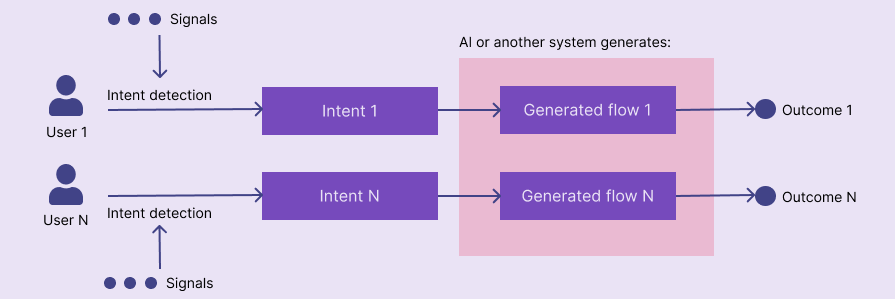
Intent-driven UX, a modern UX design concept, dynamically creates user flows and implements highly productive UX for every unique user based on their intentions. Intent-driven product interfaces detect user intentions based on various signals, such as direct user inputs, queries, prompts, multimodal inputs (voice, gestures, haptics, and vision), present contextual data (location, battery status, etc.), and behavioral patterns, and create dynamic UX by generating UX layers.
Compared to traditional fixed user flows, intent-driven dynamic user flow interactions go through the following steps:
The following diagram visualizes how intent-driven UX works:
Intent-driven UX is a theoretical UX concept; product teams can implement it in different ways. Generative UI, which uses an LLM to generate product interfaces based on the user’s intention, is a popular way to implement intent-driven UX; however, AI-less, algorithmic intent-driven UX is also a possibility. Intent-driven UX is interaction-medium agnostic, meaning you can use it to improve multimodal UX products.
While getting started with intent-driven UX, it may look similar to personalization and adaptive UX, but they both modify fixed product structures, unlike intent-driven UX, which can change the product structure layer with dynamic user flows.
Intent-driven UX can be implemented in four levels by dynamically updating the surface, skeleton, structure, scope, and strategy UX layers.
Let’s discuss how to implement intent-driven UX in each level with practical examples:
The product automatically adds an isolated UI block by updating both surface and skeleton layers but without making major adjustments to the skeleton layer. At this level, the product typically places a shortcut button or an optimized, personalized UI block independently without changing the predefined, static project skeleton, as depicted in the following diagram:
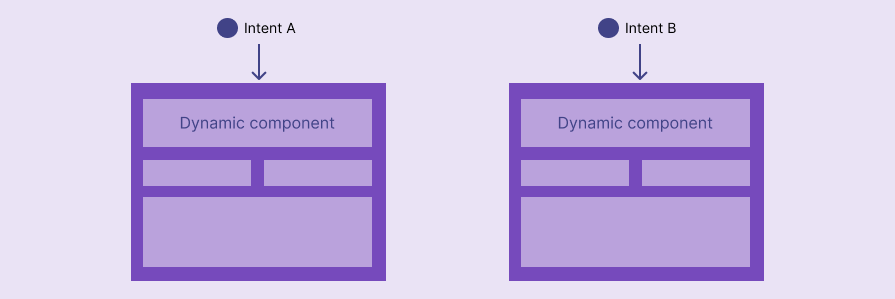
Here are some practical examples:
Deep-skeleton-level intent-driven UX goes beyond the entry-skeleton-level and generates the entire skeleton layer or a major portion of it based on the user’s intention. At this level, the product typically uses predefined core screens, navigation mappings, along with a design system/style guide, but dynamically composes individual screens, so inter-screen user flows can be different from user to user based on their direct inputs, behavior, settings, contextual data, etc., as depicted below:
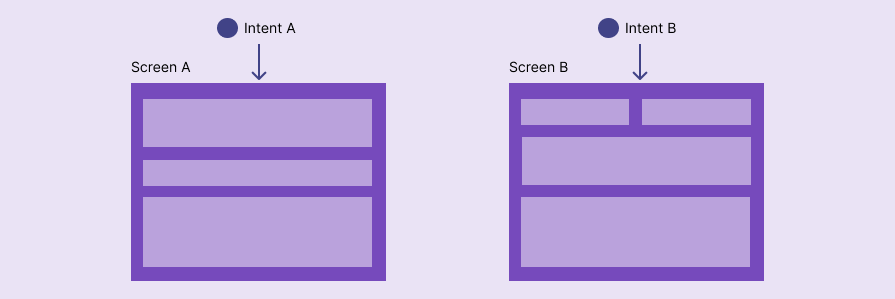
Here are some examples:
Structure-level intent-driven UX dynamically generates the product structure layer by constructing screens and their interconnection based on the user’s intention. This level basically involves constructing optimized navigational and interaction flows for each unique user intention using a predefined design system/style guide and components:
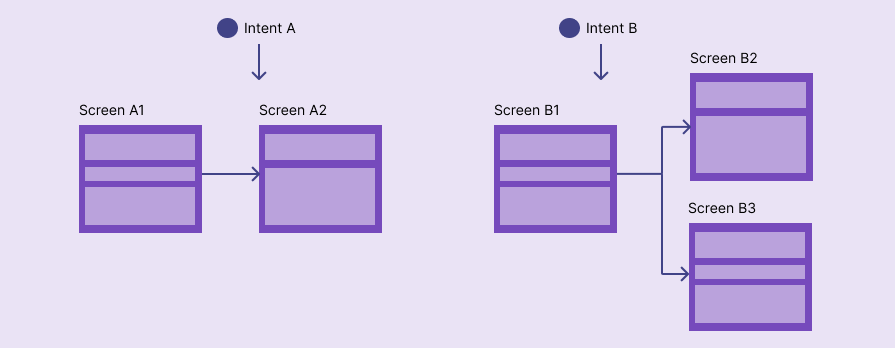
Here are some examples:
At this level, the product dynamically generates the scope layer and adjusts the strategy layer under a predefined design system/style guide using atomic UI components based on the detected user intention. This level usually extends the product with new features and changes the whole product scope or/and strategy on the fly using LLMs or similar logical modelling systems, as depicted in the following diagram:
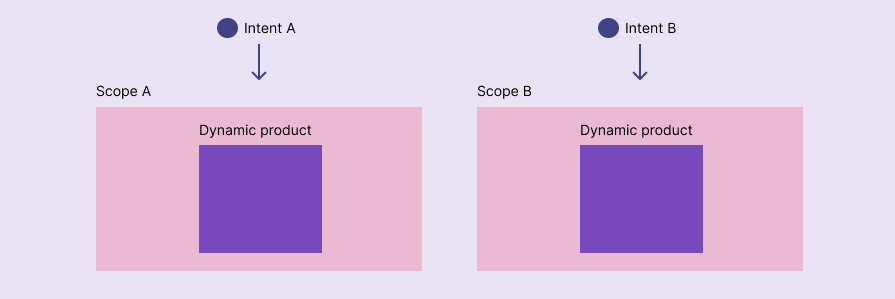
The scope-level and beyond intent-driven UX level works effectively with LLM-first products, e.g., personal assistants, and all query/prompt-driven products, e.g., search engines.
Here are some examples:
The primary idea behind scope-level and beyond intent-driven UX implementation is about extending the product capabilities based on stored knowledge/rules (e.g., using LLMs) to help users fulfill their intentions.
With intent-driven UX, products compose dynamic user flows. As a result, each user’ll get different user interfaces crafted based on their intention, but designers can’t create hundreds or even thousands of prototypes for every snapshot of dynamic user flows.
Traditional static prototypes alone won’t work with intent-driven UX — designers should present rules and outcomes for intent-driven UX parts of the product, including the following details, along with traditional prototypes for fixed parts:
Intent-driven UX isn’t about dynamically generating everything in the surface layer from scratch—the product should still adapt to a design system or a style guide to include company branding and maintain consistency in generated UI segments. Start by maintaining a design system or style guide, and update it as needed.
Identify what signals affect user intentions. Clearly define all user intentions in a document using suitable UX research methods based on your design scenario. You can use traditional user interviews, online surveys, online search, team discussions for new product ideas, and usability tests, A/B tests, and similar for existing product redesigns.
Here is a sample signals-intent table of a modern digital payment app:
| Signals | Intent |
| Repetitive payments to the same recipient with the same amount during a regular period | Making the same payment again after opening the app |
Every identified intent should map to an outcome; otherwise, the user’ll struggle with an undefined user flow. An outcome is usually what the product should generate dynamically to help the user fulfill a specific intention. Map outcomes clearly to every identified intent using a flow diagram. This diagram isn’t a traditional user flow—it’s a foundational document that helps implement dynamic user flows.
Here is a sample intent-outcome table for a digital payment app:
| Signals | Intent | Outcome |
| Repetitive payments to the same recipient with the same amount during a regular period | Making the same payment again after opening the app | Displays a shortcut to make the payment again |
You can visualize this table in a diagram as follows:

A textual description of outcomes isn’t enough for an intent-driven product handoff — we should visually present how the UI should change based on each intention. This is where designers should create designs for intent-driven UX products.
You can show how components and their states should change based on each outcome for higher-level (e.g., entry-skeleton level) intent-driven UX products.
For example, you can link components and states for the payment transfer shortcut in the previous example scenario, as demonstrated below:
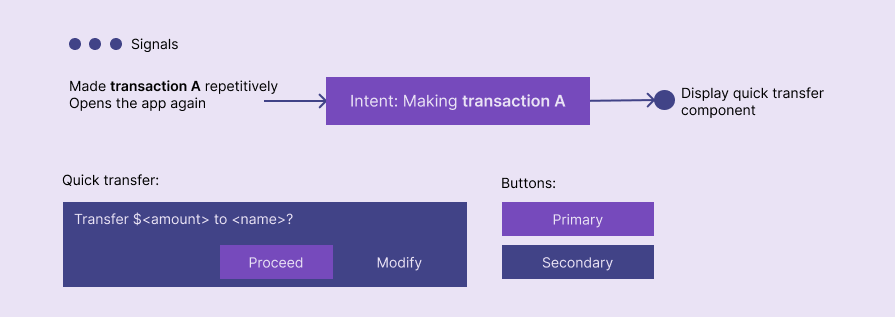
For lower-level (e.g., structure-level) intent-driven UX designs, you should also include UI composition rules along with components and their states since we can’t productively create isolated static designs for so many outcomes. For example, an intent-driven product that generates dynamic booking flows based on user inputs may use an intent-outcome diagram similar to the following:
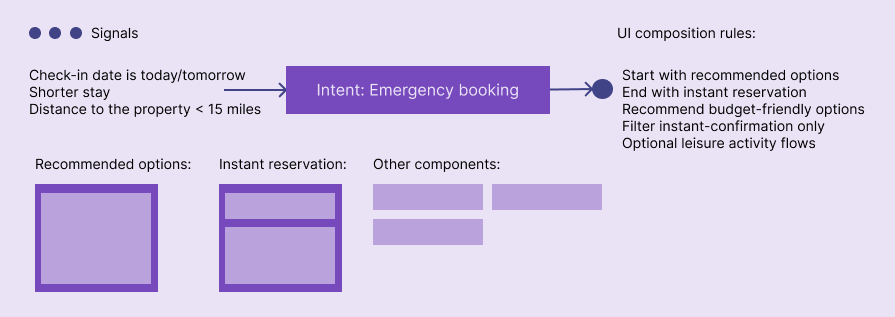
If we are designing static-flow prototypes, we can create user flows adhering to boundaries and permissions, but how do we add them in intent-driven product design documents? You can embed them in UI composition rules. As a solution for growing complexity in UI composition rules, boundaries, and permissions, you can create flow diagrams if needed:
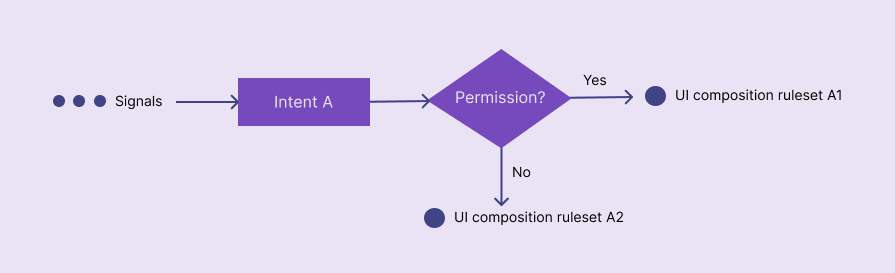
Add details about when the product should ask for user confirmations and approvals in UI composition rule diagrams. In intent-driven UX products, user confirmations/approvals may appear in various places:
Intent-driven UX flows don’t always end up fulfilling the user’s intention — they can pause or completely halt with errors too. In some scenarios, users change their intention even after entering a dynamically generated user flow or even going through the whole dynamic flow.
Depending on the outcome, create fallbacks to classic static flows, implement undo for reversible actions, recovery options for irreversible actions, and error messages. You can embed these special flows in the previous UI composition rule diagrams.
For example, if the user accepts a suggested UI layout configuration of an expense management app, the app immediately displays a toast message to switch back to the previous layout if needed, as described in the following diagram:
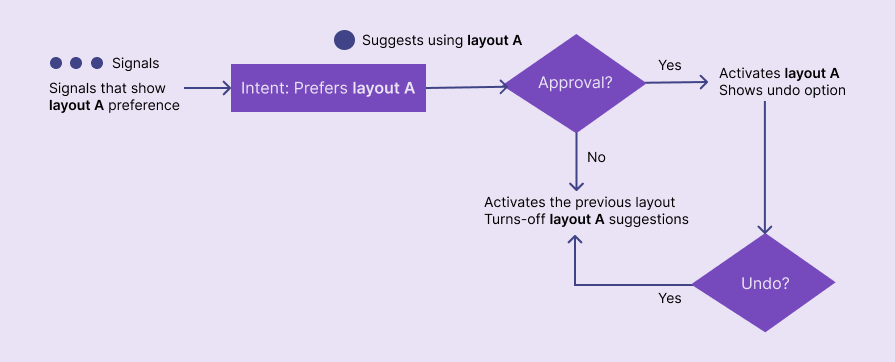
We can’t use static-flow prototypes in intent-driven UX projects because the user flow is highly dynamic — if we somehow do so, we’ll have to create hundreds or even thousands of them. For design handoff, we should prepare a product design specification that effectively describes dynamic flow generation. Instead of a single traditional prototype, we should present an interactive or non-interactive document that describes how the user intention is detected and mapped to outcomes, along with visual components, states, rules, and other UI composition details, including confirmations, boundaries, fallbacks, etc.
Creating diagrams with signals, intents, and outcomes as shown in previous examples is a good way to present an intent-driven product specification. These diagrams may look like a user flow if you are using intent-driven UX at a higher level (e.g., entry-skeleton level) — no, it’s not — it’s a diagram that embeds logic to create dynamic user flows — you’ll clearly see the difference when you start preparing for design handoff of a lower-level (e.g., structure level) intent-driven product.
We can’t completely guarantee that the predicted user intent becomes the actual user intent — intent signals typically give a probabilistic prediction for what the user expects from the system at the moment, and it may mismatch with the original intent due to implementation issues (e.g., algorithmic bias), shared devices, sudden intention change, or accidental actions. Misunderstood intent is not completely preventable, so we should help users to reach their goals even if the detected intent is wrong, using the following design tactics:
Once the intent-driven product handoff document is ready, developers will usually feed their AI models dynamic UI-generation rules. Then, the AI model is responsible for detecting intent and dynamically crafting optimized UX; AI controls your product UI composition, so you should decide how much control should AI get.
Your product’s intent-driven UX level primarily decides how much control you’ll have to give to AI or other decision-making systems (e.g., non-AI deterministic algorithms). For example, if you choose a scope-level intent-driven UX implementation, AI controls everything above the strategy layer.
You can decide your product’s AI-oriented intent-driven UX level based on the following characteristics of user intentions:
Overall, low-risk, reversible products or product regions can give more control to AI, and high-risk, irreversible ones should give less control, especially since AI is probabilistic , not deterministic.
In higher-level intent-driven UX implementations, we may identify countable, fixed flows and do manual or AI-less automated tests, but lower-level implementations create highly dynamic user flows that don’t reveal countable fixed flows. So, the only productive way to test AI-generated user flows is to let AI itself test them.
As explained in this article, you can spawn many AI-generated users and let AI test dynamic flows. AI behavior isn’t deterministic, so we can’t completely guarantee that AI tests every edge case of dynamic flows; the most effective way to test dynamic flows is to do manual testing for some crucial, identified flows along with a complete AI agent simulation.
Intent-driven UX isn’t about turning all user flows into CTAs (call to action) or letting AI generate the whole product from scratch. It’s about dynamically generating optimized user flows using predefined components and states to help users fulfill their intents effectively, without forcing users to follow repetitive, lengthy, fixed flows. Unlike personalization and adaptive UX, intent-driven products change the whole product’s UX (any core UX layer can be dynamically constructed).
Traditional static flows don’t fully disappear with intent-driven UX . A fixed-flow product can use intent-driven UX in specific places, or a primarily intent-driven product can still use fixed flows as fallbacks.
Plan a next-generation, intent-driven product; keep in mind that you’ll have to create a special handoff document instead of fixed-flow prototypes. Designing for intent creates rules for generating user flows, not exact fixed user flows.
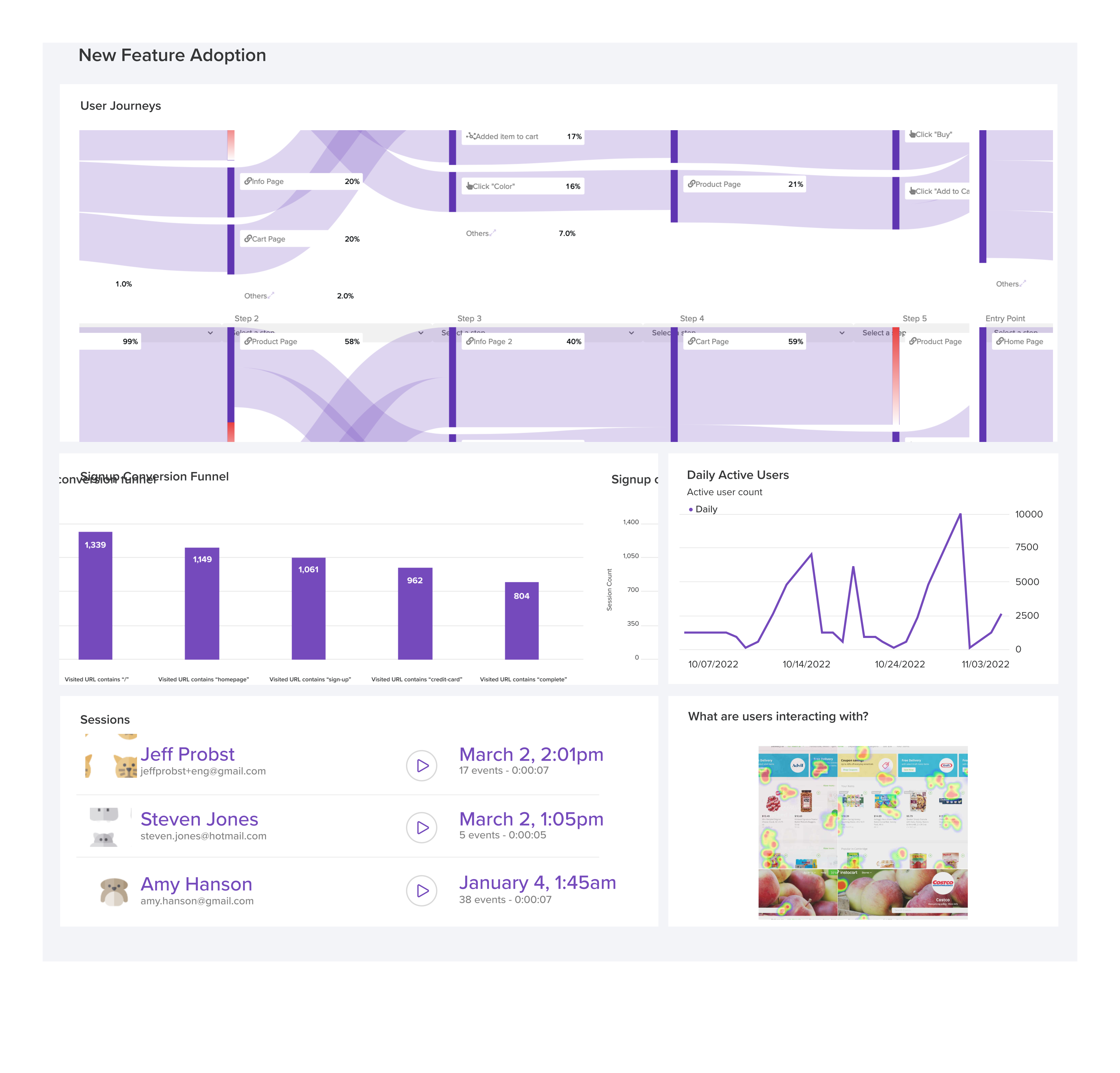
LogRocket's Galileo AI watches sessions and understands user feedback for you, automating the most time-intensive parts of your job and giving you more time to focus on great design.
See how design choices, interactions, and issues affect your users — get a demo of LogRocket today.
The need for human centered design will only grow as technology evolves. Embracing these principles now will set you up to not meet but exceed the expectations of your users.
Synthetic users can generate convincing answers, but what do those answers prove? Learn how to challenge AI research claims and keep UX decisions grounded in real user behavior.
Your UX copy documentation isn’t just for human writers anymore. Here’s how to build a copy ecosystem that AI tools and agents can understand too.
Colors in UI aren’t just decoration. They’re the key to emotional impact, readability, and accessibility. This blog breaks down how to pick colors that don’t just look good — they work for your users.

 Learn more →