Editor’s note: This article has been updated on 19 October 2026 by Jude Miracle to include Vitest and the Node.js test runner, compare TypeScript and ESM support, and clarify how supporting testing tools fit into the stack.

This guide compares Mocha, Jest, Vitest, and the built-in Node.js test runner, with equivalent TypeScript examples. I’ll also explain how to evaluate a framework for your project and where tools such as Chai, Sinon, and Supertest fit.
Unit testing checks individual units of code, such as functions or methods, in isolation. External dependencies can be replaced with test doubles so each test focuses on the unit’s behavior.
Unit tests help you catch regressions and narrow down their causes. A failing test identifies behavior that no longer matches an expectation, although you still need to determine whether the code, the test, or the requirement has changed.
Tests also document expected behavior. A new team member can use them to understand inputs, outputs, and edge cases without tracing every path through the application.
When refactoring, you can rerun the tests to check whether the behavior they cover still works. Catching problems before deployment can reduce the work involved in fixing them later.
Testing frameworks provide a set of reusable components or modules, such as test runners and utilities, for running automated tests. The testing framework is responsible for:
They are particularly useful when tests are an integral part of your continuous integration process. Frameworks are built for a specific type of testing: unit, integration, functional, or combinations of these.
Evaluate a testing framework against your project’s requirements and your team’s workflow. These six criteria provide a starting point:
Here’s how the four frameworks in this guide measure up against those criteria. The sections below cover each one in detail.
| Criteria | Mocha | Jest | Vitest | Node.js test runner |
|---|---|---|---|---|
| Ease of setup | Use Node assertions or add assertion, mocking, and coverage packages | Needs a TypeScript transform | Minimal setup for basic TypeScript tests | Nothing to install |
| TypeScript support | Via a loader like tsx | Via ts-jest, Babel, or SWC | Built in | Type stripping on Node.js v22.18+ within v22, and v24 |
| Type checking | No; tsx strips types, so run tsc --noEmit separately |
With ts-jest diagnostics enabled; separate step for Babel or SWC | No; run tsc --noEmit or vitest --typecheck |
No; Node strips types without checking them |
| Mocking | None built in; use Sinon | Built in; ESM module mocks are experimental | Built in, including ESM module mocks | mock.fn, mock.method, mock.timers; module mocks are experimental |
| Coverage | External (c8 or nyc) | Built in | Separate @vitest/coverage-v8 package |
Built in behind an experimental flag |
| Execution model | Optional parallel mode | Startup depends on transforms and configuration | Watch mode reruns affected tests | No separate runner dependency; process per file by default |
| Developer experience | Flexible, but you assemble the stack | Mature and well documented | Jest-style API, smart watch mode, UI | Minimal API, more verbose assertions |
| Maintenance | Independently maintained | Independently maintained; check ESM support for your version | Independently maintained; review major-version migration guides | Ships with Node.js releases |
Performance depends on your test suite, transforms, and CI hardware. For example, enabling type checking through ts-jest adds work that a type-stripping setup does not perform. Compare equivalent configurations, including a separate type-checking step where needed.
See the companion repository for the comparison suite. To measure startup and full-run performance, run each framework against the same tests using a tool such as hyperfine. Evaluate watch mode separately, since rerunning an affected test is a different workload from starting a fresh process.
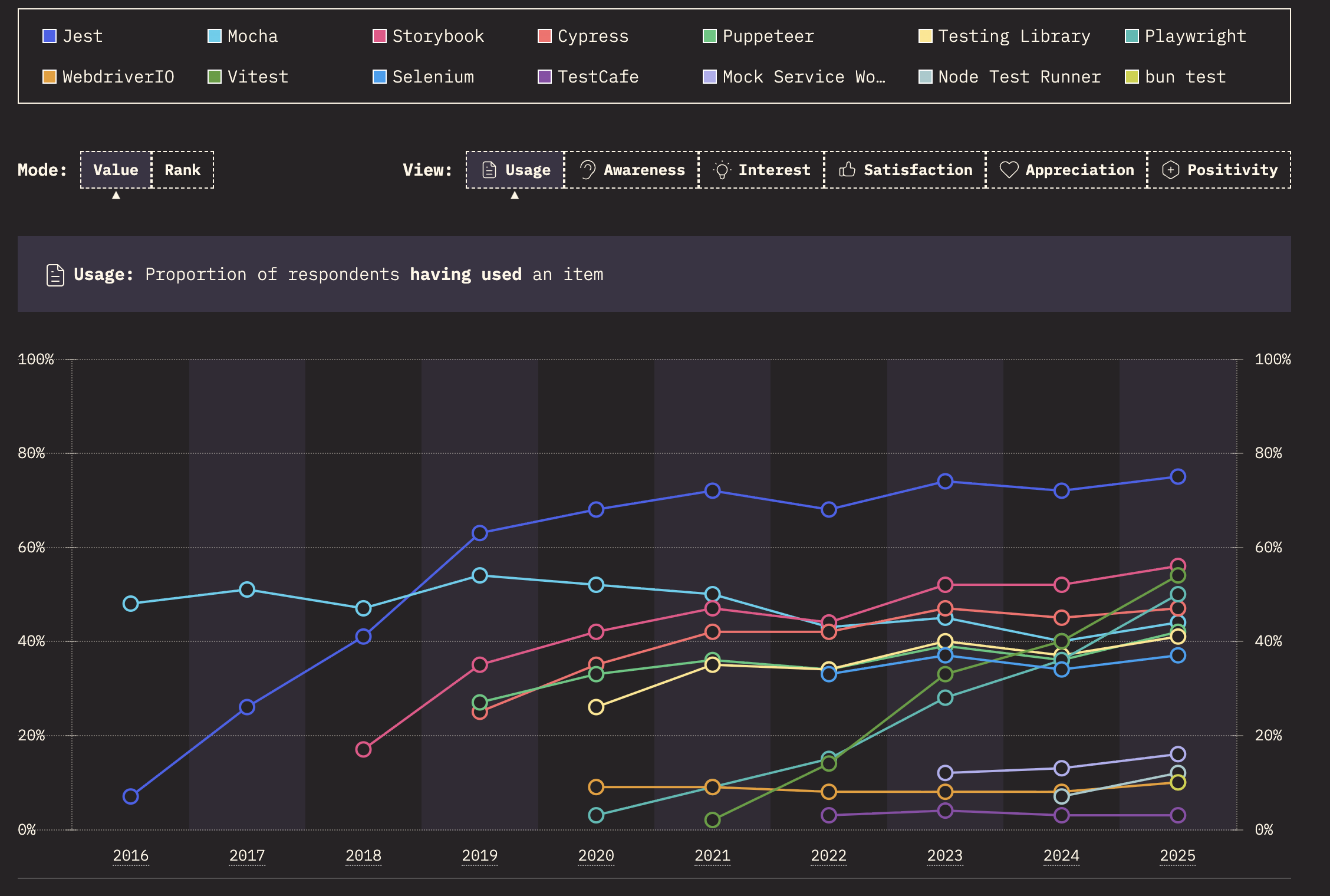
According to The State of JavaScript 2025, Jest remains the most-used testing tool among respondents, while Vitest’s usage is growing and Jest’s satisfaction ratio is declining. The Node.js test runner now appears as its own option in the survey, and Jasmine has dropped off the main list entirely, showing up only in freeform answers. Mocking was the most reported pain point among respondents, with configuration close behind.
In this guide, we’ll compare four Node.js unit testing frameworks:
We’ll also cover Jasmine and AVA, followed by assertion, mocking, HTTP testing, and browser automation tools:
All TypeScript samples below test the same function. cartTotal takes a list of items and a price service, then returns the order total:
// src/cart.ts
export type CartItem = { sku: string; qty: number };

export interface PriceService {
  getPrice(sku: string): Promise<number>;
}

export async function cartTotal(
  items: CartItem[],
  prices: PriceService,
): Promise<number> {
  let total = 0;
  for (const item of items) {
    total += (await prices.getPrice(item.sku)) * item.qty;
  }
  return total;
}
Each test replaces getPrice with a test double that returns controlled values and records calls. It then checks the total and the call count. That covers assertions, async tests, and mocking, which is where these frameworks differ most.
The examples use TypeScript and target Node.js v22. Confirm the exact package versions and configuration in the companion repository before running them.
Mocha has been around for a while; it was initially released in November 2011. Mocha lets you choose your assertion and mocking tools. You can use Node.js assertions or pair it with libraries such as Chai and Sinon.
Mocha loads native ES modules without extra configuration and has supported parallel test runs with the --parallel flag since v8. TypeScript works through a loader such as tsx, configured in .mocharc.json:
{
  "spec": "test/**/*.test.ts",
  "node-option": ["import=tsx"]
}
tsx strips types without checking them, so add tsc --noEmit to your test script or your CI pipeline if you want type errors to fail the build.
Pros:
--parallelCons:
tsx.onlySample Mocha test:
import { expect } from 'chai';
import sinon from 'sinon';
import { cartTotal } from '../src/cart';

describe('cartTotal', () => {
  afterEach(() => sinon.restore());

  it('sums price * quantity for each item', async () => {
    // Use a Sinon stub to control return values and record calls
    const getPrice = sinon.stub().callsFake(async (sku: string) => (sku === 'book' ? 12 : 5));

    const total = await cartTotal(
      [{ sku: 'book', qty: 2 }, { sku: 'pen', qty: 3 }],
      { getPrice },
    );

    expect(total).to.equal(39);
    expect(getPrice.callCount).to.equal(2);
  });
});
Jest is a JavaScript testing framework originally developed by Facebook and now maintained under the OpenJS Foundation. It’s still the most used testing tool in the State of JS survey and remains the default for React Native projects.
Jest v30 was released in June 2025. Its native ESM support remains experimental: native ESM still requires running Node with --experimental-vm-modules, and jest.mock doesn’t hoist in ES modules, so you need jest.unstable_mockModule with a dynamic import() instead.
TypeScript also requires a transform. With diagnostics enabled, ts-jest can report type errors during transformation. Babel and SWC transform TypeScript without checking types, so use a separate tsc --noEmit step with those setups.
Pros:
Cons:
Sample Jest test:
import { describe, test, expect, jest } from '@jest/globals';
import { cartTotal } from '../src/cart';

describe('cartTotal', () => {
  test('sums price * quantity for each item', async () => {
    // jest.fn wraps the implementation and records every call
    const getPrice = jest.fn(async (sku: string) => (sku === 'book' ? 12 : 5));

    const total = await cartTotal(
      [{ sku: 'book', qty: 2 }, { sku: 'pen', qty: 3 }],
      { getPrice },
    );

    expect(total).toBe(39);
    expect(getPrice).toHaveBeenCalledTimes(2);
  });
});
Vitest uses Vite’s tooling and can test standalone Node.js projects, even if the application does not use Vite. Basic TypeScript and ESM tests require little setup.
Its API is similar to Jest’s, with vi providing mocking utilities. Familiar assertions can make migration easier, but configuration, module mocks, and environment behavior still need review.
Consult the Vitest migration guide before switching an existing suite. Vitest v4.0, released in October 2025, also made Browser Mode stable for tests that need a real browser.
Pros:
vi.mock hoists module mock declarations and supports ESM mocking@vitest/uiCons:
@vitest/coverage-v8tsc --noEmit or vitest --typecheck to catch type errorsSample Vitest test:
import { describe, it, expect, vi } from 'vitest';
import { cartTotal } from '../src/cart';

describe('cartTotal', () => {
  it('sums price * quantity for each item', async () => {
    // Same API as jest.fn, with vi in place of jest
    const getPrice = vi.fn(async (sku: string) => (sku === 'book' ? 12 : 5));

    const total = await cartTotal(
      [{ sku: 'book', qty: 2 }, { sku: 'pen', qty: 3 }],
      { getPrice },
    );

    expect(total).toBe(39);
    expect(getPrice).toHaveBeenCalledTimes(2);
  });
});
This example uses it instead of test, imports from Vitest, and replaces jest.fn with vi.fn. The assertions and test logic are otherwise the same.
The Node.js distribution includes a built-in test runner in the node:test module, which became stable in Node.js v20. There is no need for installation since the tests can be run using node --test and the assertions are provided by node:assert.
With Node.js v22.18 and later in the v22 release line, and on v24, type stripping is enabled by default, allowing supported .ts files to run without a separate build step. To run a specific test file, pass its path to node --test. Check automatic test discovery against your Node.js version.
Type stripping removes type annotations without checking them and supports syntax that can be erased. Use the .ts extension in relative imports, use import type for type-only imports, and avoid using enums unless you also include the --experimental-transform-types flag on versions that support it.
Pros:
mock.fn, mock.method, and mock.timersCons:
--experimental-test-coverage flag--experimental-test-module-mocks flag is required when using mock.module for module mockingnode:assert is less expressive than expect-style matchersSample Node.js test runner test:
import { describe, it, mock } from 'node:test';
import assert from 'node:assert/strict';
import { cartTotal } from '../src/cart.ts'; // the .ts extension is required

describe('cartTotal', () => {
  it('sums price * quantity for each item', async () => {
    const getPrice = mock.fn(async (sku: string) => (sku === 'book' ? 12 : 5));

    const total = await cartTotal(
      [{ sku: 'book', qty: 2 }, { sku: 'pen', qty: 3 }],
      { getPrice },
    );

    assert.equal(total, 39);
    // call data lives on the .mock property instead of in matchers
    assert.equal(getPrice.mock.callCount(), 2);
  });
});
Jasmine is a behavior-driven testing framework with built-in assertions and spies. Its describe and it syntax groups tests around expected behavior. Teams with existing Jasmine suites can continue using it without assembling a separate assertion stack.
Pros:
Cons:
Sample Jasmine test:
describe("Sum numbers", function() {
  it("should sum two numbers correctly", function() {
    var sum = 1 + 2;
    var expectedResult = 3;
    expect(sum).toEqual(expectedResult);
  });
});Minimalism is the focus of AVA. It has a simple API while still supporting advanced features. It runs test files in parallel in isolated workers. Tests explicitly import their API instead of relying on globals.
Pros:
npm init avaCons:
Sample AVA test:
import test from 'ava';

test('Sum numbers', t => {
  const sum = 1 + 2;
  const expectedResult = 3;
  t.is(sum, expectedResult);
});Chai, Sinon, and Supertest handle assertions, test doubles, and HTTP testing. WebdriverIO is a browser and mobile automation framework with its own runner; it serves a different purpose from the unit test runners compared above.
Chai is an assertion library that follows test-driven or behavior-driven development. You can easily pair it with any JavaScript testing framework such as Mocha for your application. Chai lets you choose the assertion interface you find most readable.
Pros:
expect, should, or assert@types/chaiCons:
expect assertionsSample Chai test using Mocha:
// import chai
import { expect } from 'chai';

// write your function
function add(a, b) {
  return a + b;
}

// write assertions, you can also use `expect` or `should` interfaces
describe('add', () => {
  it('should return the sum of two numbers', () => {
    const result = add(10, 20);
    expect(result).to.equal(30);
  });
});
Sinon provides spies, stubs, mocks, and fake timers. These tools let you control dependencies and inspect how functions interact during a test. Sinon works alongside a test runner and an assertion library such as Chai.
Pros:
Cons:
Sample Sinon test using Mocha and Chai:
import sinon from 'sinon';
import { expect } from 'chai';

// a simple async function that fetches data from a remote server
async function fetchData(url) {
  const response = await fetch(url);
  return response.json();
}

describe('fetchData', () => {
  // afterEach comes from your testing framework like Mocha
  afterEach(() => {
    // restores every stub created with sinon
    sinon.restore();
  });

  it('should fetch async data', async () => {
    // replace the global fetch with a stub that resolves to a fake response
    sinon.stub(globalThis, 'fetch').resolves({
      json: async () => ({ data: 'Data' }),
    });

    const result = await fetchData('https://jsonplaceholder.typicode.com/todos');

    expect(result).to.deep.equal({ data: 'Data' });
  });
});
Supertest is another library used for testing HTTP servers and making assertions against responses. It provides a high-level API for sending HTTP requests and making assertions, which would help you test server-side code.
Pros:
http.Server instancesCons:
@types/supertestSample Supertest test using Mocha:
const request = require('supertest');
const express = require('express');

const app = express();

app.get('/posts', function (req, res) {
  res.status(200).json({ name: 'first_post' });
});

describe('GET /posts', () => {
  it('should return the post as JSON', async () => {
    await request(app)
      .get('/posts')
      .expect('Content-Type', /json/)
      .expect(200, { name: 'first_post' });
  });
});
WebdriverIO is a browser and mobile automation framework for JavaScript and TypeScript. It lets you interact with applications through actions such as clicking links, entering text, and navigating pages.
WebdriverIO is distinct from WebDriver, the browser automation protocol. Its browser automation capabilities complement unit tests, and it can also serve as a provider for Vitest Browser Mode.
Pros:
Cons:
Sample WebdriverIO script:
import { remote } from 'webdriverio';

// initialize browser for automation & test
const browser = await remote({
  capabilities: {
    browserName: 'chrome',
    'goog:chromeOptions': {
      // run headless and disable hardware acceleration in CI
      args: process.env.CI ? ['headless', 'disable-gpu'] : [],
    },
  },
});

await browser.url('https://webdriver.io');

const link = await browser.$('=API');
await link.click();
// saves a screenshot called "image"
await browser.saveScreenshot('./image.png');

await browser.deleteSession();Choose a framework based on your module system, TypeScript setup, mocking requirements, and existing tests.
For a new TypeScript project, Vitest is a strong starting point. It handles TypeScript transformation and ESM with little setup, and its Jest-style API may already be familiar to your team. Add type checking to your workflow separately.
For lightweight Node.js services and libraries, consider the built-in test runner. It avoids a separate runner dependency and can execute supported TypeScript syntax directly on compatible Node.js versions. Check the status of coverage and module-mocking features in the version you deploy.
For an existing Jest codebase, weigh the cost of migration against a specific problem you need to solve. If CommonJS tests run reliably at an acceptable speed, a switch may offer little benefit.
If ESM support or transform overhead is causing problems, trial Vitest on a representative part of the suite before committing. React Native projects should check their framework’s testing guidance and ecosystem support before switching runners.
Choose Mocha when you want to assemble your own assertion, mocking, and coverage stack. That flexibility comes with responsibility for configuring and maintaining the combination.
Whichever option you choose, try it against a representative part of your application and run it in CI before standardizing on it.

We tested five AI code review tools for speed, setup, security, and code quality to compare their strengths and help you choose the right tool.

Compare five React toast libraries for features, bundle size, accessibility, performance, and React 19 compatibility.
See how Tecovas built a patching agent that turns LogRocket’s Galileo AI issue analysis into GitHub PRs, with a developer reviewing every fix before it ships.

Explore OctaneJS, a compiler-first alternative to React. Build a task dashboard and learn about rendering, hooks, asynchronous UI, and React compatibility.
Would you be interested in joining LogRocket's developer community?
Join LogRocket’s Content Advisory Board. You’ll help inform the type of content we create and get access to exclusive meetups, social accreditation, and swag.
Sign up now
 Learn more →