Most teams adopt React Server Components for one specific reason: they want their apps to feel faster through better initial loads and less client-side JavaScript. The App Router in Next.js makes this transition feel straightforward. You fetch data on the server, React streams the UI, and the browser displays the page shell almost immediately.

The reality in production often looks different. A page request comes in, the server starts fetching multiple pieces of data, and nothing goes to the browser until the slowest request finishes. The header does not appear, and neither does the layout render. From the user’s point of view, the page simply hangs while the server is busy.
This performance gap usually comes from a small set of recurring implementation mistakes. Pages wait on data that does not need to block rendering, and layouts fetch global data far too early. These misplaced async boundaries can accidentally disable streaming entirely.
In this article, we’ll take a look at the most common React Server Component performance mistakes teams make in production. We will look at why they occur and how you can refactor them without changing your application’s behavior.
The Replay is a weekly newsletter for dev and engineering leaders.
Delivered once a week, it's your curated guide to the most important conversations around frontend dev, emerging AI tools, and the state of modern software.
React Server Components can stream only when the server is able to start rendering without waiting on slow work. When a page component waits on a slow request before returning any JSX, the server has nothing to send to the browser, and streaming cannot begin.
Consider a dashboard route where analytics data is fetched at the very top of the page component:
export default async function Home() {
  const analytics = await getAnalytics(); // slow request
  return (
    <div>
      <Header />
      <AnalyticsWidget data={analytics} />
    </div>
  );
}
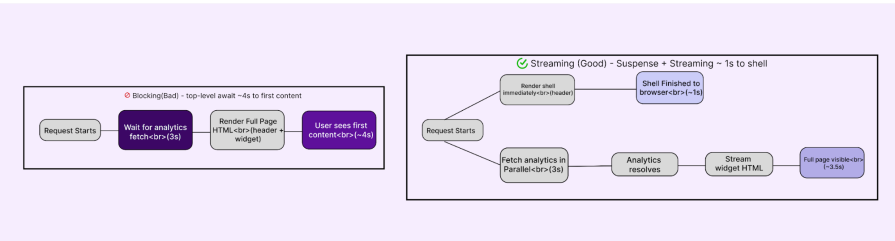
Because this await happens before the component returns any UI, the server blocks the entire render. Even parts of the page that do not depend on this data, such as the header, are delayed by the slowest request. These issues cause:
The reason this happens is that the server can only stream what it has already rendered. When slow async operations run before the first render step, they block streaming by definition.
To avoid this mistake, move slow data fetching out of the critical render path and isolate it behind Suspense boundaries so the shell can render immediately.
import { Suspense } from "react";
export default function Home() {
  return (
    <div>
      <Header />
      <Suspense fallback={<AnalyticsSkeleton />}>
        <AnalyticsWidget />
      </Suspense>
    </div>
  );
}
With this fix, the shell renders immediately, allowing the user to see meaningful structure without waiting for slow data. Sections that rely on longer-running requests load progressively as their data resolves, and the page feels responsive even though the same amount of work is still being done on the server.
Server Components make it incredibly easy to move logic to the server, but the border between server and client is still expensive to cross. Data doesn’t magically teleport. It has to be serialized, shipped, parsed, and hydrated.
Let’s look at a classic inventory page scenario where we fetch the full product catalog on the server. We are talking about hundreds of items, complete with internal IDs, warehouse metadata, and long descriptions.
It feels natural to just pass that data straight down:
export default async function ProductsPage() {
  const products = await getProducts();
  return <FilterableProductList products={products} />;
}
The catch? If FilterableProductList is a Client Component, React has to serialize everything in that product’s array to send it to the browser. Even if the UI only renders the product name and price, we are forcing the user to download the whole database row for every single item.
From the browser’s perspective, this is a heavy payload. The fetch might have been fast on the server, but the client experience takes a hit, such as:
This technical bottleneck creates a deceptive experience for your users. The page looks loaded. But for those first few hundred milliseconds, it is really just a painting you cannot interact with. You might try to click a button or scroll, but the browser is still too busy with that background work to respond.
To avoid this mistake, narrow the boundary. Before data leaves the server, shape it into exactly what the client needs.
export default async function ProductsPage() {
  const raw = await getProducts();
  const products = raw.map((p) => ({
    id: p.id,
    name: p.name,
    price: p.price,
    stock: p.stock,
    description: p.description,
    // omit internalLogs and other unused fields
  }));
  return <FilterableProductList products={products} />;
}
If the client needs more detail later, fetch it on demand or handle it on the server in response to an interaction, rather than sending everything up front.
With this fix, you have less data crossing the boundary, hydration finishes sooner, and the UI becomes interactive earlier. Filtering and other client-side actions feel responsive, not because there’s less work, but because the work that never needed to happen on the client no longer does.
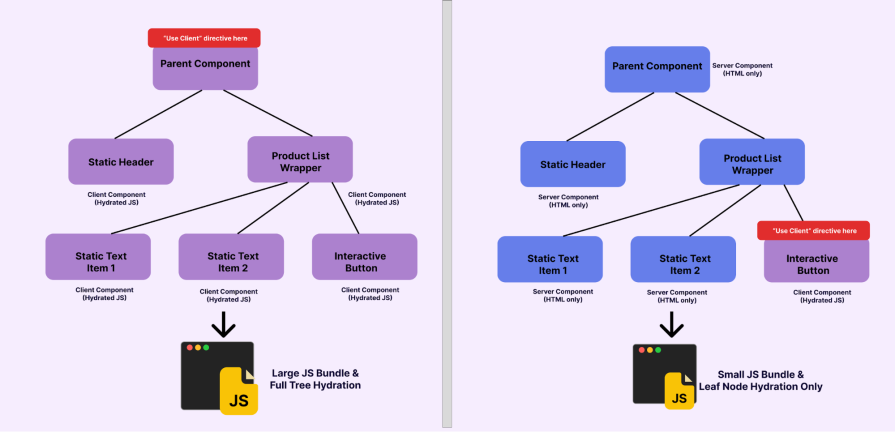
In the App Router, "use client" is not just a switch for enabling interactivity. It is a boundary that cuts off server-only optimizations. Once a component is marked as a Client Component, everything it imports becomes part of the client JavaScript bundle and must be hydrated before the UI can fully respond.
A common mistake is placing this boundary too high in the tree to support a small interaction, such as a search input or a button, and unintentionally forcing large, mostly static sections of UI to hydrate on the client.
Still using the product list scenario, let’s say we want to add a “Restock” button to every row. The easiest move is to just wrap the whole list in "use client" so we can handle the click event.
// components/FilterableProductList.tsx
"use client";
import { Package, RefreshCw } from "lucide-react";
export function FilterableProductList({ products }) {
  // filtering and mutation logic
  return (
    <div>
      <input /* filter input */ />
      {products.map((product) => (
        <div key={product.id}>
          <Package />
          <h3>{product.name}</h3>
          <button>
            <RefreshCw />
          </button>
        </div>
      ))}
    </div>
  );
}
But by doing this, we are forcing the entire list to be a component client even though only the button needs interactivity. This means every static icon, layout div, and product title is being shipped as JavaScript.
From the user’s perspective, the page appears to load, but it takes longer to feel responsive, causing issues such as:
This pattern often starts as a simple shortcut. You might wrap a large component in “use client” because it is the fastest way to unblock development. However, that single choice eventually spreads client-side work across parts of the UI that never needed it.
The reason this spreads so easily is that client boundaries are inherited. When you place that directive at the top of a file, every component it imports becomes a Client Component by default. One misplaced line of code can accidentally turn a fast, server-rendered page into a heavy, fully hydrated client tree.
Push the client boundary down to the leaves of the component tree. Isolate interactivity into small client components and keep the surrounding layout and rendering on the server.
import { Package } from "lucide-react";
import { RestockButton } from "@/components/RestockButton";
import { SearchInput } from "@/components/SearchInput";
export default async function ProductsPage({ searchParams }) {
  const products = await getFilteredProducts(searchParams.q);
  return (
    <div>
      <SearchInput />
      {products.map((product) => (
        <div key={product.id}>
          <Package />
          <h3>{product.name}</h3>
          <RestockButton id={product.id} />
        </div>
      ))}
    </div>
  );
}
Only the search input and the restock button are hydrated. Everything else renders on the server and ships as HTML.
With fewer components crossing the client boundary, the JavaScript bundle shrinks and hydration finishes sooner. Interactive elements respond immediately, and the page feels lighter, not because functionality changed, but because work that never needed to happen on the client no longer does.
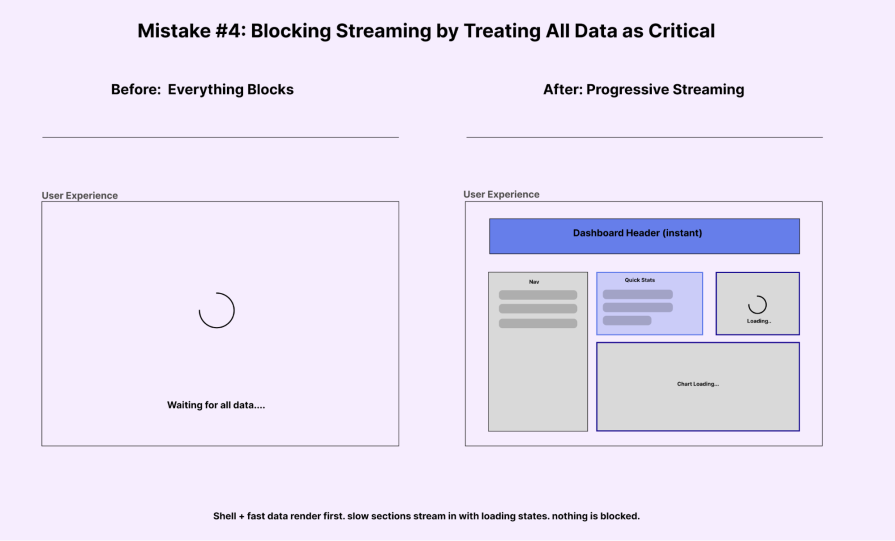
One of the biggest wins for React Server Components is streaming, which allows the server to send the page shell almost instantly. This means the header, navigation, and basic layout can appear on the screen while the slower sections of the page load in the background as their data becomes available.
That promise quietly breaks when everything is treated as critical.
Imagine you have a dashboard page where you need to display some fast static content (the title) and some slow dynamic data (the analytics cards). To do this, you fetch the analytics at the top level like so:
// app/page.tsx
import { getAnalytics } from "@/lib/data";
import { RecentOrders } from "@/components/RecentOrders";
import { BarChart3, Users, CreditCard, ArrowUpRight } from "lucide-react";
export default async function Home() {
  const analytics = await getAnalytics(); // 1.2s delay
  return (
    <div className="space-y-8">
      <div>
        <h1 className="text-3xl font-bold text-gray-900">Dashboard</h1>
        <p className="text-gray-500 mt-2">Overview of your store performance</p>
      </div>
      <div className="grid grid-cols-1 md:grid-cols-3 gap-6">
        {/* Widget 1 */}
        <div className="bg-white p-6 rounded-xl shadow-sm border border-gray-100">
           <div className="flex items-center justify-between mb-4">
              <div className="p-2 bg-blue-50 text-blue-600 rounded-lg">
                  <Users size={24} />
              </div>
           </div>
           <h3 className="text-gray-500 text-sm font-medium">Total Visitors</h3>
           {/* This number delayed the whole page */}
           <p className="text-2xl font-bold text-gray-900 mt-1">{analytics.dailyVisitors.toLocaleString()}</p>
        </div>


        {/* ... other widgets ... */}
      </div>
    </div>
  );
}
This means the server holds back everything until that 1.2-second analytics request finishes. Even the static ‘Dashboard’ heading stays hidden. The user stares at a white screen for over a second, and then suddenly the whole page pops into view all at once. Think of apps like Uber Eats. They show the navigation and layout skeletons immediately while the menus load in.
This leads to issues like:
This technical trap usually starts with a good intention. Most of us have a default instinct to await everything at the top level. We want the page to feel complete before it renders. We try to avoid layout shifts, but we accidentally trade those small shifts for a much worse problem: a long, empty wait for the user.
To solve this, you need to stop waiting for slow data at the page level. Decide what is critical (Shell) and what is secondary (Slow Widgets).
Wrap the slow parts in <Suspense> like so:
// app/page.tsx
import { Suspense } from "react";
import { AnalyticsWidgets } from "@/components/AnalyticsWidgets";
import { DashboardShell } from "@/components/DashboardShell";
export default async function Home() {
  //No top-level await here!


  return (
    <div className="space-y-8">
      {/* This shell renders IMMEDIATELY */}
      <DashboardShell title="Dashboard" subtitle="Overview of your store performance" />
      <div className="grid grid-cols-1 md:grid-cols-3 gap-6">
        {/* The slow data is isolated inside this component */}
        {/* The user sees the shell instantly, and skeletons while data loads */}
        <Suspense fallback={<AnalyticsSkeleton />}>
           <AnalyticsWidgets />
        </Suspense>
      </div>
    </div>
  );
}
This tells React: “Render the rest of the page NOW. Put a placeholder here, and fill it in when the data is ready.
With this change, the shell paints instantly. The fast data appears immediately. The slow widgets spin for a second and then pop in. Nothing about the backend got faster, but the perceived performance improved massively because the user wasn’t left waiting in the dark.
It is easy to assume everything is working perfectly when your requests are fast and your database updates without errors. However, a subtle problem often hides in plain sight right after you think you have finished a feature. A user clicks a button, the request succeeds, and the server responds correctly. Yet, for some reason, the UI stays exactly the same. The data eventually updates only after a manual refresh, but by then, the user experience has already suffered.
Let’s say we have an inventory dashboard where users can update stock levels. You might write a standard Server Action to handle the database write like this:
// app/actions.ts
"use server";
import { delay } from "@/lib/utils";
export async function updateStockAction(productId: string) {
  await delay(500); // Simulate DB write
  console.log(`Updated stock for ${productId}`);
  return { success: true, message: "Stock updated (but UI won't reflect it!)" };
}
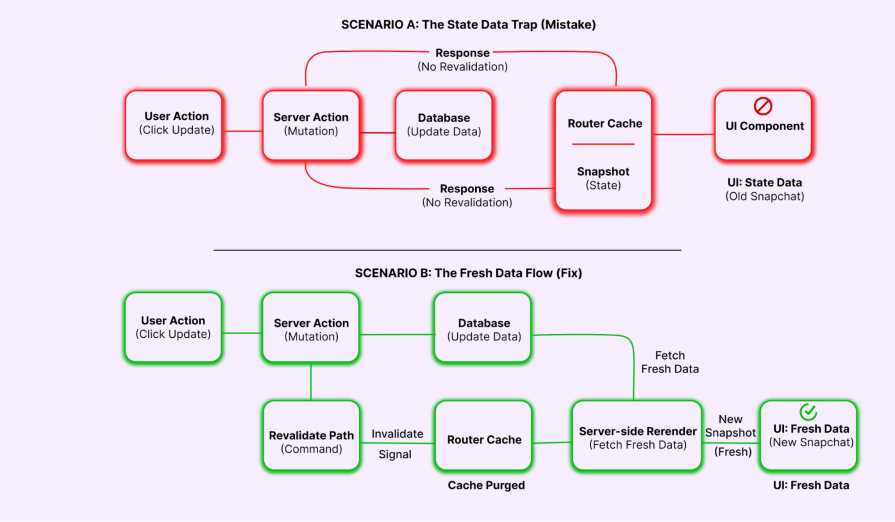
From the database’s perspective, the operation was a success. The stock is updated. But from the user’s perspective, the number on the screen didn’t budge. They click the button again and again. Eventually, they hit refresh and see the value jump.
This happens because the server-rendered data on the screen is now stale. When that information remains out of sync with the database, it creates a series of problems:
At this stage, the problem is not about how fast your code runs. Your user is essentially flying blind because the number on the screen no longer matches the truth in your database. This mismatch makes the whole app feel unpredictable.
In Next.js, you should use the revalidatePath (or revalidateTag) function. This tells the Router Cache: “The data on this path is dirty. Throw away the old snapshot and fetch a fresh one.”
"use server";
import { revalidatePath } from "next/cache";
import { delay } from "@/lib/utils";
export async function updateStockAction(productId: string) {
  await delay(500);

  revalidatePath('/products');


  return { success: true, message: "Stock updated and UI refreshed" };
}
With that one line, the disconnect vanishes. The moment the server action completes, Next.js knows the cache is stale, fetches the fresh component payload, and updates the DOM. The interface stays perfectly in sync with the user’s actions, and the system stops feeling unpredictable.
Layouts are meant to be stable. They wrap every page in your app and persist across navigations. That’s exactly why they make transitions feel fast — the frame stays put while the content changes.
But that stability becomes a trap if you put the wrong kind of async work inside them.
Layouts feel like the natural home for global data. You need the user’s avatar in the sidebar and their role displayed at the bottom. Since the layout wraps everything, it seems like the perfect place to fetch that data.
import type { Metadata } from "next";
import { Inter } from "next/font/google";
import "./globals.css";
import { getUser } from "@/lib/data";
import { LayoutDashboard, ShoppingBag, Settings, LogOut, User as UserIcon } from "lucide-react";
const inter = Inter({ subsets: ["latin"] });
export default async function RootLayout({
  children,
}: Readonly<{
  children: React.ReactNode;
}>) {
  return (
    <html lang="en">
      <body className={`${inter.className} bg-gray-50 text-gray-900`}>
        <div className="flex min-h-screen">
          {/* Sidebar */}
          <aside className="w-64 bg-slate-900 text-white p-6 flex flex-col fixed h-full">
            <div className="mb-8">
              <h1 className="text-2xl font-bold tracking-tight text-white">Horizon</h1>
            </div>


            <nav className="flex-1 space-y-2">
               {/* ... static nav links ... */}
            </nav>
            <div className="mt-auto pt-6 border-t border-slate-700">
               {/* This section caused the blockage */}
               <div className="flex items-center gap-3 mb-4">
                  <div className="w-10 h-10 rounded-full bg-slate-700 flex items-center justify-center overflow-hidden">
                      {user.avatar ? <img src={user.avatar} alt={user.name} /> : <UserIcon />}
                  </div>
                  <div>
                      <p className="text-sm font-medium">{user.name}</p>
                      <p className="text-xs text-slate-400">{user.role}</p>
                  </div>
               </div>
            </div>
          </aside>
          {/* Main Content */}
          <main className="flex-1 ml-64 p-8">
            {children}
          </main>
        </div>
      </body>
    </html>
  );
}
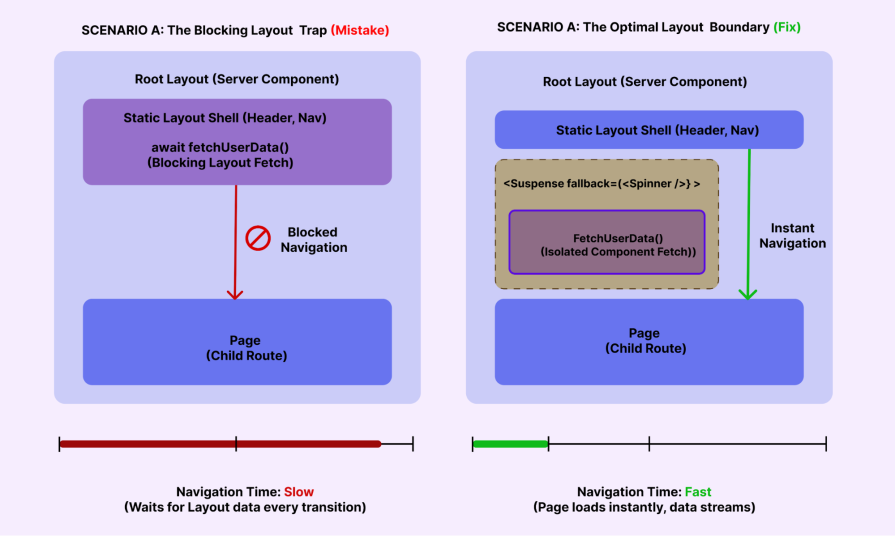
The problem is how the boundary works. Since the layout is at the top of your app tree, it acts as a gatekeeper. Next.js can’t render the page content until the layout is done. This means every route in your app is slowed down just to show a small avatar icon.
This setup leads to a few frustrating experiences, such as:
You need to treat layouts as structural scaffolding, not data loaders. You also need to keep the layout itself static and move the data dependency into a dedicated component (like <UserProfile />), then wrap it in <Suspense>like so:
// app/layout.tsx
import { UserProfile } from "@/components/UserProfile"; // Client or Server component
import { UserSkeleton } from "@/components/skeletons";
export default function RootLayout({ children }) {


  return (
    <html lang="en">
      <body className="bg-gray-50 text-gray-900">
        <div className="flex min-h-screen">
          <aside className="w-64 bg-slate-900 text-white p-6 flex flex-col fixed h-full">
            {/* Static Nav renders instantly */}
            <div className="mb-8">
              <h1 className="text-2xl font-bold text-white">Horizon</h1>
            </div>
            <nav>...</nav>
            <div className="mt-auto pt-6 border-t border-slate-700">
               <Suspense fallback={<UserSkeleton />}>
                  <UserProfile />
               </Suspense>
            </div>
          </aside>
          <main className="flex-1 ml-64 p-8">
            {children}
          </main>
        </div>
      </body>
    </html>
  );
}
Most of these issues slip into production because they are surprisingly hard to spot while you are coding. Your local dev environment often behaves differently from a production server. Streaming acts differently, hydration costs are hidden, and you almost never experience a true cold start. On top of that, Fast Refresh keeps your state alive. This makes transitions feel much smoother than a real user will ever experience.
We also focus too much on browser-side metrics. Bundle sizes and Lighthouse scores help, but they don’t tell the whole story. They don’t show when the server starts sending HTML or which async boundary is slowing things down. To the browser, everything just looks like ‘loading,’ and it can’t tell if the real bottleneck happened earlier on the server.
Poorly placed boundaries make things worse. Without clear Suspense or error boundaries, one slow section can quietly stall your whole render. The UI doesn’t crash, but it feels slow and heavy. This makes it hard to find the real problem during a quick manual test.
It all points to the same pattern. These are not obvious bugs, and they are almost never caused by slow APIs. Instead, the work is simply happening at the wrong boundary or in the wrong place. Until you start looking at performance from that perspective, these problems remain easy to miss and even harder to explain to your team.
RSCs are not slow by nature. They simply change where the work happens and how it affects the user experience. Most performance bottlenecks do not come from slow APIs or heavy math. Instead, they happen because work runs at the wrong boundary or starts too early in the render cycle.
The patterns we’ve discussed are consistent. The shell gets blocked, the client bundle grows too large, or the UI stays stale after an update. While these issues might seem small on their own, they define whether your application feels modern or sluggish.
Real performance is often less about absolute speed and more about visible progress. You make an app feel responsive when you show the layout structure early and defer the heavy lifting. Once you focus on these boundaries, the App Router stops being unpredictable. You get an interface that feels calm and fast. Best of all, you achieve that through small, targeted fixes instead of massive rewrites.
Install LogRocket via npm or script tag. LogRocket.init() must be called client-side, not
server-side
$ npm i --save logrocket

// Code:

import LogRocket from 'logrocket';
LogRocket.init('app/id');
// Add to your HTML:

<script src="https://cdn.lr-ingest.com/LogRocket.min.js"></script>
<script>window.LogRocket && window.LogRocket.init('app/id');</script>

Within roughly the same six-month window, Anthropic shipped Agent Teams for Claude Code, OpenAI published Swarm and the production-ready Agents […]

Compare the top AI development tools and models of March 2026. View updated rankings, feature breakdowns, and find the best fit for you.

Discover what’s new in The Replay, LogRocket’s newsletter for dev and engineering leaders, in the March 11th issue.

Buying AI tools isn’t enough. Engineering teams need AI literacy programs to unlock real productivity gains and avoid uneven adoption.
Hey there, want to help make our blog better?
Join LogRocket’s Content Advisory Board. You’ll help inform the type of content we create and get access to exclusive meetups, social accreditation, and swag.
Sign up now


 Learn more →