Okay, confession time: I have a dumb reason for why I learned Angular over React.
It was purely based on personal taste; I didn’t like the .jsx files. I thought they were hard to understand, and I didn’t want to try. I checked for alternatives, and at the time, there was AngularJS. The whole handlebar binding seemed better, so I went with that.
Then, Angular 2 was released, which was totally different from AngularJS. There were benefits, sure, but people had to re-learn the whole framework all over again.
All along, Angular was a high-quality, production-ready framework. But, personally, it always felt like it struggled with complexity. Even a simple HTTP GET request required you to understand how Observables worked and how to use an async pipe. You could do it without understanding these concepts, but you risked memory leaks or other non-intuitive behavior.
It also suffered from the deprecation of much-used first-party applications, such as the unexpected deprecation of flex layout. Each subsequent release of Angular didn’t do much to address the complexity of the framework.
So, when Angular 17 shipped and addressed the single biggest complaint with asynchronous data sources by providing signals, it was a bit of a turning point. As developers, we can still reach for the power of Observables, but for simple reactivity, signals were a better choice.
And in November of 2025, Angular v21 hit the scene.
Only four versions later, signals are coming to forms within Angular as well. Perhaps it seems formulaic, or even underwhelming. After all, we could just call toSignal on the observable that the FormGroup provided to roll our own signal.
But baked into this is the single biggest form improvement that Angular has ever received. Let’s explore why.
The Replay is a weekly newsletter for dev and engineering leaders.
Delivered once a week, it's your curated guide to the most important conversations around frontend dev, emerging AI tools, and the state of modern software.
You’re not reading this article because it’s the first article you’ve seen on Signal Forms. They’ve been stable in Angular for months. Months. There have been many articles about it already. But what all of those articles are lacking is a childish, almost giddy level of extreme nerd glee that Signal Forms brings.
Signal Forms solve the biggest problem with Angular and really move the dial on developer experience for the framework.
Why? Let’s be honest: Forms in Angular sucked.
You could have reactive forms, or template-driven forms. While template forms were easier, they weren’t as powerful as reactive forms in practice. Sometimes you’d get halfway through an implementation before realizing that you should have rolled with reactive forms in the first place.
And even then, because we’re good little software developers, we’d try to come up with our own custom controls for our home-made components, only to immediately get lost in the sandstorm of what we were supposed to do or not do. Combined with the asynchronous nature of forms, such as validation happening remotely or impacting other controls, the only thing you could be certain of is that none of it would work the first time around.
Every non-trivial custom form control wound up full of console.log statements as I tried to figure out exactly where my timing issue was coming from. The documentation only served to confuse things further.
With Signal Forms, most of this pain is simply…gone.
Want to see it without reading my diatribe? Fair. Clone this repo and see how easy forms are now vs what they used to be. For everyone else: read on and prepare yourself to get excited over the one thing you never thought you’d be able to — input forms.
FormGroup painIt’s not that creating forms in Angular was impossible, but it often felt harder than it needed to be. Traditionally, to create a form, you would create a FormGroup, and then have FormControls as children.
Let’s consider a rudimentary example:
formGroup = new FormGroup({
  name: new FormControl<string>(''),
  breed: new FormControl<typeof breed[number]>('unknown'),
  colours: new FormControl<typeof colours[number]>('black')
});
We have a cat registration form. Within the form, there is the cat’s name, the breed, and the colors.
Because we’re good software developers, we’ve specified a value for the control to initialize with. We do this in the hope that the FormControls won’t contain null.
Logically, it makes sense: we’ve set a value for it to initialize with, so while we should be able to set it to other values, we shouldn’t be able to set it to null. Right? Right?:

To get this to work in a more sane way, we have to specify on each of our FormControl that they are non-nullable, or use the NonNullableFormBuilder. It’s not impossible, but it’s a bit of a quirk.
The other thing here is that we have to create a bespoke FormGroup with FormControls and then map our data back and forth, especially if we want to load custom data into our controls.
ControlValueAccessor is unwieldyThe entire concept of reactive forms is a good one. Users can enter data, the form can update based on what they enter, and everyone is happy. And for the most part, this is more-or-less true for controls that have an HTML standard, like radio buttons or input boxes.
After all, how simple is an input box? You write text into it, or set it via JavaScript. If you’re feeling really adventurous, you can even set a placeholder.
However, when we place our humble utilitarian input box inside a form, it becomes a complex monster of a thing.
How should it update? How should we be notified of these updates? What if another input’s value makes this input invalid? Not to mention that there is suddenly a temporal aspect to all of this, as other controls are updated (or even added/removed entirely), that may have bearing on our control.
So, form control has to have a way for:
Even for a humble radio button, the home-grown Angular project takes 250 lines to implement this. For more complex controls, the lines of code required increase dramatically.
Creating custom, reusable controls makes sense for a lot of projects. But actually doing it can be so hard that people avoid it.
The sum total of this is that forms become hard to rationalize. Simple forms take too long to think through, and complex forms require several brownies, coffee, and gnashing of teeth before a problem is fixed.
How does it do this? Our data model for our form is now declared in an interface:
export interface CatRegistrationData {
  name: string;
  colour: typeof colours[number];
  breed: typeof breed[number];
}
And then, the declaration of our form data is as follows:
catRegistration = signal<CatRegistrationData>({
  name: '',
  colour: 'white',
  breed: 'unknown'
});

registrationForm = form(this.catRegistration);
Immediately, this is better because instead of using a custom FormGroup with FormControls, we are just using a simple interface to define the shape of our forms. Finally, the use of form connects our signal to the form in question.
:
Whereas the old FormGroup used FormControls , this just uses an interface to specify a shape or schema for the input. We don’t have to puzzle over how a FormControl works or what effect it has on the value it encapsulates.
This means that the data structures within the forms are a lot more obvious. In the old FormGroup, forms would have a value, but they would also have a valueChanges, which would emit an Observable. It wasn’t always clear to roll with, but now with the form function just exposing value as a signal, you can accurately get the current value or the latest value, depending on what you need.
Within the old FormGroup, if you had multiple fields with validation, and one of the fields failed validation, the entire form would become invalid (which is an expected outcome). But you were left to guess what field was actually causing the validation problems. FormGroup did have an errors property, but it was only for errors affecting the FormGroup itself, not the child fields.
Even within a simple form with multiple controls, showing a validation error message specifying what controls were not valid became an effort. In some ways, the errors property was confusingly named, as you would naturally think it would contain all the errors from the children components.
But, you would be wrong:
<td>
  Form status is {{formGroup.status}}
</td>
<td>
  Form errors are <pre>{{formGroup.errors | json}}</pre>
</td>
<td>
  Field error is <pre>{{formGroup.controls.name.errors | json}}</pre>
</td>
When the “Cat Name” field is required, the form is INVALID, the form errors are null, but we can see the individual error on the form control pop-up: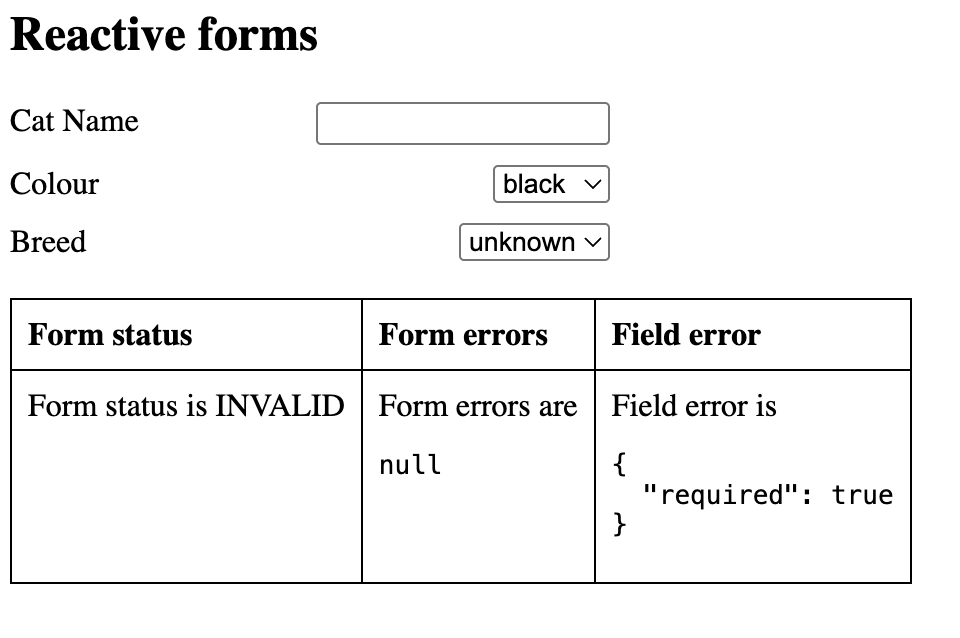
So, you would have to recursively iterate over each form control and pluck out the validation errors, and construct your own aggregation of errors. By no means impossible, but a bit of a muck-around, and not very optimal.
Fortunately, Signal Forms solve this by having an errorsSummary. Setting the validation to required for the Cat Name field produces this outcome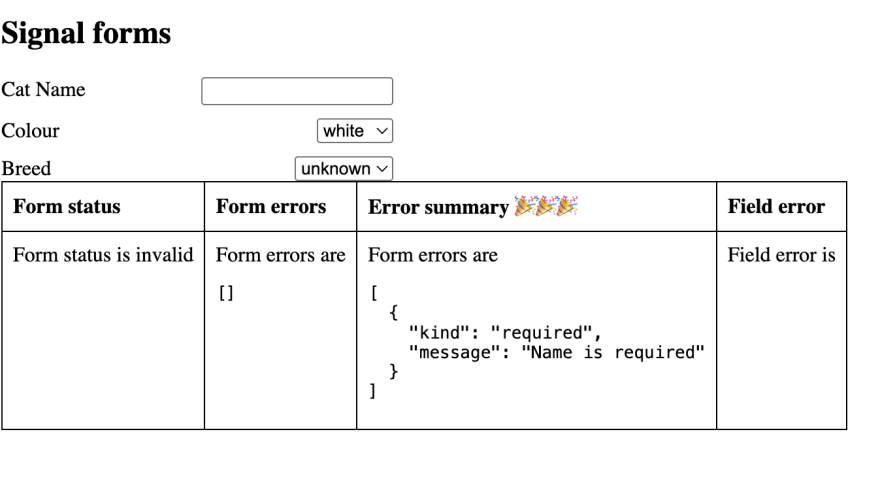
This is a very beneficial change. Being able to quickly ascertain what control is in an error state is important for field validation. It also means that, in forms where controls are nested, errors can be quickly surfaced without having to loop through nested components to find which control is in an error state.
ControlValueAccessorFor some time, Angular would tempt you with high-quality, reusable components that you technically could write if you really wanted to. Trying to do so was frequently a difficult and unwieldy process that necessitated many Stack Overflow questions and days of searching on Google.
ControlValueAccessor was one such example of a complicated system that made using it overly difficult. Consider this article that talks about how ControlValueAccessor was supposed to be implemented:
This requires the implementation of three functions:
writeValue(value): Writes a new value to the form control, which is controlled by the current form control. If the form is updated programmatically, this function will be executed to make the custom field reflect the value in the model.registerOnChange(function): Sets up a callback function that is called when the value changes within the UI. This function will ultimately propagate the new value within the form to the underlying data model for the form.registerOnTouched(function): Sets up a function that is called when the form control loses focus. Again, this will propagate the new value to the underlying data model for the form.setDisabledState(boolean) (Optional): This will be called when the control is disabled in the form itself. If false is passed, the control should be made inoperable to the user, while true should make the control active again.Setting a value and the disabled state makes sense here. But both register functions require a function to be passed into them. Things get propagated. Not to mention the fact that forms and form controls exist in a highly asynchronous world. The user can be typing into the field as updates are coming in over the API.
For example, consider a simple control like this (a stepper from 1 to 10):
The complete component code to implement this using ControlValueAccessor is as follows:
import { Component, forwardRef } from '@angular/core';
import { ControlValueAccessor, NG_VALUE_ACCESSOR } from '@angular/forms';

@Component({
  selector: 'app-stepper-cva',
  imports: [],
  templateUrl: './stepper-cva.html',
  styleUrl: './stepper-cva.css',
  providers: [
    {
      provide: NG_VALUE_ACCESSOR,
      useExisting: forwardRef(() => StepperCva),
      multi: true
    }
  ]
})
export class StepperCva implements ControlValueAccessor {
  currentValue = 1;
  isDisabled = false;

  private onChange: (value: number) => void = () => {};
  private onTouched: () => void = () => {};

  writeValue(value: number | null): void {
    this.currentValue = Math.max(1, Math.min(10, (value ?? 1)));
  }

  registerOnChange(fn: (value: number) => void): void {
    this.onChange = fn;
  }

  registerOnTouched(fn: () => void): void {
    this.onTouched = fn;
  }

  setDisabledState(isDisabled: boolean): void {
    this.isDisabled = isDisabled;
  }

  increment(): void {
    if (this.currentValue < 10 && !this.isDisabled) {
      this.currentValue++;
      this.onChange(this.currentValue);
      this.onTouched();
    }
  }

  decrement(): void {
    if (this.currentValue > 1 && !this.isDisabled) {
      this.currentValue--;
      this.onChange(this.currentValue);
      this.onTouched();
    }
  }

  isEven(num: number): boolean {
    console.log('isEven called');
    return num % 2 === 0;
  }
}
It’s like an imperative programming nightmare. Sure, it makes sense. But every time something happens on the control, you have to manually pass that state and then indicate that the control was touched.
If you do this incorrectly or out of order, things break weirdly. And as you can imagine, once you introduce data being updated into your form from a server API or something, this whole thing becomes much more complex.
Plus, what’s actually going on here? We have a function called onChange, and onTouched, but it seems like they are no-ops? Believe it or not, these functions are redefined by the calling form. The only reason why they’re here is that it’s a function that you are sort-of calling on the Angular form itself (to propagate the fact that the form has changed):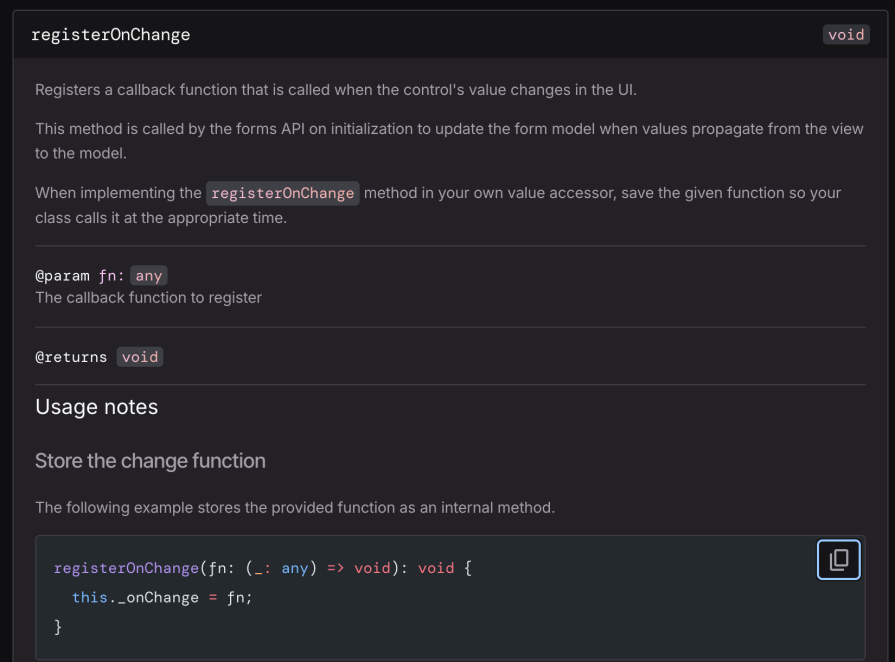
So registerOnChange gets called on instantiation, but then we call it to indicate to the parent form that something has changed.
Why is this process so obtuse? Basically, it has to do with how the form stores the value. It’s just a simple string. It’s not reactive. So we can imperatively set the value of whatever we want, but nothing else is going to know that it specifically calls out the functions to mark it as touched, mark it as changed, etc. We have to make it reactive by implementing these functions.
Also, the isEven invocation is a function call, but it gets called whenever Angular thinks it should. Predictably, this means that it gets called a couple of times, even when the view only refreshes once. Calculating even/odd via the modulo operator is very fast, but for more complex operations, this is going to cause some UI jank and slowdowns.
Finally, you have to remember to register your value providers via NG_VALUE_ACCESSOR, and you have to use forwardRef. Otherwise, it can get into a cyclic dependency resolution loop.
Angular Forms work and work well, but even simple setups can become unwieldy and confusing very quickly.
Signal Forms makes custom control creation orders of magnitude easier by instead reacting to how the data in the form changes in a sane way. The data itself is reactive, by being within a signal, which makes everything a lot easier. Check it out:
import { Component, computed, model } from '@angular/core';
import { FormValueControl } from '@angular/forms/signals';

@Component({
  selector: 'app-stepper-control',
  standalone: true,
  templateUrl: './stepper-control.html',
  styleUrl: './stepper-control.css'
})
export class StepperControl implements FormValueControl<number> {
  readonly value = model<number>(1);
  disabled = model<boolean>(false);
  touched = model<boolean>(false);
  readonly isEven = computed(() => this.value() % 2 === 0);

  increment(): void {
    const currentValue = this.value();
    if (currentValue < 10 && !this.disabled()) {
      this.value.set(currentValue + 1);
      this.touched.set(true);
    }
  }

  decrement(): void {
    const currentValue = this.value();
    if (currentValue > 1 && !this.disabled()) {
      this.value.set(currentValue - 1);
      this.touched.set(true);
    }
  }
}
It’s literally half as long.
signal. This has all the benefits of usual signals, like being able to compute values when they change. Values themselves are memoized, which means the results are cached.isEven check now takes place in a compute call, meaning it’s only called when the input value changes. Complex processes that were previously introduced jank only incur that performance penalty during the first calculation.model, from the parent.Because forms are easier and more composable, this encourages re-use.
A lot has happened since Angular 2 came out, and countless frameworks have come out with newer and better ways to do things. However, Angular’s shift to signals, and now to improve forms with the aptly named “Signal Forms,” continues down this path.
Before, forms were so confusing to set up and reuse that people would just copy and paste implementations between components. But now, there is some chance that you could actually understand custom form controls outside of hassling ChatGPT every time you need to write a new one. Exciting times, indeed.
Check out the sample project here, and let us know how you’re using Angular 21 to the fullest in the comments.
Debugging Angular applications can be difficult, especially when users experience issues that are difficult to reproduce. If you’re interested in monitoring and tracking Angular state and actions for all of your users in production, try LogRocket.
LogRocket lets you replay user sessions, eliminating guesswork by showing exactly what users experienced. It captures console logs, errors, network requests, and pixel-perfect DOM recordings—compatible with all frameworks.
With Galileo AI, you can instantly identify and explain user struggles with automated monitoring of your entire product experience.
The LogRocket NgRx plugin logs Angular state and actions to the LogRocket console, giving you context around what led to an error, and what state the application was in when an issue occurred.
Modernize how you debug your Angular apps — start monitoring for free.

A hands-on test of Claude Code Review across real PRs, breaking down what it flagged, what slipped through, and how the pipeline actually performs in practice.

Learn how inline props break React.memo, trigger unnecessary re-renders, and hurt React performance — plus how to fix them.

This article showcases a curated list of open source mobile applications for Flutter that will make your development learning journey faster.
Discover what’s new in The Replay, LogRocket’s newsletter for dev and engineering leaders, in the April 1st issue.
Hey there, want to help make our blog better?
Join LogRocket’s Content Advisory Board. You’ll help inform the type of content we create and get access to exclusive meetups, social accreditation, and swag.
Sign up now


 Learn more →