

Finding information in a collection of PDF documents can be surprisingly difficult. Traditional full-text search works well when you know the exact terminology used in a document, but it becomes less effective when you remember an idea rather than the words used to express it. Imagine searching for a document discussing how organizations establish trust between digital identity providers and verifiers, without knowing whether the original text uses those exact terms.

Semantic search offers a different approach: instead of relying exclusively on matching words, it attempts to identify documents and passages that are conceptually related to a query.
In this tutorial, we’ll build a small PDF search application using Python and Typesense. The application will let users upload PDF documents, extract their text, split it into overlapping chunks, and index those chunks for retrieval. We’ll use an embedding model to enable semantic search, with Typesense providing the underlying search infrastructure. The result is a lightweight document discovery application that can retrieve relevant passages even when a query doesn’t contain the exact words found in the source documents.
As usual, there is a GitHub repository with the full ready-to-execute code. The following description is general, but refer to the code to see how things really work.
Our solution has two distinct workflows: document ingestion and information retrieval.
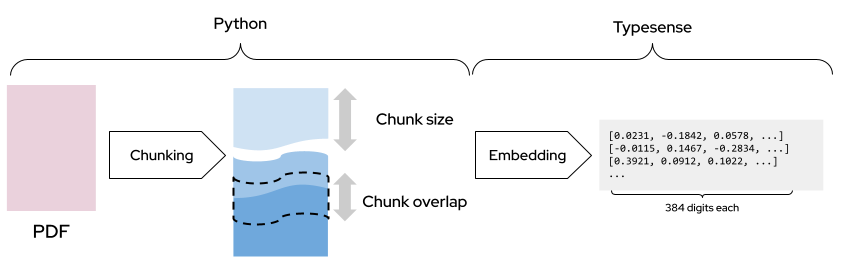
During ingestion, the application accepts a PDF, extracts its textual content, splits it into smaller overlapping chunks, and prepares JSON documents for Typesense. Each indexed record represents a passage from the original PDF and retains metadata such as the filename and page number.
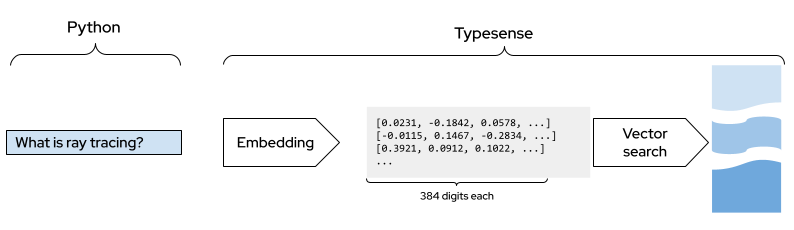
During retrieval, users enter a natural-language query. The application sends it to Typesense, which searches the indexed content and returns the most relevant chunks.
This separation is important: Typesense doesn’t need to understand PDF files. It operates on structured documents that our Python application prepares in advance.
We’ll use Typesense as our search backend, running locally through Docker. Typesense is an open-source search engine that supports traditional full-text search, vector search, and hybrid retrieval.
We’ll start by launching a Typesense instance, creating a collection, and defining the schema for our indexed PDF passages.
Each record will contain fields such as:
The collection schema will also define the embedding configuration required for vector search. See ensure_collection in the index_corpus.py for more details.
The first part of our Python application handles document ingestion. When a user uploads a PDF, the application extracts its textual content and prepares it for indexing. For this task, we’ll use a Python PDF-processing library to retrieve the text while retaining page-level information. The repository contains, in the /corpus directory, three sample PDFs; they’ve been crafted to contain some overlaps in the content to show how the semantic search works.
However, indexing an entire PDF as a single document is rarely a good strategy. Large documents can contain hundreds of pages and cover several unrelated topics. A single embedding representing the entire document would lose much of the detail needed for precise retrieval.
Chunking divides a document into smaller passages that can be indexed and retrieved independently. The size of these passages is important: smaller chunks tend to produce more precise search results because each embedding represents a narrower topic, while larger chunks retain more context but may mix several subjects together.
In this implementation, each PDF is treated as a continuous stream of words, even across page boundaries. We use a sliding window to create overlapping chunks: the window contains --chunk-size words and advances by --chunk-size - overlap words. With the default settings of 200 words and an overlap of 50, for example, each new chunk starts 150 words after the previous one, repeating its final 50 words.
Overlap helps preserve context around chunk boundaries. If a sentence or explanation is split between two chunks, the overlap makes it more likely that at least one chunk contains the complete passage, provided the passage is shorter than the overlap. This introduces some redundancy, but reduces the risk of losing relevant context during retrieval. The final chunk may be shorter than the configured size.
The chunk size also needs to account for the embedding model’s input limit. The ts/all-MiniLM-L12-v2 model supports approximately 256 tokens per input, equivalent to roughly 190–200 English words. Consequently, chunks substantially longer than this may be truncated when embedded, meaning that part of their content will not contribute to semantic search. A 200-word default is therefore a reasonable starting point for this model.
The chunk size and overlap can be adjusted through the --chunk-size and --overlap command-line options, or through CHUNK_SIZE and CHUNK_OVERLAP in the web application. The overlap must be smaller than the chunk size. Since these settings determine how documents are divided and embedded, changing them requires re-indexing the PDFs.
We also retain the original filename and the page range associated with each chunk. Because chunks can cross page boundaries, each word keeps track of its source page, allowing the application to record page_start and page_end for every retrieved passage.
This is an example of a JSON object sent to Typesense for indexing: the first two fields are just a hash of the document (doc_id) and an identifier for the specific chunk (id)
{
  "id": "0b056cb35f531e95-00001",
  "doc_id": "0b056cb35f531e95",
  "file_name": "ray_tracing.pdf",
  "file_path": "ray_tracing.pdf",
  "chunk_index": 1,
  "page_start": 1,
  "page_end": 2,
  "text": "renderer determines the surface properties, including its material, normal vector, and reflectivity. These properties are used to calculate the final pixel colo ...",
  "title": "sample"
}
In particular, looking at the source, the function build_documents performs the chunking. It extracts the pages and title, splits the page text into chunks using the specified size and overlap, and adds metadata to each chunk, including a stable document ID, file path, chunk index, and page range. If a title is available, it includes that too.
This is where semantic search differs from conventional full-text search.
Computers can compare strings and identify matching words, but understanding whether two passages express similar ideas requires a different representation.
An embedding model addresses this problem by converting text into a numerical vector. These vectors encode semantic and linguistic characteristics learned during model training. Texts with related meanings tend to produce vectors that are relatively close in the embedding space.
For our application, we’ll use ts/all-MiniLM-L12-v2, a lightweight sentence-transformer embedding model available through Typesense; it is the default built-in embedding model when no model is specified. It is possible to change it to a different one via the DEFAULT_MODEL variable.
The model plays two essential roles.
An important detail is that we don’t need a generative language model here. The embedding model doesn’t answer questions, summarize documents, or generate text. Its job is simply to transform text into a numerical representation that makes similarity search possible.
This also explains why the same embedding model must be used consistently for documents and queries: their vectors need to inhabit the same embedding space to be meaningfully compared.
Once the PDF has been processed and divided into chunks, our Python application prepares the corresponding JSON objects and sends them to Typesense.
We’ll examine the collection schema, the document structure, and how the embedding configuration fits into the indexing process.
At this point, the original PDF has effectively become a collection of searchable passages. Each passage can be retrieved independently, while its metadata preserves the connection to the source document.
We’ll also look at how Typesense handles embedding generation and vector indexing, reducing the amount of custom vector-processing code required by our application.
The following image represents the whole indexing process:
Once the documents are indexed, we can implement the search functionality. The user enters a natural-language query, and the application sends it to Typesense. The query is converted into an embedding using the configured model, allowing the search engine to retrieve passages based on semantic similarity rather than exact keyword matches alone. The interface displays the resulting chunks, their source filenames, and relevant metadata such as page numbers.
This is particularly useful when users remember a concept but not its original terminology. For example, searching for “what is ray tracing” will retrieve chunks coming from different documents in the corpus that are relevant for the query.
To fully appreciate the capability of semantic search, the app offers the possibility of performing the search by choosing the search mode: Typesense supports three search strategies that can be selected by changing the query_by parameter (see documentation)
query_by: "embedding"): retrieves documents based on the similarity between the query embedding and the embeddings stored in the indexquery_by: "text"): performs traditional full-text search against the document textquery_by: "text,embedding"): combines keyword matching and semantic similarity, using rank fusion to produce a unified result rankingThis makes it possible to experiment with different retrieval strategies without changing the document ingestion pipeline or maintaining separate search implementations.
Following a depiction of how the vector search is performed within Typesense:
PDF documents often contain valuable information, but finding it can be difficult when users don’t know exactly what to search for. By combining document extraction, overlapping text chunks, embeddings, and Typesense, we’ve built a small application that turns an ordinary PDF collection into a searchable knowledge repository.
The interesting aspect of this architecture is the separation of responsibilities: Python handles document ingestion and preparation, the embedding model converts text into vectors, and Typesense provides the indexing and retrieval infrastructure.
Although our example focuses on PDF documents, the same approach can be applied to technical documentation, reports, manuals, research papers, and other collections of unstructured text.
Semantic search doesn’t eliminate the need for good document processing or carefully chosen embedding models, but it provides a useful alternative when traditional keyword matching isn’t enough.
Explore modern CSS masonry layouts with display: grid-lanes, interactive demos, browser support, and CSS column fallbacks.

Build a Claude Code harness with saved plans, tool hooks, and milestone checks for frontend work that spans sessions.

Chema Roldán, CTO at Genially, shares how his teams have stopped watching sessions manually thanks to the LogRocket MCP.
See how JPEG XL compares with WebP and AVIF, including file sizes, decoding speed, and browser support.
Hey there, want to help make our blog better?
Join LogRocket’s Content Advisory Board. You’ll help inform the type of content we create and get access to exclusive meetups, social accreditation, and swag.
Sign up now
 Learn more →