

Topcoat is a Rust web framework that renders HTML on the server and compiles a supported subset of Rust expressions to JavaScript for browser interactivity. It combines routing, components, and an asset pipeline, with Toasty available as its database layer. The application can use reactive browser state and receive live server updates without a WebAssembly build.
Carl Lerche announced Topcoat in July 2026, describing his work with Julien Scholz and the earlier development of Toasty. The goal is to make higher-level web applications easier to build for teams that already use Rust.
This article walks through a live team task board built with Topcoat v0.10.0 and Toasty v0.11.0. It covers the framework’s browser expressions, server-rendered search, and live updates, including two documented expression bugs in that release. The complete project is on GitHub.
Topcoat renders every page on the server. A component is an async Rust function, so it can await a Toasty query in the middle of its markup and return HTML that already contains the data. Component code stays on the server, and nothing is compiled to WebAssembly.
Interactivity comes from runtime expressions. A $(...) block inside view! uses a supported subset of Rust that the macro compiles into both server-side Rust and browser-side JavaScript. Reactive content evaluates on the server for the initial HTML, then updates in the browser when its signals change. Event-handler bodies run when the browser invokes them. This button toggles its label without a network request:
let hide_done = signal(cx, || false);

view! {
    <button @click=$(|_e| hide_done.toggle())>
        $(if hide_done.get() { "Show done" } else { "Hide done" })
    </button>
}
The rendered page carries the generated JavaScript in an event attribute and comment markers. The following is a decoded diagnostic excerpt; the actual HTML escapes attribute values:
<button data-topcoat-on:click="(__local0) => (cx.hydrate({"t":"Signal","id":"d9cd3c68b3af2ab4b7b825d1a3190bbb"})).toggle()">
  <!--::topcoat::expr::start("(() => { if ((cx.hydrate({"t":"Signal","id":"d9cd3c68b3af2ab4b7b825d1a3190bbb"})).get().dehydrate()) { return cx.hydrate({"t":"str","v":"Show done"}); } else { return cx.hydrate({"t":"str","v":"Hide done"}); } })()")-->Hide done<!--::topcoat::expr::end-->
</button>
The v0.10.0 browser runtime is about 15 KB gzipped: compressing the checked-in runtime script produces 15,160 bytes. That shared script interprets the expressions embedded in each page. Application growth can still increase the amount of inline JavaScript, captured data, markup, and other assets sent to the browser.
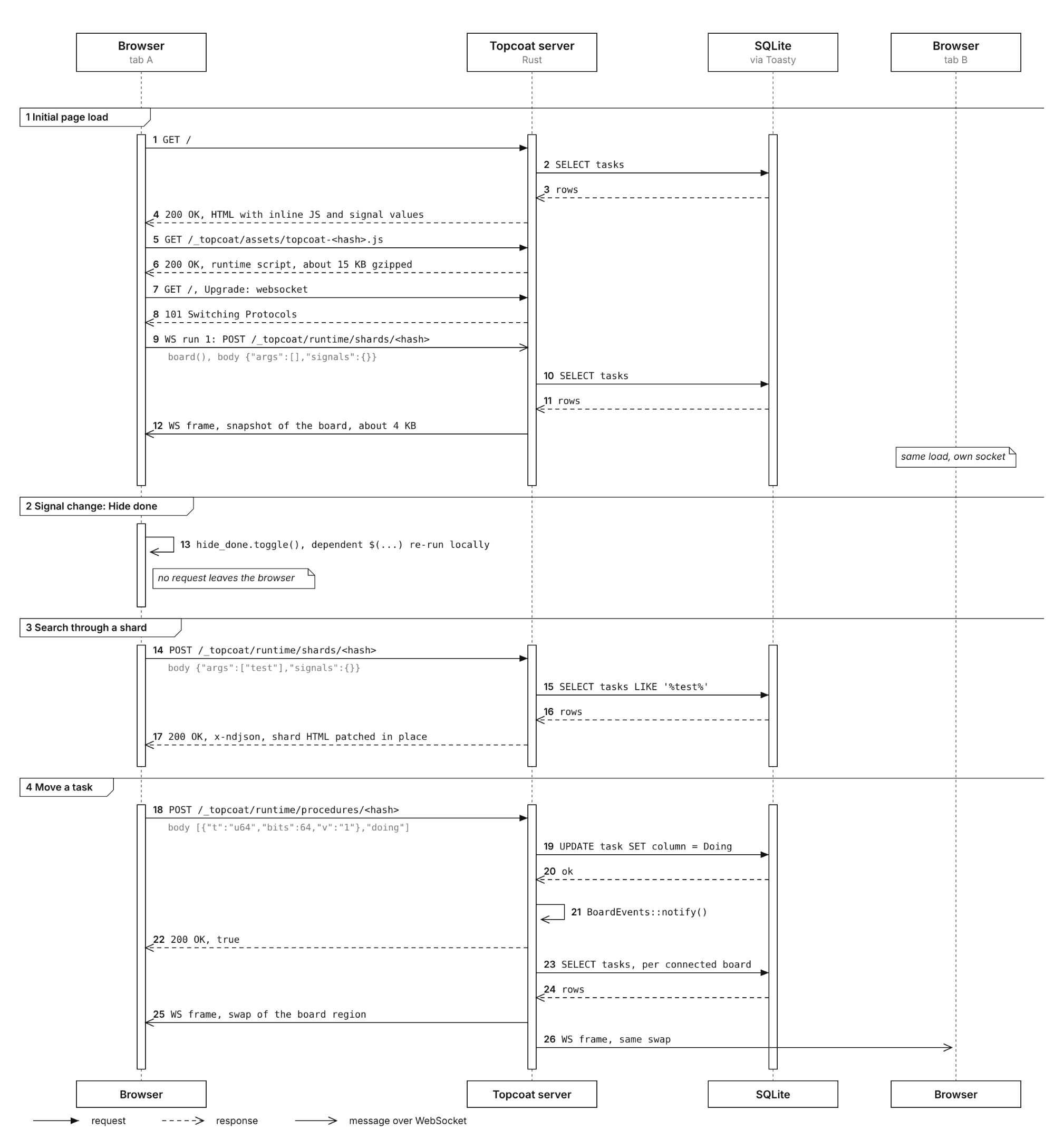
When the browser needs the server, Topcoat offers two routes. A shard is a component that re-renders on the server when its inputs change, and the browser patches the returned HTML into place. A procedure is an async server function that browser code can await.
Topcoat’s authors compare this design to HTMX. Leptos and Dioxus commonly use WebAssembly for browser-side Rust, although Dioxus also offers LiveView, which runs on the server over a WebSocket. Topcoat’s particular tradeoff is its limited Rust-to-JavaScript expression vocabulary.
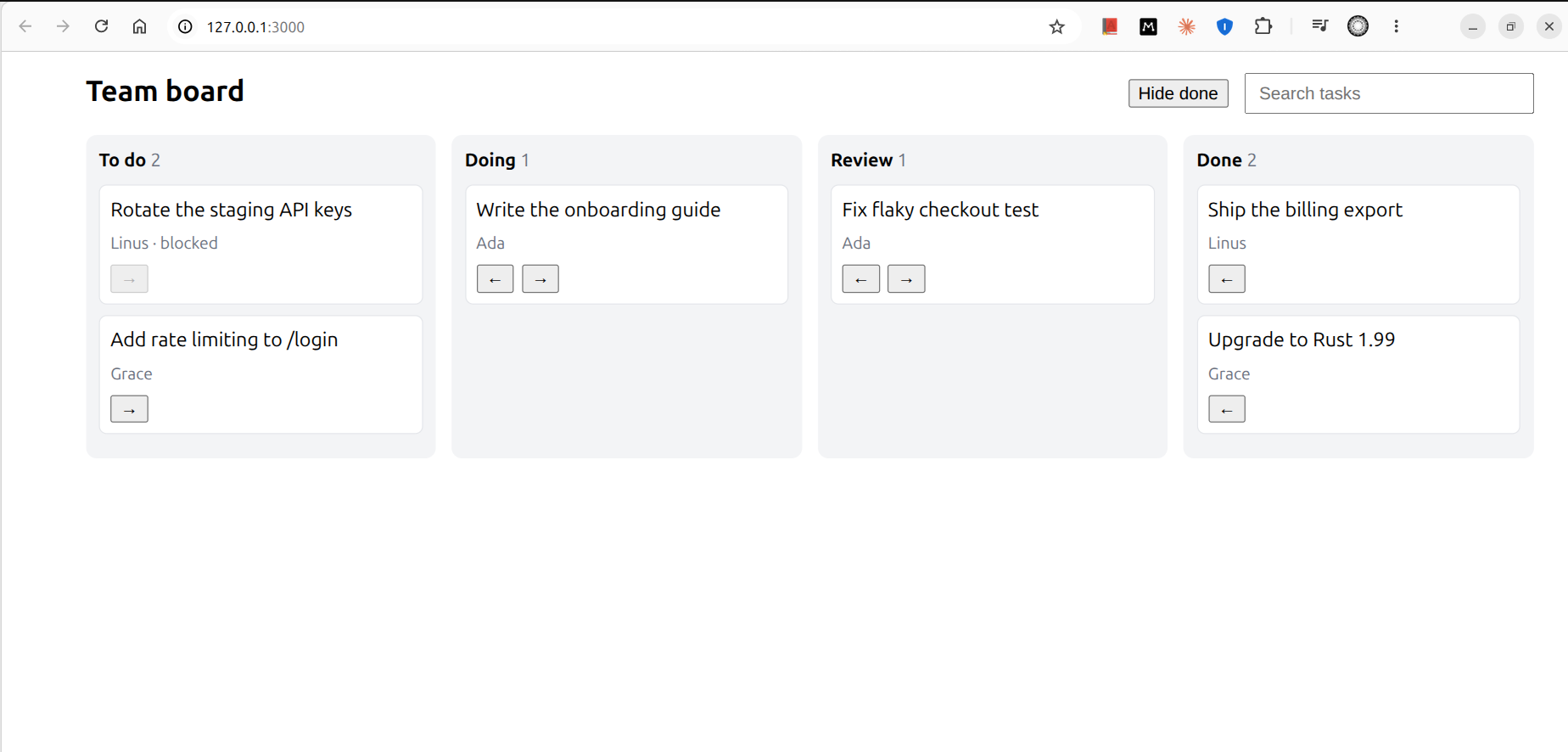
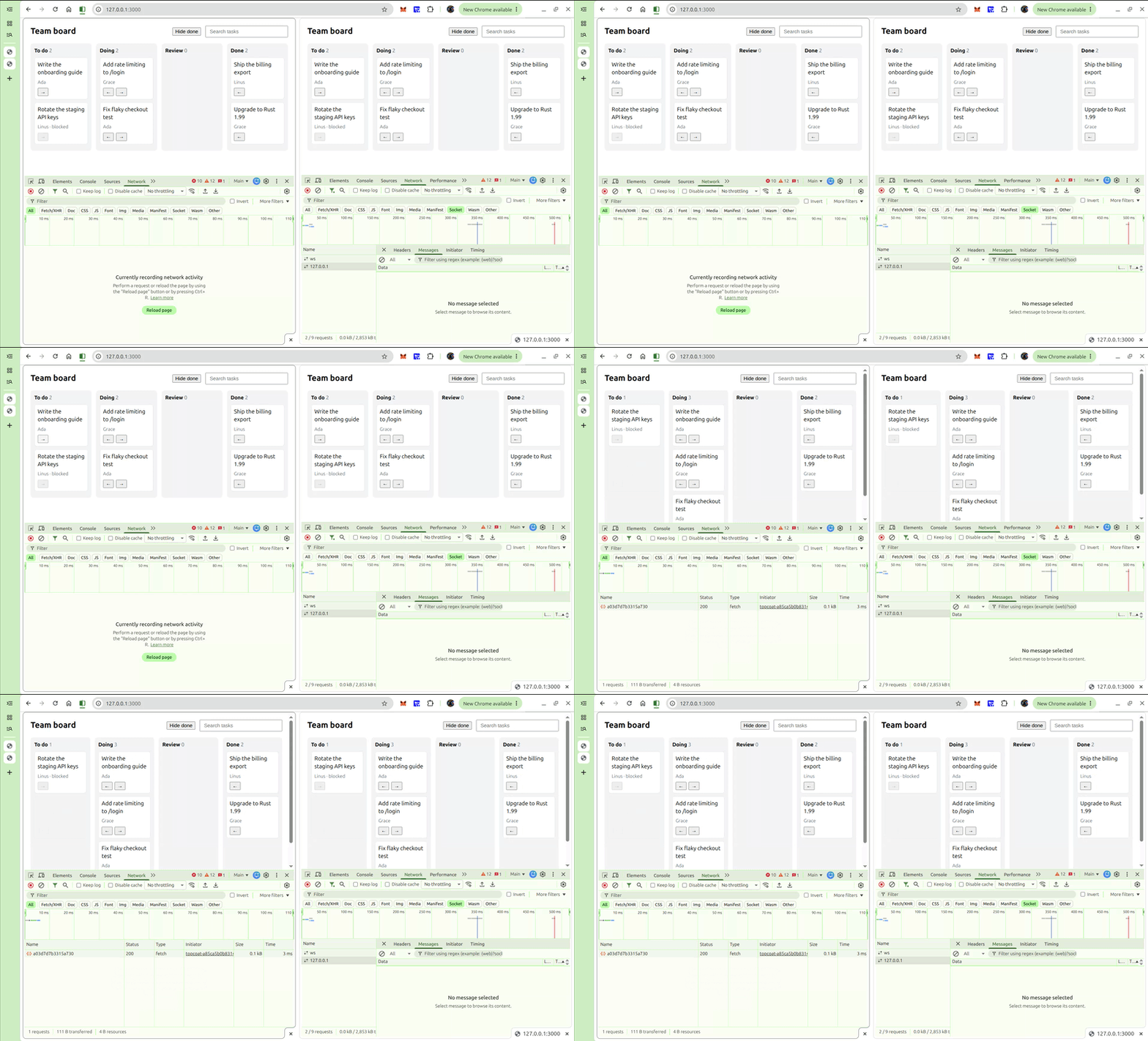
The board loads tasks from SQLite through Toasty and displays them in four columns: To do, Doing, Review, and Done. Hiding Done uses browser state, while search asks the server for updated results. Arrow buttons call a server procedure to move a task, then connected boards receive the refreshed board. The demo validates blocked tasks and adjacent-column moves on the server.
Topcoat v0.10.0 declares Rust v1.98 as its minimum version. To follow along, clone the complete demo and install the matching CLI. The excerpts below explain its main components; the repository includes the imports, layout, helpers, and styles:
git clone https://github.com/Ikeh-Akinyemi/reimagined-octo-giggle.git topcoat-taskboard
cd topcoat-taskboard
git checkout dee436e90832c45239cb5977ee626fd77c5ddb27
cargo install topcoat-cli --version 0.10.0 --locked
topcoat dev
Open http://127.0.0.1:3000 for the board and /leaks for the expression-mismatch demo. Keep the checked-in Cargo.lock when reproducing this version.
A task is a Toasty model. Its column is an enum that Toasty stores through #[derive(toasty::Embed)]:
#[derive(Debug, Clone, Copy, PartialEq, Eq, toasty::Embed)]
pub enum Column {
    Todo,
    Doing,
    Review,
    Done,
}

#[derive(Debug, toasty::Model)]
pub struct Task {
    #[key]
    #[auto]
    pub id: u64,
    pub title: String,
    pub assignee: String,
    pub column: Column,
    pub blocked: bool,
}
The main function connects to SQLite, creates the schema, and seeds a few tasks before starting the router. The in-memory database resets whenever the process restarts. A persistent deployment needs durable storage and a migration workflow.
#[tokio::main]
async fn main() {
    let mut db = Db::builder()
        .models(toasty::models!(crate::*))
        .connect("sqlite::memory:")
        .await
        .unwrap();
    db.push_schema().await.unwrap();
    seed(&mut db).await.unwrap();

    topcoat::start(
        module_router!()
            .app_context(db)
            .app_context(BoardEvents::default())
            .assets(AssetBundle::load().unwrap())
            .discover()
            .runtime()
            .build(),
    )
    .await
    .unwrap();
}
Each call on the router has one job:
.app_context() makes a value available to every handler. Here those values are the database handle and a small broadcaster for live updates..assets() serves the bundled runtime script..discover() registers every shard and procedure in the crate..runtime() handles re-render requests and the WebSocket that live regions use.The root layout then loads the runtime with topcoat::runtime::script(), next to topcoat::dev::script() for reloading during development.
Use topcoat dev for this project because the CLI builds the asset bundle that AssetBundle::load() reads. It also rebuilds and refreshes the page during development. These instructions target v0.10.0, so use that release’s setup rather than assuming examples from the main branch will match.
A signal holds reactive state. In this demo, browser events update it after the server embeds its initial value in the page. Topcoat writes that value into a comment the runtime reads on load:
<!--::topcoat::signal({"t":"signal","id":"d9cd3c68b3af2ab4b7b825d1a3190bbb","v":false})-->
That comment holds the hide_done signal behind the button shown earlier. The same signal also controls the board’s class through a bind attribute. An attribute that starts with : renders its expression’s value on the server, and the browser updates it whenever a signal the expression reads changes. An attribute that starts with @, like the button’s @click, attaches an event handler whose closure body runs only in the browser.
<main :class=$(if hide_done.get() { "board hide-done" } else { "board" })>
    board()
</main>
A single CSS rule hides the column once the class changes:
.board.hide-done .column-done { display: none; }
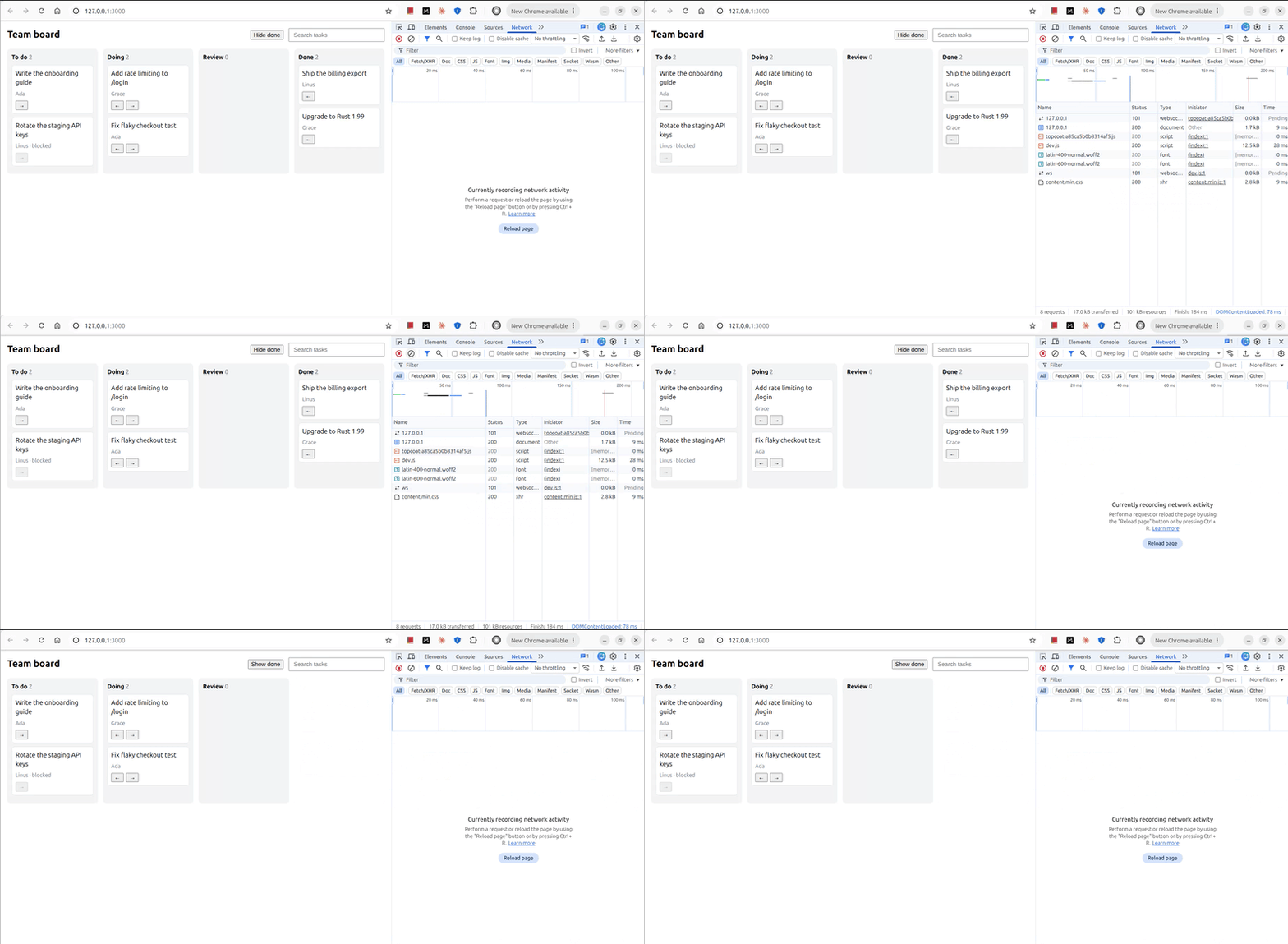
Clicking the button flips the signal. The label and the class are then re-evaluated in the browser, and the Done column disappears. The toggle itself sends no request; the board’s existing WebSocket remains separate from this interaction.
Inside $(...), a signal read becomes part of the browser expression. Reading it in server Rust creates a tracked dependency that can cause the enclosing page or shard to re-render on the server when the value changes. Keep this toggle’s reads inside the runtime expressions so its updates stay local.
Search needs the database, so it can’t run as a browser expression. The query itself is still browser state. The search box writes every keystroke into a query signal, and the page passes that signal’s value to a shard:
let query = signal(cx, String::new);

view! {
    <input
        type="search"
        placeholder="Search tasks"
        :value=$(query.get())
        @input=$(|e: Event| query.set(e.target.value))
    >

    search_results(query: $(query.get()))
}
You call a shard like a component, but its arguments can be runtime expressions. The first render includes the shard’s HTML with the rest of the page. After that, each change to query makes the browser POST the current arguments to the shard’s own endpoint, and the server runs the function again with them:
#[shard]
async fn search_results(cx: &Cx, query: String) -> Result<impl View> {
    let query: String = query.trim().chars().take(100).collect();

    let matches = if query.is_empty() {
        Vec::new()
    } else {
        Task::filter(
            Task::fields()
                .title()
                .like_with_escape(contains_pattern(&query), '\\'),
        )
        .order_by(Task::fields().id().asc())
        .exec(&mut db(cx))
        .await?
    };

    Ok(view! {
        <section class="search">
            if !query.is_empty() {
                <p>(matches.len()) " matching " (if matches.len() == 1 { "task" } else { "tasks" })</p>
                <ul>
                    for task in &matches {
                        <li>(&task.title) " · " (task.column.label())</li>
                    }
                </ul>
            }
        </section>
    })
}
Typing “test” generally sends a request per keystroke. Topcoat batches signal changes in the same tick and aborts earlier pending shard requests when a newer one starts. The returned HTML is patched into the shard’s region. In this demo, the search input sits outside that region, which explains why updating the results leaves the input in place. Debouncing would reduce request volume; aborting a browser request does not guarantee that database work has stopped.
A shard exposes its own endpoint. The v0.10 documentation says that page and layout guards do not run for direct shard requests, so authorization belongs inside the shard. This demo has no authentication and exposes its sample data to anyone who can reach it.
The query is trimmed and capped at 100 characters. The contains_pattern helper escapes %, _, and the escape character itself to give LIKE literal substring semantics. These checks control input behavior; a deployed team board also needs access checks for the requested data.
Moving a card starts in the browser. Each arrow button calls a procedure from an async click handler, passing the task’s ID and the target column as captured values:
<button
    disabled=(task.blocked)
    @click=$(async |_e| {
        move_task(id, forward.to_owned()).await;
    })
>
    "→"
</button>
The procedure validates the requested move. It rejects unknown columns, missing tasks, blocked tasks, and destinations that are not adjacent to the column it reads. When those checks pass, it writes the change and notifies subscribers:
#[procedure]
async fn move_task(cx: &Cx, id: u64, to: String) -> Result<bool> {
    let Some(to) = Column::from_slug(&to) else {
        return Ok(false);
    };

    let mut db = db(cx);
    let Some(mut task) = Task::filter_by_id(id).first().exec(&mut db).await? else {
        return Ok(false);
    };
    let adjacent = task.column.next() == Some(to) || task.column.previous() == Some(to);
    if task.blocked || !adjacent {
        return Ok(false);
    }

    toasty::update!(task { column: to }).exec(&mut db).await?;
    app_context::<BoardEvents>(cx).notify();
    Ok(true)
}
A client can call this endpoint directly, so the procedure performs its checks independently of the disabled button. Validation failures return false; a successful update returns true. Database failures propagate as errors. The click handler currently ignores the return value, so a fuller UI should display rejected moves and request failures.
The read, validation, and write are separate operations. Concurrent requests can validate against stale state, so a deployed board needs an atomic conditional update or a transaction with appropriate concurrency control. Add authentication and task-level authorization before exposing real team data.
The notification reaches every open board through a live region. live! marks part of the page that can keep changing after the first render, and each emit! replaces its content:
#[shard]
async fn board(cx: &Cx) -> Result<impl View> {
    Ok(live! {
        let mut changed = app_context::<BoardEvents>(cx).subscribe();
        loop {
            let tasks = Task::all()
                .order_by(Task::fields().id().asc())
                .exec(&mut db(cx))
                .await?;

            let token = emit! {
                for column in Column::ALL {
                    column_view(column: column, tasks: &tasks)
                }
            }?;

            if !connected(cx) {
                break Ok(token);
            }
            changed.recv().await.ok();
        }
    })
}
During the first HTTP render, connected(cx) returns false, so the region emits the current board once and stops. That same call also asks the browser to open a WebSocket when the response finishes. The browser then renders the shard again over that socket, this time with connected(cx) returning true, so the loop waits on the broadcast channel and re-emits the board after every move. The region subscribes before its first query, so a move that lands between the read and the wait isn’t lost.
In the author’s browser test, clicking → in one tab sent a procedure request, followed by board updates over the connected tabs’ sockets. The reported frame size was about 4 KB for this small seeded board; it will vary with the rendered content. Topcoat multiplexes connected page and shard renders over one WebSocket per tab, with a default limit of 64 concurrent runs per connection.
BoardEvents uses a Tokio broadcast channel inside one server process. Multiple server instances would need shared event delivery. Every connected board also queries and renders the full task list on notification, so this demo’s update cost grows with both task count and connected tabs. The search results are a separate shard and refresh when the query changes; they do not subscribe to board-move notifications.
Reactive content expressions evaluate as Rust for the initial render and as generated JavaScript for browser updates. Event-handler bodies run in response to browser events. Topcoat restricts expressions to its documented types and syntax, and unsupported syntax produces a compile error.
Its coherence suite compares expression outcomes in Rust and V8, including exact floating-point values while treating NaN payloads as equivalent. The suite checks supplied cases and final outcomes; browser interactions and side effects remain outside its coverage. Passing Rust’s type checker alone does not establish equivalent JavaScript behavior.
The v0.10.0 suite records six known mismatches that compile cleanly and still disagree. Two of them are easy to hit on a board like this one.
The first is an early return inside an if. This handler type-checks and reads like a guard:
<button @click=$(|_e| {
    if blocked {
        return;
    }
    attempts.increment();
})>
The generated JavaScript wraps the if in its own arrow function. The return therefore leaves only that inner function, and the increment still runs:
(__local0) => { (() => { if ((cx.hydrate(true)).dehydrate()) { return; } })(); (cx.hydrate({"t":"Signal","id":"50bae61385af2841f29df818168faf78"})).increment(); }
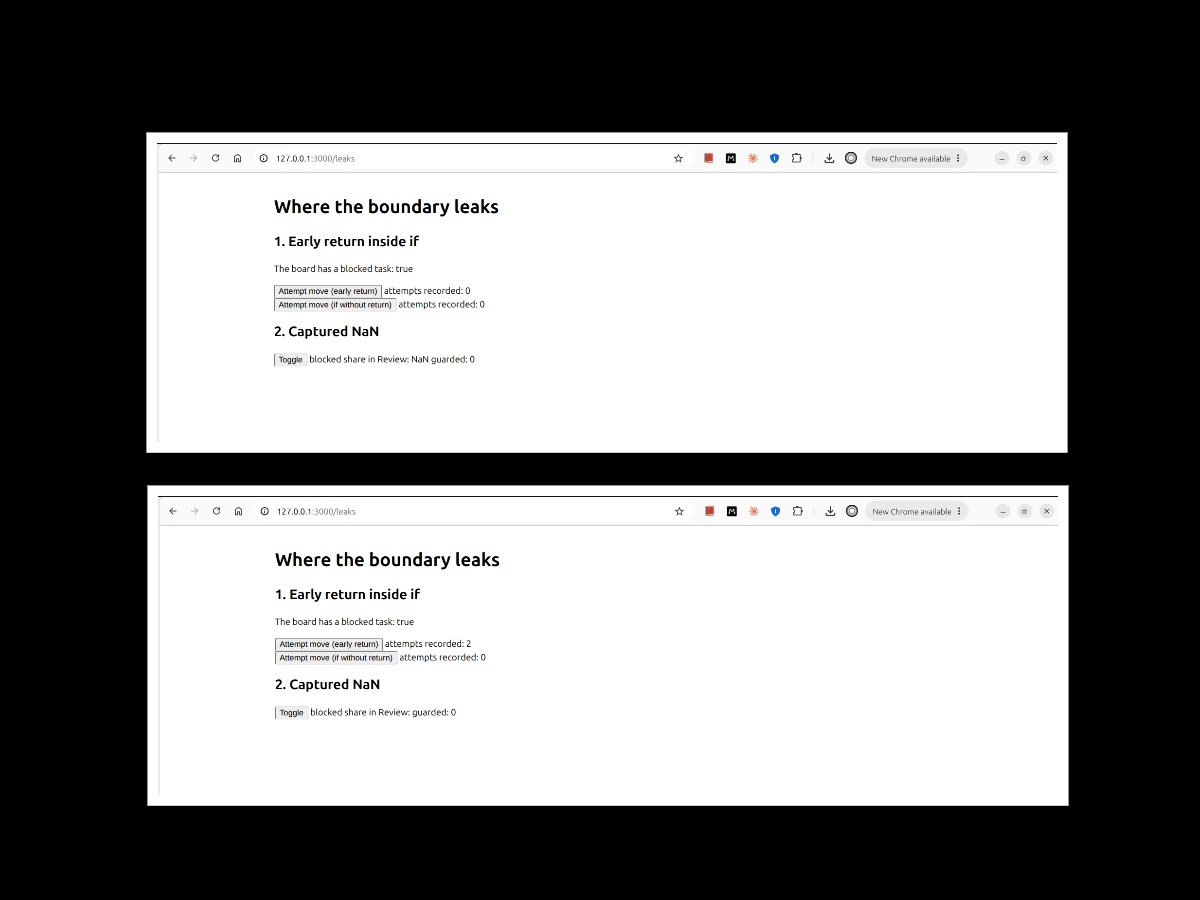
The demo records two attempts after two clicks even though the guard should exit before the increment. Writing the condition as if !blocked { attempts.increment(); } behaves correctly. A break or continue inside an if fails differently, because the browser rejects the generated code with a syntax error.
The second is a captured float that isn’t finite. The /leaks page computes the share of blocked tasks in the empty Review column, which works out to 0.0 / 0.0. The server renders NaN. When that value crosses the capture boundary, it serializes as null and hydrates as unit, causing the expression to render an empty string after its first browser update. Deciding the empty case on the server fixes this, because the expression then only ever captures a finite number:
let guarded_share = if review.is_empty() {
    0.0
} else {
    blocked_share
};
For v0.10.0, keep the documented mismatches in mind when writing runtime expressions:
return, break, or continue inside runtime if expressions until the documented mismatches are fixed.raw! for JavaScript outside the supported vocabulary, and supply equivalent Rust behavior when the expression needs server evaluation.Rust’s web frameworks cover different deployment models. Leptos supports reactive browser applications with Wasm and server rendering. Dioxus spans web and native targets and also offers LiveView. Loco and Cot provide server-application features such as database integration and authentication.
This comparison describes the version lines shown, with Topcoat’s runtime-expression approach as the browser model used in this tutorial:
| Topcoat 0.10 | Leptos 0.8 | Dioxus 0.7 | Loco 1.2 | Cot 0.7 | |
|---|---|---|---|---|---|
| Rendering | Server-rendered | SSR with hydration, or client-only | Web, desktop, and mobile, with SSR | Server, with Tera views | Server, with Askama templates |
| Browser interactivity | $(...) compiled to JS, shared ~15 KB gzip runtime |
Rust compiled to Wasm | Rust compiled to Wasm, or LiveView | Add a client library | Add a client library |
| Database layer | Toasty, held in app_context |
Bring your own | Bring your own | SeaORM | Own ORM |
| Authentication | Sessions and cookies only | None built in | None built in | JWT auth generated | Built in |
| Admin panel | No | No | No | No | Yes |
Topcoat v0.10 provides session and cookie primitives, leaving account management and access policy to the application. It has no built-in admin panel. The example also passes Toasty’s database handle through app_context; models and validation remain application code.
For comparison, Loco v1.2 includes server-rendered Tera support, and Cot’s admin panel integrates with its authentication system. Topcoat’s appeal here is the shared Rust workflow for interactive server-rendered pages, with more application infrastructure left to implement.
Topcoat lets this task board combine browser-local toggles with server-rendered search and live updates from one Rust codebase. Its shared runtime avoids a Wasm build, while the supported expression vocabulary defines how much client logic can stay in Rust.
Teams already using Rust can evaluate this approach for internal tools and dashboards where server-owned data drives the UI. Before adopting v0.10, account for its documented expression bugs and the work required for authentication, persistence, and concurrent updates. Topcoat is pre-1.0, so pin versions and review release notes when upgrading.
Debugging Rust applications can be difficult, especially when users experience issues that are hard to reproduce. If you’re interested in monitoring and tracking the performance of your Rust apps, automatically surfacing errors, and tracking slow network requests and load time, try LogRocket.
LogRocket lets you replay user sessions, eliminating guesswork around why bugs happen by showing exactly what users experienced. It captures console logs, errors, network requests, and pixel-perfect DOM recordings — compatible with all frameworks.
LogRocket's Galileo AI watches sessions for you, instantly identifying and explaining user struggles with automated monitoring of your entire product experience.
Modernize how you debug your Rust apps — start monitoring for free.
Learn how to use browser AI APIs for summarization, translation, and language detection with practical examples and implementation tips.
Learn how to build and install three Claude Code mods to monitor usage, protect secrets, and track changes.

I tested Jev against popular LLMs to compare speed, cost, and accuracy on real bank support messages.

Is react-markdown slowing down your app? We benchmarked three top streaming Markdown renderers to find the fastest, most efficient alternative for React.
Would you be interested in joining LogRocket's developer community?
Join LogRocket’s Content Advisory Board. You’ll help inform the type of content we create and get access to exclusive meetups, social accreditation, and swag.
Sign up now
 Learn more →