Figma dominates the UI/UX design industry. Adobe stopped selling XD as a standalone product after the failed acquisition of Figma. InVision discontinued its services. Only Mac users can use the Sketch app to create designs. Apart from XD and Sketch, there are new cloud-based Figma alternatives, but they are just popping up with promises and losing popularity . There is no Figma-like design app yet created to break Figma’s dominance in digital product design. Figma has undoubtedly become every designer’s default choice.

That doesn’t mean Figma is a perfect universal design app that every designer should use. Just like any other software product, Figma has its own issues. It’s a proprietary cloud-based app that uses a closed design file format. Figma is apparently free to use, but you’ll have to pay for some features; it’s a freemium product, not a free product. Open-source, self-hostable, free Figma alternatives solve these issues and are finally becoming viable by creating an open, free, flexible, extensible, developer-friendly design environment for everyone.
Let’s explore what open-source design tools can offer beyond Figma, why design teams started exploring them, and compare available open-source design tools. Will they ever be able to break Figma’s dominance?
Key Takeaways:
The whole software industry is moving toward open-source due to community involvement and popularity benefits. Even large proprietary software companies have started making their internal software modules open-source. The proprietary model is gradually becoming legacy.
Here is exactly why UI/UX design teams started loving open-source design tools by thinking beyond traditional proprietary design products like Figma:
When the design tool’s codebase becomes open, and the product is free, the particular tool can offer impressive features that proprietary tools can’t implement. Here is what open-source design tools bring:
Anyone can browse the source code of open-source design tools’ file formats, study their structure, and easily write programs to read or generate them. So, there is no vendor lock-in for design files. Open-source design tools can support each other’s formats to create a tool-migration-friendly environment or can even create a universal design file standard in the future.
Penpot, a popular open-source Figma alternative, uses the standard ZIP archive format and stores design element data in JSON format, so third-party tools can easily parse it without struggling with reverse engineering:
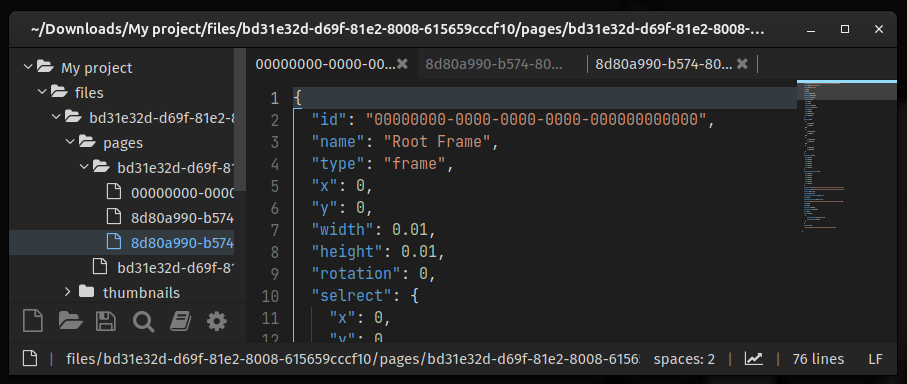
When you use an open file format, the whole design file 100% belongs to you, unlike proprietary file formats, where the file format belongs to the vendor and the design file is usually stored on their cloud infrastructure. Since open-source design tools are usually either self-hosted or locally installed, organizations can adhere to strict compliance such as GDPR, HIPAA, etc., even at the UI/UX design phase.
Open-source design tools let you use the product hosted in the open-source organization’s cloud infrastructure, self-host it on your own cloud infrastructure, or use it locally only on your PC.
Here are the benefits of self-hosting your design tool within the organization’s server infrastructure or designer PCs:
Penpot can be easily self-hosted using Docker, and OpenPencil is an offline, local-first app with serverless P2P collaboration support.

Quant UX, an open-source rapid prototyping tool, offers one-click deployments to some cloud providers. You can find one-click deployment links to Elestio and RepoCloud from its GitHub repository. No technical skills required to deploy and start using Quant UX.
Figma and similar proprietary design tools offer MCP (modal context protocol) integration, so developers can generate product designs from their favorite AI developer tools like Claude Code or Windsurf, but they won’t let UI/UX designers use their preferred AI models for built-in AI capabilities. For example, Figma uses its own AI model called Figma AI and won’t let you connect and spend your OpenAI credits.
Open-source design tools don’t embed AI models. Instead, they let you activate AI features using AI models you already pay for. This is known as the BYOK (bring your own key) AI integration.
For example, OpenPencil lets you activate its AI assistant using external AI models of your choice, including OpenAI, Anthropic, DeepSeek, and more:

The BYOK concept not only lets teams use external AI models they pay for, but also helps bring AI model provider bills to zero by connecting to local AI models or models run within your organization’s cloud infrastructure. Yes, if you use a local AI approach, your data never leaves your organization’s infrastructure, even if you use AI for designing.
Proprietary design tools typically limit extensions to traditional plugins, which prevents developers from building deeper, developer-focused features. Because vendors keep the product codebase and design canvas elements closed-source, developers can’t fully access or modify the underlying systems. Open-source tools use the open codebase and FOSS license as an advantage to make the product more extensible and developer-friendly.
Here is how open-source design tools become so extensible and developer-friendly:
Proprietary design tools let users request features. This generally works, but experts in the user community won’t have a chance to contribute directly to feature enhancements because they don’t have access to the codebase and product architecture. Experts who specialize in both UI/UX design and development (usually senior frontend and full-stack developers) can directly send bug fixes and feature implementations to all open-source design tools.
When a limited internal development team improves a proprietary product based on user feedback, millions of experts who gather around an open-source product improve every bit of it with unique, innovative ideas every day.
The FOSS development model pushes open-source design tools to success, offering many perks for both designers and developers, but Figma-like mature, proprietary design tools still have the advantage in the following aspects:
Let’s compare Figma with popular open-source alternatives: Penpot, OpenPencil, Quant UX, and Open Design:
| COMPARISON FACTOR | Figma | Penpot | OpenPencil | Quant UX | Open Design |
|---|---|---|---|---|---|
| PRODUCT’S PRIMARY GOAL | Providing a SaaS platform for UI/UX design under the proprietary modal | Providing a free and open-source UI/UX design tool with SaaS and self-hosting options | Providing a free and open-source UI/UX design toolkit for designers and developers | Providing a free and open-source rapid UI/UX prototyping tool with SaaS and self-hosting options | Providing a free and open-source local-first vibe designing desktop app |
| FIRST RELEASED IN | 2016 | 2023 | 2026 | 2019 | 2026 |
| OVERALL UI/UX DESIGN FEATURES | Offers many features for desgining and prototyping | Offers Figma-compatible features for desgining and prototyping | Offers Figma-compatible design features, but prototyping features are still being developed | Minimal designing and prototyping features are available | AI assistant automates design activities (an agent-native app) — no manual editing |
| AI SUPPORT | Built-in AI assistant for generating designs, MCP server for tool integrations | MCP server-based design generation | BYOK-based built-in AI assistant for generating designs, MCP server for tool integrations | The built-in AI assistant is being developed | AI-native design tool, BYOK model integrations |
| DESKTOP APP | Yes (official) | Yes (community-based) | Yes (official) | No | Yes (official) |
| Mobile app | Yes (official) | No | No | No | No |
| DESIGN HANDOFF | Handoff features are available via premium Dev Mode, supports built-in code generation for HTML/CSS, Android, and Swift along with the inspection mode | Built-in code generation support is available for HTML/CSS. Figma Dev-Mode-like inspection mode is available | Built-in code generation support is available for JSX using Tailwind or internal OpenPencil components | Generates code using its own low-code Vue library that developers can directly use for building the production app | Generates deployable HTML/CSS code. Direct deployment options are available, i.e., deploying to Vercel |
| COLLAB FEATURES | Multiplayer editing, user inspection, cursor chats, comments, audio chats, and team management | Multiplayer editing, comments, and team management | Multiplayer editing and user inspection | Comments | Only export options are available |
| PRICING | Free plan is available with limited features. Premium plans start from $15 per month | Free. Paid hosted plans are also available for teams that don’t prefer self-hosting | Free | Free | Free with BYOK or local models, Paid plans unlock more concurrent tasks, premium models, and more perks. Paid plans start from $16 per month |
| OFFLINE MODE | No | Yes | Yes | Yes | Yes (using a local or self-hosted AI model) |
| SELF-HOSTING | No | Yes | Yes, but not officially documented | Yes | Yes |
| EXTENSIBILITY | Limited extensibility via plugins | Plugins are available. Fully extensible by modifying the codebase | Plugins are available. Fully extensible by modifying the codebase. Official editor SDK is available for easy extending and embedding | Fully extensible by modifying the codebase | Plugins are available. Fully extensible by modifying the codebase |
| OPEN-SOURCE LICENSE | N/A (Proprietary) | MPL 2.0 | MIT | GPL 3.0 | Apache 2.0 |
| GITHUB REPOSITORY | N/A (Proprietary) | penpot/penpot | open-pencil/open-pencil | KlausSchaefers/quant-ux | nexu-io/open-design |
Given Figma feature parity and open-source feature implementations, both Penpot and OpenPencil lead the open-source Figma alternative competition. Penpot and OpenPencil competitively offer perks for both designers and developers backed by an open-source model, but they follow two different architectural philosophies, and you can choose one based on the following summary:
Overall, Penpot is a mature Figma alternative, and OpenPencil is a growing design toolkit that offers many developer-focused features along with an offline, local-first, Figma-compatible UI/UX design features.
Yes, they are ready to use. You can create complete product prototypes using all the popular open-source design tools we compared above. Penpot and OpenPencil offer a Figma-like design experience. Quant UX offers minimal design features with rapid prototyping capabilities. Open Design gives a great agent-native vibe-designing experience, similar to proprietary Lovable and Vercel’s v0.
However, you should move to open-source design tools only if Figma’s proprietary nature doesn’t meet your organization’s expectations and your organization will benefit from open-source tools’ perks (self-hosting, open formats, extensibility, and developer-focused features). Comparing tools based on UI/UX design features isn’t useful for long-term decision-making, since any tool can introduce any feature at any time.
If your organization adheres to strict data compliance, invests heavily in optimized design handoff, builds open-source products, or has concerns about Figma billing, using open-source design tools definitely has remarkable benefits.
On the other hand, if your organization is happy with Figma, it’s not worth leaving your stabilized Figma-oriented design process for open-source tools.
Open-source Figma alternatives are ready for your organization only if you seek something that Figma can’t offer under its proprietary model, such as self-hosting, internal component SDKs, open file formats, offline mode, etc.
Open-source design tools didn’t emerge to replace Figma. Their maintainers know that breaking Figma’s years-long dominance through the open-source model would be nearly impossible, so they didn’t try to reinvent the wheel. Instead, open-source design tools offer a different direction for UI/UX design tooling, with open-source benefits that Figma and other proprietary alternatives can’t provide. They prove that a design tool doesn’t have to remain a rigid, subscription-based product owned and controlled by a single vendor.
Open-source UI/UX design tools are completely free, offline, flexible, and highly extensible, and offer impressive developer-focused features for a smooth design handoff. No vendor lock-in, remote sign-up, forced updates, service subscription bills, fear of product discontinuation or pricing/terms changes — just download or self-host and use forever. Open-source Figma alternatives are becoming increasingly viable for product teams that prioritize openness, flexibility, and ownership.
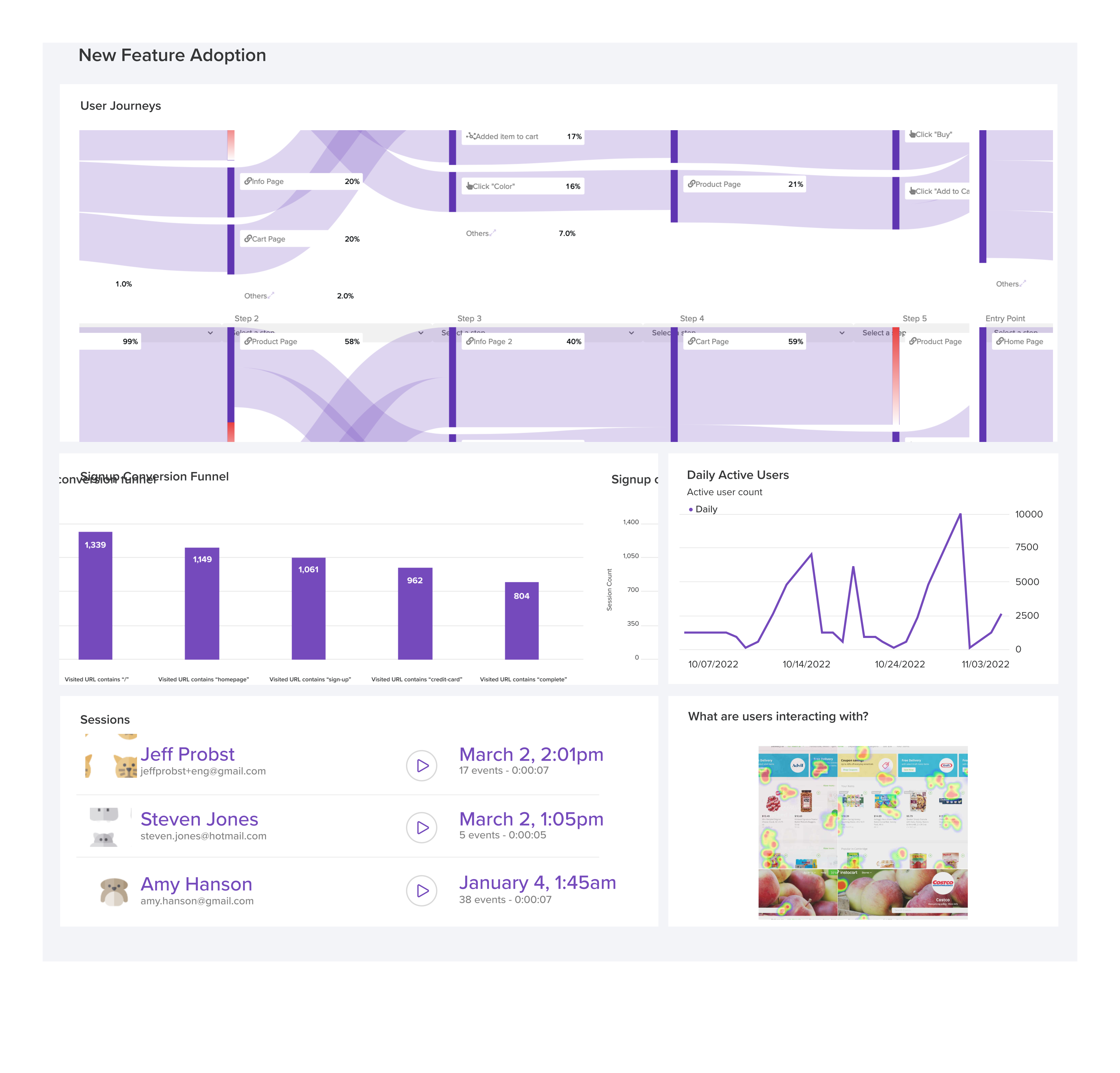
LogRocket's Galileo AI watches sessions and understands user feedback for you, automating the most time-intensive parts of your job and giving you more time to focus on great design.
See how design choices, interactions, and issues affect your users — get a demo of LogRocket today.

Fixed user flows still have a place, but AI is changing how products respond to user intent. Here’s what designers need to rethink when flows become dynamic.
Framer brings design, CMS, publishing, and AI into one workspace. Here’s how its 2026 workflow compares with Figma Sites, Relume, and Webflow—and when consolidation makes sense.

Three predictions for the next UX era, revisited against Liquid Glass, Material 3 Expressive, and spatial widgets—with a practical, conditional outlook for 2027.
AI-first helpdesks can answer questions and take action, but good UX depends on accurate information, clear approval limits, and human handoffs that preserve context.

 Learn more →