Building an AI feature in Nuxt in 2026 takes three pieces that fit together with very little glue code. The Vercel AI SDK provides the streaming engine and native Composition API composables, useChat, useCompletion, and useObject, which expose model output as reactive Vue state. Nuxt UI ships chat components built around those composables, while Cloudflare Workers AI runs inference at the edge through workers-ai-provider, which plugs into the same SDK interface as any hosted provider.
The packages divide those responsibilities cleanly. The ai package contains server-side primitives such as streamText and the stream adapters that convert model output into a typed message stream. @ai-sdk/vue provides the composables that consume that stream on the client.
We’ll build the application in two provider phases. First, we’ll establish a local baseline through Vercel AI Gateway, which gives us access to many models behind a single key. Then we’ll move inference to the edge by swapping in workers-ai-provider and binding it to Cloudflare’s env.AI. Because both providers implement the same interface, very little application code changes between the two.
Scaffold a Nuxt app and install the AI packages. This example uses Node 22 and pnpm.
pnpm create nuxt nuxt-ai-2026
cd nuxt-ai-2026
pnpm add ai @ai-sdk/vue zod
The local baseline routes requests through Vercel AI Gateway, so you’ll need a Gateway API key. Create one from the AI Gateway dashboard, then add it to nuxt.config.ts as runtime config.
export default defineNuxtConfig({
  compatibilityDate: '2026-07-31',
  devtools: { enabled: true },
  runtimeConfig: {
    aiGatewayApiKey: ''
  }
})
Nuxt maps NUXT_-prefixed environment variables onto matching runtime config values. In this case, NUXT_AI_GATEWAY_API_KEY populates aiGatewayApiKey at runtime. Add it to .env:
NUXT_AI_GATEWAY_API_KEY=your-key-here
Keep the model call inside a Nitro route so the provider key stays server-side and never reaches the browser.
The route uses several utilities from ai. streamText runs the model, convertToModelMessages converts the client’s richer message format into the format the model expects, toUIMessageStream adapts the raw model output into a typed UI stream, and createUIMessageStreamResponse wraps that stream in a response Nitro can return.
import {
  streamText,
  convertToModelMessages,
  createGateway,
  createUIMessageStreamResponse,
  toUIMessageStream,
  type UIMessage
} from 'ai'

export default defineLazyEventHandler(async () => {
  const apiKey = useRuntimeConfig().aiGatewayApiKey
  if (!apiKey) throw new Error('Missing AI Gateway API key')

  const gateway = createGateway({ apiKey })

  return defineEventHandler(async (event) => {
    const { messages }: { messages: UIMessage[] } = await readBody(event)

    const result = streamText({
      model: gateway('inclusionai/ling-3.0-flash-free'),
      messages: await convertToModelMessages(messages)
    })

    return createUIMessageStreamResponse({
      stream: toUIMessageStream({ stream: result.stream })
    })
  })
})
Wrapping the route in defineLazyEventHandler creates the Gateway instance once on the first request instead of rebuilding it on every call.
The incoming messages are UIMessage objects containing an ordered parts array rather than a single string. convertToModelMessages converts those UI-oriented messages into the format expected by the model.
Before building the interface, confirm that the route streams correctly. Start the development server, then send a raw request:
curl -N -X POST http://localhost:3000/api/chat \
  -H "Content-Type: application/json" \
  -d '{"messages":[{"id":"1","role":"user","parts":[{"type":"text","text":"Say hello in one short sentence."}]}]}'
The endpoint responds with server-sent events, with each data: line carrying one typed chunk.
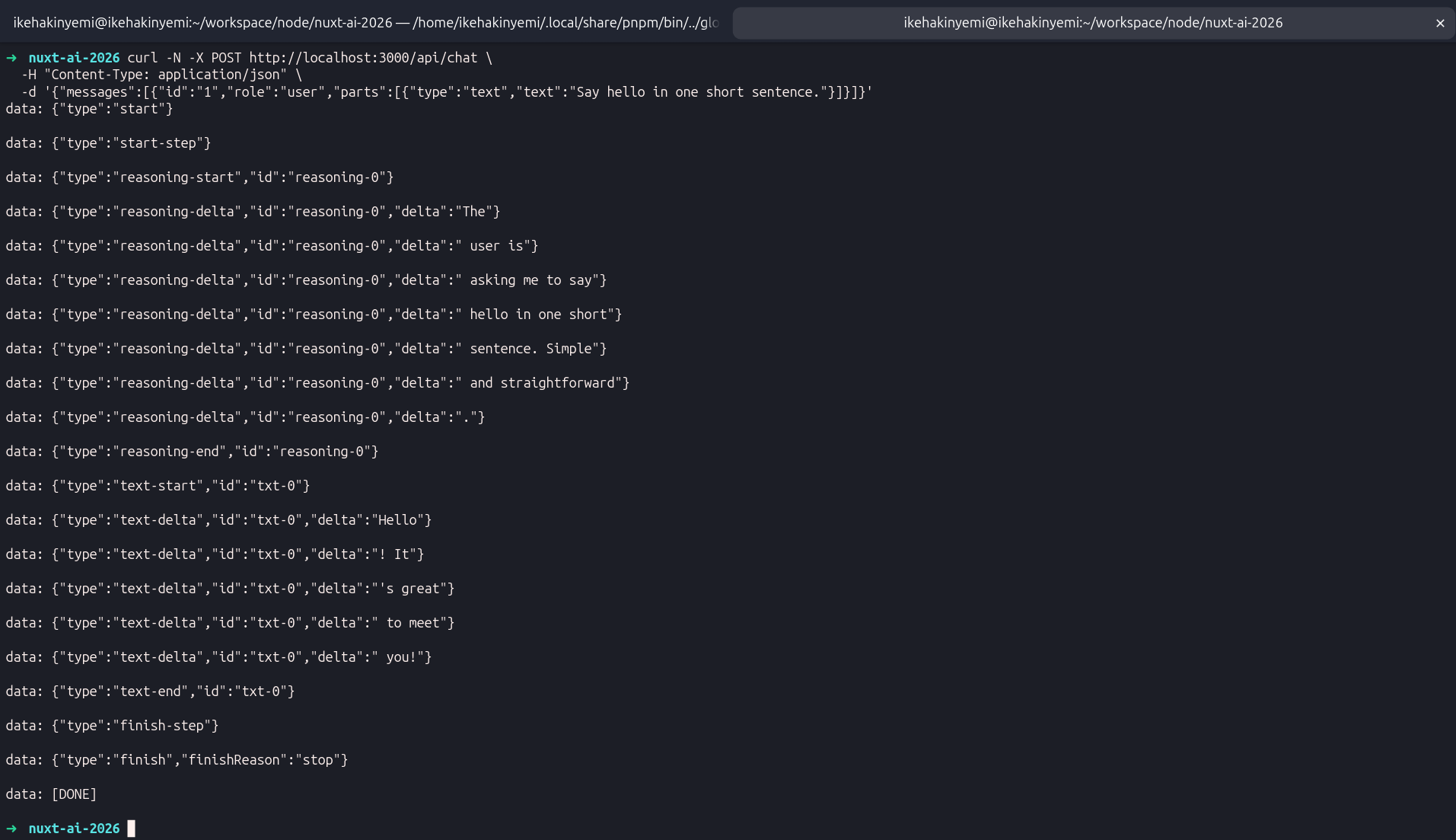
Each typed part follows a start, delta, and end sequence. This model streams a reasoning part first and a text part afterward, which lets the interface render the model’s reasoning separately from its final answer.
The deltas are fragments rather than complete words. Those fragments are what the interface progressively renders as the response arrives.
The useChat composable connects a Vue component to the streaming route and exposes the conversation as reactive state. When called with no arguments, it posts to /api/chat by default, so it works with the route from the previous section without additional transport configuration.
<script setup lang="ts">
import { useChat } from '@ai-sdk/vue'
import { ref } from 'vue'

const input = ref('')
const { messages, sendMessage, status } = useChat()

function handleSubmit(e: Event) {
  e.preventDefault()
  if (!input.value.trim()) return
  sendMessage({ text: input.value })
  input.value = ''
}
</script>

<template>
  <div v-for="(m, i) in messages" :key="m.id ?? i">
    <strong>{{ m.role === 'user' ? 'You' : 'AI' }}</strong>
    <div v-for="(part, j) in m.parts" :key="`${m.id}-${j}`">
      <div v-if="part.type === 'reasoning'">{{ part.text }}</div>
      <div v-else-if="part.type === 'text'">{{ part.text }}</div>
    </div>
  </div>

  <form @submit="handleSubmit">
    <input v-model="input" placeholder="Say something..." />
  </form>
</template>
messages is a Vue ref that updates with every streamed chunk, causing the template to re-render as the response arrives. Because each message contains an ordered array of typed parts, you iterate over m.parts rather than rendering a single string.
Separating reasoning and text into different branches also makes it possible to style the model’s reasoning independently from its answer. sendMessage opens the stream, while status moves through submitted, streaming, and ready, giving you a straightforward way to drive loading states.
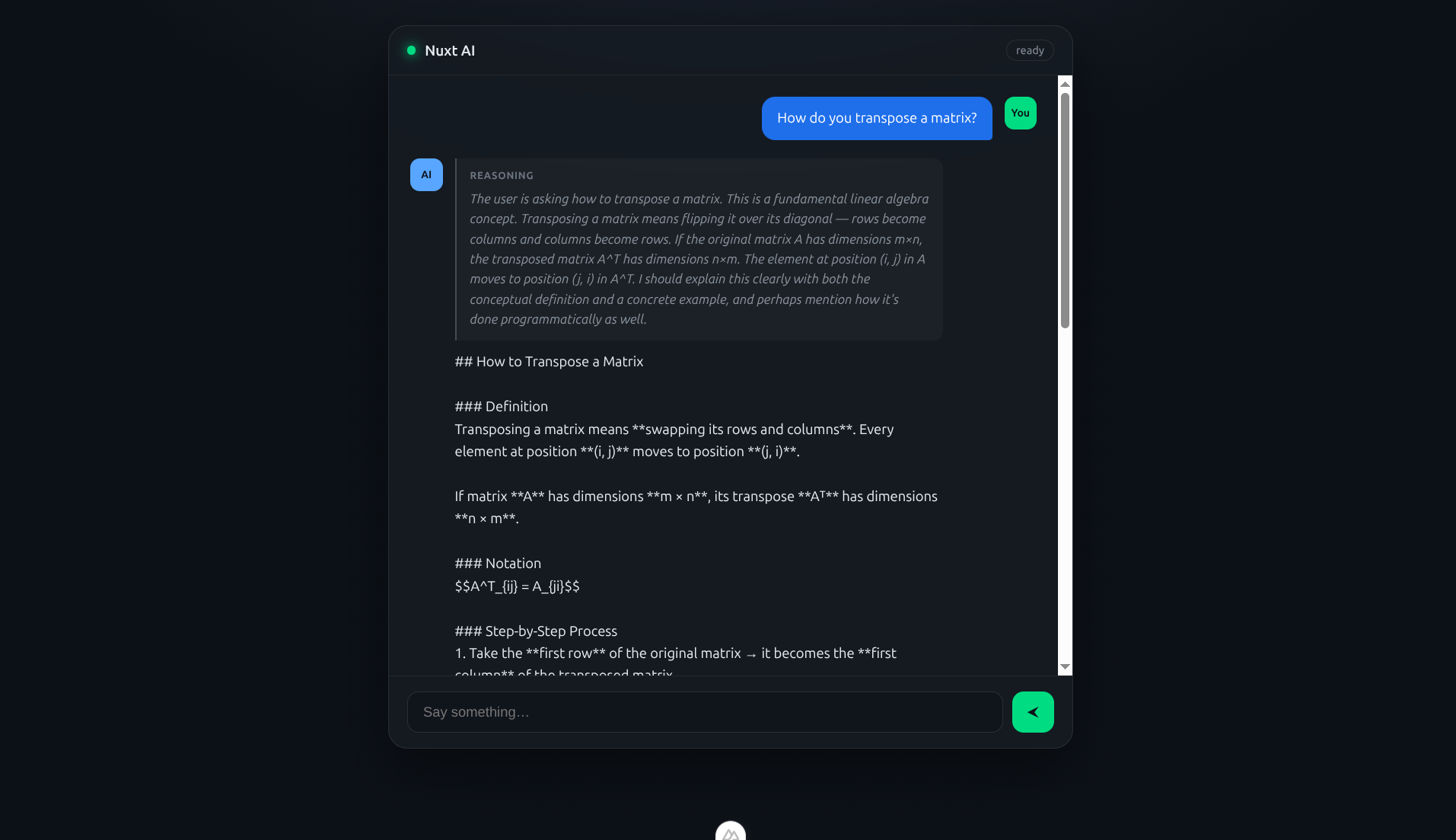
This version renders the conversation, but it still displays the model’s raw output. Markdown headings, code fences, and tables arrive as literal characters because nothing in the component parses them yet.
Next, we’ll replace this hand-rolled markup with Nuxt UI’s chat components and stream the Markdown into formatted output as it arrives.
Nuxt UI ships components specifically for AI chat that consume AI SDK message parts directly. They provide a scrolling message list, prompt controls with submit and stop handling, and dedicated UI for reasoning and tool calls without requiring you to build those pieces from scratch.
Comark handles the streamed Markdown. It parses tokens as they arrive, so formatted output builds progressively instead of appearing only after the response finishes.
Install Nuxt UI, Comark, the Shiki languages, and Shiki itself. Comark’s highlighting plugin depends on shiki, which pnpm won’t expose unless you declare it explicitly.
pnpm add @nuxt/ui @comark/nuxt @shikijs/langs shiki
Register the Nuxt UI and Comark modules, then point Nuxt at a CSS entry file:
export default defineNuxtConfig({
  compatibilityDate: '2026-07-31',
  devtools: { enabled: true },
  modules: ['@nuxt/ui', '@comark/nuxt'],
  css: ['~/assets/css/main.css'],
  runtimeConfig: {
    aiGatewayApiKey: ''
  }
})
app/assets/css/main.css imports Tailwind and Nuxt UI, and app/app.vue wraps the application in UApp, which Nuxt UI requires for features such as overlays and toasts.
@import "tailwindcss";
@import "@nuxt/ui";
<template>
  <UApp>
    <NuxtPage />
  </UApp>
</template>
Next, define a reusable Comark renderer with the highlighting plugin so assistant responses can render syntax-highlighted code blocks. This creates a <ChatComark> component that you can use inside the page.
import highlight from '@comark/nuxt/plugins/highlight'

export default defineComarkComponent({
  name: 'ChatComark',
  plugins: [highlight()],
  class: '*:first:mt-0 *:last:mb-0'
})
Now wire up the page. UChatMessages renders the conversation and controls auto-scrolling based on status. Its #content slot exposes each message so you can decide how individual parts should render.
The ai type guards distinguish reasoning from text. Reasoning goes into UChatReasoning, assistant text goes through <ChatComark>, and user text renders as a plain paragraph. isPartStreaming from @nuxt/ui/utils/ai tells each part whether it is still streaming so Comark can update incrementally.
<script setup lang="ts">
import { isReasoningUIPart, isTextUIPart } from 'ai'
import { useChat } from '@ai-sdk/vue'
import { isPartStreaming } from '@nuxt/ui/utils/ai'

const input = ref('')

const { messages, status, error, sendMessage, regenerate, stop } = useChat()

function onSubmit() {
  if (!input.value.trim()) return
  sendMessage({ text: input.value })
  input.value = ''
}
</script>

<template>
  <UContainer class="min-h-dvh flex flex-col py-6">
    <UChatMessages :messages="messages" :status="status" should-auto-scroll class="flex-1">
      <template #content="{ message }">
        <template v-for="(part, index) in message.parts" :key="`${message.id}-${part.type}-${index}`">
          <UChatReasoning
            v-if="isReasoningUIPart(part)"
            :text="part.text"
            :streaming="isPartStreaming(part)"
          >
            <ChatComark :markdown="part.text" :streaming="isPartStreaming(part)" />
          </UChatReasoning>

          <template v-else-if="isTextUIPart(part)">
            <ChatComark
              v-if="message.role === 'assistant'"
              :markdown="part.text"
              :streaming="isPartStreaming(part)"
            />
            <p v-else-if="message.role === 'user'" class="whitespace-pre-wrap">
              {{ part.text }}
            </p>
          </template>
        </template>
      </template>
    </UChatMessages>

    <UChatPrompt v-model="input" :error="error" class="sticky bottom-0" @submit="onSubmit">
      <UChatPromptSubmit :status="status" @stop="stop()" @reload="regenerate()" />
    </UChatPrompt>
  </UContainer>
</template>
UChatPromptSubmit switches between send, stop, and reload states based on status. It calls stop to interrupt a response mid-stream and regenerate to retry the previous request.
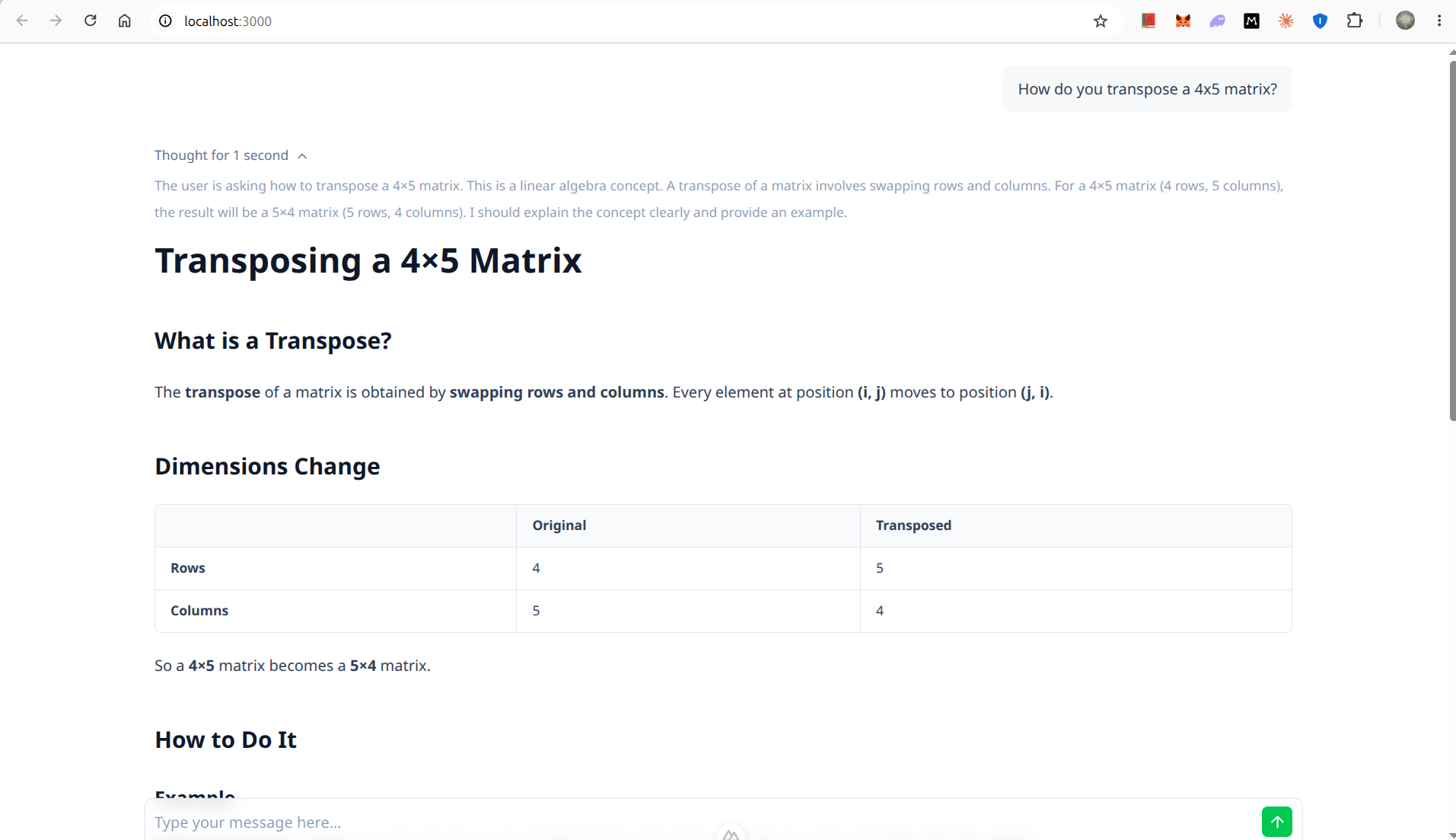
At this point, reasoning appears in a collapsible block, while the answer streams in as formatted Markdown with rendered tables and syntax-highlighted code.
The Gateway route reaches hosted models through an API key. To move inference to the edge, bind Cloudflare Workers AI directly so the model runs on Cloudflare’s network without requiring a third-party model account.
Because workers-ai-provider implements the same AI SDK interface, the swap only affects the provider and model ID. The stream handling, Vue composables, and Nuxt UI components remain unchanged.
Install the provider and Wrangler.
pnpm add workers-ai-provider
pnpm add -D wrangler
Declare the AI binding in wrangler.jsonc, along with the Worker entry point and the static assets generated by Nitro’s Cloudflare build.
Workers AI does not provide local inference emulation, so the binding still calls Cloudflare’s network during development.
{
  "$schema": "node_modules/wrangler/config-schema.json",
  "name": "nuxt-ai-2026",
  "compatibility_date": "2026-07-31",
  "compatibility_flags": ["nodejs_compat"],
  "main": ".output/server/index.mjs",
  "assets": {
    "directory": ".output/public",
    "binding": "ASSETS"
  },
  "ai": {
    "binding": "AI"
  }
}
Point Nitro at the Cloudflare Workers preset so the build targets that runtime.
export default defineNuxtConfig({
  compatibilityDate: '2026-07-31',
  devtools: { enabled: true },
  modules: ['@nuxt/ui', '@comark/nuxt'],
  css: ['~/assets/css/main.css'],
  nitro: {
    preset: 'cloudflare_module'
  },
  runtimeConfig: {
    aiGatewayApiKey: ''
  }
})
The edge route closely mirrors the Gateway route, with only the provider swapped. createWorkersAI takes the AI binding exposed by the Cloudflare preset on event.context.cloudflare.env.
import {
  streamText,
  convertToModelMessages,
  createUIMessageStreamResponse,
  toUIMessageStream,
  type UIMessage
} from 'ai'
import { createWorkersAI } from 'workers-ai-provider'

export default defineEventHandler(async (event) => {
  const { messages }: { messages: UIMessage[] } = await readBody(event)

  const workersAI = createWorkersAI({ binding: event.context.cloudflare.env.AI })

  const result = streamText({
    model: workersAI('@cf/meta/llama-3.2-3b-instruct'),
    messages: await convertToModelMessages(messages)
  })

  return createUIMessageStreamResponse({
    stream: toUIMessageStream({ stream: result.stream })
  })
})
Use a current Workers AI text-generation model because Cloudflare periodically deprecates older models. You can list the models available to your account with npx wrangler ai models and choose a text-generation entry.
To run the application on the Cloudflare runtime locally, build first and then start wrangler dev. Wrangler serves the built Worker using the real AI binding.
pnpm build
npx wrangler dev
Confirm that the edge route streams the same message shape as the Gateway route:
curl -N -X POST http://localhost:8787/api/chat-edge \
  -H "Content-Type: application/json" \
  -d '{"messages":[{"id":"1","role":"user","parts":[{"type":"text","text":"Say hello in one short sentence."}]}]}'
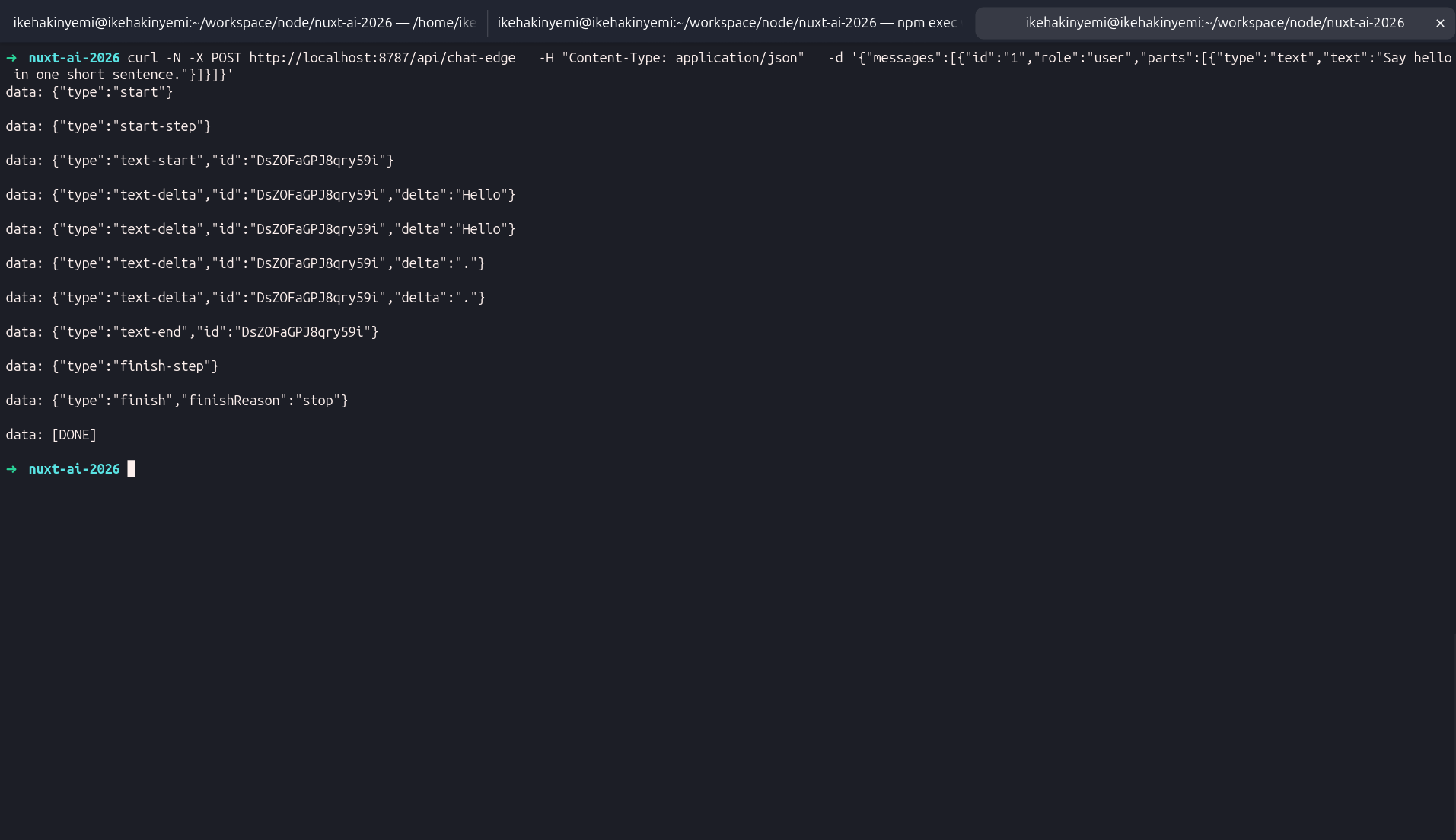
The frame sequence matches the Gateway route, so the same Nuxt UI components can render it without any changes.
The main difference is the content of the stream. This model emits text parts only because Llama 3.2 3B does not produce reasoning output, so the UChatReasoning branch simply never runs.
With the Cloudflare preset and wrangler.jsonc bindings already configured, deployment takes one command. Wrangler uploads the Worker and its static assets, then attaches the declared bindings.
npx wrangler deploy
It reports the uploaded assets, the attached bindings, and a live URL on your workers.dev subdomain.
✨ Success! Uploaded 115 files
Your Worker has access to the following bindings:
Binding            Resource
env.AI             AI
env.ASSETS         Assets
Deployed nuxt-ai-2026 triggers
  https://nuxt-ai-2026.<your-subdomain>.workers.dev
The AI binding carries over from local development to production without further configuration. The deployed edge route therefore runs the same Workers AI inference path as the local Worker.
Confirm that the live endpoint streams correctly by calling it directly:
curl -N -X POST https://nuxt-ai-2026.<your-subdomain>.workers.dev/api/chat-edge \
  -H "Content-Type: application/json" \
  -d '{"messages":[{"id":"1","role":"user","parts":[{"type":"text","text":"Say hello in one short sentence."}]}]}'
You should receive the same typed stream as the local run, which means the interface behaves the same way in production.
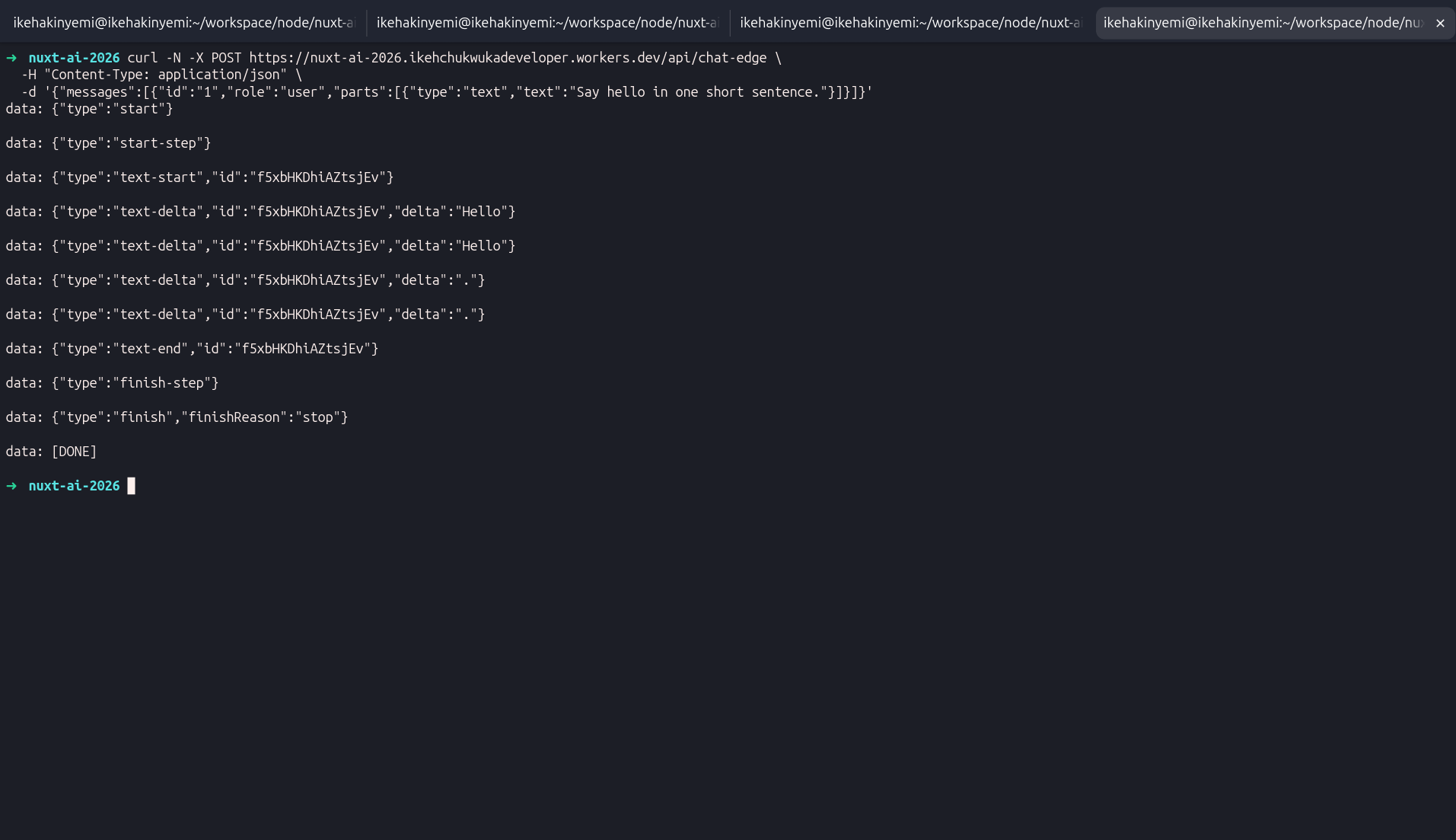
You can watch requests reach the deployed Worker in real time with npx wrangler tail nuxt-ai-2026, which prints each invocation and any server-side errors.
A fresh deployment can take a few seconds to propagate across the edge. A request sent immediately after deployment may briefly return a Cloudflare error before the Worker becomes available everywhere.
Both routes deploy to the same Worker, which keeps network distance consistent and narrows the comparison to the inference path.
The benchmark harness sends ten requests to each route, records time to first token and throughput after the first token, then reports the median across all runs. Time to first token captures connection overhead and model startup, while post-first-token throughput measures generation speed once the stream is underway. For a broader look at how AI dev tools compare in performance benchmarks, the LogRocket rankings offer useful context.
const BASE = 'https://nuxt-ai-2026.<your-subdomain>.workers.dev'
const PROMPT = 'Explain what a hash map is in three sentences.'

async function measure(route) {
  const start = performance.now()
  let firstTokenAt = null
  let tokenCount = 0

  const res = await fetch(`${BASE}${route}`, {
    method: 'POST',
    headers: { 'Content-Type': 'application/json' },
    body: JSON.stringify({
      messages: [{ id: '1', role: 'user', parts: [{ type: 'text', text: PROMPT }] }]
    })
  })

  const reader = res.body.getReader()
  const decoder = new TextDecoder()

  while (true) {
    const { done, value } = await reader.read()
    if (done) break
    for (const line of decoder.decode(value).split('\n')) {
      if (line.includes('"type":"text-delta"')) {
        if (firstTokenAt === null) firstTokenAt = performance.now()
        tokenCount++
      }
    }
  }

  const end = performance.now()
  return {
    ttft: firstTokenAt - start,
    tps: tokenCount / ((end - firstTokenAt) / 1000)
  }
}
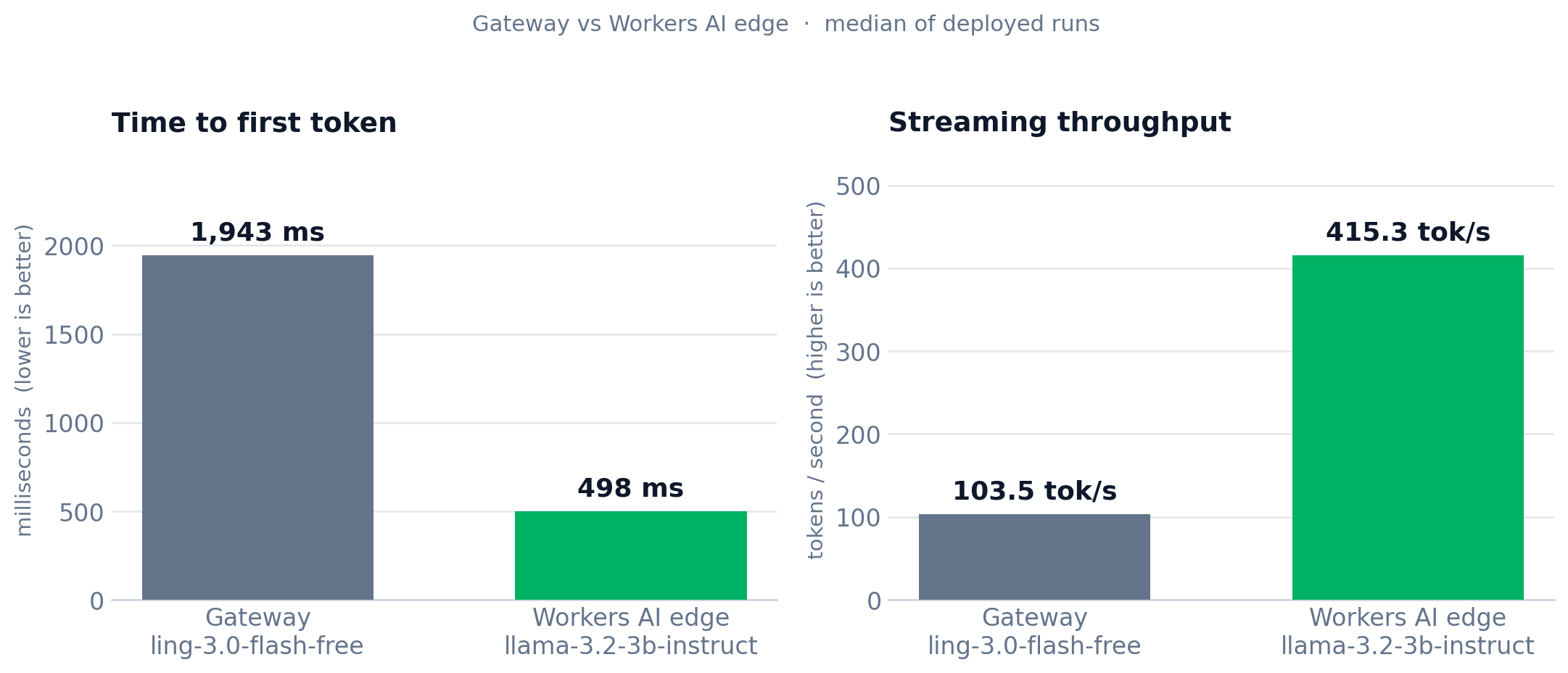
Here are the measured medians from the deployed Worker:
| Route | Model | TTFT median | Throughput median |
|---|---|---|---|
| Gateway | ling-3.0-flash-free |
1943 ms | 103.5 tok/s |
| Workers AI edge | llama-3.2-3b-instruct |
498 ms | 504.0 tok/s |
The Workers AI route reached its first token in roughly one-quarter of the time in this benchmark.
However, this is not a controlled edge-versus-hosted comparison. The Gateway route uses a reasoning model that spends time reasoning before producing its answer, while the Workers AI route uses a small instruct model that emits text immediately. Model behavior therefore accounts for at least part of the gap.
The Vue and Nuxt ecosystem now provides the pieces needed to build a production AI interface without stitching together a large amount of custom infrastructure. The AI SDK handles streaming and reactive state, Nuxt UI provides the chat interface, and Workers AI gives you an edge inference option through the same provider abstraction.
Moving from Vercel AI Gateway to Workers AI required changing the provider and model ID while leaving the rest of the application intact. The same stream format continued to work with the same Vue composables and Nuxt UI components. If you’re interested in advanced Nuxt testing and mocking strategies, that’s a natural next step once your AI routes are stable.
For Nuxt developers, that shared interface is the useful part. You can start with a hosted model provider, move inference to Cloudflare later, and keep most of the application unchanged.
You can find the complete source code on GitHub. Happy coding!
Explore how looping Transformers reuse layers and compare with traditional GPT models in reasoning tasks.
Learn how one solo developer used multiple Grok Bot AI agents to test, report bugs, fix code, and monitor deployments — hands-free, on a $30/month plan.

Compare the top AI development tools and models of October 2026. View updated rankings, feature breakdowns, and find the best fit for you.
Can AI agents debug React bugs across browsers? I tested Chrome, Safari, and Firefox debugging MCPs on four bugs to compare their findings, workflows, and effectiveness.
Would you be interested in joining LogRocket's developer community?
Join LogRocket’s Content Advisory Board. You’ll help inform the type of content we create and get access to exclusive meetups, social accreditation, and swag.
Sign up now
 Learn more →